Appearance
Operator settings
https://environment/operatorsettings
(Replace environment with the URL of your environment.)
At the end of the page, you can enter operator settings in a field.

Enter valid JSON. Use https://jsonlint.com/ to validate your JSON before you enter it in the form and submit the changes.
You can combine any options defined in that document.
Operator protocol independent settings
You can apply the following settings to any operator protocol.
Default profile
{
        "defaultProfile": "jurisdiction-de"
}
This setting defines the default settings profile for game launches (not to be confused with the operator's integration protocol, described in Operator protocol specific settings below). You can use any profile listed here.
Default game settings (all games)
{
        "defaultSettings": {
                "displayXRTP": false,
                "gambleEnabled": false
        }
}
This setting defines game settings for launched games. You can define any properties listed here.
Default game settings (demo games only)
{
        "demoSettings": {
                "displayCurrency": false
        }
}
This setting defines game settings for launched demo games. You can define any properties listed here.
Default max exposure (all games)
{
        "defaultSettings": {
                "maxExposure": 25000000
        }
}
The example above limits the max exposure in games for that operator to 250,000 EUR. Write amounts without a decimal point. For example, write 250,000 EUR as 25000000.
In the game, the engine caps the max stake to prevent players from exceeding the max exposure.
Enable animation end reporting (all games)
{
        "defaultSettings": {
                "reportAnimationEnd": true
        }
}
This setting enables the reportAnimationEnd call to the operator. The engine calls this endpoint after a gameround's win animation finishes and the spin/play button becomes active again. The operator must request this endpoint. If the operator does not request it, the engine sends no requests. See reportAnimationEnd in the Operator API documentation for the full call spec.
Default game settings (specific games)
{
        "defaultGameSpecificSettings": {
                "game-bells": {
                        "gambleEnabled": true
                }
        }
}
This setting applies game settings only to the named game (game-bells above). It overrides the defaults set in "Default game settings (all games)" for that game. You can define any properties listed here.
Age of gameround before its closed
{
        "gameRoundAgeToCloseInMS": 21600000
}
This setting defines the number of milliseconds before the engine either closes a gameround automatically or retries pending transactions (if the delayed queue does not process them). This setting is optional. It defaults to the value shown above.
Delayed queue options
These options override the default behaviour of delayed payments. All of these settings are optional. They default to the values stated below.
Enable delayed payment queue
{
        "shouldWeDelay": true
}
The engine enables this setting by default for EveryMatrix, ISoftbet, LottoLand Omni, and Pariplay integrations. All other integrations do not use delayed payment by default.
Enable delayed payment for transaction calls with generic errors (internal use only)
{
        "shouldWeDelayOnUnprocessedTransactions": true
}
This setting is disabled by default. It delays transaction calls when the response contains only a generic error and no transaction hashes. This setting is for internal use only, for now.
Set intervals of retries made
{
        "delaySettings": {
                "shortRetryCount": 10,
                "longRetryTimeInMS": 3600000,
                "shortRetryTimeInMS": 60000
        }
}
The engine retries payments in the delayed payment queue shortRetryCount times, at intervals of shortRetryTimeInMS milliseconds. After that, the engine retries every longRetryTimeInMS milliseconds. The example above shows the default values.
Maximum age of a gameround
{
"maxGameRoundAge": 86400
}
This setting defines the maximum age of a gameround, in seconds, that the delayed payment queue holds it before marking it as stranded. The example above shows the default value.
Use closing state
{
        "doNotUseClosingState": false
}
For default operation, set this value to false. When false, the engine queues end transactions but does not stop a player from starting a new gameround. The gameround state changes to "closing" instead of "open". This setting is suitable for most operators. For some ISoftBet operators, set the value to true. When true, gamerounds stay in the "open" state until the transaction transmits successfully. If the transaction does not transmit, the delayed payment queue marks the gameround as stranded after the maxGameRoundAge setting (in seconds). The example above shows the default value.
Void debits on all errors (native integration only)
{
        "voidAllDebits": true
}
The default value is false. When false, the engine voids debits only on 5xx errors or network timeouts. When you enable this flag, the engine voids all debit transactions with errors. It sends a VOID transaction to the operator, even for 4xx errors. This setting applies only to native integrations.
Operator protocol specific settings
The settings listed above are mandatory for the given operator protocol. The values shown are examples. Define the actual values as given by the integrator or operator.
PARIPLAY_EVI (Protocoltype 2)
{
        "account": {
                "Password": "******",
                "Username": "******"
        }
}

{
        "reconToken": "*****"
}

{
  "apiKey": "",
  "licenseeId": "soft2bet-licenseeid",
  "sharedSecret": ""
}
LOTTOLAND_OMNI (Protocoltype 4)
SOFT2BET/GAMEKONG (Protocoltype 22)
Replace licenseeid with the value given by Soft2bet. Add the prefix soft2bet- before you enter it in the hinterzimmer backend.
Operator to RGS endpoints (To share with operators)
Consult the operator documentation for the most recent version and the correct payload to use.
Game Launcher/Session
POST /operator/gamekong/session
POST /operator/gamekong/bonus
DELETE /operator/gamekong/bonus/{bonusId}
Create and delete bonuses
BETCONSTRUCT (Protocoltype 24)
{
  "licenseeId": "betconstruct-licenseeid",
  "sharedSecret": ""
}
Replace licenseeid with the value given by BetConstruct. Add the prefix betconstruct- before you enter it in the hinterzimmer backend.
Operator to RGS endpoints (To share with operators)
Consult the operator documentation for the most recent version and the correct payload to use.
Game Launcher
POST /operator/betconstruct/launch
POST /operator/betconstruct/bonus
POST /operator/betconstruct/getGames

{
        "licenseeId": "isb-licenseeid",
        "sharedSecret": "*******"
}
Create bonus
Get Games
ISOFTBET_PACIFIC (Protocoltype 5)
Replace licenseeid with the value given by ISoftbet. Add the prefix isb- before you enter it in the hinterzimmer backend.
This integration supports multiple licensee IDs. To use a different prefix, change "isb" to another value. The prefix must start with "isb". The prefix must contain only alphabetic characters, with no spaces or special characters.
The following example shows an alternative prefix and some other common settings for ISB operators.
{
  "licenseeId": "isbaws2-134",
  "sharedSecret": "******",
  "delaySettings": {
    "shortRetryCount": 0,
    "longRetryTimeInMS": 3600000,
    "shortRetryTimeInMS": 60000
  },
  "doNotUseClosingState": true
}

{
        "sharedSecret": "******"
}

{
        "platform": "dev",
        "gameStudio": "hoelle",
"gameStudioFullName": "Hölle Games",
        "licenseeId": "relax-partnerid",
        "incomingAccount": {
                "passWord": "password",
                "userName": "username"
        }
}
EVERYMATRIX_ENGINE (Protocoltype 6)
RELAX (Protocoltype 7)
Replace partnerid with the value given by Relax. Add the prefix relax- before you enter it in the hinterzimmer backend. Also share the values "platform", gameStudio, and incomingAccount with Relax. The engine uses the value of "gameStudioFullName" to send the full game studio name in the getGames call. Relax uses this call to get a list of available games.
GAMANZA (Protocoltype 8)
{
        "sharedSecret": "******"
}

{
        "licenseeId": "softswiss-casino_id",
        "sharedSecret": "*******"
}
SOFTSWISS (Protocoltype 10)
Replace casino_id with the value given by SOFTSWISS. Add the prefix softswiss- before you enter it in the hinterzimmer backend.
SOFTSWISS: disabling BetWin requests
{
        "softswissDisableUseBetWin": true
}
This setting is optional. It defaults to false. If you enable it (set to true), the engine sends bet and win requests in two separate calls. No transaction contains both a win and a bet action in the same payload. Add this setting to the default parameters mentioned in the paragraph above.
Note: Do not use this flag. Contact SoftSwiss before you decide to use it. The default value is false.
Light & Wonder (aka SGD aka OGS) (Protocoltype 12)
{
  "gameStudio": "265",
  "licenseeId": "ogs-5",
  "gcmLauncher": "https://hoellefrontend.s3.eu-central-1.amazonaws.com/sgd-launcher/index.html",
  "incomingAccount": {
    "passWord": "***",
    "userName": "***"
  },
  "outgoingAccount": {
    "passWord": "***",
    "userName": "***"
  }
}
This integration supports multiple prefixes for licenseeId. The prefix must start with "ogs". The prefix must contain only alphabetic characters, with no spaces or special characters.
Each assigned prefix also needs a default profile. Some backoffice calls from the L&W backend do not include an operator ID.
The engine uses the setting incomingAccount to identify calls from L&W to the hinterzimmer backend. The engine uses the setting outgoingAccount to identify calls from the hinterzimmer backend to L&W. Share these settings with L&W. These settings must be the same for all operators that share the same prefix.
The setting gameStudio is fixed. Set it to 265 in all cases.
The setting gcmLauncher is also fixed, but its value depends on the environment.
The following example shows a default operator profile.
{
  "gameStudio": "265",
  "licenseeId": "ogs-default",
  "gcmLauncher": "https://hoellefrontend.s3.eu-central-1.amazonaws.com/sgd-launcher/index.html",
  "incomingAccount": {
    "passWord": "***",
    "userName": "***"
  },
  "outgoingAccount": {
    "passWord": "***",
    "userName": "***"
  }
}
Note: To activate free rounds for an L&W operator, select the following checkbox in operator settings:
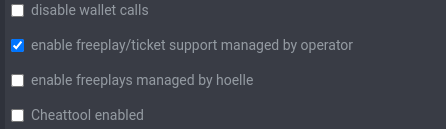
Native (Protocoltype 1)
{
        "splitNativeDebitCreditEnd": true
}
This setting is optional. It defaults to false. If you enable it (set to true), the engine splits native payment requests that contain a debit, credit, and end into two internal calls. The first call contains the debit operation. The second call contains the credit and end transactions.
Note: Do not use this flag, unless the operator cannot support a single call containing debit, credit, and end in one package. Contact hinterzimmer support before you activate this flag.
{
        "addSerialToTransactions": true
}
This setting is optional. It defaults to false. If you enable it (set to true), doTransaction calls sent to the operator include information about tickets and freeplays used. Refer to the Operator API documentation for details.
GeoIP blocking
Since version V1.6.38 of hinterzimmer back office, you can define geo IP blocking for an operator account. You need administrator rights to view or change these settings. Geo blocking applies only to game-api/login calls. Blocked players cannot launch new game sessions. Games already in progress continue.
The following image shows a sample of a valid rule.

Enter IP blocking rules as a valid JSON object. If you have problems, use a JSON validator such as https://jsonlint.com/. The JSON object can contain the following properties:
| Property | Contents |
| whiteList | An array of uppercase ISO 3166-1 alpha-2 country codes to allow. The engine blocks all other countries. You can also use ISO 3166-2 codes to target region codes, for example DE-BB for Germany/Brandenburg or US-TX for USA/Texas. |
| blackList | An array of uppercase ISO 3166-1 alpha-2 country codes to block. The engine allows all other countries. You can also use ISO 3166-2 codes to target region codes, for example DE-BB for Germany/Brandenburg or US-TX for USA/Texas. |
| grayList | An array of uppercase ISO 3166-1 alpha-2 country codes to allow, overriding a blackList or a global block. You can also use ISO 3166-2 codes to target region codes, for example DE-BB for Germany/Brandenburg or US-TX for USA/Texas. |
| allowedIPList | An array of IP addresses in CIDR notation. The engine ignores whiteList or blackList rules for these addresses. |
Note: If you define both whiteList and blackList rules, the engine uses only whiteList.
Examples
Allow only traffic from DACH and allow internal testplays
{"whiteList":["DE","AT","CH"],"allowedIPList":["172.16.16.0/24"]}Deny players from US but allow a special IP
{"blackList":["US"],"allowedIPList":["12.87.118.10"]}Override a default country block for NL while still allowing all other countries
{"grayList":["NL"]}Deny traffic from Canada, but allow traffic from Quebec and all other countries
{
"blackList": ["CA"],
"grayList": ["CA-QC"]
}
Deny traffic from Ontario
{
  "blackList": ["CA-ON"]
}
Other settings
Restrict game mode
This setting restricts an operator to real or demo games only.
{
  "validGameModes": [
    "DEMO"
  ]
}
Allowed values are "DEMO" or "REAL".
Restrict to a list of currencies
This setting restricts an operator to games within a list of permitted currencies.
{
  "currenciesRestricted": [
    "EUR",
    "HUF"
  ]
}
The allowed value is an array of any currencies (3 or 4 digits).
Use a fixed currency
{
  "useFixedCurrency": "COIN"
}
This setting is recommended for social casinos. It forces the currency, regardless of what the operator sends in the game launch request.
Using custom currencies
{
"customCurrencies": {
                "GOLD": 500,
                "SILV": 1000,
        }
}
Use these settings to enable a set of custom currencies. The currency code is limited to 4 characters. The multiplier must be an integer with a minimum value of 1.
Using custom currency multipliers
{
          "customCurrencyMultipliers": {
                    "GBP": 2
          }
}
Use this setting to define a multiplier that differs from the global multipliers. The multiplier must be an integer with a minimum value of 1.
Changes might take 24 hours to propagate. The currency multipliers are bound to an active game session, which expires after 24 hours. This delay avoids interference with running games and assigned freeplays.
Enabling custom stakes sent by the operator
{
        "allowCustomStakes": true
}
This setting enables the game setting "customStakes". The operator can send customStakes as a parameter to the game launch command. See the section "Appendix C - game settings parameters" in the Operator API Documentation.
Restrict to a list of games
This setting restricts an operator to specified games.
{
  "allowedGames": [
    "game-fruits"
  ]
}
The example above allows only the game "game-fruits" to be played.
Disable to a list of games
This setting disables a list of games for an operator.
{
  "deniedGames": [
    "game-fruits"
  ]
}
The example above allows all games except "game-fruits" to be played.
Recommend settings for social casinos
{
  "isSocial": true,
  "defaultSettings": {
    "maxExposure": 100000000000000000,
    "displayCurrency": false
  },
  "useFixedCurrency": "COIN",
  "allowCustomStakes": true
}
This set of settings enables the operator to send custom stakes. It locks the currency to "COIN" to prevent the use of other currencies. It sets the maximum exposure to the highest available number. It also suppresses the display of the currency in the game client.