# hizi docs: full text
> Every page of https://docs.hizi.io concatenated, newest build. The section index is https://docs.hizi.io/llms.txt.
## Guides
## Topics
---
# hizi documentation changelog
## v2.3.25 - 16.10.2026
### [Hizi App]
- Published a search index for AI agents at https://docs.hizi.io/docs-index.json. The index holds the pages of the site in short sections, each with a link. It does not hold the changelog or the generated API reference pages. The `search_docs` tool of the hizi MCP server uses it.
## v2.3.24 - 12.10.2026
### [Operator API]
- Corrected the error handling for credit transactions on doTransactions. `hashesProcessed` decides the result of a credit, not the HTTP status code. A credit hash with an `errorCode` is a final error: hizi marks the gameround as stranded and does not void the debit. A missing credit hash keeps the credit pending.
- Corrected the retry logic for a call with a credit and no debit. hizi makes up to 5 immediate retries with no delay, and does not queue the credit at increasing intervals.
- Documented when hizi sends a pending credit again: at the next launch of the same game, after your getGameURL call returns, and from the hourly janitor until the maximum gameround age.
- Corrected Scenario 2: hizi does not send a void for the debit after an error on a credit call.
- Removed an internal header from the retry rule for 5xx errors in the response codes and in the OpenAPI spec.
### [Game Studio API]
- Removed an internal header from the retry rule for 5xx errors in the OpenAPI spec.
## v2.3.23 - 08.10.2026
### [Operator API]
- Added a **Void of the first debit** section to doTransactions. A void of the first debit cancels the whole gameround. The operator reverses the debit and any credit of that gameround.
- Stated that a void always has the hash of a debit and never refers to a credit. For games on the native hizi game studio protocol, the first debit uses the gameRound hash as its hash.
- Added **Scenario 3**, a sample for a doTransactions call that times out and the void that follows.
- Corrected the signature rule: a void that hizi sends after a failed debit has an amount, and the signature includes it.
- Stated that hizi can send the void type in upper case (`VOID`) with an amount and a currency. Updated the void sample.
- Corrected the end transaction: hizi does not send it after a void of the first debit.
## v2.3.22 - 30.09.2026
### [Engine]
- Removed the **Source Audit and Gaps** page from the SDK guide. It was an internal page and not documentation for readers.
- Removed the links to that page from the SDK overview, the settings reference, the release checklist and the jurisdictions page.
### [Local Development]
- Removed two internal pages from the site. They were notes for contributors, not documentation.
## v2.3.21 - 30.09.2026
- Documentation housekeeping to remove references to unsupported game engine integration methods.
## v2.3.20 - 25.09.2026
### [Operator API]
- Added a **Launch URL rules** section to getGameURL. It states that a launch URL works one time only, and for one game only.
- Added a sample flow for a change from Game A to Game B.
- Corrected the validity time of the launch URL from 60 seconds to 120 seconds.
- Clarified the most frequent cause of SESSIONINVALID (1008).
## v2.3.19 - 24.09.2026
### [Operator Interface]
- Added a **Reality Check** section to the Playtech (POP) page. It explains the dialog after error 38 and the `sendRealityCheckResponse` call.
- Listed `sendRealityCheckResponse` as a required method for Playtech (POP).
- Linked the Playtech (POP) flow from the `sendRealityCheckResponse` method.
## v2.3.18 - 23.09.2026
### [Engine]
- Added a **Load Config** page to the generator docs. It explains how the engine returns `IGameConfig.loadConfig` in the `loadConfig` reply.
- Listed the reserved key names that the engine writes over, and the `loadConfig` keys that some game types read.
- Linked the page from the `IGameConfig` table and from the SDK loading sequence.
## v2.3.17 - 18.09.2026
### [Game Studio API]
- Clarified HTTP connections and base URLs in the integration guides, API reference, and AI indexes.
## v2.3.16 - 04.09.2026
### [Hizi App]
- Added a **Websockets** page. It explains the per-game switch, its default value, and the publish step.
- Documented the **Websocket password** field. The field requires the SHA-1 hex digest of the shared secret.
- Linked the page from the Hizi App overview, sidebar, and **What's What in the hizi app**.
- Corrected the Logs entry in **What's What in the hizi app**. Users search site logs inside the app.
## v2.3.15 - 18.09.2026
### [Game Studio API]
- Moved External Game Engines to the end of the Game Studio API group and the overview list.
## v2.3.14 - 17.09.2026
### [Game Studio API]
- Added a dedicated External Game Engines page with a template link, sidebar entry, and overview link.
- Described the hosting options and setup steps.
- Added a jurisdiction restriction note with instructions to contact us before production use.
## v2.3.13 - 17.09.2026
### [Game Studio API]
- Added `POST /getPlayerData`.
- Added `POST /setPlayerData`.
## v2.3.12 - 14.09.2026
### [Game Studio API]
- Documented `POST /startGameOrAddBet`. The call places a bet: it starts a new gameround on the first bet, and appends a further debit to the open gameround on each later bet. It is the supported way to hold more than one bet in one gameround.
- Explained why a second `POST /startGameRound` on an open gameround fails with error 12 `GAMEROUNDALREADYSTARTED`. A player has only one open gameround at a time, and `/startGameRound` always opens a new one. The `/startGameRound` section now points at `/startGameOrAddBet` for the second bet.
- Described how `/startGameOrAddBet` chooses between "start" and "add bet". It compares `externalGameProviderRoundId` with the gameround on the session token, then compares `debitInformation.externalGameProviderTransactionId` with the first bet of that gameround.
- Listed the three limits of an added bet: the call ignores `endGame` and `creditInformation`, a repeated `debitInformation.externalGameProviderTransactionId` fails with error 37 `TRANSACTIONALREADYEXISTS`, and a bet cannot join a gameround that started without `externalGameProviderRoundId`.
- Added two request examples and one reply example for the new call, on the **Calls provided by API V2** page and in the OpenAPI specification.
- Extended the notes on **Data structures**. `externalGameProviderRoundId` becomes the gameround hash. `externalGameProviderTransactionId` identifies one bet, is limited to 32 characters, and must differ for each bet in a gameround.
- Added `startGameOrAddBet` to the round-lifecycle ordering diagram in the OpenAPI specification.
- Added `/startGameOrAddBet` to the summary table of engine calls at the top of **Calls provided by API V2**. The table listed every other call.
- Stated which of the two bet calls to use. `/startGameRound` suits every game that takes one debit per gameround, and it is the safer call, because it starts exactly one gameround and takes exactly one debit. Use `/startGameOrAddBet` only for a game that expects more than one debit. This guidance appears on both call sections and in the OpenAPI specification.
- Linked every call on **Calls provided by API V2** to its page in the OpenAPI reference. Each row of the two summary tables now links to the reference, and each of the 23 call sections carries an **API reference** link under its heading.
## v2.3.11 - 15.09.2026
### [Engine]
- Correct factual errors on the per-vertical game pages, found by an audit against the engine, the creator and the SDK.
- Roulette: remove `maxRoundStake` and `maxRoundWin`, which no config carries. Document `useTargetRTP`. Name the real limits: `gameSettings.maxExposure` and 500 bets per round. State that the cap rewrites `gameResult.totalWin` only. Correct the exact integer stake checks, the `adjust_odds` weight formula, the un-floored per-bet `winAmount`, and an import of a type the SDK does not export.
- Mines: a mines game ships no `loadConfig` of its own. Read the grid, the mine count and the multiplier from the scenario. Read the mine-count options from `buyFeatures`. Correct the house-edge description.
- Plinko: the field is `multipliers`, keyed `rows-{N}-risk-{level}`, not a nested `buckets` map. Add `minRows`, `maxRows` and `risks`. Correct two multiplier arrays and one buy-feature id.
- Keno: a wrong `playerNumbers` count returns `INVALIDPARAMETER`. The engine auto-picks only for an absent or empty field. Add `numberRange`. Correct one buy-feature id and the high-risk payout threshold.
- Blackjack: `capped` comes from the operator's `maxExposure`. Every provably fair row is an `int` row. `insurance.won` does reach the wire as `false`.
- Hilo: the builder rounds the multipliers, not the engine. Under `adjustMultipliers` the rounding moves the real RTP off target. Correct the Ace and King rows for `strictExtremes`. The choice index is not fixed, so match on the feature suffix.
- Frogger: `pfVerify` needs one action per hop. The field is `cashoutMultiplier`, and a death entry carries none. Correct one buy-feature id and the collect response.
- Bingo: the engine rejects a bad config at bet time with `GAMECONFIGNOTSUPPORTED`. Correct the win count for two full rows and the exposure ceiling under `sum` mode.
- Crash: `minMultiplier` is also the base factor of the curve.
- Overunder: the builder rounds the multipliers and adjusts the weights, not the engine.
## v2.3.10 - 15.09.2026
### [Engine]
- Preserve SDK error codes and operator data in controller and loader failures. Correct stake conversion and effective bound descriptions.
- Add a focused SDK index for agents. Link it from the site and engine indexes. Order frontend text by the guide.
- Replace duplicated Operator Interface instructions with links to the existing Operator Interface documentation.
- Rework the SDK docs into an ordered frontend guide, with a checked slot controller.
- Cover all 57 SDK settings, loading, audio, stakes, rules, operator events, jurisdiction behavior, and recovery.
- Add Match, Progressive, and Blank guides. Correct slot scenarios, gamble, banking, feature purchases, and Crash transport.
- Document source revisions and platform gaps. Add acceptance checks for every supported creator mode.
- Publish a generated frontend text bundle with checked example source for AI agents.
- Run TypeScript, request-behavior, download, link, and anchor checks during documentation builds.
- Correct errors found by an audit against the SDK, engine, creator and Operator Interface sources. The socket example now asks for `arraybuffer`, so a binary frame from the router no longer discards every reply and broadcast. `tokenData` carries no `totalBet` or `totalWin`. `sendRealityCheckResponse` rejects on failure. A bank request that rounds to a zero multiplier leaves the remainder outstanding. A consolidated slot round returns one step per call, never an array.
- Make SDK `login()` the only documented connect path. `login()` and `refresh()` return the session identity in `tokenData` (`playerId`, `operatorId`, `gameId`, `language`, `currency`, `currencyMultiplier`, `mode`, `gameRound`). Remove the adapter that replaced the login call: it risked a second exchange of a single-use launch token and duplicated SDK code. Only `gameVariables.rcElapsed` and the singular `freePlayInfo` are lost, and both are now stated as integration requirements. The example file keeps only a launch-parameter helper.
### [Operator Interface]
- Replace the broken ReelLink balance link with the engine SDK balance operation.
### [Operator API]
- Replace the outdated jurisdiction table with the current SDK inventory. Clarify settings types and custom-stake limits.
## v2.3.9 - 15.09.2026
### [Game Studio API]
- Documented the error codes that `/voidGameRound` returns. `GAMEROUNDNOTFOUND` (14) means the gameround hash is unknown. `GAMEROUNDNOTACTIVE` (13) means the gameround is no longer open. `TRANSACTIONSARERETRYING` (26) means a credit was already processed. All three come back as an HTTP 400 response, and you must not retry them. An HTTP 5xx response, a timeout, or a network error on this call is different: retry it.
## v2.3.8 - 15.09.2026
### [Engine]
- The site now publishes `llms.txt` index files for AI agents, one per section, with a parent index at https://docs.hizi.io/llms.txt. The engine section keeps its own file at https://docs.hizi.io/engine/llms.txt. It also keeps its groups and its "Optional" block. Every description in it is unchanged.
- Added three engine pages the old file did not list: [Bingo](/engine/games/bingo), [SDK Freeplays](/engine/sdk/free-plays), and [Generator Progression Counters](/engine/generator/progression-counters). A person wrote the old file by hand, so nothing added a new page to it. The build now generates the file from the page list. A new page cannot go missing again.
- Rewrote the "For LLMs" section on the engine landing page. It pointed at the engine file and called it an index of the whole site. It now names all three files and says what each one covers.
- Changed the site crawl policy. `robots.txt` now welcomes AI systems. It sets `Content-Signal: search=yes, ai-input=yes, ai-train=yes, use=full` and it names the index files. Note that Cloudflare prepends a managed block ahead of this file for the whole zone. That block still denies the AI crawlers. Somebody must turn it off in the Cloudflare dashboard before the new policy reaches a crawler.
- The site now publishes https://docs.hizi.io/sitemap.xml. That address returned a 404 error before. It also publishes https://docs.hizi.io/llms-full.txt, which holds the full text of every page in one file.
### [Operator API]
- The section now publishes https://docs.hizi.io/operator-api/llms.txt. The file lists every page in sidebar order. It also lists all 31 operations of the OpenAPI specification, each with its verb, its path, and its summary.
### [Game Studio API]
- The section now publishes https://docs.hizi.io/game-studio-api/llms.txt. The file lists every page in sidebar order. It also lists all 28 operations of the OpenAPI specification, each with its verb, its path, and its summary.
### [Operator Interface]
- The section now publishes https://docs.hizi.io/operator-interface/llms.txt. The file lists the guide, the API reference, and the note for each of the ten supported operators.
### [Operator & Game Settings]
- The section now publishes https://docs.hizi.io/operator-game-settings/llms.txt.
### [Hizi App]
- The section now publishes https://docs.hizi.io/hizi-app/llms.txt.
## v2.3.7 - 14.09.2026
### [Engine]
- Documented the four certified figures on the SDK `ILoadConfigConfig` page: `maxPayout`, `maxPayoutOdds`, `maxWin` and `maxWinOdds`. The type carried them through its index signature only, so the page listed none of them. The entry for each field gives the unit (a multiplier of stake), the "1 in N" meaning of an odds field, and the cases in which a game omits the field. Added the same four fields to the `loadConfig` response sample on the SDK Endpoints page.
- Added a warning that `maxPayoutOdds` currently repeats `maxWinOdds`. The generator computes one odds value, from the chance that an ordinary round hits `maxWin`, and writes it to both fields. The generator Types page said `maxPayoutOdds` was the probability of reaching `maxPayout`, which is not what the field holds today. Corrected that entry.
- Documented that the generator omits `maxWinOdds` when only a buy feature reaches the top prize.
- Noted on `maxPayoutCap` that the engine does not set it on a `loadConfig` reply.
## v2.3.6 - 02.09.2026
### [Engine]
- Split the word "feature" into two words on the generator and SDK pages. A **table** is a set of entries saved beside the `basegame` table. A **feature** is a game mechanic (free spins, a buy feature, a wager feature). This follows the same rename in the hizi-engine-creator UI. The prose now says "table" where it means a set of entries (for example "across all tables", "a synthetic table named `bf_`"). Wire fields such as `feature`, `featureWeights`, and `featureToBuy` keep their names.
## v2.3.5 - 31.08.2026
### [Operator API]
- Repaired 17 dead links that the migration from Google Docs left behind. Each one pointed at a Google Docs bookmark ID (for example `#kix.ie16ui44qznz`). The `hash` links now point at the Basic types table on the Data types page. The signing-example link now points at the multi-call gameround sample.
- Replaced three dangling "see here" cross-references with real links. Two point at **Structure of player details**. One points at **Structure of hashesProcessed**.
- Corrected the player detail field `affilate` to `affiliate` in two sample payloads on the **Operator → hizi.io** page. The field table on the same page and the OpenAPI schema both call it `affiliate`.
- Corrected the sample profile name `jurisidiction-de` to `jurisdiction-de`. Appendix C lists the profile as `jurisdiction-de`.
- Corrected 8 malformed JSON keys on the **hizi.io → Operator** page. Each one read `"gameCode: "` and was missing the closing quote on the key.
- Corrected the Step 4a sample of a multi-call gameround. It declared two sibling arrays instead of one `transactions` array with two entries. Removed two trailing commas from other samples in the same table.
- Quoted the JSON keys in the `registerPlayer` response sample and in the `getGameList` response sample. Replaced the curly quotes in the `getGameList` sample with straight quotes. Added the missing closing brace to that sample.
- Documented the `HISTORY` launch mode on the **Operator → hizi.io** page. The page said games launch in three modes but described only `REAL` and `DEMO`.
- Corrected the launch URL validity window. One sentence said 60 seconds and the next said 50 seconds. The window is 60 seconds.
- Corrected three sample tables captioned "Sample call to report a bonus win". They belong to doGameRoundReport, doGameRoundResult, and reportAnimationEnd. None of them reports a bonus win.
- Corrected the `reportAnimationEnd` section. It repeated the heading and the endpoint description of `doGameRoundReport`.
- Corrected the heading "Authentification" to "Authentication" on the **Common definitions** page.
- Rewrote the two blocks of HTTP header fields on the **Common definitions** page as tables. The blocks used space alignment, which HTML collapses, so each block rendered as one run-on line.
- Wrapped the `playerdetails` sample on the **Operator → hizi.io** page in a code block. It rendered as a paragraph, so the sample lost its JSON structure.
- Changed the two sample launch URLs from `http` to `https`. The overview page states that hizi does not support HTTP.
- Lowercased "Hizi" to "hizi" in the amounts callout on the overview page.
- Corrected "Usecase" to "Use case" on the **hizi.io → Operator** page.
### [Engine]
- Repaired the flow diagram on the **hizi engine** overview page. Two lines overflowed their boxes, so the diagram rendered misaligned.
### [Operator & Game Settings]
- Replaced the curly quotes in the "Deny traffic from Ontario" sample with straight quotes. Removed the trailing comma. The sample was not valid JSON.
## v2.3.4 - 28.08.2026
### [Hizi App]
- Added a note to Step 4 of the **Create your engine** page in the Studio Quickstart guide. The note tells the user to set the Game's status from DRAFT to PUBLISHED in the game settings.
## v2.3.3 - 28.08.2026
### [Hizi App]
- Removed the GitLab icon link from the top-right of every page. The link pointed at a private GitLab project, which readers of this public site cannot open.
## v2.3.2 - 28.08.2026
### [Engine]
- Corrected the hizi engine generator reference against version 0.8.0 of `@hizi.io/engine-generator`. `getOutputFiles()` is gone from the API page. `getEntries()` and `getConfig()` replace it. `addResult()` now shows its real signature: `options` is required, `scenario` has no `null` form, and the page documents the `progressionInfo` and `forced` options. The entry match key now lists `feature` and `progressionInfo`. The constructor table gained `maxTotalScenarioRows` and `maxEntriesPerGame`, with the thresholds at which `addResult()` warns and throws. The API page gained the `scenarioRowCount` property, and the `resolveBuyFeatures()`, `isCashAward()`, `isFeatureAward()`, and limit-constant exports.
- Added the missing types to the generator Types page: `IProgressionInfo`, and the `IGameConfig` fields `rng`, `minStake`, `maxStake`, `enableCardGamble`, `enableLadderGamble`, `ladderMultipliers`, `ladderLives`, `maxPayout`, `maxPayoutRoute`, `maxWin`, `maxPayoutOdds`, `maxWinOdds`, and `certifiedVersion`. `IGameConfig` also gets its own section heading, which it lacked. `IBuyFeatureConfig` gained `maxPayout`.
- Documented `computeMaxPayout()` and its result types on the KPI Math page. Corrected the win-bucket labels to the six that the package generates. Renamed `TVolatilityClass` to its public name `VolatilityClass`. Corrected `IKpiEntry` and the `IGameRtp` field list. Rewrote the cash-counter RTP section: a counter with `resetOnFeatureEnd` is now walked per entry from `progressionInfo`, and the total-mass formula is only the fallback upper bound.
- Corrected `start()`, which opens `scenarios.jsonl` only. `end()` writes `entries.jsonl`. Corrected the zero-win scenario cap to 2,000, the entry ordering in `entries.jsonl` (weight descending, across all features), and the illustrative numbers in the slot game example. The generator index no longer lists the removed `stakeboost` buy-feature strategy.
- Added the caveat that `progressionInfo` is part of the entry match key, so it does change the generated output even though it does not change gameplay.
## v2.3.1 - 27.08.2026
### [Operator API]
- Replaced the hero banner on the landing page with a normal overview page. Merged the separate Introduction page into it. `/operator-api/` is now the one overview for the section. It gives the scope, the amount-units warning, and the parts of the API. One "What's In This Section" list then links to the rest of the section. The old feature cards are gone, so the page no longer holds a heading per link. The page is listed in the section sidebar. Every page in the section shows breadcrumbs.
### [Game Studio API]
- Replaced the hero banner on the landing page with a normal overview page. Merged the separate Introduction page into it. `/game-studio-api/` is now the one overview for the section. It gives the scope (including RGS-to-RGS) and the further-references table. One "What's In This Section" list then links to the rest of the section. The old feature cards are gone. Two of those cards only repeated a fact from the scope or from the table, so the page drops them. The page is listed in the section sidebar. Every page in the section shows breadcrumbs.
### [Operator Interface]
- Replaced the hero banner on the landing page with a normal overview page. `/operator-interface/` is now the overview for the section. The intro states the event-based protocol, the aggregator support, and the TypeScript types. Three feature-card headings held those facts before. The registry login and the install steps keep their own page at `/operator-interface/guide/getting-started`. The overview links to that page first under "Next Steps". Both pages are listed in the section sidebar. Every page in the section shows breadcrumbs.
### [Operator & Game Settings]
- Replaced the hero banner on the landing page with a normal overview page. Merged the separate Introduction page into it. `/operator-game-settings/` is now the one overview for the section. One "What's In This Section" list links to the two settings pages. It replaces three feature cards, two of which pointed at the same page. The page is listed in the section sidebar. Every page in the section shows breadcrumbs.
### [Engine]
- Replaced the hero banners on the hizi engine, Generator, and SDK landing pages with normal overview pages. Merged the separate "What is hizi engine?" page into `/engine/`. `/engine/`, `/engine/generator/`, and `/engine/sdk/` are now the overview for their section. Each overview says what the thing is and how it works. The "Next Steps" list then links to the rest of the section. The setup steps keep their own page in each of the three sections: `/engine/getting-started`, `/engine/generator/getting-started`, and `/engine/sdk/getting-started`. The install steps and the quick-start walkthroughs are on those pages, not on the overview. Each overview links to its Getting Started page first under "Next Steps". The old feature cards are gone. Their links moved into "Next Steps". Their facts moved into the prose and the lists that already cover them. The code samples and tables are unchanged. Every page in the section shows breadcrumbs.
### [Local Development]
- The retirement notices now have a sidebar and breadcrumbs, so a reader who arrives from an old link can see where they are and navigate out.
### [Hizi App]
- Added an overview page and a sidebar for the section, which previously had neither. Both pages show breadcrumbs.
- Fixed the home page's Hizi App topic card. It linked to Getting Started. Every other topic card links to its section overview. The card now links to the Hizi App overview too.
- Split the single Getting Started page into four pages: Getting Started, [What's What in the hizi app](/hizi-app/whats-what), [Glossary](/hizi-app/glossary), and [Currencies](/hizi-app/currencies). The Overview page links to all four. The sidebar lists all five Hizi App pages. No prose changed, only the page each section lives on.
## v2.3.0 - 27.08.2026
### [Hizi App]
- Added a new **Studio Quickstart** section: the ordered, end-to-end path for a game studio building a game on the hizi engine with its own frontend, from engine config to operator-ready. Five steps: create your engine, set your frontend URL, install the SDK, place bets and collect, and implement the Operator Interface. Each step is a short checklist that links to the existing hizi app, engine, SDK, and Operator Interface pages for the detail, instead of repeating it. Written in ASD-STE100 style.
- Added a "Getting started as a studio building games on hizi" card as the first card on the home page, pointing at the new quickstart guide.
- Split the home page into a **Guides** section (currently just the new Studio Quickstart guide) above the existing **Topics** section, instead of a single mixed grid of nine cards.
- Added a CLAUDE.md policy requiring all documentation content to follow ASD-STE100 Simplified Technical English.
## v2.2.3 - 27.08.2026
### [Engine]
- Rewrote all engine, generator, and SDK pages in ASD-STE100 Simplified Technical English: short sentences, active voice, and one idea per sentence. Code samples, headings, and identifiers are unchanged.
### [Game Studio API]
- Rewrote all Game Studio API pages in ASD-STE100 style, including the prose and the hero/feature card text.
### [Operator API]
- Rewrote all Operator API pages and appendices in ASD-STE100 style, including the prose and the hero/feature card text.
### [Operator Interface]
- Rewrote all Operator Interface guide, API, and per-operator pages in ASD-STE100 style.
### [Operator & Game Settings]
- Rewrote all Operator & Game Settings pages in ASD-STE100 style.
### [Local Development]
- Rewrote the Local Development pages in ASD-STE100 style.
### [Hizi App]
- Rewrote the Hizi App getting-started page, this changelog, the site home page, and the shared Response Codes page in ASD-STE100 style.
## v2.2.2 - 27.08.2026
### [Game Studio API]
- Corrected `BETLIMITREACHED` (11). The previous text described `passThroughData.clientMessage.msg` as commonly absent for this code. In production, the field is reliably present, the same as for `REALITYCHECK` (38). Presence depends on the operator's own account configuration or responsible-gambling (RG) configuration, not on the error code.
## v2.2.1 - 27.08.2026
### [Game Studio API]
- Rewrote the note about idempotency (whether a repeated call has the same effect as one call) in the retry-handling appendix. It now states which calls do **not** deduplicate a retry: `addWin`, `startGameRound`, `wagerWin`, `collectWin`, `endGameRound`. It states which call deduplicates a retry: `voidGameRound`. None of these calls are safe to retry after the gameRound closes.
- Fixed two wrong error-code references. The previous text cited `errorCode 15` for "round already closed" and "round never started". The correct codes are 13 and 14.
- Clarified that `/getGameRoundInfo` fails on a closed round. `/getGameRoundHistoryInfo` fails on an open round. Call `/getGameRoundInfo` first. If it fails, call `/getGameRoundHistoryInfo` instead of only querying `/getGameRoundInfo`.
- Removed a reference to `reconcileTransactions`. This call belongs to the Operator API, not the Game Studio API that a game studio can call.
## v2.2.0 - 26.08.2026
### [Engine]
- Split the single "Engine & Creator Docs" home page card into three cards. **Hizi Engine** explains how the engine works. **Hizi Engine Generator** covers turning simulations into the served JSONL files. **Hizi Engine SDK** covers integrating a frontend. Each card has its own visitor-focused description.
- Merged the Games section into the SDK docs. `/engine/sdk/*` and `/engine/games/*` now share one sidebar with a "Game Guides" group. The SDK Overview lists the eleven per-game guides. The Games overview now reads as part of the SDK section. All existing `/engine/games/...` URLs stay the same.
- Gave the Generator and SDK sections their own landing pages, with a hero and a feature grid. These pages match the engine landing page. These sections no longer use plain overview pages. The existing overview content stays on the page below the hero.
- Updated `llms.txt` to describe two audiences instead of three: generator authors, and frontend/SDK authors, including per-game integration.
- Made the Engine section self-contained. Its own landing page and sidebar no longer show the Generator or SDK as sub-parts of Engine. The Generator and SDK are now separate top-level sections. You can reach them from the home page.
### [Hizi App]
- Moved the Hizi App card to the first position on the home page.
- Removed the "About this site" section from the bottom of the home page.
## v2.1.21 - 26.08.2026
### [Engine]
- Added a Bingo game guide. It covers the three creator templates: Bingo 75, Bingo 90, and Bingo 80. It also covers the fully parameter-driven `loadConfig`/scenario contract.
- Fixed the cell-index formula. The previous formula was hardcoded to a 5-column grid, but a board's `cols` value varies. Added the missing Bingo 80 paytable table. Added Bingo 80's real highest-mode RTP (Return to Player), for the board that actually ships in that pay mode. This sits alongside the illustrative Bingo 75/90 figures.
- Reworded a passage that described the board-as-config design by contrast with a "variant" concept. This "variant" concept no longer exists in the code.
## v2.1.20 - 19.08.2026
### [Engine]
- Documented how the KPI math scores `playerChoice` progression-counter awards. `computeGameRtp()`/`computeEffectiveEntries()` default to a **uniform** selection-fraction assumption across `onComplete.awards`, not real player behaviour, for the single blended RTP number. Only the `playerChoiceAnalysis: true` min/max range reflects worst-case and best-case player choice. Added this to KPI Math. Cross-linked it from the generator's Progression Counters page.
## v2.1.19 - 19.08.2026
### [Engine]
- Added a generator-side Progression Counters page (`engine/generator/progression-counters`). It mirrors the Buy-Features page. The new page covers four topics. It covers recording `progressionAwards` on `addResult()`. It covers configuring `progressionCounters` (including `resetOnFeatureEnd` and `progressionInfo`) at `end()`. It includes a runnable example. It covers how the KPI-math functions fold counters into RTP. Cross-linked the page from the API, Types, Output Format, and KPI Math pages. Also cross-linked it from the existing SDK · Progression Counters page.
- Fixed the `IProgressionCounterConfig` snippet on KPI Math. The snippet was missing `resetOnFeatureEnd` and `stakeSpecific`. It also showed feature-only awards and omitted cash options. Added the missing `resetOnFeatureEnd` field to the Types reference.
- Corrected the API Reference's description of entry-matching for `addResult()`. `progressionAwards` is part of the key that the engine uses to detect duplicate entries. Entries that differ only in counter increments do not merge.
- Corrected the SDK · Progression Counters page in three ways. First, the hizi-engine runtime no longer supports `resetOnFeatureEnd`; it no longer resets a counter. The page now flags this with a warning and points to Single-Gameround Jackpots for that shape of mechanic instead. Second, the `progressionAwards` examples used a flat `{ counter: number }` shape. This does not match the current step-indexed `{ counter: { step: number } }` API. Third, `engineData.progressionCounters` is only present once a counter has actually incremented, not on every response. Added the same `resetOnFeatureEnd` caveat to the new generator page and to the Types reference.
## v2.1.18 - 14.08.2026
### [Game Studio API]
- Documented `passThroughData.clientMessage` (the `PassThroughData`/`NativeClientMessage` structures) as the field for player display on responsible-gambling prompts. Clarified that `X-H-ERROR-MSG` is diagnostic, log-only text, not localized copy for the player.
## v2.1.17 - 14.08.2026
### [Game Studio API]
- Removed the "Operator API reference" row from the introduction page's Further references table. The site header already links to the Operator API docs. The row duplicated that link and confused readers.
## v2.1.16 - 14.08.2026
### [Engine]
- Moved the documentation of the buy-feature ID to its single remaining location. The engine no longer duplicates `buyFeatureId` at the reply root of `placeBet`/`collect`. Read it instead from `result.engineData.buyFeatureId`. This field is now guaranteed present on every reply of a bought round. The reason: `collect` replies now always carry a `result` with closed `engineData`. Updated the `IPlaceBetReply`/`ICollectReply` references on Endpoints and the Buy-Features cross-link.
## v2.1.15 - 14.08.2026
### [Game Studio API]
- Deep-linked the "Further references" table on the Introduction page to the exact Response Codes & Error Codes sections. These sections cover error codes, HTTP return codes, and response headers. Renamed the row labels to match those section names. Also removed the redundant "Definition of V2 interfaces" row, which pointed at this page's own section.
## v2.1.14 - 14.08.2026
### [Local Development]
- Retired this section. The local-development/`core-docker` setup path is no longer a supported integration path. Replaced the Getting Started, Troubleshooting, and overview pages with a retirement notice. The notice stays live so existing links do not 404. Removed the section's sidebar. Dropped its card from the home page.
### [Game Studio API]
- Updated the integration-models comparison table and callout on Basics. The local-development/`core-docker` setup path for the hizi.io-hosted-engine model is now retired. The table no longer links to it as an active guide.
## v2.1.13 - 14.08.2026
### [Engine]
- Removed this section from the global topbar dropdown navigation. You can now reach it from the left sidebar once inside the section, and from the home page.
- Reworded the home page feature card to lead with visitor intent. For example: "you want to create a game using the hizi engine". Before, the card just listed content.
### [Operator Interface]
- Removed this section from the global topbar dropdown navigation. You can now reach it from the left sidebar once inside the section, and from the home page.
- Reworded the home page feature card to lead with visitor intent.
### [Operator API]
- Removed this section from the global topbar dropdown navigation. You can now reach it from the left sidebar once inside the section, and from the home page.
- Reworded the home page feature card to lead with visitor intent.
### [Game Studio API]
- Removed this section from the global topbar dropdown navigation. You can now reach it from the left sidebar once inside the section, and from the home page.
- Reworded the home page feature card to lead with visitor intent.
### [Operator & Game Settings]
- Removed this section from the global topbar dropdown navigation. You can now reach it from the left sidebar once inside the section, and from the home page.
- Reworded the home page feature card to lead with visitor intent.
### [Local Development]
- Removed this section from the global topbar dropdown navigation. You can now reach it from the left sidebar once inside the section, and from the home page.
- Reworded the home page feature card to lead with visitor intent. For example: "you want to run the hizi stack on your own machine".
### [Hizi App]
- Added a home page entry point: a feature card linking to the Getting Started guide. Before this change, the page had no link anywhere on the site.
- Reworded the home page feature card to lead with visitor intent.
## v2.1.12 - 14.08.2026
### [Operator API]
- Removed the outdated "(vX.Y.Z)" version tag from the homepage feature card, the landing-page hero, and the introduction page. This changelog is now the only place on the site that shows a version number.
### [Game Studio API]
- Removed the outdated "(vX.Y)" version tag from the homepage feature card, the landing-page hero, and the introduction page. The reason is the same as above.
## v2.1.11 - 11.08.2026
### [Operator & Game Settings]
- Fixed a copy-paste error where the "Enable animation end reporting" section described `maxExposure` instead of `reportAnimationEnd`.
- Clarified the "Default game settings (specific games)" description to state it applies only to the named game, not all games.
- Fixed the "Default profile" section, which called `defaultProfile` a "protocol". `defaultProfile` actually sets a settings profile (for example, `jurisdiction-de`). This is a different concept from the operator's integration protocol, described later on the page.
- Removed stray private-use Unicode glyphs (copy-paste artifacts). These glyphs rendered as broken characters in the GAMEKONG and BETCONSTRUCT protocol sections' headings and code samples. Fixed a malformed `### ---` heading. The heading should have been a plain horizontal rule.
### [Operator API]
- Removed a stray private-use Unicode glyph from the `doGameRoundResult` `msg` field description.
## v2.1.10 - 10.08.2026
### [Hizi App]
- Added a "FAQs" section to the Getting Started page, beneath the glossary. It includes a "Currencies" topic. This topic covers the default currency list, multipliers, and custom currencies. It also includes a walkthrough for adding a new cryptocurrency.
## v2.1.9 - 07.08.2026
### [Game Studio API]
- Standardised terminology in prose across the site, for these terms: `RGS-to-RGS`, `third-party`, `gameround(s)`, `freeplay(s)`, `free spin(s)`, `long-lived`/`short-lived` token, and `game engine`. API identifiers, error codes, endpoint names, and code samples stay the same.
### [Operator API]
- Applied the same terminology standardisation to the Operator API pages, the appendices and the shared Response Codes table.
### [Operator Interface]
- Applied the same terminology standardisation to the Operator Interface methods reference.
### [Engine]
- Applied the same terminology standardisation to the Engine, SDK and Generator pages.
### [Hizi App]
- Applied the same terminology standardisation to the Hizi App Getting Started page and its glossary.
## v2.1.8 - 06.08.2026
### [Engine]
- Documented the new `buyFeatureId` field. The engine returns this field on `placeBet`/`collect` replies for a round opened by buying a feature. The engine echoes it back on every reply for that round, including continuations and the closing `collect`. Added the field to the `IPlaceBetReply`/`ICollectReply` reference on Endpoints. Cross-linked it from Buy-Features.
## v2.1.7 - 04.08.2026
### [Hizi App]
- Updated the Glossary on the Getting Started page with clearer term definitions and old-backoffice equivalents.
## v2.1.6 - 31.07.2026
### [Engine]
- Fixed a bug in the access-restricted internal guide. Users could sometimes reach the guide without its access check. This happened when a user navigated to the guide from elsewhere on the site, rather than opening it directly.
## v2.1.5 - 31.07.2026
### [Engine]
- Removed screenshots from the internal QA and testing guide.
## v2.1.4 - 31.07.2026
### [Engine]
- Added an internal QA and testing guide (access-restricted) for the hizi engine. Cross-linked it from a few related pages.
## v2.1.3 - 31.07.2026
### [Engine]
- Added a "Freeplays" SDK guide (`/engine/sdk/free-plays`). It covers how a frontend reads `freePlaysAvailable` from `login`/`refresh`/`loadConfig`. It covers how the frontend picks between multiple packages. It covers how the frontend spends one via `placeBet({ useTicket, useTicketFeatureType })`. It covers how the frontend keeps its local list in sync, because `placeBet` does not echo the list back. Linked the guide from Game Flow, Buy Features, and the `IFreePlayInfo` type entry.
## v2.1.2 - 31.07.2026
### [Hizi App]
- Added a getting-started page for the hizi app backoffice (app.hizi.io). The page covers three onboarding paths: build with the hizi engine, import your own game, and distribute to operators. It includes a section-by-section overview of the app's 27 backoffice pages. It includes a glossary of common terms. The page is not yet linked from navigation. The team shares it directly with registered tenants for now.
## v2.1.1 - 29.07.2026
### [Engine]
- Editorial polish across the engine game and SDK pages.
### [Local Development]
- Editorial polish of the getting-started and troubleshooting pages.
## v2.1.0 - 29.07.2026
### [Operator API]
- Added a machine-readable [OpenAPI 3.0 specification](/operator-api/openapi.yaml). It covers every documented call, callback, backoffice endpoint, freeplay or discount call, and health or certified-hash endpoint. In some places, the source docs are ambiguous or self-contradictory (for example, `getGameRoundResult`'s response type, or `registerPlayer`'s reply shape). The spec's descriptions call out these places instead of silently resolving them.
- Fixed the `reportAnimationEnd` sample call, mislabeled as `POST /gameRound` instead of `POST /reportAnimationEnd`.
- Added a sample `internalPlayerId` value to the `registerPlayer` success response.
- Added a browsable [OpenAPI Reference](/operator-api/reference/), one page per operation. `vitepress-openapi` generates each page from the spec. Each page shows request and response schemas, authentication, and copy-paste code samples. The "Try it out" console is hidden for now. Neither API can actually run from this console. The reasons: computed HMAC signing, and no CORS support on the real servers for this origin.
### [Game Studio API]
- Added a machine-readable [OpenAPI 3.0 specification](/game-studio-api/openapi.yaml). It covers game launch, the full round-lifecycle call set, calls the game engine must implement, and freeplays. The spec models request signing as three chained header security schemes, with the HMAC construction documented inline. The spec documents round ordering (start → wager → end → collect) per operation. OpenAPI has no native construct for call sequencing.
- Clarified in the `voidGameRound` spec that a returned `balance` is not guaranteed accurate. `errorCode` only appears on failure.
- Documented the actual mandatory fields for `getGameConfiguration`: `stakes`, `currency`, `currencyMultiplier`, `expectedRtp`, `maxPayoutOdds`, `gameCode`. The team confirmed these fields against the original red-highlighted source. That source did not survive migration to markdown.
- Added a browsable [OpenAPI Reference](/game-studio-api/reference/), same as the Operator API.
## v2.0.8 - 29.07.2026
### [Operator API]
- Moved "Response Codes & Error Codes" out of the Operator API section, to a shared top-level page (`/response-codes`). This page is linked from both the Operator API and Game Studio API nav, sidebar, and homepage cards. Both areas reference it. Dropped the internal-only response headers (`X-H-OPERATOR-ERROR_ID`, `X-H-REPEATCOUNT`, `X-H-DELAYNEXTRETRY`, `X-H-DONOTDELAY`). These headers are not relevant to external integrators. Fixed a dangling unlinked reference to it in Appendix E: Discounts.
- Linked the new page from the Operator API Introduction for visibility.
### [Game Studio API]
- Linked the shared "Response Codes & Error Codes" page from the Game Studio API nav, sidebar, and homepage card.
- Repointed three rows in the Game Studio API Introduction's reference table. The rows: "API return codes", "HTTP status codes", and "custom HTTP headers". These rows now link straight to the new page, instead of to the generic Operator API link.
## v2.0.7 - 29.07.2026
### [Engine]
- Documented the per-transform `boardStates` breakdown for base spins (`'Input'` → `'After Expanding Wilds'` → `'After Substitution'` → `'After Duplication'`). Cross-linked it from the Symbol Substitutions and Duplications section.
## v2.0.6 - 28.07.2026
### [Engine]
- Documented `singleGameRoundProgressionData` on the Slot Game Responses page. This field supports the new within-round jackpot mechanic, Single-Gameround Jackpots. The documentation covers its shape, how to read the meter, and trigger handling. It also covers how this mechanic differs from Progression Counters. The differences: where it lives, its persistence, and how its cash counts toward `maxPayout` and max-exposure. Cross-linked this from Progression Counters and Response Handling.
## v2.0.5 - 27.07.2026
### [Game Studio API]
- Documented inbound request signing (per-endpoint signed fields). Documented the `currencyMultiplier` and `baseStake` fields.
- Clarified authentication of the calls that the RGS makes. `doAutoClose` is unsigned; attribute it via `X-H-AUTH-ID`. An egress-IP restriction is recommended for `doAutoClose`, but not required. `health` and `certifiedfiles` must stay open to all IPs, for external monitoring and certification bodies.
## v2.0.4 - 24.07.2026
### [Engine]
- Documented `engineData.progressionEvents` on the Progression Counters and Response Handling pages. This field is the per-step feed of progression-counter increments. It also carries any awards resolved as a counter completes: cash wins, feature awards, and player-choice requests. Added a full `IProgressionEvent` type reference.
- Documented the `resetOnFeatureEnd` counter field for feature-scoped progression that resets when a feature run ends.
- Corrected the progression-counter description in the generator KPI-math reference: a counter awards cash or feature spins, not only feature spins.
## v2.0.3 - 23.07.2026
### [Operator API]
- Reworded "single source of truth" references.
### [Operator & Game Settings]
- Reworded "single source of truth" references.
### [Local Development]
- Reworded "single source of truth" references.
## v2.0.2 - 22.07.2026
### [Operator API]
- Clarified that all amounts use 1/100 of the base currency as a fixed factor,
not the currency's ISO minor unit. Added up-front callouts to
the Introduction and hizi.io → Operator pages.
- De-duplicated the currency-multiplier note on `maxExposure`, `maxStake`, and
`minStake` in Appendix C.
## v2.0.1 - 22.07.2026
### [Game Studio API]
- Marked the jackpot payload fields as not currently implemented.
## v2.0.0 - 22.07.2026
- Consolidated the previously separate per-area changelogs into this single
changelog. The areas: Operator Interface, Operator API, Game Studio API,
Operator & Game Settings, and Local Development. Added a top-level
**Changelog** navigation item. Versioning restarts here. From this
version, all documentation areas share one version.
---
# hizi engine
**hizi engine** is a system for building and serving pre-computed game outcomes for fixed-odds games. Examples of fixed-odds games include slots, instant wins, and scratch cards. Every outcome it serves is certified and provably fair.
## How It Works
```
+--------------+ +------------+ +--------------+
| Your Game | | hizi | | JSONL |
| Engine |----->| Generator |----->| (.jsonl.br) |
| (offline) | | | | |
+--------------+ +------------+ +------+-------+
|
v
+--------------+ +------------+ +--------------+
| Your Game | | hizi | | hizi engine |
| Frontend |<---->| RGS |<---->| (runtime) |
| (browser) | | Platform | | |
+--------------+ +------------+ +--------------+
|
+-- uses @hizi.io/engine-sdk
```
1. **Generate**: Your game engine simulates millions of outcomes. The hizi engine generator streams them into compact JSONL files (a line-delimited JSON format).
2. **Deploy**: You deploy the output files to the hizi RGS platform. The platform serves outcomes to players at runtime.
3. **Play**: Your frontend calls `login`, `loadConfig`, `placeBet`, and `collect` using the hizi engine SDK. The engine selects outcomes from the weighted entry pool. It uses certified RNG (a random number generator) for this selection.
## What hizi engine Handles
- **Outcome selection**: The engine selects outcomes by weighted random selection, using certified RNG.
- **Game state**: The engine manages multi-step scenarios, free spins, and bonus rounds. It tracks the state across sequential `placeBet` calls.
- **Balance management**: The engine debits and credits the balance through the hizi RGS platform.
- **Session management**: The engine manages token-based authentication and the session lifecycle.
- **Buy-feature pricing**: The engine calculates pricing automatically from entry data.
- **Certification**: The engine verifies file hashes and keeps audit trails for RNG activity.
- **Compact storage**: The engine stores entries and scenarios as Brotli-compressed JSONL files. It serves outcomes from these files without memory accumulation, whatever the size of the dataset.
## What You Build
- **Game engine**: Your game engine simulates outcomes offline (reels, wins, and bonuses).
- **Frontend client**: Your frontend client is the visual interface for the game (HTML5, React, Unity, etc.).
## Next Steps
- [Getting Started](/engine/getting-started): Choose your path. Get set up.
- [Core Concepts](/engine/core-concepts): Understand entries, weights, and scenarios.
- [Provably Fair](/engine/provably-fair): The engine selects every outcome from a published, hash-verifiable entry pool. A player can verify a round later from the revealed seed.
## For LLMs
This site publishes `llms.txt` index files. They follow the [llmstxt.org](https://llmstxt.org/) standard. A large language model reads them easily.
- [https://docs.hizi.io/llms.txt](https://docs.hizi.io/llms.txt) indexes every section of the site. Start here.
- [https://docs.hizi.io/engine/llms.txt](https://docs.hizi.io/engine/llms.txt) indexes this section only. Every other section publishes one too.
- [https://docs.hizi.io/llms-full.txt](https://docs.hizi.io/llms-full.txt) holds the full text of every page, in one file.
Point your model, or your agent tooling, at the first of those to get a map of the docs.
---
# Cheating (Rigging RNG for Testing)
You can tell hizi engine to draw a specific outcome instead of a real random one. The engine uses
this same mechanism internally for tests. QA, certification, and demonstrations also use this
mechanism. This process is called **rigging** or **cheating**. It works in two places: at game
launch, where it fixes the first draw, and mid-session, where it fixes a later draw on an
already-running round.
::: warning Authorization lives outside the engine
You can rig a bet only when the session is authorized to use the cheat tool. hizi-engine does not
authorize sessions. It only queues the `expectedRNGResult` value that game-api hands back on the
token. See [Authorizing a session](#authorizing-a-session) below.
:::
## How it works
A game makes several decisions with an RNG (Random Number Generator). These decisions include
which entry to pay out, which stored scenario to replay for that entry, which card to deal, and
which pocket the roulette ball lands in. Fortuna (or PF, see
[Provably Fair](/engine/provably-fair)) normally draws these values. A rig is a **queue of
numbers**. The game consumes these numbers in place of real draws, in the exact order that the
game's handler makes them:
```jsonc
[[24753536], [0]]
```
A plain slot spin uses two draws. The first number picks the **entry** (see
[Core Concepts § Entries](/engine/core-concepts#entries)). The engine walks the weighted table
until it reaches the cumulative weight. The second number picks which of that entry's stored
[scenarios](/engine/core-concepts#scenarios) to replay (`0` means the first one recorded).
Multi-step verticals (game types with more than one draw per round), such as mines picks,
blackjack hits, and hi/lo calls, queue one pair (or more) per step. Each step makes its own draw.
## Finding a rig
### From the backoffice
1. Go to **Games** and find your game. Open it and check the **hizi engine configs** tab. This
tab shows which config each environment (staging or production) currently runs.
2. Open that config and select the **Edit** tab. Filter or sort the list to find the win that you
want to force. Note its **Cum. Weight** value.
The engine draws a value uniformly from `[1, totalWeight]`. The engine resolves the **first entry
whose own Cum. Weight is `>=` the draw**. An entry with weight `w` owns the `w` draw values
immediately below and including its own Cum. Weight. You can use the Cum. Weight value shown in
the Edit tab directly as the rig's first number. You do not need to adjust this value.
### From the Math Doc
**Export tab → Math Doc** downloads the certification math document (HTML) for that config
version. Scroll to the bottom of the document to find ready-made example rigs for each entry. The
document generates these rigs from the same weighting logic as the Edit tab. You can copy and
paste them directly.
::: tip Not every vertical has Math Doc rigs
Math Doc rigs work only for verticals that use an entry or pool table, such as slot, keno, and
roulette pockets. Blackjack and crash resolve their RNG draws into cards or multipliers elsewhere
in the stack. For these verticals, the document has no `[[cumWeight],[scenario]]`-shaped rig to
read. Instead, queue raw draws to rig them (see
[Multi-step and non-slot verticals](#multi-step-and-non-slot-verticals)).
:::
## Authorizing a session
Rigging takes effect only when the session is authorized to use the cheat tool. Otherwise, the
engine silently ignores `expectedRNGResult`, and the bet resolves normally (see
[Gotchas](#gotchas) below).
**Local RGS:** In the hizi.io backoffice, open the relevant **Identity**. Go to **Settings**. Turn
on **Enable cheat tool**. Select **Save**, then select **Publish** to sync the change to your
local RGS.
**Hosted environments (sandbox or production):** game-api decides authorization. It checks
`canUseCheatTool` on the operator, or allows a demo session on the test operator. There is no
per-request opt-in beyond this.
## Using a rig
### At launch
Append `expectedRNGResult` as a query parameter to the game's demo or launch URL:
```
https://.hizi.work/demo/?expectedRNGResult=[[24753536],[0]]
```
This rigs the first draw or draws of the round. Use it to demonstrate a specific outcome from a
cold launch.
### Mid-session
Pass `expectedRNGResult` (a JSON-encoded `number[][]` string) through `additionalData` on any
`placeBet` call. Send it the same way as other per-bet fields, such as `pickPosition` and `bets`:
```typescript
await placeBet({
backendURL,
token,
stake,
additionalData: { expectedRNGResult: '[[24753536],[0]]' },
});
```
hizi-engine forwards this value to game-api's `/setDebugData` before it dispatches the bet. It
then continues with whatever tokenData game-api returns. Queue several `[…]` pairs to rig several
consecutive draws from one call. The handler consumes one queued entry per RNG call, in order.
This lets you rig a multi-step round, such as mines pick after pick or blackjack hit after hit,
draw-by-draw across its whole sequence in a single `expectedRNGResult`.
### Multi-step and non-slot verticals
For verticals without a Math Doc rig (blackjack, crash), or for multi-step verticals where you
want to rig more than the opening draw, queue the raw draws that the handler itself would make.
Use this instead of an entry/scenario pair. Check the vertical's guide under
[Games](/engine/games/) to see what each step draws. `hizi-engine-tester`'s cheat-rig input box
wires this exact `additionalData` field into every `placeBet` call it sends. Use it as a working
reference to test rigs before you script your own.
## Gotchas
- **Silent no-op when unauthorized.** An `expectedRNGResult` on an unauthorized session does not
cause an error. The engine simply drops it, and the bet resolves as a normal, unrigged draw. If
a rig does not work, check the cheat-tool authorization of the identity or operator before you
assume the rig value is wrong.
- **Not every vertical maps onto a Math Doc rig.** See the tip under
[From the Math Doc](#from-the-math-doc).
- **Local RGS needs an explicit publish.** Turning on **Enable cheat tool** in Identity Settings
does nothing until you select **Save** and then **Publish** to sync the change to your local
RGS.
---
# Core Concepts
## Entries
An **entry** is a unique combination of:
- **Win amount** - The payout for this outcome.
- **Meta tags** - Labels that classify the outcome (e.g. `'big-win'`, `'freespins-trigger'`).
- **Feature awards** - Configuration for feature awards triggered by this outcome.
When you call `addResult()`, the library checks if an entry with the same `win`, `metaTags`, and `featureAwards` combination already exists. If the entry exists, the library increases its **weight**. If not, the library creates a new entry.
## Weight
The `weight` field on an entry shows how many times that exact outcome occurred during your simulation. The hizi engine uses these weights to determine the probability distribution.
For example, if you simulate 1,000,000 spins and a "no-win" outcome occurs 600,000 times, that entry has `weight: 600000`.
Weights accumulate into a **cumulative weight**. The engine walks this cumulative weight at spin time to draw an entry. See [Cheating](/engine/cheating) for how to read that value off the backoffice and force a specific entry during testing.
## Scenarios
A **scenario** is an array of snapshots of the game state for a particular occurrence of an entry. Each snapshot is a `Record`. It contains whatever data your engine needs to recreate the outcome visually, for example reel positions and visible symbols.
### Single-Result Scenarios (Recommended)
Most of the time, each scenario contains a **single result**. You pass a plain `Record` to `addResult()`. The library wraps it in an array automatically:
```typescript
// Single result - the library wraps this in [scenario] internally
await generator.addResult({ grid: visibleSymbols }, { feature: 'basegame', win });
```
This is the **preferred approach**. When each scenario contains one result, the hizi engine has the maximum pool of scenarios to choose from per spin. This produces the greatest variety of visual outcomes at runtime.
### Multi-Result Scenarios
Some game features produce **progressive, dependent data** across a sequence of spins. For example, with sticky symbols, the symbol positions on spin N depend on what happened on spins 1 through N-1. In these cases, pass an array of records to `addResult()`:
```typescript
// Multi-result - an array of records representing a sequence of dependent spins
await generator.addResult(
[
{ grid: spin1Grid, stickyPositions: [] },
{ grid: spin2Grid, stickyPositions: [[0, 1]] },
{
grid: spin3Grid,
stickyPositions: [
[0, 1],
[2, 0],
],
},
],
{ feature: 'basegame', win: totalWin, metaTags },
);
```
::: warning Use multi-result scenarios only when necessary
Bundling multiple results into a single scenario **significantly reduces the permutation space**. With single-result scenarios, the engine can independently pick any scenario for each spin. This gives `N × N × N × ...` possible combinations. With multi-result scenarios, each entry's pool is a fixed set of pre-recorded sequences. The engine picks one whole sequence. The variety is limited to however many sequences you stored (up to `maxScenariosPerEntry`).
Only use multi-result scenarios when the data across spins is genuinely dependent. You cannot separate this data by spin.
:::
### Scenario Limits
Each entry stores an array of scenarios. By default, the generator keeps up to **1,000 scenarios** per entry. After that limit, new occurrences still increase the weight. New occurrences do not add scenario data. This is configurable:
```typescript
const generator = new HiziEngineGenerator({
maxScenariosPerEntry: 500, // Store fewer scenarios per entry
});
```
::: tip Why limit scenarios?
A "no-win" entry can appear millions of times. Storing every single game state would use enormous amounts of memory. 1,000 representative snapshots are usually more than enough for the runtime to pick from.
:::
#### Zero-win and loose caps
Two options (TypeScript generator) help large simulations keep `scenarios.jsonl` small without losing any entry or weight precision. Large simulations are often necessary to reach jackpot-odds wins.
- **`maxScenariosPerZeroWinEntry`** (default `2000`): a separate, larger cap for zero-win dead spins. Zero-win dead spins make up about 60% of spin volume in a typical slot. They benefit from more retained variety than paying outcomes.
- **`looseScenarioCap`** (default `false` in the generator, **on** in the creator): pools the cap per `win + featureAwards + progressionAwards` bucket instead of per full unique entry. Outcomes that share the same win, feature spins, and progression, but differ only in incidental metaTags (cascade, spin-multiplier, win tier), share one scenario budget. The generator still keys and weights each entry individually. Every entry keeps at least one scenario, so it stays replayable. Only redundant example boards are pooled away.
```typescript
const generator = new HiziEngineGenerator({
maxScenariosPerEntry: 1000,
maxScenariosPerZeroWinEntry: 2000,
looseScenarioCap: true,
});
```
::: tip Why pool the cap?
Incidental metaTags can fragment one win into many entries. Each entry then stores up to `maxScenariosPerEntry` boards. On a 100M-spin run, this multiplies the scenarios file many times over for no extra fidelity. Pooling the cap by the meaningful outcome (win + feature spins + progression) keeps the file small. The jackpot outcomes you ran all those spins for stay fully represented.
:::
## Tags
### Meta Tags
Meta tags classify **what happened** on a spin. They are useful for filtering and analytics:
```typescript
// Tag the outcome based on the result
const metaTags: string[] = [];
if (win === 0) metaTags.push('no-win');
if (win >= 100) metaTags.push('big-win');
if (scatterCount >= 3) metaTags.push('scatter-trigger');
await generator.addResult(scenario, { feature: 'basegame', win, metaTags });
```
Two outcomes with different meta tags become **separate entries**, even if the win amount is the same. This lets the hizi engine distinguish between, for example, a "big-win" and a "big-win with scatter".
## Tables
A **table** is a set of entries saved beside the `basegame` table. Every table writes to the same output files. The `feature` parameter on `addResult()` names the table the entry belongs to (e.g. `'basegame'`, `'freespin'`). If you do not pass a `feature` in the addResult options, it defaults to `'basegame'`.
```typescript
const generator = new HiziEngineGenerator();
await generator.start('./output/');
// Base game entries
await generator.addResult(scenario, {
win,
metaTags,
});
// Freespin entries
await generator.addResult(scenario, {
feature: 'freespin',
win,
metaTags,
});
await generator.end();
```
At runtime, the engine filters entries by the `feature` field, so it draws from one table. When a spin awards feature spins, the `feature` field on the award names the table the engine draws from.
## Feature Awards
When a spin triggers additional free "spins", you pass a `featureAwards` configuration:
```typescript
await generator.addResult(scenario, {
win,
metaTags: ['freespin-trigger'],
featureAwards: {
type: 'randomChoice',
awards: [
{
count: 10, // Award 10 bonus spins
feature: 'freespin', // Those spins use the 'freespin' table
},
],
},
});
```
The `feature` field tells the hizi engine which table to draw from during the bonus round.
### Player Choice vs. Random Choice
The `type` discriminator on the `TFeaturesAwarded` object distinguishes two wrapper types for feature awards:
- **`IFeaturesAwardedRandomChoice`** (`type: 'randomChoice'`) - The engine picks the bonus option randomly. Individual awards support an optional `weighting` field to bias the selection.
- **`IFeaturesAwardedPlayerChoice`** (`type: 'playerChoice'`) - The player selects which bonus to play. This type does not need a `weighting` field.
```typescript
// Random choice with weighting
const randomAwards: TFeaturesAwarded = {
type: 'randomChoice',
awards: [
{ count: 5, feature: 'bonus-a', weighting: 3 },
{ count: 10, feature: 'bonus-b', weighting: 1 },
],
};
// Player choice (no weighting)
const playerAwards: TFeaturesAwarded = {
type: 'playerChoice',
awards: [
{ count: 5, feature: 'bonus-a' },
{ count: 10, feature: 'bonus-b' },
],
};
```
## Buy-Features
A **buy-feature** lets the player purchase direct entry into a bonus feature (e.g. free spins) for a fixed price. This bypasses the base-game trigger. Each option maps a `featureToBuy` id to a different table. You set the price in advance so the buy-feature RTP (return to player, the average percentage of stakes paid back to players) matches the RTP of the target game.
Buy-features live on the game config, so the frontend discovers them via `loadConfig`. Every `placeBet` call that includes a `featureToBuy` id routes to that table instead of the base game.
```typescript
// Generator side - configured per game in config.json, e.g.
// buyFeatures: [{ id: 'risk_high', feature: 'freespins_high', price: 100, ... }]
// SDK side - select a buy-feature when placing a bet
await placeBet({ backendURL, token, stake: 100, featureToBuy: 'risk_high' });
```
Games that ship **only** buy-features with no base-game entries (e.g. frogger, mines, plinko, keno, overunder) require a `featureToBuy` on every new round. Otherwise, a plain `placeBet` has nothing to draw against.
See [Buy-Features](/engine/sdk/buy-features) for the full SDK surface and option shape.
## Progression Counters
A **progression counter** tracks player progress across many rounds. Each counter has a name and accumulates toward 1.0 (100%). When a counter reaches the threshold, it fires an award (e.g. free spins). The counter then resets and carries over any excess. The engine persists counters per player, and optionally per stake level.
Setup lives in two places:
1. **Game config** declares the counters and what each counter awards on completion.
2. **Entries** opt in to contributing by setting a `progressionAwards` map, keyed **counter → step → increment**. The outer key is the counter name. The inner key is the 0-based index of the scenario step (matching the runtime engine's `currentScenarioIndex`). The value is the fractional increment. For example, `{ 'scatter-collection': { 0: 0.01 } }` means "each draw of this entry increases the `scatter-collection` counter by 1% on the entry's first scenario step". Omit steps with no increment from the inner map.
```typescript
await generator.addResult(scenario, {
win,
metaTags,
progressionAwards: { 'scatter-collection': { 0: 0.01 } },
});
```
Per-step attribution lets the runtime stamp counter changes onto the scenario step that caused them. This lets the frontend animate the counter and any threshold-crossing award at the right moment. A multi-result entry whose scenario fires the counter twice, on steps 2 and 4, passes `{ 'scatter-collection': { 2: 0.2, 4: 0.2 } }`.
Because progression state is per-player, counters produce long-running "collect to win" mechanics on top of the otherwise-stateless fixed-odds model. See [Progression Counters](/engine/sdk/progression-counters) for the shape of the counter config, the payload fields, and the completion flow.
---
# Game guides
The creator supports 14 modes. Each guide defines its requests, returned scenario, player decisions, and settlement.
Start with the shared [frontend guide](/engine/sdk/). Apply its loading, stakes, operator, jurisdiction, and recovery requirements to every vertical.
| Creator mode | Guide | Round model |
| --- | --- | --- |
| `slot` | [Slots](./slot) | One or more results, feature spins, choices, and optional gamble. |
| `plinko` | [Plinko](./plinko) | A selected row and risk table returns one bucket. |
| `hilo` | [Hi/Lo](./hilo) | Card choices, skips, and collect-or-continue. |
| `overunder` | [Over/Under](./overunder) | A threshold and direction select one roll outcome. |
| `frogger` | [Frogger](./frogger) | Successive survival steps with optional cashout. |
| `mines` | [Mines](./mines) | Player picks reveal tiles until cashout or a mine. |
| `keno` | [Keno](./keno) | Player selections and a draw settle together. |
| `match` | [Match](./match) | A numbered arrangement settles an EXACT or AT_LEAST match bet. |
| `bingo` | [Bingo](./bingo) | A draw resolves patterns across one or more tickets. |
| `progressive` | [Progressive](./progressive) | A configured step ladder offers cashout after survival. |
| `crash` | [Crash](./crash) | Server ticks and cashout events use the same live connection. |
| `roulette` | [Roulette](./roulette) | Multiple selections settle against one number. |
| `blackjack` | [Blackjack](./blackjack) | Hand actions can create extra debits before final settlement. |
| `blank` | [Blank and custom](./custom) | Imported configuration retains its game type and contract. |
## Shared implementation rules
Validate the opening debit and any extra debit before submitting an action. Apply the effective policy for this player and vertical. A table selected through `featureToBuy` can be a normal bet variant with price `1`.
Pass `config` to SDK `placeBet` for automatic scenario decoding. Decode collect results explicitly when required. Render authoritative results before enabling the next allowed action.
Preserve original choice indexes and round identity. Never apply the slot continuation loop to a game that needs a player decision. Never infer the wallet credit from animation or a displayed cashout estimate.
The [release checklist](/engine/sdk/release-checklist) covers acceptance cases for every mode.
---
# Bingo Game Responses
Apply the shared [frontend requirements](/engine/sdk/) for loading, stakes, operator events, jurisdiction controls, and recovery.
This guide explains how to send a Bingo round to `placeBet`. It explains how to read the enriched `scenario` the engine returns. It explains how to use the `loadConfig` ruleset to render the paytable. The guide covers the boards the creator ships as templates: **Bingo 75**, **Bingo 90**, and **Bingo 80**. It also covers any other board that a config itself describes.
## Overview
Bingo is a single-call, instant-win draw game. The player buys **1–6 tickets** at a chosen per-ticket stake. The engine generates the tickets. The engine draws a fixed number of balls from the pool. The engine daubs the matching numbers. The engine pays every completed pattern. The game has no continuation, no `playerChoice`, and no `collect` step. Each `placeBet` call returns a complete result.
There is exactly one `bingo` game type. Every config describes its own board: grid, number pool, balls drawn, free cells, column bands, and the full list of prize patterns. The engine plays exactly what that config describes. "Bingo 75", "Bingo 90" and "Bingo 80" are **templates in the game creator**. They are ordinary configs. A designer can start from a template and edit it freely. A client reads the board shape from the scenario's own `rows`, `cols`, and `freeCellCount` fields. This works the same way for any config.
The three boards the creator ships today:
| | Bingo 75 | Bingo 90 | Bingo 80 |
| --- | --- | --- | --- |
| Number pool | 1–75 | 1–90 | 1–80 |
| Balls drawn | 40 | 35 | 36 |
| Ticket layout | 5×5, B-I-N-G-O column bands, free centre | 3×5, one flat pool | 4×4, one flat pool |
| Numbers per ticket | 24 (+ free centre) | 15 | 16 |
| Prize patterns | 11 | 13 | 10 |
| Default pay mode | `sum` | `sum` | `highest` |
| Top prize | ×5000 (full card) | ×5000 (full card) | ×5000 (coverall) |
Any other board is equally valid. A config can state a 6×2 grid over a pool of 40 with its own patterns. The engine does not need to know about it in advance.
Tickets are independent and identically distributed. Prizes are per ticket. Therefore RTP (return to player, the average share of stakes the game pays back over time) stays constant no matter how many tickets the player buys.
## Sending a Round
Send the number of tickets in `additionalData`. The per-ticket stake is the top-level `stake` field. The engine generates the tickets and draws the balls on the server. The player does not choose any numbers.
```typescript
import { placeBet, bingoTicketData } from '@hizi.io/engine-sdk';
const response = await placeBet({
config,
backendURL,
token,
stake: 20, // per-ticket stake
additionalData: bingoTicketData(3), // buy 3 tickets → total debit 60
});
```
The helper `bingoTicketData(ticketCount)` returns `{ ticketCount }`. You may build that object inline instead. `ticketCount` defaults to `1` when omitted. It must be an integer in the range `1..maxTickets` (6 by default). Otherwise the engine returns `INVALIDPARAMETER`.
::: tip Per-ticket vs. total stake
`stake` is the stake **per ticket**. The round debit equals `stake × ticketCount`. Each prize pays `multiplier × stake` per ticket. The maximum round exposure depends on `payMode`. Under `highest` mode only the top prize pays, so the ceiling is `5000 × stake × ticketCount` (Bingo 80). Under `sum` mode a full card completes every contained instance. The per-ticket ceiling is then the sum of all instance multipliers: **×7374.8** on Bingo 75 and **×7218.7** on Bingo 90.
:::
## The Bingo Scenario
The engine enriches each `placeBet` response with the full round result:
```typescript
interface IBingoScenario {
gridSize: number; // size of the number pool
rows: number; // ticket rows - render the ticket
cols: number; // ticket columns from these two
freeCellCount: number; // pre-daubed cells on a ticket
drawCount: number; // balls drawn per round
payMode: 'sum' | 'highest';
stakePerTicket: number; // smallest currency units
ticketCount: number; // 1..maxTickets
drawnNumbers: number[]; // balls drawn, in draw order
tickets: IBingoTicketResult[];
totalStake: number; // stakePerTicket × ticketCount
totalWin: number; // summed cash across all tickets
}
interface IBingoTicketResult {
cells: number[]; // ticket numbers, row-major; free cells are 0
daubed: boolean[]; // parallel to cells: is each cell daubed?
wins: IBingoPatternWin[]; // every completed pattern instance on this ticket
ticketWin: number; // total cash won by this ticket
}
interface IBingoPatternWin {
pattern: string; // stable pattern key, e.g. "fullCard", "line"
instance: number; // which placement of the pattern matched
multiplier: number; // payout multiplier for this pattern
cells: number[]; // cell indices covered (row-major) - for highlighting
winAmount: number; // multiplier × stakePerTicket
}
```
### Reading the Result
```typescript
if (response.success) {
const scenario = response.result.result.scenario as IBingoScenario;
console.log('Balls:', scenario.drawnNumbers);
scenario.tickets.forEach((ticket, i) => {
console.log(`Ticket ${i + 1} won ${ticket.ticketWin}`);
for (const win of ticket.wins) {
console.log(` ${win.pattern} (${win.multiplier}x) → ${win.winAmount}`);
}
});
console.log('Total win:', scenario.totalWin);
}
```
### Cell layout and states
`cells` is row-major: `index = row * scenario.cols + col`. The array is `scenario.rows * scenario.cols` cells long. Read `rows` and `cols` from the scenario to render the ticket. Do not assume a fixed grid width. Any pre-daubed free cell has `cells[i] === 0`. `scenario.freeCellCount` gives the number of free cells on a ticket (`0` for a board with no free space). Of the three creator templates, only **Bingo 75** has a free cell (the centre cell, `cells[12] === 0`, 25 cells total). **Bingo 90** (15 cells) and **Bingo 80** (16 cells) have none.
| `cells[i]` | `daubed[i]` | Meaning | Display |
| --- | --- | --- | --- |
| `0` | `true` | Free cell (pre-daubed, if the board has one) | Star / pre-daubed |
| number | `true` | Daubed (its ball was drawn) | Highlighted |
| number | `false` | Not yet daubed | Default |
To highlight a winning pattern, use `win.cells`. It lists the exact cell indices that instance covers.
## Contained Patterns Stack
The engine evaluates every pattern **instance** independently. Overlapping patterns all pay. The amounts add together. Completing two full rows on a Bingo 90 ticket pays **both** single-line (`bingoRow`) prizes **and** the two-line (`twoLines`) prize. It also pays every shorter pattern inside those rows. Two adjacent rows complete 17 instances in total: six `rowThree`, four `square`, four `rowFour`, two `bingoRow` and one `twoLines`. Each instance is one entry in `wins`. Two non-adjacent rows (the top row and the bottom row) complete 13 instances, because no `square` fits. A full card also completes the frame, the diagonals, and every line it contains. Each of these pays.
## Paytable
Multipliers come from the published paytable. A game can override them via `loadConfig.paytable` (keyed by pattern key). Prizes equal `multiplier × per-ticket stake`.
### Bingo 75 (creator template)
| Pattern key | Name | Cells | Multiplier |
| --- | --- | --- | --- |
| `line` | Single Bingo (row/column off-centre) | 5 | ×0.3 |
| `lineCentre` | Single Bingo Through Centre (through free centre) | 4 | ×0.35 |
| `innerCorners` | Four Corners (inner corners) | 4 | ×1 |
| `slimL` | Slim L | 7 | ×5 |
| `x` | X (both diagonals) | 8 | ×10 |
| `smallFrame` | Small Frame | 8 | ×20 |
| `bigDiamond` | Large Diamond | 8 | ×25 |
| `champagne` | Champagne Glass | 10 (incl. free centre) | ×100 |
| `cornersFrame` | Four Corners and Small Frame | 12 | ×200 |
| `bigFrame` | Large Frame | 16 | ×2000 |
| `fullCard` | Full Card | 24 | ×5000 |
### Bingo 90 (creator template)
| Pattern key | Name | Cells | Multiplier |
| --- | --- | --- | --- |
| `colThree` | Three in a Column | 3 | ×0.2 |
| `rowThree` | Three in a Row (no diagonals) | 3 | ×0.2 |
| `square` | Four in a Square (2×2) | 4 | ×0.3 |
| `rowFour` | Four in a Row | 4 | ×1 |
| `lForm` | L Shape | 5 | ×2.5 |
| `bingoRow` | Bingo (full row) | 5 | ×10 |
| `chevron` | Chevron | 5 | ×15 |
| `plus` | Plus | 7 | ×25 |
| `pyramid` | Pyramid | 8 | ×30 |
| `centreBlock` | Centre Block (3×3) | 9 | ×100 |
| `twoLines` | Two Lines | 10 | ×150 |
| `hollow` | Hollow (border) | 12 | ×1500 |
| `fullCard` | Full Card | 15 | ×5000 |
### Bingo 80 (creator template)
No published spec exists for this board. The designers built its patterns and multipliers for this task. They tuned the paytable to land close to the RTP target of the other two templates under `highest` payMode. Its patterns overlap heavily by design. Because of this overlap, `sum` mode would push RTP well over 100%.
| Pattern key | Name | Cells | Multiplier |
| --- | --- | --- | --- |
| `horizontalLine` | Any Line - Horizontal | 4 | ×0.35 |
| `verticalLine` | Any Line - Vertical | 4 | ×0.3 |
| `diagonal` | Diagonal | 4 | ×1 |
| `fourCorners` | Four Corners | 4 | ×3 |
| `centerSquare` | Center Square | 4 | ×5.5 |
| `block2x2` | 2x2 Block | 4 | ×2.55 |
| `letterT` | Letter T | 7 | ×16 |
| `letterX` | Letter X | 8 | ×22 |
| `frame` | Letter O / Frame | 12 | ×150 |
| `coverall` | Coverall (Full House) | 16 | ×5000 |
## The `loadConfig` Ruleset
A bingo game config ships an `IBingoLoadConfig`:
```typescript
interface IBingoLoadConfig {
// --- the board (all required: there is no preset to fall back on) ---
rows: number; // ticket rows
cols: number; // ticket columns
gridSize: number; // number pool, 1..gridSize
drawCount: number; // balls drawn per round; a direct RTP lever
patterns: IBingoPatternConfig[]; // prize patterns (cell masks + multipliers)
// --- optional ---
freeCells?: number[]; // pre-daubed cell indices (default: none)
columnRanges?: { start: number; end: number }[]; // 1 flat band, or exactly `cols` bands
payMode?: 'sum' | 'highest'; // how completed patterns pay (default 'sum')
paytable?: Record; // multiplier-only overrides by pattern key
maxTickets?: number; // cap on tickets per round (defaults to 6)
}
```
The whole board is data-driven. `patterns` defines the pattern set. The creator's pattern editor produces this set. `paytable` overrides individual multipliers on top of it. `drawCount` sets how many balls the engine draws from the fixed pool. This is a direct lever for RTP.
`columnRanges` controls how the engine generates tickets. One range means a single flat draw for the whole ticket (Bingo 90 / 80). Exactly `cols` ranges means each column draws only from its own band (Bingo 75's B 1–15 … O 61–75). Each band must hold at least as many numbers as its column has drawable cells. The bands' widths must total no more than `gridSize`. The engine rejects a config that breaks either rule at bet time, not at config load. Bingo has no `loadConfig` handler of its own. The first `placeBet` returns `GAMECONFIGNOTSUPPORTED` with the reason in the message. Stake limits and the exposure cap come from `gameSettings` on the placeBet request, not from this config. The stake ladder and `minStake` apply to the **per-ticket** stake. `maxStake` caps the **whole round** (`stake × ticketCount`).
### Payout modes
- **`sum`** (default): every completed pattern instance pays. The amounts add together (contained patterns stack, as described above).
- **`highest`**: only the single highest-value completed instance on each ticket pays. The other instances still appear in `wins`, with `winAmount: 0`. The scenario's `payMode` field records which mode ran.
## Single-Result Game
Bingo is a **single-result** game. `engineData.inProgress` is `false` after every result. The client needs no continuation or collect calls.
```typescript
const { scenario, engineData, totalWin } = response.result.result;
// engineData.inProgress === false - round is complete
```
## How the Math Works
The engine draws balls without replacement, uniformly, from the full pool (40 of 75, or 35 of 90). Consider a pattern instance that needs `k` specific ticket numbers (the free centre does not count). The probability that the engine draws all `k` numbers is the **hypergeometric coverage**:
```
P(all k drawn) = C(N − k, D − k) / C(N, D)
```
`N` is the pool size. `D` is the draw count. By linearity of expectation, the per-ticket RTP is the sum over every pattern instance of `P(all its cells drawn) × multiplier`. This sum does not depend on ticket count or on how patterns overlap. The Bingo 90 full card evaluates to **1 in 14,099,900.1**. This matches the client's displayed Hauptgewinnchance exactly.
RTP is therefore a property of the paytable and the draw, not of any weighted entry pool. The default paytable lands at approximately **93.9% (Bingo 75)** and approximately **93.4% (Bingo 90)** in `sum` mode. Tune `loadConfig.paytable` or `drawCount` to reach a specific certified target.
### RTP in `highest` mode
In `highest` mode, RTP is **not** the per-pattern sum. The engine pays one instance instead of all of them. RTP still has an exact closed form, so no simulation is needed. Every ticket number is equally likely to be drawn. Therefore the set of daubed cells is a uniformly random subset of the ticket's `c` non-free cells. The size of this subset is the hypergeometric daub count. So:
> RTP = Σ over daubed-subsets `B` of the `c` cells `P(daubed = B) × maxMult(B)`
`maxMult(B)` is the largest multiplier among patterns whose cells all lie in `B`. `P(daubed = B) = P(count = |B|) / C(c, |B|)`. This is a finite sum over `2^c` subsets (2¹⁶ for Bingo 80, 2¹⁵ for Bingo 90, 2²⁴ for Bingo 75). The engine exposes this calculation as `analyticRtpHighest(def)`.
**Bingo 80** ships with `highest` payMode by default. Its patterns overlap heavily, so `sum` mode would run well over 100%. Bingo 80 evaluates to approximately **94.3%**, the closest of the three to the other templates' target. **Bingo 90** and **Bingo 75** normally ship `sum` mode. Run as a hypothetical under `highest` mode, their own paytables evaluate to **68.7%** and **81.3%** respectively. Both figures match a Monte-Carlo cross-check.
## Provably Fair Verification
Bingo is one-shot. The ticket generation and the ball draw form a single certified-RNG call sequence. The round replays exactly from its seeds. Use [`pfVerify`](/engine/sdk/endpoints#pfverify) to reproduce the tickets, the draw, and the payouts.
::: tip Pass the ticket count
Send the round's `stake` (per-ticket) and the `ticketCount` the player bought. The generated tickets and the draw are functions of the RNG sequence. The win amounts scale with the stake.
:::
### Request
```typescript
import { pfVerify } from '@hizi.io/engine-sdk';
const reply = await pfVerify({
backendURL,
token,
serverSeed: pf.revealedServerSeed,
clientSeed: pf.clientSeed,
stake: 20, // per-ticket stake from the round
ticketCount: 3, // tickets bought on the round
});
```
### Reading the response
Bingo is one-shot. `steps` has one entry:
- `rngData`: the certified draw calls (one `getDoubles` per ticket, then one for the balls). Check this array for an exact match against the live `pf.rngData`.
- `steps[0].scenario.tickets` / `drawnNumbers`: check these for an element-wise match against the live scenario.
- `steps[0].totalWin`: this equals the live round multiplier.
```typescript
if (!reply.success) return;
const { rngData, steps } = reply.result;
const rngOk = deepEqual(rngData, pf.rngData);
const drawOk = deepEqual(steps[0].scenario.drawnNumbers, liveScenario.drawnNumbers);
const winOk = steps[0].totalWin === liveResult.totalWin;
```
## Next Steps
- [Response Handling](/engine/sdk/response-handling): the `IGameResult` structure and `engineData` fields.
- [Roulette Responses](/engine/games/roulette): another single-call draw game with no `.db`.
- [Keno Responses](/engine/games/keno): another draw game built on hypergeometric coverage.
---
# Blackjack Game Responses
Apply the shared [frontend requirements](/engine/sdk/) for loading, stakes, operator events, jurisdiction controls, and recovery.
This guide explains how to send a blackjack round to `placeBet`. It explains how to read the `scenario` that the engine returns. It also explains how the `availableActions` in the scenario drive the multi-step action flow.
## Overview
Blackjack is a **rules-based, multi-step** game. Unlike fixed-odds games, there is no entries database. The engine draws cards from a random number generator (RNG). It evaluates each action live. A round is a sequence of `placeBet` calls:
1. **Initial deal**: Send one `placeBet` call with the main stake and optional side bets.
2. **Action continuations**: Send one `placeBet` call per decision (hit, stand, double, split, insurance, even money) while `engineData.inProgress === true`.
3. **Settlement**: The final `placeBet` call ends the round. There is no separate `collect` call.
`result.scenario` holds everything you need to render the round: engine state, dealer view, current hands, available actions, side bets, and totals. The field `engineData.inProgress` shows whether the round is still active. The engine returns rules switches once, via `loadConfig`. It does not repeat them on every `placeBet` call.
## Initial Deal
Use `blackjackInitialData()` from `@hizi.io/engine-sdk` to send side bets with the opening bet. Omit side bets for a plain main-hand round.
```typescript
import { placeBet, blackjackInitialData } from '@hizi.io/engine-sdk';
// Main hand only
const first = await placeBet({
config,
backendURL,
token,
stake: 100,
additionalData: blackjackInitialData(),
});
// Main hand + side bets
const firstWithSides = await placeBet({
config,
backendURL,
token,
stake: 100,
additionalData: blackjackInitialData({
perfectPairs: { stake: 10 },
twentyOnePlusThree: { stake: 10 },
}),
});
```
The player posts side-bet stakes **in addition to** the main `stake`. The engine debits the full total.
Both helpers return raw additional data. Put them in `additionalData`. Spreading them directly into SDK options drops `initialData` or `action` from the request.
## Action Continuations
While the round is in progress, the engine surfaces the legal actions in `result.scenario.availableActions`. Build the next `placeBet` payload with `blackjackActionData()`.
```typescript
import { placeBet, blackjackActionData } from '@hizi.io/engine-sdk';
// Hit on the current hand
const next = await placeBet({
config,
backendURL,
token,
stake: 100, // same base stake as the opening bet
additionalData: blackjackActionData({ kind: 'hit' }),
});
// Double - the engine will read supplementalStakeCost from the offered choice
await placeBet({ config, backendURL, token, stake: 100, additionalData: blackjackActionData({ kind: 'double' }) });
// Split, insurance (with amount), even money
await placeBet({ config, backendURL, token, stake: 100, additionalData: blackjackActionData({ kind: 'split' }) });
await placeBet({ config, backendURL, token, stake: 100, additionalData: blackjackActionData({ kind: 'insurance', amount: 50 }) });
await placeBet({ config, backendURL, token, stake: 100, additionalData: blackjackActionData({ kind: 'evenMoney' }) });
```
Available action kinds: `hit`, `stand`, `double`, `split`, `insurance`, `evenMoney`. The scenario's `availableActions` array tells you which actions are currently legal. It also tells you any `supplementalStakeCost` the player must post to take them.
## The Blackjack Scenario
`gameResult.scenario` is a single flat `IBlackjackScenario`. Settlement-only fields (`dealer.cards`, `dealer.total`, `hands[].outcome`, `hands[].payout`, side-bet `result`/`payout`, `insurance.won`/`payout`, `capped`/`uncappedTotalWin`) are absent mid-round. The engine adds these fields once `engineData.inProgress === false`. The engine drops the mid-round-only fields (`activeHand`, `phase`, `availableActions`) at settlement.
The engine omits optional fields from the response when they would be empty, false, or a "no-op default". Almost no `false` flag or empty object reaches the wire. One exception exists: `insurance.won` carries `false` on a settled insurance bet that lost. `engineData.inProgress` is the source of truth for whether the round is still active. Mid-round, `phase` also tells you whether the next decision is about insurance or is a regular player turn.
```typescript
interface IBlackjackScenario {
dealer: {
upcard: IBlackjackCard;
peekState?: 'noBJ' | 'bj'; // present only when the dealer peeked
cards?: IBlackjackCard[]; // settlement-only: full revealed hand
total?: number; // settlement-only
};
hands: IBlackjackHand[];
activeHand?: number; // index into `hands`; omitted once settled
phase?: 'insurance_offered' | 'player_turn'; // omitted once settled
availableActions?: IBlackjackChoice[]; // omitted when no decision pending
sideBets?: { // omitted when no side bets placed
perfectPairs?: IBlackjackPerfectPairsBet;
twentyOnePlusThree?: IBlackjackTwentyOnePlusThreeBet;
};
insurance?: IBlackjackInsuranceBet;
evenMoneyTaken?: boolean; // present (true) only when even money was taken
baseStake: number;
totalStake: number; // base + every supplemental posted so far
totalWin: number; // 0 mid-round, gross payout once settled
capped?: boolean; // true when the operator's `maxExposure` clipped the payout
uncappedTotalWin?: number; // pre-cap payout, present only when `capped`
}
interface IBlackjackHand {
cards: IBlackjackCard[];
total: number;
soft?: boolean; // omitted when false (no ace counted as 11)
stake: number;
isFromSplit?: boolean;
isFromSplitAces?: boolean;
busted?: boolean;
stood?: boolean;
doubled?: boolean;
surrendered?: boolean;
outcome?: 'win' | 'loss' | 'push' | 'blackjack' | 'bust' | 'surrender';
payout?: number;
}
interface IBlackjackChoice {
action: 'hit' | 'stand' | 'double' | 'split' | 'insurance' | 'evenMoney';
supplementalStakeCost?: number;
data?: Record;
}
interface IBlackjackPerfectPairsBet { stake: number; result?: 'mixed' | 'colored' | 'perfect' | 'loss'; payout?: number }
interface IBlackjackTwentyOnePlusThreeBet { stake: number; result?: 'flush' | 'straight' | 'threeOfAKind' | 'straightFlush' | 'suitedTrips' | 'loss'; payout?: number }
interface IBlackjackInsuranceBet { stake: number; won?: boolean; payout?: number }
interface IBlackjackCard {
rank: 'A' | '2' | '3' | '4' | '5' | '6' | '7' | '8' | '9' | '10' | 'J' | 'Q' | 'K';
suit: 'S' | 'H' | 'D' | 'C';
}
```
The engine keeps ranks as strings (including `'10'` rather than `10`) so the frontend can render card faces directly.
### Multi-hand Rounds
After a split, `hands` contains one entry per resulting hand. Each entry has its own `stake`, card list, and `total`. Once the round settles, each entry also has an `outcome`. `totalStake` is the sum of every posted stake in the round (main hand + splits + doubles + side bets + insurance). `totalWin` is the summed credit from all winning positions.
## Game Flow
```
placeBet (initial) → engineData.inProgress?
├─ false → terminal (dealer/player blackjack, all hands bust) - read settled scenario
└─ true → scenario.availableActions presents legal actions
└─ placeBet (action) → repeat until engineData.inProgress === false
```
`engineData.inProgress` is the gate for continuation calls. Mid-round, `scenario.phase` carries the finer-grained sub-state (`insurance_offered` vs `player_turn`). The engine drops the phase once the round settles. There is no `collect` call. The final `placeBet` call credits winnings automatically.
## Complete Example
This action loop assumes a validated session, config, stake, and request lock. Apply operator blocks and cycle timing around it. `render`, `askPlayer`, and `mapToAction` are frontend adapters.
```typescript
import { login, loadConfig, placeBet, blackjackInitialData, blackjackActionData, IBlackjackScenario } from '@hizi.io/engine-sdk';
let response = await placeBet({
config,
backendURL,
token,
stake: 100,
additionalData: blackjackInitialData(),
});
while (response.success) {
const { scenario, engineData } = response.result.result;
const bj = scenario as IBlackjackScenario;
if (!engineData.inProgress) {
// Terminal - render dealer (full hand), all hands with outcomes, and payouts
await render(bj);
break;
}
await render(bj);
const picked = await askPlayer(bj.availableActions); // your UI picks one
// Recheck operator gates, legal action, balance, and supplementalStakeCost.
response = await placeBet({
config,
backendURL,
token,
stake: 100,
additionalData: blackjackActionData(mapToAction(picked)),
});
}
```
## Provably Fair Verification
Blackjack draws every card from the RNG on demand: opening deal, dealer peek, hit/double draws, split draws, dealer's hole and run-out. A provably fair (PF) round's `pf.rngData` field records every one of those calls. Use [`pfVerify`](/engine/sdk/endpoints#pfverify) to make the engine re-deal the round from its revealed seeds and your saved action list. This confirms that the cards, and therefore the payout, were never altered.
### Request
Mirror the round's opening side bets in `initialData`. Mirror every player decision (in order) in `actions`. Each action is the raw `TRulesAction` object that your code sent on the live round. This is what `blackjackActionData()` would have built. There is no entry in `actions` for the initial deal itself. The engine does that automatically from the seeds.
```typescript
import { pfVerify } from '@hizi.io/engine-sdk';
const reply = await pfVerify({
backendURL,
token,
serverSeed: pf.revealedServerSeed,
clientSeed: pf.clientSeed,
stake: 100, // base stake on the opening bet
initialData: {
sideBets: { perfectPairs: { stake: 10 }, twentyOnePlusThree: { stake: 10 } },
},
actions: [
{ action: { kind: 'insurance', amount: 50 } }, // dealer Ace → declined or taken
{ action: { kind: 'hit' } },
{ action: { kind: 'stand' } },
],
});
```
::: tip Insurance amount
`{ kind: 'insurance' }` carries the `amount` the player wagered. Round it the same way the live round did (typically `baseStake / 2`).
:::
### Reading the response
`steps[i].scenario` is the `IBlackjackScenario` after each action. It has the same shape that `placeBet` returned at that step. The terminal step (`steps[steps.length - 1]`, where `engineData.inProgress === false`) carries the fully settled scenario: dealer's revealed hand, every player hand's `outcome` / `payout`, side-bet results, insurance payout, capped totals.
Two checks for a verified round:
- `rngData` row-for-row matches the live `pf.rngData`. The engine draws cards as `int` rows. The dealer's peek also draws an `int` row. Every blackjack row is an `int` row.
- `steps[i].scenario.dealer.cards` and each `hands[j].cards` match the live scenario at the same step. This proves the cards were not swapped. The terminal step's `totalWin` also matches.
```typescript
if (!reply.success) return; // reply.error has the failure
const { steps } = reply.result;
const cardsOk = steps.every((step, i) => {
const live = liveSteps[i].scenario as IBlackjackScenario;
const verified = step.scenario as IBlackjackScenario;
if (!deepEqual(live.dealer.cards, verified.dealer.cards)) return false;
return live.hands.every((h, j) => deepEqual(h.cards, verified.hands[j].cards));
});
const terminal = steps[steps.length - 1];
const winOk = terminal.totalWin === lastLiveResult.totalWin;
```
## Next Steps
- [Response Handling](/engine/sdk/response-handling): `IGameResult` structure and `engineData` fields.
- [Crash Responses](/engine/games/crash): Another rules-based game, driven by websocket broadcasts rather than per-step actions.
- [Types Reference](/engine/sdk/types): Full blackjack type surface (`TBlackjackAction`, `IBlackjackSideBets`, etc.).
---
# Crash game responses
Crash is a live game. The engine commits its bust point before the round starts. Server time controls the curve and all cashouts.
Implement the shared [frontend requirements](/engine/sdk/). Use the [Crash transport](/engine/sdk/crash-transport) for requests and broadcasts on one connection. SDK 0.2.18 `enableWebSockets` discards these broadcasts.
## Opening a Round
Validate each stake and the complete debit. Check whether the jurisdiction permits multiple simultaneous bets and automatic cashout targets.
The following fragments assume an open `GameSocket` named `socket`. Its event handler must exist before the first request.
```typescript
import { crashPlaceBetData, type IPlaceBetReply } from '@hizi.io/engine-sdk';
const bets = [
{ stake: 100, autoCashOutMultiplier: 2.5 },
{ stake: 100 },
];
const response = await socket.request({
op: 'placeBet', token,
...crashPlaceBetData(bets),
});
if (!response.success) {
// Disable opening bets. Reconcile the session before another action.
}
```
`crashPlaceBetData` returns `{ bets }`. SDK `additionalData` normally flattens this field into the request. With the raw transport, spread the helper directly.
The total debit is the sum of the bet stakes. `autoCashOutMultiplier` must exceed `1`. Omit it for a manual bet. Do not implement automatic cashout by watching local animation ticks.
A single manual bet can instead use `{ op: 'placeBet', token, stake: 100 }`. Lock the opening action before sending it. Enable the next round only after confirmed settlement and required cycle timing.
## Listening to the Curve
The transport calls your handler with `(event, payload)`. Validate payloads against the exported `TCrashEvent` union before using them.
| Event | Payload and action |
| --- | --- |
| `roundStarted` | `roundHash`, `betHashes` in submission order, `currentMultiplier: 0`, and optional `balance`. Bind the new round. |
| `roundResumed` | `roundHash`, `startTime`, `currentMultiplier`, `betsSubmitted`, and `totalWinValue`. Replace local state with the restored state. |
| `roundTick` | `currentMultiplier`. Update the visual curve. |
| `betCashedOut` | `betHashes`, matching `winValues`, `winValue`, cumulative `totalWinValue`, `multiplier`, and `isAuto`. Mark those bets settled. |
| `roundEnded` | `currentMultiplier`, plus `revealedServerSeed` on a provably fair round. `currentMultiplier` is absent when the round closes externally. The SDK's `ICrashRoundEndedPayload` does not declare `revealedServerSeed`, so read it from the raw frame. Stop the live curve and disable cashout. |
| `balanceUpdated` | Cumulative `totalWinValue` and `winValues: { hash, value }[]`. Reconcile settled bets and refresh the authoritative balance. |
Each event name also exists in `CRASH_EVENTS`. `betCashedOut` can occur several times. Replace cumulative `totalWinValue`; do not add it repeatedly.
Most events do not include a round hash. Bind them to the active connection and round established by `roundStarted` or `roundResumed`. Ignore callbacks from an old connection after reconnecting. Events can arrive before the request reply.
Do not reveal the bust point before `roundEnded`. Local interpolation estimates presentation only. It cannot establish a payable multiplier.
## Manual Cashout
Use an unsettled bet hash from the server. Mark its request as pending before sending it. Prevent a second cashout request for the same bet.
```typescript
import { crashCollectData, type ICollectReply } from '@hizi.io/engine-sdk';
const response = await socket.request({
op: 'collect', token,
...crashCollectData(betHash),
});
```
The helper accepts one hash or an array. The engine selects the multiplier when the request arrives. It rejects cashout after bust with `GAMEROUNDNOTACTIVE`.
A successful manual cashout produces `betCashedOut` with `isAuto: false`. Reconcile both the reply and the event without displaying two credits. A lost reply does not authorize another cashout request without checking the bet state.
## Reconnecting Mid-Round
The curve continues while the frontend is disconnected. Disable cashout and opening bets during recovery. Close the old transport and register the replacement handler.
Refresh credentials when required. Load the authoritative round before deciding whether a live resume is necessary. For a confirmed open Crash round, send no new stake or bets:
```typescript
const response = await socket.request({ op: 'placeBet', token });
```
The engine returns the existing scenario and emits `roundResumed`. Restore settled bets, pending bets, the curve position, and cumulative winnings. Resume normal event handling.
| Response | Required recovery |
| --- | --- |
| `GAMEROUNDALREADYSTARTED` | The live round can already be settled. Reload its result and balance before allowing another player-requested opening. |
| `GAMEROUNDNOTACTIVE` | The live state is unavailable. Reconcile through loadConfig, history, or the operator. Do not assume wallet settlement. |
| `DATASTRUCTUREWRONG` | State cannot be interpreted. Keep play blocked and report the operator error. |
| Network error or timeout | Preserve uncertainty. Reconnect and reconcile; do not send another opening bet. |
A resume can itself produce final settlement events. Continue receiving them during recovery. If state remains ambiguous, keep new play blocked.
## Scenario Shape
```typescript
interface ICrashScenario {
startTime: string;
betsSubmitted: ICrashBet[];
betsCollected?: Record;
}
interface ICrashBet {
hash: string;
stake: number;
autoCashOutMultiplier?: number;
multiplierCollected?: number;
amountCollected?: number;
collected?: boolean;
inProgress?: boolean;
collectedAtinMS?: number;
}
```
`startTime` is an ISO timestamp. `collectedAtinMS` measures milliseconds since that time. Stakes and collected amounts use minor currency units. Multipliers are decimal factors.
The scenario describes accepted bets and cashouts. Do not reconstruct it from the currently displayed curve.
## Configuration
Read `config.loadConfig` as the exported `ICrashLoadConfig` after validating its shape.
| Field | Meaning |
| --- | --- |
| `startMultiplier` | Visual multiplier at curve start. |
| `timerIntervalMs` | Server broadcast interval in milliseconds. |
| `startGameDelayMs` | Delay before the curve rises. |
| `gameRtp` | Return to player as a fraction, such as `0.95`. |
| `minMultiplier`, `maxMultiplier` | Configured bounds on the drawn multiplier. `minMultiplier` is also the base factor of the curve itself. A config that raises `minMultiplier` rescales the whole curve. |
| `growth` | Exponential growth per second. |
| `postCashoutSpeedMultiplier` | Presentation speed factor after all bets cash out. |
The engine can accelerate the remaining flight after every bet has settled. This does not create additional winnings. Do not confuse the configured `maxMultiplier` cap with the hidden bust point of a live round.
## Game Flow
```text
validated player opening → request on the event connection
→ roundStarted → ticks → cashout events
↓
roundEnded → balanceUpdated → balance reconciliation
↓
timing and input gates → next player opening
```
Operator pause can block new actions. It cannot pause server time. Do not freeze the screen while presenting a cashout button as live. Agree the wrapper's behavior for active real-time rounds.
The [release checklist](/engine/sdk/release-checklist) includes disconnection before cashout, events before replies, and repeated settlement messages.
## Provably Fair Verification
Crash has one seed-derived surface: the committed `maxMultiplier`, which is the curve's bust point. (A seed-derived surface is the part of the outcome that the provably fair seeds determine.) Everything else is not derivable from the seeds. This includes the curve interpolation, the player's manual cashout time, and auto-cashout settlement. The engine tracks these by wall-clock time or by operator audit. Use [`pfVerify`](/engine/sdk/endpoints#pfverify) to confirm that the engine fixed the bust point before the round started.
::: warning Cashouts are not PF-derived
A passing `pfVerify` call proves the engine could not have moved the bust point after it committed to that point. It does **not** verify that the engine settled your bet at the right multiplier. That check is a separate operator-audit concern (timestamps, multiplier-at-cashout reconciliation).
:::
### Request
This request needs no actions and no bets. The seeds alone determine the round's `maxMultiplier`.
```typescript
import { pfVerify } from '@hizi.io/engine-sdk';
const reply = await pfVerify({
backendURL,
token,
serverSeed: revealedServerSeed, // from the ROUND_ENDED broadcast
clientSeed: pf.clientSeed,
});
```
### Reading the response
This is a one-shot check: `steps` has one entry.
- `rngData`: one `double` row (the entropy that derives the multiplier). Compare it as an array against the live `pf.rngData`.
- `steps[0].scenario.maxMultiplier`: equals the multiplier where the curve crashed on the live `ROUND_ENDED` event.
```typescript
if (!reply.success) return;
const { rngData, steps } = reply.result;
const rngOk = deepEqual(rngData, pf.rngData);
const bustOk = steps[0].scenario.maxMultiplier === liveCrashPoint;
```
If both values match, the engine committed to the bust point before the player placed any bets.
## Next Steps
- [Response Handling](/engine/sdk/response-handling): the `IGameResult` structure and `engineData` fields.
- [Blackjack Responses](/engine/games/blackjack): a rules-based game with a richer action tree.
- [Types Reference](/engine/sdk/types): `ICrashScenario`, `ICrashBet`, `ICrashLoadConfig`, `TCrashEvent`, `CRASH_EVENTS`, `crashPlaceBetData`, `crashCollectData`.
---
# Blank and imported game outcomes
The creator's Blank mode imports or edits a custom outcome format. It is not a predefined game with one universal scenario type.
An imported archive preserves its `gameType`. A Blank game without an imported type can use `blank`. The engine's fixed-odds path can also serve custom presentations such as instant wins or scratch cards.
## Required frontend contract
Define these items with the archive author before implementing the renderer:
| Contract item | Required content |
| --- | --- |
| Identity | Game type, archive version, and supported scenario schema. |
| Presentation configuration | Symbol or item assets, dimensions, rules, paytable, and feature labels. |
| Scenario schema | Every field, its type, units, optionality, and display meaning. |
| Input | Required initial selections and any supported `additionalData`. |
| Flow | Single result, stored scenario sequence, feature continuation, player choice, or collection. |
| Money | Original base stake, purchase cost, win units, caps, and settlement behavior. |
| Recovery | Fields sufficient to restore an interrupted presentation and pending decision. |
| Compliance | Approved classification, messages, timing, probabilities, and certificate information. |
Include this contract in the game's versioned frontend assets or documentation. Do not infer it from a filename or sample image.
## Fixed-odds request flow
Call `placeBet` with the selected stake to open the round. Pass the loaded `config`. Render the returned `scenario` according to the agreed schema.
A custom visual choice does not alter a server outcome unless the engine defines an input for it. An arbitrary `additionalData` field does not create new game logic.
An array supplied to the generator becomes a sequence of scenario results. Use `engineData.scenarioInfo` and the current action state. Nested arrays within one scenario remain local presentation data.
For a scratch-card presentation, reveal the committed result. Do not choose a new win when the player scratches another region. Implement reveal-all only where the approved product rules permit it.
## Reject unsupported contracts
If `gameType` or a required scenario field is unknown, keep new play disabled. Display a configuration error. Do not fall back to a slot renderer or generate a local result.
A custom contract still requires every [shared frontend function](/engine/sdk/): launch, settings, stakes, loading, operator events, recovery, errors, and jurisdiction behavior.
---
# Frogger Game Responses
Apply the shared [frontend requirements](/engine/sdk/) for loading, stakes, operator events, jurisdiction controls, and recovery.
This guide explains how to read the `scenario` field that `placeBet` returns for a frogger-style (chicken-run / crash-walk) game. It also explains how to use the `loadConfig` data to display cashout multipliers.
## Overview
Frogger is a multi-step wager game. The player places an initial bet at a chosen risk level. Then the player progresses through steps. At each step, the player can cash out or continue. If the player survives a step, the step multiplies the cashout value. If the player dies, the player loses everything. Each risk level has its own wager multiplier and cashout progression.
The game uses **wager stake features** (`wagerStakeFeatures`). Each step is a separate feature. The entry's win is the absolute cashout multiplier for that step. If the player chooses to continue, the engine triggers the next step's feature automatically.
## The Frogger Scenario
When `placeBet` returns a frogger result, `gameResult.scenario` contains:
```typescript
interface IFroggerScenario {
step: number; // Current step index (0 = initial bet)
risk: string; // Risk level name: "low" | "medium" | "high" | "extreme"
alive: boolean; // Whether the player survived this step
cashoutMultiplier?: number; // Cashout value if the player collects here
}
```
`cashoutMultiplier` is present only on a surviving entry. A death entry is `{ step, risk, alive: false }` and carries no multiplier.
### Step 0: Initial Bet
The first `placeBet` call places the initial bet. This call must include a `featureToBuy` field that selects the risk level (see [Risk Selection via Buy Features](#risk-selection-via-buy-features)). The result shows whether the player survived entry:
```typescript
const response = await placeBet({ config, backendURL, token, stake, featureToBuy: `risk_${selectedRisk}` });
if (response.success) {
const { scenario, engineData, totalWin } = response.result.result;
const frogger = scenario as IFroggerScenario;
if (frogger.alive) {
// Player survived - show cashout offer
console.log(`Cashout available: ${frogger.cashoutMultiplier}x`);
// engineData.inProgress === true - player must wager or collect
} else {
// Instant death - player loses their bet
console.log('Died on entry');
// engineData.inProgress === false - round is over
}
}
```
### Subsequent Steps: Wager or Collect
After the player survives, the game is **in progress** (`engineData.inProgress === true`). The player chooses one of these options:
1. **Collect**: cash out at the current multiplier
2. **Continue**: wager the current cashout for a higher multiplier
```typescript
// Player wants to continue - place a wager bet
const wagerResponse = await placeBet({
config,
backendURL,
token,
stake, // Same stake as the original bet
});
if (wagerResponse.success) {
const { scenario, engineData, totalWin } = wagerResponse.result.result;
const frogger = scenario as IFroggerScenario;
if (frogger.alive) {
// Survived - new cashout multiplier available
console.log(`Step ${frogger.step}: ${frogger.cashoutMultiplier}x`);
if (!engineData.inProgress) {
// Final step - auto-cashout
console.log(`Auto-cashout: ${totalWin}`);
}
} else {
// Died - everything is lost
console.log(`Busted at step ${frogger.step}`);
// engineData.inProgress === false
}
}
```
To **collect** instead of continuing, use the collect/cashout mechanism rather than calling `placeBet` again.
### Collect Response: `deathStep` and `maxSteps`
When the player collects, the engine copies the last step's `scenario` and adds two extra fields to it:
```typescript
interface IFroggerCollectScenario {
risk: string;
step: number; // Step the player cashed out on
alive: boolean;
cashoutMultiplier?: number; // carried over from the collected step
/**
* The step the player *would have* busted on had they kept going -
* `null` if the simulated run would have survived to the final step.
*/
deathStep: number | null;
/** Maximum steps configured for this frogger table. */
maxSteps: number;
}
```
`deathStep` is purely **cosmetic / informational**. It is a "what would have happened" readout for the UI (for example, "You cashed out at step 3. You would have busted on step 5!"). It is:
- Simulated with `Math.random()`, not certified RNG.
- Not part of certified gameplay. It does not affect the payout or the audit log.
- `null` when the simulated run would have reached the final step without busting.
`maxSteps` is the total number of progression steps configured for the table. Use it to render "cashed out at N of M" style displays.
```typescript
const collectResponse = await collect({ backendURL, token });
if (collectResponse.success) {
const { scenario, totalWin } = collectResponse.result.result;
const frogger = scenario as IFroggerCollectScenario;
if (frogger.deathStep === null) {
showMessage(`Cashed out at step ${frogger.step}/${frogger.maxSteps} - you would have survived!`);
} else {
showMessage(`Cashed out at step ${frogger.step}/${frogger.maxSteps} - you would have busted on step ${frogger.deathStep}.`);
}
}
```
Note: `deathStep` and `maxSteps` are **only** present on the collect response. The `placeBet` scenario during normal play contains `{ risk, step, alive, cashoutMultiplier }`.
## Cashout Multipliers from `loadConfig`
The `loadConfig` response includes the full cashout progression for each risk level. Use this to render the step ladder in your UI before the player starts.
```typescript
const configResponse = await loadConfig({ backendURL, token });
if (configResponse.success) {
const lc = configResponse.result.config;
// lc.maxSteps - maximum number of progression steps
// lc.risks - array of { name, steps, multipliers }
// where multipliers is the cashout values for that risk per step
// (index 0 is always 0, index N is the cashout multiplier at step N)
const risks = lc.risks as Array<{ name: string; steps: number; multipliers: number[] }>;
// risks[0] → { name: "low", steps: 10, multipliers: [0, 1.25, 1.5, 2, 2.5, 3, ...] }
// risks[3] → { name: "extreme", steps: 5, multipliers: [0, 3, 9, 27, 81, 243] }
}
```
### Rendering the Step Ladder
```typescript
function renderStepLadder(risk: { name: string; multipliers: number[] }) {
// multipliers[0] = 0 (step 0 has no cashout)
// multipliers[1] = cashout after surviving step 0
// multipliers[N] = cashout after surviving step N-1
for (let step = 1; step < risk.multipliers.length; step++) {
renderStep(step, `${risk.multipliers[step]}x`);
}
}
```
## How RTP Works in Frogger
### The house edge is taken once, on entry
The engine applies the target RTP (for example, 95%) entirely at **step 0**, the initial bet. After that, every wager step is a **fair game**.
Here is a concrete example with a **2x wager multiplier** and **95% target RTP**:
| Step | Cashout | Survive chance | Cumulative RTP |
| --------- | ------- | -------------- | -------------- |
| 0 (entry) | N/A | **47.5%** | N/A |
| 1 | 2x | 50% | 95% |
| 2 | 4x | 50% | 95% |
| 3 | 8x | 50% | 95% |
| 4 | 16x | 50% | 95% |
- **Step 0** survive chance = 95% ÷ 2.0 = **47.5%** (slightly below the "fair" 50%)
- **Steps 1+** survive chance = **50%** (exactly fair, a coin flip for double-or-nothing)
Step 0 is slightly harder than fair. This creates the 5% house edge. Once the player survives entry, every subsequent wager is neutral. The player no longer fights the house, only the odds.
### Why it's the same RTP at every cashout point
No matter which step the player decides to cash out at, their expected return on the original bet is always 95%:
- Cash out at step 1: 47.5% × 2x = **0.95x**
- Cash out at step 2: 47.5% × 50% × 4x = **0.95x**
- Cash out at step 5: 47.5% × 50%⁴ × 32x = **0.95x**
This means players cannot gain an advantage by always cashing out early or by always going deep. The game is balanced at every step.
### With multiplier rounding
When multiplier rounding is enabled, the builder rounds the cashout values at each step to clean numbers (for example, 2x, 4x, 8x instead of 1.97x, 3.88x, 7.65x). This happens once, when the game is generated. The builder then derives the survive weights from the rounded values, so the target RTP stays exact. Two things follow from this:
- **Survive weights** at each step may vary slightly from the "fair" rate.
- **Per-step win values** are absolute cashout multipliers (e.g. 1.25, 1.5, 2.0), not relative ratios. This avoids compounding rounding errors across many steps. The engine uses `wagerStakeFeatures` mode. Each entry's win IS the cashout multiplier at that step, applied directly to the stake.
## Risk Selection via Buy Features
Every risk level is a **buy feature**. There is no default basegame. Every opening `placeBet` call must include a `featureToBuy` field. The engine rejects a call without one with `PARAMETERMISSING` ("This game requires a buy feature. Provide `featureToBuy`.").
```typescript
import { placeBet } from '@hizi.io/engine-sdk';
// Buy features are named like "risk_low", "risk_medium", "risk_high", "risk_extreme"
const featureId = `risk_${selectedRisk}`;
const response = await placeBet({
config,
backendURL,
token,
stake,
featureToBuy: featureId,
});
```
`featureToBuy` is required only on the **opening** bet. The wager-stake continuations (step 1, step 2, and so on) are plain `placeBet` calls. The engine tracks the active feature across the round.
## Multi-Step Game Flow
Frogger is a **multi-step wager game**. The typical flow:
1. **Initial bet**: call `placeBet` with `featureToBuy` for risk selection (required)
2. **Check result**: if `alive`, show the cashout offer; if dead, the round is over
3. **Player decides**: collect to end the round, or continue by calling `placeBet` again
4. **Repeat** until the player collects, dies, or reaches the final step (auto-cashout)
```
placeBet (step 0) → alive? → placeBet (step 1) → alive? → ... → collect or bust
→ dead? → round over
```
`engineData.inProgress` is `true` while the player has an active cashout to wager or collect. It becomes `false` when the player dies, collects, or hits the auto-cashout at the final step.
## Complete Example
```typescript
import { login, loadConfig, placeBet } from '@hizi.io/engine-sdk';
interface IFroggerScenario {
step: number;
risk: string;
alive: boolean;
cashoutMultiplier?: number; // absent on a death entry
}
// After login and loadConfig...
const config = configResponse.result.config;
const risks = config.risks as Array<{ name: string; steps: number; multipliers: number[] }>;
// Player selects "high" risk
const selectedRisk = 'high';
const featureId = `risk_${selectedRisk}`;
// Show the step ladder
const risk = risks.find(r => r.name === selectedRisk)!;
for (let i = 1; i < risk.multipliers.length; i++) {
renderStep(i, `${risk.multipliers[i]}x`);
}
// Place initial bet with buy feature
let response = await placeBet({
config,
backendURL,
token,
stake,
featureToBuy: featureId,
});
// Game loop
while (response.success) {
const { scenario, engineData, totalWin } = response.result.result;
const frogger = scenario as IFroggerScenario;
if (!frogger.alive) {
// Player died
showBust(frogger.step);
break;
}
if (!engineData.inProgress) {
// Auto-cashout at final step
showWin(totalWin * stake);
break;
}
// Show cashout offer and wait for player decision
const playerChoice = await showCashoutOffer(frogger.cashoutMultiplier);
if (playerChoice === 'collect') {
// Player collects - end the round
showWin(totalWin * stake);
break;
}
// Player continues - place next wager
response = await placeBet({ config, backendURL, token, stake });
}
```
## Provably Fair Verification
Frogger sits on top of the fixed-odds pipeline. Each hop is a weighted entry draw. The wager-stake cascade is deterministic from the entries. There are no mid-round player choices that the seeds do not already imply. Use [`pfVerify`](/engine/sdk/endpoints#pfverify) to replay every hop from the committed seeds.
### Request
```typescript
import { pfVerify } from '@hizi.io/engine-sdk';
const reply = await pfVerify({
backendURL,
token,
serverSeed: pf.revealedServerSeed,
clientSeed: pf.clientSeed,
stake: 100,
featureToBuy: 'risk_medium', // the round's risk tier
actions: [{ playerChoiceIndex: 0 }, { playerChoiceIndex: 0 }], // one per continuation hop
});
```
`actions` drives the replay. Pass one `{ playerChoiceIndex: 0 }` for every continuation hop the live round played. The verifier chains each hop from the previous step's `nextFeature`, so the index value itself is ignored. Frogger surfaces no `playerChoice`. Without `actions` the reply contains the opening step only.
### Reading the response
- `rngData`: one `int` row per hop (each entry draw). Compare it array-equal against the live `pf.rngData`.
- `steps[i]`: the `IGameResult` after hop `i`, including `scenario.cashoutMultiplier`. `steps[0]` is the opening bet. Compare `steps[i]` against the live round's step `i`, in order. Send enough actions to make the two chains the same length.
- `steps[steps.length - 1].totalWin`: the final cashout multiplier at the end of the round (or `0` if the frog died).
The `deathStep` value shown by the live UI at collect time is **not** part of `pfVerify`'s output. It is `Math.random()`-driven cosmetic enrichment in `frogger.collect`, not PF-derived.
## Next Steps
- [Response Handling](/engine/sdk/response-handling): `IGameResult` structure and `engineData` fields.
- [Plinko Responses](/engine/games/plinko): reads plinko game responses.
- [Buy Features](/engine/sdk/buy-features): explains how buy features work.
---
# Hi/Lo Game Responses
Apply the shared [frontend requirements](/engine/sdk/) for loading, stakes, operator events, jurisdiction controls, and recovery.
This guide explains how to read the `scenario` field that `placeBet` returns for a Hi/Lo card game. It also explains how to use the `loadConfig` data to display card odds and multipliers.
## Overview
Hi/Lo is a multi-step wager game. The engine deals the player a card from an infinite deck (13 equally-likely values, Ace low through King high, 4 suits). The player chooses **Higher**, **Lower**, or **Skip**:
- **Higher / Lower**: The player guesses the next card's rank. A win multiplies the cashout. A loss forfeits everything.
- **Skip**: The player discards the card and receives a new one. The cashout multiplier does not change.
The player can **collect** at any point between guesses.
The game uses **wager features** (`wagerFeatures`). Each round's features multiply the accumulated `totalWin`. The basegame entry (`win: 1`) sets the initial stake as the base. Every subsequent feature multiplies from there.
## The Hi/Lo Scenario
When `placeBet` returns a Hi/Lo result, `gameResult.scenario` contains:
```typescript
interface IHiLoScenario {
round: number; // Current round (0 = deal, 1+ = guesses)
card: number; // Card value: 1 (Ace) through 13 (King)
suit: string; // "hearts" | "diamonds" | "clubs" | "spades"
action?: string; // "deal" (initial card) or "choose" (skip re-deal choice)
guess?: string; // "higher" | "lower" | "skip" - present on guess results
correct?: boolean; // Whether the guess was correct - present on higher/lower
multiplier?: number; // Win multiplier - present on correct guesses
}
```
The `card` and `suit` always represent the **drawn card**:
- On deal/choose: the card the player sees and must decide on
- On win/lose: the next card the engine drew (the result of the guess)
- On skip: the new card the engine deals after the skip
## Game Flow
### Step 1: Initial Deal and Player Choice
The first `placeBet` call deals a card. It presents the player's choices in `playerChoice`:
```typescript
const response = await placeBet({ config, backendURL, token, stake: 100 });
if (response.success) {
const { scenario, engineData } = response.result.result;
const hilo = scenario as IHiLoScenario;
// hilo.round === 0, hilo.card === 7, hilo.suit === "hearts"
console.log(`Dealt: ${hilo.card} of ${hilo.suit}`);
// engineData.playerChoice contains the available actions:
// [
// { feature: "round_1_card_7_higher", count: 1 },
// { feature: "round_1_card_7_lower", count: 1 },
// { feature: "round_1_card_7_skip", count: 1 },
// ]
}
```
### Step 2: Player Guesses
The player selects a choice by index, using `playerChoiceIndex`. Find the index by the feature name, not by a fixed position:
```typescript
// Player chooses "higher"
const higherIndex = engineData.playerChoice.findIndex(choice => choice.feature.endsWith('_higher'));
const guessResponse = await placeBet({
config,
backendURL,
token,
playerChoiceIndex: higherIndex,
});
if (guessResponse.success) {
const { scenario, engineData, totalWin } = guessResponse.result.result;
const hilo = scenario as IHiLoScenario;
if (hilo.correct) {
// Won - scenario shows the drawn card
console.log(`Correct! Drew ${hilo.card} of ${hilo.suit}, multiplier: ${hilo.multiplier}x`);
console.log(`Cashout: ${totalWin}x`);
// engineData.playerChoice has choices for the next card
// engineData.canCollect === true - player can collect or continue
} else {
// Lost - scenario shows the card that beat you
console.log(`Bust! Drew ${hilo.card} of ${hilo.suit}`);
// engineData.inProgress === false - round is over
}
}
```
### Skip: New Card, Same Multiplier
When the player skips, the scenario shows the new card. The multiplier does not change:
```typescript
// The skip choice is always the last entry in playerChoice
const skipIndex = engineData.playerChoice.length - 1;
const skipResponse = await placeBet({
config,
backendURL,
token,
playerChoiceIndex: skipIndex,
});
if (skipResponse.success) {
const { scenario, engineData } = skipResponse.result.result;
const hilo = scenario as IHiLoScenario;
// hilo.guess === "skip"
// hilo.card is the NEW card dealt
console.log(`New card: ${hilo.card} of ${hilo.suit}`);
// engineData.playerChoice has higher/lower/skip for the new card
// totalWin is unchanged
}
```
### Collecting
To cash out, call the collect endpoint instead of placing another bet:
```typescript
const collectResponse = await collect({ backendURL, token });
// Player receives totalWin × stake
```
## Loading Game Config
The `loadConfig` response provides game parameters. It also provides the full odds and multiplier tables for round 1 (house edge) and round 2+ (fair):
```typescript
const config = configResponse.result.config;
config.gameType; // 'hilo'
config.maxRounds; // Maximum guess rounds (e.g. 25)
config.tiesWin; // Whether same-value cards count as a win
config.strictExtremes; // When true, a tie loses on Ace + higher and on King + lower
config.startingCardMin; // Minimum starting card value (e.g. 4)
config.startingCardMax; // Maximum starting card value (e.g. 10)
// Round 1 odds (house edge applied)
config.round1Odds; // Array of { card, pHigher, pLower, higherMultiplier, lowerMultiplier }
// Round 2+ odds (fair, 100% RTP)
config.fairOdds; // Same structure, but with fair multipliers
```
### Using the Odds Tables
```typescript
interface IHiLoOdds {
card: number; // 1 (Ace) through 13 (King)
pHigher: number; // Probability of winning a "higher" guess
pLower: number; // Probability of winning a "lower" guess
higherMultiplier: number; // Payout multiplier for correct "higher"
lowerMultiplier: number; // Payout multiplier for correct "lower"
}
const round1Odds = config.round1Odds as IHiLoOdds[];
const fairOdds = config.fairOdds as IHiLoOdds[];
// Show odds for current card (e.g. card value 7, round 1)
const odds = round1Odds[6]; // 0-indexed: card 7 is index 6
console.log(`Higher: ${(odds.pHigher * 100).toFixed(1)}% → ${odds.higherMultiplier}x`);
console.log(`Lower: ${(odds.pLower * 100).toFixed(1)}% → ${odds.lowerMultiplier}x`);
// For round 2+, use fairOdds instead
const fair = fairOdds[6];
console.log(`Fair higher: ${fair.higherMultiplier}x`);
```
## How the Player Choice Works
Hi/Lo uses `playerChoice` feature awards to present the higher/lower/skip options. The `playerChoiceIndex` in the `placeBet` request is a position in the awards array. The positions are not fixed. The builder adds the higher choice only when a higher guess can win. It adds the lower choice only when a lower guess can win. It always adds the skip choice last.
| Choice | Feature pattern |
| ------- | ---------------------------------- |
| Higher | `round_{N}_card_{V}_higher` |
| Lower | `round_{N}_card_{V}_lower` |
| Skip | `round_{N}_card_{V}_skip` |
::: warning
Do not hardcode an index. Read the `feature` name of each entry in `engineData.playerChoice`. Match on the suffix `_higher`, `_lower` or `_skip`. With the default `strictExtremes: true`, an Ace offers no lower choice and a King offers no higher choice. Skip is index 2 only for a card that offers both directions.
:::
## How RTP Works in Hi/Lo
### The house edge is taken once, on the first guess
The engine applies the target RTP (for example, 98%) at **round 1** only. All subsequent guesses use **fair odds (100% RTP)**.
For every card, the invariant holds: **P(win) × multiplier = effective RTP**
| Round | Effective RTP | Multiplier formula |
| ------- | ------------- | ------------------------- |
| Round 1 | 98% (target) | `0.98 / P(win)` |
| Round 2+ | 100% (fair) | `1.0 / P(win)` |
### Dynamic Odds: Strategy Does Not Change the EV
The engine computes multipliers per card, based on the probability of winning that guess. Higher probability means lower multiplier. The expected value is identical for every card:
| Card | Guess | P(win) | Multiplier | EV (Round 1) |
| ---- | ------ | ------ | ---------- | ------------- |
| A | Higher | 92.3% | 1.0617x | 0.98 |
| 7 | Higher | 53.8% | 1.82x | 0.98 |
| K | Lower | 92.3% | 1.0617x | 0.98 |
| 7 | Lower | 53.8% | 1.82x | 0.98 |
The default config sets `strictExtremes: true`. A tie then loses at exactly two cards: an Ace with "higher", and a King with "lower". So those two guesses win 12 times in 13, not always.
**Skipping does not change the expected value.** It changes the variance (risk and reward), not the RTP. A player who skips to Aces wins almost every time. That player gains almost nothing. A player who plays middle cards wins less often. That player gets bigger payouts. The EV is the same either way.
### Multiplier rounding
When the game config enables multiplier rounding, the builder snaps multipliers to clean numbers (for example, 1x, 1.5x, 2x). The builder does this once, at generate time. In the default `adjustMultipliers` mode the builder keeps the natural card weights. The rounded multiplier then moves the actual RTP off the target. In `adjustWeights` mode the builder adjusts the win and lose weights. Only that mode keeps the target RTP exact.
## Feature Structure
Hi/Lo uses a layered feature structure:
```
basegame (regular feature, deal card, win=1)
└─ playerChoice → round_1_card_7_higher | _lower | _skip
round_1_card_7_higher (wagerFeature, resolves guess)
├─ win entries (per drawn card): multiplier, playerChoice → round_2_card_X_higher | _lower | _skip
└─ lose entries (per drawn card): win=0, bust
round_1_card_7_skip (wagerFeature, re-deals same round)
└─ entries (per drawn card): win=1, playerChoice → round_1_card_X_higher | _lower | _skip
round_N_card_V (wagerFeature, choice after skip re-deal)
└─ single entry: win=1, playerChoice → round_N_card_V_higher | _lower | _skip
```
Key points:
- **Basegame** is a regular feature, not a wager feature. `win: 1` sets `totalWin = 1× stake`.
- **All round features** are wager features. Multipliers compound multiplicatively.
- **Win and lose entries** each show the drawn card in the scenario. A win shows the card the player beat. A loss shows the card that beat the player.
- **Win entries** include `playerChoice` for the next card. The player does not need another `placeBet` call.
- **Skip entries** include `playerChoice` for the re-dealt card. The player does not need another `placeBet` call.
- **Choice features** (`round_N_card_V`) are entered only through skip re-deals. The basegame skips them for the initial card.
## Complete Example
```typescript
import { login, loadConfig, placeBet, collect } from '@hizi.io/engine-sdk';
interface IHiLoScenario {
round: number;
card: number;
suit: string;
guess?: string;
correct?: boolean;
multiplier?: number;
}
const CARD_LABELS: Record = {
1: 'A', 2: '2', 3: '3', 4: '4', 5: '5', 6: '6', 7: '7',
8: '8', 9: '9', 10: '10', 11: 'J', 12: 'Q', 13: 'K',
};
// After login and loadConfig...
// Deal initial card
let response = await placeBet({ config, backendURL, token, stake: 100 });
// Game loop
while (response.success) {
const { scenario, engineData, totalWin } = response.result.result;
const hilo = scenario as IHiLoScenario;
if (hilo.guess && hilo.correct === false) {
// Bust - show the card that beat the player
showBust(CARD_LABELS[hilo.card], hilo.suit);
break;
}
if (!engineData.inProgress) {
// Auto-cashout at max rounds
showWin(totalWin);
break;
}
// Show current card and choices
const choices = engineData.playerChoice;
showCard(CARD_LABELS[hilo.card], hilo.suit);
if (totalWin > 1) {
showCashout(totalWin); // Player can collect
}
// Wait for player decision
const decision = await getPlayerDecision(choices);
if (decision === 'collect') {
await collect({ backendURL, token });
showWin(totalWin);
break;
}
// Continue with chosen action
response = await placeBet({
config,
backendURL,
token,
playerChoiceIndex: decision, // index into engineData.playerChoice
});
}
```
## Provably Fair Verification
Hi/Lo is a multi-step game. Each guess (higher / lower / skip) draws a fresh card from the RNG. The verify path replays the round. It follows the same `playerChoice` decisions the player made live.
### Request
Each continuation step contributes one entry in `actions`. The `playerChoiceIndex` field matches the offered choice (higher / lower / skip).
```typescript
import { pfVerify } from '@hizi.io/engine-sdk';
const reply = await pfVerify({
backendURL,
token,
serverSeed: pf.revealedServerSeed,
clientSeed: pf.clientSeed,
stake: 100,
actions: [
{ playerChoiceIndex: 0 }, // higher
{ playerChoiceIndex: 0 }, // higher
{ playerChoiceIndex: 2 }, // skip
{ playerChoiceIndex: 1 }, // lower - round ends here
],
});
```
### Reading the response
- `rngData`: one `int` row per drawn card. Compare it against the live `pf.rngData` array for equality.
- `steps[0]`: the `IGameResult` for the initial deal. `steps[i + 1]`: the `IGameResult` after action `i`. Each step includes the revealed card in `scenario`.
- `steps[steps.length - 1].totalWin`: equals the live terminal multiplier.
The card sequence in the verified `steps[]` proves the engine could not have re-drawn a card to alter the outcome.
```typescript
if (!reply.success) return;
const { rngData, steps } = reply.result;
const rngOk = deepEqual(rngData, pf.rngData);
const terminalWinOk = steps[steps.length - 1].totalWin === lastLiveResult.totalWin;
```
## Next Steps
- [Response Handling](/engine/sdk/response-handling): the `IGameResult` structure and `engineData` fields.
- [Frogger Responses](/engine/games/frogger): another multi-step wager game with a collect-or-continue flow.
- [Mines Responses](/engine/games/mines): a multi-step wager game with tile picking.
---
# Keno Game Responses
Apply the shared [frontend requirements](/engine/sdk/) for loading, stakes, operator events, jurisdiction controls, and recovery.
This guide explains how to read the `scenario` field that `placeBet` returns for a keno game. It also explains how to use the `loadConfig` data to display the pay table.
## Overview
Keno is a lottery-style game. The player picks 1–10 numbers from a grid of 40. The house draws random numbers. The engine pays the player based on how many picks match the draw. Each combination of pick count and risk level (low, medium, or high) has a different pay table. The grid size and draw count are configurable in the builder.
Keno is a **single-result** game. Each `placeBet` returns a complete result. There are no multi-step wager chains.
## Sending Player Numbers
Every keno round requires a `featureToBuy` (pick count and risk). See [Pick Count & Risk Selection via Buy Features](#pick-count-risk-selection-via-buy-features) for details. Send the player's chosen numbers via `additionalData`. If the request omits them, the engine auto-picks random numbers.
```typescript
// Player selects their own numbers
await placeBet({
config,
backendURL,
token,
stake: 100,
featureToBuy: 'picks_5_risk_medium',
additionalData: { playerNumbers: [3, 7, 12, 25, 38] },
});
// Auto-pick - engine chooses the numbers
await placeBet({
config,
backendURL,
token,
stake: 100,
featureToBuy: 'picks_5_risk_medium',
});
```
The number of `playerNumbers` must match the pick count for the selected feature. If the count does not match, the engine returns `INVALIDPARAMETER`. The engine auto-picks only when `playerNumbers` is absent or empty.
## The Keno Scenario
The engine enriches each `placeBet` response with the full draw result:
```typescript
interface IKenoScenario {
picks: number; // How many numbers the player selected
risk: string; // Risk level: "low" | "medium" | "high"
matches: number; // How many player picks matched the draw
multiplier: number; // Payout multiplier for this outcome
playerNumbers: number[]; // Player's chosen numbers (1-indexed, sorted)
drawnNumbers: number[]; // House-drawn numbers (1-indexed, sorted)
gridSize: number; // Total numbers on the grid
drawCount: number; // How many numbers the house draws
}
```
### Reading the Result
```typescript
const response = await placeBet({
config,
backendURL, token, stake: 100,
featureToBuy: 'picks_5_risk_medium',
additionalData: { playerNumbers: [3, 7, 12, 25, 38] },
});
if (response.success) {
const scenario = response.result.result.scenario as IKenoScenario;
console.log('Your numbers:', scenario.playerNumbers); // [3, 7, 12, 25, 38]
console.log('House drew:', scenario.drawnNumbers); // [2, 7, 15, 19, 25, 28, 31, 33, 37, 40]
console.log(`${scenario.matches} matches, ${scenario.multiplier}x`);
// Highlight matches
const drawnSet = new Set(scenario.drawnNumbers);
for (const num of scenario.playerNumbers) {
if (drawnSet.has(num)) {
console.log(`${num} - MATCH`);
}
}
}
```
### Tile States for Rendering
Each number on the grid falls into one of four states:
| Player picked? | House drew? | State | Display |
| -------------- | ----------- | ------- | ------------------ |
| Yes | Yes | Match | Green highlight |
| Yes | No | Miss | Blue (player pick) |
| No | Yes | Drawn | Red highlight |
| No | No | Neutral | Default |
## Pay Table from `loadConfig`
The `loadConfig` response includes a `payTable` object containing multiplier arrays for every pick count and risk level:
```typescript
const config = configResponse.result.config;
const payTable = config.payTable as Record>;
// payTable["3"]["low"] → [0, 1.5, 2, 4.5]
// payTable["7"]["medium"] → [0, 0, 0, 3, 6.5, 17, 75, 530]
config.gameType; // 'keno'
config.gridSize; // 40
config.numberRange; // { start: 1, end: 40 }
config.drawCount; // 10
config.minPicks; // 1
config.maxPicks; // 10
config.risks; // ["low", "medium", "high"]
```
Each array has `picks + 1` entries. Index 0 is the payout for 0 matches. Index 1 is the payout for 1 match. Later indexes follow the same pattern. An entry of 0 means no payout for that match count.
`numberRange` gives the first and the last number printed on the grid. Read the grid labels from it. A grid does not always start at 1.
## Pick Count & Risk Selection via Buy Features
Every combination of pick count and risk level is a **buy feature**. There is no default basegame. Every `placeBet` call must include a `featureToBuy`. The engine rejects a call without one with `PARAMETERMISSING` ("This game requires a buy feature. Provide `featureToBuy`.").
```typescript
import { placeBet } from '@hizi.io/engine-sdk';
// Player selects 7 picks, medium risk, chooses their numbers
const featureId = `picks_${selectedPicks}_risk_${selectedRisk}`;
const response = await placeBet({
config,
backendURL,
token,
stake,
featureToBuy: featureId,
additionalData: { playerNumbers: [2, 8, 15, 22, 29, 33, 40] },
});
```
## Single-Result Game
Keno is a **single-result** game. `engineData.inProgress` is `false` after every result. The game does not need continuation calls or collect calls.
```typescript
const response = await placeBet({ config, backendURL, token, stake, featureToBuy: 'picks_2_risk_low', additionalData: { playerNumbers: [5, 10] } });
if (response.success) {
const { scenario, engineData, totalWin } = response.result.result;
// engineData.inProgress === false - round is complete
}
```
## How the Math Works
Keno uses the **hypergeometric distribution** to compute match probabilities. This distribution gives the probability of a fixed number of successes when the engine samples without replacement. The player picks `k` numbers from a grid of `N`. The house draws `D` numbers. The formula gives the probability of exactly `h` matches:
```
P(h | k, N, D) = C(k, h) × C(N − k, D − h) / C(N, D)
```
`C(n, r)` is the binomial coefficient (read as "n choose r").
The risk level controls the **payout shape**:
- **Low risk**: frequent small wins. Payouts start from fewer matches.
- **Medium risk**: a balance between frequency and size. The threshold is moderate.
- **High risk**: rare but large wins. Payouts start from more matches.
The builder auto-computes multipliers from the target RTP (return to player) and risk exponents. The builder has a "clean multipliers" option. When enabled, the builder snaps values to round numbers (for example, 1.5x, 5x, 75x). The builder then adjusts the entry weights to keep the target RTP. The engine reads the finished numbers from the config.
## Provably Fair Verification
Keno is single-step. The PF (Provably Fair) chain commits to a single weighted entry draw. This draw fixes the match count. The engine seeds the cosmetic `playerNumbers` (when auto-picked) and `drawnNumbers` arrays from the PF commitment itself: `(serverSeedHash, clientSeed)`. This lets the engine and `pfVerify` reproduce the same values without extra inputs.
::: tip Send the player picks if they chose their own
If the player typed their own `playerNumbers`, pass that array back to the verify call. If you omit it, the verifier auto-picks from the seed. Then the array does not match the live scenario.
:::
### Request
```typescript
import { pfVerify } from '@hizi.io/engine-sdk';
const reply = await pfVerify({
backendURL,
token,
serverSeed: pf.revealedServerSeed,
clientSeed: pf.clientSeed,
stake: 100,
featureToBuy: 'picks_10_risk_high', // the round's `picks_N_risk_X` package
playerNumbers: [3, 11, 17, 22, 29, 31, 38, 40, 41, 44], // omit for auto-pick
});
```
### Reading the response
Keno is one-shot. `steps` has one entry:
- `rngData`: one `int` row (the entry weighted draw). It matches the live `pf.rngData` array exactly.
- `steps[0].scenario.matches`: equals the live match count.
- `steps[0].scenario.playerNumbers` / `drawnNumbers`: matches the live scenario element-wise.
- `steps[0].totalWin`: equals the live multiplier.
```typescript
if (!reply.success) return;
const { rngData, steps } = reply.result;
const matchOk = deepEqual(rngData, pf.rngData);
const drawOk = deepEqual(steps[0].scenario.drawnNumbers, liveScenario.drawnNumbers);
const winOk = steps[0].totalWin === liveResult.totalWin;
```
## Next Steps
- [Response Handling](/engine/sdk/response-handling): the `IGameResult` structure and `engineData` fields.
- [Plinko Responses](/engine/games/plinko): another single-result game with risk levels.
- [Buy Features](/engine/sdk/buy-features): how buy features work.
---
# Match game responses
Match draws a permutation of numbered balls into numbered slots. A match occurs when a ball lands in its own slot.
## Configuration and choices
Read `config.minBalls`, `maxBalls`, `betModes`, and `bets`. Each bet contains:
```typescript
interface MatchBet {
balls: number;
betMode: 'EXACT' | 'AT_LEAST';
targetK: number;
table: string;
winProbability: number; // Fraction, not a percentage.
multiplier: number;
}
```
Use the returned bets to build the selector. `EXACT` wins on exactly `targetK` matches. `AT_LEAST` wins on that count or more.
A table can have an ID such as `balls_5_exact_2`. Match `bet.table` to a returned buy option. Do not construct IDs from labels.
The creator uses a price-1 buy feature to select each ordinary bet. Apply the [vertical-specific permission mapping](/engine/sdk/stakes-and-money#feature-purchases). Lock ball count, mode, and target while the request runs.
## Request
```typescript
const option = config.buyFeatures?.find(f => f.feature === selectedBet.table);
if (!option) throw new Error('Selected table is unavailable');
const reply = await placeBet({
backendURL, token, config,
stake: selectedStake,
featureToBuy: option.id,
});
if (!reply.success) throw new Error(reply.error.message);
const result = reply.result.result;
```
Match resolves in one call. The engine enriches the selected outcome with an arrangement. The round closes automatically. Do not call `collect` for an ordinary completed Match round.
## Scenario
The SDK does not export `IMatchScenario` in version 0.2.18. Define this local type and validate it at the renderer boundary:
```typescript
interface IMatchScenario {
balls: number;
betMode: 'EXACT' | 'AT_LEAST';
targetK: number;
matches: number;
won: boolean;
arrangement: number[];
matchedSlots: number[];
winProbability: number;
multiplier: number;
}
```
`arrangement[i]` is the ball in slot `i + 1`. Ball numbers and `matchedSlots` are one-based. Array indexes are zero-based.
For example, `[1, 3, 2, 5, 4]` has one match, at slot 1. Animate that returned arrangement. Do not shuffle locally to choose the result.
`multiplier` describes the bet's winning payout. On a loss, it can remain positive while `totalWin` is zero. Use `won` and the authoritative result.
Convert the win using `engineData.baseStake`. Read per-bet odds and RTP from the supplied configuration. Rounding and outcome weights can make RTP differ between bets.
## Recovery and tests
Restore a completed arrangement as history. Do not replay its bet. Test both modes, zero matches, maximum matches, a missing table, and a lost response.
Verify that `matchedSlots` agrees with the displayed arrangement. A permutation cannot have exactly `balls - 1` matches. Do not offer an impossible target absent from the returned bet list.
For provably fair rounds, use [PF verification](/engine/provably-fair) with the original stake and feature ID.
Apply all [shared frontend requirements](/engine/sdk/), including stake limits, operator notifications, rules, and jurisdiction timing.
---
# Mines Game Responses
Apply the shared [frontend requirements](/engine/sdk/) for loading, stakes, operator events, jurisdiction controls, and recovery.
This guide explains how to read the `scenario` field that `placeBet` returns for a mines-style game. It also explains how to read the grid size, the mine count and the cashout multiplier.
## Overview
Mines is a multi-step wager game. The player places an initial bet with a chosen mine count. The player then reveals tiles on a grid. Each safe tile increases the cashout multiplier. If the player hits a mine, the player loses the entire stake. The player can cash out at any point between picks.
The game uses **wager stake features** (`wagerStakeFeatures`). Each pick is a separate feature. The entry's win is the absolute cashout multiplier relative to the original stake. This avoids compounding rounding errors across many picks.
## Sending a Pick Position
Every `placeBet` call for a mines game **must** include a `pickPosition` in `additionalData`. This tells the engine which tile the player selected:
```typescript
// Initial bet - select mine count via featureToBuy + first tile pick
await placeBet({
config,
backendURL,
token,
stake: 100,
featureToBuy: 'mines_10',
additionalData: { pickPosition: 7 },
});
// Continuation - subsequent tile picks
await placeBet({
config,
backendURL,
token,
playerChoiceIndex: 0,
additionalData: { pickPosition: 12 },
});
```
::: warning
The engine returns an error if a call omits `pickPosition`. Every bet in a mines game requires a tile selection.
:::
## The Board Array
The engine's game layer adds a `board` array to each `placeBet` response. This array shows the state of the full grid. Each element is one of the following:
| Value | Meaning |
| ---------- | ------------------------------------ |
| `null` | Unknown. The engine has not revealed the tile. |
| `'picked'` | Safe. The player picked this tile and survived. |
| `'bomb'` | Mine. The player hit this tile, or the engine reveals it when the round ends. |
```typescript
interface IMinesScenario {
board: (null | 'bomb' | 'picked')[]; // Length = grid size (e.g. 25 for 5x5)
currentMultiplier: number; // Current cashout multiplier
mineCount: number; // Mines on this board
}
```
### Reading the Board
```typescript
const response = await placeBet({
config,
backendURL, token, stake: 100,
featureToBuy: 'mines_10',
additionalData: { pickPosition: 7 },
});
if (response.success) {
const { scenario, engineData } = response.result.result;
const { board, currentMultiplier, mineCount } = scenario as IMinesScenario;
// board[7] is 'picked' (safe) or 'bomb' (mine hit)
if (board[7] === 'picked') {
console.log(`Safe! Cashout: ${currentMultiplier}x`);
// engineData.canCollect === true - collect or continue
} else {
console.log('Boom!');
// All mine positions are revealed in the board
}
}
```
### Game Over Reveal
When the round ends (a mine hit, or auto-cashout on the final safe tile), the engine reveals all mine positions in the `board` array. Tiles that the player never picked remain `null`. If an unpicked tile contains a mine, it becomes `'bomb'`.
```typescript
// After hitting a mine, the board might look like:
// [null, 'picked', null, 'bomb', 'picked', null, null, 'bomb', null, ...]
// ↑ safe ↑ mine ↑ safe ↑ the hit
```
## Player Actions After a Safe Pick
1. **Collect**: cash out at the current multiplier.
2. **Continue**: reveal another tile for a higher multiplier.
```typescript
// Player wants to continue
const next = await placeBet({
config,
backendURL,
token,
playerChoiceIndex: 0,
additionalData: { pickPosition: 12 },
});
if (next.success) {
const { board, currentMultiplier } = next.result.result.scenario as IMinesScenario;
if (board[12] === 'picked') {
console.log(`New cashout: ${currentMultiplier}x`);
} else {
console.log('Mine hit - round over');
}
}
```
## Loading Game Config
A mines game ships no `loadConfig` block of its own. The generator emits only `rtp`, `gameType`, `features`, `wagerStakeFeatures`, `buyFeatures` and `featureWeights`. The publish step then adds an empty `loadConfig`. The reply carries no `gridSize`, `minMines` or `maxMines` field. `minMines` and `maxMines` are builder inputs only.
Read the mine-count options from the buy features. Read the grid size, the mine count and the cashout multiplier from the scenario.
```typescript
const config = configResponse.result.config;
config.gameType; // 'mines'
// Mine-count options: every buy-feature id is `mines_`
const mineCounts = (config.buyFeatures ?? []).map(bf => Number(bf.id.slice('mines_'.length)));
// After the first placeBet:
scenario.board.length; // Grid size (e.g. 25 for 5x5)
scenario.mineCount; // Mines on this board
scenario.currentMultiplier; // Cashout multiplier after this pick
```
::: tip
A hand-authored config can supply `loadConfig.gridSize`. The engine reads it for the board reveal. If it is absent, the engine uses 25 tiles.
:::
## Mine Count Selection via Buy Features
Every mine count is a **buy feature**. There is no default basegame. Every opening `placeBet` call must include a `featureToBuy`. If a call omits it, the engine returns `PARAMETERMISSING` ("This game requires a buy feature. Provide `featureToBuy`.").
```typescript
import { placeBet } from '@hizi.io/engine-sdk';
// Player selects 10 mines - first pick at position 3
const response = await placeBet({
config,
backendURL,
token,
stake: 100,
featureToBuy: 'mines_10',
additionalData: { pickPosition: 3 },
});
```
The opening bet requires `featureToBuy`. Subsequent picks in the same round are plain `placeBet` calls. The engine tracks the active feature.
## Multi-Step Game Flow
Mines is a multi-step wager stake game. The typical flow:
1. **Initial bet**: `placeBet` with `pickPosition` and `featureToBuy` for the mine count (required).
2. **Pick loop**: each `placeBet` call with `playerChoiceIndex: 0` and a new `pickPosition`.
3. **End**: the player collects, hits a mine, or reveals all safe tiles (auto-cashout).
```
placeBet (pick 1) → [safe] → placeBet (pick 2) → [safe] → ... → collect
→ [mine] → round ends (loss, mines revealed)
```
`engineData.canCollect` is `true` while the player has an active cashout. `engineData.inProgress` becomes `false` when the player hits a mine or reveals all safe tiles.
## How the Math Works
The cashout multiplier at pick k is: `targetRTP / P(survive k picks)`
Where `P(survive k picks) = product of (safeTiles - i) / (gridSize - i)` for i = 0 to k-1.
No single pick carries the house edge. The builder applies the `targetRTP` factor once, inside every cashout multiplier. Each step's survive probability matches the fair odds exactly. The RTP therefore stays the same, regardless of when the player collects.
## Provably Fair Verification
A Provably Fair (PF) mines round commits to every entry draw (one per pick) and to the seeded mine-reveal shuffle. Use [`pfVerify`](/engine/sdk/endpoints#pfverify) to make the engine replay the round and confirm both commitments. The engine seeds the bomb-reveal shuffle from the PF commitment itself, `(serverSeedHash, clientSeed)`. The verifier reproduces the same bomb layout without extra inputs.
### Request
Replay every pick, including the opening one. Pass each step's `pickPosition` in `actions`, in order. The `playerChoiceIndex` of a continuation step only matters when the engine surfaces a `playerChoice` (for example, a risk pick mid-round). In the common case, use `playerChoiceIndex: 0`.
```typescript
import { pfVerify } from '@hizi.io/engine-sdk';
const reply = await pfVerify({
backendURL,
token,
serverSeed: pf.revealedServerSeed,
clientSeed: pf.clientSeed,
stake: 100,
featureToBuy: 'mines_10', // every mines round opens on a buy feature
actions: [
{ pickPosition: 7 }, // opening pick
{ pickPosition: 12 }, // continuation
{ pickPosition: 18 }, // continuation that hit a mine - round ends here
],
});
```
### Reading the response
`steps[i].scenario` is an `IMinesScenario` for pick `i`, including the cumulative `board` and (on the terminal step) the revealed mines. Compare against the round's recorded scenarios:
- `rngData`: compare it array-by-array against the live round's `pf.rngData`. Each pick contributes one `int` row (the weighted entry draw).
- `steps[i].scenario.board`: compare it element-by-element against the live board at each step. Terminal-step bomb positions must match exactly.
- `steps[steps.length - 1].totalWin` (multiplier): compare it to the live round's terminal `totalWin`.
```typescript
if (!reply.success) return; // reply.error has the failure
const { rngData, steps } = reply.result;
const rngOk = rngData.every((row, i) => deepEqual(row, pf.rngData[i]));
const terminal = steps[steps.length - 1];
const liveBoard = lastLiveResult.scenario.board;
const boardOk = liveBoard.every((tile, i) => tile === terminal.scenario.board[i]);
const cashoutOk = terminal.totalWin === lastLiveResult.totalWin;
```
---
# Over/Under Game Responses
Apply the shared [frontend requirements](/engine/sdk/) for loading, stakes, operator events, jurisdiction controls, and recovery.
This guide explains how to read the `scenario` field that `placeBet` returns for an Over/Under game. It also explains how to use the `loadConfig` data to display odds and multipliers.
## Overview
Over/Under is a single-roll wager game. The engine rolls a virtual 100-sided die (values 1–100). The player bets whether the result is **over** or **under** a chosen threshold.
- **Under T**: wins if the roll is ≤ T. Win chance = T/100.
- **Over T**: wins if the roll is > T. Win chance = (100 − T)/100.
The payout multiplier scales inversely with win probability: **multiplier = RTP / P(win)**. RTP (Return to Player) is the average percentage of all stakes that the game pays back to players. Lower risk means smaller rewards. Higher risk means bigger wins.
Each bet is a **buy feature** (a bet that the player buys directly, in one step). The player selects a bet and places it in a single `placeBet` call. The game has no multi-step flow. It has no collect step.
## The Over/Under Scenario
When `placeBet` returns an Over/Under result, `gameResult.scenario` contains:
```typescript
interface IOverUnderScenario {
roll: number; // Die result: 1–100
threshold: number; // The chosen threshold
betType: string; // "under" or "over"
won: boolean; // Whether the bet was correct
multiplier?: number; // Win multiplier - present on wins
}
```
## Game Flow
### Single-Step: Place Bet and Roll
Each bet is a buy feature. The player picks a bet (`over_75`, `under_30`, etc.). The player calls `placeBet` with `featureToBuy`:
```typescript
const response = await placeBet({
config,
backendURL,
token,
stake: 100,
featureToBuy: 'over_75',
});
if (response.success) {
const { scenario, totalWin } = response.result.result;
const result = scenario as IOverUnderScenario;
console.log(`Rolled: ${result.roll}`);
if (result.won) {
console.log(`Win! ${result.multiplier}x → payout ${totalWin}`);
} else {
console.log(`Loss`);
}
}
```
::: tip
The game resolves instantly. It has no collect step, no playerChoice, and no follow-up calls. One request produces one result.
:::
### Feature Naming
Buy features follow the pattern `{direction}_{threshold}`:
| Feature | Bet | Win condition |
| ----------- | --------- | -------------- |
| `under_1` | Under 1 | roll ≤ 1 |
| `over_1` | Over 1 | roll > 1 |
| `under_50` | Under 50 | roll ≤ 50 |
| `over_50` | Over 50 | roll > 50 |
| `under_99` | Under 99 | roll ≤ 99 |
| `over_99` | Over 99 | roll > 99 |
The game provides 198 bets (`under_1` through `under_99`, `over_1` through `over_99`) as buy features.
## Loading Game Config
The `loadConfig` response provides the odds table:
```typescript
const config = configResponse.result.config;
config.diceMax; // 100 (die sides)
config.odds; // Array of threshold odds
```
### Using the Odds Table
```typescript
interface IOverUnderOdds {
threshold: number; // 1–99
pUnder: number; // P(roll <= threshold)
pOver: number; // P(roll > threshold)
underMultiplier: number; // Payout for correct "under" bet
overMultiplier: number; // Payout for correct "over" bet
}
const odds = config.odds as IOverUnderOdds[];
// Show odds for threshold 75
const t75 = odds[74]; // 0-indexed: threshold 75 is index 74
console.log(`Under 75: ${(t75.pUnder * 100).toFixed(0)}% → ${t75.underMultiplier}x`);
console.log(`Over 75: ${(t75.pOver * 100).toFixed(0)}% → ${t75.overMultiplier}x`);
```
## How RTP Works
The `rtpMode` setting in the builder controls the house edge in two ways:
### Adjust Multipliers (default)
This mode keeps natural win probabilities. It reduces the multiplier to reach the target RTP. The house edge is visible in the payout.
**P(win) × multiplier = target RTP**
| Bet | P(win) | Multiplier (98% RTP) | EV |
| -------- | ------ | -------------------- | ----- |
| Under 50 | 50% | 1.96x | 0.98 |
| Over 50 | 50% | 1.96x | 0.98 |
| Under 98 | 98% | 1.0x | 0.98 |
| Over 98 | 2% | 49.0x | 0.98 |
### Adjust Weights
This mode uses a fair multiplier (1/P). It reduces the win probability to reach the target RTP. The house edge stays hidden in the win rate.
**adjusted P(win) × fair multiplier = target RTP**
| Bet | Multiplier | Adjusted P(win) | EV |
| -------- | ---------- | --------------- | ----- |
| Under 50 | 2.0x | 49% | 0.98 |
| Over 50 | 2.0x | 49% | 0.98 |
| Under 98 | 1.0204x | 96.04% | 0.98 |
| Over 98 | 50.0x | 1.96% | 0.98 |
Every bet has the same expected value, regardless of threshold or RTP mode. The player trades risk for reward.
### Multiplier rounding
If you enable multiplier rounding, the builder snaps multipliers to clean numbers (e.g. 1x, 1.5x, 2x). The builder does this once, at generate time. In "Adjust Multipliers" mode, this may cause the actual RTP to deviate slightly from the target. In "Adjust Weights" mode, the builder adjusts weights to maintain the target RTP exactly.
## Feature Structure
Over/Under uses standalone buy features. It has no basegame. Every `placeBet` call must include a `featureToBuy`. The engine rejects a call without one with `PARAMETERMISSING` ("This game requires a buy feature. Provide `featureToBuy`.").
```
under_50 (buy feature, resolves instantly)
├─ win entries (rolls 1–50): win = multiplier
└─ lose entries (rolls 51–100): win = 0
over_75 (buy feature, resolves instantly)
├─ win entries (rolls 76–100): win = multiplier
└─ lose entries (rolls 1–75): win = 0
```
Key points:
- **Every bet is a buy feature** that `featureToBuy` triggers.
- **No wager features.** Each feature resolves directly to a final win amount.
- **Win entries** show specific roll values from the winning range for visual variety.
- **Lose entries** show specific roll values from the losing range.
- **Single round.** One `placeBet` call gives an immediate result.
## Complete Example
```typescript
import { login, loadConfig, placeBet } from '@hizi.io/engine-sdk';
interface IOverUnderScenario {
roll: number;
threshold: number;
betType: string;
won: boolean;
multiplier?: number;
}
// After login and loadConfig...
const odds = config.odds;
// Player wants "Over 75" - show them the odds first
const t75 = odds[74];
console.log(`Over 75: ${(t75.pOver * 100).toFixed(0)}% chance → ${t75.overMultiplier}x`);
// Place bet and roll in one call
const response = await placeBet({
config,
backendURL,
token,
stake: 100,
featureToBuy: 'over_75',
});
if (response.success) {
const result = response.result.result.scenario as IOverUnderScenario;
const totalWin = response.result.result.totalWin;
if (result.won) {
console.log(`Rolled ${result.roll} - Win! ${result.multiplier}x → payout ${totalWin}`);
} else {
console.log(`Rolled ${result.roll} - Loss`);
}
}
```
## Provably Fair Verification
Over/Under is one-shot. A single entry draw (the random number the engine generates for the round) fixes the roll. The threshold and direction (from `featureToBuy`) decide the payout. Use [`pfVerify`](/engine/sdk/endpoints#pfverify) to replay the draw.
### Request
```typescript
import { pfVerify } from '@hizi.io/engine-sdk';
const reply = await pfVerify({
backendURL,
token,
serverSeed: pf.revealedServerSeed,
clientSeed: pf.clientSeed,
stake: 100,
featureToBuy: 'over_50', // the round's threshold + direction package
});
```
### Reading the response
This is one-shot. `steps` has one entry.
- `rngData`: one `int` row (the entry draw). Compare it to the live `pf.rngData`. The arrays must be equal.
- `steps[0].scenario.roll`: this value equals the live roll value.
- `steps[0].totalWin`: this value equals the live multiplier.
```typescript
if (!reply.success) return;
const { rngData, steps } = reply.result;
const rollOk = steps[0].scenario.roll === liveScenario.roll;
const winOk = steps[0].totalWin === liveResult.totalWin;
```
## Next Steps
- [Response Handling](/engine/sdk/response-handling): `IGameResult` structure and `engineData` fields.
- [Hi/Lo Responses](/engine/games/hilo): a multi-step card guessing game with cashout.
- [Keno Responses](/engine/games/keno): a number selection game with instant resolution.
---
# Plinko Responses
Apply the shared [frontend requirements](/engine/sdk/) for loading, stakes, operator events, jurisdiction controls, and recovery.
This guide explains how to read the `scenario` field that `placeBet` returns for a plinko game. It also explains how to use the `loadConfig` data to map bucket indexes to multiplier values.
## Overview
Plinko is a ball-drop game where a ball falls through rows of pegs into prize buckets. Each combination of row count and risk level (low/medium/high) produces a different set of bucket multipliers. The `minRows` and `maxRows` fields in the config give the row counts that the game offers. The shipped builder templates use 8 to 16 rows. The game uses buy features to let the player select a row/risk combination.
## The Plinko Scenario
When `placeBet` returns a plinko result, `gameResult.scenario` contains:
```typescript
interface IPlinkoScenario {
bucket: number; // Bucket index the ball landed in (0 to rows)
rows: number; // Number of rows played (minRows to maxRows)
risk: string; // Risk level: "low" | "medium" | "high"
multiplier: number; // Payout multiplier for this bucket
}
```
```typescript
const response = await placeBet({ config, backendURL, token, stake, featureToBuy: 'rows_8_risk_low' });
if (response.success) {
const { scenario, totalWin } = response.result.result;
const plinko = scenario as IPlinkoScenario;
console.log(`Rows: ${plinko.rows}, Risk: ${plinko.risk}`);
console.log(`Ball landed in bucket ${plinko.bucket}`);
console.log(`Multiplier: ${plinko.multiplier}x`);
console.log(`Win: ${totalWin * stakeAmount}`);
}
```
## Bucket Multipliers from `loadConfig`
The `loadConfig` response includes four plinko fields in the config: `minRows`, `maxRows`, `risks` and `multipliers`. `minRows` and `maxRows` give the lowest and the highest row count. `risks` lists the risk levels. Together they tell you which row/risk combinations exist. `multipliers` holds a pre-computed multiplier array for every combination. It is a flat object, not a nested one. Each key has the form `rows-{rows}-risk-{risk}`. Use this data to render the bucket labels in your UI before the player drops the ball.
```typescript
const configResponse = await loadConfig({ backendURL, token });
if (configResponse.success) {
const config = configResponse.result.config;
const minRows = config.minRows as number; // e.g. 8
const maxRows = config.maxRows as number; // e.g. 16
const risks = config.risks as string[]; // ["low", "medium", "high"]
const multipliers = config.multipliers as Record;
// multipliers["rows-8-risk-low"] → [2.48, 1.48, 1.08, 0.91, 0.86, 0.91, 1.08, 1.48, 2.48]
// multipliers["rows-8-risk-medium"] → [5.08, 1.99, 1.13, 0.83, 0.75, 0.83, 1.13, 1.99, 5.08]
// multipliers["rows-8-risk-high"] → [9.97, 2.58, 1.14, 0.73, 0.63, 0.73, 1.14, 2.58, 9.97]
// multipliers["rows-16-risk-high"] → [281.53, 46.44, 12.53, 4.6, 2.14, 1.21, ...] (17 buckets)
}
```
Each array has `rows + 1` entries (one per bucket). Multipliers are symmetric. Edge buckets pay more than center buckets. The values above are the builder defaults for a 98% target RTP. Every game ships its own values, so read them from the config.
### Rendering bucket labels
```typescript
function renderBuckets(rows: number, risk: string, multipliers: Record) {
const mults = multipliers[`rows-${rows}-risk-${risk}`];
// mults.length === rows + 1
for (let i = 0; i < mults.length; i++) {
renderBucketLabel(i, `${mults[i]}x`);
}
}
```
## Selecting Row/Risk via Buy Features
Every row/risk combination is a **buy feature**. There is no default basegame. Every `placeBet` call must include a `featureToBuy`. If a call does not include one, the engine rejects it with `PARAMETERMISSING` ("This game requires a buy feature. Provide `featureToBuy`.").
```typescript
import { placeBet } from '@hizi.io/engine-sdk';
// Buy features are named like "rows_12_risk_high"
const featureId = `rows_${selectedRows}_risk_${selectedRisk}`;
const response = await placeBet({
config,
backendURL,
token,
stake,
featureToBuy: featureId,
});
```
## Animating the Ball Drop
The scenario gives you the final `bucket` index and the `rows` count. To animate the ball path, simulate the descent:
```typescript
function animateBallDrop(rows: number, bucket: number) {
// The ball makes `rows` binary decisions (left/right).
// The bucket index equals the number of right turns.
// Generate a random path that ends at the target bucket:
const rights = bucket; // Total right turns needed
const lefts = rows - bucket; // Total left turns needed
// Shuffle to create a random-looking path to the known destination
const moves = [...Array(rights).fill('right'), ...Array(lefts).fill('left')];
shuffleArray(moves);
// Animate each peg bounce
let x = 0;
for (let row = 0; row < rows; row++) {
if (moves[row] === 'right') x++;
animateBounce(row, x);
}
// Ball lands in bucket at index x (=== bucket)
}
```
## Single-Result Game
Plinko is a **single-result** game. Each `placeBet` call returns a complete result. `engineData.inProgress` is `false` after each spin. The game has no multi-step scenarios or continuation calls.
```typescript
const response = await placeBet({
config,
backendURL,
token,
stake,
featureToBuy: featureId,
});
if (response.success) {
const { scenario, engineData, totalWin } = response.result.result;
// engineData.inProgress === false - round is complete
// No need to call placeBet again
}
```
## Complete Example
```typescript
import { login, loadConfig, placeBet } from '@hizi.io/engine-sdk';
interface IPlinkoScenario {
bucket: number;
rows: number;
risk: string;
multiplier: number;
}
// After login and loadConfig...
const config = configResponse.result.config;
const multipliers = config.multipliers as Record;
// Player selects 12 rows, high risk
const rows = 12;
const risk = 'high';
const featureId = `rows_${rows}_risk_${risk}`;
// Show bucket multipliers before spin
const mults = multipliers[`rows-${rows}-risk-${risk}`];
renderBuckets(mults); // [51.6, 10.26, 3.39, 1.55, 0.91, 0.67, 0.61, 0.67, 0.91, 1.55, 3.39, 10.26, 51.6]
// Place the bet
const response = await placeBet({
config,
backendURL,
token,
stake,
featureToBuy: featureId,
});
if (response.success) {
const plinko = response.result.result.scenario as IPlinkoScenario;
const totalWin = response.result.result.totalWin;
// Animate ball drop through 12 rows into bucket
await animateBallDrop(plinko.rows, plinko.bucket);
// Show result
highlightBucket(plinko.bucket, `${plinko.multiplier}x`);
showWin(totalWin * stake);
}
```
## Provably Fair Verification
Plinko is one-shot: a single weighted entry draw lands the ball in its bucket. Use [`pfVerify`](/engine/sdk/endpoints#pfverify) to replay that draw from the committed seeds.
### Request
```typescript
import { pfVerify } from '@hizi.io/engine-sdk';
const reply = await pfVerify({
backendURL,
token,
serverSeed: pf.revealedServerSeed,
clientSeed: pf.clientSeed,
stake: 100,
featureToBuy: 'rows_12_risk_high', // the round's row-count + risk package
});
```
### Reading the response
This is one-shot: `steps` has one entry.
- `rngData`: one `int` row (the entry draw). Compare it to the live `pf.rngData` with an array-equal check.
- `steps[0].scenario.bucket` (or whatever field your plinko build exposes): this value equals the live bucket.
- `steps[0].totalWin`: this value equals the live multiplier.
```typescript
if (!reply.success) return;
const { rngData, steps } = reply.result;
const rngOk = deepEqual(rngData, pf.rngData);
const bucketOk = deepEqual(steps[0].scenario, liveScenario);
```
## Next Steps
- [Response Handling](/engine/sdk/response-handling): the `IGameResult` structure and `engineData` fields.
- [Slot Game Responses](/engine/games/slot): how to read hizi engine slot game responses.
- [Buy Features](/engine/sdk/buy-features): how buy features work.
---
# Progressive game responses
The Progressive vertical is a sequence of survive-or-bust steps. Each surviving step increases the amount available for collection.
This vertical is not a shared progressive jackpot. Its progression belongs to one game round.
## Configuration
Read these fields directly from `loadConfig().result.config`:
| Field | Meaning |
| --- | --- |
| `gameType` | `progressive`. |
| `maxSteps` | Number of outcome steps before final automatic collection. |
| `multipliers` | Cashout multipliers. Index `0` is zero; index `n + 1` corresponds to scenario step `n`. |
| `surviveRates` | Per-step survival probabilities as fractions. Index `n` corresponds to scenario step `n`. |
| `wagerStakeFeatures` | Continuation tables such as `step_1`. |
| `rtp` | Return-to-player percentage for the supplied configuration. |
Explain survival probabilities, payout growth, bust behavior, and maximum steps in the rules. Use the supplied values. Do not derive new probabilities from rounded display multipliers.
## Open and continue
The opening bet uses the base game. It requires no `featureToBuy`.
```typescript
const first = await placeBet({ backendURL, token, stake: selectedStake, config });
if (!first.success) throw new Error(first.error.message);
// Render first.result.result before presenting Collect or Continue.
```
After a surviving result, inspect `canCollect`, `inProgress`, and any `playerChoice`. Require a deliberate player action to risk the win.
```typescript
// Only after the player chooses Continue and the result permits continuation:
const next = await placeBet({ backendURL, token, config });
// If playerChoice exists, send its original playerChoiceIndex instead.
// Only while collection is offered:
const collected = await collect({ backendURL, token });
```
Do not send the stake again for a continuation. Do not automatically run every surviving step. The player must retain the offered cashout decision.
## Scenario
```typescript
interface ProgressiveScenario {
step: number; // Zero-based.
alive: boolean;
cashoutMultiplier?: number; // Present on a surviving step.
}
```
This type is local to your frontend. SDK 0.2.18 does not export a Progressive scenario type.
The engine uses absolute wager-stake multipliers. A 4× cashout after a 2× cashout is 4× the original stake, not 8×.
A bust pays zero unless additional configured mechanics protect a banked amount. The final surviving step normally closes and credits automatically. Inspect returned round state before another action.
The creator emits `step_1` through `step_(maxSteps - 1)`. Do not request a nonexistent `step_maxSteps` table.
## Recovery and tests
Restore the last step, base stake, amount available, and pending choice. Test initial bust, middle bust, collection after each step, and final automatic closure. Test `maxSteps=1`, which has no continuation.
Apply the [common requirements](/engine/sdk/) and the jurisdiction rules for this product classification. Do not apply slot bonus-buy restrictions to an ordinary Progressive opening bet.
---
# Roulette Game Responses
Apply the shared [frontend requirements](/engine/sdk/) for loading, stakes, operator events, jurisdiction controls, and recovery.
This guide explains how to send a roulette round to `placeBet`. It also explains how to read the enriched `scenario` object that the engine returns. Use the `loadConfig` ruleset to render payouts and validate bets on the client side.
## Overview
Roulette is a wager game that resolves in a single `placeBet` call. The wheel is a European single-zero wheel with 37 pockets (0 to 36). The player places one or more bets. Each bet has its own type, selection, and stake. The engine draws a pocket. The engine settles every bet. The engine returns the result in a single response. The round has no continuation, no `playerChoice` step, and no `collect` step.
- **One round = one `placeBet` call.**
- **Round stake** is the sum of every bet's `stake`. Pass that sum as the top-level `stake` field. The engine validates that the two values match.
- The engine returns **settlement** per bet in `scenario.settlement[]`. It also returns enriched pocket metadata (color, odd/even, dozen, column).
## Bet Types
| Type | Selection shape | Winning pockets | Standard payout (total return) |
| ----------- | ------------------------ | --------------- | ------------------------------ |
| `straight` | `number` (0–36) | 1 | 36 |
| `split` | `[number, number]` | 2 | 18 |
| `street` | `number` (1–12, street index) | 3 | 12 |
| `corner` | `[number, number, number, number]` | 4 | 9 |
| `six_line` | `number` (1–11, six-line index) | 6 | 6 |
| `red` | `null` / omit | 18 | 2 |
| `black` | `null` / omit | 18 | 2 |
| `odd` | `null` / omit | 18 | 2 |
| `even` | `null` / omit | 18 | 2 |
| `low_18` | `null` / omit (covers 1–18) | 18 | 2 |
| `high_18` | `null` / omit (covers 19–36) | 18 | 2 |
| `dozen` | `1` (1–12), `2` (13–24), `3` (25–36) | 12 | 3 |
| `column` | `1` (column 1,4,7…), `2`, `3` | 12 | 3 |
::: tip
The engine returns actual payouts in `loadConfig.payouts`. These may differ from the standard table. See [How RTP Works](#how-rtp-works) below.
:::
### Selection Conventions
- **Splits** must be adjacent on the layout. The engine accepts `[a, b]` where `a` and `b` share a row or column edge. This includes the 0-row splits `[0, 1]`, `[0, 2]`, and `[0, 3]`. Order does not matter.
- **Streets** are indexed 1–12: street `s` covers pockets `{3s−2, 3s−1, 3s}`. Street 1 = `{1, 2, 3}`, street 12 = `{34, 35, 36}`.
- **Corners** are 4-pocket squares anchored at the top-left pocket. The engine validates that the four pockets form a legal 2×2 block (not column 3, not crossing the table edge).
- **Six-lines** are indexed 1–11: six-line `s` covers two adjacent streets, pockets `{3s−2 … 3s+3}`.
## The Roulette Scenario
When `placeBet` returns a roulette result, `gameResult.scenario` contains:
```typescript
interface IRouletteScenario {
pocket: number; // Drawn pocket: 0–36
color: 'red' | 'black' | 'green'; // green = pocket 0
oddEven: 'odd' | 'even' | null; // null when pocket = 0
highLow: 'low_18' | 'high_18' | null;
dozen: 1 | 2 | 3 | null;
column: 1 | 2 | 3 | null;
settlement: IRouletteBetSettlement[];
totalStake: number; // Sum of bet stakes
totalWin: number; // Sum of all winAmounts, never capped
}
interface IRouletteBetSettlement {
type: TRouletteBetType;
selection?: number | [number, number] | [number, number, number, number] | 1 | 2 | 3 | null;
stake: number;
won: boolean;
payout: number; // total return multiplier - stake × payout gives the bet's gross return
winAmount: number; // stake × payout on a win, 0 on a loss. Not rounded
}
```
### Reading `winAmount`
`winAmount` is the gross return of one bet: `stake × payout`. The engine does not round it. A `won: true` straight bet of 10 chips at standard payout 36 returns `winAmount = 10 × 36 = 360`. Under `adjust_payouts` the payouts are fractional, so `winAmount` is often fractional too. The same bet at the 98% payout 36.260 returns `winAmount = 362.60`. A losing bet has `winAmount = 0`. The engine does not return the stake separately, because it already debited the stake at `placeBet` time.
The wallet receives one amount for the whole round, not one amount per bet. That amount is `Math.floor(gameResult.totalWin × stake)`. Treat every `winAmount` as a display value.
Sum across the array: `scenario.totalWin === settlement.reduce((s, b) => s + b.winAmount, 0)`.
### `gameResult.totalWin`
`gameResult.totalWin` is a **stake-relative multiplier**, not an amount. The engine credits `gameResult.totalWin × stake` to the player. For roulette specifically:
```
gameResult.totalWin = scenario.totalWin / scenario.totalStake
```
Use `scenario.totalWin` for display. Use `gameResult.totalWin` only when you compute the credited amount yourself.
The `gameSettings.maxExposure` cap can break this identity. The engine clips `gameResult.totalWin` only. It never changes `scenario.totalWin`. See [Validation Rules](#validation-rules).
## Game Flow
### Single-Step: Place All Bets and Spin
```typescript
import { placeBet, rouletteAdditionalData, type IRouletteBet } from '@hizi.io/engine-sdk';
const bets: IRouletteBet[] = [
{ type: 'straight', selection: 17, stake: 5 },
{ type: 'red', stake: 20 },
{ type: 'dozen', selection: 2, stake: 10 },
];
const totalStake = bets.reduce((s, b) => s + b.stake, 0); // 35
const response = await placeBet({
config,
backendURL,
token,
stake: totalStake,
additionalData: rouletteAdditionalData(bets), // { bets }
});
if (response.success) {
const scenario = response.result.result.scenario as IRouletteScenario;
console.log(`Pocket ${scenario.pocket} (${scenario.color})`);
for (const s of scenario.settlement) {
console.log(` ${s.type}${s.selection != null ? ` ${JSON.stringify(s.selection)}` : ''} - ${s.won ? `won ${s.winAmount}` : 'lost'}`);
}
console.log(`Total: staked ${scenario.totalStake}, won ${scenario.totalWin}`);
}
```
The helper `rouletteAdditionalData(bets)` returns `{ bets }`. You may build that object inline instead.
::: warning
The top-level `stake` must equal the sum of `bets[].stake`. If the values do not match, the engine returns `INVALIDPARAMETER` with `"Declared stake does not match bet total."`
:::
::: tip
The round resolves instantly. It needs no `collect` step, no `playerChoice` step, and no follow-up calls. One request produces one fully settled result.
:::
## Loading Game Config
`loadConfig.config` for a roulette game carries the ruleset. The SDK exports no type for it. Declare this interface in your own code:
```typescript
interface IRouletteLoadConfig {
wheelVariant: 'european';
useTargetRTP: boolean; // false = textbook payouts on a uniform wheel
rtpMechanism: 'adjust_payouts' | 'adjust_odds';
targetRTP: number; // e.g. 0.98
enabledBets: Record;
payouts: Record; // total return multipliers (stake × payout = win amount)
}
```
The builder emits these six fields and no others. An older config can omit `useTargetRTP`. The engine then reads it as `true`. Stake limits and the exposure cap come from `gameSettings` on the `placeBet` request, not from this config.
### Using the Config Client-Side
```typescript
const config = configResponse.result.config as IRouletteLoadConfig;
// Render only the bet types this ruleset enables
for (const type of Object.keys(config.enabledBets) as TRouletteBetType[]) {
if (!config.enabledBets[type]) continue;
const payout = config.payouts[type];
console.log(`${type}: ${payout.toFixed(3)}×`);
}
// Pre-validate the round stake before calling placeBet.
// The limit is the effective maxStake on the loadConfig reply, not part of the ruleset.
const maxStake = configResponse.result.config.maxStake as number | undefined;
if (maxStake !== undefined && totalStake > maxStake) {
throw new Error(`Stake ${totalStake} exceeds maxStake ${maxStake}`);
}
```
## How RTP Works
The builder can reach the target RTP in two ways. RTP means return to player: the percentage of wagered money that the game returns to players over time. The `rtpMechanism` setting controls which way the builder uses. The `useTargetRTP` flag switches the whole mechanism on. When it is `false`, the wheel keeps uniform pocket weights and textbook payouts. The RTP is then the rules-derived 36/37, about 97.30%.
### `adjust_payouts` (default)
Pocket weights stay uniform, at 1/37 each. The engine increases each bet type's payout so the RTP equals the target on every bet:
```
payout = (targetRTP × 37) / winningPockets
```
For 98% RTP:
| Bet type | Winning pockets | Payout (total return) | EV |
| ---------- | --------------- | --------------------- | ----- |
| straight | 1 | 36.260 | 0.98 |
| split | 2 | 18.130 | 0.98 |
| street | 3 | 12.087 | 0.98 |
| corner | 4 | 9.065 | 0.98 |
| six_line | 6 | 6.043 | 0.98 |
| red/black | 18 | 2.014 | 0.98 |
| dozen/col | 12 | 3.022 | 0.98 |
These payouts are slightly below the textbook values. This difference shows the house edge.
### `adjust_odds`
Payouts stay at the textbook values (36 / 18 / 12 / 9 / 6 / 3 / 2). The engine reduces the pocket-0 weight so non-zero pockets cover `targetRTP` of the total weight:
```
weight(0) = round(1000000 × (1 − targetRTP))
weight(1..36) = floor((1000000 − weight(0)) / 36)
```
The 36 non-zero weights do not always divide evenly. The engine gives the remainder to the lowest pockets, one unit each. The builder previewer uses a smaller scale of 10000 and rounds each weight. Its preview odds can differ a little from the live wheel.
Even-money, dozen, and column bets never include 0. These bets hit the textbook RTP exactly. Inside bets that include 0 (for example, straight on 0, or split `[0,1]`) have RTP below the target. This happens because the engine down-weights their winning pocket. The builder warns when this happens. The headline RTP shown in the previewer assumes a bet that does not include zero.
## Validation Rules
The engine enforces the following at `placeBet` time. Any failure returns `INVALIDPARAMETER`:
- `bets` is a non-empty array.
- Every bet's `type` must be a member of `enabledBets`. Its value must be `true`.
- Every bet's `stake` must be an integer. It must be greater than `0`.
- Every bet's `selection` is shape-valid for its `type`. The engine checks splits and corners for adjacency.
- `bets` holds at most 500 entries. A longer array returns `"Too many bets. Maximum 500."`
- Top-level `stake` is an integer. It equals `sum(bets[].stake)` exactly. The engine compares the two values with no tolerance.
The round stake has no ceiling in this config. The engine validates it against `gameSettings`, the same way as every other vertical. See [Stakes and money](/engine/sdk/stakes-and-money).
`gameSettings.maxExposure` caps the round payout. The engine clips `gameResult.totalWin` so the credited amount lands at the cap. It leaves `scenario.totalWin` and every `settlement[].winAmount` unchanged. The two values then disagree. This cap is silent. The engine does not report it as an error.
## Pocket Color Reference
```typescript
const RED_POCKETS = new Set([
1, 3, 5, 7, 9, 12, 14, 16, 18,
19, 21, 23, 25, 27, 30, 32, 34, 36,
]);
// Black = 1..36 minus RED_POCKETS. Green = 0.
```
Each spin also provides the same metadata via `scenario.color`, `scenario.oddEven`, `scenario.dozen`, and `scenario.column`. Prefer these fields when you react to a result. Do not recompute them on the client.
## Complete Example
```typescript
import {
login, loadConfig, placeBet,
rouletteAdditionalData,
type IRouletteBet,
type IRouletteScenario,
} from '@hizi.io/engine-sdk';
// After login... IRouletteLoadConfig is the local interface declared above.
const cfgResp = await loadConfig({ backendURL, token });
const config = cfgResp.result.config as IRouletteLoadConfig;
// Player composes a round
const bets: IRouletteBet[] = [
{ type: 'straight', selection: 17, stake: 5 },
{ type: 'split', selection: [4, 5], stake: 5 },
{ type: 'corner', selection: [10, 11, 13, 14], stake: 5 },
{ type: 'red', stake: 20 },
{ type: 'dozen', selection: 2, stake: 10 },
];
const totalStake = bets.reduce((s, b) => s + b.stake, 0);
const maxStake = cfgResp.result.config.maxStake as number | undefined;
if (maxStake !== undefined && totalStake > maxStake) throw new Error('Round stake too large');
const resp = await placeBet({
config,
backendURL,
token,
stake: totalStake,
additionalData: rouletteAdditionalData(bets),
});
if (resp.success) {
const scenario = resp.result.result.scenario as IRouletteScenario;
console.log(`Wheel landed on ${scenario.pocket} (${scenario.color})`);
for (const s of scenario.settlement) {
if (s.won) {
console.log(` ✓ ${s.type} - won ${s.winAmount} at ${s.payout}×`);
} else {
console.log(` ✗ ${s.type} - lost ${s.stake}`);
}
}
console.log(`Net: ${scenario.totalWin - scenario.totalStake}`);
}
```
## Provably Fair Verification
Roulette is one-shot. One weighted-index draw lands the pocket. A deterministic settlement step then pays out each bet. Use [`pfVerify`](/engine/sdk/endpoints#pfverify) to replay the pocket draw and the settlement from the round's seeds.
### Request
Pass the round's stake and the exact `bets` array that the player submitted on the opening `placeBet` call. Both the pocket and the per-bet payouts are functions of those bets.
```typescript
import { pfVerify } from '@hizi.io/engine-sdk';
const reply = await pfVerify({
backendURL,
token,
serverSeed: pf.revealedServerSeed,
clientSeed: pf.clientSeed,
stake: 200, // total wagered (sum of bet stakes)
bets: [
{ type: 'straight', selection: 17, stake: 100 },
{ type: 'red', stake: 100 },
],
});
```
### Reading the response
This is a one-shot check. `steps` has one entry.
- `rngData`: one `int` row (the weighted pocket draw). Compare it element by element against the live `pf.rngData`.
- `steps[0].scenario.pocket`: equals the live pocket.
- `steps[0].scenario.settlement`: matches the live per-bet `won`, `payout`, and `winAmount` values, element by element.
- `steps[0].totalWin`: equals the live total.
```typescript
if (!reply.success) return;
const { steps } = reply.result;
const pocketOk = steps[0].scenario.pocket === liveScenario.pocket;
const settleOk = deepEqual(steps[0].scenario.settlement, liveScenario.settlement);
```
## Next Steps
- [Response Handling](/engine/sdk/response-handling): the `IGameResult` structure and `engineData` fields.
- [Over/Under Responses](/engine/games/overunder): another single-call wager game.
- [Hi/Lo Responses](/engine/games/hilo): a multi-step playerChoice game with cashout.
---
# Slot Game Responses
This guide explains how to read the `scenario` field that `placeBet` returns for slot games. The shapes below target `@hizi.io/engine-sdk` 0.2.18. Earlier versions used a separate package, `@hizi.io/slot-types`. `@hizi.io/engine-sdk` is the same package as the API client. You do not need an extra install to type-check your scenario handling on the frontend.
## Overview
The slot engine inside `hizi-engine-creator` generates slot game databases. The creator's `playGame()` produces the `IResult` objects that it stores as scenarios. At runtime, `gameResult.scenario` contains exactly that structure.
Each API result contains one `IResult` scenario object. The generator can store an array, but the engine returns its current step. Cascades within one spin can also appear as the nested `cascadeData.steps` array.
Implement the shared [frontend requirements](/engine/sdk/) first. Use [rules and presentation](/engine/sdk/rules-and-presentation) to build the paytable from the effective configuration.
## The `IResult` Structure
```typescript
interface IResult {
featureName?: string;
board: TBoard;
wins?: IWin[];
winAmount: number;
symbolSubstitutions?: ISymbolSubstitutionData[];
duplicatingSymbolData?: IDuplicatingSymbolData[];
stuckSymbols?: TStuckSymbols;
bookSpinChosenSymbol?: string;
bookSpinWin?: IBookSpinWin;
spinMultiplierTotal?: number;
multiplierCollectionData?: IMultiplierCollectionData[];
cascadeData?: ICascadeData;
boardStates?: IBoardState[];
holdAndWinData?: IHoldAndWinData;
wheelWins?: IWheelWin[];
randomFeatureEntry?: string;
featureMultiplier?: number;
eventMultiplier?: number;
collectorTargetData?: ICollectorTargetData[];
collectorLevelData?: ICollectorLevelData;
collectedSpinMultiplierData?: ICollectedSpinMultiplierData;
reelRows?: number[];
cascadeMultiplierValue?: number;
featureRoundId?: number;
spinInfo?: ISpinInfo[]; // consolidated rounds only - see Feature progression below
nextFeature?: string; // consolidated rounds only - see Feature progression below
singleGameRoundProgressionData?: ISingleGameRoundProgressionData[]; // jackpot games only - see Single-Gameround Jackpots below
}
```
Most fields are optional and only present when the corresponding feature is active. A minimal base game result without features contains just `board`, `wins`, and `winAmount`.
## Reading the Board
`board` is a 2D array indexed by **column** (reel), then **row** (top to bottom):
```typescript
type TBoard = Array>;
```
```typescript
const scenario = gameResult.scenario as IResult;
// A 5×3 slot: 5 columns, 3 rows each
// scenario.board[0] = ['cherry', 'lemon', 'bar'] ← reel 0
// scenario.board[1] = ['seven', 'cherry', 'cherry'] ← reel 1
// ...
for (let col = 0; col < scenario.board.length; col++) {
for (let row = 0; row < scenario.board[col].length; row++) {
const symbol = scenario.board[col][row];
// Render symbol at grid position (col, row)
}
}
```
## Reading Wins
`wins` is an array of `IWin` objects. Each describes one winning combination:
```typescript
interface IWin {
mode: 'winline' | 'ways' | 'scatter' | 'cluster' | 'unconditional' | 'collector';
positions: Array<{ column: number; row: number }>;
winMultiplier?: number;
featureWin?: { featureName: string; featureCount: number };
overrideWins?: boolean;
symbolMultiplierTotal?: number;
spinMultiplierValue?: number;
multipayCount?: number;
multipayResults?: IMultipayResult[];
winlineIndex?: number;
progressionAwards?: Record;
collectedSymbols?: ICollectedSymbol[];
}
```
### Highlighting winning positions
```typescript
if (scenario.wins) {
for (const win of scenario.wins) {
for (const pos of win.positions) {
// Highlight the symbol at (pos.column, pos.row)
}
console.log(`${win.mode} win: ${win.winMultiplier}x`);
}
}
```
### Win modes
| Mode | Description |
| --------------- | ----------------------------------------------------------------- |
| `winline` | Consecutive matching symbols along a configured payline |
| `ways` | Matching symbols in adjacent columns (left-to-right or both ways) |
| `scatter` | Matching symbols anywhere on the board |
| `cluster` | Adjacent matching symbols forming a connected group |
| `unconditional` | Awards that fire on every spin regardless of symbols |
| `collector` | Collector symbols gathering target symbol values |
### Feature triggers
A win can trigger bonus features via `featureWin`:
```typescript
for (const win of scenario.wins ?? []) {
if (win.featureWin) {
console.log(`Triggered ${win.featureWin.featureName} × ${win.featureWin.featureCount}`);
}
}
```
`featureWin` only tells you _what_ triggered. To track progression, read `spinInfo`, `nextFeature`, or `currentFeature`. These tell you which feature a spin belongs to, how many spins remain, and what plays next. Where they live depends on the round type. See [Feature progression](/engine/sdk/response-handling#spininfo-and-nextfeature) for the unified accessor that works for both. For consolidated slot rounds, the engine bakes them onto the scenario `IResult` (`scenario.spinInfo`, `scenario.nextFeature`, `scenario.featureName`). Otherwise, they come from `engineData`.
### Override wins
When a win sets `overrideWins`, the engine pays only the highest-paying override win on the spin. The engine suppresses all other wins on that spin. Use this to detect wins that you should render exclusively (for example, a jackpot scatter that hides the line wins).
### Multipay scatters
`multipayCount` records how many times an award pays. The parent's totals already contain those pays. Each pay can draw a different weighted result.
`multipayResults` attributes each triggering pay to its positions and drawn outcome:
```typescript
interface IMultipayResult {
positions?: Array<{ column: number; row: number }>;
winMultiplier?: number;
spinMultiplierValue?: number;
featureWin?: { featureName: string; featureCount: number };
progressionAwards?: Record;
}
```
A pay's `winMultiplier` precedes the parent's `symbolMultiplierTotal`. Apply that multiplier only for the per-pay breakdown. Do not add the breakdown to the parent's win again. Missing pays can represent weighted outcomes that did not trigger.
### Payline identity
For a winline win, use `winlineIndex` to select the exact effective line. Two wins can share starting positions but follow different lines.
Resolve `config.winlines[scenario.featureName] ?? config.winlines.base` before indexing. These are the creator browser export's maps. An imported contract can use a different schema. See [rules and presentation](/engine/sdk/rules-and-presentation).
## Win Multipliers
Several multipliers can modify a win's payout (`winMultiplier`). The engine surfaces each multiplier on the win or the spin, so you can render the breakdown without recomputing it:
| Field | Where | Meaning |
| --- | --- | --- |
| `win.winMultiplier` | per-win | Final win value, after the engine applies every multiplier on this win |
| `win.symbolMultiplierTotal` | per-win | Combined multiplier from symbols-with-multipliers in this win (uses the slot's `symbolMultiplierBehaviour`: `highest` / `multiply` / `add`). Only present when > 1 |
| `win.spinMultiplierValue` | per-win | A spin-multiplier award that this win contributes (for example, multiplier symbols on the board). The engine aggregates this across all wins into `result.spinMultiplierTotal` |
| `result.spinMultiplierTotal` | per-spin | Sum of every win's `spinMultiplierValue` on this spin. The engine applies this to `result.winAmount`. Only present when > 0 |
| `result.cascadeMultiplierValue` | per-spin | Final cascade multiplier value after all cascade steps. Only present when the config sets `cascadeMultiplier` |
| `result.featureMultiplier` | per-spin | Effective feature-level Win Multiplier that the engine applies to this spin's wins. The field does not show the source: the value can come from `featureConfig.multiplier` (static), `randomMultiplierOptions` (rolled once per run), or `perSpinRandomMultiplierOptions` (rolled fresh every spin). Only present when ≠ 1×. See [Win Multiplier](#win-multiplier) |
`winAmount` is the final value that the spin paid out. The multipliers above are a breakdown for display purposes. If you multiply them yourself, you will not always reproduce `winAmount` exactly, because rounding happens at intermediate steps.
## Symbol Substitutions and Duplications
When the slot config has `symbolSubstitutions` (for example, wilds that turn into specific paying symbols) or symbols with `duplicatingCount` (a symbol that copies itself onto another position), the engine reports what happened. You can then animate the transformation:
```typescript
interface ISymbolSubstitutionData {
position: { column: number; row: number };
originalSymbol: string;
newSymbol: string;
}
interface IDuplicatingSymbolData {
sourcePosition: { column: number; row: number };
targetPosition: { column: number; row: number };
symbol: string;
}
```
```typescript
for (const sub of scenario.symbolSubstitutions ?? []) {
// Animate sub.originalSymbol turning into sub.newSymbol at sub.position
}
for (const dup of scenario.duplicatingSymbolData ?? []) {
// Animate dup.symbol jumping from dup.sourcePosition to dup.targetPosition
}
```
`scenario.board` is always the **final** post-transformation board. Use `boardStates` (see [Board States](#board-states)) when you also need the pre-transformation board. A base spin surfaces `'After Expanding Wilds'`, `'After Substitution'`, and `'After Duplication'` there as separate entries, one per transform that actually changed the board.
## Cascades / Tumbles
When the config enables cascades, `cascadeData` tracks the full tumble sequence within a single spin:
```typescript
interface ICascadeData {
count: number; // Number of cascade iterations (0 = no cascades)
steps: ICascadeStep[]; // Each step of the cascade
}
interface ICascadeStep {
inputBoard?: TBoard; // Board before transformations
board: TBoard; // Board at this step
wins: IWin[]; // Wins found at this step
winAmount: number; // Win from this step
cascadeMultiplier?: number; // Active multiplier on this step (only when cascadeMultiplier is configured)
}
```
When the slot config enables `cascadeMultiplier`, the multiplier ramps up across cascade steps. Each step's `cascadeMultiplier` is the value that the engine applies to that step's wins. The engine also surfaces the final value on the spin's top-level `cascadeMultiplierValue`.
```typescript
if (scenario.cascadeData) {
for (let i = 0; i < scenario.cascadeData.steps.length; i++) {
const step = scenario.cascadeData.steps[i];
// step.board = board state at this cascade step
// step.wins = wins found at this step
// step.winAmount = payout from this step
// Animate: remove winning symbols, drop new ones, show next board
}
}
```
Step 0 is the initial evaluation. Steps 1 and later are cascade iterations. In each one, the engine removes winning symbols. Then it drops in new symbols.
::: tip
Animate every nested `cascadeData.steps` entry within the same response. A generator-level multi-result scenario uses separate API continuations. These are different levels. Do not send an extra request for each nested cascade.
:::
## Hold & Win
`holdAndWinData` tracks the state of a Hold & Win (respin) feature:
```typescript
interface IHoldAndWinData {
multipliers: (number | null)[][]; // Payout multiplier at each position
symbols?: (string | null)[][]; // Symbol at each stuck position
livesRemaining: number; // Remaining respins
totalMultiplier: number; // Sum of all placed multipliers
ended: boolean; // Feature complete?
}
```
```typescript
if (scenario.holdAndWinData) {
const hw = scenario.holdAndWinData;
// Render the grid: non-null entries in hw.multipliers are stuck symbols
for (let col = 0; col < hw.multipliers.length; col++) {
for (let row = 0; row < hw.multipliers[col].length; row++) {
if (hw.multipliers[col][row] !== null) {
// Show stuck symbol with its multiplier value
}
}
}
console.log(`Lives: ${hw.livesRemaining}, Total: ${hw.totalMultiplier}x`);
}
```
The engine bundles Hold & Win results as a multi-result scenario. The trigger spin and all H&W respins come as sequential steps.
### Collector, booster, and locked-cell state
Use the returned snapshots and events. Do not reconstruct collector targets by comparing board images.
| `IHoldAndWinData` field | Render |
| --- | --- |
| `collectorCollected` | Cumulative collector contribution, already in `totalMultiplier`. |
| `collectorSweeps` | Collector landings on this respin only. Missing means no sweep. |
| `boosterContributed` | Cumulative booster contribution, already in the total. |
| `lockedCells[col][row]` | Cells that still cannot receive coins. Missing means no lock grid. |
| `pendingCellModifiers` | Persistent modifiers on empty cells. They are not paid yet. |
| `cellBoosterStamps` | Stamps created on this respin. Animate each stamp once. |
| `cellBoosterContributed` | Cumulative applied cell boosts, already in the total. |
```typescript
interface CollectorSweep {
col: number;
row: number;
collected: number;
multiplier?: number;
from: Array<{ col: number; row: number }>;
}
interface PendingCellModifier {
col: number;
row: number;
add: number;
mult: number;
}
interface CellBoosterStamp {
col: number;
row: number;
mode: 'add' | 'multiply';
value: number;
resolved: boolean;
}
```
A sweep's `from` cells identify the gathered coins. Read their values from the same snapshot's `multipliers` grid. Boosters resolve before collectors. `collected` already includes the sweep's optional multiplier.
Collectors that land together use the same earlier snapshot. They do not gather each other on that respin. A collector from an earlier respin can be a target. A landing on an empty board still produces a zero-value sweep.
A pending modifier transforms a future coin value `p` into `(p + add) * mult`. A stamp with `resolved: true` acts immediately. Otherwise, keep the marker until the returned state consumes it.
Render the trigger board before respin events. Some creator payloads include a `holdAndWinEntryData` snapshot outside the current `IResult` declaration. Validate that extension against the published game. Do not require it on every game or expect collector sweeps on that entry snapshot.
Keep the same grid, locked cells, banked total, and remaining lives when resuming. The feature's `ended` flag ends that feature. The engine's round state determines whether another feature or collection follows.
## Sticky Symbols
During features with sticky symbols, `stuckSymbols` tracks which positions the engine locks:
```typescript
type TStuckSymbols = Array>;
// Same shape as board - null means the position is not stuck
```
```typescript
if (scenario.stuckSymbols) {
for (let col = 0; col < scenario.stuckSymbols.length; col++) {
for (let row = 0; row < scenario.stuckSymbols[col].length; row++) {
if (scenario.stuckSymbols[col][row] !== null) {
// This position has a locked symbol that persists across spins
}
}
}
}
```
## Multiplier Collection
`multiplierCollectionData` tracks accumulated multiplier progress within a feature:
```typescript
interface IMultiplierCollectionData {
symbol: string; // Symbol being collected
count: number; // Total collected across all spins
multiplier: number; // Current active multiplier
target: 'winline' | 'ways' | 'scatter' | 'cluster' | 'bookwinline' | 'totalwin';
}
```
```typescript
if (scenario.multiplierCollectionData) {
for (const mc of scenario.multiplierCollectionData) {
console.log(`${mc.symbol}: collected ${mc.count}, multiplier ${mc.multiplier}x on ${mc.target} wins`);
}
}
```
## Collected Spin Multiplier
For games like Gates of Olympus where multiplier symbols accumulate within a cascade or feature:
```typescript
interface ICollectedSpinMultiplierData {
collectedMultiplier: number; // Accumulated multiplier across spins
appliedMultiplier: number; // Multiplier applied to this spin's wins (0 = not applied)
}
```
## Win Multiplier
Every feature spin can carry a Win Multiplier from one of three sources. The result exposes all three via the same `featureMultiplier` field, so consumers do not need to branch on the source:
| Source | Config | Behaviour |
| --- | --- | --- |
| Static | `featureConfig.multiplier` | Flat multiplier that applies to every spin of every run of the feature. |
| Run-level random | `featureConfig.randomMultiplierOptions` | The engine rolls one value from the weighted list at the start of each feature run. The same value applies to every spin of that run. |
| Per-spin random | `featureConfig.perSpinRandomMultiplierOptions` | The engine rolls a fresh value from the weighted list on every individual feature spin. The multiplier varies spin-to-spin within one run. Cascades within a single spin keep that spin's value, because cascades happen within one spin. |
Precedence when more than one is configured: per-spin > run-level > static.
```typescript
if (scenario.featureMultiplier !== undefined) {
// e.g. show "5x" alongside the feature wins
console.log(`Feature multiplier: ${scenario.featureMultiplier}x`);
}
```
The engine omits the field when the effective multiplier is 1× (no feature multiplier configured, or base spins).
**Per-spin random and the DB shape.** Per-spin random forces the feature into the consolidated or grouped DB path, the same way `randomMultiplierOptions` does. Outcomes cannot be pre-baked when the engine rolls the multiplier at runtime. So all spins of the run land in a single grouped scenario entry. Configurations that need each free spin to come from an independent scenario table should use multiple feature configs with different static multipliers. They should also route entries through a player-choice or weighted award.
**Hold & Win.** The engine ignores per-spin random on Hold & Win features. H&W settles cumulatively at the end of the respin sequence, so a per-spin pick has nowhere meaningful to land. H&W falls back to the run-level pick (or static). `featureMultiplier` reflects that single applied value.
**Random-entry preview spins.** When `featureRandomEntryConfig` replaces a base spin with a feature-style preview, the preview spin picks its own multiplier. It uses per-spin if the substituted feature configures it, otherwise run-level. It picks independently of any surrounding feature run.
## Wheel Features
`wheelWins` contains results from wheel bonus spins:
```typescript
interface IWheelWin {
selectedSegment: number; // Index of the landing segment
winAmount?: number; // Cash prize (if any)
featureAward?: IFeatureWin; // Feature triggered (if any)
}
```
## Board States
`boardStates` provides named snapshots that show intermediate board transformations. A base spin emits one entry per transform that actually changed the board, in pipeline order: `'Input'`, then any of `'After Expanding Wilds'`, `'After Substitution'`, or `'After Duplication'` that applied. A spin where none of those changed the board has no `boardStates` at all. Feature spins add their own steps on top of that (for example, `'Generated'`, `'After Sticky'`, `'Book Expanded'`):
```typescript
interface IBoardState {
name: string; // e.g. 'Input', 'After Expanding Wilds', 'After Substitution', 'After Duplication', 'Generated', 'After Sticky', 'Book Expanded'
board: TBoard;
}
```
Use these to animate board transformations step by step. For example, show the raw generated board before it expands wilds or applies sticky symbols.
Cascade steps currently expose only their own before and after board, not this same per-transform breakdown. This gap is tracked separately.
## Book Spins
During book-spin features:
- `bookSpinChosenSymbol`: the expanding symbol that the engine selects for the feature
- `bookSpinWin`: additional win data from the book expansion:
```typescript
interface IBookSpinWin {
symbolWinAmount: number; // Win from the chosen expanding symbol
totalWin: number; // Total book spin win multiplier
}
```
## Collector Features
When collector mechanics are active, the spin reports per-symbol target values as well as the player's level progression:
```typescript
interface ICollectorTargetData {
symbol: string; // Target symbol on the board
position: { column: number; row: number };
value: number; // Weighted random value assigned to this target instance
}
interface ICollectedSymbol {
symbol: string; // Target symbol gathered by the collector
position: { column: number; row: number };
value: number; // Payout value assigned to this target
}
interface ICollectorLevelData {
currentLevel: number; // 0-based index into the levels array
collectedCount: number; // Collected in the current level (resets on level up)
totalCollected: number; // Total across all levels in this feature
}
```
- `scenario.collectorTargetData` lists the values that the engine rolls for each target symbol present on the board this spin (regardless of whether the collector gathered them).
- `win.collectedSymbols` (on `collector` mode wins) lists the targets that a collector win actually gathers and the value it awards for each.
- `scenario.collectorLevelData` is the level-progression state after this spin, when the slot has a `collectorLevelConfig`.
```typescript
if (scenario.collectorLevelData) {
const cl = scenario.collectorLevelData;
console.log(`Level ${cl.currentLevel}, collected ${cl.collectedCount} this level, ${cl.totalCollected} total`);
}
```
## Megaways (Variable Reel Heights)
When the slot config sets `megaways`, each reel generates a random number of rows per spin. The engine reports the chosen heights on `reelRows`, so you can size the grid before you render symbols:
```typescript
if (scenario.reelRows) {
// scenario.reelRows[col] = number of rows on reel col for this spin
// scenario.board[col].length matches scenario.reelRows[col]
}
```
`reelRows` is only present when the active config (base or feature) has `megaways` enabled.
## Random Feature Entry
If the slot config has `featureRandomEntryConfig`, the engine can replace a base spin with a feature-style spin. It applies the feature's symbols, awards, and multiplier. The spin's `randomFeatureEntry` carries the name of the feature whose config the engine used:
```typescript
if (scenario.randomFeatureEntry) {
console.log(`This spin used the "${scenario.randomFeatureEntry}" feature config`);
}
```
A random-entry spin can also queue additional spins of the same feature (when the feature's `count > 1`). Those queued spins are normal feature spins. They have `featureName` set instead.
## Feature Run Identification
`featureRoundId` is a 1-based counter that distinguishes separate runs of the same feature within one round. If a feature triggers, completes, then re-triggers from a base spin or wheel award later in the round, the second run gets `featureRoundId: 2`:
```typescript
// Group feature spins by run
const runs = new Map();
for (const r of allResults) {
if (r.featureName && r.featureRoundId !== undefined) {
const key = `${r.featureName}#${r.featureRoundId}`;
if (!runs.has(key)) runs.set(key, []);
runs.get(key)!.push(r);
}
}
```
Hold & Win in particular uses this to count respins within a single trigger. Every step of the run carries the same `featureRoundId`. So filtering on `featureName` and `featureRoundId` gives you the spins of one respin sequence.
## Single-Gameround Jackpots
`singleGameRoundProgressionData` carries a jackpot mechanic that fills and pays entirely **within one gameround**. The engine creates it fresh at round start and discards it at round end. It never carries over between rounds. This is a different mechanic from [Progression Counters](/engine/sdk/progression-counters), which persist for a player across rounds. See [How this differs from Progression Counters](#how-this-differs-from-progression-counters) below if you have already integrated that one.
```typescript
interface ISingleGameRoundProgressionData {
counter: string; // Jackpot name (matches an entry in the game's singleGameRoundProgression config)
value: number; // Meter value after this step, always in [0, 1)
completed?: {
cashWin?: number; // Cash paid, in stake-multiplier units - already included in this step's winAmount
featureAwards?: { feature: string; count: number }[]; // Feature spins granted on completion
};
}
```
The mechanic needs the whole round to replay as one unit. So a game that configures any single-gameround jackpot always sets `consolidateRounds`. The round is then one stored multi-step scenario, described in [Single vs Multi-Result Scenarios](#single-vs-multi-result-scenarios) below. The engine returns one step per `placeBet` continuation, never an array. Each step carries its own `singleGameRoundProgressionData`. There is no `engineData` equivalent to read instead. Unlike `spinInfo` or `progressionCounters`, this mechanic has no runtime-persisted state. So the data lives only on the scenario steps you already have.
### Reading the meter
Every jackpot that the game configures gets one entry in `singleGameRoundProgressionData` on **every** step, whether or not it changed that step. So you always have a complete, current fill level for every jackpot, without tracking state yourself between `placeBet` calls:
```typescript
// One step per reply. Walk continuations while engineData.scenarioInfo reports inProgress.
const step = gameResult.scenario as IResult;
{
for (const jackpot of step.singleGameRoundProgressionData ?? []) {
renderMeter(jackpot.counter, jackpot.value); // fill level, 0 to just under 1
}
}
```
### Handling a trigger
`completed` is present only on the step where a jackpot's meter actually crosses 1.0. A meter can cross more than once in a single step, for example when several jackpot symbols land at once. In that case, `cashWin` is the total across every crossing on that step. `featureAwards` lists the combined spin counts.
```typescript
{
for (const jackpot of step.singleGameRoundProgressionData ?? []) {
if (!jackpot.completed) continue;
if (jackpot.completed.cashWin) {
// Already included in step.winAmount / the round's totalWin - use this
// only to show which jackpot paid and how much, not to add to a total.
showJackpotWin(jackpot.counter, jackpot.completed.cashWin * stake);
}
for (const award of jackpot.completed.featureAwards ?? []) {
showFeatureAward(jackpot.counter, award.feature, award.count);
}
}
}
```
The meter can also drop back to `0` with no `completed`, on a step where none of your own logic changed it. This happens when the jackpot's `resetOnFeatureEnd` scoping fires (the meter is scoped to one feature run rather than the whole round). Treat it the same as any other value change. Just re-render the meter at its new value.
### How this differs from Progression Counters
Both mechanics look similar in shape: a fractional meter that fires an `onComplete` award. However, you read them from different places, and they mean different things:
| | Progression Counters | Single-Gameround Jackpots |
| --- | --- | --- |
| Where it lives | `engineData.progressionCounters` / `engineData.progressionEvents` | `scenario` (baked onto each `IResult` step) |
| Persistence | Across rounds, per player (and optionally per stake) | One gameround only, never carries over |
| Cash award | Paid on top of `totalWin`, not part of it | Already included in `winAmount` / `totalWin`. It is a normal win |
| Counts toward `maxPayout` / max-exposure | No | Yes |
If a game uses both, read each from its own location. A jackpot name is never also a progression counter name on the same game.
## Single vs Multi-Result Scenarios
The API returns one scenario object per response. A multi-result entry advances through `engineData.scenarioInfo.currentScenarioIndex`. Its `inProgress` flag describes remaining entry steps.
A consolidated round can include base play and several features. Read its `scenario.spinInfo`, `scenario.featureName`, and `scenario.nextFeature`. Use `engineData` as the fallback for games with runtime feature progression.
A complete entry does not prove the whole round has settled. Inspect collect availability, player choices, and the round status. Follow the [slot controller](/engine/sdk/game-flow).
## Rendering a result
The renderer receives an already decoded `IGameResult`. Route card and ladder gamble results to their specific views first. The fragment below handles a result with a slot board. `view` is your rendering adapter, not an SDK export.
```typescript
import type { IGameResult, IResult } from '@hizi.io/engine-sdk';
async function present(result: IGameResult) {
const slot = result.scenario as unknown as IResult;
if (slot.cascadeData?.steps.length) {
for (const step of slot.cascadeData.steps) {
await view.presentCascade(step);
}
} else {
await view.presentBoards(slot.boardStates, slot.board);
await view.presentWins(slot.wins ?? [], slot.winAmount);
}
await view.presentFeatureState(slot);
// The session controller decides the next legal action after timing and reports.
}
```
Validate the scenario at your application boundary. Unknown symbols, missing boards, or unsupported required mechanics must block new play. Display a recoverable configuration error with the operator's approved behavior.
Resolve rendering only after all required wins and transitions finish. Treat replay as presentation of saved state. Do not replay a debit, a wallet credit, or an operator round-start notification.
## Supported Features
This is a complete reference of every mechanic the slot engine can model. The "Example" column points to a recognisable commercial slot that uses the same mechanic. This is useful shorthand when you discuss configurations with designers. The configuration field shows the relevant key on `ISlotConfig`, `ISymbol`, `IAwardTrigger`, or `IFeatureConfig`.
### Grid & reels
| Mechanic | Config | Example | Notes |
| --- | --- | --- | --- |
| Fixed grid | `columns`, `rows` | Starburst (NetEnt) | Standard fixed grid. |
| Variable reel heights (Megaways) | `megaways` | Bonanza Megaways (Big Time Gaming) | Each reel rolls a random number of rows per spin within `[minRows, maxRows]`. Per-reel ranges use `reelRowRange`. |
| Fixed reel strips (reelsets) | `reelSetConfig` | Mechanical-style NetEnt slots | Board generation picks a window of `rows` consecutive symbols from each strip. You can weight multiple reelsets against each other. When enabled, this bypasses per-symbol reel weights and stacking. |
### Symbols
| Mechanic | Config | Example | Notes |
| --- | --- | --- | --- |
| Wilds | `symbol.isWild` | 20 Super Hot (EGT) | Substitutes for paying symbols. |
| Expanding wilds | `symbol.isExpandingWild` | Starburst (NetEnt) | Wild expands to fill its reel. |
| Wild scatters | `symbol.isWildScatter` | Book of Ra (Novomatic) | Wild that also counts toward scatter awards (per-award opt-in via `canIncludeWildScatters`). |
| Per-reel symbol weighting | `symbol.reelWeights[]` | virtually every modern slot | Different probability per reel. |
| Reel spacing | `symbol.reelSpacing` | high-volatility scatter symbols | Minimum stop distance between occurrences on a reel. |
| Symbol stacking | `symbol.minStack`
`symbol.maxStack`
`symbol.averageStack` | Buffalo (Aristocrat) | A symbol either appears alone or in a contiguous group on a reel. `averageStack` skews stack sizes toward a target. |
| Symbol multipliers | `symbol.multiplier`
`symbolMultiplierBehaviour` | Sweet Bonanza (Pragmatic Play) | Multiplies the win when this symbol is part of it. Combination across multiple multiplier symbols: `highest` / `multiply` / `add`. |
| Multi-position symbols | `symbol.winlineCount` | "double-wide" symbols in various Pragmatic Play / BTG titles | A symbol counts as N adjacent positions for win length. |
| Duplicating symbols | `symbol.duplicatingCount` | various "cloning wild" mechanics | Symbol clones itself onto another position before evaluation. |
| Symbol substitutions | `symbolSubstitutions[]` | Mystery Symbols (Fishin' Frenzy series, Reel Time Gaming) | One symbol transforms into another via a weighted pick. `uniformSubstitution` makes all source occurrences resolve to the same target. `noSubstitutionWeighting` lets the source survive untransformed. |
### Win evaluation modes
| Mechanic | Config | Example | Notes |
| --- | --- | --- | --- |
| Paylines | `award.mode: 'winline'`
`winlines[]` | Book of Ra (Novomatic) | Configured payline patterns. |
| Ways pays | `award.mode: 'ways'` | 243 Ways (Microgaming) | Adjacent-reel matching, no payline patterns. |
| Scatter pays | `award.mode: 'scatter'` | universal | N matching symbols anywhere on the board. |
| Multipay scatter | `award.multipay` | various | Scatter pays `floor(count / N)` times for big counts. |
| Cluster pays | `award.mode: 'cluster'`
`adjacency` | Aloha! Cluster Pays (NetEnt), Reactoonz (Play'n GO) | Connected groups of matching symbols. `adjacency` is `fourWays` (default) or `eightWays`. |
| Unconditional awards | `award.mode: 'unconditional'` | bonus picks, "always pays" mechanics | Fires every spin regardless of board state. |
| Collector awards | `award.mode: 'collector'`
`collectsSymbols` | Money Train (Relax Gaming) | A collector symbol gathers values from target symbols on the board into one win. |
| Override wins | `award.overrideWins` | jackpot lines, super-wild wins | Only the highest override win pays. It suppresses other wins on the spin. |
| After-cascade evaluation | `award.afterCascade`
`award.cascadePersist` | various | The engine evaluates the award only on the final post-cascade board (or its symbols persist through cascades). |
| Range-based scatter triggers | `award.maxCount` | bonus tiers (for example, 3/4/5 scatters → different awards) | Award only triggers when the symbol count is within `[count, maxCount]`. |
### Cascades (tumble mechanics)
| Mechanic | Config | Example | Notes |
| --- | --- | --- | --- |
| Cascading wins | `cascade` | Gonzo's Quest (NetEnt) | The engine removes winning symbols. Remaining symbols drop down. New symbols fill from the top. This repeats until there is no win. |
| Progressive cascade multiplier | `cascadeMultiplier` | Sweet Bonanza (Pragmatic Play), Sugar Rush (Pragmatic Play) | Multiplier ramps up across cascade steps. |
| First-step substitutions only | `cascadeSubstitution` | various | Substitutions apply only on the first cascade step (default is every step). |
### Bonus features
| Mechanic | Config | Example | Notes |
| --- | --- | --- | --- |
| Free spins | `featureConfig.type: 'freespins'` | universal | Standard bonus spins. |
| Bonus spins (lower priority) | `featureConfig.type: 'bonusspins'` | Book of Holla: Bonus Spins (Hoelle Games) | Only run when no free spins feature has remaining spins. |
| Wheel features | `featureConfig.type: 'wheel'` | Mega Moolah (Microgaming), Wheel of Fortune (IGT) | Single weighted segment pick. The segment can pay cash, trigger another feature, or both. |
| Hold & Win (respin) | `featureConfig.holdAndWin` | Lightning Link (Aristocrat) | Coin symbols stick. The respin counter resets on every hit (`lives`). The feature ends when the grid is full or lives reach 0. `fullScreenBonus`, `symbolWeights`, `blankWeight`, and `payouts` shape the maths. |
| Book Spins (expanding feature symbol) | `featureConfig.bookSpinSymbolAllowList` | Book of Ra (Novomatic), Book of Dead (Play'n GO) | The engine rolls one symbol from the allow list at feature start. On each spin, it expands to fill all positions and pays as a winline regardless of position. |
| Random feature entry | `featureRandomEntryConfig`
`featureRandomEntryBaseWeighting` | random Hold & Win drops on a base spin | Weighted chance to replace a base spin with a feature-style spin (using the feature's full config). Can also queue additional feature spins. |
| Static feature multiplier | `featureConfig.multiplier` | "wins multiplied by 3 during free spins" | Flat multiplier on every win during the feature. The result surfaces this via `featureMultiplier`. |
| Random feature multiplier (run-level) | `featureConfig.randomMultiplierOptions` | Random Multiplier Free Spins variants | The engine rolls one multiplier from a weighted list at the start of each feature run. This multiplier applies to the entire run. The result surfaces it via `featureMultiplier`. This forces the feature into a grouped DB entry. |
| Per-spin random feature multiplier | `featureConfig.perSpinRandomMultiplierOptions` | "every free spin a fresh global multiplier" variants | The engine rolls a fresh multiplier from the weighted list on every individual feature spin. So the multiplier varies spin-to-spin within one run. This overrides both `multiplier` and `randomMultiplierOptions`. It applies to regular feature spins only. Hold & Win and wheel features fall back to the run-level pick. The result surfaces it via `featureMultiplier`. This forces the feature into a grouped DB entry. |
### Sticky mechanics (feature-scoped)
All fields below live on `IFeatureConfig` (`featureConfig.X`).
| Mechanic | Config | Example | Notes |
| --- | --- | --- | --- |
| Sticky wilds / sticky symbols | `stickySymbols` | Dead or Alive (NetEnt) | Listed symbols persist on the board across feature spins once they land. |
| Sticky wins | `stickyWins` | various | All symbols involved in any winning combination become sticky. |
| Sticky winlines | `stickyWinlines` | various | Symbols on a winning payline become sticky. |
| Sticky symbol limit | `stickySymbolLimit` | various | Caps how many symbols can be sticky simultaneously. |
| Sticky overwrite rules | `stickySymbolOverwriteRules` | upgrading stuck symbols (low → high) | A new sticky can replace an existing stuck symbol per defined replacement rule. |
### Multiplier mechanics (per-feature)
All fields below live on `IFeatureConfig` (`featureConfig.X`).
| Mechanic | Config | Example | Notes |
| --- | --- | --- | --- |
| Multiplier collection | `multiplierCollectionConfigs` | various "multiplier symbol counter" free spins features | Counts collected symbols across all feature spins. Thresholds map count to active multiplier. Targets a specific win type (`winline`/`ways`/`scatter`/`cluster`/`bookwinline`/`totalwin`). |
| Collected spin multiplier | `collectedSpinMultiplier` | Gates of Olympus (Pragmatic Play) | Spin multiplier values accumulate across feature spins (`add` = sum, `multiply` = product). `application` is `always` or `onHit`. |
### Collector mechanics
| Mechanic | Config | Example | Notes |
| --- | --- | --- | --- |
| Target value pool | `collectorTargetValues` | Money Train (Relax Gaming) | The engine assigns weighted random values to each target symbol type when a collector evaluation runs. |
| Collector level progression | `collectorLevelConfig` | Big Bass Bonanza (Pragmatic Play) | Collector symbols progress through ranked levels. Each level has its own `multiplier`. Each level can grant `additionalSpins` and can transition to a different feature via `nextFeature`. Base game and features share this mechanic. |
### Triggers, awards & round control
| Mechanic | Config | Example | Notes |
| --- | --- | --- | --- |
| Feature awards from wins | `awardResult.featureAward` | universal scatter-bonus triggers | A win awards `featureCount` spins of a named feature. |
| Spin multiplier awards | `awardResult.spinMultiplier` | Gates of Olympus (Pragmatic Play), using board multiplier symbols | A win contributes a spin-multiplier value. The engine sums it into `result.spinMultiplierTotal` and applies it to the spin's win amount. |
| Pot awards (combination-aware) | `potAwards` | 3 Pots of Egypt (3 Oaks), combined trigger tables | The engine evaluates multiple scatter groups together against one outcome table. This allows correlated triggers and shared probability budgets. |
| Progression counters | `progressionCounters`
`awardResult.progressionAwards` | various "meter/charge/level-up" mechanics | Wins increment named counters. A counter at 1.0 awards configured features. Counters can be `stakeSpecific` for separate counters per stake. |
| Single-gameround jackpots | `singleGameRoundProgression`
`awardResult.progressionAwards` | "Three Pot Progression"-style in-round jackpot pots | Same increment mechanism as progression counters, but scoped to one gameround only. There is no cross-round persistence. A cash award is part of `winAmount`/`maxPayout`, like any other win. Forces `consolidateRounds`. See [Single-Gameround Jackpots](#single-gameround-jackpots). |
| Random-choice / player-choice award resolution | `progressionCounter.onComplete.type` | various player-choice bonus picks | When a counter completes, the engine either rolls the awards randomly or surfaces them as a player choice via the SDK. |
| Max payout cap | `maxPayout`
`consolidateRounds` | Pragmatic Play 5,000× / 25,000× max-win cap | When cumulative win reaches the cap the round ends immediately. |
| Consolidated rounds | `consolidateRounds` | bundled bonus/H&W games | Bundles all feature spins into the base scenario instead of separate tables. `maxPayout` requires this. |
| Scenario variety cap | `maxScenariosPerEntry` | (generator-level tuning) | Caps stored scenarios per unique entry. A higher cap gives more variety and a larger DB. |
| Zero-win scenario cap | `maxScenariosPerZeroWinEntry` | (dead-spin tuning, default 2000) | Separate, larger cap for 0-win spins (~60% of volume), so dead-spin variety is not starved. |
| Loose scenario cap | `looseScenarioCap` | (default on in the creator) | Pools the scenario cap across outcomes that share win, feature spins, and progression, but differ only in cosmetic tags. This keeps `scenarios.jsonl` small on the large sims needed to reach jackpot-odds wins, without changing entries or weights. |
## Player controls and disclosures
Use [stakes and money](/engine/sdk/stakes-and-money) for stake buttons and purchases. Use [settings](/engine/sdk/settings-reference) for mute, turbo, stop, autoplay, and orientation.
Suppress celebrations for returns no greater than total stakes when required. Keep the returned amount visible. Include the complete purchase cost when comparing a bought round with its return.
Use [gamble and banking](/engine/sdk/gamble-features) for card and ladder gambles. Keep required acknowledgements and operator pause active across free features and recovery.
Show rules for every configured item in the feature inventory below. Source the actual symbols, awards, limits, and probabilities from the published game. Do not infer them from a visual theme or reference title.
## Provably Fair Verification
When a slot round runs with `config.rng === 'pf'`, every spin's outcome is fully determined by the RNG draws committed to in the round's `pf` block. Use [`pfVerify`](/engine/sdk/endpoints#pfverify) to have the engine replay the round from its revealed seeds and compare the result to what you recorded live.
### Request
The slot replay needs the opening stake and any `featureToBuy` that it used. To replay each continuation step in the live round (wager-feature decisions, random-choice or player-choice awards), pass the matching `playerChoiceIndex` in `actions`. Free spin and feature cascades that resolve internally need no player choice and no entry in `actions`. The engine cascades them itself.
```typescript
import { pfVerify } from '@hizi.io/engine-sdk';
const reply = await pfVerify({
backendURL,
token,
serverSeed: pf.revealedServerSeed,
clientSeed: pf.clientSeed,
stake: 100,
featureToBuy: 'freespin', // only if the round opened on a buy feature
actions: [
{ playerChoiceIndex: 1 }, // first wager-feature / playerChoice resolution
{ playerChoiceIndex: 0 }, // second
],
});
```
### Reading the response
`rngData` mirrors the live round's `pf.rngData` row-for-row: same `pf:start-end` ids, same `nonces[]`, same `values[]`. `steps[]` is the per-step `IGameResult` chain that placeBet returned in order. The terminal step is `steps[steps.length - 1]`. Compare against your recorded round:
```typescript
if (!reply.success) {
// handle reply.error
return;
}
const { rngData, steps } = reply.result;
// 1. RNG audit
const audited = rngData.length === pf.rngData.length &&
rngData.every((row, i) => deepEqual(row, pf.rngData[i]));
// 2. Scenario / totalWin (terminal step)
const terminal = steps[steps.length - 1];
const resultOk = deepEqual(terminal.scenario, lastLiveResult.scenario) &&
terminal.totalWin === lastLiveResult.totalWin;
```
If both line up, the engine could not have rigged the outcome. Every draw and every cascade trace back to `(serverSeed, clientSeed, your actions)`.
## Next Steps
- [Response Handling](/engine/sdk/response-handling): the `IGameResult` structure and `engineData` fields.
- [Plinko Responses](/engine/games/plinko): how to read plinko game responses.
- [Types & Interfaces](/engine/sdk/types): the full SDK type reference.
---
# hizi engine Generator
Turn your simulation results into the compact JSONL files the engine serves.
**hizi engine generator** converts your game engine's simulation results into compact JSONL files. The hizi engine runtime consumes these files. The package name is `@hizi.io/engine-generator`.
## Next Steps
- [Getting Started](/engine/generator/getting-started): Install the generator. Write your first output files.
- [Slot Game Example](/engine/generator/examples/slot-game): A complete end-to-end game.
- [Output Format](/engine/generator/output-format): How the generator groups identical outcomes into one weighted entry.
- [Browser Usage](/engine/generator/browser): How to run the generator in the browser against OPFS, as well as under Node.js.
- [Buy-Features](/engine/generator/buy-features): Selection pools built from recorded entries, with the entrypool strategy, weight overrides, and pricing from the engine.
- [KPI Math](/engine/generator/kpi-math): Pure functions for RTP, volatility, hit rate, win distribution, and a breakdown per table (`featureBreakdowns`). The engine reports the same numbers.
- [Types](/engine/generator/types): Every exported interface.
- [API Reference](/engine/generator/api): The full `HiziEngineGenerator` surface.
---
# hizi engine Generator API
## Constructor
```typescript
new HiziEngineGenerator(options?: IHiziEngineGeneratorCoreOptions)
```
### Options
| Property | Type | Default | Description |
| ----------------------------- | --------- | ------- | -------------------------------------------------------------------------------------------------------------------------------------------------------------------------------------------------------------------------------------------------------------------- |
| `maxScenariosPerEntry` | `number` | `1000` | The maximum number of scenario snapshots that the generator stores per entry. After the generator reaches this limit, new occurrences still increase the weight. New occurrences do not add more scenario data. |
| `maxScenariosPerZeroWinEntry` | `number` | `2000` | A separate, larger cap for zero-win entries (dead spins). These entries dominate the spin volume, so the generator needs more scenario variety for them. This cap applies in both strict and loose modes. _Since 0.3.0._ |
| `looseScenarioCap` | `boolean` | `false` | When set to `true`, the generator pools the cap per `feature + win + featureAwards + progressionAwards + progressionInfo` bucket instead of per full unique entry. Outcomes that differ only in incidental metaTags (cascade, multiplier, win tier) then share one scenario budget. The generator does not change entries or weights. Every entry keeps at least one scenario. This setting keeps `scenarios.jsonl` small in large simulations needed to reach jackpot-odds wins. _Since 0.3.0._ |
| `maxTotalScenarioRows` | `number` | `10_000_000` | Hard cap on the total number of scenario rows across all tables. Every row becomes one item in the deploy archive. To stay below the cap, lower `maxScenariosPerEntry` / `maxScenariosPerZeroWinEntry`, or set `looseScenarioCap`. Extra rows buy scenario variety only, never RTP precision. |
| `maxEntriesPerGame` | `number` | `500_000` | Hard cap on the number of unique entries across all tables of the game. Entry counts grow with the cardinality of the match key (win × metaTags × featureAwards × progressionAwards). Reduce the granularity there instead of raising the cap. |
```typescript
// Use defaults (1000 scenarios per entry)
const generator = new HiziEngineGenerator();
// Custom limit
const generator = new HiziEngineGenerator({ maxScenariosPerEntry: 500 });
// Large simulation tuned for jackpot-odds wins: pool the cap across cosmetic
// metaTags, and keep more dead-spin variety (since 0.3.0)
const generator = new HiziEngineGenerator({
maxScenariosPerEntry: 1000,
maxScenariosPerZeroWinEntry: 2000,
looseScenarioCap: true,
});
```
::: warning Hard caps
`addResult()` throws as soon as the game passes `maxEntriesPerGame` unique entries, or `maxTotalScenarioRows` scenario rows. The generator calls `console.warn` earlier, at the soft thresholds of 100,000 entries and 1,000,000 scenario rows.
:::
---
## Methods
### `start()`
Start streaming results to JSONL files (JSON Lines, one JSON object per line). The generator writes scenarios during `addResult()`. The generator writes entries and config during `end()`. The generator automatically compresses JSONL files to `.br` with brotli at the end. In Node.js, the generator writes to the local filesystem. In the browser, the generator writes to OPFS (Origin Private File System).
```typescript
async start(outputDirectory: string): Promise
```
| Parameter | Type | Description |
| ----------------- | -------- | -------------------------------------------------------- |
| `outputDirectory` | `string` | Directory for output files. The generator creates the directory if it does not exist. |
```typescript
// Node.js
await generator.start('./output/');
// Creates ./output/ and begins streaming scenarios.jsonl.
// end() writes entries.jsonl and compresses both files to .br
// Browser (OPFS)
await generator.start('/output');
```
::: warning
Calling `start()` while output is already open throws an error. Call `end()` first.
:::
---
### `addResult()`
Record a single game outcome. This is the primary method that you call in your simulation loop.
The generator streams scenarios directly to disk during this call. The generator keeps entry metadata in memory and writes it during `end()`.
Pass `options` on every call. This parameter is required.
```typescript
addResult(
scenario: Record | Record[],
options: {
feature?: string;
win?: number;
metaTags?: string[];
featureAwards?: TFeaturesAwarded;
weight?: number;
progressionAwards?: Record>;
progressionInfo?: IProgressionInfo;
forced?: boolean;
}
): void
```
| Parameter | Type | Default | Description |
| --------------------------- | -------------------------------------------------------------- | ------------ | ------------------------------------------------------------------------------------------------------------------------------------------------------------------------ |
| `scenario` | `Record \| Record[]` | - | A single game state snapshot, or an array of snapshots for multi-result features. The generator automatically wraps single records in an array. |
| `options.feature` | `string` | `'basegame'` | Feature name (e.g. `'basegame'`, `'freespin'`). Every table writes to the same output files. The `feature` field on each entry names its table. |
| `options.win` | `number` | `0` | The win amount for this outcome |
| `options.metaTags` | `string[]` | - | Classification labels for this outcome |
| `options.featureAwards` | `TFeaturesAwarded` | - | Feature awards that this outcome triggers |
| `options.weight` | `number` | `1` | Weight for this occurrence. Useful when importing pre-aggregated data. |
| `options.progressionAwards` | `Record>` | - | Progression counter increments keyed counter name → 0-based scenario step index → fractional increment (e.g. `{ "scatter-collection": { "2": 0.2 } }`). Per-step attribution lets the runtime stamp counter changes onto the scenario step that caused them. See [Progression Counters](/engine/generator/progression-counters). |
| `options.progressionInfo` | `IProgressionInfo` | - | Explicit feature-run boundaries plus the flat per-step counter increments for this entry. It is part of the match key, so two outcomes that differ only here stay separate. See [Progression Counters](/engine/generator/progression-counters#progressioninfo-explicit-reset-boundaries-for-the-analytic-rtp-model). |
| `options.forced` | `boolean` | `false` | Marks this result as a forced (authored) outcome instead of a natural simulation hit. `end()` folds the forced weight in as `max(natural, forced)`. A forced scenario bypasses the scenario cap, so the authored board stays replayable. The written rows carry no trace of the forcing. |
**Entry matching:** The generator merges results with the same `feature`, `win`, `metaTags`, `featureAwards`, `progressionAwards`, and `progressionInfo` into a single entry. The entry's `weight` increments. The generator appends the scenario, up to the configured limit. `progressionAwards` and `progressionInfo` are part of the match key. Entries that differ only in which counter they increment, or by how much, stay separate. See [Progression Counters · Entry matching](/engine/generator/progression-counters#recording-increments-with-addresult).
**Single-result (recommended)** - pass a plain object. The library wraps it in an array internally:
```typescript
generator.addResult(
{ result: { reelIndexes: [1, 2, 3], visibleSymbols: [[5, 5, 5]] } },
{
feature: 'basegame',
win: 100,
metaTags: ['big-win'],
featureAwards: {
type: 'randomChoice',
awards: [{ count: 10, feature: 'freespin' }],
},
},
);
```
**Multi-result** - pass an array when spin results are dependent on each other (e.g. sticky symbols with progressive state). See [Scenarios](/engine/core-concepts#scenarios) for trade-offs.
```typescript
generator.addResult(
[
{ grid: spin1Grid, stickyPositions: [] },
{ grid: spin2Grid, stickyPositions: [[0, 1]] },
{
grid: spin3Grid,
stickyPositions: [
[0, 1],
[2, 0],
],
},
],
{
feature: 'basegame',
win: totalWin,
metaTags: ['sticky-feature'],
},
);
```
::: info Every call needs a scenario
The `scenario` parameter has no `null` variant in the type signature. Pass a scenario object, or an array of scenario objects, on every call. There is no typed way to record an occurrence without scenario data.
:::
---
### `buildBuyFeatures()`
Resolve buy-feature definitions against current entries using metaTag-based subsetting. Call this after `addResult()` and before `end()`, or pass definitions directly via `end({ buyFeatureDefinitions })`.
```typescript
buildBuyFeatures(definitions: IBuyFeatureDefinition[]): IBuyFeatureEntry[]
```
| Parameter | Type | Description |
| ------------- | -------------------------- | ------------------------------------------------------------------- |
| `definitions` | `IBuyFeatureDefinition[]` | Buy-feature definitions to resolve against the current entry pool. |
**Resolution strategy:** For `entrypool`, the generator includes only entries with at least one matching metaTag. `metaTagWeights` scales the tagged weights per tag. `weightOverrides` replaces specific tagged entry weights for fine-tuning.
This method is **pure**. It resolves and returns the pools without writing anything. The generator materialises the pools into `entries.jsonl` as `bf_` features only when you pass them to `end()` (as `buyFeatures`, or by handing the definitions to `end({ buyFeatureDefinitions })`).
```typescript
// Run your simulation first...
for (const spin of simulate()) {
generator.addResult(spin.scenario, {
win: spin.win,
metaTags: spin.tags, // e.g. ['freespin-trigger', 'big-win']
});
}
// Resolve buy features from metaTags
const buyFeatures = generator.buildBuyFeatures([
{
id: 'freespin',
type: 'entrypool',
metaTags: ['freespin-trigger'],
},
{
id: 'boost',
type: 'entrypool',
metaTags: ['big-win'],
},
]);
// Pass resolved pools to end() - materialised into entries.jsonl as bf_ features
await generator.end({ buyFeatures });
```
::: warning
Throws an error if no output is open or no entries exist. Call `start()` and `addResult()` first.
:::
---
### `end()`
Finalize output: write entries (including materialised `bf_` buy-feature pools), write optional config, and compress the files. This is the single call that produces all output files.
```typescript
async end(options?: IEndOptions): Promise
```
#### Options
| Property | Type | Default | Description |
| ----------------------- | -------------------------- | ------- | -------------------------------------------------------------------------------------------------------------------------- |
| `config` | `IGameConfig` | - | Game configuration to write as `config.json`. The generator auto-populates `featureWeights` if not set. |
| `buyFeatures` | `IBuyFeatureEntry[]` | - | Pre-resolved buy-feature pools. The generator materialises them into `entries.jsonl` as `bf_` features. |
| `buyFeatureDefinitions` | `IBuyFeatureDefinition[]` | - | Buy-feature definitions to auto-resolve from entry metaTags. The generator merges resolved pools with `buyFeatures`, if provided. |
```typescript
// Minimal - just entries + scenarios
await generator.end();
// Full - config, buy features, and brotli compression in one call
await generator.end({
config: {
gameCode: 'my-slot',
gameType: 'slot',
rtp: 95.97,
// featureWeights auto-populated from generated data
stakes: [0.20, 0.40, 1.00, 2.00, 5.00],
features: ['freespin'],
wagerFeatures: ['color-red', 'color-black'],
progressionCounters: [{
name: 'scatter-collection',
onComplete: { type: 'randomChoice', awards: [{ count: 10, feature: 'freespin' }] },
stakeSpecific: false,
}],
},
buyFeatures: [
{ name: 'buy-freespin-10', entries: [{ feature: 'freespin', id: 3, weight: 500 }] },
],
});
// Output: entries.jsonl.br (incl. bf_buy_freespin_10), scenarios.jsonl.br, config.json
// Auto-resolve buy features from metaTags in one call
await generator.end({
config: { gameCode: 'my-slot' },
buyFeatureDefinitions: [
{ id: 'freespin', type: 'entrypool', metaTags: ['freespin-trigger'] },
{ id: 'boost', type: 'entrypool', metaTags: ['big-win'] },
],
});
```
::: warning
Throws an error if no output is open. Call `start()` first.
:::
---
### `getEntries()`
Get the `entries.jsonl` content that `end()` wrote. Available after `start()` + `end()` in browser/OPFS mode.
```typescript
getEntries(): string
```
```typescript
await generator.end();
const entriesJsonl = generator.getEntries();
```
::: warning
`getEntries()` throws in three cases: before `end()` runs, in Node.js, or when `end()` writes no entries. In Node.js, read `entries.jsonl.br` from the output directory instead.
:::
The generator does not return `scenarios.jsonl` this way. That file can reach several gigabytes, so it stays on OPFS. Read it through [`outputDirectory`](#outputdirectory).
---
### `getConfig()`
Get the `config.json` content that `end()` wrote. Returns `null` when `end()` runs without a config.
```typescript
getConfig(): string | null
```
```typescript
await generator.end({ config: { gameCode: 'my-slot' } });
const configJson = generator.getConfig();
```
::: warning
`getConfig()` throws before `end()` runs, or in Node.js. In Node.js, read `config.json` from the output directory instead.
:::
---
### `dbEntryCount`
Number of unique entries created so far in streaming mode. Read this before calling `end()` since finalization resets the counter.
```typescript
get dbEntryCount(): number
```
---
### `scenarioRowCount`
Number of scenario rows written to `scenarios.jsonl` so far. Read this before calling `end()` since finalization resets the counter.
```typescript
get scenarioRowCount(): number
```
---
### `featureTotalWeights`
Feature → total weight map. Available after `end()`. Use this to populate the `featureWeights` field in your game's `config.json`.
```typescript
get featureTotalWeights(): Record
```
```typescript
await generator.end();
console.log(generator.featureTotalWeights);
// { basegame: 636874, freespin: 80000 }
```
---
### `outputDirectory`
OPFS output directory path. Available after `end()` in browser/OPFS mode. Use this to read generated files directly from OPFS without loading them into memory via `getEntries()`.
```typescript
get outputDirectory(): string | null
```
```typescript
await generator.end();
console.log(generator.outputDirectory);
// '/sim-output' (OPFS path) or null (Node.js)
```
Returns `null` in Node.js. Read files from the output directory on disk instead.
---
## Static Methods
### `loadEntries()`
Load all entries with their full scenario data from JSONL content strings.
```typescript
static loadEntries(entriesJsonl: string, scenariosJsonl: string, feature?: string): TEntries
```
| Parameter | Type | Description |
| ---------------- | -------- | ------------------------------------------------------- |
| `entriesJsonl` | `string` | Content of the `entries.jsonl` file |
| `scenariosJsonl` | `string` | Content of the `scenarios.jsonl` file |
| `feature` | `string` | Optional feature name to filter by (e.g. `'basegame'`) |
```typescript
import { readFileSync } from 'fs';
import { brotliDecompressSync } from 'zlib';
import { HiziEngineGenerator } from '@hizi.io/engine-generator';
const entriesJsonl = brotliDecompressSync(readFileSync('./output/entries.jsonl.br')).toString();
const scenariosJsonl = brotliDecompressSync(readFileSync('./output/scenarios.jsonl.br')).toString();
const entries = HiziEngineGenerator.loadEntries(entriesJsonl, scenariosJsonl, 'basegame');
for (const entry of entries) {
console.log(`win=${entry.win}, weight=${entry.weight}, scenarios=${entry.scenarios.length}`);
}
```
---
### `loadEntryMetadata()`
Load entry metadata without scenarios. Useful for displaying an overview before lazy-loading full scenario data.
```typescript
static loadEntryMetadata(entriesJsonl: string, feature?: string): TEntryMetadata[]
```
| Parameter | Type | Description |
| -------------- | -------- | -------------------------------------------------- |
| `entriesJsonl` | `string` | Content of the `entries.jsonl` file |
| `feature` | `string` | Optional feature name to filter by |
```typescript
const metadata = HiziEngineGenerator.loadEntryMetadata(entriesJsonl, 'basegame');
for (const meta of metadata) {
console.log(`Entry ${meta.entryId}: win=${meta.win}, weight=${meta.weight}`);
}
```
---
## Utility Exports
The package also exports helper constants and functions for working with output files.
### File Name Constants
```typescript
import { entriesFile, scenariosFile, configFile } from '@hizi.io/engine-generator';
entriesFile // 'entries.jsonl'
scenariosFile // 'scenarios.jsonl'
configFile // 'config.json'
```
### `sanitizeFeatureName()`
Convert a feature name to a safe identifier by replacing hyphens and spaces with underscores.
```typescript
import { sanitizeFeatureName } from '@hizi.io/engine-generator';
sanitizeFeatureName('card-color-red'); // 'card_color_red'
sanitizeFeatureName('free spin'); // 'free_spin'
```
This is the same normalization that the generator applies internally. Use it when you need to match feature names against entry data.
### `resolveBuyFeatures()`
Resolve entry-pool buy-feature definitions against a list of entries by metaTag subsetting. [`buildBuyFeatures()`](#buildbuyfeatures) calls this function internally. Use it directly when you hold the entries yourself, outside a generator session.
```typescript
import { resolveBuyFeatures } from '@hizi.io/engine-generator';
resolveBuyFeatures(
entries: readonly IBuyFeatureResolvableEntry[], // { id, weight, metaTags? }
definitions: readonly IBuyFeatureDefinition[],
): IResolvedBuyFeature[] // { id, entries: { id, weight }[] }
```
The package also exports the matching types: `IBuyFeatureResolvableEntry`, `IResolvedBuyFeature`, and `IResolvedBuyFeatureEntry`.
### Award Type Guards
Discriminate a single progression-counter award option at runtime. A cash award carries `winMultiplier`. A feature award carries `count` and `feature`.
```typescript
import { isCashAward, isFeatureAward } from '@hizi.io/engine-generator';
for (const award of counter.onComplete.awards) {
if (isCashAward(award)) payCash(award.winMultiplier);
else if (isFeatureAward(award)) awardSpins(award.count, award.feature);
}
```
### Limit Constants
The hard caps and the soft warning thresholds that [`addResult()`](#addresult) enforces. Read them instead of hard-coding the numbers.
```typescript
import {
warnTotalScenarioRows, // 1_000_000 - console.warn threshold
defaultMaxTotalScenarioRows, // 10_000_000 - default maxTotalScenarioRows
warnEntriesPerGame, // 100_000 - console.warn threshold
defaultMaxEntriesPerGame, // 500_000 - default maxEntriesPerGame
} from '@hizi.io/engine-generator';
```
---
# Browser Usage
hizi engine generator works in the browser. It uses OPFS (Origin Private File System) for file storage. The same `HiziEngineGenerator` class works in both Node.js and the browser. The generator detects the environment automatically.
## Requirements
- Run the generator in a **dedicated Web Worker**. OPFS sync access handles require this.
- The server must set **Cross-Origin-Isolation** headers for access to OPFS:
- `Cross-Origin-Opener-Policy: same-origin`
- `Cross-Origin-Embedder-Policy: require-corp`
## Import
```typescript
import { HiziEngineGenerator } from '@hizi.io/engine-generator';
```
## Generating and Downloading
All files are plain JSONL during generation. The generator does not need compression at runtime.
```typescript
const generator = new HiziEngineGenerator();
// Start - writes to OPFS
await generator.start('/sim-output');
// Record results (same as Node.js)
for (const outcome of simulationResults) {
generator.addResult(outcome.scenario, {
win: outcome.win,
metaTags: outcome.tags,
});
}
// Finalize - writes entries to OPFS, closes scenario stream
await generator.end();
// Get generated file contents (since 0.6.0 - getOutputFiles() was removed
// in 0.6.0). scenarios.jsonl is intentionally NOT retrievable this way: it
// can be arbitrarily large, so it stays on OPFS. Read it via
// `generator.outputDirectory` (see below).
const entries = generator.getEntries(); // entries.jsonl content
const config = generator.getConfig(); // config.json content, or null if
// end() was called without a config
```
::: warning
`getEntries()` throws in three cases: before `end()` runs, in Node.js, or when `end()` writes no entries. In Node.js, read `entries.jsonl.br` from the output directory instead. `getConfig()` throws before `end()` runs or in Node.js.
:::
## Compressing for Download
To produce brotli-compressed `.br` files in the browser, use `brotli-wasm`:
```bash
npm install brotli-wasm
```
```typescript
import brotliWasm from 'brotli-wasm';
const bw = await brotliWasm;
const compress = (data: Uint8Array) => bw.compress(data, { quality: 9 });
// entries.jsonl is returned in memory by getEntries()
const entriesBr = compress(new TextEncoder().encode(generator.getEntries()));
// config.json (if you passed a config to end())
const config = generator.getConfig();
const configBr = config !== null ? compress(new TextEncoder().encode(config)) : null;
// scenarios.jsonl stays on OPFS - read it back from the output directory
async function readOpfsFile(dirPath: string, name: string): Promise {
let dir = await navigator.storage.getDirectory();
for (const part of dirPath.split('/').filter(Boolean)) {
dir = await dir.getDirectoryHandle(part);
}
const file = await (await dir.getFileHandle(name)).getFile();
return new Uint8Array(await file.arrayBuffer());
}
const scenarios = await readOpfsFile(generator.outputDirectory!, 'scenarios.jsonl');
const scenariosBr = compress(scenarios);
```
## Available Methods
| Method / Property | Description |
| -------------------- | ---------------------------------------------------------------- |
| `start(dir)` | Start streaming to OPFS |
| `addResult()` | Record a game outcome (scenarios stream directly to disk) |
| `end()` | Finalize output: write entries, close scenario stream |
| `getEntries()` | Get `entries.jsonl` content as a string (since 0.6.0). Throws before `end()` runs, in Node.js, or when `end()` writes no entries |
| `getConfig()` | Get `config.json` content as a string, or `null` when `end()` runs without a config (since 0.6.0). Throws before `end()` runs or in Node.js |
| `outputDirectory` | OPFS path (available after `end()` runs). Read scenarios directly from OPFS without loading them into memory. |
---
# Buy-Features
Buy-features let a player buy direct entry into a bonus feature (for example, free spins) for a fixed price. This bypasses the base-game trigger. The generator produces the **selection pool** that each buy draws from. The generator also writes the matching **pricing configuration** into `config.json`.
This page explains how to define buy-features at generation time. See [SDK · Buy-Features](/engine/sdk/buy-features) for how the engine serves them at runtime.
## Two parts of a buy-feature
A buy-feature in the generator has **two** pieces:
1. **Selection pool**: an `IBuyFeatureEntry`. At `end()`, the generator **materialises it into `entries.jsonl`** as a synthetic table named `bf_`. A table is a set of entries saved beside the `basegame` table. This is the list of entries (with weights) that the engine draws from when a player buys the feature.
2. **Pricing config**: an `IBuyFeatureConfig` attached to `config.buyFeatures` in `config.json`. This tells the engine the feature's `targetPrice`, `targetRtp`, and `initialSpins`.
You generally need both. Without one, you get either an unpriced pool or a priced feature with nothing to select from.
::: tip Wiring the pricing config to the pool
Each resolved pool becomes a table named `bf_` in `entries.jsonl`. Hyphens and spaces become underscores. For example, `buy-freespin` becomes `bf_buy_freespin`. Set `IBuyFeatureConfig.feature` to this name. This makes the engine's `placeBet` draw from the pool when a player buys.
:::
::: tip Scenarios are shared, not duplicated
A `bf_` pool entry **reuses its source entry's `id`**. Scenarios are keyed by `entryId`, not by table. So materialising a pool adds only the lightweight weight rows to `entries.jsonl`. The engine stores the scenario data once and shares it. A pool entry can therefore re-weight an existing outcome. It cannot invent a new one.
:::
## Resolution strategy: `entrypool`
The generator builds buy-feature pools by **resolving** an [`IBuyFeatureDefinition`](/engine/generator/types#ibuyfeaturedefinition) against the entries that your simulation has recorded. The `entrypool` strategy includes only entries with **at least one matching `metaTag`**. This is the typical pattern for a "buy directly into the bonus" feature: tag your trigger entries, then pool them.
```typescript
// All entries tagged 'freespin-trigger' form the pool.
// Each entry keeps its original weight (scaled by metaTagWeights, if set).
{ id: 'buy-freespin', type: 'entrypool', metaTags: ['freespin-trigger'] }
```
### `metaTagWeights`
`metaTagWeights` scales the weights of tagged entries by a per-tag multiplier. Use it to weight one tag's entries **relative to another** within the pool. An entry that matches several selected tags uses the highest weighting. Unlisted tags default to `1`.
```typescript
// Pool = all 'trigger' and 'jackpot' entries. Within it, 'jackpot' entries are
// weighted 5× relative to plain 'trigger' entries.
{ id: 'buy-bonus', type: 'entrypool', metaTags: ['trigger', 'jackpot'], metaTagWeights: { 'jackpot': 5 } }
```
::: tip
A uniform multiplier over a single-tag pool has **no effect** on selection. Every pool entry scales equally. Their relative probabilities stay unchanged. The total scales with them. `metaTagWeights` only changes outcomes when the pool spans more than one tag. To re-weight individual entries, use `weightOverrides`.
:::
### `weightOverrides`
`weightOverrides` replaces the computed weights for specific tagged entries. Use it to fine-tune the pool's RTP after inspection:
```typescript
{
id: 'buy-freespin',
type: 'entrypool',
metaTags: ['freespin-trigger'],
weightOverrides: { '3': 500, '7': 200 }, // entry IDs → explicit weight
}
```
::: tip Pool scope
Definitions resolve against **all** entries in the generator, across every table. An `entrypool` matches tagged entries regardless of which table they belong to. For a pool from one table only, tag only the entries of that table.
:::
## Setting them up
There are two equivalent ways to register a buy-feature with the generator. Pick the one that fits your flow.
### Option A: Inline via `end({ buyFeatureDefinitions })`
Pass definitions directly to `end()`. The generator resolves them against the recorded entries. It materialises everything in one step.
```typescript
import { HiziEngineGenerator } from '@hizi.io/engine-generator';
import type { IBuyFeatureDefinition } from '@hizi.io/engine-generator';
const gen = new HiziEngineGenerator();
await gen.start('./output/');
// ...run your simulation, calling gen.addResult(...) with metaTags...
const buyFeatureDefinitions: IBuyFeatureDefinition[] = [
{ id: 'buy-freespin', type: 'entrypool', metaTags: ['freespin-trigger'] },
{ id: 'buy-boost', type: 'entrypool', metaTags: ['big-win'] },
];
await gen.end({
config: {
gameCode: 'my-slot',
gameType: 'slot',
stakes: [1.0],
features: ['freespin'],
buyFeatures: [
{ id: 'buy-freespin', feature: 'bf_buy_freespin', targetRtp: 95, targetPrice: 100 },
{ id: 'buy-boost', feature: 'bf_buy_boost', targetRtp: 95, targetPrice: 20 },
],
},
buyFeatureDefinitions,
});
```
### Option B: Explicit via `buildBuyFeatures()`
Resolve the pool yourself before `end()`. Inspect or post-process it as needed. Then pass the resolved `IBuyFeatureEntry[]` as `end({ buyFeatures })`.
```typescript
const buyFeatures = gen.buildBuyFeatures([
{ id: 'buy-freespin', type: 'entrypool', metaTags: ['freespin-trigger'] },
{ id: 'buy-boost', type: 'entrypool', metaTags: ['big-win'] },
]);
// Optional: inspect or adjust buyFeatures here
await gen.end({
config: { /* …as above… */ },
buyFeatures,
});
```
`buildBuyFeatures()` is **pure**. It resolves and returns the pools without writing anything. The pools are materialised into `entries.jsonl` only when you pass them to `end()` (as `buyFeatures`, or by handing the definitions directly to `end({ buyFeatureDefinitions })`).
Use **Option A** for simplicity. Use **Option B** when you need to see the resolved pool before you commit to it (for example, to log per-entry weights, compute the buy-feature's RTP, or merge with hand-written entries).
::: tip Mixing pre-resolved and auto-resolved
`end()` accepts both `buyFeatures` and `buyFeatureDefinitions` in the same call. The generator **appends** resolved definitions to the pre-resolved list. This lets you hand-write a pool for one feature and auto-resolve another. Both land in `entries.jsonl` as `bf_` tables.
:::
## Full example
A minimal simulation with a `freespin` feature plus two buy-features. This is runnable end-to-end.
```typescript
import { HiziEngineGenerator } from '@hizi.io/engine-generator';
import type { IBuyFeatureDefinition, IEndOptions } from '@hizi.io/engine-generator';
const gen = new HiziEngineGenerator({ maxScenariosPerEntry: 5 });
await gen.start('./output/');
// ── Basegame ──
for (let i = 0; i < 600; i++)
gen.addResult({ reels: [0, 0, 0] }, { feature: 'basegame', win: 0, metaTags: ['no-win'] });
for (let i = 0; i < 300; i++)
gen.addResult({ reels: [1, 1, 0] }, { feature: 'basegame', win: 2, metaTags: ['small-win'] });
for (let i = 0; i < 60; i++)
gen.addResult(
{ reels: [7, 7, 7] },
{
feature: 'basegame',
win: 0,
metaTags: ['freespin-trigger'],
featureAwards: { type: 'randomChoice', awards: [{ count: 10, feature: 'freespin' }] },
},
);
for (let i = 0; i < 40; i++)
gen.addResult({ reels: [5, 5, 5] }, { feature: 'basegame', win: 20, metaTags: ['big-win'] });
// ── Freespin ──
for (let i = 0; i < 70; i++)
gen.addResult({ reels: [0, 0, 0] }, { feature: 'freespin', win: 0, metaTags: ['no-win'] });
for (let i = 0; i < 25; i++)
gen.addResult({ reels: [2, 2, 0] }, { feature: 'freespin', win: 3, metaTags: ['small-win'] });
for (let i = 0; i < 5; i++)
gen.addResult({ reels: [5, 5, 5] }, { feature: 'freespin', win: 30, metaTags: ['big-win'] });
const buyFeatureDefinitions: IBuyFeatureDefinition[] = [
{ id: 'buy-freespin', type: 'entrypool', metaTags: ['freespin-trigger'] },
{ id: 'buy-boost', type: 'entrypool', metaTags: ['big-win'] },
];
const endOptions: IEndOptions = {
config: {
gameCode: 'buyfeatures-demo',
gameType: 'slot',
stakes: [1.0],
features: ['freespin'],
buyFeatures: [
{ id: 'buy-freespin', feature: 'bf_buy_freespin', targetRtp: 95, targetPrice: 100 },
{ id: 'buy-boost', feature: 'bf_buy_boost', targetRtp: 95, targetPrice: 20 },
],
},
buyFeatureDefinitions,
};
await gen.end(endOptions);
```
### What gets written
- **`entries.jsonl.br`**: the base entries, plus the materialised `bf_` pools. For the example above:
- `bf_buy_freespin`: 1 entry (the basegame `freespin-trigger` entry), total weight 60.
- `bf_buy_boost`: the `big-win` entries (basegame + freespin) at their original weights.
Pool entries reuse their source entry's `id`. This means they share scenarios. No scenario data is duplicated.
- **`config.json`**: includes `buyFeatures` with the pricing configs above. It also includes an auto-populated `featureWeights` that adds the `bf_` features for each pool. This lets the generator compute their RTP alongside normal features.
There is **no** `buyfeatures.jsonl`. Pools live in `entries.jsonl`. The engine reads this file at runtime.
## Related
- [`IBuyFeatureDefinition`](/engine/generator/types#ibuyfeaturedefinition): definition shape
- [`IBuyFeatureEntry`](/engine/generator/types#ibuyfeatureentry): resolved pool shape
- [`IBuyFeatureConfig`](/engine/generator/types#ibuyfeatureconfig): pricing config shape
- [`buildBuyFeatures()`](/engine/generator/api#buildbuyfeatures) and [`end()`](/engine/generator/api#end): API reference
- [SDK · Buy-Features](/engine/sdk/buy-features): flow for buying at runtime
---
# Slot Game
This example shows how to use tags, feature awards, and tables. A table is a set of entries saved beside the `basegame` table. It generates config for a slot game with a free spins bonus feature.
## The Game
- **3 reels, 3 rows** with a single payline (middle row)
- **Symbols**: 0–5 (regular, low-to-high) and 6 (scatter)
- **Win**: 3 of a kind on the payline pays `symbol × 10`
- **Free spins**: 3+ scatters anywhere triggers **10 free spins**
## Key Concepts
This example demonstrates:
- **`metaTags`** - Classifies spin outcomes (`'no-win'`, `'big-win'`, `'freespin-trigger'`)
- **`feature` parameter** - Tags base game and free spin entries with a `feature` field in the output files
- **`featureAwards`** - Tells the hizi engine to award bonus spins that reference a feature name
## Full Example
```typescript
import { HiziEngineGenerator } from '@hizi.io/engine-generator';
import type { TFeaturesAwarded } from '@hizi.io/engine-generator';
const SYMBOLS = [0, 1, 2, 3, 4, 5, 6]; // 6 = scatter
const SCATTER = 6;
const NUM_REELS = 3;
const NUM_ROWS = 3;
function randomSymbol(): number {
return SYMBOLS[Math.floor(Math.random() * SYMBOLS.length)];
}
function simulateSpin() {
// Generate the grid
const grid: number[][] = [];
let scatterCount = 0;
for (let row = 0; row < NUM_ROWS; row++) {
const rowSymbols: number[] = [];
for (let reel = 0; reel < NUM_REELS; reel++) {
const sym = randomSymbol();
rowSymbols.push(sym);
if (sym === SCATTER) scatterCount++;
}
grid.push(rowSymbols);
}
// Check payline (middle row, index 1)
const payline = [grid[1][0], grid[1][1], grid[1][2]];
let win = 0;
if (payline[0] === payline[1] && payline[1] === payline[2] && payline[0] !== SCATTER) {
win = payline[0] * 10;
}
return { grid, win, scatterCount };
}
async function main() {
const NUM_BASE_SPINS = 1_000_000;
const NUM_FREESPIN_SPINS = 1_000_000;
const generator = new HiziEngineGenerator();
await generator.start('./output/');
// ── Base game feature ──
for (let i = 0; i < NUM_BASE_SPINS; i++) {
const base = simulateSpin();
const triggersFreespins = base.scatterCount >= 3;
// Meta tags
const metaTags: string[] = [];
if (base.win === 0 && !triggersFreespins) metaTags.push('no-win');
if (base.win >= 30) metaTags.push('big-win');
if (triggersFreespins) metaTags.push('freespin-trigger');
// Feature awards config
let featureAwards: TFeaturesAwarded | undefined;
if (triggersFreespins) {
featureAwards = {
type: 'randomChoice',
awards: [
{
count: 10,
feature: 'freespin', // Use the 'freespin' table
},
],
};
}
// Record base game spin
generator.addResult(
{ grid: base.grid },
{
feature: 'basegame',
win: base.win,
metaTags,
featureAwards,
},
);
}
// ── Freespin feature ──
for (let i = 0; i < NUM_FREESPIN_SPINS; i++) {
const free = simulateSpin();
const fsMetaTags: string[] = [];
if (free.win === 0) fsMetaTags.push('no-win');
if (free.win >= 30) fsMetaTags.push('big-win');
// Record freespin result into the freespin tables
generator.addResult(
{ grid: free.grid },
{
feature: 'freespin',
win: free.win,
metaTags: fsMetaTags,
},
);
}
await generator.end();
console.log('Done!');
}
main();
```
## How Features and Spins Work Together
The flow during simulation:
```
entries.jsonl (every table in one file, sorted by weight descending)
{"feature":"freespin","id":7,"weight":985372,"cumulativeWeight":985372,"win":0,"metaTags":["no-win"]}
{"feature":"basegame","id":0,"weight":866504,"cumulativeWeight":866504,"win":0,"metaTags":["no-win"]}
{"feature":"basegame","id":1,"weight":119043,"cumulativeWeight":985547,"win":0,"metaTags":["freespin-trigger"],
"featureAwards":{"type":"randomChoice","awards":[{"count":10,"feature":"freespin"}]}}
{"feature":"freespin","id":12,"weight":2955,"cumulativeWeight":988327,"win":50,"metaTags":["big-win"]}
{"feature":"freespin","id":8,"weight":2934,"cumulativeWeight":991261,"win":10,"metaTags":[]}
{"feature":"basegame","id":2,"weight":2911,"cumulativeWeight":988458,"win":10,"metaTags":[]}
…
```
The generator sorts all entries by `weight`, from highest to lowest, before it writes them. Rows of different tables therefore interleave. `cumulativeWeight` stays a running total within one table, so it does not increase monotonically down the file.
At runtime, the hizi engine:
1. Picks a **base game** entry (where `feature === 'basegame'`) using the weighted distribution.
2. If the entry has `featureAwards` with `feature: 'freespin'`, it runs that many spins using free spin entries.
## Output Structure
The generator produces two output files: `entries.jsonl` and `scenarios.jsonl`.
The tables below list the entries from one run of 1,000,000 base spins and 1,000,000 free spins. The weights are approximate. A different run produces slightly different numbers, because the example draws every symbol at random.
**basegame entries** (in `entries.jsonl`):
| win | weight | metaTags | featureAwards |
| --- | -------- | ---------------------- | ------------------------------- |
| 0 | ~866,500 | `['no-win']` | - |
| 0 | ~119,000 | `['freespin-trigger']` | 10 spins → `'freespin'` entries |
| 10 | ~2,900 | `[]` | - |
| 20 | ~2,900 | `[]` | - |
| 30 | ~2,900 | `['big-win']` | - |
| 40 | ~2,900 | `['big-win']` | - |
| 50 | ~2,900 | `['big-win']` | - |
**freespin entries** (in `entries.jsonl`):
| win | weight | metaTags | featureAwards |
| --- | -------- | ------------- | ------------- |
| 0 | ~985,400 | `['no-win']` | - |
| 10 | ~2,900 | `[]` | - |
| 20 | ~2,900 | `[]` | - |
| 30 | ~2,900 | `['big-win']` | - |
| 40 | ~2,900 | `['big-win']` | - |
| 50 | ~2,900 | `['big-win']` | - |
The win ladder has five steps, because a payline of three matching symbols pays `symbol × 10` and the five paying symbols are `1` to `5`. Three matching `0` symbols pay `0`, so they land in the `no-win` entry. The freespin loop never tags `freespin-trigger`, because it ignores the scatter count.
The generator combines all features in the same files. The `feature` field on each entry distinguishes them.
---
# Getting Started with hizi engine generator
## Installation
The generator is available on the public npm registry. Install it like any other npm package.
```bash
npm install @hizi.io/engine-generator
```
## Quick Start
The generator works in three steps. First, **simulate** outcomes. Then, **record** them with `addResult()`. Finally, **write** output files with `start()` and `end()`.
```typescript
import { HiziEngineGenerator } from '@hizi.io/engine-generator';
const generator = new HiziEngineGenerator();
await generator.start('./output/');
// Creates ./output/ and begins streaming scenarios.jsonl.
// end() writes entries.jsonl and compresses both files to .br
for (const spin of simulate(1_000_000)) {
generator.addResult(spin.scenario, {
win: spin.win,
metaTags: spin.tags,
});
}
await generator.end();
```
Open an output directory with `start()` before you record any results. Then call `addResult()` once for each outcome your game engine produces. A scenario carries your own game-specific result data:
```typescript
// Your game engine produces an outcome
const win = 50;
const scenario = {
result: {
reelIndexes: [12, 45, 78],
visibleSymbols: [
[2, 3, 1],
[2, 2, 2],
[4, 0, 5],
],
},
};
generator.addResult(scenario, {
win,
metaTags: ['medium-win'],
});
```
Repeat this step for every spin in your simulation. A typical simulation has hundreds of thousands or millions of spins.
The generator writes each scenario straight to disk as you record it. It does not accumulate scenarios in memory, whatever the size of the dataset. The generator keeps up to 1,000 snapshots for each entry. A zero-win (dead spin) entry gets a larger budget of 2,000 snapshots. The generator always tracks the full weight of the entry. Change these limits with the [constructor options](/engine/generator/api).
`end()` is the last step. The hizi engine loads the output files it writes.
---
# KPI Math
The generator package exports pure functions that compute game statistics from generated entry data. Examples of these statistics are RTP, volatility, hit rate, and win distribution. Use these functions to validate simulation output. Use these functions to produce compliance reports.
## Import
You can import KPI functions from the main package or from a dedicated `@hizi.io/engine-generator/math` sub-export. Use the sub-export when you need only the math utilities, not the full generator:
```typescript
// From the main package
import {
computeAllKpis,
computeGameRtp,
computeEffectiveEntries,
computeOverallKpis,
computeMetaTagKpis,
computeWinDistribution,
computeWinOdds,
computeMaxPayout,
classifyVolatility,
generateBucketName,
} from '@hizi.io/engine-generator';
// Or from the math sub-export
import { computeAllKpis, computeGameRtp } from '@hizi.io/engine-generator/math';
```
---
## Functions
### `computeAllKpis()`
Compute a full KPI suite in one call. The function includes a game RTP breakdown when you provide feature data.
```typescript
computeAllKpis(
entries: IKpiEntry[],
baseEntries?: IKpiEntry[],
featureEntriesMap?: Map,
progressionCounters?: IProgressionCounterConfig[],
wagerFeatures?: Set,
playerChoiceAnalysis?: boolean
): IAllKpis
```
| Parameter | Type | Description |
| ---------------------- | ----------------------------- | ---------------------------------------------------------------------------------------------------------------------------------------------------------------------------------- |
| `entries` | `IKpiEntry[]` | Entries for the KPI computation (typically base game entries) |
| `baseEntries` | `IKpiEntry[]` | Base game entries (for calculating the game RTP) |
| `featureEntriesMap` | `Map` | Map of feature name to entries (e.g. `'freespin'` maps to freespin entries) |
| `progressionCounters` | `IProgressionCounterConfig[]` | Progression counter configs (for RTP of counter-triggered features) |
| `wagerFeatures` | `Set` | Feature names that use wager mechanics, excluded from the additive RTP contribution. Pass the union of the game config's `wagerFeatures` (relative multipliers) and `wagerStakeFeatures` (absolute cashout multipliers) |
| `playerChoiceAnalysis` | `boolean` | When `true`, the function computes a min/max RTP range based on the player choice strategy. It adds `minTotalRtp`/`maxTotalRtp` to `IGameRtp` and per-feature `minRtpContribution`/`maxRtpContribution`. |
```typescript
import { readFileSync } from 'fs';
import { brotliDecompressSync } from 'zlib';
import { HiziEngineGenerator, computeAllKpis } from '@hizi.io/engine-generator';
const entriesJsonl = brotliDecompressSync(readFileSync('./output/entries.jsonl.br')).toString();
const scenariosJsonl = brotliDecompressSync(readFileSync('./output/scenarios.jsonl.br')).toString();
const baseEntries = HiziEngineGenerator.loadEntries(entriesJsonl, scenariosJsonl, 'basegame');
const freespinEntries = HiziEngineGenerator.loadEntries(entriesJsonl, scenariosJsonl, 'freespin');
const featureMap = new Map([['freespin', freespinEntries]]);
const kpis = computeAllKpis(baseEntries, baseEntries, featureMap);
console.log(`RTP: ${kpis.overall.rtp}%`);
console.log(`Hit Rate: ${kpis.overall.hitRate}%`);
console.log(`Volatility: ${kpis.overall.volatilityClass}`);
if (kpis.gameRtp) {
console.log(`Total Game RTP: ${kpis.gameRtp.totalRtp}%`);
for (const f of kpis.gameRtp.featureBreakdowns) {
console.log(` ${f.featureName}: ${f.rtpContribution}%`);
}
}
```
---
### `computeGameRtp()`
Compute the RTP breakdown per feature and the overall game RTP, including retrigger expansion and progression counter contributions.
```typescript
computeGameRtp(
baseEntries: IKpiEntry[],
featureEntriesMap: Map,
requiredFeatures: Set,
progressionCounters?: IProgressionCounterConfig[],
wagerFeatures?: Set,
playerChoiceAnalysis?: boolean
): IGameRtp
```
| Parameter | Type | Description |
| ---------------------- | ----------------------------- | ------------------------------------------------------------------------------------------------------------------------ |
| `baseEntries` | `IKpiEntry[]` | Base game entries |
| `featureEntriesMap` | `Map` | Map of feature name to entries |
| `requiredFeatures` | `Set` | All feature names referenced by feature awards |
| `progressionCounters` | `IProgressionCounterConfig[]` | Progression counter configs |
| `wagerFeatures` | `Set` | Feature names that use wager mechanics, excluded from the additive RTP contribution. Pass the union of the game config's `wagerFeatures` and `wagerStakeFeatures` |
| `playerChoiceAnalysis` | `boolean` | When `true`, the function computes a min/max RTP range for player choice scenarios |
The function returns an `IGameRtp` object. This object has `baseRtp`, a breakdown per table (`featureBreakdowns`), and **`cashCounterBreakdowns`**. A table is a set of entries saved beside the `basegame` table. `cashCounterBreakdowns` has one entry per counter whose `awards` array contains at least one cash option, and whose accumulated increment mass is not `0`. The function skips a counter that never accumulates anything anywhere. A counter that accumulates mass but never completes (a reset always wins) still gets a row, so its `0` contribution stays visible. The object also has `totalRtp` (= `baseRtp + Σ featureContributions + Σ cashCounterContributions`).
A counter's `onComplete.awards` array may mix feature and cash options. The `computeGameRtp` function handles each option independently:
- **Feature options** contribute through the empirical feature breakdowns. The counter-awarded spins end up in the target feature's database (DB). The empirical RTP of that feature picks them up automatically.
- **Cash options** never enter any DB. Therefore, `computeGameRtp` adds them explicitly. For each qualifying counter:
- `expectedCompletions` comes from one of two models, chosen by `resetOnFeatureEnd` (see below).
- `expectedCashPerCompletion = Σ(option.winMultiplier × selectionFraction)` summed over the **cash options only** (feature options contribute 0 cash here).
- `rtpContribution = expectedCompletions × expectedCashPerCompletion / baseTotalWeight × 100`.
#### Two models for `expectedCompletions`
**A counter without `resetOnFeatureEnd`** persists across gamerounds, so every unit of increment mass eventually completes. The function uses the total mass:
```
expectedCompletions = Σ(entry.weight × Σ_step progressionAwards[counter][step])
```
summed across the `basegame` table and every other table. The function sums each entry's per-step deltas for the counter first, then weights them.
**A counter with `resetOnFeatureEnd`** discards the mass that sits on the meter when a resetting feature ends, so the total-mass model overstates it. The function instead walks each entry deterministically from the baked [`progressionInfo`](/engine/generator/progression-counters#progressioninfo-explicit-reset-boundaries-for-the-analytic-rtp-model): it applies the entry's `progressionEvents` in step order, counts one completion each time the value reaches `1.0` (and subtracts `1.0`), and resets the value to `0` at each `featureEnds` step that names a resetting feature. Increments at a reset step apply before the reset, which matches the runtime order.
The walk starts each entry at `0`. That assumption holds only when every entry also ends at `0`. The function therefore falls back to the total-mass model for the **whole counter** in two cases:
- an entry leaves a non-zero residual on the counter after its events and resets, or
- an entry increments the counter but carries no `progressionInfo` at all.
The fallback figure is an **upper bound** on the counter's cash contribution, not an exact number. The function then calls `console.warn` and pushes a message describing the offending entry onto [`IGameRtp.warnings`](#igamertp). Check that field before you treat a reset-scoped counter's contribution as exact.
Player-choice min/max for a cash counter breakdown collapses to min/max over `option.winMultiplier if isCash(option) else 0`. Picking a feature option contributes 0 cash to this breakdown. Its expected value (EV) flows through the feature breakdowns instead.
::: warning `selectionFraction` assumes uniform choice, not real player behaviour
`selectionFraction` is the weight given to each option of an `onComplete`/`featureAwards` array. The generator uses `selectionFraction` when it computes a single blended RTP number. For `randomChoice`, `selectionFraction` is **proportional to `weighting`**. For `playerChoice`, `selectionFraction` is **uniform (`1 / awards.length`)**. For example, take a `playerChoice` counter with options `[{ count: 10, feature: 'freespins' }, { winMultiplier: 25 }]`. The generator scores this counter as if a player picks each option 50% of the time, regardless of how players actually choose.
That default number is a modelling convenience. It is not a player-optimal figure. If real players lean toward one option, pass `playerChoiceAnalysis: true` instead. This gives you `minRtpContribution`/`maxRtpContribution` (and `minTotalRtp`/`maxTotalRtp`). These values show the true worst-case bound (player always picks the lowest-value option) and the best-case bound. The generator evaluates each option independently, rather than assuming a uniform choice. The same method applies to [`computeEffectiveEntries()`](#computeeffectiveentries) below.
:::
---
### `computeEffectiveEntries()`
Compute an "effective win" for each base entry. The effective win includes the expected value of any awarded feature spins. This value is useful for auto-balancing.
```typescript
computeEffectiveEntries(
baseEntries: T[],
featureEntriesMap: Map,
progressionCounters?: IProgressionCounterConfig[],
wagerFeatures?: Set,
playerChoiceAnalysis?: boolean
): (T & { effectiveWin: number; minEffectiveWin?: number; maxEffectiveWin?: number })[]
```
| Parameter | Type | Description |
| ---------------------- | ----------------------------- | --------------------------------------------------------------------------------------------------------------------------- |
| `baseEntries` | `T[]` | Base game entries |
| `featureEntriesMap` | `Map` | Map of feature name to entries |
| `progressionCounters` | `IProgressionCounterConfig[]` | Progression counter configs |
| `wagerFeatures` | `Set` | Feature names that use wager mechanics, excluded from the effective win bonus. Pass the union of the game config's `wagerFeatures` and `wagerStakeFeatures` |
| `playerChoiceAnalysis` | `boolean` | When `true`, the function adds `minEffectiveWin` and `maxEffectiveWin` based on the player choice strategy |
The `effectiveWin` formula works as follows. For each base entry, add `win + sum(featureAwards × featureEvPerSpin)`. Then, for every progression counter increment on this entry, add the option-by-option contribution `inc × selectionFraction × (count × featureEvPerSpin for feature options, or winMultiplier for cash options)`. PlayerChoice min/max evaluate each option independently. Feature options contribute their feature EV. Cash options contribute their winMultiplier.
---
### `computeMaxPayout()`
Compute the theoretical maximum payout of a single gameround, as a multiplier of stake. This function produces the `maxPayout` and `maxPayoutRoute` values in [`IGameConfig`](/engine/generator/types#igameconfig), and the per-buy-feature `maxPayout` in [`IBuyFeatureConfig`](/engine/generator/types#ibuyfeatureconfig).
```typescript
computeMaxPayout(
baseEntries: IKpiEntry[],
featureEntriesMap: Map,
options?: {
maxRetriggerDepth?: number;
wagerFeatures?: Set;
wagerStakeFeatures?: Set;
buyFeatures?: IBuyFeaturePayoutInput[];
}
): IMaxPayoutResult
```
| Parameter | Type | Default | Description |
| ---------------------------- | ----------------------------- | ------- | -------------------------------------------------------------------------------------------------------------------------------------------------- |
| `baseEntries` | `IKpiEntry[]` | - | Base game entries |
| `featureEntriesMap` | `Map` | - | Map of feature name to entries. Keys use the sanitized feature name |
| `options.maxRetriggerDepth` | `number` | `0` | How deep the function follows retrigger chains. `0` follows none. Each extra level multiplies the result by the retrigger spin count, so even `1` produces very large numbers on a high-volatility game |
| `options.wagerFeatures` | `Set` | - | Feature names that use relative wager mechanics. The function excludes them from the additive payout |
| `options.wagerStakeFeatures` | `Set` | - | Feature names that use absolute cashout mechanics. Each step's win replaces the accumulated win instead of adding to it. The function follows these chains to their natural end, without the `maxRetriggerDepth` cap |
| `options.buyFeatures` | `IBuyFeaturePayoutInput[]` | `[]` | Buy-feature starting points to evaluate alongside the base game path |
The function evaluates every starting path: the base game, plus one path per buy feature. It takes the best case at each step, for both `playerChoice` and `randomChoice` awards. The result is therefore an optimal player with the luckiest draw, not an expected value.
```typescript
const result = computeMaxPayout(baseEntries, featureMap, {
maxRetriggerDepth: 1,
buyFeatures: [{ id: 'buy-freespin', featureKey: 'freespin', spins: 10 }],
});
console.log(result.maxPayout); // e.g. 5000 (× stake)
console.log(result.winningPath); // 'basegame' or 'buyfeature:buy-freespin'
console.log(result.buyFeatureMaxPayouts); // { 'buy-freespin': 5000 }
```
#### `IMaxPayoutResult`
```typescript
interface IMaxPayoutResult {
maxPayout: number;
route: IMaxPayoutRouteStep[];
winningPath: string;
buyFeatureMaxPayouts: Record;
}
```
| Field | Type | Description |
| ---------------------- | ------------------------- | ----------------------------------------------------------------------------------- |
| `maxPayout` | `number` | Maximum theoretical win as a multiplier of stake, across all starting paths |
| `route` | `IMaxPayoutRouteStep[]` | The steps through the game graph that reach `maxPayout` |
| `winningPath` | `string` | Which path produced the maximum: `'basegame'` or `buyfeature:` |
| `buyFeatureMaxPayouts` | `Record` | Maximum payout per buy feature, keyed by buy-feature id |
#### `IMaxPayoutRouteStep`
```typescript
interface IMaxPayoutRouteStep {
feature: string;
spins: number;
bestEntryWin: number;
awardType?: 'playerChoice' | 'randomChoice';
chosenAward?: { feature: string; count: number };
}
```
| Field | Type | Description |
| --------------- | --------------------------------------- | ----------------------------------------------------------------------------- |
| `feature` | `string` | Feature name for this step |
| `spins` | `number` | Number of spins played in this feature at this step |
| `bestEntryWin` | `number` | Best single-spin win multiplier found in this feature |
| `awardType?` | `'playerChoice' \| 'randomChoice'` | Type of award selection that led into this feature. Absent for the base game |
| `chosenAward?` | `{ feature: string; count: number }` | The award option the function chose (the best one) |
#### `IBuyFeaturePayoutInput`
```typescript
interface IBuyFeaturePayoutInput {
id: string;
featureKey: string;
spins?: number;
}
```
| Field | Type | Description |
| ------------ | -------- | ----------------------------------------------------------------------------------------------------------------------------------------------------------- |
| `id` | `string` | Buy-feature identifier. It appears in `winningPath` and in `buyFeatureMaxPayouts` |
| `featureKey` | `string` | Sanitized key into `featureEntriesMap`. For an `entrypool` buy feature this is `bf_`. For a `feature` type buy feature it is the target feature name |
| `spins?` | `number` | Number of spins awarded on entry. Set the configured `initialSpins` for a `feature` type. Omit it for an `entrypool` type, which the function treats as one spin from the filtered pool |
---
### `computeOverallKpis()`
Compute overall statistics: RTP, hit rate, volatility, and max win.
```typescript
computeOverallKpis(entries: IKpiEntry[]): IOverallKpis
```
---
### `computeMetaTagKpis()`
Compute per-tag statistics: frequency, RTP contribution, average win, etc.
```typescript
computeMetaTagKpis(entries: IKpiEntry[]): IMetaTagKpis[]
```
---
### `computeWinDistribution()`
Compute a bucketed win distribution. The function always returns the same six buckets, from lowest win to highest: `"0x"`, `"0–1x"`, `"1–5x"`, `"5–20x"`, `"20–100x"`, `"100x+"`.
```typescript
computeWinDistribution(entries: IKpiEntry[]): IWinDistribution
```
Each bucket is exclusive at its lower bound and inclusive at its upper bound. `"0–1x"` therefore holds wins above `0` and up to `1`.
---
### `computeWinOdds()`
Compute win odds at standard thresholds (e.g. "1 in 5 chance of winning 2x or more").
```typescript
computeWinOdds(entries: IKpiEntry[]): IWinOdds
```
---
### `classifyVolatility()`
Classify a standard deviation value into a volatility category.
```typescript
classifyVolatility(stdDev: number): VolatilityClass
```
| Range | Classification |
| ----- | -------------- |
| < 5 | `'Low'` |
| 5–10 | `'Medium'` |
| 10–15 | `'High'` |
| >= 15 | `'Very High'` |
---
### `generateBucketName()`
Generate a human-readable label for a win bucket range. The function rounds a bound that is within 0.01 of a whole number to that whole number, so `0.001` prints as `0` and `5.001` prints as `5`.
```typescript
generateBucketName(min: number, max: number): string
```
Examples: `generateBucketName(0, 0)` returns `"0x"`, `generateBucketName(0.001, 1)` returns `"0–1x"`, and `generateBucketName(100.001, Infinity)` returns `"100x+"`.
---
## Types
### `IKpiEntry`
Input type for all KPI functions. It is [`IEntryConfig`](/engine/generator/types#ientryconfig) without `scenarios`, so a loaded entry or an entry metadata row fits it directly.
```typescript
type IKpiEntry = Omit;
// which resolves to:
{
weight: number;
win?: number;
metaTags?: string[];
featureAwards?: TFeaturesAwarded;
progressionAwards?: Record>;
progressionInfo?: IProgressionInfo;
}
```
| Field | Type | Description |
| -------------------- | ---------------------------------------- | ------------------------------------------------------------------------------------ |
| `weight` | `number` | How many times this outcome occurred |
| `win?` | `number` | Total win for this entry, as a multiplier of stake |
| `metaTags?` | `string[]` | Classification labels |
| `featureAwards?` | `TFeaturesAwarded` | Feature awards that this entry triggers |
| `progressionAwards?` | `Record>` | Progression counter increments (counter → step index → increment) |
| `progressionInfo?` | `IProgressionInfo` | Feature-run boundaries and flat per-step counter increments. The reset-aware cash-counter walk reads this field |
---
### `IAllKpis`
Complete KPI result returned by `computeAllKpis()`.
```typescript
interface IAllKpis {
overall: IOverallKpis;
metaTags: IMetaTagKpis[];
winDistribution: IWinDistribution;
winOdds: IWinOdds;
gameRtp: IGameRtp | null;
}
```
---
### `IOverallKpis`
```typescript
interface IOverallKpis {
totalEntries: number;
totalWeight: number;
rtp: number;
hitRate: number;
volatilityStdDev: number;
volatilityClass: VolatilityClass;
maxWin: number;
}
```
| Field | Type | Description |
| ------------------ | ------------------ | -------------------------------------------------- |
| `totalEntries` | `number` | Number of unique entries |
| `totalWeight` | `number` | Sum of all weights |
| `rtp` | `number` | Return to Player percentage |
| `hitRate` | `number` | Percentage of spins with win > 0 |
| `volatilityStdDev` | `number` | Standard deviation of win distribution |
| `volatilityClass` | `VolatilityClass` | `'Low'` \| `'Medium'` \| `'High'` \| `'Very High'` |
| `maxWin` | `number` | Highest win amount |
---
### `IGameRtp`
```typescript
interface IGameRtp {
baseRtp: number;
featureBreakdowns: IFeatureRtpBreakdown[];
cashCounterBreakdowns: ICashCounterRtpBreakdown[];
totalRtp: number;
allFeaturesLoaded: boolean;
minTotalRtp?: number;
maxTotalRtp?: number;
warnings?: string[];
}
```
| Field | Type | Description |
| ----------------------- | ----------------------------- | --------------------------------------------------------------------------------------------------- |
| `baseRtp` | `number` | Base game RTP percentage |
| `featureBreakdowns` | `IFeatureRtpBreakdown[]` | RTP contribution per table (sorted by contribution descending) |
| `cashCounterBreakdowns` | `ICashCounterRtpBreakdown[]` | Per-counter RTP contributions from cash-awarding progression counters (sorted by contribution descending). Feature-awarding counters do not appear here. `featureBreakdowns` already captures their contribution empirically |
| `totalRtp` | `number` | Base + all feature contributions + all cash counter contributions |
| `allFeaturesLoaded` | `boolean` | Whether all detected features had data available |
| `minTotalRtp` | `number?` | Min possible total RTP (player picks worst option). Present when `playerChoiceAnalysis` is enabled. |
| `maxTotalRtp` | `number?` | Max possible total RTP (player picks best option). Present when `playerChoiceAnalysis` is enabled. |
| `warnings` | `string[]?` | Non-fatal accuracy warnings. Absent when every figure is exact. A counter that falls back to the total-mass model pushes a message here. See [`computeGameRtp()`](#computegamertp) |
---
### `IFeatureRtpBreakdown`
```typescript
interface IFeatureRtpBreakdown {
featureName: string;
triggerRate: number;
avgInitialSpins: number;
evPerSpin: number;
pRetrigger: number;
expectedTotalSpins: number;
rtpContribution: number;
minRtpContribution?: number;
maxRtpContribution?: number;
}
```
| Field | Type | Description |
| -------------------- | --------- | ------------------------------------------------------------------------------------------------ |
| `featureName` | `string` | Feature name (e.g. `'freespin'`) |
| `triggerRate` | `number` | Probability of triggering (0–1) |
| `avgInitialSpins` | `number` | Weighted average initial spins awarded |
| `evPerSpin` | `number` | Expected value per feature spin (in stake units) |
| `pRetrigger` | `number` | Retrigger probability within the feature |
| `expectedTotalSpins` | `number` | Average total spins including retriggers |
| `rtpContribution` | `number` | Percentage points contributed to total game RTP |
| `minRtpContribution` | `number?` | Min contribution when player picks worst option. Present when `playerChoiceAnalysis` is enabled. |
| `maxRtpContribution` | `number?` | Max contribution when player picks best option. Present when `playerChoiceAnalysis` is enabled. |
---
### `ICashCounterRtpBreakdown`
```typescript
interface ICashCounterRtpBreakdown {
counterName: string;
rtpContribution: number;
minRtpContribution?: number;
maxRtpContribution?: number;
}
```
| Field | Type | Description |
| -------------------- | --------- | ------------------------------------------------------------------------------------------------ |
| `counterName` | `string` | Progression counter name |
| `rtpContribution` | `number` | Percentage points that this counter's cash payouts contribute to total game RTP |
| `minRtpContribution` | `number?` | Min contribution when player picks worst option. Present when `playerChoiceAnalysis` is enabled. |
| `maxRtpContribution` | `number?` | Max contribution when player picks best option. Present when `playerChoiceAnalysis` is enabled. |
---
### `IMetaTagKpis`
```typescript
interface IMetaTagKpis {
tag: string;
entryCount: number;
totalWeight: number;
frequency: number;
rtp: number;
rtpContribution: number;
hitRate: number;
volatilityStdDev: number;
averageWin: number;
maxWin: number;
}
```
---
### `IWinDistribution`
```typescript
interface IWinDistribution {
buckets: IWinBucket[];
}
interface IWinBucket {
label: string;
probability: number;
entryCount: number;
}
```
---
### `IWinOdds`
```typescript
interface IWinOdds {
thresholds: IWinOddsThreshold[];
}
interface IWinOddsThreshold {
threshold: number;
odds: string;
probability: number;
}
```
| Field | Type | Description |
| ------------- | -------- | ---------------------------------------- |
| `threshold` | `number` | Win multiplier threshold (e.g. 2, 5, 10) |
| `odds` | `string` | Human-readable odds (e.g. `"1 in 5"`) |
| `probability` | `number` | Probability as a percentage (0–100) |
---
### `VolatilityClass`
```typescript
import type { VolatilityClass } from '@hizi.io/engine-generator';
type VolatilityClass = 'Low' | 'Medium' | 'High' | 'Very High';
```
`VolatilityClass` is the public name. The package declares the type internally as `TVolatilityClass` and re-exports it under the public name.
---
### `IProgressionCounterConfig`
Configuration for a progression counter. A progression counter triggers an award on completion: feature spins, cash, or a mix of both. See [Types · `IProgressionCounterConfig`](/engine/generator/types#iprogressioncounterconfig) for the full interface (including `resetOnFeatureEnd`). See [Progression Counters](/engine/generator/progression-counters) for how the generator sets a progression counter at generation time.
```typescript
interface IProgressionCounterConfig {
name: string;
onComplete: TProgressionAwarded; // { type: 'randomChoice' | 'playerChoice'; awards: (IFeatureAward | ICashAward)[] }
stakeSpecific?: boolean;
resetOnFeatureEnd?: string[];
}
```
| Field | Type | Description |
| ------------------- | -------- | ----------------------------------------------------- |
| `name` | `string` | Counter name (must match keys in `progressionAwards`) |
| `onComplete` | `object` | What happens when the counter reaches 1.0 |
| `onComplete.type` | `string` | `'playerChoice'` or `'randomChoice'` |
| `onComplete.awards` | `array` | Mixed list of feature-spin (`{ count, feature }`) and cash (`{ winMultiplier }`) options awarded on completion |
---
# Load Config
`config.loadConfig` holds static data for your game client. Typical examples are a paytable, reel strips, or symbol names. The generator writes it into `config.json` at [`end()`](/engine/generator/api#end). The engine then returns it to the client in every `loadConfig` reply.
This page explains how to set `loadConfig`, where its keys appear in the reply, and which keys the engine itself reads. See [SDK · Launch and loading](/engine/sdk/launch-and-loading) for how the client fetches the reply.
## Set `loadConfig` at `end()`
`loadConfig` is a field of [`IGameConfig`](/engine/generator/types#igameconfig). Its type is `Record`, so it accepts any JSON object. Pass it inside `config` at `end()`:
```typescript
await generator.end({
config: {
gameCode: 'my-slot',
rtp: 96.2,
stakes: [10, 20, 50, 100],
loadConfig: {
paytable: {
cherry: [0, 0, 5, 20, 50],
bell: [0, 0, 10, 40, 100],
},
reels: [
['cherry', 'bell', 'wild'],
['bell', 'cherry', 'scatter'],
['cherry', 'wild', 'bell'],
],
winlines: 20,
},
},
});
```
The generator copies `config` into `config.json` without changes. It adds only `featureWeights` when you do not set that field. The generator does not add, remove, or validate keys inside `loadConfig`.
Use only JSON values (objects, arrays, strings, numbers, booleans, `null`). The generator writes `config.json` with `JSON.stringify`. A function, a `Map`, or an `undefined` value does not survive this step.
## Where the keys appear in the reply
The engine does not return a `loadConfig` object. It spreads the keys of `loadConfig` into the **top level** of the reply's `config` object. It then adds its own computed fields next to them.
The generator example above gives this client code:
```typescript
import { loadConfig } from '@hizi.io/engine-sdk';
const loaded = await loadConfig({ backendURL, token });
if (!loaded.success) throw new Error(loaded.error.message);
const config = loaded.result.config;
config.paytable; // { cherry: [0, 0, 5, 20, 50], bell: [0, 0, 10, 40, 100] }
config.reels; // [['cherry', 'bell', 'wild'], ...]
config.winlines; // 20
config.rtp; // 96.2 (an engine field, not from loadConfig)
config.stakes; // Stakes after the currency multiplier (an engine field)
config.loadConfig; // undefined: the reply has no nested loadConfig object
```
The SDK types the reply as [`ILoadConfigConfig`](/engine/sdk/types#iloadconfigconfig). That type has an index signature (`[key: string]: unknown`) for your own keys. Your custom keys are therefore `unknown` in TypeScript. Declare an interface for them and validate their shape before you use them.
## Reserved key names
The engine writes its own fields **after** it spreads `loadConfig`. When a `loadConfig` key has the same name as an engine field, the engine value replaces your value. Do not use these names inside `loadConfig`:
| Key | Engine behaviour |
| --- | --- |
| `currencyMultiplier` | Always set, from the session's token data |
| `gameCode` | Always set, to the game id of the session |
| `gameType` | Always set, from `IGameConfig.gameType` |
| `rtp` | Always set, from `IGameConfig.rtp` |
| `version` | Always set, to the engine version string |
| `certifiedVersion` | Always set, from `IGameConfig.certifiedVersion` |
| `buyFeatures` | Always written. The value is `undefined` when the game has no buy-features |
| `maxWagerableWin` | Always written. The value is `undefined` when the game has no wager features |
| `minWagerableWin` | Always written. The value is `undefined` when the game has no wager features |
| `wagerFeatures` | Always written. The value is `undefined` when the game has no wager features |
| `wagerStakeFeatures` | Always written. The value is `undefined` when the game has no wager-stake features |
| `maxPayout` | Set only when `IGameConfig.maxPayout` has a value |
| `maxPayoutOdds` | Set only when `IGameConfig.maxPayoutOdds` has a value |
| `maxWin` | Set only when `IGameConfig.maxWin` has a value |
| `maxWinOdds` | Set only when `IGameConfig.maxWinOdds` has a value |
| `minStake` | Set when the game config or the operator settings supply a minimum stake |
| `maxStake` | Set when the game config or the operator settings supply a maximum stake |
| `calculatedMaxExposure` | Set when the engine can calculate the maximum exposure |
| `stakes` | Set when the game has a stake list |
| `ladderMultipliers` | Set when the game enables the ladder gamble |
| `ladderLives` | Set when the game enables the ladder gamble |
| `progressionCounters` | Set when the game has progression counters |
| `progressionCounterValues` | Set when the game has progression counters |
::: warning An `undefined` engine value also removes your key
The engine writes some fields even when they have no value (for example `buyFeatures` on a game without buy-features). The `undefined` value replaces your value. JSON serialization then drops the key. A `loadConfig.buyFeatures` key therefore never reaches the client, even on a game without buy-features.
:::
The "Set only when" keys replace your value only in that condition. Do not depend on this. A later change to the game config can make the engine write the key.
## Static data for each game version
The engine reads `loadConfig` from the published game config. It sends the same keys to every player and every session of that game version. The engine does not change `loadConfig` for a player, a currency, or a stake.
Do not put data for one player or one session into `loadConfig`. The engine supplies session data in other fields. For example, `stakes`, `minStake`, and `maxStake` already include the currency multiplier and the operator settings. See [SDK · Stakes and money](/engine/sdk/stakes-and-money).
To change `loadConfig`, generate and publish a new game version.
## Keys that the engine reads
For most slot games, the engine only forwards `loadConfig` to the client. Some game types are different. For these, the engine also reads keys from `loadConfig` to run the game logic. A missing or wrong key changes the outcome, or makes `placeBet` fail.
| Game type | Keys the engine reads | Details |
| --- | --- | --- |
| Any game with scenario compression | `scenarioSchema`, `symbolMap` | A numeric `scenarioSchema` turns on scenario minification for game types with a compression scheme. `symbolMap` maps each integer to a symbol name. See [Scenario Compression](/engine/scenario-compression) |
| `mines` | `gridSize` | Board size for the mine reveal. A `gridSize` in the scenario has priority. The default is 25. See [Mines](/engine/games/mines#loading-game-config) |
| `keno` | `gridSize`, `drawCount` | Size of the number grid (default 40) and the count of drawn numbers (default 10). See [Keno](/engine/games/keno#pay-table-from-loadconfig) |
| `roulette` | The roulette ruleset (`enabledBets`, `payouts`, `rtpMechanism`, `targetRTP`, `useTargetRTP`) | The engine validates bets and settles them against this ruleset. See [Roulette](/engine/games/roulette#loading-game-config) |
| `bingo` | The full bingo ruleset (`rows`, `cols`, `gridSize`, `freeCells`, `columnRanges`, `drawCount`, `payMode`, `patterns`, `paytable`, `maxTickets`) | The engine rejects an invalid ruleset at `placeBet`. See [Bingo](/engine/games/bingo#the-loadconfig-ruleset) |
| `blackjack` | The blackjack rules | The engine applies these rules to each action. See [Blackjack](/engine/games/blackjack) |
| `crash` | The crash configuration (`ICrashLoadConfig`) | The engine uses it for the curve and the drawn multiplier. See [Crash](/engine/games/crash#configuration) |
| `match` | `bets` | The engine does not read this table. It sends it to the client without changes. See [Match](/engine/games/match#configuration-and-choices) |
The engine keeps these keys at the top level of the reply too. The client reads them from `loaded.result.config`, for example `config.gridSize` or `config.payouts`.
::: tip Scenario compression keys
The generator does not write `scenarioSchema` or `symbolMap`. The hizi pipeline sets them when it stores a game's scenarios minified. Do not add them to `loadConfig` by hand.
:::
---
# Output Format
## Output Files
The generator produces brotli-compressed JSONL files in the output directory. It also produces an optional plain JSON config file:
```
output/
├─ entries.jsonl.br (entry metadata - brotli-compressed JSONL)
├─ scenarios.jsonl.br (scenario data - brotli-compressed JSONL)
└─ config.json (game configuration - plain JSON, via end() config option)
```
The generator writes all tables (basegame, freespin, bonus, and other types) to the same `entries.jsonl` file. A table is a set of entries saved beside the `basegame` table. This includes buy-feature pools. Each entry line includes a `feature` field that names the table it belongs to.
The generator automatically compresses JSONL files to `.br` (brotli, quality 9). It removes the raw `.jsonl` files. The generator writes `config.json` as plain JSON (not compressed).
## Entry Format
Each line in `entries.jsonl` is a JSON object:
```json
{"feature":"basegame","id":0,"weight":612483,"cumulativeWeight":612483,"win":0,"metaTags":["no-win"],"scenarioCount":1000}
{"feature":"freespin","id":3,"weight":80000,"cumulativeWeight":80000,"win":5,"metaTags":["small-win"],"scenarioCount":1000}
{"feature":"basegame","id":1,"weight":23891,"cumulativeWeight":636374,"win":50,"metaTags":["big-win"],"scenarioCount":1000}
{"feature":"basegame","id":2,"weight":500,"cumulativeWeight":636874,"win":0,"metaTags":["freespin-trigger"],"featureAwards":{"type":"randomChoice","awards":[{"count":10,"feature":"freespin"}]},"progressionAwards":{"scatter-collection":{"0":0.01}},"scenarioCount":500}
```
The generator sorts every entry by `weight`, from highest to lowest, across all tables. Rows of different tables therefore interleave. It appends the `bf_` buy-feature pool rows after that block.
Each entry includes a `cumulativeWeight` field: the running total of weights within that table. The engine uses this value for efficient weighted selection.
The generator omits optional fields (`metaTags`, `featureAwards`, `progressionAwards`, `progressionInfo`) when they are not present. It writes no null values.
`progressionAwards` uses this key structure: counter name, then scenario step index (0-based), then fractional increment. This structure lets the runtime attribute a counter change to the scenario step that produced it. Write it via `addResult()`. See [Progression Counters](/engine/generator/progression-counters).
`progressionInfo` holds the entry's feature-run boundaries plus the same increments in a flat per-step list. The generator writes it onto the row when you pass it to `addResult()`. See [Types · `IProgressionInfo`](/engine/generator/types#iprogressioninfo).
## Scenario Format
Each line in `scenarios.jsonl` is a JSON object:
```json
{"entryId":0,"scenarioIndex":0,"scenario":[{"reels":[[2,3,1],[2,2,2],[4,0,5]],"winLines":0}]}
{"entryId":1,"scenarioIndex":0,"scenario":[{"reels":[[5,5,5],[2,3,1],[4,0,5]],"winLines":3}]}
```
The `scenario` field is an array of records that hold the game state. A normal spin has a single element. A multi-result feature, like sticky symbols, has multiple elements.
## Config Format
The optional `config.json` file contains configuration for the game. The hizi engine consumes this file at import time:
```json
{
"gameCode": "my-slot",
"gameType": "slot",
"rtp": 95.97,
"featureWeights": { "basegame": 636874, "freespin": 80000 },
"stakes": [0.20, 0.40, 1.00, 2.00, 5.00],
"features": ["freespin"],
"wagerFeatures": ["color-red", "color-black"],
"progressionCounters": [
{ "name": "scatter-collection", "onComplete": { "type": "randomChoice", "awards": [{ "count": 10, "feature": "freespin" }] }, "stakeSpecific": false }
]
}
```
Write it by passing `config` to [`end()`](/engine/generator/api#end). If you do not set `featureWeights`, the generator auto-populates it from [`featureTotalWeights`](/engine/generator/api#featuretotalweights).
## Buy-Features Format
The generator **materialises buy-feature pools into `entries.jsonl`** as synthetic tables named `bf_`. There is no separate `buyfeatures.jsonl` file. Each pool entry is an ordinary entry line. It carries the pool's `feature` name and its selection weight:
```json
{"feature":"bf_buy_freespin","id":3,"weight":500,"cumulativeWeight":500,"win":5,"metaTags":["small-win"],"scenarioCount":1000}
{"feature":"bf_buy_freespin","id":4,"weight":300,"cumulativeWeight":800,"win":8,"metaTags":["small-win"],"scenarioCount":1000}
```
Pool entries **reuse their source entry's `id`**. This means they share scenarios (scenarios key on `entryId`, not on table). The generator adds only the weight rows. It never adds scenario data.
The engine selects entries from a pool. It filters `entries` on the `bf_` table. It then picks a weighted entry via `cumulativeWeight`, bounded by `featureWeights[bf_]`.
Write pools by passing `buyFeatures` or `buyFeatureDefinitions` to [`end()`](/engine/generator/api#end). See [Buy-Features](/engine/generator/buy-features).
## Why JSONL?
- **Streaming**: Scenarios stream directly to disk as the generator creates them. This avoids memory accumulation. The generator can handle billions of results.
- **Cross-platform**: The format works in Node.js and in browsers. It has no native binary dependencies.
- **Compressible**: Brotli compression (quality 9) typically reduces file size by 90% or more. This gives efficient distribution.
::: info
File size depends on two factors: the complexity of your scenario data and the frequency of meta tags. Simpler scenarios produce smaller files.
:::
## Reading Output Files
### TypeScript (Node.js)
```typescript
import { readFileSync } from 'fs';
import { brotliDecompressSync } from 'zlib';
import { HiziEngineGenerator } from '@hizi.io/engine-generator';
const entriesJsonl = brotliDecompressSync(readFileSync('./output/entries.jsonl.br')).toString();
const scenariosJsonl = brotliDecompressSync(readFileSync('./output/scenarios.jsonl.br')).toString();
// Load all basegame entries with scenarios
const entries = HiziEngineGenerator.loadEntries(entriesJsonl, scenariosJsonl, 'basegame');
```
### Command Line
```bash
# View entries
brotli -d output/entries.jsonl.br --stdout | jq -c . | head -5
# View config (plain JSON, no decompression needed)
cat output/config.json | jq .
```
---
# Progression Counters
Progression counters are meters. They accumulate across gamerounds. When a counter reaches 1.0, it triggers an award (feature spins, cash, or a choice between the two for the player). The generator records, on each entry, **which counters it moves and by how much** (`progressionAwards`). The generator also writes the matching **counter configuration** into `config.json` (`progressionCounters`).
This page covers how to define progression counters at generation time. See [SDK · Progression Counters](/engine/sdk/progression-counters) for how the engine accumulates, completes, and resets them at runtime.
## Two parts of a progression counter
A progression counter in the generator has **two** pieces:
1. **Entry-level increments** (`progressionAwards`, passed to [`addResult()`](/engine/generator/api#addresult)): each entry that moves a counter carries a fractional increment. The generator keys this increment by counter name and by the 0-based scenario step that produced it. The engine reads this data to move the meter as outcomes land.
2. **Counter config**: an [`IProgressionCounterConfig`](/engine/generator/types#iprogressioncounterconfig) attached to `config.progressionCounters` in `config.json`. This config tells the engine four things: the counter's name, what it awards on completion, whether it is per-stake, and whether a feature ending resets it.
Use both. Increments with no config never complete. A config with no incrementing entries never fills.
## Recording increments with `addResult()`
Pass `progressionAwards` alongside the usual `win` / `metaTags` / `featureAwards` options. The outer key is the counter's `name`. The inner key is the **0-based step index** within this call's scenario array (`0` for a single-object scenario). The generator attributes the increment to this step:
```typescript
// A single scatter land increments 'scatter-collection' by 1%.
generator.addResult(
{ reels: [7, 0, 0] },
{
feature: 'basegame',
win: 0,
metaTags: ['scatter'],
progressionAwards: { 'scatter-collection': { 0: 0.01 } },
},
);
```
For a multi-result scenario (an array passed to `addResult()`), attribute each increment to the step that caused it. Do not bundle everything onto step `0`:
```typescript
// Step 0 is a plain tumble; step 2 lands the third scatter of a cascade.
generator.addResult(
[{ grid: gridAfterDrop1 }, { grid: gridAfterDrop2 }, { grid: gridAfterDrop3 }],
{
feature: 'basegame',
win: 12,
progressionAwards: { 'scatter-collection': { 2: 0.03 } },
},
);
```
Per-step attribution lets the runtime stamp the counter change onto the exact scenario step that produced it. The client can then animate the fill (and any award) at the right moment, instead of only at round end. See [`engineData.progressionEvents`](/engine/sdk/progression-counters#progression-events) on the SDK page.
::: tip Entry matching includes `progressionAwards` and `progressionInfo`
The generator merges `addResult()` calls into one entry when `feature`, `win`, `metaTags`, `featureAwards`, `progressionAwards`, **and** `progressionInfo` all match. Two otherwise-identical outcomes that increment different counters (or by different amounts) become two separate entries. The same holds for two outcomes whose `progressionInfo` differs. Keep the increment granularity coarse (round to a fixed step size) if you want counter-driven outcomes to merge instead of multiplying your entry count.
:::
The generator can increment a counter from the entries of any table. A table is a set of entries saved beside the `basegame` table. For example, a scatter that lands during `freespin` can feed the same counter as one that lands in `basegame`. The generator does not require the incrementing entries to share a feature with the counter's award.
## Counter config: `IProgressionCounterConfig`
Pass `progressionCounters` inside `config` at [`end()`](/engine/generator/api#end). Selection mode (`randomChoice` or `playerChoice`) lives on `onComplete`. Each option inside `onComplete.awards` is independently a feature-spin award (`{ count, feature }`) or a cash award (`{ winMultiplier }`). You can mix the two kinds of award in the same array.
```typescript
await generator.end({
config: {
gameCode: 'my-slot',
gameType: 'slot',
stakes: [1.0],
features: ['freespin'],
progressionCounters: [
{
name: 'scatter-collection',
onComplete: {
type: 'randomChoice',
awards: [{ count: 10, feature: 'freespin' }],
},
stakeSpecific: false,
},
],
},
});
```
### `stakeSpecific`
When `true`, the engine keeps one counter value per stake level. Otherwise, the engine shares a single value across all stakes a player switches between.
### `resetOnFeatureEnd`
`IProgressionCounterConfig` also carries an optional `resetOnFeatureEnd?: string[]`. This field lists feature names. When one of these features ends, the counter would reset to `0`. This reset would discard any carried value.
::: warning Not enforced by the current runtime
The hizi-engine runtime does not act on this field today. A previous version implemented this feature, then removed it. Nothing resets the counter when a listed feature ends. Also, `loadConfig` strips the field before it reaches the client. A counter with `resetOnFeatureEnd` set behaves the same as one without it in a live game. It simply persists across rounds until it completes.
The KPI-math RTP calculation ([`computeGameRtp()`](/engine/generator/kpi-math#computegamertp)) still honours `resetOnFeatureEnd` via `progressionInfo` (see below). This means a config that sets `resetOnFeatureEnd` can produce an RTP report that assumes reset behaviour. The live game never performs this reset behaviour. Do not set `resetOnFeatureEnd` on a shipping game's `progressionCounters`. For a meter that fills and resets within a single feature run or gameround, use [Single-Gameround Jackpots](/engine/games/slot#single-gameround-jackpots) instead. This is the currently-supported mechanic for that shape.
:::
## `progressionInfo`: explicit reset boundaries for the analytic RTP model
`addResult()` also accepts an optional `progressionInfo` alongside `progressionAwards`. This field provides explicit metadata about where a multi-step entry's feature runs end. It also provides a flat list of the entry's counter increments by step. The `progressionInfo` field exists so the KPI math never has to *infer* feature-run boundaries from scenario data. This field is an offline, analytic-RTP input. As covered above, the live runtime does not currently reset counters on a feature end. So `progressionInfo` has no effect on gameplay:
```typescript
generator.addResult(scenarioSteps, {
feature: 'freespin',
win: 40,
progressionAwards: { 'bonus-jackpot': { 4: 0.25 } },
progressionInfo: {
featureEnds: [{ name: 'freespin', scenarioIndex: 9 }],
progressionEvents: [{ counter: 'bonus-jackpot', increment: 0.25, scenarioIndex: 4 }],
},
});
```
::: warning `progressionInfo` does change the generated output
`progressionInfo` has no effect on gameplay, but it is not free of consequences. The generator folds it into the entry match key and into the `looseScenarioCap` bucket key. Two otherwise-identical outcomes with different `progressionInfo` therefore become two separate entries, each with its own weight and its own scenario budget. Bake it consistently, and keep it as coarse as the RTP model allows, or the entry count multiplies.
:::
This matters specifically for `resetOnFeatureEnd` counters. Without a baked reset boundary, [`computeGameRtp()`](/engine/generator/kpi-math#computegamertp) would have to assume that all increment mass eventually pays out. This assumption overstates RTP for a counter whose progress is sometimes discarded mid-run. `progressionInfo` is optional. Omit it for counters that never use `resetOnFeatureEnd`, because there is no reset boundary to bake.
## Full example
A minimal simulation with a `freespin` feature and a scatter-collection counter that awards 10 free spins on completion. This is runnable end-to-end.
```typescript
import { HiziEngineGenerator } from '@hizi.io/engine-generator';
const gen = new HiziEngineGenerator();
await gen.start('./output/');
// ── Basegame ──
for (let i = 0; i < 700; i++)
gen.addResult({ reels: [0, 0, 0] }, { feature: 'basegame', win: 0, metaTags: ['no-win'] });
for (let i = 0; i < 200; i++)
gen.addResult({ reels: [1, 1, 0] }, { feature: 'basegame', win: 2, metaTags: ['small-win'] });
// Every scatter land increments the counter by 1% - 100 lands to complete.
for (let i = 0; i < 100; i++)
gen.addResult(
{ reels: [7, 0, 0] },
{
feature: 'basegame',
win: 0,
metaTags: ['scatter'],
progressionAwards: { 'scatter-collection': { 0: 0.01 } },
},
);
// ── Freespin ──
for (let i = 0; i < 80; i++)
gen.addResult({ reels: [0, 0, 0] }, { feature: 'freespin', win: 0, metaTags: ['no-win'] });
for (let i = 0; i < 20; i++)
gen.addResult({ reels: [2, 2, 0] }, { feature: 'freespin', win: 3, metaTags: ['small-win'] });
await gen.end({
config: {
gameCode: 'progression-demo',
gameType: 'slot',
stakes: [1.0],
features: ['freespin'],
progressionCounters: [
{
name: 'scatter-collection',
onComplete: {
type: 'randomChoice',
awards: [{ count: 10, feature: 'freespin' }],
},
stakeSpecific: false,
},
],
},
});
```
### What gets written
- **`entries.jsonl.br`**: the `scatter` entry carries `"progressionAwards":{"scatter-collection":{"0":0.01}}`. The generator does not create synthetic entries for counters (unlike buy-feature pools). The field lives directly on the entries that earn it.
- **`config.json`**: includes `progressionCounters` with the config above.
See [Output Format · Entry Format](/engine/generator/output-format#entry-format) and [Output Format · Config Format](/engine/generator/output-format#config-format) for the exact JSON shapes.
## KPI math
The generator's KPI functions fold progression counters into RTP and effective-win calculations when you pass `progressionCounters` alongside your entries:
- [`computeGameRtp()`](/engine/generator/kpi-math#computegamertp) adds a `cashCounterBreakdowns` entry for every counter with at least one cash option in `onComplete.awards`, as long as the counter accumulates some increment mass. The function skips a counter that never accumulates anything anywhere. The function computes each entry from the expected completions and the expected cash per completion. Feature options need no special handling. The awarded spins land in the target feature's own DB, so its empirical RTP already includes them.
- [`computeEffectiveEntries()`](/engine/generator/kpi-math#computeeffectiveentries) folds each entry's counter increments into `effectiveWin`. Each increment contributes its share of the counter's expected payout (feature EV or cash `winMultiplier`, per option).
For a `playerChoice` counter, both functions default to assuming a **uniform** pick across `onComplete.awards`. This is not real player behaviour. Pass `playerChoiceAnalysis: true` for the true worst-case/best-case RTP range instead of a single blended number. See [KPI Math · `selectionFraction` assumes uniform choice](/engine/generator/kpi-math#computegamertp).
## Related
- [`IProgressionCounterConfig`](/engine/generator/types#iprogressioncounterconfig): config shape
- [`addResult()`](/engine/generator/api#addresult) and [`end()`](/engine/generator/api#end): API reference
- [`computeGameRtp()`](/engine/generator/kpi-math#computegamertp) and [`computeEffectiveEntries()`](/engine/generator/kpi-math#computeeffectiveentries): KPI math
- [SDK · Progression Counters](/engine/sdk/progression-counters): runtime accumulation, completion, and client integration
---
# Types & Interfaces
All types are exported from the main package:
```typescript
import type {
IEntryConfig,
TEntryMetadata,
TEntries,
IAddResultOptions,
IProgressionInfo,
IEndOptions,
IBuyFeatureEntry,
IBuyFeatureDefinition,
IFeatureAward,
TPlayerChoiceFeatureAward,
TRandomChoiceFeatureAward,
TFeatureAward,
IFeaturesAwardedPlayerChoice,
IFeaturesAwardedRandomChoice,
TFeaturesAwarded,
IHiziEngineGeneratorCoreOptions,
IGameConfig,
IBuyFeatureConfig,
IProgressionCounterConfig,
} from '@hizi.io/engine-generator';
```
---
## `IEntryConfig`
This interface represents a single unique outcome group in the output file.
```typescript
interface IEntryConfig {
win?: number;
weight: number;
metaTags?: string[];
featureAwards?: TFeaturesAwarded;
progressionAwards?: Record>;
progressionInfo?: IProgressionInfo;
scenarios: Record[][];
}
```
| Field | Type | Description |
| ------------------- | ----------------------------- | ---------------------------------------------------------------------------------------------------------------------------------------------------------------------------------------------------------------------------------------- |
| `win` | `number` | Payout amount for this outcome |
| `weight` | `number` | How many times this outcome occurred in the simulation |
| `metaTags` | `string[]` | Classification labels (e.g. `'big-win'`, `'no-win'`) |
| `featureAwards` | `TFeaturesAwarded` | Configuration of the feature award (player choice or random choice) |
| `progressionAwards` | `Record>` | Increments for progression counters, keyed by counter name → 0-based scenario step index → fractional increment (e.g. `{"scatter-collection": {"2": 0.2}}`). The step index matches the engine's `currentScenarioIndex`. The generator attributes counter changes to the scenario step that produced them. It omits steps with no increment. See [Progression Counters](/engine/generator/progression-counters). |
| `progressionInfo` | `IProgressionInfo` | Explicit feature-run boundaries plus the flat per-step counter increments for this entry. See [`IProgressionInfo`](#iprogressioninfo). |
| `scenarios` | `Record[][]` | Array of scenario result arrays. Each scenario is itself an array of records: a single-element array for normal spins, or multiple elements for multi-result features (e.g. sticky symbols). See [Scenarios](/engine/core-concepts#scenarios). |
---
## `TEntries`
An array of `IEntryConfig`. This is the return type of [`loadEntries()`](/engine/generator/api#loadentries).
```typescript
type TEntries = IEntryConfig[];
```
---
## `TEntryMetadata`
Entry metadata without scenario data. [`loadEntryMetadata()`](/engine/generator/api#loadentrymetadata) returns this type for lazy-loading patterns.
```typescript
type TEntryMetadata = Omit & {
entryId: number;
scenarioCount: number;
};
```
| Field | Type | Description |
| -------------------- | ------------------------ | ---------------------------------------------------- |
| `entryId` | `number` | Entry ID. Use it to correlate with the `entryId` field in `scenarios.jsonl` |
| `weight` | `number` | How many times this outcome occurred |
| `win?` | `number` | Payout amount |
| `metaTags?` | `string[]` | Classification labels |
| `scenarioCount` | `number` | Number of stored scenarios for this entry |
| `featureAwards?` | `TFeaturesAwarded` | Configuration of the feature award |
| `progressionAwards?` | `Record>` | Increments for progression counters (counter → step index → increment) |
| `progressionInfo?` | `IProgressionInfo` | Feature-run boundaries and flat per-step counter increments. See [`IProgressionInfo`](#iprogressioninfo) |
---
## `IProgressionInfo`
Explicit progression metadata baked into an entry at generation time. The runtime and the analytic RTP model then never have to derive feature-run boundaries from the scenario steps. Pass it through [`addResult()`](/engine/generator/api#addresult).
```typescript
interface IProgressionInfo {
featureEnds: { name: string; scenarioIndex: number }[];
progressionEvents: { counter: string; increment: number; scenarioIndex: number }[];
}
```
| Field | Type | Description |
| ------------------- | ------------------------------------------------------------- | -------------------------------------------------------------------------------------------------------------------------------------------------------------------------------------- |
| `featureEnds` | `{ name: string; scenarioIndex: number }[]` | The end step of every feature run in this entry. One contiguous run of steps that share a feature produces exactly one element, at its last step. Sorted by `scenarioIndex`. A counter whose `resetOnFeatureEnd` lists `name` resets to `0` at this step, after the step's own increments apply. |
| `progressionEvents` | `{ counter: string; increment: number; scenarioIndex: number }[]` | The flat form of `progressionAwards`: one element per counter and step with a non-zero increment. Sorted by `scenarioIndex`, then by `counter`. |
In both arrays, `scenarioIndex` is the 0-based step index within this entry's scenario array. It uses the same indexing as the inner keys of `progressionAwards`.
See [Progression Counters](/engine/generator/progression-counters#progressioninfo-explicit-reset-boundaries-for-the-analytic-rtp-model) for when to bake this field.
---
## `IFeatureAward`
Base interface for a feature award.
```typescript
interface IFeatureAward {
count: number;
feature: string;
}
```
| Field | Type | Description |
| --------- | -------- | ------------------------------------------------------------------------------------- |
| `count` | `number` | Number of spins to award |
| `feature` | `string` | The feature name identifying which tables to use for these spins (e.g. `'freespin'`). |
---
## `TPlayerChoiceFeatureAward`
A feature award option the player can choose.
```typescript
type TPlayerChoiceFeatureAward = IFeatureAward;
```
---
## `TRandomChoiceFeatureAward`
A feature award option that the engine chooses randomly, with optional weighting.
```typescript
type TRandomChoiceFeatureAward = IFeatureAward & {
weighting?: number;
};
```
| Field | Type | Description |
| ----------- | -------- | ---------------------------------------------------------------------------------- |
| `weighting` | `number` | Relative weight for random selection. Higher values increase the chance that the engine chooses this option. |
---
## `TFeatureAward`
Union of all feature award types:
```typescript
type TFeatureAward = TPlayerChoiceFeatureAward | TRandomChoiceFeatureAward;
```
---
## `IFeaturesAwardedPlayerChoice`
Wrapper for player-choice feature awards. The player selects which bonus to play.
```typescript
interface IFeaturesAwardedPlayerChoice {
type: 'playerChoice';
awards: TPlayerChoiceFeatureAward[];
}
```
---
## `IFeaturesAwardedRandomChoice`
Wrapper for random-choice feature awards. The engine picks the bonus option randomly.
```typescript
interface IFeaturesAwardedRandomChoice {
type: 'randomChoice';
awards: TRandomChoiceFeatureAward[];
}
```
---
## `TFeaturesAwarded`
Union of feature award wrapper types. Use the `type` discriminator to narrow:
```typescript
type TFeaturesAwarded = IFeaturesAwardedPlayerChoice | IFeaturesAwardedRandomChoice;
```
---
## `IHiziEngineGeneratorCoreOptions`
Constructor options for `HiziEngineGenerator`.
```typescript
interface IHiziEngineGeneratorCoreOptions {
maxScenariosPerEntry?: number;
maxScenariosPerZeroWinEntry?: number; // since 0.3.0
looseScenarioCap?: boolean; // since 0.3.0
maxTotalScenarioRows?: number;
maxEntriesPerGame?: number;
}
```
| Field | Type | Default | Description |
| ----------------------------- | --------- | ------- | ------------------------------------------------------------------------------------------------------------------------------------------------------------------------------------------------------------------------------------------------------------------------------------- |
| `maxScenariosPerEntry` | `number` | `1000` | Maximum scenario snapshots per entry |
| `maxScenariosPerZeroWinEntry` | `number` | `2000` | Maximum scenario snapshots for zero-win (dead-spin) entries. Dead spins are about 60% of volume. The generator allocates a larger budget to them for more variety. _Since 0.3.0._ |
| `looseScenarioCap` | `boolean` | `false` | When set to `true`, the generator pools the scenario cap per `feature + win + featureAwards + progressionAwards + progressionInfo` bucket, instead of per unique entry. This shares the budget across outcomes that differ only in incidental metaTags. Entries and weights stay unchanged. Every entry keeps at least 1 scenario. _Since 0.3.0._ |
| `maxTotalScenarioRows` | `number` | `10_000_000` | Hard cap on the total number of scenario rows across all tables. `addResult()` throws when a new row would pass it. |
| `maxEntriesPerGame` | `number` | `500_000` | Hard cap on the number of unique entries across all tables of the game. `addResult()` throws when a new entry would pass it. |
---
## `IAddResultOptions`
Options for the [`addResult()`](/engine/generator/api#addresult) method.
```typescript
interface IAddResultOptions {
feature?: string;
win?: number;
metaTags?: string[];
featureAwards?: TFeaturesAwarded;
progressionAwards?: Record>;
progressionInfo?: IProgressionInfo;
weight?: number;
forced?: boolean;
}
```
| Field | Type | Default | Description |
| -------------------- | ------------------------ | ------------ | ------------------------------------------------------------------------------------------------------------ |
| `feature?` | `string` | `'basegame'` | Feature name for table selection (e.g. `'basegame'`, `'freespin'`) |
| `win?` | `number` | - | The win amount for this outcome |
| `metaTags?` | `string[]` | - | Classification labels for this outcome |
| `featureAwards?` | `TFeaturesAwarded` | - | Feature awards that this outcome triggers |
| `progressionAwards?` | `Record>` | - | Increments for progression counters, keyed by counter name → 0-based scenario step index → fractional increment (e.g. `{ "scatter-collection": { "2": 0.2 } }`). See [Progression Counters](/engine/generator/progression-counters). |
| `progressionInfo?` | `IProgressionInfo` | - | Feature-run boundaries and flat per-step counter increments for this entry. See [`IProgressionInfo`](#iprogressioninfo). |
| `weight?` | `number` | `1` | Weight for this occurrence. Use this field when you import pre-aggregated data. |
| `forced?` | `boolean` | `false` | Marks this result as a forced (authored) outcome instead of a natural simulation hit. `end()` folds the forced weight in as `max(natural, forced)`. A forced scenario bypasses the scenario cap, so the authored board stays replayable. The written rows carry no trace of the forcing. |
---
## `IEndOptions`
Options for the [`end()`](/engine/generator/api#end) method. Pass these to write config and buy features alongside entries and scenarios. In Node.js, the generator automatically brotli-compresses JSONL files to `.br`. It then removes the raw files.
```typescript
interface IEndOptions {
config?: IGameConfig;
buyFeatures?: IBuyFeatureEntry[];
buyFeatureDefinitions?: IBuyFeatureDefinition[];
}
```
| Field | Type | Default | Description |
| ------------------------ | -------------------------- | ------- | -------------------------------------------------------------------------------------------------------------------------- |
| `config?` | `IGameConfig` | - | Game configuration to write as `config.json`. The generator auto-populates `featureWeights` if you do not set it. |
| `buyFeatures?` | `IBuyFeatureEntry[]` | - | Pre-resolved buy-feature pools. The generator materialises them into `entries.jsonl` as `bf_` features. |
| `buyFeatureDefinitions?` | `IBuyFeatureDefinition[]` | - | Buy-feature definitions to auto-resolve from entry metaTags. The generator merges resolved pools with `buyFeatures` (if provided). |
---
## `IBuyFeatureDefinition`
Definition for auto-resolving a buy-feature from entry metaTags. Pass to [`buildBuyFeatures()`](/engine/generator/api#buildbuyfeatures) or [`end({ buyFeatureDefinitions })`](/engine/generator/api#end).
```typescript
interface IBuyFeatureDefinition {
id: string;
type: 'entrypool';
metaTags: string[];
metaTagWeights?: Record;
weightOverrides?: Record;
}
```
| Field | Type | Default | Description |
| ------------------- | -------------------------- | ------- | ------------------------------------------------------------------------------------------------------------------- |
| `id` | `string` | - | Buy feature identifier (e.g. `"buy-freespin"`). |
| `type` | `'entrypool'` | - | Resolution strategy. `entrypool`: the generator includes only entries with at least one matching metaTag. |
| `metaTags` | `string[]` | - | Meta tag names to match against entry metaTags. |
| `metaTagWeights?` | `Record` | - | Tag → weighting multiplier that the generator applies to tagged entry weights. An entry that matches several tags uses the highest value. Unlisted tags default to `1`. |
| `weightOverrides?` | `Record` | - | Optional entry ID → weight overrides that the generator applies to tagged entries. These overrides take precedence over computed base weights. |
---
## `IBuyFeatureEntry`
A purchasable buy-feature mapped to a weighted subset of entries. [`end()`](/engine/generator/api#end) materialises this feature into `entries.jsonl` as a `bf_` feature pool.
```typescript
interface IBuyFeatureEntry {
name: string;
entries: { feature: string; id: number; weight: number }[];
}
```
| Field | Type | Description |
| --------- | ------------------------------------------------------- | ----------------------------------------------------------------------------------------------- |
| `name` | `string` | Unique buy-feature identifier (e.g. `"buy-freespin"`). The generator uses this identifier as the key when a player purchases the feature. |
| `entries` | `{ feature: string; id: number; weight: number }[]` | Weighted entry references that form this buy-feature's selection pool. |
Each object in `entries`:
| Field | Type | Description |
| --------- | -------- | ------------------------------------------------------------------------------------- |
| `feature` | `string` | Name of the table the entry belongs to (e.g. `"freespin"`). |
| `id` | `number` | Row ID of the entry in the table's entries JSONL. |
| `weight` | `number` | Selection weight. Higher values make this entry more likely when the buy-feature triggers. |
---
## `IGameConfig`
The generator writes this full game configuration to `config.json`. The hizi engine consumes it.
```typescript
interface IGameConfig {
gameCode: string;
gameType?: string;
rtp?: number;
rng?: TRngMode;
featureWeights?: Record;
minStake?: number;
maxStake?: number;
stakes?: number[];
maxWagerableWin?: number;
minWagerableWin?: number;
features?: string[];
buyFeatures?: IBuyFeatureConfig[];
loadConfig?: Record;
wagerFeatures?: string[];
wagerStakeFeatures?: string[];
wagerChoices?: TPlayerChoiceFeatureAward[];
enableCardGamble?: boolean;
enableLadderGamble?: boolean;
ladderMultipliers?: number[];
ladderLives?: number;
progressionCounters?: IProgressionCounterConfig[];
maxPayout?: number;
maxPayoutRoute?: IMaxPayoutRouteStep[];
maxWin?: number;
maxPayoutOdds?: number;
maxWinOdds?: number;
certifiedVersion?: number;
}
type TRngMode = 'fortuna' | 'pf';
```
| Field | Type | Description |
| ---------------------- | ----------------------------------- | ----------------------------------------------------------------------------------------------------------------------------------------------------------------- |
| `gameCode` | `string` | Unique game identifier |
| `gameType?` | `string` | Game type identifier (e.g. `'slot'`, `'mines'`, `'crash'`, `'keno'`, `'plinko'`, `'hilo'`, `'dice'`) |
| `rtp?` | `number` | Game RTP (return to player) as a percentage (e.g. `95.97`) |
| `rng?` | `TRngMode` | RNG (random number generator) mode. `'fortuna'` (the default when you omit the field) asks the rng-fortuna service for each value. `'pf'` is provably-fair mode: the engine commits a hash of its server seed up front, derives every value locally, and reveals the seed at round close so the player can re-derive it |
| `featureWeights?` | `Record` | Feature name → total weight map. Use [`featureTotalWeights`](/engine/generator/api#featuretotalweights) after `end()` |
| `minStake?` | `number` | Minimum allowed stake value, in base units, before the currency multiplier applies |
| `maxStake?` | `number` | Maximum allowed stake value, in base units, before the currency multiplier applies |
| `stakes?` | `number[]` | Available stake values |
| `maxWagerableWin?` | `number` | Maximum win amount that wager features allow |
| `minWagerableWin?` | `number` | Minimum win amount that the game requires before it offers a wager |
| `features?` | `string[]` | Extra feature names beyond basegame. Order determines play priority |
| `buyFeatures?` | `IBuyFeatureConfig[]` | Purchasable buy-feature configurations |
| `loadConfig?` | `Record` | Static data that the `loadConfig` response returns (e.g. paytable, reels). The engine spreads its keys into the top level of the reply's `config`. See [Load Config](/engine/generator/load-config) |
| `wagerFeatures?` | `string[]` | Feature names where entry win is a relative multiplier that applies to accumulated `totalWin` |
| `wagerStakeFeatures?` | `string[]` | Feature names where entry win is an absolute cashout multiplier relative to stake. Use for multi-step wager chains (e.g. mines picks). See [Wager Stake Features](/engine/wager-stake-features) |
| `wagerChoices?` | `TPlayerChoiceFeatureAward[]` | Wager options that the game offers as a playerChoice after any winning result |
| `enableCardGamble?` | `boolean` | Enables the built-in card gamble. hizi-engine synthesizes the wager features (`card_red`, `card_black`, `card_`), their `wagerChoices`, and every outcome at runtime, with fixed odds (red or black 2×, single suit 4×) over a fair 52-card deck. The generator does not bake them into the output files |
| `enableLadderGamble?` | `boolean` | Enables the built-in ladder gamble. hizi-engine synthesizes one wager feature per climbable step (`ladder_1`, and so on). It resolves each rung's win or bust from the fair odds that `ladderMultipliers` implies |
| `ladderMultipliers?` | `number[]` | Ladder rung win multipliers, from bottom to top. The ratio of two consecutive multipliers defines that step's payout and its fair win probability. Required when you set `enableLadderGamble` |
| `ladderLives?` | `number` | Starting lives in the ladder minigame. Cosmetic only: the engine forwards it to the client |
| `progressionCounters?` | `IProgressionCounterConfig[]` | Configurations for progression counters. See [Progression Counters](/engine/generator/progression-counters) |
| `maxPayout?` | `number` | Maximum theoretical payout as a multiplier of stake, computed at generation time. See [`computeMaxPayout()`](/engine/generator/kpi-math#computemaxpayout) |
| `maxPayoutRoute?` | `IMaxPayoutRouteStep[]` | Step-by-step route through the game graph that reaches `maxPayout` |
| `maxWin?` | `number` | Highest win on a single spin as a multiplier of stake (the maximum entry win across all pools), computed at generation time |
| `maxPayoutOdds?` | `number` | The "1 in N" denominator for the per-round probability of reaching `maxPayout`, computed at generation time. **The generator currently writes the `maxWinOdds` value here.** It computes one odds value, from the chance that an ordinary round hits `maxWin`, and writes it to both fields. For a game whose tables accumulate wins over a round, `maxPayout` is larger than `maxWin`, so this figure understates how rare the maximum payout is |
| `maxWinOdds?` | `number` | The "1 in N" denominator for the per-round probability of reaching `maxWin`, computed at generation time. The generator omits this field when only a buy feature reaches the top prize, because an ordinary round never wins it |
| `certifiedVersion?` | `number` | Version of hizi-engine's certified logic that this game's data was certified against. See the note below |
### `certifiedVersion`
`certifiedVersion` states which version of hizi-engine's certified logic (RNG outcome selection and paytable resolution) the game's numbers were signed off against. Omit it, or set it to `0`, for the baseline. The baseline is the certified logic that has been live since hizi-engine's initial certification, and it is currently the only version there is.
The hizi-engine maintainers raise the number to `1`, `2`, and so on each time the certified logic changes after a certification. A config therefore always states which behaviour it was certified against. hizi-engine can refuse to run a version that it does not implement.
---
## `IBuyFeatureConfig`
Configuration for a purchasable buy-feature entry.
```typescript
interface IBuyFeatureConfig {
id: string;
feature: string;
initialSpins?: number;
targetRtp: number;
targetPrice: number;
maxPayout?: number;
}
```
| Field | Type | Description |
| --------------- | -------- | --------------------------------------------------------- |
| `id` | `string` | Buy feature identifier |
| `feature` | `string` | Which table to select from |
| `initialSpins?` | `number` | Number of spins the game initially awards on the feature |
| `targetRtp` | `number` | Expected return percentage when buying this feature |
| `targetPrice` | `number` | Price as a multiplier of stake (e.g. `100` = 100× stake) |
| `maxPayout?` | `number` | Maximum theoretical payout as a multiplier of stake when a player buys this feature, computed at generation time |
---
## `IProgressionCounterConfig`
Configuration for a progression counter that triggers awards when it reaches 1.0.
```typescript
interface IProgressionCounterConfig {
name: string;
onComplete: TProgressionAwarded;
stakeSpecific?: boolean;
resetOnFeatureEnd?: string[];
}
// Selection mode (`playerChoice` or `randomChoice`) is at the top level;
// each option in `awards` is independently a feature spin or a cash payout.
// The two kinds may be mixed in the same array.
type TProgressionAwarded =
| { type: 'playerChoice'; awards: TPlayerChoiceAward[] }
| { type: 'randomChoice'; awards: TRandomChoiceAward[] };
type TPlayerChoiceAward = IFeatureAward | ICashAward;
// { count, feature } | { winMultiplier }
type TRandomChoiceAward = TPlayerChoiceAward & { weighting?: number };
```
| Field | Type | Default | Description |
| ---------------- | --------------------- | ------- | ----------------------------------------------------------------------------------------------------------------------------------------------- |
| `name` | `string` | - | Counter name that matches keys in entry `progressionAwards` |
| `onComplete` | `TProgressionAwarded` | - | Award that the generator grants when the counter reaches 1.0. Each option in `awards` carries either `{ count, feature }` or `{ winMultiplier }` (cash, × stake). |
| `stakeSpecific?` | `boolean` | - | If `true`, the game maintains a separate counter per stake level. If `false`, the game shares one counter across all stakes |
| `resetOnFeatureEnd?` | `string[]` | - | Feature names whose run end would reset this counter to `0`. **Not enforced by the current runtime**: the analytic RTP model uses this field only. See [Progression Counters · resetOnFeatureEnd](/engine/generator/progression-counters#resetonfeatureend). |
Use the `isCashAward` / `isFeatureAward` type guards (exported from
`@hizi.io/engine-generator`) to discriminate a single option at runtime.
See [Progression Counters](/engine/generator/progression-counters) for how you set these fields at generation time and how they interact with `progressionAwards`.
---
# Getting Started
hizi engine has two main workflows. Your role decides which workflow you need. You may need one or both.
## Generating Output Files
If you build a game engine that produces simulation results, use [**hizi engine generator**](/engine/generator/) to convert the results into JSONL output files.
```typescript
import { HiziEngineGenerator } from '@hizi.io/engine-generator';
const generator = new HiziEngineGenerator();
await generator.start('./output/');
// Record each simulation outcome
await generator.addResult({ grid: visibleSymbols }, { win, metaTags: ['big-win'] });
// Finalize the output files
await generator.end();
```
Start here:
- [Core Concepts](/engine/core-concepts) - Understand entries, weights, scenarios, and metaTags.
- [Generator Quick Start](/engine/generator/getting-started) - Generate your first output files.
- [Slot Game Example](/engine/generator/examples/slot-game) - A complete working example with free spins.
## Frontend Integration
If you build a game frontend that plays against a running hizi engine, use the [**hizi engine SDK**](/engine/sdk/).
```typescript
import { login, loadConfig, placeBet, collect } from '@hizi.io/engine-sdk';
const { token, backendURL } = (await login({ loginURL, launchToken })).result;
const config = (await loadConfig({ backendURL, token })).result.config;
const result = (await placeBet({ backendURL, token, stake: config.stakes[0] })).result.result;
```
::: warning
This example omits error handling to stay short. Every SDK call returns a `TNetworkResponse`. Always check `response.success` before you access `result`. See [Error Handling](/engine/sdk/error-handling).
:::
Start here:
- [SDK Quick Start](/engine/sdk/getting-started) - Install the SDK. Make your first API calls.
- [Game Flow](/engine/sdk/game-flow) - Implement the complete game lifecycle.
---
# Provably Fair
Every game vertical can run with **provably-fair RNG**. RNG stands for random number generator. Provably-fair RNG uses a SHA-256 commitment and an HMAC-SHA512 chain. A player can independently verify that nobody manipulated the round's outcome.
The certified `rng-fortuna` service owns the secret `serverSeed`. The `rng-fortuna` service runs the derivation of each value. The engine opens a session. The engine draws values through `rng-fortuna`'s PF (provably fair) endpoints. The engine records each batch in a persisted audit trail. The engine closes the session at round end. At that point, `rng-fortuna` reveals the seed for verification on the client side.
::: tip Forcing an outcome instead of verifying one
This page proves that a *real* draw was not manipulated. To force a specific draw on purpose, for QA, certification, or a demo, see [Cheating](/engine/cheating). An authorized session can queue exact `expectedRNGResult` values instead of a Fortuna/PF draw.
:::
## The protocol in 30 seconds
Four pieces of state per session:
| Name | Who controls it | When the player sees it |
|------------------|---------------------------------------|-------------------------------|
| `serverSeed` | `rng-fortuna` (32 random bytes) | Revealed **after** round end |
| `serverSeedHash` | `rng-fortuna` (`SHA-256(serverSeed)`) | Shared **before** play |
| `clientSeed` | Client (player chooses it, or the system generates it) | Always public |
| `nonce` | `rng-fortuna`, increments per value | Always public |
`rng-fortuna` publishes `serverSeedHash` before the player bets. This stops anyone from changing the seed afterward. The player chooses `clientSeed`. This stops anyone from precomputing the outcome.
The game config turns on PF mode with `config.rng === 'pf'`. Plain fortuna is the default. The engine never holds `serverSeed`.
## Wire shape
The `pf` block on the placeBet response:
```jsonc
{
"sessionId": "…",
"serverSeedHash": "…",
"clientSeed": "…",
"revealedServerSeed": "…", // only on the closing step
"rngData": [
{ "id": "pf:0-2", "values": [0.42, 0.18, 0.91], "nonces": [0, 1, 2], "type": "double" },
{ "id": "pf:3-3", "values": [16], "nonces": [3], "type": "int" }
]
}
```
`rngData` is the per-round audit trail. It lists every value that `rng-fortuna` drew, in order, with its nonce. The `type` field marks two kinds of calls. `double` calls return floats in `[0, 1)`. `int` calls return integers in a game-defined range.
## Setting the client seed
The player supplies `clientSeed` as a top-level field in the **placeBet request body**:
```jsonc
// placeBet request
{
"stake": 1,
"clientSeed": "my-lucky-seed"
}
```
Only the **first** placeBet of a round consumes the supplied seed. This first call opens the PF session against `rng-fortuna`. Continuation steps include a blackjack hit, a mines reveal, and a fixed-odds wager-feature collect. On these steps, the round is already bound to its opening seed. The engine ignores any `clientSeed` field on follow-up request bodies.
If the opening call omits the field, or leaves it empty, `rng-fortuna` generates a random `clientSeed` for the round. The engine always echoes the bound seed back in the `pf` block of every placeBet response. The client can record this seed for verification. The client does not need to remember what it sent.
## Reveal timing per vertical
- **Slots, blackjack, single-step rounds.** placeBet ends the round. The placeBet response includes `revealedServerSeed`.
- **Multi-step rounds with a collect step (mines, fixed-odds wager features, frogger).** The engine reveals the seed in the closing step's response. This is the collect step, or whichever step ends the round.
- **Crash.** placeBet opens the round. A timer closes the round, not placeBet. The seed must stay secret until the round closes. Otherwise, the player could pre-derive `maxMultiplier` from the first nonce. The placeBet response carries only `sessionId` and `serverSeedHash`. The engine broadcasts `revealedServerSeed` on the `ROUND_ENDED` websocket event. This lets every observer verify the committed multiplier.
## Player verification
The player must remember only the `serverSeedHash` from the first placeBet response. The closing response carries everything else. For Crash, the `ROUND_ENDED` broadcast carries it instead:
```text
1. Save serverSeedHash from the first placeBet response.
2. Play freely.
3. At round close, receive { serverSeedHash, clientSeed, revealedServerSeed, rngData }.
4. Verify locally:
- Commitment: SHA-256(revealedServerSeed) === serverSeedHash.
- Values: recompute each rngData entry from (revealedServerSeed,
clientSeed, nonces[]) and check that the recomputed values
match values[]. 'double' rows verify by direct comparison.
'int' rows are bracket-checkable when the verifier knows
the call's min/max out-of-band (e.g. from the game's
rules); the commitment check is the strong proof either way.
```
The verification can run entirely in the browser using Web Crypto. It needs no third-party libraries.
## Server-side verify
The engine also exposes [`pfVerify`](/engine/sdk/endpoints#pfverify). POST the revealed seeds and the player's action list to this endpoint. The engine re-runs the exact game logic that the round ran. The engine returns the full `rngData` audit and the game result. Use this endpoint when the client does not want to re-implement the HMAC chain. You can also use it to cross-check the player's locally computed result. Every game type has its own request shape. See the Provably Fair section in each per-game guide under [Games](/engine/games/).
## Audit trail
The engine persists every round's `rngResult.pf.rngData` to gameState. Each entry carries `id`, `values`, `nonces`, and `type`. A verifier needs all four fields. PF entries use the id format `pf:start-end`. Raw-Fortuna entries, from non-PF code paths, keep the per-call UUID. **Systems that consume the operator's audit data** and join on the legacy UUID shape must handle the `pf:start-end` id format on PF rounds.
---
# Scenario Compression
Scenarios (see [Core Concepts](/engine/core-concepts#scenarios)) are the per-spin snapshots of
game state. The engine returns them to your game client. For rich games, especially slots,
scenarios are large and highly repetitive. The hizi pipeline stores and sends them in a
**minified** form. It expands them back to the full shape on the client.
This process is transparent. With one line of setup, **your game client sees exactly the same
scenario objects it always has**. This page explains what changes on the wire and how to opt in.
## Why
- **Smaller payloads**: less bandwidth for each `placeBet` call. Smaller items in storage.
- **Harder to read**: a third party who watches network traffic cannot easily read a minified
scenario.
## What "minified" means
The hizi pipeline applies two transforms to each scenario:
1. **Short keys**: the pipeline turns verbose keys into short codes (`board` → `b`, `winAmount` →
`wa`, `winMultiplier` → `wm`, …).
2. **Integer symbols**: the pipeline turns symbol and enum string values into integers (`"wild"`
→ `6`, `"winline"` → `0`, …).
A slot board step looks like this on the wire:
```jsonc
// full (what your client sees after decoding)
{ "board": [["low1", "wild", "scatter"], ["low2", "low1", "wild"]],
"winAmount": 7,
"wins": [{ "mode": "winline", "positions": [{ "column": 0, "row": 1 }], "winMultiplier": 5 }] }
// minified (what travels on the wire)
{ "b": [[0, 6, 7], [1, 0, 6]],
"wa": 7,
"w": [{ "m": 0, "p": [{ "c": 0, "r": 1 }], "wm": 5 }] }
```
The game's config publishes the integer-to-symbol-name mapping as **`symbolMap`**. A
**`scenarioSchema`** marker flags the game as using minification. Both arrive in the `loadConfig`
response:
```typescript
const cfg = await loadConfig({ backendURL, token });
// cfg.result.config.scenarioSchema -> e.g. 1 (present only for minified games)
// cfg.result.config.symbolMap -> { "0": "low1", "1": "low2", "6": "wild", "7": "scatter", ... }
```
## How it flows
```
Creator ── builds game-data.zip with scenarios stored minified
│
Engine ── stores minified, sends minified on the wire (placeBet / loadConfig / pfVerify)
│ (expands internally where it needs to: game-history rendering, RTP simulation,
│ and games whose logic reads the scenario, e.g. mines/keno)
▼
SDK ── decodes back to full string-symbol scenarios for your client
```
## Decoding in the SDK
The easiest path: pass the `config` you got from `loadConfig` into `placeBet` (and `pfVerify`).
The SDK decodes the returned scenario for you before resolving.
```typescript
const cfg = await loadConfig({ backendURL, token });
const config = cfg.success ? cfg.result.config : undefined;
// placeBet decodes the scenario when you pass `config`.
const bet = await placeBet({ backendURL, token, stake, config });
if (bet.success) {
const scenario = bet.result.result.scenario; // full, string-symbol form
}
```
`loadConfig` automatically decodes any scenarios embedded in its own reply (a resumed round or
history in `previousResults`). Those scenarios are already expanded.
To decode a result you are handling yourself (for example one you stored), call `decodeScenario`
directly:
```typescript
import { decodeScenario } from '@hizi.io/engine-sdk';
decodeScenario(gameResult, config); // mutates gameResult.scenario in place
```
## Safe by default / backward compatible
- Passing `config` is **always safe**. `decodeScenario` is a **no-op** for games that do not
minify (no `scenarioSchema`). It is also a no-op when `config` is missing. You never need to
branch on game type.
- For games that do not minify, the API returns results unchanged. For rounds recorded before
minification was enabled, the API also returns results unchanged.
- If you do **not** pass `config`, `placeBet` returns the raw (minified) reply untouched. Use this
if you want to handle decoding yourself.
## Notes
- `@hizi.io/engine-sdk` defines the scenario codec once, as the single source of truth. The engine
(wire minify) and the builder (storage compression) import it. This way, the three sides can
never disagree on the format. The `SCHEME_VERSION` constant guards the scheme.
- Server-rendered game history expands scenarios automatically. You do not need to do anything
there.
---
# Build a frontend with the hizi engine SDK
Use this guide to build a game frontend for the hizi Remote Gaming Server (RGS). It covers all 14 modes in hizi-engine-creator. Slots receive the complete implementation path.
The engine selects outcomes and stores round state. The RGS handles authentication, wallet transactions, and operator services. Your frontend renders the returned result, controls player actions, and implements the operator and jurisdiction requirements.
```text
Game frontend → SDK or game transport → hizi RGS → hizi engine
↔ Operator Interface ↔ operator lobby
```
## Start here
| Step | Implement | Deliverable |
| --- | --- | --- |
| 1 | [Getting started](./getting-started) | Connect once. Load the current config and round. |
| 2 | [Launch and loading](./launch-and-loading) | Loading screens, messages, assets, audio, and ready handshake. |
| 3 | [Stakes and money](./stakes-and-money) | Valid stakes, default selection, full purchase cost, and balance display. |
| 4 | [Slot game flow](./game-flow) | Request lock, state decisions, timing, choices, and recovery. |
| 5 | [Rules and presentation](./rules-and-presentation) | Paytable, rules, return to player (RTP), and every configured mechanic. |
| 6 | [Operator Interface](./operator-interface) | Loading, round events, pause, audio, errors, and lobby actions. |
| 7 | [Settings reference](./settings-reference) and [jurisdictions](./jurisdictions) | Validated controls for the player, product, and jurisdiction. |
| 8 | [Recovery and session](./recovery-and-session) | Reconnect, resume, reality checks, session totals, and safe exit. |
| 9 | [RGS features](./rgs-features) | Freeplays, discounts, promotions, history, and operator extensions. |
| 10 | [Release checklist](./release-checklist) | Evidence from normal, interrupted, and restricted play. |
This guide documents SDK **0.2.18**. Some contracts require operator or certification input.
::: warning Release requirements
A jurisdiction preset alone does not establish compliance. Apply the effective player limits and the rules for the specific product. For example, UKGC limits differ by player age and casino vertical. Resolve every applicable gap before enabling real-money play.
:::
## For AI agents
Read the ordered guide above before writing money requests. Then read the game's vertical guide.
- [SDK index for agents](/engine/sdk/llms.txt): ordered guide, game pages, and links to related documentation.
- [Complete frontend guide as text](/engine/sdk/llms-full.txt): SDK pages, all game guides, operator contracts, and example source.
- [Engine index for agents](/engine/llms.txt): links to individual pages with descriptions.
- [Whole documentation site as text](/llms-full.txt): includes backend and platform references.
The build generates these files from the same pages. It includes the checked TypeScript examples. Do not invent omitted settings, rule text, credentials, scenario fields, or operator contracts.
## Choose a vertical
Requests, legal actions, and settlement differ between verticals. A scenario renderer alone is insufficient.
| Creator mode | Guide | Main frontend difference |
| --- | --- | --- |
| Slot | [Slots](/engine/games/slot) | Boards, cascades, feature spins, choices, gamble, and banking. |
| Plinko | [Plinko](/engine/games/plinko) | Row and risk table, returned bucket, immediate settlement. |
| Hi/Lo | [Hi/Lo](/engine/games/hilo) | Card choices, skip, and explicit cashout. |
| Over/Under | [Over/Under](/engine/games/overunder) | Threshold and direction table, one returned roll. |
| Frogger | [Frogger](/engine/games/frogger) | Explicit progress or cashout, absolute multipliers. |
| Mines | [Mines](/engine/games/mines) | Player tile picks, hidden board, and cashout. |
| Keno | [Keno](/engine/games/keno) | Number selection, draw, and hit paytable. |
| Match | [Match](/engine/games/match) | EXACT or AT_LEAST matches and numbered ball placement. |
| Bingo | [Bingo](/engine/games/bingo) | Multiple tickets, card cells, draw sequence, and patterns. |
| Progressive | [Progressive](/engine/games/progressive) | Survival steps and cashout. This mode is not a shared jackpot. |
| Crash | [Crash](/engine/games/crash) | Live server events and cashout on one WebSocket connection. |
| Roulette | [Roulette](/engine/games/roulette) | Multiple bets, total debit, and individual settlements. |
| Blackjack | [Blackjack](/engine/games/blackjack) | Hands, legal actions, extra debits, insurance, and settlement. |
| Blank | [Blank and custom](/engine/games/custom) | Preserve the imported game type or define a custom contract. |
## SDK surface
| Area | Exports and reference |
| --- | --- |
| Session | `login`, `refresh`, `loadConfig`, `updateBalance`, `reportAnimationEnd`. See [endpoints](./endpoints). |
| Money actions | `placeBet`, `collect`. See [game flow](./game-flow) and [gamble](./gamble-features). |
| Response handling | `TNetworkResponse`, `API_RETURNCODES`, `recoverableErrorCodes`, `defaultNetworkTimeout`. See [errors](./error-handling). |
| Freeplays | `getFreePlaysRemaining`, `getFreePlayStake`, `IFreePlayInfo`. See [freeplays](./free-plays). |
| Discounts | `IDiscountInfo`, `IDiscountEntry`, `IBalanceReply.discountInfo`. See [RGS features](./rgs-features). |
| Game helpers | `rouletteAdditionalData`, `blackjackInitialData`, `blackjackActionData`, `minesPickData`, `kenoPickData`, `bingoTicketData`. |
| Crash | `CRASH_EVENTS`, `crashPlaceBetData`, `crashCollectData`. See the required [transport](./crash-transport). |
| WebSocket requests | `enableWebSockets`, `WebSocketHandler`. The handler does not expose Crash broadcasts. |
| Choices | `isCashChoice`, `isFeatureChoice`, `TPlayerChoiceAward`. Preserve the server's original choice indexes. |
| Results and configuration | `IGameResult`, `ILoadConfigConfig`, `IGameSettings`, and game-specific types. See [types](./types). |
| Compression | `decodeScenario`, `compressScenario`, `expandScenario`, `compressStep`, `expandStep`, `hasScheme`, `buildSymbolToInt`, `SCHEME_VERSION`. |
| Provably fair results | `pfVerify`, `IPfVerifyOptions`, `IPfVerifyReply`. See [verification](./endpoints#pfverify). |
The [endpoint reference](./endpoints) describes operation names. Most operations use `POST backendURL` with an `op` body field. Do not append `/placeBet` to the supplied URL.
## Responsibilities
Build the rendering, input, audio, timing, loading, rules, history presentation, and operator integration in your frontend. Keep a single owner for session state and money requests.
Use approved localized content for mandatory messages and rules. Confirm the game version, currency, jurisdiction, player limits, and operator protocol before enabling play.
The engine supplies outcomes and saved state. Treat them as authoritative. Never calculate payable winnings from animation, replay an uncertain bet, or automatically choose a gamble option.
---
# Buy-Features
A buy-feature lets a player pay a fixed price for direct entry into a bonus feature (for example, free spins). The player does not need to trigger the feature in the base game.
## How It Works
The published game defines each available option. `loadConfig.config.buyFeatures` supplies its runtime price, return to player (RTP), and initial spin count. The current engine exposes the configured target price and effective feature RTP.
Use these returned values. Do not reconstruct the price from base-game RTP or a remembered generator formula. Rebuild the purchase display when the session configuration changes.
Some verticals use `featureToBuy` to select a normal bet table with price `1`. See that vertical's guide before treating every table as a bonus purchase.
## Getting Available Buy-Features
The `loadConfig` response includes the buy-features:
```typescript
const response = await loadConfig({ backendURL, token: sessionToken });
if (response.success) {
const buyFeatures = response.result.config.buyFeatures;
if (buyFeatures && buyFeatures.length > 0) {
for (const feature of buyFeatures) {
console.log(`Feature: ${feature.id}`);
console.log(` Price: ${feature.price}x stake`);
console.log(` Initial spins: ${feature.initialSpins}`);
}
}
}
```
## Buy-Feature Option Type
Each entry in `config.buyFeatures` is `IBuyFeatureOption & { id: string }`:
```typescript
// Base type
interface IBuyFeatureOption {
feature: string; // Name of the table whose entries the engine uses
price: number; // Buy price as multiplier of stake
featureRTP: number; // Feature RTP percentage
initialSpins: number; // Spins awarded on initial trigger
}
// In config.buyFeatures, each entry also has an `id` field:
// (IBuyFeatureOption & { id: string })[]
```
| Field | Type | Description |
| -------------- | -------- | -------------------------------------------------------------------------------------------------- |
| `id` | `string` | Feature identifier |
| `feature` | `string` | Name of the table whose entries the engine uses in the engine configuration |
| `price` | `number` | Buy price as a multiplier of stake. A price of `100` means the feature costs 100x the stake amount |
| `featureRTP` | `number` | The expected return percentage when buying this feature |
| `initialSpins` | `number` | Number of spins the engine awards on the initial trigger (before retriggers) |
## Purchasing a Feature
Resolve [legal stakes and the full purchase cost](/engine/sdk/stakes-and-money) first. Require `packageBuyEnabled` under the approved policy for paid slot bonus purchases. Check `maxPackageStake` against the total debit. Confirm the cost with the player before sending the request.
The current engine applies some purchase limits to the base stake only. Its acceptance does not replace your check of the complete debit.
To buy a feature, call `placeBet` with `featureToBuy`. The engine computes the price from the `stake` and the configured `price` multiplier. The client only needs to pass the feature ID:
```typescript
const feature = buyFeatures[0]; // e.g. { id: 'freespin', price: 100 }
const currentStake = legalStakes[selectedStakeIndex]; // validated policy ladder
const response = await placeBet({
backendURL,
token: sessionToken,
stake: currentStake,
featureToBuy: feature.id,
config,
});
if (response.success) {
const gameResult = response.result.result;
// Render, finish timing, then inspect choices and collection before continuation.
}
```
::: tip
`feature.price` is a multiplier of stake. Use it for UI display (`feature.price * currentStake`) to show the total cost. You do not need to send it back to the engine.
:::
::: tip
`response.result.result.engineData.buyFeatureId` echoes back `feature.id` on this reply. It also echoes on every later reply for the round, including continuations and `collect`. See [Endpoints](/engine/sdk/endpoints#placebet) for the full field reference.
:::
## Next Steps
- [Response Handling](/engine/sdk/response-handling) - Handle the multi-step round after purchasing.
- [Gamble Features](/engine/sdk/gamble-features) - Other post-win features.
- [Freeplays](/engine/sdk/free-plays) - Spending an operator-granted ticket instead of buying a feature.
- [Endpoints](/engine/sdk/endpoints) - `placeBet` parameter reference.
## Resume and finish a purchase
Read the bought ID from `response.result.result.engineData.buyFeatureId`. Read the original selected stake from `engineData.baseStake`.
The RGS can store the full purchase debit in both `gameRoundInfo.stake` and `gameRoundInfo.baseStake`. Do not multiply payouts by that purchase debit. If a legacy bought round lacks the engine base stake, resolve its history before further play.
Continue the existing round without repeating `featureToBuy` or `stake`. Render all awarded spins and retriggers. Respect choices, collect availability, exposure caps, and final round status.
Apply the [recovery procedure](/engine/sdk/recovery-and-session) after an uncertain purchase response. Never resend the purchase automatically.
---
# Crash transport
Crash requires requests and server broadcasts on the same WebSocket connection. The engine binds the live round to that connection.
## SDK limitation
SDK 0.2.18 `enableWebSockets` exposes only `close` and `isConnected`. Its message handler ignores messages without a pending request ID. It discards Crash broadcasts.
Do not read an imaginary `handler.socket` or open a second socket only for events. Use this transport for all requests in the Crash session. It replaces `enableWebSockets`.
[Download the transport](/engine/sdk/examples/game-socket.ts).
```typescript
import { API_RETURNCODES, defaultNetworkTimeout, type TNetworkResponse } from '@hizi.io/engine-sdk';
type Envelope = {
requestId?: string;
status?: number;
headers?: Record;
reply?: Record;
event?: string;
payload?: unknown;
};
// One connection carries both requests and server events. This replaces enableWebSockets.
export class GameSocket {
private nextId = 0;
private pending = new Map) => void;
timer: ReturnType;
}>();
private constructor(private socket: WebSocket, onEvent: (event: string, payload: unknown) => void) {
socket.addEventListener('message', message => {
const frame = typeof message.data === 'string' ? message.data
: message.data instanceof ArrayBuffer ? new TextDecoder('utf-8').decode(message.data)
: null;
if (frame === null) return;
let data: Envelope;
try { data = JSON.parse(frame); } catch { return; }
if (!data || typeof data !== 'object') return;
// Crash events can arrive before the matching placeBet reply.
if (typeof data.event === 'string') { onEvent(data.event, data.payload); return; }
if (!data.requestId) return;
const pending = this.pending.get(data.requestId);
if (!pending) return;
this.pending.delete(data.requestId);
clearTimeout(pending.timer);
if (typeof data.status === 'number' && data.status >= 200 && data.status < 300) {
pending.resolve({ success: true, result: data.reply ?? {} });
return;
}
const headers = Object.fromEntries(Object.entries(data.headers ?? {}).map(([k, v]) => [k.toLowerCase(), v]));
let text = headers['x-h-error-msg'];
const encoded = headers['x-h-error-msg-base64'];
if (encoded) {
try { text = new TextDecoder().decode(Uint8Array.from(atob(encoded), c => c.charCodeAt(0))); }
catch { text = text ?? 'Invalid error text'; }
}
pending.resolve({ success: false, error: {
code: String(headers['x-h-error-id'] ?? data.reply?.errorId ?? data.reply?.code ?? API_RETURNCODES.UNEXPECTED),
message: String(text ?? data.reply?.errorText ?? data.reply?.message ?? 'Request failed'),
...(data.reply?.passThroughData === undefined ? {} : { passThroughData: data.reply.passThroughData }),
} });
});
socket.addEventListener('close', () => this.failPending());
socket.addEventListener('error', () => this.failPending());
}
static async connect(url: string, onEvent: (event: string, payload: unknown) => void): Promise {
const socket = new WebSocket(url);
// The router sends replies as binary. Without this the browser delivers a Blob,
// String(blob) is "[object Blob]", and every reply and event is discarded.
socket.binaryType = 'arraybuffer';
const transport = new GameSocket(socket, onEvent);
await new Promise((resolve, reject) => {
const timer = setTimeout(() => { socket.close(); reject(new Error('Socket connection timed out')); }, defaultNetworkTimeout);
const failed = () => { clearTimeout(timer); reject(new Error('Socket connection failed')); };
socket.addEventListener('error', failed, { once: true });
socket.addEventListener('close', failed, { once: true });
socket.addEventListener('open', () => {
clearTimeout(timer);
socket.removeEventListener('error', failed);
socket.removeEventListener('close', failed);
resolve();
}, { once: true });
});
return transport;
}
async request(body: Record): Promise> {
if (this.socket.readyState !== WebSocket.OPEN) return this.networkError();
const requestId = `frontend-${++this.nextId}`;
return new Promise(resolve => {
const timer = setTimeout(() => {
this.pending.delete(requestId);
resolve(this.networkError());
}, defaultNetworkTimeout);
this.pending.set(requestId, { timer, resolve: value => resolve(value as TNetworkResponse) });
try {
this.socket.send(JSON.stringify({ cmd: 'game', data: {
body, requestId, method: 'POST', headers: { 'Content-Type': 'application/json' },
} }));
} catch {
clearTimeout(timer);
this.pending.delete(requestId);
resolve(this.networkError());
}
});
}
private networkError(): TNetworkResponse {
return { success: false, error: {
code: String(API_RETURNCODES.NETWORKERROR),
message: 'Connection interrupted. Reconcile the round before another action.',
} };
}
private failPending(): void {
for (const pending of this.pending.values()) {
clearTimeout(pending.timer);
pending.resolve(this.networkError());
}
this.pending.clear();
}
close(): void { this.failPending(); this.socket.close(); }
}
```
## Start a round
```typescript
import {
CRASH_EVENTS, crashPlaceBetData, crashCollectData,
type IPlaceBetReply, type ICollectReply,
} from '@hizi.io/engine-sdk';
import { GameSocket } from './game-socket';
const socket = await GameSocket.connect(connection.webSocketURL!, (event, payload) => {
// Validate the event payload against the Crash types before rendering.
// Retain roundHash, bet hashes, cashout states, and settlement events.
crashView.handle(event, payload);
});
const opening = crashPlaceBetData([{ stake: selectedStake, autoCashOutMultiplier: 2 }]);
const response = await socket.request({
...opening,
op: 'placeBet', token: connection.token, stake: selectedStake,
});
if (!response.success) {
// Stop new actions. Reconnect and reconcile; do not repeat the opening bet.
}
// Manual cashout, only after the server identifies this bet:
const cashout = crashCollectData(betHash);
const collected = await socket.request({
...cashout,
op: 'collect', token: connection.token,
});
```
The event handler must exist before the opening request. Events can arrive before its reply. Route them by round and bet identity. Do not treat a late event from a previous round as the current result.
The transport does not automatically retry or reconnect. On disconnection, disable actions. Open a new connection and use the [Crash resume request](/engine/games/crash#reconnecting-mid-round). Do not send another opening stake.
Do not use `SlotSession` for Crash. A timer or animation freeze cannot pause its server round. Display a reconnecting state instead of a simulated live cashout value.
## Request and event differences
Request replies contain `requestId`, HTTP-like `status`, `headers`, and `reply`. Broadcasts contain `event` and `payload`.
Handle `roundStarted`, `roundResumed`, `roundTick`, `betCashedOut`, `roundEnded`, and `balanceUpdated`. Their types and state transitions appear in the [Crash guide](/engine/games/crash).
A successful cashout uses the server's multiplier and amount. The local curve estimates presentation only. Do not calculate a payable cashout from the displayed multiplier.
Before a new round, reconcile all submitted bets and the final balance. Do not assume `roundEnded` alone contains the complete wallet update.
Use normal SDK `loadConfig` over HTTP before opening this transport, or send its raw operation through `request`. For a raw reply, apply `decodeScenario` with the returned config to resumed results. Keep one session owner for the connection and request lock.
---
# Demo
Open Fruits 95 ↗
---
# Endpoints
The hizi RGS platform provides all endpoints. The initial `login()` call returns the `backendURL` and `token`. The SDK sends game operations as JSON POST bodies to `backendURL`. Login and refresh use GET on their supplied URLs. Do not append operation names to `backendURL`.
## login
Exchange the short-lived launch token for a session token and the URLs for all later calls. The game's launch URL provides the launch token. The response also carries the **operator's platform settings** (`gameSettings`). Your frontend must follow these settings, such as stake limits, enabled features, UI behaviour, and regulatory flags.
**Request:**
```typescript
await login({ loginURL, launchToken });
```
**Response: `IConnectReply`**
```typescript
{
token: string; // Session token for subsequent API calls
backendURL: string; // URL for game API calls
refreshURL: string; // URL for refreshing the session
logoutURL: string; // Logout URL
webSocketURL?: string; // WebSocket URL (optional)
balance?: IBalanceReply; // Player balance
gameSettings?: IGameSettings; // Operator platform settings - read this!
tokenData?: ITokenData; // Token metadata (playerId, gameId, language, currency, mode, currencyMultiplier, gameRound, …)
freePlaysAvailable?: IFreePlayInfo[]; // Available free plays
featuresAvailable?: { game: string; type: string; rtp: number; value: number; description?: string }[];
operatorProtocol?: number; // Operator protocol version in use (informational)
}
```
::: warning Read `gameSettings` before showing the game
`gameSettings` values differ by operator and by jurisdiction. These values must control your UI. Your frontend must clamp and validate stakes. Your frontend must also respect every enabled and disabled flag. The engine validates financial requests, but it does not implement frontend controls or disclosures. Apply all frontend requirements explicitly.
Typical fields to apply:
- Use `minStake`, `maxStake`, and `maxPackageStake` to clamp the stake selector and buy-feature prices.
- Use `customStakes`, `defaultStakeIndex`, and `forceDefaultStake` to override the game's own stake list.
- Use `maxExposure` to cap the maximum win that you show or allow.
- Use `autoplayEnabled`, `autoplayLossLimitRequired`, and `autoplayShowTotalStake` to control the autoplay UI.
- Use `gambleEnabled`, `turboEnabled`, `stopEnabled`, `partialCollectEnabled`, and `packageBuyEnabled` to enable or disable feature buttons.
- Use `displayRTP`, `displayXRTP`, `showExactRTP`, `displayWinOdds`, and `displayJackpotOdds` to control the disclosure of RTP and odds.
- Use these fields to control presentation: `forceOrientation`, `disableFullScreenMobile`, `hideCompanyLogo`, `displayClock`, `abbreviateAmounts`, `displayNetPosition`, `hideDemoBalance`, and `displaySessionTimer`.
- Use `historyURL`, `homeURL`, `topupURL`, `lossLimitURL`, `homeEnabled`, and `redirectTarget` for external navigation.
- If `reportAnimationEnd` is `true`, call [`reportAnimationEnd`](#reportanimationend) after every win animation.
- Use `operatorHandlesErrors`, `translateErrors`, `preventRedirect`, and `refreshDisabled` to handle errors and sessions.
See [`IGameSettings`](/engine/sdk/types#igamesettings) for the full field list. Operators may also supply extra fields beyond the typed ones. The index signature `[key: string]: unknown` exposes these extra fields.
:::
::: tip Stake limits precedence
Operator limits replace the corresponding game defaults. A nonempty `customStakes` list replaces the default ladder. The current engine custom-list path skips its separate min/max checks. Filter the selected ladder against effective player and jurisdiction limits yourself. See [stakes and money](/engine/sdk/stakes-and-money).
:::
SDK `login` and `refresh` copy a fixed list of eleven top-level keys and discard the rest of the raw reply. `tokenData` is one of them, so `playerId`, `operatorId`, `gameId`, `language`, `currency`, `currencyMultiplier`, `mode` and any open `gameRound` all reach your frontend. Every other SDK operation returns the raw reply unchanged, so `loadConfig` gives back `gameRoundInfo` and `amountToCollect` straight after. Only `gameVariables.rcElapsed` and the singular `freePlayInfo` are lost for good. Do not replace `login` to recover them. See [what `login()` does not return](/engine/sdk/launch-and-loading#what-login-does-not-return).
---
## loadConfig
Load the game configuration including available stakes, RTP, and buy-features.
**Request:**
```typescript
await loadConfig({ backendURL, token });
```
Under the hood, this sends:
```json
{
"op": "loadConfig",
"token": ""
}
```
**Response: `ILoadConfigReply`**
```typescript
{
config: {
gameCode: string;
gameType?: string; // Game vertical; optional in older configurations
stakes?: number[]; // Available stake amounts (optional)
minStake?: number; // Effective minimum stake
maxStake?: number; // Effective maximum stake
calculatedMaxExposure?: number; // Effective monetary exposure limit
ladderMultipliers?: number[]; // Built-in ladder gamble configuration
ladderLives?: number;
rtp: number; // Return to player percentage
maxPayoutCap?: number; // Maximum payout cap (the engine does not set this on loadConfig)
maxPayout?: number; // Highest payout one round can accumulate, as a multiplier of stake
maxPayoutOdds?: number; // "1 in N" denominator for maxPayout (currently repeats maxWinOdds)
maxWin?: number; // Highest win one spin can pay, as a multiplier of stake
maxWinOdds?: number; // "1 in N" denominator for maxWin in ordinary play
maxWagerableWin?: number; // Maximum win amount eligible for wagering
minWagerableWin?: number; // Minimum win amount eligible for wagering
version: string; // Engine version
buyFeatures?: IBuyFeatureOption[]; // Available buy-features (with `id` added)
wagerFeatures?: string[]; // Relative wager features (e.g. ["card_red", "card_black", ...])
wagerStakeFeatures?: string[]; // Absolute cashout wager features (e.g. mines/frogger steps)
progressionCounters?: IProgressionCounterConfig[]; // Progression counter configs
progressionCounterValues?: Record; // Current counter values (0.0–1.0)
[key: string]: unknown; // Additional fields from loadConfig.json
};
tokenData: ITokenData; // Updated token data
balance?: IBalanceReply; // Player balance
gameResult?: IGameResult; // Last game result (if resuming)
gameRoundInfo?: IGameRoundInfo; // Game round info (if resuming)
freePlaysAvailable?: IFreePlayInfo[]; // Available free plays
previousResults?: IGameResult[]; // Previous game results
amountToCollect?: number; // Uncollected amount
}
```
**Key fields:**
| Field | Description |
| --------------------------------- | ----------------------------------------------------------------------------------------------------------------- |
| `config.gameType` | The current game vertical, including fixed-odds types. Older configs can omit it. Validate it against your frontend. |
| `config.stakes` | Array of available stake amounts, in minor currency units. Optional. Some games use custom stakes set by the operator. |
| `config.rtp` | Return to player percentage (for example, `95` for 95%) |
| `config.maxPayout` | The four certified figures a game states are `maxPayout`, `maxPayoutOdds`, `maxWin` and `maxWinOdds`. Print them on the rules screen. A figure the game does not have is absent, never `0`. See [`ILoadConfigConfig`](/engine/sdk/types#iloadconfigconfig) |
| `config.buyFeatures` | Available buy-feature options. See [buy-features](/engine/sdk/buy-features) |
| `config.wagerFeatures` | Available wager feature names (absent if the game has no wager features). See [gamble-features](/engine/sdk/gamble-features) |
| `config.progressionCounters` | Progression counter configuration. See [Progression Counters](/engine/sdk/progression-counters) |
| `config.progressionCounterValues` | Current counter values per player (0.0–1.0 range) |
| `gameResult` | The last game result if the player has an incomplete round to resume |
---
## placeBet
Place a bet to receive a game result. You can also continue an in-progress round with this endpoint.
**Request:**
```typescript
// New spin
await placeBet({ backendURL, token, stake, config });
// Continue multi-step round
await placeBet({ backendURL, token, config });
// Buy feature
await placeBet({
backendURL,
token,
stake,
featureToBuy: featureId,
config,
});
```
`config` is the object that `loadConfig()` returns (`configResponse.result.config`). Passing `config` enables automatic decompression of the `scenario` field. Passing `config` makes the SDK expand a minified `scenario` before it resolves. Without `config`, `scenario` stays minified. The option does nothing for a game that does not minify scenarios.
Under the hood:
```json
{
"op": "placeBet",
"token": "",
"stake": 100,
"featureToBuy": "freespin"
}
```
**Options: `IPlaceBetOptions`**
| Field | Type | Required | Description |
| ---------------------- | ------------------------- | -------- | ------------------------------------------------------------------ |
| `backendURL` | `string` | Yes | Backend URL from login response |
| `token` | `string` | Yes | Session token |
| `stake` | `number` | No | Stake amount. Required for the first call of a gameround. |
| `useTicket` | `boolean` | No | Use a freeplay ticket |
| `useTicketFeatureType` | `string` | No | Feature type of the ticket |
| `featureToBuy` | `string` | No | Feature to buy (for example, `'freespin'`). The engine derives the price from the stake. |
| `config` | `ILoadConfigConfig` | No | Config from `loadConfig()`. Required to decompress the `scenario` field. |
| `playerChoiceIndex` | `number` | No | Index of the selected option when `engineData.playerChoice` is set |
| `additionalData` | `Record` | No | Additional game-specific parameters |
**Response: `IPlaceBetReply`**
```typescript
{
result: IGameResult; // The game result
tokenData: ITokenData; // Updated token data
balance?: IBalanceReply; // Updated balance
gameRoundInfo?: IGameRoundInfo; // Game round status
amountToCollect?: number; // Uncollected amount
}
```
The key payload is `result`, an `IGameResult`:
```typescript
{
// Your scenario data (from hizi engine generator)
scenario: Record;
// Engine state
engineData: {
// entryIndex, scenarioInfo and spinInfo come from the fixed-odds (entries-DB)
// pipeline. Rules-engine games such as blackjack and crash omit those three.
// Every other field below, including inProgress and canCollect, applies to all games.
entryIndex?: number;
scenarioInfo?: IScenarioInfo;
spinInfo?: ISpinInfo[];
playerChoice?: TPlayerChoiceAward[];
currentFeature?: string;
nextFeature?: string;
progressionCounters?: Record;
canCollect?: boolean;
inProgress: boolean;
buyFeatureId?: string; // Opening purchase identifier
baseStake?: number; // Base stake for the round, EXCLUDING buy-feature cost
bankedWin?: number; // Protected win multiplier, still unpaid
ladderState?: { baseWin: number; currentRungIndex: number; lives: number; previousRungIndex?: number };
version?: string;
};
// Cumulative win (multiplier of stake)
totalWin: number;
}
```
::: tip
If the round opened with `featureToBuy`, every reply for that round echoes back which feature it was. This includes every continuation `placeBet` call and the closing `collect` call. The SDK path is `response.result.result.engineData.buyFeatureId` after checking `response.success`. Use this field to attribute the round's total win to the bought feature. You do not need to track the feature on the client side. The field is absent (`undefined`) for a round that did not open by buying a feature. Older engine versions also duplicated this field at the reply root as `buyFeatureId`. That copy no longer exists. Read the field from `engineData` instead.
:::
**Decision logic after presentation and required timing:**
| State | Action |
| --- | --- |
| Closed round with consistent terminal engine flags | Enable a new player-requested round. |
| `engineData.canCollect === true` | Offer collect. Offer only permitted choices or explicit continuation. |
| Nonempty `engineData.playerChoice` | Wait for a player choice. Preserve its original index. |
| `engineData.inProgress === true`, without either condition above | Follow the vertical's continuation contract. |
| Open round without a legal action, or contradictory state | Recover before another request. |
The checked [slot controller](/engine/sdk/game-flow) implements this order. A positive `totalWin` does not authorize `collect`. An `inProgress` flag does not authorize an automatic gamble.
Games without a collect phase normally settle automatically. Render their final balance and result. Do not collect a second time after settlement.
---
## collect
Collect when the vertical offers cashout. Fixed-odds games signal this with `engineData.canCollect`. Crash uses its live bet hashes. Ordinary slot rounds without a collect phase settle automatically.
A partial collect during an open gamble banks a protected amount. It keeps the round open and does not immediately credit the wallet. See [gamble and banking](/engine/sdk/gamble-features).
**Request:**
```typescript
// Collect full amount
await collect({ backendURL, token });
// Bank part of an open gamble win, when permitted
await collect({ backendURL, token, amount });
```
Under the hood:
```json
{
"op": "collect",
"token": "",
"collectAmount": 5000
}
```
**Options: `ICollectOptions`**
| Field | Type | Required | Description |
| ---------------- | ------------------------- | -------- | ------------------------------------------------------------------ |
| `backendURL` | `string` | Yes | Backend URL from login response |
| `token` | `string` | Yes | Session token |
| `amount` | `number` | No | Amount to collect. If you omit this field, the engine collects the full available amount |
| `additionalData` | `Record` | No | Additional game-specific parameters (for example, the crash `betHash` from `crashCollectData()`) |
**Response: `ICollectReply`**
```typescript
{
amountCredited?: number; // Actual credit, absent when only banking
amountToCollect: number; // Amount that was requested
balance?: IBalanceReply; // Updated balance
tokenData: ITokenData; // Updated token data
result?: IGameResult; // Updated state; can remain open after banking
gameRoundInfo?: IGameRoundInfo;
}
```
`collect` has no `config` option. If its reply contains a compressed result, call `decodeScenario(reply.result.result, config)` after checking success.
Use the returned round status and engine flags to determine settlement. If they are missing, reload state. Do not treat `amountToCollect` on this reply as a guaranteed remaining balance. Its SDK contract describes the requested amount. Reload authoritative outstanding amounts before another partial collect.
Omit `amount` for full collection. Do not subtract a previously banked amount. A successful response alone does not prove that the round closed.
---
## pfVerify
Replay any past round from its revealed seeds. If the round had player actions, replay those too. `pfVerify` reruns the exact game logic that the live round used. It returns the full result and the per-call RNG audit. You can compare this audit against what you recorded at round time.
This endpoint works only for provably-fair rounds. A provably-fair round runs with `config.rng === 'pf'`. The endpoint never touches the wallet, progression counters, or operator caps. It is pure compute.
**Request:**
```typescript
import { pfVerify } from '@hizi.io/engine-sdk';
const reply = await pfVerify({
backendURL,
token, // current session token (auth + gameId routing)
serverSeed: pf.revealedServerSeed,
clientSeed: pf.clientSeed,
stake: 100, // the stake the round opened with
featureToBuy: 'freespin', // if the round opened on a buy feature
initialData: { /* … */ }, // blackjack side bets
bets: [ /* … */ ], // roulette / crash opening bets
playerNumbers: [ /* … */ ], // keno picks
actions: [
{ playerChoiceIndex: 0 }, // fixed-odds wager choice
{ pickPosition: 12 }, // mines pick
{ action: { kind: 'hit' } }, // blackjack action (TRulesAction shape)
],
});
```
Under the hood, the SDK POSTs to `backendURL`:
```json
{ "op": "pfVerify", "token": "", "serverSeed": "…", "clientSeed": "…", "…": "…" }
```
**Options: `IPfVerifyOptions`**
| Field | Type | Required | Description |
| --- | --- | --- | --- |
| `backendURL` | `string` | Yes | Backend URL from the login response. |
| `token` | `string` | Yes | Session token. The engine uses it only to resolve the `gameId` to the game config. The endpoint makes no wallet calls. |
| `serverSeed` | `string` | Yes | The revealed server seed from the round's `pf` block. |
| `clientSeed` | `string` | Yes | The client seed for that round. |
| `startNonce` | `number` | No | Defaults to `0`. Set it if your round opened mid-stream against an existing provably-fair session. |
| `stake` | `number` | No | Required by games that need the stake to settle. Examples: blackjack settlement math, and Frogger or other fixed-odds wager games. |
| `featureToBuy` | `string` | No | Mirror the round's opening `featureToBuy` value. Examples: the Mines mine count, or a Slot bonus buy. |
| `initialData` | `Record` | No | Mirror the round's opening payload. Currently this is blackjack's `{ sideBets }`. |
| `bets` | `unknown[]` | No | Roulette's `IRouletteBet[]` or Crash's `ICrashBet[]`. These are the round's opening bets. |
| `playerNumbers` | `number[]` | No | Keno: the player numbers, if the round was opened with explicit picks. |
| `actions` | `IPfVerifyAction[]` | No | Continuation actions, in order. The shape depends on the game. See the game's Provably Fair section under [Games](/engine/games/). |
**Response: `IPfVerifyReply`**
```typescript
{
rngData: IRngDataEntry[]; // per-call audit, same shape as the live `pf.rngData`
steps: IGameResult[]; // per-step game outcomes, terminal step last (length 1 for one-shots)
}
```
Two fields, two checks:
1. **Audit replay**: compare `rngData` element by element against the round's saved `pf.rngData`. Rows of type `'int'` must match exactly. Rows of type `'double'` carry the raw HMAC float and must match exactly. Use a deep-equal over the array. A swapped server seed produces different draws. A passing comparison proves the revealed seed is the seed that the round committed to.
2. **Result replay**: compare each `steps[i].scenario` and `steps[i].totalWin` value to what the live round returned at the matching step. For one-shot games, this is just `steps[0]`. For multi-step rounds (blackjack, Mines, Hi-Lo), this is the full per-step chain.
If both checks match, only `(serverSeed, clientSeed, actions)` determined the round. The engine could not have rigged the outcome.
::: tip `engineData` is preserved
Each step is a full `IGameResult`. `steps[i].engineData` carries the engine's per-step flow-control state: `playerChoice` (fixed-odds wager-feature offerings), `inProgress`, and `nextFeature`. Use this data to verify the round's flow, not just the final outcome. For example, confirm that a fixed-odds round showed the expected wager choices.
:::
::: tip Defence-in-depth commit check
For an explicit commitment check on top of the audit replay, compute `SHA-256(serverSeed)` on the client. Compare the result to the `serverSeedHash` you saved before the round opened. This takes one `crypto.subtle.digest` call. The engine does not need to return this value.
:::
::: tip Scope
`pfVerify` skips the **operator-side** post-processing that the live `placeBet` call runs. This includes progression counters, `gameSettings.maxExposure` caps, and supplemental stake debits. You cannot derive these from the provably-fair commitment. Verification covers only the RNG draws and the game logic that uses them.
:::
::: warning Crash
Crash player-cashout timing depends on the wall clock, not on the seed. `pfVerify` for Crash returns only the committed `scenario.maxMultiplier`. This is the entire seed-derived surface. The operator audits bet settlements.
:::
See [Provably Fair](/engine/provably-fair) for the underlying HMAC-SHA512 protocol. That page also explains how the protocol derives the seeds from `(serverSeed, clientSeed, nonce)`.
---
## refresh
Refresh an expired session token. Call this when API requests return `SESSIONINVALID` or `NOTLOGGEDON` errors.
**Request:**
```typescript
await refresh(refreshURL);
```
The initial `login()` response provides the `refreshURL` (`result.refreshURL`).
**Response: `IConnectReply`**
```typescript
{
token: string; // New session token
backendURL: string; // Backend URL (may change)
refreshURL: string; // New refresh URL
logoutURL: string; // Logout URL
webSocketURL?: string; // WebSocket URL
balance?: IBalanceReply; // Player balance
gameSettings?: IGameSettings; // Platform settings
tokenData?: ITokenData; // Token metadata
freePlaysAvailable?: IFreePlayInfo[]; // Available free plays
}
```
::: tip
After a successful refresh, update your stored `token`, `backendURL`, and `refreshURL` with the new values from the response.
:::
---
## reportAnimationEnd
Notify the backend that the game animation has finished. Use this endpoint when the operator requires animation-end reporting (see `gameSettings.reportAnimationEnd`).
**Request:**
```typescript
await reportAnimationEnd({ backendURL, token });
```
---
## updateBalance
Request an updated balance from the backend.
**Request:**
```typescript
await updateBalance({ backendURL, token });
```
---
# Error handling
SDK calls return `TNetworkResponse`. Check `success` before accessing `result`. Catch exceptions from rendering, scenario decoding, and any custom transport separately.
```typescript
const response = await placeBet({ backendURL, token, stake, config });
if (!response.success) {
stopAutoplay();
blockPlay();
showError(response.error.code, response.error.message);
// Reconcile the server state before permitting another money request.
} else {
await present(response.result);
}
```
## Error contract
`IErrorResponse` contains a string `code`, a `message`, and optional `passThroughData`. `API_RETURNCODES` is a numeric enum. Convert its value to a string before comparison.
```typescript
if (!response.success && response.error.code === String(API_RETURNCODES.REALITYCHECK)) {
// Keep the next paid action blocked until the operator flow completes.
}
```
`recoverableErrorCodes` already contains strings. The default network timeout is 30,000 milliseconds.
Do not expose tokens, complete requests, or raw session data in logs. Retain safe diagnostic identifiers, the error code, operation, timestamp, and last known round hash.
## Controller and loader errors
The controller and loader examples throw `SdkRequestError` for an SDK failure. It retains `code`, `passThroughData`, and the original error as `cause`.
[Download the error helper](/engine/sdk/examples/sdk-error.ts). Save it beside the other example files.
```typescript
import type { IErrorResponse } from '@hizi.io/engine-sdk';
// Keep SDK failures distinguishable from validation and renderer exceptions.
export class SdkRequestError extends Error {
readonly code: IErrorResponse['code'];
readonly passThroughData: IErrorResponse['passThroughData'];
constructor(error: IErrorResponse) {
super(error.message, { cause: error });
this.name = 'SdkRequestError';
this.code = error.code;
this.passThroughData = error.passThroughData;
}
}
```
```typescript
import { SdkRequestError } from './sdk-error';
try {
await game.start(selectedStake);
} catch (error) {
stopAutoplay();
blockPlay();
if (error instanceof SdkRequestError) {
handleOperatorError(error.code, error.message, error.passThroughData);
} else {
showLocalError(error);
}
}
```
The handlers are application components. Validate operator data before displaying a dialog or sending an acknowledgement. Keep play blocked until recovery completes.
## Recovery policy
| Error | Action |
| --- | --- |
| `BALANCETOOLOW` | Stop autoplay. Refresh balance. Offer the approved cashier action. |
| `BETLIMITREACHED`, `INVALIDPARAMETER` | Revalidate stakes and settings. Do not keep sending the rejected value. |
| `NETWORKERROR`, malformed response, or lost connection | Treat the transaction outcome as unknown. Reconnect and load current state. |
| `OPERATIONBEINGPROCESSED` | Keep actions blocked. Poll a safe state read with bounded delay. Do not submit another bet. |
| `RATELIMITEXCEEDED` | Stop repeated requests. Use bounded backoff for safe reads. Reconcile any money action. |
| `GENERICBETERROR`, `GENERICWINERROR`, `RNGFAILURE` | Display the failure. Determine round state before any new action. |
| `SESSIONINVALID`, `NOTLOGGEDON` | Use the supplied refresh flow when allowed. Replace session data and restore the round. |
| `PLAYERBLOCKED`, `COOLOFFPERIODACTIVE`, `RESPONSIBLEGAMINGLIMITREACHED`, `RESPONSIBLESGAMINGSESSIONEXPIRED`, or `REALITYCHECK` | Follow the operator's dialog and acknowledgement contract. Do not automatically retry. |
| Unknown code or inconsistent state | Stop new play. Preserve the last confirmed state and offer support or exit. |
The exported `recoverableErrorCodes` list classifies errors. It does **not** guarantee that retrying a money request is safe.
A bet can commit before the connection fails. Neither `placeBet` nor `collect` exposes a general client idempotency key. Never turn a Retry button into an unconditional repeat of the last request.
Use [recovery](./recovery-and-session) to discover whether the round is open, complete, or awaiting a choice. A new paid bet requires a new player action.
## Operator errors and messages
Honor `operatorHandlesErrors` and `translateErrors`. Forward required errors through [Operator Interface](/operator-interface/api/methods#error).
Preserve `passThroughData` for the operator adapter. It can include a dialog, buttons, or an acknowledgement requirement. Do not reduce every error to a generic dismiss button.
Render message text safely. Validate button URLs and allowed actions. Do not evaluate response content as code or insert arbitrary HTML.
A dismissed dialog does not clear an uncertain transaction. Keep separate blocks for operator pause, session expiry, recovery, and responsible-gambling restrictions.
## Recovery UX
Show the last confirmed board with a clear pending or reconnecting state. Avoid displaying an assumed loss, refund, or win while the result is unknown.
Use bounded retries for safe reads. Offer support after repeated failure. Do not trap the player in an automatic login or reload loop.
Cancel timers and close sockets on teardown. Prevent late replies from changing a replacement session's view.
---
# Freeplays
Freeplays (free spins or tickets) are bets that an operator grants to a player. A player can spend a freeplay without a wallet debit. Each freeplay has a fixed stake, and optionally a fixed feature, set when the operator grants the package.
## How It Works
Operators grant and revoke freeplay packages out-of-band, through the Operator API. The engine sends the currently available packages to your frontend as part of the normal session calls. There is no separate "claim" endpoint. Read `freePlaysAvailable` and spend a ticket with `placeBet`.
## Reading Available Freeplays
`freePlaysAvailable` (an array of [`IFreePlayInfo`](/engine/sdk/types#ifreeplayinfo)) is included in:
- [`login()`](/engine/sdk/endpoints#login) / [`refresh()`](/engine/sdk/endpoints#refresh): `IConnectReply.freePlaysAvailable`
- [`loadConfig()`](/engine/sdk/endpoints#loadconfig): `ILoadConfigReply.freePlaysAvailable`
```typescript
const response = await login({ loginURL, launchToken });
if (response.success) {
const freePlays = response.result.freePlaysAvailable ?? [];
}
```
::: warning Not echoed by `placeBet`
`IPlaceBetReply` does **not** carry `freePlaysAvailable`. See [Keeping the List in Sync](#keeping-the-list-in-sync) to update your local copy after you spend a ticket.
:::
Each entry groups tickets that share a stake, a currency, and (optionally) a feature. A player can hold several entries at the same time:
```typescript
interface IFreePlayInfo {
currency: string; // ISO 4217 currency code
stake: number; // Fixed stake amount for each free play
count: number; // Number of free plays available
feature?: string; // Optional feature to enter directly (e.g. "freespin")
}
```
The RGS wire entry also carries a package `serial`, unique per operator. The SDK type omits it. Read it from the raw reply when your ticket picker must identify one package of several.
### Helpers
Two helper functions summarize the array. You do not need to reduce the array yourself:
```typescript
import { getFreePlaysRemaining, getFreePlayStake } from '@hizi.io/engine-sdk';
const totalRemaining = getFreePlaysRemaining(freePlays); // sum of `count` across all entries
const firstStake = getFreePlayStake(freePlays); // first entry's `stake`, or undefined if none
```
::: tip
`getFreePlayStake` only reads the first entry. If a player can hold packages at more than one stake or feature, do not rely on this helper alone. Iterate `freePlaysAvailable` yourself and build a picker.
:::
## Choosing a Freeplay
Sometimes more than one package is available, with different stakes, or a stake tied to a specific feature such as `"freespin"`. Present the options so the player can pick which one to spend:
```typescript
const options = freePlays.map((fp, i) => ({
value: i,
label: fp.feature ? `${fp.stake} · ${fp.feature} (${fp.count} left)` : `${fp.stake} (${fp.count} left)`,
}));
```
## Spending a Freeplay
Call `placeBet` with `useTicket: true`, the ticket's own `stake`, and (if set) its `feature` as `useTicketFeatureType`:
```typescript
const freePlay = freePlays[selectedIndex]; // e.g. { currency: 'EUR', stake: 100, count: 5, feature: 'freespin' }
const response = await placeBet({
backendURL,
token: sessionToken,
stake: freePlay.stake,
useTicket: true,
useTicketFeatureType: freePlay.feature,
config,
});
if (response.success) {
const gameResult = response.result.result;
// Handle exactly like any other placeBet result - multi-step rounds,
// player choices, and wager/collect flows all still apply.
}
```
::: tip Still a normal round
A freeplay spin returns a normal `IGameResult`. It runs through the full [game flow](/engine/sdk/game-flow) (multi-step rounds, player choices, wager/collect). The only difference is that the engine does not debit the stake from the player's balance.
:::
## Keeping the List in Sync
The reply type does not guarantee an updated ticket list. Reload with `loadConfig` before the next ticket. Refresh also supplies the list when session renewal is required.
You can reduce a local count after a confirmed opening response for display. Never reduce it on a timeout or again for a continuation. Reconcile uncertain responses before another ticket request. The operator can grant or revoke tickets while the game is open.
## Ticket controls and summary
Lock the ticket's stake, currency, and feature. Validate its availability and effective limits before the opening request. Never silently replace an invalid ticket with a paid bet.
Apply the same timing, input, rule, and recovery controls as paid play. A granted feature ticket uses `useTicketFeatureType`. It does not require a paid `featureToBuy` purchase. Confirm the applicable jurisdiction policy for promotional tickets separately.
Show the number of remaining tickets and the campaign win summary. Accumulate confirmed round winnings once per round identity. Do not add each cumulative feature result again.
Finish all awarded feature steps before displaying the completed campaign. Reconcile the final ticket list and balance. Require a clear player action before switching to paid play. Send the appropriate Operator Interface [freeplay events](/operator-interface/api/methods#features).
## Next Steps
- [Game Flow](/engine/sdk/game-flow) - The full game cycle for a freeplay spin. It is the same cycle as any other bet.
- [Endpoints](/engine/sdk/endpoints) - `placeBet` parameter reference, including `useTicket` / `useTicketFeatureType`.
- [Types](/engine/sdk/types#ifreeplayinfo) - Full `IFreePlayInfo` field reference.
---
# Gamble and collection
A gamble risks an existing win. Collection takes the available win when the engine permits it. Both actions belong to the current round.
## Available actions
Read `engineData.canCollect`, `playerChoice`, `inProgress`, and the configuration's wager lists. A positive `totalWin` alone does not permit collection or gambling.
Apply `gameSettings.gambleEnabled` to elective slot gambles. If gambling is disabled, keep collection available. Do not automatically select a gamble to finish the round.
A mandatory bonus choice can also use `playerChoice`. Classify feature options against `wagerFeatures` and `wagerStakeFeatures`. Preserve cash awards and other mandatory choices.
Keep each option's original array index when hiding disallowed actions. Submit that original `playerChoiceIndex`, without a new stake or `featureToBuy`.
## Two wager models
| Model | Meaning |
| --- | --- |
| `wagerFeatures` | The selected outcome multiplies the currently at-risk win. |
| `wagerStakeFeatures` | The selected outcome specifies an absolute cashout multiplier of the original base stake. |
The second model supports longer progressions such as Mines, Frogger, and Progressive. Their ordinary progression is a vertical-specific action. Do not assume the slot gamble permission disables the whole game.
The engine decides eligibility using configured win limits and current state. `minWagerableWin` and `maxWagerableWin` are authoring amounts subject to currency conversion in engine checks. Use the offered actions instead of calculating eligibility from those fields alone.
## Built-in card gamble
Current engines synthesize card gamble when configured. They offer `card_red`, `card_black`, `card_hearts`, `card_diamonds`, `card_clubs`, and `card_spades`.
A fair 52-card draw determines the result. A correct colour pays 2× the at-risk win. A correct suit pays 4×. A miss loses the at-risk amount. Previously banked money remains protected.
The returned scenario contains `suit` and `rank`. Render that card. Do not draw a local random card. Older custom wager tables can use other feature names and scenario contracts.
After card entry, the engine can restrict later choices to the card family. Read the new options every time. Do not offer a cached ladder choice.
## Ladder gamble
Read `config.ladderMultipliers` and `config.ladderLives`. Read current state from `engineData.ladderState`:
```typescript
interface ILadderState {
baseWin: number; // Win multiplier captured at ladder entry.
currentRungIndex: number;
lives: number;
previousRungIndex?: number;
}
```
The `ladder` choice advances one server step. Render the returned rung and lives. Rung payouts refer to `baseWin` and the original base stake. Do not multiply each new rung by the previous payout.
Reaching the top can auto-collect. A bust can also close the round while paying protected money. Inspect the returned flags and balance. Do not call `collect` again after automatic closure.
## Full collection
When `canCollect` is true, call `collect({ backendURL, token })`. Omit `amount` to collect the full available sum.
Check the response. `amountCredited` is the amount credited when present. Replace the balance with the returned balance. `amountToCollect` in a collect reply is not a reliable new remainder; it can echo the requested amount.
Current replies can include `result` and `gameRoundInfo`. Use them to determine whether the round stays open. A collect reply can contain a compressed scenario. After `reply.success`, call `decodeScenario(reply.result.result, config)` when that result exists.
## Bank part of a win
Gate this function with `partialCollectEnabled`. Explain it as protecting part of the win inside the round, not paying it immediately.
```text
base stake = 100
outstanding win = 1000
bank request = collect({ amount: 500 })
returned bankedWin = 5
immediate wallet credit = none
outstanding win still includes the protected 500
```
`engineData.bankedWin` is a multiplier. Multiply it by `engineData.baseStake` for display. The remaining at-risk amount excludes that protected portion.
A later partial request adds to the protected amount. The engine rounds the protected multiplier down to two decimal places. Display the returned value, not your requested value.
Reject a partial amount that rounds to a zero multiplier. The engine credits only that small amount, stamps `inProgress: false` and `canCollect: false` on the reply, and leaves the rest of the win outstanding. Your frontend then shows a settled round while the RGS round is still open. Reject an amount that would protect the entire remaining win: that takes the full-collect path. Offer explicit full collection without `amount` instead. Offer explicit full collection without `amount` instead. The slot controller checks both cases.
Do not add the banked amount to balance. Do not subtract it from the amount sent for final collection. For final collection, omit `amount`.
If a collect response omits updated result or round state, use `loadConfig` before another action. Never assume success means the round closed. Never send a zero collect amount.
## Required tests
Exercise both wager models, every card option, ladder top and bust, banking followed by win or loss, and reload during a choice. Test a bought round's base stake and a disabled-gamble session. Reconcile a lost collect reply before permitting another request.
See [game flow](./game-flow), [money](./stakes-and-money), and [recovery](./recovery-and-session).
---
# Game flow
The slot frontend is a state machine. Its current state determines which action can run. One lock serializes requests and presentation.
## State and action order
```text
connect → loadConfig → restore → loading/rules acknowledgements
│
├─ ready → player starts one paid round
├─ choice → player selects an original option index
├─ collect-or-continue → player collects or risks the win
└─ continuation → next required free slot step
│
request → render → timing → report → inspect new state
│
recovery on error
```
Operator pause, reality checks, expired sessions, and required dialogs block these transitions. Removing one block must not remove the others.
Inspect `canCollect` and pending choices before continuing. `inProgress: true` alone is not an instruction to send another request immediately.
## Build order
1. Implement [launch and loading](./launch-and-loading).
2. Normalize [settings](./settings-reference). Calculate [legal stakes](./stakes-and-money).
3. Restore the response from `loadConfig`.
4. Implement [slot rendering and rules](./rules-and-presentation).
5. Connect [operator events](./operator-interface) to the same action gates as local controls.
6. Add [freeplays](./free-plays), [purchases](./buy-features), [gamble](./gamble-features), and [RGS features](./rgs-features).
7. Exercise the [release checks](./release-checklist).
## Slot controller
The following controller is a compilable reference for requests, choices, recovery, banking, and timing. It targets slots. Other verticals have different action contracts.
Its `View.render` callback is your renderer. Resolve that promise only after required presentation finishes. Implement operator notifications and dialog controls as described on their pages.
The caller supplies `Policy` after resolving the player's configuration. Do not construct that policy from permissive defaults. Refresh it when session settings change.
[Download the controller](/engine/sdk/examples/slot-session.ts). Save the [error helper](/engine/sdk/examples/sdk-error.ts) beside it. [Download the launch-parameter helper](/engine/sdk/examples/launch.ts).
```typescript
import { SdkRequestError } from './sdk-error';
import {
collect, decodeScenario, loadConfig, placeBet, reportAnimationEnd,
isFeatureChoice,
type IGameResult, type IGameRoundInfo, type IGameSettings,
type ILoadConfigConfig, type ILoadConfigReply, type IPlaceBetOptions,
type IPlaceBetReply, type ICollectReply, type ISessionOptions,
type IBalanceReply, type IFreePlayInfo, type TPlayerChoiceAward, type ITokenData,
} from '@hizi.io/engine-sdk';
export type Phase = 'ready' | 'choice' | 'collect-or-continue' |
'continuation' | 'recovery' | 'busy' | 'blocked';
export interface Snapshot {
result?: IGameResult;
round?: IGameRoundInfo;
balance?: IBalanceReply;
tokenData?: ITokenData;
freePlays?: IFreePlayInfo[];
amountToCollect?: number;
}
export interface Policy {
// Validated for this player, currency, vertical, and jurisdiction.
stakes: number[];
minSpinTimeMs: number;
buyEnabled: boolean;
gambleEnabled: boolean;
partialCollectEnabled: boolean;
maxPurchaseAmount?: number;
}
export interface View {
// Resolve only after all boards, wins, and feature transitions finish.
render(snapshot: Snapshot, resumed: boolean): Promise;
}
// These dependencies also let tests model delayed or lost replies.
const defaultApi = { collect, loadConfig, placeBet, reportAnimationEnd };
const defaultClock = {
now: () => performance.now(),
sleep: (ms: number) => new Promise(resolve => setTimeout(resolve, ms)),
};
export function slotPhase(snapshot: Snapshot): Exclude {
const { result, round, amountToCollect } = snapshot;
if (round?.status && !['open', 'closed'].includes(round.status)) return 'recovery';
if (round?.status === 'closed') {
return result?.engineData.inProgress || result?.engineData.canCollect || result?.engineData.playerChoice?.length ? 'recovery' : 'ready';
}
if (!result) return round?.status === 'open' || (amountToCollect ?? 0) > 0 ? 'recovery' : 'ready';
const e = result.engineData;
if (e.canCollect) return 'collect-or-continue';
if (e.playerChoice?.length) return 'choice';
if (e.inProgress) return 'continuation';
if (round?.status === 'open' || (amountToCollect ?? 0) > 0) return 'recovery';
return 'ready';
}
export function roundBaseStake(snapshot: Snapshot): number {
// The RGS can record the full purchase price in BOTH round stake fields.
const stored = snapshot.result?.engineData.baseStake;
if (typeof stored === 'number' && stored > 0) return stored;
if (snapshot.result?.engineData.buyFeatureId) {
throw new Error('Bought round has no recorded base stake. Resolve its history.');
}
const stake = snapshot.round?.baseStake;
if (typeof stake === 'number' && stake > 0) return stake;
throw new Error('Round has no base stake. Recover its state.');
}
export function permittedStakes(
config: ILoadConfigConfig, settings: Partial,
limits: { min: number; max: number },
): number[] {
// The caller supplies finite, approved bounds. No invented fallback ladder.
if (!Number.isFinite(limits.min) || !Number.isFinite(limits.max) ||
limits.min <= 0 || limits.max < limits.min) throw new Error('Invalid stake limits');
const source = settings.customStakes?.length ? settings.customStakes : config.stakes;
if (!source?.length) throw new Error('This game needs a validated stake input or an explicit ladder');
return [...new Set(source)].filter(n => Number.isSafeInteger(n) &&
n >= limits.min && n <= limits.max).sort((a, b) => a - b);
}
export class SlotSession {
snapshot: Snapshot = {};
private busy = false;
private uncertain = true;
private blocks = new Set();
constructor(
private session: ISessionOptions,
public config: ILoadConfigConfig,
public settings: Partial,
public policy: Policy,
private view: View,
private api = defaultApi,
private clock = defaultClock,
) {
if (!Number.isFinite(policy.minSpinTimeMs) || policy.minSpinTimeMs < 0) {
throw new Error('Invalid minimum spin time');
}
}
get phase(): Phase {
if (this.busy) return 'busy';
if (this.uncertain) return 'recovery';
if (this.blocks.size) return 'blocked';
return slotPhase(this.snapshot);
}
block(reason: string): void { this.blocks.add(reason); }
unblock(reason: string): void { this.blocks.delete(reason); }
// Replace credentials after a successful refresh. Recover before any new bet.
replaceSession(session: ISessionOptions): void {
if (this.busy) throw new Error('Wait for the current request');
this.session = session;
this.uncertain = true;
}
private assertPhase(...allowed: Phase[]): void {
if (!allowed.includes(this.phase)) throw new Error(`Action unavailable in ${this.phase}`);
}
private isWager(option: TPlayerChoiceAward): boolean {
return isFeatureChoice(option) && [
...this.config.wagerFeatures ?? [], ...this.config.wagerStakeFeatures ?? [],
].includes(option.feature);
}
private accept(reply: IPlaceBetReply | ICollectReply, collecting = false): void {
// A collect reply can carry a compressed scenario. collect() has no config option.
if (collecting && reply.result) decodeScenario(reply.result, this.config);
this.snapshot = {
result: reply.result,
round: reply.gameRoundInfo,
balance: reply.balance ?? this.snapshot.balance,
tokenData: reply.tokenData,
freePlays: this.snapshot.freePlays,
// A collect reply describes the requested amount, not guaranteed remaining funds.
amountToCollect: collecting ? (reply.gameRoundInfo?.status === 'closed' ? 0 : undefined) : reply.amountToCollect,
};
// IPlaceBetReply does not declare updated freeplays. Reload at the campaign boundary.
}
async restore(loaded?: ILoadConfigReply): Promise {
if (this.busy) throw new Error('Wait for the current request');
this.busy = true;
this.uncertain = true;
try {
if (!loaded) {
const reply = await this.api.loadConfig(this.session);
if (!reply.success) throw new SdkRequestError(reply.error);
loaded = reply.result;
}
this.config = loaded.config;
this.snapshot = {
result: loaded.gameResult,
round: loaded.gameRoundInfo,
balance: loaded.balance,
tokenData: loaded.tokenData,
freePlays: loaded.freePlaysAvailable,
amountToCollect: loaded.amountToCollect,
};
await this.view.render(this.snapshot, true);
this.uncertain = false;
} finally { this.busy = false; }
}
private async bet(options: Omit): Promise {
// Set the lock before the first await. A double click cannot start two requests.
this.busy = true;
const started = this.clock.now();
try {
const reply = await this.api.placeBet({ ...options, ...this.session, config: this.config });
if (!reply.success) throw new SdkRequestError(reply.error);
this.accept(reply.result);
await this.view.render(this.snapshot, false);
// Check elapsed time again after each wait. A timer is not a clock.
while (this.clock.now() - started < this.policy.minSpinTimeMs) {
await this.clock.sleep(this.policy.minSpinTimeMs - (this.clock.now() - started));
}
if (this.settings.reportAnimationEnd === true) {
const report = await this.api.reportAnimationEnd(this.session);
if (!report.success) throw new SdkRequestError(report.error);
}
} catch (error) {
// Never repeat a money request just because its response was lost.
this.uncertain = true;
throw error;
} finally { this.busy = false; }
}
async start(stake: number, featureId?: string): Promise {
this.assertPhase('ready');
if (!this.policy.stakes.includes(stake)) throw new Error('Stake is unavailable');
const feature = featureId === undefined ? undefined : this.config.buyFeatures?.find(f => f.id === featureId);
if (featureId !== undefined && (!feature || !this.policy.buyEnabled)) throw new Error('Purchase is unavailable');
// The engine debits Math.ceil(targetPrice * stake), so ceil here too.
const cost = Math.ceil(stake * (feature?.price ?? 1));
if (!Number.isSafeInteger(cost) || cost <= 0) throw new Error('Invalid debit');
if (feature && this.policy.maxPurchaseAmount !== undefined && cost > this.policy.maxPurchaseAmount) {
throw new Error('Purchase exceeds its limit');
}
if (!this.snapshot.balance) throw new Error('Refresh the balance before a paid bet');
if (cost > this.snapshot.balance.totalBalance) throw new Error('Insufficient balance');
await this.bet({ stake, ...(featureId === undefined ? {} : { featureToBuy: featureId }) });
}
async ticket(ticket: IFreePlayInfo): Promise {
this.assertPhase('ready');
const current = this.snapshot.freePlays?.find(t => t.currency === ticket.currency &&
t.stake === ticket.stake && t.feature === ticket.feature && t.count > 0);
if (!current || !this.policy.stakes.includes(current.stake)) throw new Error('Ticket is unavailable');
if (this.snapshot.balance && current.currency !== this.snapshot.balance.currency) throw new Error('Ticket currency differs');
await this.bet({ stake: current.stake, useTicket: true,
...(current.feature ? { useTicketFeatureType: current.feature } : {}) });
// Ticket counts are not guaranteed on placeBet replies. Refresh before another ticket.
this.snapshot.freePlays = undefined;
}
async choose(index: number): Promise {
this.assertPhase('choice', 'collect-or-continue');
const choices = this.snapshot.result?.engineData.playerChoice ?? [];
const option = choices[index];
if (!Number.isInteger(index) || !option) throw new Error('Choice is unavailable');
if (this.isWager(option) && !this.policy.gambleEnabled) throw new Error('Gamble is disabled');
await this.bet({ playerChoiceIndex: index });
}
async continue(): Promise {
this.assertPhase('continuation', 'collect-or-continue');
const e = this.snapshot.result!.engineData;
if (e.playerChoice?.length) throw new Error('A player choice is required');
if (!e.inProgress) throw new Error('No continuation exists');
// In slots, a collectable continuation risks the existing win.
if (e.canCollect && !this.policy.gambleEnabled) throw new Error('Gamble is disabled');
await this.bet({});
}
async cashOut(amount?: number): Promise {
this.assertPhase('collect-or-continue');
if (amount !== undefined) {
const outstanding = this.snapshot.amountToCollect;
if (!this.policy.partialCollectEnabled || this.snapshot.result?.engineData.inProgress !== true || !Number.isSafeInteger(amount) || amount <= 0 ||
outstanding === undefined || amount >= outstanding) throw new Error('Invalid bank amount');
const base = roundBaseStake(this.snapshot);
const result = this.snapshot.result!;
const banked = result.engineData.bankedWin ?? 0;
const requested = Math.floor(amount / base * 100) / 100;
const nextBanked = Math.floor((banked + requested) * 100) / 100;
// These requests take a different engine path. Use explicit full collect instead.
if (nextBanked <= banked || nextBanked >= result.totalWin) throw new Error('Bank amount must protect only part of the at-risk win');
}
this.busy = true;
try {
const reply = await this.api.collect({ ...this.session, ...(amount === undefined ? {} : { amount }) });
if (!reply.success) throw new SdkRequestError(reply.error);
this.accept(reply.result, true);
// Do not add bankedWin to balance or subtract it from the outstanding amount.
await this.view.render(this.snapshot, false);
// Older replies omit result/round state. Reload instead of assuming a close.
if (!reply.result.result || reply.result.gameRoundInfo?.status !== 'closed') this.uncertain = true;
} catch (error) {
this.uncertain = true;
throw error;
} finally { this.busy = false; }
}
}
```
### Connect it to your frontend
`loadSession()` is the loader from [getting started](./getting-started#connect-once).
```typescript
const { connection, session, loaded: reply } = await loadSession(location.search);
const game = new SlotSession(
session,
reply.config,
connection.gameSettings ?? {},
approvedPolicy,
{ render: (snapshot, resumed) => renderer.present(snapshot, { resumed }) },
);
await game.restore(reply);
// Complete Operator Interface setup, loading, and required acknowledgements.
// Then route every control through game.start, game.choose, or game.cashOut.
```
`approvedPolicy` contains validated stakes, timing, permissions, and purchase limits. `renderer` is your game-specific view. They are application components, not SDK exports.
Use `game.phase` to enable buttons. Catch every rejected action at the UI boundary. Show a suitable error without resending its request.
A plain `continuation` can advance after its presentation finishes. Require player input for `choice` and `collect-or-continue`. An empty option array is not a choice prompt.
After a partial collect, call `restore()` to reload the outstanding amount before further decisions. Banking does not change the wallet balance.
A freeplay start calls `ticket`. Reload ticket availability before the next ticket. The response type does not guarantee updated ticket counts on every bet.
The example intentionally leaves a failed request in `recovery`. Call `restore()` after resolving connection or operator errors. A new session token requires `replaceSession()` first.
### Boundaries of the example
The controller does not select a legal jurisdiction, provide translated rules, draw reels, or implement a casino wrapper. The linked guides specify those responsibilities. Test the combined frontend, not only this class.
The controller applies minimum timing to each bet step. It does not implement an approved dynamic timing scheme. It also does not infer a legacy bought round's missing base stake.
## WebSocket support
HTTP works for ordinary slot requests. To use the SDK request transport:
```typescript
import { enableWebSockets } from '@hizi.io/engine-sdk';
const socket = await enableWebSockets(connection.webSocketURL!);
// The SDK now sends loadConfig/placeBet/collect through this transport.
// On teardown or session replacement:
socket.close();
```
Validate the optional URL before this call. Handle setup rejection. The helper uses one module-global transport; do not share it between independent player sessions.
A dropped connection causes in-flight requests to fail. The next SDK call attempts to reconnect. Only `close()` explicitly returns subsequent requests to HTTP. Reconnection does not authorize a repeat bet.
The returned handler exposes only `close()` and `isConnected()`. It does not expose the native socket or a broadcast callback. SDK 0.2.18 ignores messages without a matching request ID. Crash therefore needs the [documented broadcast transport](./crash-transport).
## Other game types
Use each vertical's [game guide](/engine/games/). Blackjack requires legal actions and can add stakes. Mines requires picks. Crash continues on server time. Do not apply the slot's automatic continuation behavior to those games.
---
# Getting started
Install the audited SDK version. Open a session and load its state before adding player controls.
## What you need
- A published game configuration and its approved rules and assets.
- A frontend URL configured for that game in Hizi.
- An authorized test launch from the Hizi Backoffice or operator integration.
- The player currency, language, mode, jurisdiction, and effective limits.
- The selected Operator Interface protocol and its test environment.
See the [Studio Quickstart](/studio-quickstart/) for game creation and frontend registration. Never embed a backoffice credential in the frontend.
## Install
```bash
npm install --save-exact @hizi.io/engine-sdk@0.2.18
```
The package contains TypeScript declarations. Use a browser build tool such as the tool already selected for your game. Keep the resolved SDK version in your lockfile.
Install [Operator Interface](/operator-interface/guide/getting-started) with the supplied registry access. Its package is `@hoelle/operator-interface`.
## Connect once
Use SDK `login()`. It returns the session token, the URLs, `gameSettings`, `operatorProtocol` and `tokenData`. `tokenData` holds the player, game, language, currency, currency multiplier, mode and any open round. The [launch guide](./launch-and-loading) explains the single-use token and the complete loading sequence.
Use the [SDK error helper](./error-handling#controller-and-loader-errors) to retain operator error data.
This function loads data only. Call it from your loader and handle errors in that loader.
```typescript
import { loadConfig, login } from '@hizi.io/engine-sdk';
import { launchParams } from './launch';
import { SdkRequestError } from './sdk-error';
export async function loadSession(search: string) {
const connected = await login(launchParams(search));
if (!connected.success) {
throw new SdkRequestError(connected.error);
}
const connection = connected.result;
const session = { backendURL: connection.backendURL, token: connection.token };
const loaded = await loadConfig(session);
if (!loaded.success) {
throw new SdkRequestError(loaded.error);
}
return { connection, session, loaded: loaded.result };
}
```
Do not call `login` again after this exchange. SDK `loadConfig` decompresses `gameResult` and `previousResults` with the returned config.
`login()` copies eleven top-level keys and discards the rest of the raw connect reply. Most of it returns on the next call, because no other SDK operation narrows its reply. Two fields do not: `gameVariables.rcElapsed` and the singular `freePlayInfo`. Do not write your own connect call to recover them. See [what `login()` does not return](./launch-and-loading#what-login-does-not-return).
## Before the first bet
1. Check `config.gameType` against the frontend's supported game type. Use the deployment contract for older configs without this field.
2. Apply the [settings](./settings-reference) and effective [stake limits](./stakes-and-money).
3. Set up [Operator Interface](./operator-interface) and register incoming events.
4. Load the assets and [rules](./rules-and-presentation) for every possible feature.
5. Restore `gameResult`, `gameRoundInfo`, and `amountToCollect`. See [recovery](./recovery-and-session).
6. Finish required [loading messages](./launch-and-loading).
7. Enable only the actions allowed by the restored state.
A positive win does not mean that `collect` is available. An open round does not mean that a continuation can run automatically.
For slots, use the checked [game flow example](./game-flow). For other games, implement the decisions in the [vertical guide](/engine/games/).
## First verification
Launch in demo mode through the real wrapper. Confirm the currency, stakes, rules, mute state, and loading handshake. Place one player-requested bet. Disconnect during the next response, then reload the page.
The frontend must restore that round without placing another opening bet. Continue with the [release checklist](./release-checklist).
---
# Jurisdictions and responsible gambling
A jurisdiction defines the rules that apply to a product and player. The frontend must apply the resolved session settings.
A jurisdiction preset is a platform configuration. It is not a game certificate. Supported deployment markets can also lack a preset. Confirm the game's approval, operator integration, and applicable product classification before release.
## Platform preset inventory
This table records all 13 named Hizi presets on 15 September 2026. It describes code defaults, not a complete statement of local law.
Amounts below are authoring values in 1/100 of the base currency. The RGS converts them before returning session settings. Do not copy these amounts into a frontend currency table.
| Preset code | Settings pinned by the preset |
| --- | --- |
| `jurisdiction-agcc` | `maxStake=5000`; `minSpinTime=3000`; reality checks on; stop, turbo, autoplay, and multiple instances off; autoplay loss limit required. |
| `jurisdiction-at` | `minSpinTime=2000`; autoplay off; `maxPackageStake=5000`. |
| `jurisdiction-br` | Gamble off; show `maxWin` odds; hide demo balance; translate errors; do not store autoplay; show total autoplay stake; inactivity timeout 1800 seconds; show paytable on entry. |
| `jurisdiction-bg` | `minSpinTime=3000`; stop off. |
| `jurisdiction-de` | `maxStake=100`; `minSpinTime=5000`; show RTP, jackpot odds, and both win odds; XRTP and coins off; stop, turbo, autoplay, package buy, and multiple instances off; dynamic timing on. |
| `jurisdiction-gr` | `maxStake=2000`; `maxExposure=14000000`; `minSpinTime=2000`; stop off; `maxPackageStake=2000`. |
| `jurisdiction-lt` | `minSpinTime=1000`; stop, gamble, and autoplay off; package buy on. |
| `jurisdiction-mga` | Reality checks and win/loss display on; autoplay loss limit required. |
| `jurisdiction-nl` | Turbo, autoplay, and package buy off; `defaultStakeIndex=0`; force default stake. |
| `jurisdiction-caon` | `minSpinTime=2500`; stop, turbo, and autoplay off; show both win odds and net position; inactivity timeout 1200 seconds. |
| `jurisdiction-pt` | `minSpinTime=3000`; package buy off. |
| `jurisdiction-se` | `minSpinTime=3000`; stop, turbo, and autoplay off. |
| `jurisdiction-ukgc` | `maxStake=500`; `minSpinTime=2500`; reality checks on; stop, turbo, autoplay, package buy, and multiple instances off; show net position and session timer; require autoplay loss limit; suppress celebrations for returns no greater than stake. |
`jurisdiction-not-set` has no pinned settings. It does not select a permissive jurisdiction. Unlisted fields still require resolved values from the operator profile.
South Africa is an example of a deployment market without a dedicated Hizi preset. Use the approved operator configuration and certificate for such markets. Do not substitute `jurisdiction-not-set` as evidence of compliance.
## UKGC requirements and preset gaps
UKGC means the United Kingdom Gambling Commission. Its online-slot cap is £5 for players aged 25 or older. The cap is £2 for ages 18–24. It applies to total stakes within a game cycle. The preset's `500` cannot identify a player's age. Require the correct player-specific cap from the operator. Do not derive age from locale or a client preference. [UKGC stake guidance](https://www.gamblingcommission.gov.uk/licensees-and-businesses/guide/online-slots-stake-limit-guidance).
For slots, enforce at least 2.5 seconds between cycle starts. Require a new press after release. Prevent held-button repeat and simultaneous games. Disable turbo and early reveal controls. Do not celebrate a return that is no greater than total stakes. For casino games outside slots and peer-to-peer poker, the minimum cycle interval is 5 seconds. The shared 2500 ms preset does not implement that distinction. [UKGC RTS 14](https://www.gamblingcommission.gov.uk/standards/remote-gambling-and-software-technical-standards/rts-14-responsible-product-design).
Casino games require an individual commitment to each cycle. Disable autoplay through every input route. [UKGC RTS 8](https://www.gamblingcommission.gov.uk/standards/remote-gambling-and-software-technical-standards/rts-8-autoplay-functionality).
Display elapsed session time for casino play outside peer-to-peer poker. Keep reality checks available through the agreed operator integration. [UKGC RTS 13](https://www.gamblingcommission.gov.uk/standards/remote-gambling-and-software-technical-standards/rts-13-time-requirements-and-reality-checks).
Display the session's net position in account currency. Preserve its accounting across session refresh. [UKGC RTS 2](https://www.gamblingcommission.gov.uk/standards/remote-gambling-and-software-technical-standards/rts-2-displaying-transactions).
Do not implement a universal rule that every bonus choice is a gamble. An awarded free feature and an elective wager need different controls. Classify the supplied options before applying restrictions.
## Timing, turbo, and stop
Start a monotonic timer when accepting a new game cycle. Include network time and animation time in that interval. Enable the next cycle only after all these conditions hold:
- The minimum interval has elapsed.
- The required result presentation has finished.
- The server state permits a new cycle.
- Required animation reports have succeeded.
- No operator pause, reminder, error, or session block remains.
Recheck the clock when a timer wakes. Background tabs throttle timers. A timer callback alone does not prove that input can resume.
Use the stricter reviewed interval where product rules exceed the returned preset. The slot example applies the interval to each presented bet step. This conservative policy can make a free feature slower.
`dynamicMinSpinTime` does not specify a complete algorithm. A fixed minimum is the safe default until an approved dynamic policy exists. Do not use a fast earlier spin to justify an unapproved short later spin.
Stop and turbo affect presentation only. They cannot change a result, cancel an accepted debit, or start a new cycle early. Stop-autoplay must always prevent another automatic paid start, even when early reel stopping is disabled.
## Germany: additional integration requirements
The German regulator describes manual starts, a five-second interval, and disclosure of return and maximum-win probability. It also describes a five-minute break after acknowledgement at 60 minutes of continuous play. [GGL player-protection requirements](https://www.gluecksspiel-behoerde.de/de/fuer-spielende/die-spielerschutzmassnahmen-des-gluestv21-im-ueberblick/konkrete-spielerschutzmassnahmen-fuer-verschiedene-gluecksspielarten).
The Hizi preset does not define the complete break state or its persistence. Agree which component owns the reminder and break. Preserve that state through reload. Keep new play disabled until the authoritative break ends.
Do not infer permission for a product from the preset's name. Confirm approved text, game classification, stake exceptions, and the applicable certificate with the operator.
## Messages and session displays
The SDK provides no universal `ukgcMessages` bundle. Supply approved localized text for these states:
| State | Required frontend behavior |
| --- | --- |
| Loading notice | Display `loadMsg` for the configured minimum. |
| Rules on entry | Display current rules before accepting play. |
| Reality check | Display elapsed time. Include confirmed win/loss when required. Offer Continue, Exit, and History as applicable. |
| Required break | State that play is paused. Show the remaining break time when available. Prevent new bets. |
| Financial or responsible-gambling limit | Show the supplied restriction and permitted actions. Do not offer a retry that bypasses it. |
| Session expired or inactive | Stop play. Offer the approved exit or reconnect flow. |
| Interrupted round | Explain that the frontend restores the existing round. |
| Insufficient balance | Show the error. Offer the operator's cashier action when available. |
| Result no greater than stake | Display the returned amount without a win celebration. |
Use the player's language. Keep required text readable in both orientations. Preserve keyboard focus in dialogs. A close icon or Escape key must not bypass required acknowledgement.
## Reality checks
`rcInterval` is in milliseconds. The Operator API spec states this, and the SDK's `IGameSettings.rcInterval` comment incorrectly says seconds. No spec states the unit of `gameVariables.rcElapsed`. It is compared against `rcInterval`, so treat it as milliseconds, and confirm the unit with hizi.io support before a certified release.
```text
elapsedTowardsReminder = initialRcElapsed + elapsedSinceConnection
reminderDue = elapsedTowardsReminder >= rcInterval
```
After acknowledgement, reset the reminder interval according to the operator contract. Do not reset the overall session timer. An expired reminder blocks the next paid action. A long feature must not make the reminder disappear.
Coordinate client timers with `pauseRequested`, `continueRequested`, and server error `REALITYCHECK`. Use `OperatorInterface.realityCheck` only for the agreed owner. It does not create a generic in-game dialog.
Some operators require `OperatorInterface.sendRealityCheckResponse(backendURL, token, continued)`. That method belongs to `@hoelle/operator-interface`, not to the engine SDK. Check that response before continuing. Do not resend the rejected bet. See [Operator Interface](/operator-interface/api/methods#sendrealitycheckresponse).
## Autoplay where permitted
Require a finite round count and an explicit start. Show total cost when requested. Require the configured loss limit. Provide a persistent stop control.
Stop before the next paid bet after an error, limit, insufficient balance, stake change, bonus entry, player choice, or operator stop. Recheck permissions and limits for every iteration. Do not restart automatically after recovery or a reminder.
Preserve original choice indexes when hiding disallowed options. Never automatically choose the first available gamble or bonus award.
## Release evidence
Test the resolved settings for each supported market, currency, player tier, and vertical. Presets are useful fixtures, but they are only one input. Record the approved messages, timing, restrictions, recovery behavior, and certificate version. Use the [release checklist](./release-checklist).
---
# Launch and loading screens
The remote gaming server (RGS) supplies the launch and session data. The frontend owns the loading screens and input controls.
## Launch contract
Read `login` and `token` from the query string with `URLSearchParams`. Preserve other launch parameters for the operator adapter. Do not decode a parameter twice.
| Value | Source | Use |
| --- | --- | --- |
| Login URL and launch token | Query parameters `login`, `token` | Exchange once. A launch token can be single-use. |
| Session token | Connect reply `token` | Send with each engine request. Keep it in memory. |
| API address | SDK `backendURL`; raw reply `backendUrl` | Send SDK operations to this address. Do not construct endpoint paths. |
| Refresh and logout addresses | SDK `refreshURL`, `logoutURL` | Retain the complete URLs, including their query strings. |
| Socket address | SDK `webSocketURL` | Optional for slots. See [transport](./game-flow#websocket-support). |
| Settings | `gameSettings` | Apply before enabling any control. Reapply after refresh. |
| Game and player | `tokenData.gameId`, `tokenData.playerId`, `tokenData.operatorId` | Use for Operator Interface setup. |
| Language, currency, mode | `tokenData.language`, `tokenData.currency`, `tokenData.mode` | Select translations and display units. The mode is `REAL` or `DEMO`. Do not infer real mode from the balance. |
| Currency factor | `tokenData.currencyMultiplier` | Returned stakes are already in account units. Do not multiply them again. See [stakes and money](./stakes-and-money). |
| Open round | `tokenData.gameRound` | A hash here means an unfinished round. Restore it before play. |
| Operator protocol | `operatorProtocol` | Use the negotiated protocol. Do not select one from the hostname. |
| Reality-check offset | Raw `gameVariables.rcElapsed` | Time already elapsed towards the next reminder. See [jurisdictions](./jurisdictions#reality-checks) for the unit. |
| Operator data | Top-level `passThroughData` on the connect reply | Route through the integration for that operator. |
Use the platform launch flow from [Studio Quickstart](/studio-quickstart/set-your-frontend-url). A page opened without launch parameters needs a launch instruction. It must not place a real bet.
## Connect with `login()`
Use SDK `login()`. It is the supported connect call. Do not write your own replacement for it.
`login()` and `refresh()` return `tokenData`, and `tokenData` carries the session identity: `playerId`, `operatorId`, `gameId`, `language`, `currency`, `currencyMultiplier`, `mode`, and any open `gameRound`. The typed name of the game mode is `mode`, not `gameMode`. `ITokenData` is an open record (`[key: string]: unknown`), so the SDK also passes through any extra field your operator puts in `tokenData`.
Use the [SDK error helper](./error-handling#controller-and-loader-errors) to retain operator error data.
```typescript
// Read the launch parameters the operator puts on your frontend URL, in the shape
// SDK login() takes: { loginURL, launchToken }. login() builds the request itself.
//
// There is deliberately no replacement for login() here. login() is the supported
// connect call. Re-implementing it to recover a dropped field risks exchanging a
// single-use launch token twice, and drifts from the SDK on every release.
export function launchParams(search: string): { loginURL: string; launchToken: string } {
const params = new URLSearchParams(search);
const loginURL = params.get('login');
const launchToken = params.get('token');
if (!loginURL || !launchToken) throw new Error('Launch URL requires login and token');
return { loginURL, launchToken };
}
```
```typescript
import { loadConfig, login } from '@hizi.io/engine-sdk';
import { launchParams } from './launch';
import { SdkRequestError } from './sdk-error';
const connected = await login(launchParams(location.search));
if (!connected.success) throw new SdkRequestError(connected.error);
const connection = connected.result;
const session = { backendURL: connection.backendURL, token: connection.token };
const loaded = await loadConfig(session);
if (!loaded.success) throw new SdkRequestError(loaded.error);
// Read the player, game, language and currency from connection.tokenData.
// Restore loaded.result before enabling the first paid spin.
```
A launch token can be single-use. Exchange it once. Do not call `login()` twice, and do not add a second connect path beside it.
### What `login()` does not return
`parseConnectReply()` copies eleven top-level keys: `token`, `backendURL`, `refreshURL`, `logoutURL`, `webSocketURL`, `balance`, `gameSettings`, `tokenData`, `freePlaysAvailable`, `featuresAvailable`, and `operatorProtocol`. It discards every other field of the raw connect reply.
Most of what it drops you get again on the next call. Only `login()` and `refresh()` use this narrowing step. Every other SDK operation returns the raw reply unchanged, so `loadConfig` gives you `gameRoundInfo`, `amountToCollect` and the resumed round state straight after connecting. An error reply keeps `passThroughData`.
Two fields do not come back:
| Field | Consequence |
| --- | --- |
| `gameVariables.rcElapsed` | The elapsed time towards the next reality check. Without it a relaunch restarts the reminder interval at zero. |
| `freePlayInfo` | The singular package-progress block (`used`, `granted`, `won`, `isLast`, `serial`). The plural `freePlaysAvailable` survives; this one does not. |
**Do not fork `login()` to recover them.** A second exchange of a single-use launch token is a real failure, and a hand-written copy of `parseConnectReply()` drifts from the SDK on every release. The cost of that workaround is higher than the two fields are worth.
Handle them as integration requirements instead:
- Where the operator contract gives the wrapper the reality check, the wrapper owns the elapsed time. Send `realityCheck(...)` through the [Operator Interface](./operator-interface) and do not track the offset yourself.
- Where the game owns the reminder, ask hizi.io support to carry `rcElapsed` in `tokenData`, which `login()` does return. Record the gap in your integration notes until it is carried. See [jurisdictions](./jurisdictions#reality-checks).
- For freeplay progress, drive the ticket picker from `freePlaysAvailable`. The RGS puts `freePlayInfo` on every gameround reply once freeplays are active, and `placeBet` is not narrowed, so the block reaches you there. `IPlaceBetReply` does not declare it, so read it as an extra field and validate it yourself.
Catch fetch failures and invalid JSON at the application boundary. Keep play disabled. Follow [error handling](./error-handling).
Do not log the launch URL, session token, or complete connection object. Restrict allowed launch hosts in your deployment configuration. Remove consumed credentials from visible history only after the wrapper has read its launch parameters.
## Loading sequence
1. Display a loading screen immediately. Disable all inputs that can place a bet.
2. Read saved preferences. Apply the operator's [storage restrictions](./settings-reference#preferences-and-device-behavior).
3. Exchange the launch token. Preserve metadata that your operator needs.
4. Register [Operator Interface listeners](/operator-interface/api/events). Await `OperatorInterface.setup`.
5. Call `OperatorInterface.loadProgress(0)`.
6. Fetch `loadConfig`. Validate its game type, settings, currency, and available stakes. Custom keys from the game's `loadConfig` data (for example a paytable) appear at the top level of `config`. See [Load Config](/engine/generator/load-config).
7. Load the required fonts, translations, symbol textures, rules, and sounds. Report progress from `0` to `1`.
8. Call `gameDataLoaded()` after configuration and required game data are ready.
9. Restore any interrupted round. Display its last board or pending player choice.
10. Keep `loadMsg` visible for at least `minLoadTime` milliseconds after the message appears.
11. Show the paytable when `displayPaytableOnEnterGame` is true. Require acknowledgement before play.
12. Call `loadProgress(1)` and `loadComplete()` when loading ends.
13. Send `initialGameState(muted)`. Send the current stake and balance.
14. Call `gameReady()` when the player can interact with the restored game.
`gameReady()` does not mean a new paid spin is available. A restored game can require collection or a bonus choice.
Use `gameUIUpdated(buyMenuOpen, splashVisible, waitingForConfirmation)` when those states change. Keep a splash acknowledgement separate from a spin request.
## `loadingScreens` and messages
The engine SDK defines no `loadingScreens` API or response field. Implement the loading screens in your frontend. The standard settings are `loadMsg` and `minLoadTime`.
Treat `loadMsg` as text. Use `textContent` or your framework's escaped text binding. Do not insert it as HTML. Use an approved translation when the operator supplies a message identifier instead of prose.
Keep essential instructions readable on narrow screens. Do not cover a required message with progress animations. If an asset fails, show a clear error with recovery or exit controls. Do not report successful loading.
The RGS does not supply a complete set of translated jurisdiction messages. Include approved messages in your game assets. See [jurisdiction messages](./jurisdictions#messages-and-session-displays).
## Audio, background tabs, and mobile
Start the browser audio context from a player gesture. A successful unmute request can still require that gesture. Keep the audio icon consistent with the effective state.
Track three independent conditions: the player's mute preference, an operator mute request, and suspension while hidden or paused. Play audio only when all conditions permit it. An operator resume must not override the player's mute preference.
Handle mute, unmute, and toggle requests through one audio controller. Report actual changes with `muted()` or `unmuted()`. Stop sounds, music, and queued win sounds when muted.
On `visibilitychange`, suspend presentation and new input. A hidden tab does not stop server time or a Crash round. Reconcile state before continuing after disconnection.
Apply orientation and fullscreen restrictions before presenting controls. Support resize, safe areas, keyboard focus, and touch. Never stretch a fixed board into inaccessible buttons. See [settings](./settings-reference#preferences-and-device-behavior).
---
# Operator Interface
Use the existing [Operator Interface documentation](/operator-interface/) to connect your frontend to the operator.
- [Installation](/operator-interface/guide/getting-started)
- [Setup and usage](/operator-interface/guide/usage)
- [Incoming events](/operator-interface/api/events)
- [Methods](/operator-interface/api/methods), including loading, round notifications, errors, and reality checks
- [Operator-specific guides](/operator-interface/operators/)
---
# Progression Counters
Progression counters track player progress across gamerounds. When a counter reaches 100% (value 1.0), it triggers an award and resets. The counter carries over any excess value. Each option in the counter's `awards` array has one of two kinds: a **feature spin** award (`{ count, feature }`) or a **cash** award (`{ winMultiplier }` × stake). The two kinds can mix freely in the same array.
This page covers how the engine accumulates, completes, and resets counters at runtime. For how to increment counters and configure them at generation time, see [Generator · Progression Counters](/engine/generator/progression-counters).
> Do you need a jackpot that fills and pays within a single gameround instead of persisting across rounds for a player? That is a different, similarly-shaped mechanic. See [Single-Gameround Jackpots](/engine/games/slot#single-gameround-jackpots).
## Configuration
Define counters in your game's `config.json`. Selection mode (`randomChoice` or `playerChoice`) is at the top level. Each option inside `awards` chooses its own kind by the field it carries.
### Feature spins only
```json
{
"progressionCounters": [
{
"name": "scatter-collection",
"onComplete": {
"type": "randomChoice",
"awards": [{ "count": 10, "feature": "freespins" }]
},
"stakeSpecific": false
}
]
}
```
### Cash only
`winMultiplier` is in stake-multiplier units. When the counter completes, the engine pays `winMultiplier × stake` directly.
```json
{
"progressionCounters": [
{
"name": "cashbox",
"onComplete": {
"type": "randomChoice",
"awards": [
{ "winMultiplier": 5, "weighting": 3 },
{ "winMultiplier": 20, "weighting": 1 }
]
},
"stakeSpecific": false
}
]
}
```
### Mixed (feature + cash in the same awards array)
A single counter completion can offer the player a choice between a feature spin and a cash payout. Alternatively, the counter can randomly pick between the two:
```json
{
"progressionCounters": [
{
"name": "treasure",
"onComplete": {
"type": "playerChoice",
"awards": [
{ "count": 10, "feature": "freespins" },
{ "winMultiplier": 25 }
]
},
"stakeSpecific": false
}
]
}
```
For `playerChoice`, the client receives the option list in `engineData.playerChoice`. The client submits a `playerChoiceIndex` on the next `placeBet` call. The engine resolves the pick by its kind. A cash option adds `winMultiplier × stake` to `totalWin`. The engine then resumes any pending feature spin, or ends the round. A feature option starts the awarded feature spin.
### Fields
| Field | Type | Description |
| -------------------- | ------------------------------------------ | ------------------------------------------------------------------------------------------------------------ |
| `name` | `string` | Counter identifier. It must match keys in entry `progressionAwards`. |
| `onComplete` | `TProgressionAwarded` | The award that the engine triggers when the counter reaches 1.0. |
| `onComplete.type` | `"randomChoice" \| "playerChoice"` | Whether the engine picks a weighted option or the player picks from a list. |
| `onComplete.awards` | `TPlayerChoiceAward[]` / `TRandomChoiceAward[]` | Mixed list of feature-spin and cash options. Each option carries either `{ count, feature }` or `{ winMultiplier }`, plus an optional `weighting` for `randomChoice`. |
| `stakeSpecific` | `boolean` | If `true`, each stake level maintains its own counter. |
::: warning `resetOnFeatureEnd` is not live at runtime
The generator's `IProgressionCounterConfig` also carries an optional `resetOnFeatureEnd?: string[]` (feature names whose end would reset the counter to `0`). The engine briefly implemented this feature. The engine team then **removed it from the runtime**. The currently-deployed engine ignores the field entirely. Nothing resets the counter when a listed feature ends. `loadConfig` strips the field before it sends `config.progressionCounters` to the client. A counter always persists across rounds until it completes.
The generator's KPI-math RTP calculation still accounts for `resetOnFeatureEnd`. It treats tagged increment mass as discarded at the reset boundary. So a config that sets this field can produce an RTP report that assumes reset behaviour. The live game never performs this reset behaviour. Do not set `resetOnFeatureEnd` on a shipping game's `progressionCounters` today.
If you need a meter that fills and resets within a single feature run or gameround, use a different, already-supported mechanic. See [Single-Gameround Jackpots](/engine/games/slot#single-gameround-jackpots).
:::
## Entry-Level Setup
During game generation, assign `progressionAwards` to entries that should increment counters:
```typescript
await generator.addResult(scenario, {
win,
metaTags,
featureAwards,
weight,
progressionAwards: { 'scatter-collection': { 0: 0.01 } }, // 1% increment, attributed to scenario step 0
});
```
The inner key identifies the 0-based scenario step for the increment. Use `0` for a single-object scenario. For a multi-result scenario, use the step that produced the increment. See [Generator · Recording increments with `addResult()`](/engine/generator/progression-counters#recording-increments-with-addresult) for the full shape and how it interacts with entry matching.
In the editor, use the **Progression Awards** section on each entry to set pairs of counter name and increment value.
## How It Works
1. **Round start**: The engine loads current counter values from player data.
2. **Each spin**: If the selected entry has `progressionAwards`, the engine increments the corresponding counters.
3. **Completion**: When a counter reaches 1.0 or more, the engine picks one option from the `onComplete.awards` array. Or the engine asks the player to pick one. The engine then dispatches the option by kind. A feature option merges spins into `spinInfo`. A cash option adds `winMultiplier × stake` to `totalWin`. The counter then resets and carries over any excess.
4. **Round end**: The engine saves updated counter values to player data.
`engineData.progressionCounters` holds the counter values, keyed by counter name. This field appears only after at least one counter receives an increment. Before that, the engine omits the field entirely instead of sending `{}`:
```typescript
const counters = gameResult.engineData.progressionCounters;
// { "scatter-collection": 0.55 } // 55% progress
```
## Client Integration
### loadConfig Response
When a game has progression counters, `loadConfig` returns:
```json
{
"config": {
"progressionCounters": [
{ "name": "scatter-collection", "onComplete": { ... }, "stakeSpecific": false }
],
"progressionCounterValues": {
"scatter-collection": 0.55
}
}
}
```
### placeBet Response
Each `placeBet` response includes current counter values in `engineData`:
```json
{
"result": {
"engineData": {
"progressionCounters": { "scatter-collection": 0.56 },
"inProgress": true
}
}
}
```
## Progression Events
`engineData.progressionCounters` carries each counter's **value** at the current step. On its own, this only lets a client read the fill level. It cannot tell which step delivered an increment or an award. `engineData.progressionEvents` provides that information. It has one entry per counter that changed on the current scenario step. The client can then animate the fill and play the award at the exact moment they happen. The client does not need to infer them from the end-of-round state.
Each `placeBet` response carries the events for that step:
```typescript
interface IProgressionEvent {
counter: string; // Counter name (matches progressionCounters)
delta: number; // Increment applied on this step
value: number; // Counter value after this step's delta and any reset
cashWin?: number; // Cash awarded on this step, in stake-multiplier units
featureAwards?: TRandomChoiceFeatureAward[]; // Feature spins merged into spinInfo on this step
playerChoiceRequested?: boolean; // A completion on this step needs player input
}
```
`delta` and `value` are always present. The award fields appear only when the increment carries the counter across `1.0`. The fields also require that `onComplete` fires:
- `cashWin`: cash paid by a resolved cash award. The value is already included in `totalWin`. Use it only to present the win.
- `featureAwards`: feature spins merged into the round's `spinInfo`.
- `playerChoiceRequested`: the completion needs the player to choose. The options also arrive on `engineData.playerChoice`.
A single step can complete a counter more than once. This can happen with a large increment, or a high carried-in value. Every crossing on that step aggregates into one event.
```typescript
for (const event of gameResult.engineData.progressionEvents ?? []) {
animateCounter(event.counter, event.value); // fill to the new value
if (event.cashWin) showJackpotWin(event.counter, event.cashWin * stake);
if (event.featureAwards) showFeatureAward(event.counter);
if (event.playerChoiceRequested) awaitPlayerChoice(); // options on engineData.playerChoice
}
```
The events are scoped to the current step. They arrive on the `placeBet` continuation for the exact step where the counter changed. This includes a step inside a multi-step round, such as a free spin sequence. For example, an award that lands on the third free spin signals on that spin, not at round end. `progressionEvents` is absent or empty on steps where no counter changed.
## Example
### Feature counter
A slot game where collecting 100 scatter symbols awards 10 free spins:
1. **Config**: Define a counter `scatter-collection` with `onComplete: { type: "randomChoice", awards: [{ count: 10, feature: "freespins" }] }`.
2. **Generation**: On entries where a scatter lands, set `progressionAwards: { "scatter-collection": { 0: 0.01 } }`.
3. **Gameplay**: After 100 scatter lands (100 x 0.01 = 1.0), the counter triggers 10 free spins. The counter then resets to 0.
### Cash counter
A coin-collect mechanic where every 20 coin landings pays out 5× stake:
1. **Config**: Define a counter `coin-collect` with `onComplete: { type: "randomChoice", awards: [{ winMultiplier: 5 }] }`.
2. **Generation**: On entries where a coin lands, set `progressionAwards: { "coin-collect": { 0: 0.05 } }`.
3. **Gameplay**: After 20 coin lands (20 × 0.05 = 1.0), the counter pays `5 × stake` into `totalWin`. The counter then resets to 0.
### Mixed treasure-chest counter
This is a "pick your prize" mechanic. Every 50 chest landings offers the player a choice between free spins and a flat cash payout:
1. **Config**:
```json
{
"name": "chest-pick",
"onComplete": {
"type": "playerChoice",
"awards": [
{ "count": 8, "feature": "freespins" },
{ "winMultiplier": 30 }
]
},
"stakeSpecific": false
}
```
2. **Generation**: On each chest land, set `progressionAwards: { "chest-pick": { 0: 0.02 } }`.
3. **Gameplay**: After 50 chest lands, the engine surfaces both options in `engineData.playerChoice`. The client renders both kinds (use the `isCashChoice` / `isFeatureChoice` guards). The client then posts `playerChoiceIndex`. The engine pays out based on the picked option's kind.
## Float Precision
Counter arithmetic uses `Math.round(val * 1e6) / 1e6` to avoid floating-point drift. This keeps behavior consistent across rounds.
## Backward Compatibility
- All progression fields are optional. Existing games without progression counters are unaffected.
- The engine handles old output files without `progressionAwards` fields gracefully.
- `progressionCounters` on `engineData` is optional. Clients that do not use it can ignore it.
---
# Recovery and session management
A game round persists on the server. Reloading the browser does not cancel its bets or erase its choices.
## Restore before accepting a bet
Call `loadConfig` after connection. The SDK decompresses `gameResult` and `previousResults` with the returned configuration.
Retain these values together:
| Value | Purpose |
| --- | --- |
| `gameResult` | Last authoritative scenario and engine state. |
| `gameRoundInfo` | Round hash, status, stake, mode, and currency. |
| `amountToCollect` | Outstanding amount, when supplied. |
| `previousResults` | Earlier recorded results for reconstruction. Entries can lack usable engine results. |
| `balance` | Current wallet display. |
| `freePlaysAvailable` | Current ticket availability. |
| `config.progressionCounterValues` | Persisted counters. Use the current result for counters inside an open round. |
Do not infer the current game from the last frame cached by the frontend. Do not replay old requests to reconstruct it.
## Recovery decision table
Apply the table in this order after restoring the visible state. The [slot controller](./game-flow#slot-controller) implements these guards.
| Returned state | Frontend action |
| --- | --- |
| Unknown or transitional round status, such as `closing` or `stranded`, or any value your integration does not recognise | Keep bets disabled. Reconcile or show a support action. |
| Closed round with contradictory `inProgress` or `canCollect` | Treat the reply as inconsistent. Do not start another round. |
| Open round without a usable result | Keep bets disabled. Read history or request integration support. |
| `canCollect: true` | Present collection. Present only permitted current choices or continuations. |
| Nonempty `playerChoice` | Present the original indexed options. Wait for player input. |
| `inProgress: true`, without a decision | For slots, resume the next free continuation without a stake. |
| Closed or completed state, without an outstanding amount | Finish any required presentation. Enable a new round after timing and operator gates. |
| Outstanding money without an offered action | Reconcile. Do not invent a collect request from the amount alone. |
For Blackjack, use `scenario.availableActions`. For Mines, wait for a tile choice. For Crash, rejoin its live round. Those verticals must not use a slot continuation loop.
## Reconstruct slot presentation
Restore the board, feature name, run identifier, remaining spins, sticky symbols, Hold and Win state, counters, and gamble state. Read [slot responses](/engine/games/slot).
Use `engineData.baseStake` for a bought round. Restore `engineData.buyFeatureId` for purchase attribution. Use `engineData.bankedWin` and `ladderState` when present.
Use earlier results only for presentation that requires history. Filter out missing results. Do not add their `totalWin` values together. Suppress duplicate feature-award notifications, session ledger entries, and wallet credits.
A result has already happened when the server returns it. Replaying its animation must not place its bet again.
## Lost replies and duplicate requests
Allow one money request at a time per session. Set the lock before any `await`. Keep the lock through result presentation and required reporting.
A timeout can happen after the server commits a bet. A transport request identifier does not make a bet idempotent. The SDK exposes no general idempotency key for `placeBet` or `collect`.
After an uncertain result:
1. Stop autoplay and new input.
2. Keep the last confirmed state visible with a recovery message.
3. Restore the connection if needed.
4. Call `loadConfig` to discover the server state.
5. Apply the recovery table. Resolve closed outcomes through history when necessary.
6. Require a new player action before starting another paid round.
Do not automatically resend the original stake, buy, gamble choice, tile pick, or collect amount. See [errors](./error-handling).
## Refresh
Use the returned `refreshURL` as supplied. SDK `refresh(refreshURL)` returns a new connection object, including a fresh `tokenData`. It narrows the reply exactly as `login()` does. See [what `login()` does not return](./launch-and-loading#what-login-does-not-return).
Wait for any in-flight money request before changing credentials. Replace the token and all returned URLs together. Reapply returned settings. Rebuild permitted stakes and action gates. Close the old socket before opening the new one.
Call `loadConfig` again. Preserve the session timer, reality-check offset, and net-position accounting. Do not convert an expired request into a new paid bet.
Honor `refreshDisabled` and operator navigation requirements. A reload request is not permission to create a new launch token or bypass an expired session.
## Exit and inactivity
Use Operator Interface `quit()`, `history()`, or `cashier()` when the wrapper owns navigation. Otherwise use the supplied URL and `redirectTarget`. Honor `preventRedirect`.
The SDK has no logout helper. If your integration requires logout, follow the supplied logout URL contract. Do not append a guessed route or revoke a session from an unload handler.
`sessionTimeoutInSeconds` measures inactivity in seconds. Use real player activity, not reel ticks or network polling, to reset the activity timer. Stop new play when the interval expires. Follow the operator's session-expiry flow.
Closing a page can leave a round open for resumption or server auto-close. Describe that behavior in the rules. Do not issue a speculative bet or cashout in `beforeunload`.
## Reporting animation completion
SDK `reportAnimationEnd` and Operator Interface `spinAnimationStopped` are separate signals. One goes to the RGS. The other goes to the wrapper.
When `gameSettings.reportAnimationEnd` is true, send the SDK report after the required presentation finishes. Check its response before enabling another action. Do not report when the response first arrives.
A restored completed result does not automatically require a duplicate report. Determine outstanding reporting from the operator's resume contract. Keep a reporting failure separate from a failed wager. Never repeat the wager to repair its report.
---
# Frontend release checks
Use this checklist for a complete frontend. A successful SDK call or documentation build does not certify a game.
## Integration inputs
Record the deployed engine version, archive version, SDK version, operator protocol, currencies, jurisdictions, and product classifications. Retain approved rules and translations.
The frontend must have a defined behavior for each setting in the [reference](./settings-reference).
## Shared acceptance matrix
| Area | Required cases and expected behavior |
| --- | --- |
| Launch | Valid launch, missing parameters, expired token, refresh, and wrapper setup. Exactly one launch exchange. |
| Loading | Slow assets, failed assets, localization, `loadMsg`, minimum duration, entry paytable, and restored round. No early paid input. |
| Stakes | Minimum, maximum, below/above bounds, custom list, empty list, range input, invalid saved stake, and forced default. Validate all input routes. |
| Currency | At least two currency multipliers, custom/social display, complete buy cost, and bought-round recovery. No double conversion. |
| Requests | Double click, held key, touch repeat, wrapper spin, and autoplay. At most one money request at a time. |
| Timing | Fast network, slow network, hidden tab, pause during animation, turbo, stop, and report failure. No early cycle start. |
| Money | Loss, equal-stake return, win, cap, partial bank, full collect, and lost credit response. Balance matches the server. |
| Recovery | Reload during base spin, cascade, feature, choice, gamble, and collect. Continue the existing round without another debit. |
| Errors | Insufficient balance, processing, rate limit, session expiry, reality check, network loss, and unknown code. No automatic money retry. |
| Operator Interface | Every required incoming event, notification ordering, pause acknowledgement, navigation, promotion, and error dialog. |
| Audio and device | Local and operator mute/unmute, audio unlock, hidden tab, orientation, fullscreen restriction, resize, and teardown. |
| Rules | Every enabled mechanic, paytable variant, feature RTP, maximum win, required odds, and missing information. |
| Responsible gambling | Reminder offset, elapsed time, net position, financial limit, inactivity, required break, and reload persistence. |
| Freeplays | Multiple ticket types, fixed stake, wrong currency, final ticket, feature ticket, expired availability, and reload. |
| Promotions | Discount expiry, refreshed eligibility, package mapping, and correct accounting. |
| Accessibility | Readable required text, keyboard focus, touch targets, scrollable rules, and non-dismissible mandatory acknowledgement. |
## Slot outcome fixtures
Use approved test outcomes in a test environment. Do not wait for rare outcomes to occur naturally. Never enable outcome forcing in production.
Exercise every mechanic present in the archive:
- Base loss, small return, stake-equivalent return, large win, and exposure cap.
- Every pay mode, override win, multipay breakdown, and feature payline override.
- Expanding wilds, substitutions, duplication, sticky changes, and book expansion.
- Cascades with no continuation, multiple nested steps, and changing multipliers.
- Freespin trigger, retrigger, re-entry, and different feature dimensions.
- Hold and Win locks, boosters, cell modifiers, collector sweeps, full grid, and exhausted lives.
- Wheel result, random feature entry, collector levels, and accumulated multipliers.
- Persistent counters, cash awards, feature awards, and mixed player choices.
- Within-round jackpots and their reset at the next round.
- Card colour/suit gambles, ladder climb/bust/top, and bank-then-lose.
- Consolidated and non-consolidated scenarios, with reload at each decision boundary.
Verify displayed breakdowns against final `totalWin` and wallet settlement. Presentation values must not create duplicate credits.
## Every creator mode
The creator exposes 14 modes. Each needs the shared acceptance matrix plus these cases:
| Mode and guide | Inputs, results, and extra checks |
| --- | --- |
| [Slot](/engine/games/slot) | Stakes, bonuses, scenarios, and all enabled mechanics above. |
| [Progressive](/engine/games/progressive) | No initial buy; survive/bust, player cashout decision, absolute multipliers, final auto-close. |
| [Plinko](/engine/games/plinko) | Returned row/risk table ID, bucket index, multiplier, and one-round settlement. |
| [Hi/Lo](/engine/games/hilo) | Original higher/lower/skip choice indexes, card odds, skip behavior, collect, and bust. |
| [Over/Under](/engine/games/overunder) | Direction/threshold table, boundary numbers, roll, and settlement. |
| [Frogger](/engine/games/frogger) | Risk table, progression, collect-or-continue, and final step. |
| [Mines](/engine/games/mines) | Every call's pick, duplicate/invalid pick, mine-count table, board reveal, and collection. |
| [Keno](/engine/games/keno) | Manual/automatic numbers, distinct valid picks, pick-count/risk table, matched numbers, and paytable. |
| [Match](/engine/games/match) | Ball count, exact/at-least target, arrangement, one-based matched slots, and per-bet odds. |
| [Bingo](/engine/games/bingo) | Ticket count, both variants, free cells, daubs, contained patterns, and full debit. |
| [Crash](/engine/games/crash) | Shared request/event socket, multiple bets, auto/manual cashout, reconnect, and final balance. |
| [Roulette](/engine/games/roulette) | Every offered bet shape, total stake, zero handling, wheel rules, and each settlement. |
| [Blackjack](/engine/games/blackjack) | Available actions, side bets, split/double/insurance costs, hidden dealer card, and final settlement. |
| [Blank/imported](/engine/games/custom) | Versioned custom schema, unknown-type rejection, and its declared input/recovery contract. |
## Jurisdiction evidence
Test every named preset that the release supports. Include player-specific overrides and markets without presets. Read the [jurisdiction inventory](./jurisdictions#platform-preset-inventory).
For UKGC slots, test the £2 and £5 player tiers. For other casino classifications, test the applicable five-second cycle interval. Test the absence of autoplay, rapid reveal, simultaneous play, and inappropriate celebrations.
For Germany, test the agreed reminder and break across refresh. For Brazil, test paytable on entry, translated errors, and demo-balance behavior. For Ontario, test the required odds, net position, and inactivity policy.
Obtain the operator's acceptance of the complete integration and its jurisdiction configuration. Record the game certificate and approved messages. Do not mark a missing required odds value or session service as “passed”.
## Documentation example checks
This repository runs `npm run check:sdk-examples`. It compiles the public examples against SDK 0.2.18 and runs deterministic request tests.
Those checks cover guards, metadata, timing, and transport envelopes. They do not exercise a live wallet, certify rules, or replace operator-wrapper tests.
---
# Response Handling
This guide explains the structure of game results that `placeBet` returns. It also explains how to handle different game scenarios.
## The IGameResult Structure
Every `placeBet` response contains an `IGameResult` object at `response.result.result`:
```typescript
const response = await placeBet({ backendURL, token: sessionToken, stake, config });
if (response.success) {
const gameResult: IGameResult = response.result.result;
}
```
`IGameResult` has three fields:
```typescript
interface IGameResult {
scenario: Record;
engineData: {
entryIndex?: number;
scenarioInfo?: IScenarioInfo;
spinInfo?: Array;
playerChoice?: TPlayerChoiceAward[];
currentFeature?: string;
nextFeature?: string;
progressionCounters?: Record;
progressionEvents?: IProgressionEvent[];
canCollect?: boolean;
inProgress: boolean;
bankedWin?: number;
baseStake?: number;
buyFeatureId?: string;
version?: string;
ladderState?: ILadderState;
};
totalWin: number;
}
```
## The `scenario` Field
The `scenario` field contains whatever scenario data you stored when calling `addResult()` in [hizi engine generator](/engine/generator/). Its shape is entirely game-specific.
For example, if your generator stored:
```typescript
await generator.addResult(
{
visibleSymbols: [
[1, 2, 3],
[4, 5, 6],
[7, 8, 9],
],
reelIndexes: [12, 45, 78],
winLines: [{ line: 0, symbols: [1, 1, 1], payout: 10 }],
},
{ feature: 'basegame', win },
);
```
Then `gameResult.scenario` contains exactly that object at runtime:
```typescript
const { visibleSymbols, reelIndexes, winLines } = gameResult.scenario as MyGameResult;
```
::: tip
Define a TypeScript interface for your game's scenario data. Cast `gameResult.scenario` to it. This gives you type safety for your game-specific fields.
:::
## The `engineData` Field
`engineData` tells you about the engine's internal state. It also tells you what to do next.
### `inProgress`
This flag means the round has more work. Inspect `canCollect`, pending choices, and round status before another request.
Use the [state decision order](/engine/sdk/game-flow#state-and-action-order). Wait for a player choice or cashout decision when offered. A closed round or an operator pause takes precedence over automatic continuation.
### `scenarioInfo`
`scenarioInfo` tracks the progression of a multi-result scenario:
```typescript
interface IScenarioInfo {
scenarioIndex: number; // Which scenario was selected
currentScenarioIndex: number; // Current step (0-based)
inProgress: boolean; // More steps in this scenario?
}
```
You create a multi-result scenario when you pass an array to `addResult()` in [hizi engine generator](/engine/core-concepts#multi-result-scenarios):
```typescript
// Generator side - creates a 3-step scenario
await generator.addResult(
[
{ grid: step1Grid }, // Step 0
{ grid: step2Grid }, // Step 1
{ grid: step3Grid }, // Step 2 (final - win awarded here)
],
{ feature: 'basegame', win: totalWin },
);
```
At runtime, each `placeBet` call returns one step:
| placeBet call | `scenarioInfo.currentScenarioIndex` | `scenarioInfo.inProgress` | `totalWin` |
| ------------- | ----------------------------------- | ------------------------- | ----------------- |
| 1st (initial) | `0` | `true` | `0` |
| 2nd | `1` | `true` | `0` |
| 3rd | `2` | `false` | Entry's win value |
::: info
The selected entry adds its win on its final scenario step. Earlier steps add no new entry win. The first consolidated round therefore reports `totalWin: 0` until its final step. A later feature can retain an earlier accumulated total.
:::
### `spinInfo` and `nextFeature`
These fields track free spins and bonus features. `spinInfo` is an array with one entry per feature awarded so far this round:
```typescript
interface ISpinInfo {
feature: string; // Feature name (e.g. 'freespin')
count: number; // Total spins AWARDED for this feature (not remaining)
used: number; // Spins already consumed (incl. the current spin)
}
```
::: warning `count` is the total awarded, not the remaining count
**Remaining spins = `count - used`**. The feature run ends when `used === count`. `count` is the running total of spins awarded to the feature. It starts at the award size. It **grows** when the feature retriggers or the player re-enters the feature (the engine increments the existing entry instead of replacing it). Do not add `count + used`. That calculation double-counts spins.
:::
`nextFeature` tells you which table the engine draws the next spin from. A table is a set of entries saved beside the `basegame` table. An absent `nextFeature` does not prove settlement. A gamble or choice can still be pending. Use the engine flags and round status.
**Example free spin flow:**
| Step | `nextFeature` | `spinInfo` | What happened |
| ------------ | ------------- | ---------------------------------------------- | --------------------------------- |
| Base spin | `'freespin'` | `[{feature: 'freespin', count: 10, used: 0}]` | Base spin triggered 10 free spins |
| Free spin 1 | `'freespin'` | `[{feature: 'freespin', count: 10, used: 1}]` | First free spin played |
| Free spin 2 | `'freespin'` | `[{feature: 'freespin', count: 10, used: 2}]` | Second free spin |
| ... | ... | ... | ... |
| Free spin 10 | `undefined` | `[{feature: 'freespin', count: 10, used: 10}]` | Last free spin, round ends |
#### Where this data lives: `engineData` vs `scenario`
The flow above is the **non-consolidated** case. Here, the engine draws each feature spin at runtime. It exposes progression on `engineData` (`spinInfo`, `currentFeature`, `nextFeature`).
For slots built with **consolidated rounds** (`consolidateRounds`), the whole round is one scenario array. The engine replays this array step by step. There are no runtime counters. The engine leaves `engineData.spinInfo` empty. Instead, the engine bakes the equivalent data onto each scenario step: `scenario.spinInfo`, `scenario.featureName` (the current feature), and `scenario.nextFeature`. The `count` and `used` semantics stay identical. The only difference is where you read the data from.
[Single-Gameround Jackpots](/engine/games/slot#single-gameround-jackpots) is a mechanic that only exists in this scenario-baked form. It forces `consolidateRounds`. It has no `engineData` equivalent as a fallback. Unlike progression counters, it has no runtime-persisted state at all.
Read it through a single accessor. The accessor prefers the scenario copy. It falls back to `engineData` if needed. This way, your code works regardless of how the game was built:
```typescript
import type { IGameResult, ISpinInfo } from '@hizi.io/engine-sdk';
// Feature fields baked onto a slot scenario (subset of IResult from @hizi.io/engine-sdk).
interface SlotScenarioFeatureFields {
featureName?: string;
featureRoundId?: number;
spinInfo?: ISpinInfo[];
nextFeature?: string;
}
function featureProgress(result: IGameResult) {
const s = result.scenario as SlotScenarioFeatureFields;
const e = result.engineData;
return {
spinInfo: s.spinInfo ?? e.spinInfo, // ISpinInfo[] | undefined
currentFeature: s.featureName ?? e.currentFeature, // undefined ⇒ base game
nextFeature: s.nextFeature ?? e.nextFeature, // presentation only; inspect round state too
};
}
const fp = featureProgress(gameResult);
if (fp.currentFeature) {
const si = fp.spinInfo?.find(s => s.feature === fp.currentFeature);
if (si) console.log(`${fp.currentFeature}: spin ${si.used} of ${si.count} (${si.count - si.used} left)`);
}
```
::: tip Retriggers vs re-entries
Because `count` is cumulative per feature, two separate runs of the same feature share one accumulating `{ count, used }`. To scope a per-run "spin X of N" display, use the scenario's `featureRoundId`. A **retrigger** keeps the same `featureRoundId` and grows `count`. A **re-entry** increments `featureRoundId`.
:::
### `playerChoice`
When set, the player must make a selection before the game can continue. The `playerChoice` field appears for `playerChoice` type [feature awards](/engine/core-concepts#feature-awards) from hizi engine generator.
Each option is either a `TPlayerChoiceFeatureAward` (`{ count, feature }`) or a `TPlayerChoiceCashAward` (`{ winMultiplier }`). Use the `isFeatureChoice` / `isCashChoice` type guards exported from `@hizi.io/engine-sdk` to render each option correctly:
```typescript
import { isFeatureChoice, isCashChoice } from '@hizi.io/engine-sdk';
if (gameResult.engineData.playerChoice) {
const options = gameResult.engineData.playerChoice;
for (let i = 0; i < options.length; i++) {
const option = options[i];
if (isFeatureChoice(option)) {
console.log(`Option ${i}: ${option.count} spins for feature: ${option.feature}`);
} else if (isCashChoice(option)) {
console.log(`Option ${i}: cash win ×${option.winMultiplier}`);
}
}
// After the player selects an option, send the choice index:
const chosenIndex = 0; // player's selection
const response = await placeBet({
backendURL,
token: sessionToken,
playerChoiceIndex: chosenIndex,
config,
});
}
```
The engine merges the chosen award into the existing `spinInfo` (it preserves any in-progress features). Then the engine starts playing the chosen feature's spins. After this, inspect the updated state. Wait for any new choice or collect decision before continuing.
### `progressionCounters` and `progressionEvents`
Games with [progression counters](/engine/sdk/progression-counters) expose two related fields. `progressionCounters` holds the counter values at the current step. `progressionEvents` lists what changed on this step: the increment for each counter, and any award that fired when the counter crossed its threshold:
```typescript
for (const event of gameResult.engineData.progressionEvents ?? []) {
animateCounter(event.counter, event.value);
if (event.cashWin) showJackpotWin(event.counter, event.cashWin * stake); // already in totalWin
}
```
Read `progressionEvents` to animate the counter and to deliver the award at the moment it happens. Read `progressionCounters` for the current fill level. Both fields update on each `placeBet` continuation. This means the engine signals an award on the exact step where it lands, even inside a multi-step round. See [Progression Counters](/engine/sdk/progression-counters#progression-events) for the event shape and for full details on handling it.
## The `totalWin` Field
`totalWin` is the cumulative win amount as a **multiplier of stake**. To get the currency value:
```typescript
const baseStake = gameResult.engineData.baseStake;
if (baseStake === undefined) throw new Error('Resolve the original round stake');
const winInMinorUnits = gameResult.totalWin * baseStake;
```
Treat `totalWin` as the current accumulated value. Replace your display with it. Do not sum successive `totalWin` values. Authoritative balance and settlement amounts determine wallet credit.
A bought feature retains the original selected stake in `engineData.baseStake`. The RGS round field `gameRoundInfo.stake` carries its full purchase debit. Never use that debit as the payout multiplier base.
`bankedWin` is a protected part of the outstanding win. It is not an additional prize or an immediate wallet credit.
## Handling Common Game Features
`gameResult.scenario` is game-specific. It contains whatever you stored in [hizi engine generator](/engine/generator/). How you handle features depends on your scenario data structure. Here are common patterns:
### Cascades / Tumbles
If your generator stores cascade data, multi-result scenarios work well:
```typescript
// In your generator
await generator.addResult(
[
{ grid: initialGrid, wins: initialWins }, // Initial spin
{ grid: afterCascadeGrid, wins: cascadeWins }, // After cascade
{ grid: afterSecondCascade, wins: secondCascadeWins }, // Second cascade
],
{ feature: 'basegame', win: totalWin },
);
```
For that custom generator example, each `placeBet` returns one scenario step. Follow the round decision order before requesting another step.
Creator slots usually return all cascades of a spin inside `scenario.cascadeData.steps`. Animate that array within the current response. Do not send a request for each nested cascade. Read the [slot cascade contract](/engine/games/slot#cascades-tumbles).
### Free Spins
Free spins use [`featureAwards`](/engine/core-concepts#feature-awards) in hizi engine generator. The engine handles them automatically:
```typescript
// Check if entering free spins (use the unified accessor - see "Where this data lives")
const fp = featureProgress(gameResult);
if (fp.nextFeature === 'freespin') {
const spinInfo = fp.spinInfo?.find(s => s.feature === 'freespin');
if (spinInfo) console.log(`Free spins: ${spinInfo.used} / ${spinInfo.count}`); // count is the total awarded
}
```
## Decision flow
1. Check response success before accessing `result`.
2. Decode its scenario with the current configuration.
3. Render the returned boards and wins once for this result identity.
4. Finish minimum timing and any required animation report.
5. Respect operator pause, required dialogs, and session restrictions.
6. Check round status, collect availability, choices, and continuation in that order.
7. Recover any missing or contradictory state before another money request.
See the checked [slot controller](/engine/sdk/game-flow). Use the vertical's action rules for other games.
## Next Steps
- [buy-features](/engine/sdk/buy-features) - How to implement buy-feature support.
- [Error Handling](/engine/sdk/error-handling) - Handle network and game errors.
- [Types & Interfaces](/engine/sdk/types) - Full type reference for `IGameResult` and related types.
---
# RGS features and promotions
The remote gaming server (RGS) handles accounts, transactions, tickets, and operator integration. The frontend displays and requests supported actions.
## Feature inventory
| Capability | Frontend contract |
| --- | --- |
| Real, demo, and social play | Read session mode and currency. Apply `isSocial` and `hideDemoBalance`. Never simulate a real wallet locally. |
| Wallet balance | Replace from returned `balance`. Use `updateBalance` after external deposits or wrapper requests. |
| Engine bonus purchase | `config.buyFeatures` plus `placeBet({ stake, featureToBuy })`. See [purchases](./buy-features). |
| Operator freeplay tickets | `freePlaysAvailable` plus `useTicket` and optional `useTicketFeatureType`. See [freeplays](./free-plays). |
| Awarded feature spins | `engineData` or scenario `spinInfo`. These belong to the existing round. |
| Card, ladder, and other wager features | Original `playerChoiceIndex` or permitted continuation. See [gamble](./gamble-features). |
| Partial collection | `collect({ amount })` can bank money without a wallet credit. |
| Persistent progression | Load counters, replace runtime values, and process events once. See [progression](./progression-counters). |
| Within-round jackpots | Slot `singleGameRoundProgressionData`. It is not a shared progressive jackpot feed. |
| Operator feature packages | Connect reply `featuresAvailable`. This is distinct from engine `buyFeatures`. |
| Live discounts | `balance.discountInfo`. Display eligibility while sending the ordinary undiscounted stake. |
| Operator promotions | Operator Interface free-round and promotion events. Use the negotiated adapter. |
| Provably fair verification | `config.rng === 'pf'`, round `pf` data, and `pfVerify`. See [verification](/engine/provably-fair). |
| Session refresh and history | Supplied refresh/history URLs and `loadConfig` recovery data. |
| Server time and broadcasts | Crash events through a [shared request/broadcast socket](./crash-transport). |
## Discounts
The SDK exports `IDiscountInfo` and `IDiscountEntry`. A discount contains text, currency, stake tiers, and optional campaign validity.
```typescript
interface DiscountTier {
stake: number;
absoluteDiscountAmount: number;
spinsRemaining?: number;
}
// balance.discountInfo also carries text, currency, discounts[], campaignId,
// validFrom, and validTo.
```
Match the current stake and currency. Check the validity interval and remaining eligibility. Show the full stake, discount, and effective debit when confirmed by the integration.
Send the original stake to the engine. Do not subtract the discount in `placeBet`, win conversion, or rules. The operator applies its discount during settlement. The server balance remains authoritative.
Replace discount information whenever a balance reply arrives. Do not assume a campaign survives refresh or its last available spin. See [Operator API discounts](/operator-api/appendix-e-discounts).
## Operator packages and shared jackpots
`featuresAvailable` describes operator packages with `game`, `type`, `rtp`, `value`, and an optional `description`. It is not an alias for `config.buyFeatures`.
The engine SDK has no generic purchase helper for those packages. It also has no shared-jackpot subscription or claim helper. Implement the operator's agreed protocol before exposing either function. Do not send an operator package type as `featureToBuy` without a documented mapping.
A game can display a fixed or within-round jackpot from its scenario. Do not present that value as a live shared jackpot pool. State reset conditions and odds in the rules.
### Backend services and frontend extensions
The Game Studio API carries jackpot data types (`jackpotContribution`, `jackpotPayout`) and common-draw round fields. The jackpot feature is specified but not live: the spec marks those fields "Not currently implemented" and the engine ignores them. The published Game Studio API has no player-storage service. None of this is an operation of the engine SDK.
The audited engine request router does not expose generic `getJackpotInfo` or `confirmJackpotWin` operations to your frontend. A shared-jackpot deployment needs a supported backend bridge and its frontend contract. See the [Game Studio API](/game-studio-api/) for server integration.
That contract must supply jackpot IDs, eligible stakes, currency units, current amounts, data age, and reconnection behavior. It must define prize notification, confirmation, credit timing, and replay handling. Display stale data as stale. Never count a jackpot notification as wallet credit before settlement confirms it.
Common-draw games need a draw identifier, participation state, authoritative deadlines, result messages, and missed-event recovery. The creator's ordinary Bingo and Crash modes do not automatically supply a shared-draw service. Do not advertise a multiplayer or jackpot function solely because the RGS supports its backend primitives.
Persist player state behind your own game server. Keep frontend preferences separate from persisted engine counters. Do not call private backend routes or embed server credentials in the game.
## Provably fair data
Provably fair (PF) rounds expose commitment and replay data where the configured engine supports it. Preserve the live audit and revealed seed. Verification must compare both the random-number audit and the resulting scenarios.
Do not show successful verification before those comparisons succeed. A missing seed is not a passing verification. Send original opening data and player actions in the correct order to `pfVerify`.
PF data can appear as additional reply fields outside the SDK's declared result types. Validate those extensions. Follow the [PF guide](/engine/provably-fair) and each vertical's replay instructions.
## Functionality outside the frontend
Game certification, jurisdiction approval, age verification, wallet settlement, exclusion checks, and ticket grants require platform or operator services. The frontend must honor their results and restrictions.
There is no frontend API that can make an uncertified game approved or grant a missing permission. A complete integration includes those services and the [acceptance evidence](./release-checklist).
---
# Rules and slot presentation
The frontend explains the game and displays server outcomes. It must not calculate a replacement outcome or infer unpublished odds.
## Rules supplied to the player
Make the rules accessible before play and during an idle or decision state. Show these items for the actual deployed configuration:
- Game objective, controls, and the meaning of each symbol.
- Stake unit, available stakes, and total cost of an action.
- Pay direction, paylines, ways, clusters, scatter pays, and wild behavior.
- Conditions for each bonus, retrigger, random entry, and player choice.
- Freeplay terms, fixed ticket stake, and distinctions from awarded feature spins.
- Purchase price, feature RTP, and maximum possible win where applicable.
- Gamble rules, odds, collection, protected money, and end conditions.
- Return-to-player (RTP), maximum win, payout caps, and required win odds.
- What happens after disconnection, reload, inactivity, or an unfinished round.
- Operator history, exit, and responsible-gambling controls.
Use the certified rules and deployed configuration as the source. A slot-shaped graphic does not define a legal product classification. UK rules must explain the game and likelihood of winning before commitment. [UKGC RTS 3](https://www.gamblingcommission.gov.uk/standards/remote-gambling-and-software-technical-standards/rts-3-rules-game-descriptions-and-the-likelihood-of-winning).
## Slot configuration from the creator
The creator's browser exporter supplies this presentation structure through `loadConfig`:
| Field | Shape and use |
| --- | --- |
| `grid` | `{ base: { rows, columns }, [feature]: { rows, columns } }`. Select dimensions for the current feature. |
| `symbols` | `{ base: [...], [feature]: [...] }`. Entries contain names and appearance information such as reels, spacing, and stacks. |
| `winlines` | `{ base: number[][], [feature]: number[][] }`. Each line contains a row index for each reel. |
| `awards` | `{ base: [...], [feature]: [...] }`. Each award contains a `trigger` and `results`. |
| `features` | Names of configured slot features. These are not all purchasable. |
| `featureConfigs` | Feature-specific settings, including wheel and Hold and Win configuration. Common fields listed above are separated out. |
| `symbolMap`, `scenarioSchema` | Scenario compression metadata. Pass the complete config to `placeBet`. |
| `buyFeatures` | Runtime purchase options. Use the returned `id`, price, initial spins, and RTP. |
For each map, read the current feature key when present. Otherwise use `base`. Resolve `win.winlineIndex` against that effective feature's winlines.
An award trigger contains symbol names, count, mode, and optional maximum count, adjacency, wild-scatter, or override behavior. Results can be one result or weighted alternatives. Do not present a variable award as a guaranteed fixed payment.
The CLI slot export can contain only `symbolMap` in its presentation configuration. Imported games can have custom data. Validate required presentation fields at load. Supply a versioned rules and asset manifest when the archive lacks them.
Symbol names are not texture URLs. Maintain an explicit name-to-asset map. Include assets for every feature and transformed symbol. Do not replace an unknown winning symbol with another symbol.
## RTP and maximum wins
Show `config.rtp` as a percentage. Use `showExactRTP` for supplied precision. Use `buyFeatures[].featureRTP` for each purchase. Do not substitute the base RTP for every purchase.
Display `maxWin` and `maxPayout` in the units required by the rules. Convert with the base stake for currency displays. Apply `calculatedMaxExposure` or the configured exposure cap where appropriate.
Some configurations omit these figures. Absence does not mean zero. Blackjack, Crash, and Bingo do not have the same entry-derived metrics as slots.
Current `maxPayoutOdds` duplicates `maxWinOdds`. It does not independently describe an accumulated maximum payout. `maxWinOdds` can also be absent when the top prize exists only in a buy pool. Obtain approved odds before enabling a market that requires a missing or unreliable figure. Do not fabricate it.
## Render a slot result
Use the SDK `IResult` type for the slot scenario. Validate unknown data before rendering. Read the [full field guide](/engine/games/slot).
| Mechanic | Result fields | Rendering requirement |
| --- | --- | --- |
| Fixed or variable reels | `board`, `reelRows` | Read `board[column][row]`. Allow different row counts per reel. |
| Lines, ways, scatter, cluster, unconditional wins | `wins`, `positions`, `mode`, `winlineIndex` | Highlight the returned positions and effective payline. |
| Overrides and multipay | `overrideWins`, `multipayCount`, `multipayResults` | Show the breakdown without adding it again to the reported win. |
| Expanding wilds, substitutions, duplication | `boardStates`, `symbolSubstitutions`, `duplicatingSymbolData` | Animate recorded transformations. Finish on the returned board. |
| Cascades or tumbles | `cascadeData.steps`, `inputBoard`, `cascadeMultiplier` | Animate every supplied step inside this response. Do not request a bet for each array entry. |
| Sticky and changing sticky symbols | `stuckSymbols`, `boardStates` | Replace state from the latest result. Do not retain symbols after the feature resets. |
| Book expansion | `bookSpinChosenSymbol`, `bookSpinWin` | Show the chosen symbol and the recorded expansion. |
| Static, random, and event multipliers | `featureMultiplier`, `eventMultiplier`, `spinMultiplierTotal` | Display applied values. They already affect the outcome. |
| Multiplier collection | `multiplierCollectionData`, `collectedSpinMultiplierData` | Distinguish accumulated and applied values. |
| Collectors and levels | `collectorTargetData`, `wins[].collectedSymbols`, `collectorLevelData` | Display assigned values and returned level progress. |
| Hold and Win | `holdAndWinData` | Restore coin values, symbols, lives, locks, pending modifiers, boosters, and collector sweeps. |
| Wheel | `wheelWins[].selectedSegment`, `featureAward` | Land on the returned segment. Process awarded feature state. |
| Random feature entry | `randomFeatureEntry` | Show the transition described by the result. |
| Freespins and respins | `spinInfo`, `featureName`, `nextFeature`, `featureRoundId` | Support both scenario and engine carriers. Remaining spins equal `count - used`. |
| Player choices | `engineData.playerChoice` | Render cash and feature options. Preserve original indexes. |
| Persistent progression | `engineData.progressionCounters`, `progressionEvents` | Replace values. Animate deltas once. Respect `stakeSpecific`. |
| Within-round jackpots | `singleGameRoundProgressionData` | Use the scenario state. Reset at the next round, not the next response. |
| Card and ladder gambles | `scenario.suit`, `scenario.rank`, `engineData.ladderState` | Switch to the gamble renderer. A card result has no slot board. |
### Avoid double counting
The server's `totalWin` determines the outcome. Slot `winAmount` and component wins explain its presentation. They do not authorize additional credits.
Consolidated rounds deliver one stored scenario step per `placeBet`. Intermediate steps can return `totalWin: 0`. Show their local animation amounts without treating zero as a loss or final settlement.
A cascade's nested steps differ from separate scenario continuations. Render the nested array locally. Then inspect `engineData` for the next permitted request.
### Feature state
Prefer scenario `spinInfo`, `featureName`, and `nextFeature` when present. Otherwise use the engine equivalents. The [unified accessor](./response-handling#where-this-data-lives-enginedata-vs-scenario) covers both forms.
`count` is the total awarded. `used` is the amount consumed. Retriggers increase `count`. Re-entry into the same feature can change `featureRoundId`. Do not reset every counter because one feature starts again.
A full meter does not promise a pending win unless the result specifies one. Do not add progression awards to `totalWin` a second time.
## Complete the presentation
Await board animation, local cascade steps, mandatory messages, feature transitions, and the required result display. Keep controls locked during these steps.
A low return still needs a readable result. Suppress celebratory effects when required; do not suppress the amount or imply that the stake returned in full.
Use `performanceMode` to simplify effects on weak devices. Preserve board order, selected outcomes, amounts, and timing. A reduced-animation mode must remain a complete explanation of the result.
---
# Frontend settings reference
`login` and `refresh` return `gameSettings`. The remote gaming server (RGS) resolves profiles and overrides before sending these settings.
The TypeScript interface declares many required properties. Actual replies can omit properties or contain null values. Validate the reply. Resolve missing values through the agreed integration profile. Do not treat a missing permission as permission to enable a feature.
Apply settings to every input path, including keyboard shortcuts and Operator Interface events. Reapply settings after refresh. A local preference cannot enable an operator-disabled function.
## Bets and gameplay
| Setting | Frontend requirement |
| --- | --- |
| `minStake`, `maxStake` | Validate the selected base stake. Use effective reply amounts. See [stake precedence](./stakes-and-money#select-legal-stakes). |
| `customStakes` | Replace the default ladder when nonempty. Apply independent legal and player limits. |
| `defaultStakeIndex` | Select a valid index in the final displayed ladder. |
| `forceDefaultStake` | Ignore the saved stake at a new session. Preserve the stake of an open round. |
| `maxExposure` | Display the configured cap where required. Honor capped results and early round closure. |
| `packageBuyEnabled` | Gate slot bonus purchases. Other verticals need an agreed mapping for table selection. |
| `maxPackageStake` | Check purchase limits. Current handlers compare the base stake; the frontend must also check the complete cost. |
| `gambleEnabled` | Gate elective slot gambles. Keep collection available when the engine offers it. Do not hide mandatory bonus choices. |
| `partialCollectEnabled` | Gate banking part of a win. Explain that banking can leave the money inside the round. |
| `autoplayEnabled` | Gate the autoplay menu and every automatic paid-start path. |
| `autoplayLossLimitRequired` | Require a valid loss limit before autoplay starts. Stop when the limit is reached. |
| `autoplayShowTotalStake` | Show stake × selected round count in the autoplay confirmation. |
| `turboEnabled` | Gate faster presentation. Disabled turbo also applies to wrapper requests and stored preferences. |
| `stopEnabled` | Gate early stopping of presentation. Never change the outcome or bypass timing. |
| `minSpinTime` | Enforce milliseconds between accepted cycle starts. See [timing](./jurisdictions#timing-turbo-and-stop). |
| `dynamicMinSpinTime` | Select the approved timing policy. Do not infer an averaging algorithm from this boolean. |
| `multipleInstancesAllowed` | Prevent your frontend from offering simultaneous games when false. Coordinate session enforcement with the operator. |
| `reportAnimationEnd` | Report completed presentation to the RGS. Await success before another action. |
## Loading, rules, and amounts
| Setting | Frontend requirement |
| --- | --- |
| `loadMsg` | Display the supplied loading message as text. |
| `minLoadTime` | Minimum visible loading interval in milliseconds. Start it when the required message appears. |
| `displayPaytableOnEnterGame` | Show the rules or paytable before play. |
| `displayRTP` | Show the configured return-to-player (RTP) percentage in the rules. |
| `showExactRTP` | Preserve supplied precision. Do not invent missing decimal places. |
| `displayXRTP` | Show experienced RTP only for games with an approved definition and source. It is not theoretical `config.rtp`. |
| `displayWinOdds` | Display requested `maxWin` and/or `maxPayout` odds. Verify availability and correctness before release. |
| `displayJackpotOdds` | Display approved jackpot odds. Do not substitute a progression meter for probability. |
| `skipWinsEqualToOrLessThanStake` | Suppress win celebrations for a return no greater than the total amount staked. Still display the result. |
| `displayCoins` | Legacy coin display. It must not replace a required currency amount. |
| `displayCurrency` | Control the configured currency display. A legal requirement takes precedence over a cosmetic setting. |
| `currencyToDisplay` | Use the agreed display label. Do not change amounts or currency sent to the server. |
| `abbreviateAmounts` | Abbreviate only where the integration permits it, normally social mode. Keep exact amounts accessible. |
| `isSocial` | Apply social presentation. Do not infer it from a zero balance or demo tickets. |
| `hideDemoBalance` | Hide the demo balance when requested. Keep stake and result controls understandable. |
| `hideCompanyLogo` | Hide the provider logo where configured. Preserve required attribution and regulatory information. |
| `translateErrors` | Map recognized error codes to approved local text. Preserve operator-supplied messages and actions. |
## Sessions and responsible gambling
| Setting | Frontend requirement |
| --- | --- |
| `jurisdiction` | Select the tested jurisdiction configuration. This is not a country code or proof of certification. |
| `rcEnabled` | Enable the agreed reality-check flow. Do not start a second reminder system when the operator owns it. |
| `rcInterval` | Reality-check interval in **milliseconds**. The SDK's seconds comment is incorrect. |
| `rcDisplayWinLoss` | Include confirmed session win/loss values in the reminder. |
| `displayClock` | Display the current clock. This differs from elapsed session time. |
| `displaySessionTimer` | Display elapsed session time. The SDK type also permits a string. The platform sends only a boolean. Treat a string as an operator-specific extension. |
| `displayNetPosition` | Display session winnings minus stakes. Exclude deposits and withdrawals. |
| `sessionTimeoutInSeconds` | Inactivity limit in **seconds**. A zero value disables this timeout where the profile permits it. |
| `operatorHandlesErrors` | Forward errors through Operator Interface. Keep play blocked until the integration resolves them. |
A true `rcEnabled` without a usable interval requires integration configuration. Do not silently omit the reminder. `login()` does not return `gameVariables.rcElapsed`, so agree the owner of the elapsed time with the operator. See [what `login()` does not return](./launch-and-loading#what-login-does-not-return).
## Navigation
| Setting | Frontend requirement |
| --- | --- |
| `homeEnabled` | Show the home control only when allowed. |
| `homeURL` | Fallback destination for the lobby. Prefer the wrapper action where required. |
| `historyURL` | Destination for account or game history. |
| `topupURL` | Destination for deposits. Do not change balances locally after navigation. |
| `lossLimitURL` | Destination for responsible-gambling limits. |
| `redirectTarget` | Use `self`, `parent`, or `top` as configured. |
| `preventRedirect` | Prevent automatic navigation. Use the operator's control or an explicit player action as agreed. |
| `refreshDisabled` | Gate the game's reload controls and operator-requested refresh flow. |
| `launcherType` | Distinguish `reelLink` and `online` launch behavior. Read the [ReelLink adapter](/operator-interface/operators/reellink). |
## Preferences and device behavior
| Setting | Frontend requirement |
| --- | --- |
| `forceOrientation` | SDK values: `0` none, `1` landscape, `2` portrait. Hizi configuration also uses corresponding strings. Normalize the received value. |
| `disableFullScreenMobile` | Prevent automatic mobile fullscreen. |
| `doNotStoreSettings` | Do not persist listed preferences. The platform currently defines `autoplay`. |
| `turboDefaultEnabled` | Additional platform field. Start turbo only when `turboEnabled` also permits it. |
| `performanceMode` | Additional platform field: `enabled`, `landscape`, or `portrait`. Reduce costly animation in the selected mode. Preserve outcome information. |
| `progressionAnimations` | Additional platform field. Gate progression animations while preserving counter values and awards. |
The last three fields exist in Hizi configuration but lack explicit SDK properties. Access them through the settings index signature. Check types at runtime.
There is no standard `loadingScreens` or mute setting in this interface. Build loading screens locally. Use Operator Interface audio events and player preferences for mute state.
## Apply defaults deliberately
Use strict boolean checks after normalization. The string `"false"` is truthy in JavaScript. Do not use `Boolean(value)` on unvalidated settings.
Resolve an absent restrictive setting from a reviewed integration profile. Keep paid play disabled if required limits or legal behavior remain unknown. Include the resulting settings object in acceptance fixtures, with credentials removed.
The [release checks](./release-checklist) define the cases to exercise.
---
# Stakes and money
A stake is the amount associated with a bet. A win multiplier is a ratio. Keep these values separate.
## Units
| Value | Unit and interpretation |
| --- | --- |
| `stake`, balances, `amountToCollect`, `amountCredited` | Integer units of 1/100 of the account currency. For EUR, `100` means EUR 1.00. |
| Reply `config.stakes`, `config.minStake`, `config.maxStake` | Amounts after the engine applies the currency multiplier. Do not multiply them again. |
| Reply `gameSettings.minStake`, `maxStake`, `maxPackageStake`, `maxExposure` | Amounts after the RGS applies the currency multiplier. |
| `gameSettings.customStakes` | Explicit amounts in 1/100 of the game currency. The RGS applies no multiplier to them. They replace the default ladder. |
| `config.currencyMultiplier` | Conversion of authoring amounts into the account currency. This is not a display divisor. |
| `IGameResult.totalWin`, `engineData.bankedWin` | Multipliers of the round's original base stake. |
| Slot `scenario.winAmount`, win breakdowns | Multipliers for presentation. They are not separate wallet credits. |
| `buyFeatures[].price` | Multiplier of the selected base stake. |
| `rtp`, `featureRTP` | Percentages. `95.5` means 95.5%, not 0.955%. |
| `maxWin`, `maxPayout` | Multipliers. The first describes one spin. The second describes the whole round. |
| `maxWinOdds`, `maxPayoutOdds` | The `N` in “1 in N”. See the [known limitation](./rules-and-presentation#rtp-and-maximum-wins). |
For custom and social currencies, use the operator's display label and precision contract. Keep wire amounts unchanged. See [Currencies](/hizi-app/currencies).
## Select legal stakes
The engine applies this precedence:
1. A nonempty `gameSettings.customStakes` list replaces the game ladder.
2. Without that list, operator min/max settings replace the corresponding game defaults.
3. The engine applies the currency multiplier to game defaults before comparison.
4. A game ladder with more than one entry also restricts accepted values.
`loadConfig` supplies effective min/max values on current engines. Its ladder can exclude stakes that exceed maximum exposure.
::: warning Custom stakes bypass engine bounds
Current `validateStake` skips min/max checks when `customStakes` is nonempty. Server acceptance does not prove a custom stake meets jurisdiction limits. Apply approved limits in the frontend. Resolve a conflicting configuration before release.
:::
Build the frontend list from the custom ladder, or otherwise `config.stakes`. Remove duplicates, nonpositive values, and invalid amounts. Apply the approved bounds for this player, currency, and vertical.
Use operator overrides when computing effective bounds. Do not intersect an operator override with an obsolete authoring default. Apply independent legal and player limits as additional bounds.
```typescript
import { permittedStakes } from './slot-session';
// approvedMin/approvedMax include effective configuration and player limits.
const stakes = permittedStakes(config, gameSettings, {
min: approvedMin,
max: approvedMax,
});
if (stakes.length === 0) {
// Disable paid play. Show a configuration error. Do not invent a stake.
}
```
`stakes` is optional in the SDK. Some games use a numeric stake input. Validate that input against explicit effective bounds. Agree its increments and rounding with the operator. An absent ladder is not permission to accept every amount.
## Default and restored stakes
Apply `defaultStakeIndex` to the final displayed ladder. Clamp an out-of-range index to an available entry. Do not use an index from the unfiltered ladder.
When `forceDefaultStake` is true, ignore the saved preference at a new session. Otherwise restore a saved value only if it remains legal.
An open round has its own stake. Restore that value before a continuation. Do not replace it with today's default or a newly filtered value. Lock the stake selector during the round. Resolve changed limits through recovery or operator support.
Apply the same validation to pointer controls, keyboard controls, autoplay, and Operator Interface events. A wrapper request cannot bypass the stake validator.
## Feature purchases
Show the base stake and the complete cost before confirmation:
```text
base stake = 100
feature.price = 80
debit = 100 × 80 = 8000
```
Send `stake: 100` and the returned feature `id`. Do not send `stake: 8000`. The engine calculates the debit.
For slots, require `packageBuyEnabled` and a returned buy option. Check the complete cost against balance and approved purchase limits. Recheck after confirmation if settings or the stake changed.
Current engine handlers compare `maxPackageStake` against the requested base stake. No handler compares it against the complete purchase cost. Apply the complete-cost check in your frontend. Include this difference in operator acceptance tests.
Other verticals use `featureToBuy` to select an ordinary table, often at price `1`. These selections are not necessarily slot bonus purchases. Agree their permission mapping for that vertical. See [game guides](/engine/games/).
## Base stake on a bought round
For a buy, the RGS can report the full debit in both `gameRoundInfo.stake` and `gameRoundInfo.baseStake`. Prefer `result.engineData.baseStake` for win conversion, including after reload.
```typescript
import { roundBaseStake } from './slot-session';
const base = roundBaseStake(snapshot);
const displayedWin = Math.floor(snapshot.result!.totalWin * base);
```
Example: a base stake of `100`, purchase price of `80`, and `totalWin: 12` yields `1200`. It does not yield `96000`.
The helper rejects a bought round without its recorded base stake. Resolve an older round from authoritative history. Do not divide by a current feature price that might have changed.
## Balance, cumulative wins, and limits
Replace the displayed balance with each authoritative balance reply. Do not add `totalWin` to it. A reply may already include the credit.
Never sum successive `totalWin` values. They describe the accumulated result, not a sequence of new payments. Consolidated scenarios can report zero until the final step.
The engine floors a converted win to integer units. Use server amounts for settlement and account displays. Use scenario amounts only for animation breakdowns.
`maxExposure` limits a round's payout. The engine can cap `totalWin` and end the round early. Honor returned state even when feature counters still show unused spins. Do not add the discarded spins or an uncapped scenario sum back into the win.
`calculatedMaxExposure` reports the reachable amount when the engine can calculate it. `maxPayoutCap` is not currently supplied by `loadConfig`.
## Net position
A session net position measures play, not deposits or withdrawals. Do not calculate it from a balance difference.
The session carries no net-position counters. `tokenData` is `V2_GameToken`, and it holds session identity only: `operatorId`, `playerId`, `gameId`, `mode`, `currency`, `currentToken`, `gameRound`, `walletMode`, `language`, `currencyMultiplier`, `device`, `commonDraw`. The `totalBetAmount` and `totalWinAmount` fields in the Operator API are per round, not per session.
Retain a session ledger of confirmed round debits and credits. Key entries by round and transaction identity. Exclude wallet deposits and duplicate replay animations. Preserve the agreed session boundary through refresh and reload.
Show unknown totals as unavailable while reconciling. Do not silently reset a required net position to zero. Agree how freeplays, discounts, pending winnings, and resumed rounds enter the session ledger.
---
# Types & Interfaces
## Engine Types
The `@hizi.io/engine-sdk` package exports these types:
```typescript
import type { IGameResult, IScenarioInfo, ISpinInfo, IBuyFeatureOption, ILoadConfigConfig, IProgressionEvent, TPlayerChoiceAward, TPlayerChoiceFeatureAward, TPlayerChoiceCashAward } from '@hizi.io/engine-sdk';
```
---
### `IGameResult`
This is the primary game result object that `placeBet` returns. It contains scenario data, engine state, and win information.
```typescript
interface IGameResult {
scenario: Record;
engineData: {
entryIndex?: number;
scenarioInfo?: IScenarioInfo;
spinInfo?: Array;
playerChoice?: TPlayerChoiceAward[];
currentFeature?: string;
nextFeature?: string;
progressionCounters?: Record;
progressionEvents?: IProgressionEvent[];
canCollect?: boolean;
inProgress: boolean;
bankedWin?: number;
baseStake?: number;
buyFeatureId?: string;
version?: string;
ladderState?: ILadderState;
};
totalWin: number;
}
```
| Field | Type | Description |
| -------------------------------- | ----------------------------- | ---------------------------------------------------------------------------------------------------------- |
| `scenario` | `Record` | Game-specific scenario data. The [hizi engine generator](/engine/generator/) stores this data during generation. |
| `engineData` | `object` | Engine state tracking. See fields below |
| `engineData.entryIndex` | `number` | Index of the selected entry in the entries table. This field applies only to fixed-odds games. Rules-engine games (blackjack, crash) omit it. |
| `engineData.scenarioInfo` | `IScenarioInfo` | State of the progression through a multi-result scenario. This field applies only to fixed-odds games. Rules-engine games (blackjack, crash) omit it. |
| `engineData.spinInfo` | `ISpinInfo[]` | Total awarded and used spins per feature. Remaining = `count - used`. |
| `engineData.playerChoice` | `TPlayerChoiceAward[]` | Pending player choices. Each option is a `TPlayerChoiceFeatureAward` (spins) or `TPlayerChoiceCashAward` (win multiplier). Use the `isFeatureChoice` and `isCashChoice` type guards. |
| `engineData.currentFeature` | `string` | The feature that produced this result. Absent during base game spins |
| `engineData.nextFeature` | `string` | Name of the table the engine uses for the next spin. `undefined` when the round is ending |
| `engineData.progressionCounters` | `Record` | Current progression counter values (0.0–1.0). See [Progression Counters](/engine/sdk/progression-counters) |
| `engineData.progressionEvents` | `IProgressionEvent[]` | Per-step counter increments and awards that resolved this step (cash wins, feature awards, player choice requests). Use this data to animate counter fills and award delivery. |
| `engineData.canCollect` | `boolean` | `true` when the player can call `collect()` to cash out. See [Gamble Features](/engine/sdk/gamble-features) |
| `engineData.inProgress` | `boolean` | `true` if the round needs more `placeBet` calls to complete |
| `totalWin` | `number` | Cumulative win amount as a multiplier of stake |
---
### `ILadderState`
```typescript
interface ILadderState {
baseWin: number;
currentRungIndex: number;
lives: number;
previousRungIndex?: number;
}
```
`baseWin` is the accumulated win multiplier when the ladder starts. The configured rung multiplier acts on this value. See [gamble](/engine/sdk/gamble-features).
The result's `bankedWin` is an unpaid protected multiplier. Its `baseStake` is the original selected monetary stake. These values survive continuations and recovery.
### `IScenarioInfo`
Tracks progression through a multi-result scenario.
```typescript
interface IScenarioInfo {
scenarioIndex: number;
currentScenarioIndex: number;
inProgress: boolean;
}
```
| Field | Type | Description |
| ---------------------- | --------- | ---------------------------------------------------------------------------- |
| `scenarioIndex` | `number` | Which scenario was randomly selected from the entry's scenario pool |
| `currentScenarioIndex` | `number` | Current step in the scenario (0-based). Increments with each `placeBet` call |
| `inProgress` | `boolean` | `true` if the scenario has more steps to play |
---
### `ISpinInfo`
Tracks remaining spins for a feature (e.g., free spins).
```typescript
interface ISpinInfo {
feature: string;
count: number;
used: number;
}
```
| Field | Type | Description |
| --------- | -------- | ------------------------------------------------ |
| `feature` | `string` | Name of the table whose entries the engine uses |
| `count` | `number` | Total spins **awarded** for this feature, not remaining spins. This count grows on a retrigger or re-entry. Remaining spins = `count - used` |
| `used` | `number` | Spins already consumed, including the current spin |
---
### `IBuyFeatureOption`
Describes an available buy-feature.
```typescript
interface IBuyFeatureOption {
feature: string;
price: number;
featureRTP: number;
initialSpins: number;
}
```
| Field | Type | Description |
| -------------- | -------- | ------------------------------------------------- |
| `feature` | `string` | Name of the table whose entries the engine uses |
| `price` | `number` | Buy price as a multiplier of stake |
| `featureRTP` | `number` | Expected return percentage for this feature |
| `initialSpins` | `number` | Spins awarded on initial trigger |
::: tip
In `ILoadConfigConfig.buyFeatures`, each entry is `IBuyFeatureOption & { id: string }`. The config adds the `id` field. The base type does not include this field.
:::
---
### `ILoadConfigConfig`
Game configuration returned by `loadConfig`.
```typescript
interface ILoadConfigConfig {
gameCode: string;
gameType?: string;
symbolMap?: Record;
scenarioSchema?: number;
stakes?: number[];
minStake?: number;
maxStake?: number;
rtp: number;
maxPayoutCap?: number;
maxPayout?: number;
maxPayoutOdds?: number;
maxWin?: number;
maxWinOdds?: number;
maxWagerableWin?: number;
minWagerableWin?: number;
version: string;
buyFeatures?: (IBuyFeatureOption & { id: string })[];
wagerFeatures?: string[];
wagerStakeFeatures?: string[];
progressionCounters?: IProgressionCounterConfig[];
progressionCounterValues?: Record;
ladderMultipliers?: number[];
ladderLives?: number;
calculatedMaxExposure?: number;
[key: string]: unknown;
}
```
| Field | Type | Description |
| -------------------------- | ---------------------------------------- | ---------------------------------------------------------------------------------- |
| `gameCode` | `string` | Unique game identifier |
| `gameType` | `string` | Current game vertical, including fixed-odds games. Older configurations can omit it. |
| `stakes` | `number[]` | Available stake amounts. This field is optional; some games use custom stakes that the operator defines. |
| `rtp` | `number` | Return to player percentage (e.g., `95`) |
| `maxPayoutCap` | `number` | Maximum payout cap (optional). The engine does not set this field on a `loadConfig` reply. Read `maxPayout` for the game's own maximum payout. |
| `maxPayout` | `number` | Highest payout one round can accumulate, as a multiplier of stake (optional). Absent for a game with no entries table (blackjack, crash, bingo). |
| `maxPayoutOdds` | `number` | The "1 in N" denominator for `maxPayout` (optional). This field currently repeats `maxWinOdds`. See the warning below. |
| `maxWin` | `number` | Highest win one spin can pay, as a multiplier of stake (optional). This is not the round total. For that, read `maxPayout`. |
| `maxWinOdds` | `number` | The "1 in N" denominator for `maxWin` in ordinary play (optional). Absent when only a buy feature reaches the top prize. |
| `maxWagerableWin` | `number` | Maximum authoring amount eligible for wagering. The engine applies currency conversion during eligibility checks. |
| `minWagerableWin` | `number` | Minimum authoring amount eligible for wagering. Use the offered actions after engine checks. |
| `minStake` | `number` | Effective minimum stake in account units. The operator override replaces the game default. Otherwise, the engine converts the default. Optional when neither supplies a bound. |
| `maxStake` | `number` | Effective maximum stake in account units. The operator override replaces the game default. Otherwise, the engine converts the default. Optional when neither supplies a bound. |
| `version` | `string` | Engine version string |
| `buyFeatures` | `(IBuyFeatureOption & { id: string })[]` | Available buy-feature options (each with an added `id` field) |
| `wagerFeatures` | `string[]` | Names of wager features. For these features, the entry win is a relative multiplier on the at-risk win (for example, `["card_red", ...]`). |
| `wagerStakeFeatures` | `string[]` | Names of wager-stake features. For these features, the entry win is an absolute cashout multiplier relative to stake (e.g., mines and frogger steps). |
| `progressionCounters` | `IProgressionCounterConfig[]` | Progression counter configs. See [Progression Counters](/engine/sdk/progression-counters) |
| `progressionCounterValues` | `Record` | Current counter values from player data (0.0–1.0) |
| `symbolMap` | `Record` | Integer-to-symbol name mapping used for scenario decompression. Present when `scenarioSchema` is set. |
| `scenarioSchema` | `number` | Schema version used to compress the scenario. When present, pass `config` to `placeBet` to decompress. |
The index signature passes through additional fields from the engine's `loadConfig.json`.
`maxPayout`, `maxPayoutOdds`, `maxWin` and `maxWinOdds` are the four figures a certified game must state. The generator computes them and the game config carries them. Print them on the game's rules screen. A figure that a game does not have is absent from the reply. It never arrives as `0`. Two cases produce an absent figure:
- The game has no entries table (blackjack, crash, bingo). It carries none of the four.
- Only a buy feature reaches the top prize. The game then carries `maxWin` with no `maxWinOdds` beside it, because an ordinary round never wins that prize.
::: warning `maxPayoutOdds` currently repeats `maxWinOdds`
The generator derives one odds value, from the chance that an ordinary round hits `maxWin`. It writes that same value to both fields. Nothing computes the chance of the accumulated max-payout route. For a game whose tables accumulate wins over a round, `maxPayout` is larger than `maxWin`, so `maxPayoutOdds` understates how rare the maximum payout is.
:::
---
### `IProgressionCounterConfig`
Configuration for a progression counter.
```typescript
interface IProgressionCounterConfig {
name: string;
onComplete: TProgressionAwarded;
stakeSpecific: boolean;
}
// Selection mode at the top level; each option is independently a feature
// spin or a cash payout. The two kinds may be mixed in the same array.
type TProgressionAwarded =
| { type: 'playerChoice'; awards: TPlayerChoiceAward[] }
| { type: 'randomChoice'; awards: TRandomChoiceAward[] };
type TPlayerChoiceAward =
| TPlayerChoiceFeatureAward // { count, feature }
| TPlayerChoiceCashAward; // { winMultiplier }
type TRandomChoiceAward =
| (TPlayerChoiceFeatureAward & { weighting?: number })
| (TPlayerChoiceCashAward & { weighting?: number });
```
| Field | Type | Description |
| --------------- | --------------------- | --------------------------------------------------------------------------------------------------------------------------------- |
| `name` | `string` | Counter identifier that matches keys in entry `progressionAwards` |
| `onComplete` | `TProgressionAwarded` | Award granted when the counter reaches 1.0. Each option in the `awards` array is independently a feature spin or cash payout. |
| `stakeSpecific` | `boolean` | If `true`, separate counter per stake level |
> The engine sends the `playerChoice` array back to the client in
> `engineData.playerChoice`. This array is typed as `TPlayerChoiceAward[]`.
> Use the `isCashChoice` and `isFeatureChoice` type guards exported
> from `@hizi.io/engine-sdk` to render each option correctly.
### `IProgressionEvent`
Per-step progression activity in `engineData.progressionEvents`. One entry exists per counter that changed on the current scenario step. See [Progression Counters](/engine/sdk/progression-counters#progression-events).
```typescript
interface IProgressionEvent {
counter: string; // Counter name (matches progressionCounters)
delta: number; // Increment applied on this step
value: number; // Counter value after this step's delta and any reset
cashWin?: number; // Cash awarded this step, in stake-multiplier units (already in totalWin)
featureAwards?: TRandomChoiceFeatureAward[]; // Feature spins merged into spinInfo this step
playerChoiceRequested?: boolean; // A completion on this step needs player input
}
```
| Field | Type | Description |
| ----------------------- | ----------------------------- | ------------------------------------------------------------------------------------ |
| `counter` | `string` | Counter name, matching an entry in `progressionCounters`. |
| `delta` | `number` | Increment applied to the counter on this step. |
| `value` | `number` | Counter value after this step's increment and any reset. |
| `cashWin` | `number` | Present when a cash award resolves on this step. This value is in stake-multiplier units. `totalWin` already includes it. |
| `featureAwards` | `TRandomChoiceFeatureAward[]` | Present when the engine awards feature spins on this step. The engine merges these spins into `spinInfo`. |
| `playerChoiceRequested` | `boolean` | Present when a completion this step needs player input (options on `engineData.playerChoice`). |
---
## Response Types
These types come from `@hizi.io/engine-sdk`:
### `IPlaceBetReply`
Response from `placeBet()`:
```typescript
interface IPlaceBetReply {
result: IGameResult;
tokenData: ITokenData;
balance?: IBalanceReply;
gameRoundInfo?: IGameRoundInfo;
amountToCollect?: number;
}
```
Access the game result:
```typescript
const gameResult = response.result.result; // IGameResult
```
| Field | Type | Description |
| ----------------- | ---------------- | --------------------------------------------------- |
| `result` | `IGameResult` | The game result with scenario data and engine state |
| `tokenData` | `ITokenData` | Updated token data |
| `balance` | `IBalanceReply` | Updated balance |
| `gameRoundInfo` | `IGameRoundInfo` | Gameround status (stake, open/closed) |
| `amountToCollect` | `number` | Uncollected amount from the round |
---
### `ICollectReply`
A successful collect can keep the round open. Read engine flags and round status. Reload outstanding amounts after partial banking.
Response from `collect()`:
```typescript
interface ICollectReply {
amountCredited?: number;
amountToCollect: number;
balance?: IBalanceReply;
tokenData: ITokenData;
result?: IGameResult;
gameRoundInfo?: IGameRoundInfo;
}
```
| Field | Type | Description |
| ----------------- | -------- | ---------------------------------------- |
| `amountCredited` | `number?` | Actual wallet credit. Absent when a partial collect only banks winnings. |
| `amountToCollect` | `number` | Amount requested for collection |
---
### `ILoadConfigReply`
Response from `loadConfig()`:
```typescript
interface ILoadConfigReply {
config: ILoadConfigConfig;
tokenData: ITokenData;
balance?: IBalanceReply;
gameResult?: IGameResult;
gameRoundInfo?: IGameRoundInfo;
freePlaysAvailable?: IFreePlayInfo[];
previousResults?: IGameResult[];
amountToCollect?: number;
}
```
| Field | Type | Description |
| -------------------- | ------------------- | -------------------------------------------- |
| `config` | `ILoadConfigConfig` | Game configuration |
| `tokenData` | `ITokenData` | Token data |
| `balance` | `IBalanceReply` | Player balance |
| `gameResult` | `IGameResult` | Last game result (for round resumption) |
| `gameRoundInfo` | `IGameRoundInfo` | Gameround info (for round resumption) |
| `freePlaysAvailable` | `IFreePlayInfo[]` | Available freeplays |
| `previousResults` | `IGameResult[]` | Previous game results |
| `amountToCollect` | `number` | Uncollected amount from an in-progress round |
---
## Network Types
From `@hizi.io/engine-sdk`:
### `TNetworkResponse`
```typescript
type TNetworkResponse = TNetworkSuccess | TNetworkError;
```
### `TNetworkSuccess`
```typescript
type TNetworkSuccess = {
result: T;
success: true;
};
```
### `TNetworkError`
```typescript
type TNetworkError = {
error: IErrorResponse;
success: false;
};
```
### `IErrorResponse`
```typescript
interface IErrorResponse {
code: string; // stringified API_RETURNCODES value or engine-specific id
message: string;
passThroughData?: unknown;
}
```
| Field | Type | Description |
| ----------------- | -------- | ------------------------------------------------------------------------------------- |
| `code` | `string` | Machine-readable error code. Compare against `API_RETURNCODES` string values or `recoverableErrorCodes`. |
| `message` | `string` | Human-readable error message (may be localized) |
| `passThroughData` | `unknown`| Optional operator-specific data |
---
## Additional Reply Types
### `IConnectReply`
`login()` and `refresh()` return the session identity in `tokenData` (`playerId`, `operatorId`, `gameId`, `language`, `currency`, `currencyMultiplier`, `mode`, `gameRound`). They copy eleven top-level keys and discard the rest of the raw reply. See [what `login()` does not return](/engine/sdk/launch-and-loading#what-login-does-not-return).
Response from `login()` and `refresh()`:
```typescript
interface IConnectReply {
token: string;
backendURL: string;
refreshURL: string;
logoutURL: string;
webSocketURL?: string;
balance?: IBalanceReply;
gameSettings?: IGameSettings;
tokenData?: ITokenData;
freePlaysAvailable?: IFreePlayInfo[];
featuresAvailable?: { game: string; type: string; rtp: number; value: number; description?: string }[];
operatorProtocol?: number;
}
```
| Field | Type | Description |
| -------------------- | ----------------- | -------------------------------------- |
| `token` | `string` | Session token for subsequent API calls |
| `backendURL` | `string` | URL for game API calls |
| `refreshURL` | `string` | URL for refreshing the session token |
| `logoutURL` | `string` | URL for logging out |
| `webSocketURL` | `string` | WebSocket URL (optional) |
| `balance` | `IBalanceReply` | Player balance |
| `gameSettings` | `IGameSettings` | Platform game settings |
| `tokenData` | `ITokenData` | Token metadata |
| `freePlaysAvailable` | `IFreePlayInfo[]` | Available freeplays |
| `featuresAvailable` | `{ game: string; type: string; rtp: number; value: number; description?: string }[]` | Purchasable feature packages available to the player (distinct from per-game `buyFeatures`) |
---
## Supporting Types
### `IBalanceReply`
```typescript
interface IBalanceReply {
totalBalance: number;
mode: string;
currency: string;
balances: IBalanceEntry[];
discountInfo?: IDiscountInfo;
}
```
### `IBalanceEntry`
```typescript
interface IBalanceEntry {
type: string;
currency: string;
amount: number;
}
```
---
### `IDiscountInfo` and `IDiscountEntry`
These exported types describe `balance.discountInfo`. See [discounts](/engine/sdk/rgs-features#discounts) for fields and presentation requirements.
### `IGameSettings`
See the [settings reference](/engine/sdk/settings-reference) for units, runtime variants, defaults, and required behavior. The SDK interface declares required fields, but runtime settings can be partial.
Platform-level game settings that the operator provides:
```typescript
interface IGameSettings {
autoplayEnabled: boolean;
autoplayLossLimitRequired: boolean;
displayCoins: boolean;
displayJackpotOdds: boolean;
displayRTP: boolean;
displayXRTP: boolean;
forceOrientation: ForcedOrientation;
gambleEnabled: boolean;
historyURL: string;
homeURL: string;
loadMsg: string;
maxExposure: number;
maxStake: number;
maxPackageStake: number;
minStake: number;
minLoadTime: number;
minSpinTime: number;
multipleInstancesAllowed: boolean;
rcDisplayWinLoss: boolean;
rcEnabled: boolean;
rcInterval: number;
stopEnabled: boolean;
topupURL: string;
turboEnabled: boolean;
homeEnabled: boolean;
dynamicMinSpinTime: boolean;
redirectTarget: 'self' | 'parent' | 'top';
packageBuyEnabled: boolean;
defaultStakeIndex: number;
operatorHandlesErrors: boolean;
displayClock: boolean;
isSocial: boolean;
displayCurrency: boolean;
customStakes: number[];
lossLimitURL: string;
partialCollectEnabled: boolean;
hideCompanyLogo: boolean;
abbreviateAmounts: boolean;
showExactRTP: boolean;
jurisdiction: string;
forceDefaultStake: boolean;
disableFullScreenMobile: boolean;
displayPaytableOnEnterGame: boolean;
doNotStoreSettings: string[];
sessionTimeoutInSeconds: number;
displayNetPosition: boolean;
hideDemoBalance: boolean;
preventRedirect: boolean;
refreshDisabled: boolean;
displayWinOdds: DisplayWinOdds[];
displaySessionTimer: boolean | string;
skipWinsEqualToOrLessThanStake: boolean;
reportAnimationEnd: boolean;
launcherType: 'reelLink' | 'online';
autoplayShowTotalStake: boolean;
translateErrors: boolean;
currencyToDisplay: string;
[key: string]: unknown;
}
```
::: tip Additional fields
Operators may provide additional settings fields beyond those listed above. The index signature `[key: string]: unknown` allows any extra properties. Inspect the `gameSettings` object at runtime to see all available fields for your operator.
:::
---
### `IGameRoundInfo`
On a bought round `stake` carries the full purchase debit. `baseStake` records the underlying stake. Use `IGameResult.engineData.baseStake` for win multipliers. See [stakes and money](/engine/sdk/stakes-and-money).
```typescript
interface IGameRoundInfo {
hash: string;
status: string;
stake: number;
baseStake: number;
mode: string;
currency: string;
game: string;
currencyMultiplier?: number;
commonRoundHash?: string;
}
```
---
### `IGameState`
```typescript
interface IGameState {
hash: string;
type: string;
processedOn?: string;
result?: {
winAmount?: number;
info: Record;
};
amountWagered?: number;
collected?: number;
reason?: string;
}
```
---
### `ITokenData`
Opaque token metadata. Structure varies by operator.
```typescript
interface ITokenData {
[key: string]: unknown;
}
```
---
### `IFreePlayInfo`
See [Freeplays](/engine/sdk/free-plays) for how to read, choose and spend these.
```typescript
interface IFreePlayInfo {
currency: string;
stake: number;
count: number;
feature?: string;
}
```
| Field | Type | Description |
| ---------- | -------- | ----------------------------------------- |
| `currency` | `string` | Currency code for the freeplay |
| `stake` | `number` | Stake amount for the freeplay |
| `count` | `number` | Number of freeplays available |
| `feature` | `string` | Feature type for the freeplay (optional) |
---
### `TPlayerChoiceFeatureAward`
Describes one option in a player choice prompt:
```typescript
type TPlayerChoiceFeatureAward = {
count: number;
feature: string;
};
```
| Field | Type | Description |
| --------- | -------- | ------------------------------------------ |
| `count` | `number` | Number of spins awarded |
| `feature` | `string` | Target feature for the awarded spins |
---
### `WebSocketHandler`
Returned by `enableWebSockets()`:
```typescript
interface WebSocketHandler {
close(): void;
isConnected(): boolean;
}
```
| Method | Description |
| --------------- | ----------------------------------------------------------------- |
| `close()` | Close the WebSocket connection. All API calls revert to HTTP. |
| `isConnected()` | Check if the WebSocket is currently open |
A dropped connection does **not** revert the SDK to HTTP. The next API call reopens the socket automatically (SDK 0.2.3 or later). Only `close()` switches back to HTTP. See [WebSocket Support](/engine/sdk/game-flow#websocket-support).
---
## Request Option Types
### `ILoginOptions`
Options for `login()`:
```typescript
interface ILoginOptions {
loginURL: string;
launchToken: string;
}
```
| Field | Type | Description |
| ------------ | -------- | ------------------------------------------- |
| `loginURL` | `string` | The operator-provided login endpoint URL |
| `launchToken`| `string` | Short-lived token from the launch URL query |
---
### `ISessionOptions`
Base options for authenticated requests (`loadConfig`, `reportAnimationEnd`, `updateBalance`):
```typescript
interface ISessionOptions {
backendURL: string;
token: string;
}
```
| Field | Type | Description |
| ------------ | -------- | --------------------------------- |
| `backendURL` | `string` | Backend URL from login response |
| `token` | `string` | Session token |
---
### `IPlaceBetOptions`
Options for `placeBet()`. Extends `ISessionOptions`:
```typescript
interface IPlaceBetOptions extends ISessionOptions {
config?: ILoadConfigConfig;
stake?: number;
useTicket?: boolean;
useTicketFeatureType?: string;
featureToBuy?: string;
playerChoiceIndex?: number;
additionalData?: Record;
}
```
| Field | Type | Description |
| ---------------------- | ------------------------- | ------------------------------------------------------------------ |
| `config` | `ILoadConfigConfig` | Config from `loadConfig()`. Required to decompress the `scenario` field. |
| `stake` | `number` | Stake amount. Required for the first call of a gameround. |
| `useTicket` | `boolean` | Use a freeplay ticket |
| `useTicketFeatureType` | `string` | Feature type of the ticket |
| `featureToBuy` | `string` | Feature to buy (e.g., `'freespin'`). Engine derives the price from the stake. |
| `playerChoiceIndex` | `number` | Index of the selected option when `engineData.playerChoice` is set |
| `additionalData` | `Record` | Additional game-specific parameters |
---
### `ICollectOptions`
Options for `collect()`. Extends `ISessionOptions`:
```typescript
interface ICollectOptions extends ISessionOptions {
amount?: number;
additionalData?: Record;
}
```
| Field | Type | Description |
| ---------------- | ------------------------- | ----------------------------------------------------------------- |
| `amount` | `number` | Amount to collect. If you omit this field, the SDK collects the full available amount |
| `additionalData` | `Record` | Additional game-specific parameters (e.g. crash `betHash` via `crashCollectData()`) |
---
# Wager Stake Features
**Wager stake features** (`wagerStakeFeatures`) are a variant of [wager features](/engine/sdk/gamble-features). The engine uses them for multi-step wager games such as mines and frogger. Like regular wager features, a losing step forfeits everything in the round. A winning step works differently. Regular wager features multiply the accumulated `totalWin` by a relative multiplier. Wager stake features use the entry's `win` as an **absolute cashout multiplier applied directly to the original stake**. There is no chain of multiplications. So there is no compounding rounding loss.
## The Problem with Relative Wager Chains
Regular wager features (`wagerFeatures`) treat each entry's `win` as a multiplier on the player's accumulated winnings. After every step, the engine floors the running multiplier to two decimal places:
```typescript
// runStep.ts - relative wager step
gameResult.totalWin = Math.floor(prevResult.totalWin * multiplier * 100) / 100;
```
Each floor discards up to `0.01×` of the stake. For a card gamble with a few steps, this loss is negligible. Mines can chain up to **24 steps** (5×5 grid, 1 mine). Frogger can chain up to **20 steps** (20 on low risk, 15 medium, 12 high, 10 extreme). The per-step losses compound through the chain.
The effect is large enough to break the game's math. A 1-mine game targets **98% RTP**. When modelled with relative wager features, it measured **91.55% actual RTP** across 43 million simulated rounds. This is a 6.45% shortfall caused entirely by compounding rounding.
## How Wager Stake Features Work
In a `wagerStakeFeatures` feature, each entry's `win` stores the **absolute cashout multiplier** relative to the original stake. For example, `1.225` means "your cashout is 1.225× your stake". This differs from a relative multiplier like `1.04`, which means "multiply your current winnings by 1.04".
On a winning step the engine does not multiply anything. It simply adopts the entry's `win` as the round's new `totalWin`:
```typescript
// runStep.ts - wager-stake step: totalWin is absolute, as drawn from the entry.
// (Math.max only enforces the banked floor - see Banking below.)
gameResult.totalWin = Math.max(gameResult.totalWin, banked);
```
At any point, the payout involves only a **single** rounding operation. The engine applies this operation once, when the player collects:
```typescript
// util.ts - one floor, at cashout
winAmount = Math.floor(totalWin * stake);
```
On a losing step, the entry's `win` is `0`. The player loses the stake, exactly as with regular wager features.
### Rounding Rules at a Glance
| Mode | Entry `win` means | Per-step arithmetic | Rounding |
| -------------------- | ------------------------------------ | --------------------------------------------- | ----------------------- |
| `wagerFeatures` | Multiplier on accumulated `totalWin` | `floor(prev × win × 100) / 100` | Every step (2 decimals) |
| `wagerStakeFeatures` | Absolute cashout multiplier on stake | `totalWin = win` (replace, no multiplication) | Once, at collect |
## Configuring a Game
In the game's `config.json`, list the step features under `wagerStakeFeatures` instead of `wagerFeatures`:
```json
{
"wagerStakeFeatures": ["mines_1_pick_1", "mines_1_pick_2", "mines_1_pick_3"]
}
```
On the generator side, each wager entry's `win` must be the **absolute cashout multiplier at that step** (the cumulative cashout). It is not the ratio between consecutive steps. See [`wagerStakeFeatures` on `IGameConfig`](/engine/generator/types) for the config field.
### Mixing Both Wager Types
Both types can coexist in the same game. The engine builds its feature priority from the union of `wagerFeatures` and `wagerStakeFeatures`. For example, a mines game could use `wagerStakeFeatures` for the mine-picking progression. The same game could use regular `wagerFeatures` for an optional card gamble on top. The picks use absolute multipliers with no compounding loss. The card gamble multiplies the final cashout value as usual.
## Worked Example
A player bets 100 on a 1-mine game (5×5 grid, 98% RTP). Each safe step's entry carries the absolute cashout multiplier. The collectible amount is `floor(win × stake)`:
| Step | Entry `win` | Collectible: `floor(win × 100)` |
| --------- | ----------- | ------------------------------- |
| Base game | `1.0208` | 102 |
| Pick 1 | `1.0652` | 106 |
| Pick 2 | `1.1136` | 111 |
| Pick 3 | `1.1666` | 116 |
| Pick 4 | `1.225` | 122 |
If the player hits a mine at any step, the entry `win` is `0`. The player loses the stake.
Each entry's `win` is the cashout multiplier **for that step**, not a ratio between consecutive steps. The engine sets `totalWin` to the entry's `win` and moves on.
For comparison, if the engine modelled the same sequence with regular `wagerFeatures` (relative ratios, floored at every step), the player could collect only **120** instead of **122**. Compounding floors lose two cents of stake in just five steps.
## Banking (Partial Collect)
During an in-progress gamble the player can call [`collect`](/engine/sdk/endpoints#collect) with a partial `amount` to **bank** part of the outstanding win instead of cashing out. Banking interacts directly with the wager math above:
- The banked portion becomes a **protected floor**. The engine tracks it as a stake multiplier (`floor(amount / stake × 100) / 100`). No money moves at bank time. The round (and its provably-fair session) stays open. The engine pays the banked amount in full at the final, round-closing collect.
- On subsequent **relative** wager steps, the engine re-stakes only the un-banked remainder: `totalWin = banked + floor((prev − banked) × multiplier × 100) / 100`. A losing step can never drop the player below the banked floor.
- On **wager-stake** (and ladder) steps, the engine clamps the absolute result to the floor: `totalWin = max(win, banked)`.
- A surviving banked floor remains collectible even after a losing step ends the gamble. The engine always pays it out before it closes the round.
A request that banks nothing new, or banks the entire outstanding win, collapses to a normal full collect.
## Game Guides
For the shipped games built on wager stake features, see the [Mines](/engine/games/mines) and [Frogger](/engine/games/frogger) response guides. See [Gamble Features](/engine/sdk/gamble-features) for the SDK-level view of both wager modes.
---
# Game Studio API
The Game Studio API V2 is the interface for game engines and third-party RGS to integrate with the hizi.io platform. It covers game launches, round management, and certified RNG.
## Scope
This document contains specifications for the hizi.io API V2. This API has two purposes. First, it lets games connect to the hizi.io Remote Gaming Server (RGS). This is also known as the "powered by" programme. Second, it lets a third-party RGS communicate with the hizi.io RGS. This is RGS-to-RGS integration. The API supports communication between game clients, backends, and operators. It supports direct game engine integrations. It also supports RGS-to-RGS interactions.
The API has key purposes. It enables secure, scalable game launches in real-money mode or demo mode. It manages gamerounds. Gameround operations include starting, ending, wagering, and collecting wins. It gives access to certified Random Number Generator (RNG) services. The API uses HTTP endpoints.
This document also covers detailed specifications for endpoints, data structures, and flows. These include retrieval of game configuration, handling of freeplay, health checks, and management of errors, among others.
## Further references
| | |
| --- | --- |
| Error codes | [Response Codes & Error Codes](/response-codes#error-codes-sent-via-x-h-error-id-field-or-used-in-errorcode-object) |
| HTTP return codes | [Response Codes & Error Codes](/response-codes#http-return-codes) |
| Response headers | [Response Codes & Error Codes](/response-codes#response-headers) |
## What's In This Section
- **OpenAPI Reference**: Every call and callback, with parameters, schemas, examples, and copy-paste code samples ([Browse the API Reference](/game-studio-api/reference/)).
- **Connection**: How to connect to the hizi.io RGS ([Basics](/game-studio-api/basics)).
- **Game Launch & Configuration**: How to retrieve the game configuration and launch a game in real-money mode or demo mode ([Game Launch](/game-studio-api/game-launch)).
- **Round Lifecycle**: How to start a gameround, wager, end the round, and collect the wins across sequential calls ([Calls Provided by API V2](/game-studio-api/calls-provided)).
- **Freeplays & Certified RNG**: How to handle freeplay rounds and how to use the certified RNG services for regulated markets ([Freeplays](/game-studio-api/freeplays)).
- **Reliability**: Request signing, health checks, and the defined handling for lost responses and retries ([Lost Responses & Retries](/game-studio-api/retries)).
- **External Game Engines**: Host your own engine and connect it through the hizi app ([External Game Engines](/game-studio-api/external-game-engines)).
## OpenAPI Specification
This site provides a machine-readable [OpenAPI 3.0 specification](/game-studio-api/openapi.yaml). It covers every documented call, callback, and data structure on this page. Point your tooling (codegen, request collections, or LLM/agent integrations) at `https://docs.hizi.io/game-studio-api/openapi.yaml`. The site generates the spec from this prose documentation. The spec notes a few places where the source docs are ambiguous or contradictory. Where the spec and this documentation conflict, treat those notes as authoritative over the spec's own types.
The site also renders the same spec as a browsable [OpenAPI Reference](/game-studio-api/reference/), with one page per operation.
---
# Basics
Third-party game engines use API V2 to interface directly with the hizi.io RGS. You can also use API V2 for a RGS-to-RGS integration. API V2 also provides a call for the hizi.io certified RNG.
API V2 uses HTTP. Expose an HTTP endpoint to receive incoming calls. Send HTTP POST requests to the hizi.io RGS.
## Integration models and what each needs
There are two integration models. They have very different setup requirements:
| | **Classic RGS-to-RGS** (the typical case) | **hizi.io-hosted engine** (direct engine integration / "RGS inception") |
| --- | --- | --- |
| Where your game logic runs | On **your own** infrastructure | **Inside** the hizi.io RGS |
| Transport | HTTP/2 | HTTP/2 |
| RNG | **Your own** certified RNG (pass results in `rngResult`) | hizi.io certified RNG via [`/getRandomResult`](/game-studio-api/calls-provided#post-v2-api-endpoint-getrandomresult-conditional) |
| Certification | **You** run your own certification on your own infrastructure. hizi.io is not involved. You expose your certified file hashes via [`/certifiedfiles`](/game-studio-api/calls-to-implement) | Built and certified within the hizi.io stack |
> **If you do a classic RGS-to-RGS integration, you only implement this HTTP/2 API on your own infrastructure.** This API alone connects your RGS to hizi.io. **Your certification is entirely your own responsibility.** You run it yourself. hizi.io has no role in it (there is no hizi.io certification suite for you to obtain).
## RNG: which integrations need the hizi.io certified RNG?
The `/getRandomResult` call to the hizi.io certified RNG is relevant **only** when the game logic runs inside the hizi.io RGS. In this case, the game logic must obtain its randomness from hizi.io for compliance:
- **Direct game engine integration** hosted by hizi.io, or a partner RGS hosted within the hizi.io RGS ("RGS inception"), **uses** `/getRandomResult`.
- **Classic RGS-to-RGS integration** (your RGS runs on your own infrastructure, the typical case) **does not** use `/getRandomResult`. Keep using your own certified RNG (for example, a provably-fair one). Pass its results in the `rngResult` fields of the gameround calls. You run your certification on your own infrastructure. hizi.io is not involved. hizi.io provides no certification suite for it. No part of hizi.io expects `/getRandomResult` calls from such integrations.
See [`/getRandomResult`](/game-studio-api/calls-provided#post-v2-api-endpoint-getrandomresult-conditional) for details.
## Important notes
All amounts in calls, payloads, and responses are in minor units (1/100 of the currency)
Make all calls idempotent on the hashes passed
## Information flow for game engines
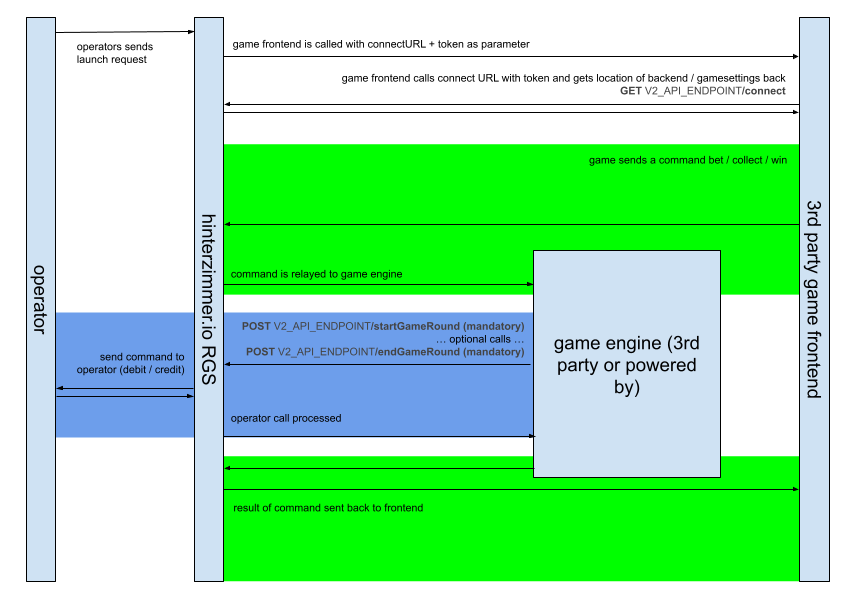
## Information flow for RGS-to-RGS communication
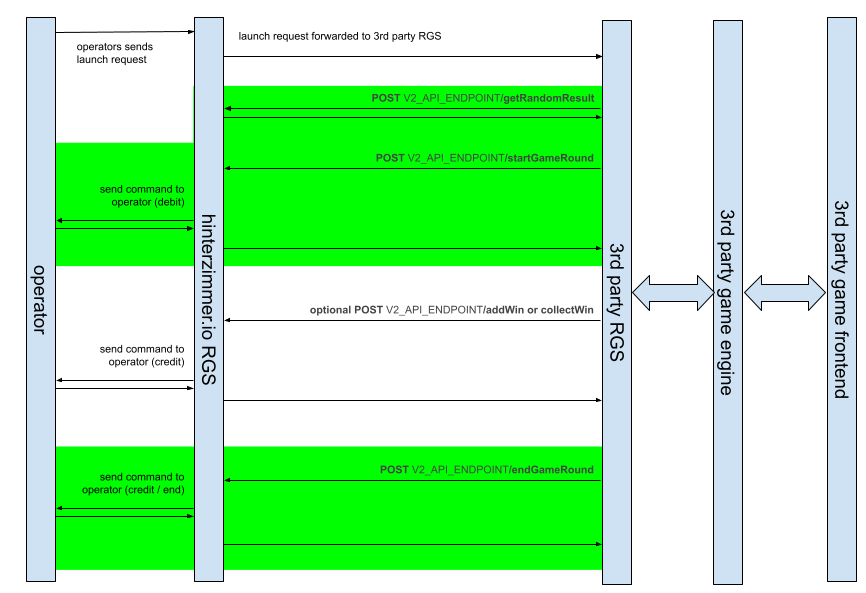
---
---
# Calls provided by API V2
## Introduction
API V2 supports simple operations like gamestart, win, and end. It also provides more complex endpoints. These endpoints let you wager wins. They also track game spin events, for example free spins in a gameround. They prevent the game from consuming more spins than it awarded.
API V2 also provides an interface to the hizi.io certified RNG (random number generator).
Game front ends use these calls to start communication with hizi.io. Game engines and third-party RGS also use these calls.
The following tables summarize the calls. More details and the structure of each call appear below.
**Frontend Calls (GET)**
| | | | |
| --- | --- | --- | --- |
| **Endpoint** | **Method** | **Required** | **Description** |
| [`/status`](/game-studio-api/reference/getStatus) | GET | Optional | Check API status |
| [`/connect`](/game-studio-api/reference/connect) | GET | Mandatory | Establish connection, get long-lived token |
| [`/reconnect`](/game-studio-api/reference/reconnect) | GET | Optional | Re-establish connection using long-lived token |
| [`/disconnect`](/game-studio-api/reference/disconnect) | GET | Optional | Signal game close/leave to operator |
**Game Engine / RGS Calls (POST)**
| | | | |
| --- | --- | --- | --- |
| **Endpoint** | **Method** | **Required** | **Description** |
| [`/testPing`](/game-studio-api/reference/testPing) | POST | Optional | Test communication and payload signature |
| [`/startGameRound`](/game-studio-api/reference/startGameRound) | POST | Mandatory | Start round, debit bet, optionally credit win and close |
| [`/startGameOrAddBet`](/game-studio-api/reference/startGameOrAddBet) | POST | Optional | Place a bet: start the round, or add a bet to the open round. Only for a game that expects more than one debit |
| [`/endGameRound`](/game-studio-api/reference/endGameRound) | POST | Mandatory | Close a gameround |
| [`/getGameRoundInfo`](/game-studio-api/reference/getGameRoundInfo) | POST | Optional | Get info about an open gameround |
| [`/getGameRoundHistoryInfo`](/game-studio-api/reference/getGameRoundHistoryInfo) | POST | Optional | Get historical info about a closed gameround |
| [`/voidGameRound`](/game-studio-api/reference/voidGameRound) | POST | Optional | Void a debit for an open gameround |
| [`/collectWin`](/game-studio-api/reference/collectWin) | POST | Optional | Collect part or all of open winnings |
| [`/addWin`](/game-studio-api/reference/addWin) | POST | Mandatory | Add a win to a gameround |
| [`/wagerWin`](/game-studio-api/reference/wagerWin) | POST | Optional | Wager part or all of open winnings |
| [`/getUncollectedAmount`](/game-studio-api/reference/getUncollectedAmount) | POST | Optional | Get amount of uncollected winnings |
| [`/addSpinCounterGameState`](/game-studio-api/reference/addSpinCounterGameState) | POST | Optional | Track spin events (for example free spins), not needed for RGS-to-RGS |
| [`/getAvailableSpinCounter`](/game-studio-api/reference/getAvailableSpinCounter) | POST | Optional | Get available spin counter, not needed for RGS-to-RGS |
| [`/getTokenForGameRound`](/game-studio-api/reference/getTokenForGameRound) | POST | Optional | Get token for a gameround |
| [`/getTokenData`](/game-studio-api/reference/getTokenData) | POST | Optional | Get token data |
| [`/getPlayerData`](/game-studio-api/reference/getPlayerData) | POST | Optional | Get the stored data of a player for a game |
| [`/setPlayerData`](/game-studio-api/reference/setPlayerData) | POST | Optional | Store data for a player for a game |
| [`/getLastGameRounds`](/game-studio-api/reference/getLastGameRounds) | POST | Optional | Get last gamerounds |
| [`/getRandomResult`](/game-studio-api/reference/getRandomResult) | POST | Conditional¹ | Get certified RNG result |
| [`/getOperatorSettings`](/game-studio-api/reference/getOperatorSettings) | GET | Optional | Get operator-specific settings |
| [`/getBalance`](/game-studio-api/reference/getBalance) | POST | Optional | Get player balance |
> **¹ `/getRandomResult` is not required for a classic RGS-to-RGS integration.** If your RGS runs on your own infrastructure and already uses your own certified RNG (the typical RGS-to-RGS case), do **not** call `/getRandomResult`. Keep using your certified RNG. Pass its results in the `rngResult` fields as usual. The hizi.io certified RNG is required only when the game logic runs *inside* the hizi.io RGS and must get randomness from hizi.io for compliance. This applies to direct game engine integrations hosted by hizi.io, and to a partner RGS hosted within the hizi.io RGS ("RGS inception"). See [`/getRandomResult`](#post-v2-api-endpoint-getrandomresult-conditional) below.
## **Game frontend calls**
All calls use the GET method. Each call needs a valid token, except status calls. There are two types of token. The game launcher passes a short-lived token as a URL parameter named “token”. The connect call returns a long-lived token.
### **GET** V2\_API\_ENDPOINT**/status (optional)**
**API reference**: [`/status`](/game-studio-api/reference/getStatus)
Use this call to check the status of the V2 API. You can call it from the game frontend, the game backend, or a third-party RGS.
**parameters**: **none**
```
response: a JSON structure containing a message
```
### **GET** V2\_API\_ENDPOINT**/connect (mandatory to use)**
**API reference**: [`/connect`](/game-studio-api/reference/connect)
The game launcher passes a connect URL and a short-lived token to the game frontend. The game frontend uses this information to establish communication with hizi.io. It also uses this information to get a long-lived token. The game frontend uses the long-lived token to authenticate further calls. The short-lived token is valid for 5 minutes only.
```
E.g. the game launcher is called via this URL
https://location-of-gamelauncher/index.html?token=206fa387-9565-4fc7-b6e6-b555ae064cfc&login=https%3A%2F%2Fapi.sample.hizi.io%2Fgameapi%2v2%2Fconnect
```
The game frontend then calls:
```
https://api.sample.hizi.io/v2/connect?token=206fa387-9565-4fc7-b6e6-b555ae064cfc
```
**parameters**: **token**
**response**: **V2\_ConnectReply**
### **GET** V2\_API\_ENDPOINT**/reconnect (optional)**
**API reference**: [`/reconnect`](/game-studio-api/reference/reconnect)
This call is similar to connect but uses a long-lived token from a previous connect call. Use it to reestablish connection after an error message.
**parameters**: **token**
**response**: **V2\_ConnectReply**
### **GET** V2\_API\_ENDPOINT**/disconnect (optional)**
**API reference**: [`/disconnect`](/game-studio-api/reference/disconnect)
Use this call to signal that a game frontend is closing or leaving to the operator. Some operators require this functionality. Implement this call. For the “token” parameter, use the long-lived token from a previous connect call. The response of this call is not defined. The frontend does not need to wait for the response.
**parameters**: **token**
**response**: **none**
---
## **Game engine / RGS calls**
Game engines use this group of calls to communicate with the RGS. Operators do not use these calls. Game engines use these calls only to communicate with the RGS.
### Signing RGS requests
All calls use the POST method with a JSON payload. Sign each request with a shared secret to hash the payload. The payload is always a JSON structure.
You need a secret to sign requests. Log in to the hizi.io backoffice with your credentials to get this secret. The signature is a base64-encoded SHA256 HMAC digest of a defined set of request parameters. This method shares the secret without including it in the request. You must also provide a timestamp in a request header field. Include this timestamp in the signature. Concatenate the fields with a hash character (#) before you calculate the SHA256 HMAC.
Every request sends the signature in the request header field X-H-AUTH-SIG. For an example implementation of creating signatures, log in to the hizi.io backoffice and look at the sample code provided.
See the sample source in the Appendix of this document.
---
### Mandatory request headers
When you submit a call, pass the following request headers:
| | |
| --- | --- |
| X-Request-Id | Unique ID to identify the call in logs |
| X-H-AUTH-ID | Game provider ID that hinterzimmer assigns |
| X-H-AUTH-SIG | Signature of the payload |
| X-H-TIMESTAMP | Timestamp (included in the signature data) |
### Response headers
The API sets the following headers in the response when it returns the call result:
| | |
| --- | --- |
| X-Response-Status | For a successful call, this header is present and contains “ok”. Any other value, or the absence of this header, indicates an error. |
| X-H-ERROR-ID | Contains an error code if an error occurs |
| X-H-ERROR-MSG | An optional error message |
| X-Response-Id | Unique ID of the response, used to identify the call in logs |
---
### **POST** V2\_API\_ENDPOINT**/testPing (optional)**
**API reference**: [`/testPing`](/game-studio-api/reference/testPing)
This call sends a test payload to the API. The API returns the same payload back. Use this call to check basic communication and the signature of the payload.
**request**: **V2\_TestPingRequestBody**
```
response: proxies body back in testDataReceived
```
Example:
```
{
url: '/gameapi/v2/testPing',
method: 'POST',
body: '{"testData":{"testInt":1,"testString":"something","testBoolean":true}}',
headers: {
'x-h-auth-id': '000063d0ef40000000000000001b',
'x-h-timestamp': '2023-01-26T11:28:21.429Z',
'x-request-id': '8c00b93dd861405cbeb7c14fded1e72a',
'x-h-auth-sig': 'fea0tckY+PfMPQA1mfhRsyUWdcJ9BXGseFOgOVE9MvE='
},
response: '{"testDataReceived":{"testInt":1,"testString":"something","testBoolean":true}}',
responseHeaders: {
'x-request-id': 'c28bb1aa40714c54ad36fe2bc6154939',
'x-response-id': '1a3b4d1d499c4f43a78cc7a138bebdd5',
'x-response-status': 'ok'
}
}
```
---
### **POST** V2\_API\_ENDPOINT**/startGameRound (mandatory)**
**API reference**: [`/startGameRound`](/game-studio-api/reference/startGameRound)
This call starts a new gameround and debits the bet. Optionally, it can also credit winnings and close the gameround immediately. Optionally, it can close any existing gameround and collect open winnings.
Use this call for every game that takes one debit per gameround. It is the safer of the two bet calls, because it starts exactly one gameround and takes exactly one debit.
A player can have only one open gameround at a time. This call always starts a **new** gameround, so a second call on an open gameround fails with error **12 GAMEROUNDALREADYSTARTED**. Use [`/startGameOrAddBet`](#post-v2-api-endpoint-startgameoraddbet-optional) only for a game that expects more than one debit in one gameround.
**request**: **V2\_StartGameRoundRequestBody**
**response**: **V2\_GameAPIReply**
Example (no win)
```
{
url: '/gameapi/v2/startGameRound',
method: 'POST',
body: '{"token":"83020869-abc0-4123-a95e-ee4f5e8e8343","rngResult":{"rngCallId":"5cd23259ea4c49e7b955e79321da4365","result":"test","winAmount":0},"debitInformation":{"debitAmount":100,"currency":"EUR"},"endGame":true}',
headers: {
'x-h-auth-id': '000063d0ef40000000000000001b',
'x-h-timestamp': '2023-01-26T11:28:21.509Z',
'x-request-id': '20e6bd07275c42fdb161f86a65a19a61',
'x-h-auth-sig': 'Wq1xa11DsazyMNYoi26lBbes1P5SmVFc2VujHvgYea4='
},
response: '{"tokenData":{"operatorId":"000063d0ef40000000000000001b","playerId":"c9c5385f9ee449459fcd6ff39ac53911","gameId":"efbdc5b0ef8c434cbf11daab2fda0d5d","mode":"REAL","currency":"EUR","currentToken":"83020869-abc0-4123-a95e-ee4f5e8e8343","language":"DE","currencyMultiplier":1,"gameRound":"9f3e51d518024a98977be80c30106cc3"},"balance":{"totalBalance":6916,"mode":"REAL","currency":"EUR","balances":[{"type":"real","amount":6916,"currency":"EUR"}]},"amountToCollect":0,"amountCredited":0,"gameRoundInfo":{"hash":"9f3e51d518024a98977be80c30106cc3","status":"closed","stake":100,"mode":"REAL","currency":"EUR","game":"efbdc5b0ef8c434cbf11daab2fda0d5d"},"gameState":[{"hash":"9f3e51d518024a98977be80c30106cc3","type":"debit","result":{"winAmount":0},"processedOn":"2023-01-26T11:28:22.126Z"}]}',
responseHeaders: {
'x-response-id': '873ae012-ea6b-4b6e-b4d0-3946afb48b06',
'x-h-error-id': '0',
'x-h-repeatcount': '0',
'x-response-status': 'ok',
'x-request-id': 'c1822729c33f4ba69493ead9154291c9'
}
}
```
Example (with win)
```
{
url: '/gameapi/v2/startGameRound',
method: 'POST',
body: '{"token":"83020869-abc0-4123-a95e-ee4f5e8e8343","rngResult":{"rngCallId":"7c1d45ad589046f3b52fe779ffd96632","result":"test","winAmount":77},"debitInformation":{"debitAmount":100,"currency":"EUR"},"endGame":false}',
headers: {
'x-h-auth-id': '000063d0ef40000000000000001b',
'x-h-timestamp': '2023-01-26T11:28:21.509Z',
'x-request-id': 'ace5640f237a4959b9a20e83b82dece7',
'x-h-auth-sig': '3hG9jfqJtRAIdUppRQc6EJEELhUUtT95xbEAJHFed9A='
},
response: '{"tokenData":{"operatorId":"000063d0ef40000000000000001b","playerId":"c9c5385f9ee449459fcd6ff39ac53911","gameId":"efbdc5b0ef8c434cbf11daab2fda0d5d","mode":"REAL","currency":"EUR","currentToken":"83020869-abc0-4123-a95e-ee4f5e8e8343","language":"DE","currencyMultiplier":1},"balance":{"totalBalance":6816,"mode":"REAL","currency":"EUR","balances":[{"type":"real","amount":6816,"currency":"EUR"}]},"amountToCollect":77,"amountCredited":0,"gameRoundInfo":{"hash":"ff85e29cb4414c89a89829c8411dacc2","status":"open","stake":100,"mode":"REAL","currency":"EUR","game":"efbdc5b0ef8c434cbf11daab2fda0d5d"},"gameState":[{"hash":"ff85e29cb4414c89a89829c8411dacc2","type":"debit","result":{"winAmount":77},"processedOn":"2023-01-26T11:28:22.810Z"}]}',
responseHeaders: {
'x-response-id': 'e628b84c-6df4-45d1-9561-d7653e144a3a',
'x-h-error-id': '0',
'x-h-repeatcount': '0',
'x-response-status': 'ok',
'x-request-id': 'ec8a82e6ce0e4aa79095fe4119756a54'
}
}
```
---
### **POST** V2\_API\_ENDPOINT**/startGameOrAddBet (optional)**
**API reference**: [`/startGameOrAddBet`](/game-studio-api/reference/startGameOrAddBet)
This call places a bet. It starts a new gameround on the first bet. It adds a further bet to the open gameround on each later bet.
::: warning Use this call only for a game that expects more than one debit
Use [`/startGameRound`](#post-v2-api-endpoint-startgameround-mandatory) for every other game. `/startGameRound` is the safer call. It starts exactly one gameround and takes exactly one debit, so it rejects a duplicate bet that this call accepts. Choose `/startGameOrAddBet` only when the game design puts two or more bets in one gameround.
:::
A player can have only one open gameround at a time. `/startGameRound` always marks its debit as the first debit of a **new** gameround. So a second `/startGameRound` on an open gameround fails with error **12 GAMEROUNDALREADYSTARTED** and the message `gameround already started`. This is correct behaviour. Send the second bet to `/startGameOrAddBet` instead.
**request**: **V2\_StartGameRoundRequestBody** (the same body as `/startGameRound`)
**response**: **V2\_GameAPIReply**
#### How the call chooses between start and add
The call compares `externalGameProviderRoundId` in the request with the gameround on the session token:
| Condition | Result |
| --- | --- |
| `externalGameProviderRoundId` is absent, or differs from the gameround on the token | The call starts a new gameround. It behaves like `/startGameRound`. |
| The two values match, and `debitInformation.externalGameProviderTransactionId` differs from the first bet of that gameround | The call adds a bet to the open gameround. |
| The two values match, and `debitInformation.externalGameProviderTransactionId` equals the first bet of that gameround | The call repeats the first bet. A lost first bet is safe to send again. |
#### How to send more than one bet in one gameround
1. Send the **first** bet to `/startGameOrAddBet`. Set `externalGameProviderRoundId` to your own gameround id. hizi.io then uses that value as the gameround hash.
2. Send each **later** bet to the same call, with the same `externalGameProviderRoundId`.
3. Give each bet its own `debitInformation.externalGameProviderTransactionId`.
4. Keep both identifiers to 32 characters or fewer.
5. Send `rngResult` on every bet. It must carry the keys `rngCallId`, `result` and `winAmount`. The values can be `null` and `0`.
6. Add one win per bet with [`/addWin`](#post-v2-api-endpoint-addwin-mandatory). Give each win its own `externalGameProviderTransactionId`. Set `collect: true` to pay the player.
7. Close the gameround with [`/endGameRound`](#post-v2-api-endpoint-endgameround-mandatory).
#### Limits
- The call ignores `endGame` and `creditInformation` on a bet that it adds to an open gameround. Only the call that **starts** the gameround reads those two fields. Close the gameround with [`/endGameRound`](#post-v2-api-endpoint-endgameround-mandatory).
- A repeated `debitInformation.externalGameProviderTransactionId` on a later bet fails with error **37 TRANSACTIONALREADYEXISTS**. The call does not answer with a silent success.
- A bet cannot join a gameround that started **without** `externalGameProviderRoundId`. The comparison in the table above always fails for such a gameround. So set the field on the first bet, even if you expect only one bet.
Example (first bet, which starts the gameround)
```
{
url: '/gameapi/v2/startGameOrAddBet',
method: 'POST',
body: '{"token":"83020869-abc0-4123-a95e-ee4f5e8e8343","externalGameProviderRoundId":"round-0001","rngResult":{"rngCallId":"5cd23259ea4c49e7b955e79321da4365","result":"","winAmount":0},"debitInformation":{"debitAmount":100,"currency":"EUR","externalGameProviderTransactionId":"bet-0001"},"endGame":false}',
headers: {
'x-h-auth-id': '000063d0ef40000000000000001b',
'x-h-timestamp': '2023-01-26T11:28:21.509Z',
'x-request-id': '20e6bd07275c42fdb161f86a65a19a61',
'x-h-auth-sig': 'Wq1xa11DsazyMNYoi26lBbes1P5SmVFc2VujHvgYea4='
},
response: '{"tokenData":{"operatorId":"000063d0ef40000000000000001b","playerId":"c9c5385f9ee449459fcd6ff39ac53911","gameId":"efbdc5b0ef8c434cbf11daab2fda0d5d","mode":"REAL","currency":"EUR","currentToken":"83020869-abc0-4123-a95e-ee4f5e8e8343","language":"DE","currencyMultiplier":1,"gameRound":"round-0001"},"balance":{"totalBalance":6916,"mode":"REAL","currency":"EUR","balances":[{"type":"real","amount":6916,"currency":"EUR"}]},"amountToCollect":0,"amountCredited":0,"gameRoundInfo":{"hash":"round-0001","status":"open","stake":100,"mode":"REAL","currency":"EUR","game":"efbdc5b0ef8c434cbf11daab2fda0d5d"},"gameState":[{"hash":"round-0001","type":"debit","result":{"winAmount":0},"processedOn":"2023-01-26T11:28:22.126Z"}]}',
responseHeaders: {
'x-response-id': '873ae012-ea6b-4b6e-b4d0-3946afb48b06',
'x-h-error-id': '0',
'x-h-repeatcount': '0',
'x-response-status': 'ok',
'x-request-id': 'c1822729c33f4ba69493ead9154291c9'
}
}
```
Example (second bet, which joins the same gameround)
```
{
url: '/gameapi/v2/startGameOrAddBet',
method: 'POST',
body: '{"token":"83020869-abc0-4123-a95e-ee4f5e8e8343","externalGameProviderRoundId":"round-0001","rngResult":{"rngCallId":"7c1d45ad589046f3b52fe779ffd96632","result":"","winAmount":0},"debitInformation":{"debitAmount":100,"currency":"EUR","externalGameProviderTransactionId":"bet-0002"},"endGame":false}',
headers: {
'x-h-auth-id': '000063d0ef40000000000000001b',
'x-h-timestamp': '2023-01-26T11:28:24.113Z',
'x-request-id': 'ace5640f237a4959b9a20e83b82dece7',
'x-h-auth-sig': '3hG9jfqJtRAIdUppRQc6EJEELhUUtT95xbEAJHFed9A='
},
response: '{"tokenData":{"operatorId":"000063d0ef40000000000000001b","playerId":"c9c5385f9ee449459fcd6ff39ac53911","gameId":"efbdc5b0ef8c434cbf11daab2fda0d5d","mode":"REAL","currency":"EUR","currentToken":"83020869-abc0-4123-a95e-ee4f5e8e8343","language":"DE","currencyMultiplier":1,"gameRound":"round-0001"},"balance":{"totalBalance":6816,"mode":"REAL","currency":"EUR","balances":[{"type":"real","amount":6816,"currency":"EUR"}]},"amountToCollect":0,"amountCredited":0,"gameRoundInfo":{"hash":"round-0001","status":"open","stake":200,"mode":"REAL","currency":"EUR","game":"efbdc5b0ef8c434cbf11daab2fda0d5d"},"gameState":[{"hash":"round-0001","type":"debit","result":{"winAmount":0},"processedOn":"2023-01-26T11:28:22.126Z"}]}',
responseHeaders: {
'x-response-id': 'e628b84c-6df4-45d1-9561-d7653e144a3a',
'x-h-error-id': '0',
'x-h-repeatcount': '0',
'x-response-status': 'ok',
'x-request-id': 'ec8a82e6ce0e4aa79095fe4119756a54'
}
}
```
---
### **POST** V2\_API\_ENDPOINT**/endGameRound (mandatory)**
**API reference**: [`/endGameRound`](/game-studio-api/reference/endGameRound)
This call ends an open gameround. It collects any open winnings.
```
request: V2_EndGameRoundRequestBody
```
**response**: **V2\_GameAPIReply**
Example
```
{
url: '/gameapi/v2/endGameRound',
method: 'POST',
body: '{"token":"d182d578-dcce-4850-b091-205c482c0f58","gameRound":"3c2d66db3e5142d1986e210c809f88e4"}',
headers: {
'x-h-auth-id': '000063d0ef40000000000000001b',
'x-h-timestamp': '2023-01-26T11:28:21.509Z',
'x-request-id': 'ba8cf3f65d1e4f25aefd42cdc6b1caa6',
'x-h-auth-sig': 'YuIsLOFtIfSDhKfvoY2DLnc7UxlcRMc8z7XXm9UkGSc='
},
response: '{"tokenData":{"operatorId":"000063d0ef40000000000000001b","playerId":"c9c5385f9ee449459fcd6ff39ac53911","gameId":"efbdc5b0ef8c434cbf11daab2fda0d5d","mode":"REAL","currency":"EUR","currentToken":"d182d578-dcce-4850-b091-205c482c0f58","language":"DE","currencyMultiplier":1,"gameRound":"3c2d66db3e5142d1986e210c809f88e4"},"balance":{"totalBalance":6954,"mode":"REAL","currency":"EUR","balances":[{"type":"real","amount":6954,"currency":"EUR"}]},"amountToCollect":0,"amountCredited":0,"gameRoundInfo":{"hash":"3c2d66db3e5142d1986e210c809f88e4","status":"closed","stake":13,"mode":"REAL","currency":"EUR","game":"efbdc5b0ef8c434cbf11daab2fda0d5d"},"gameState":[{"hash":"3c2d66db3e5142d1986e210c809f88e4","type":"debit","result":{"winAmount":0},"processedOn":"2023-01-26T11:28:26.591Z"}]}',
responseHeaders: {
'x-response-id': '7ba96252-1aad-41a0-af34-abc9ff939299',
'x-h-error-id': '0',
'x-h-repeatcount': '0',
'x-response-status': 'ok',
'x-request-id': '7dd55c93439b474b8523be610c0e05d5'
}
}
```
### **POST** V2\_API\_ENDPOINT**/getGameRoundInfo (optional)**
**API reference**: [`/getGameRoundInfo`](/game-studio-api/reference/getGameRoundInfo)
This call returns information about a gameround.
```
request: V2_GetGameRoundDetailsRequestBody
```
**response**: **V2\_GameAPIReply**
Example
```
{
url: '/gameapi/v2/getGameRoundInfo',
method: 'POST',
body: '{"token":"83020869-abc0-4123-a95e-ee4f5e8e8343","gameRound":"ff85e29cb4414c89a89829c8411dacc2"}',
headers: {
'x-h-auth-id': '000063d0ef40000000000000001b',
'x-h-timestamp': '2023-01-26T11:28:21.509Z',
'x-request-id': '4dcef13fa1094f29b720df41e16376fc',
'x-h-auth-sig': 'zwlF64lg7h71r1qgHPXuILziZsaZxHtH7AZJfrtQvPY='
},
response: '{"tokenData":{"operatorId":"000063d0ef40000000000000001b","playerId":"c9c5385f9ee449459fcd6ff39ac53911","gameId":"efbdc5b0ef8c434cbf11daab2fda0d5d","mode":"REAL","currency":"EUR","currentToken":"83020869-abc0-4123-a95e-ee4f5e8e8343","language":"DE","currencyMultiplier":1,"gameRound":"ff85e29cb4414c89a89829c8411dacc2"},"amountToCollect":77,"gameRoundInfo":{"hash":"ff85e29cb4414c89a89829c8411dacc2","status":"open","stake":100,"mode":"REAL","currency":"EUR","game":"efbdc5b0ef8c434cbf11daab2fda0d5d"},"gameState":[{"hash":"ff85e29cb4414c89a89829c8411dacc2","type":"debit","result":{"winAmount":77},"processedOn":"2023-01-26T11:28:22.810Z"}]}',
responseHeaders: {
'x-request-id': '57ad03d0c9f54cd6ab5b81d7895a154d',
'x-response-id': '400f691553b3490080681432e3fd65c0',
'x-response-status': 'ok'
}
}
```
### **POST** V2\_API\_ENDPOINT**/getGameRoundHistoryInfo (optional)**
**API reference**: [`/getGameRoundHistoryInfo`](/game-studio-api/reference/getGameRoundHistoryInfo)
This call returns historical information about a gameround.
```
request: V2_GetGameRoundDetailsRequestBody
```
**response**: **V2\_GameAPIReply**. The response also includes any **protectedInfo**.
Notes: This call is not available for open gamerounds. Use getGameRoundInfo instead.
### **POST** V2\_API\_ENDPOINT**/voidGameRound (optional)**
**API reference**: [`/voidGameRound`](/game-studio-api/reference/voidGameRound)
This call voids a debit for a gameround. The operator receives a doTransactions call with a void operation for the initial debit. This call does not work if the gameround is not open. It also does not work if the operator already processed a credit successfully. In these cases, the call returns an HTTP 400 error with one of these error codes (see [Response Codes & Error Codes](/response-codes)):
- `GAMEROUNDNOTFOUND` (14): the gameround hash is unknown.
- `GAMEROUNDNOTACTIVE` (13): the gameround exists, but it is no longer open. A repeated void call on the same round also returns this code.
- `TRANSACTIONSARERETRYING` (26): a credit for the gameround was already processed.
Do not send the call again after one of these three errors. The standard retry policy for an HTTP 4xx response applies. Other failures are different. Retry `/voidGameRound` after an HTTP 5xx response, a timeout, or a network error. A lost void is not a void that went through.
```
request: V2_VoidGameRoundRequestBody
```
**response**: **V2\_GameAPIReply**,
Example
```
{
url: '/gameapi/v2/voidGameRound',
method: 'POST',
body: '{"token":"83020869-abc0-4123-a95e-ee4f5e8e8343","gameRound":"ff85e29cb4414c89a89829c8411dacc2"}',
headers: {
'x-h-auth-id': '000063d0ef40000000000000001b',
'x-h-timestamp': '2023-01-26T11:28:21.509Z',
'x-request-id': 'b5f00dc745f84da3adcd474da161f759',
'x-h-auth-sig': '4c4gjIruvm+qHmZO+Jc2eFbdH35sr45xVXNW6pDKUAw='
},
response: '{"balance":6902941,"gameRoundInfo":{"hash":"8f105c8a01fc46d7bb45c317c619445a","status":"cancel","stake":13,"mode":"REAL","currency":"EUR","game":"093a992277e14d6bbb1e5ead156f6734","baseStake":13,"currencyMultiplier":1}}',
responseHeaders: {
'x-response-id': '23778189-4957-45fe-91f2-704541b11010',
'x-h-error-id': '0',
'x-h-repeatcount': '0',
'x-response-status': 'ok',
'x-request-id': '90f91efe393f4ca5af621728e11f7227'
}
}
```
### **POST** V2\_API\_ENDPOINT**/collectWin (optional)**
**API reference**: [`/collectWin`](/game-studio-api/reference/collectWin)
This call collects part or all open winnings. It optionally closes the gameround when the call collects all open winnings.
```
request: V2_CollectWinRoundRequestBody
```
**response**: **V2\_GameAPIReply**
Example
```
{
url: '/gameapi/v2/collectWin',
method: 'POST',
body: '{"token":"83020869-abc0-4123-a95e-ee4f5e8e8343","gameRound":"ff85e29cb4414c89a89829c8411dacc2","collectInformation":{"currency":"EUR","creditAmount":37}}',
headers: {
'x-h-auth-id': '000063d0ef40000000000000001b',
'x-h-timestamp': '2023-01-26T11:28:21.509Z',
'x-request-id': 'b5f00dc745f84da3adcd474da161f759',
'x-h-auth-sig': '4c4gjIruvm+qHmZO+Jc2eFbdH35sr45xVXNW6pDKUAw='
},
response: '{"tokenData":{"operatorId":"000063d0ef40000000000000001b","playerId":"c9c5385f9ee449459fcd6ff39ac53911","gameId":"efbdc5b0ef8c434cbf11daab2fda0d5d","mode":"REAL","currency":"EUR","currentToken":"83020869-abc0-4123-a95e-ee4f5e8e8343","language":"DE","currencyMultiplier":1,"gameRound":"ff85e29cb4414c89a89829c8411dacc2"},"balance":{"totalBalance":6853,"mode":"REAL","currency":"EUR","balances":[{"type":"real","amount":6853,"currency":"EUR"}]},"amountToCollect":40,"amountCredited":37,"gameRoundInfo":{"hash":"ff85e29cb4414c89a89829c8411dacc2","status":"open","stake":100,"mode":"REAL","currency":"EUR","game":"efbdc5b0ef8c434cbf11daab2fda0d5d"},"gameState":[{"hash":"ff85e29cb4414c89a89829c8411dacc2","type":"debit","result":{"winAmount":77},"processedOn":"2023-01-26T11:28:22.810Z"},{"hash":"9e959481e6c8411f88a0fcdb43e9e55f","type":"credit","result":{},"collected":37,"reason":"collect 0.37 EUR","processedOn":"2023-01-26T11:28:23.260Z"}]}',
responseHeaders: {
'x-response-id': '23778189-4957-45fe-91f2-704541b11010',
'x-h-error-id': '0',
'x-h-repeatcount': '0',
'x-response-status': 'ok',
'x-request-id': '90f91efe393f4ca5af621728e11f7227'
}
}
```
---
### **POST** V2\_API\_ENDPOINT**/addWin (mandatory)**
**API reference**: [`/addWin`](/game-studio-api/reference/addWin)
This call adds an uncollected (open) win to an open gameround. Optionally, it can also collect the win amount immediately and close the gameround.
**request**: **V2\_AddWinRequestBody**
**response**: **V2\_GameAPIReply**
Example
```
{
url: '/gameapi/v2/addWin',
method: 'POST',
body: '{"token":"d182d578-dcce-4850-b091-205c482c0f58","gameRound":"ff85e29cb4414c89a89829c8411dacc2","rngResult":{"rngCallId":"69cf2876471845ba8e97f3adbdf1d163","result":"test-uncollected","winAmount":10}}',
headers: {
'x-h-auth-id': '000063d0ef40000000000000001b',
'x-h-timestamp': '2023-01-26T11:28:21.509Z',
'x-request-id': '9c6c2a59e2e9468d82214839ecf9c45d',
'x-h-auth-sig': 'tMWdNcBZf+6SwrB9qm74B/uKhbE5qDotugxrwdssqqM='
},
response: '{"tokenData":{"operatorId":"000063d0ef40000000000000001b","playerId":"c9c5385f9ee449459fcd6ff39ac53911","gameId":"efbdc5b0ef8c434cbf11daab2fda0d5d","mode":"REAL","currency":"EUR","currentToken":"d182d578-dcce-4850-b091-205c482c0f58","language":"DE","currencyMultiplier":1,"gameRound":"ff85e29cb4414c89a89829c8411dacc2"},"amountToCollect":89,"gameState":[{"hash":"ff85e29cb4414c89a89829c8411dacc2","type":"debit","result":{"winAmount":77},"processedOn":"2023-01-26T11:28:22.810Z"},{"hash":"9e959481e6c8411f88a0fcdb43e9e55f","type":"credit","result":{},"collected":37,"reason":"collect 0.37 EUR","processedOn":"2023-01-26T11:28:23.260Z"},{"hash":"7ac21c2772124befbcd5c70500f421a8","type":"wager","result":{"winAmount":60},"amountWagered":21,"processedOn":"2023-01-26T11:28:24.037Z"},{"hash":"cfbbf8f2a6554d1c9738ecd14aabbb8a","type":"genericwin","result":{"winAmount":10},"processedOn":"2023-01-26T11:28:24.647Z"}]}',
responseHeaders: {
'x-request-id': '5c022f0582f04763b9751ce0aca1e8d9',
'x-response-status': 'ok'
}
}
```
### **POST** V2\_API\_ENDPOINT**/wagerWin (optional)**
**API reference**: [`/wagerWin`](/game-studio-api/reference/wagerWin)
This call wagers part or all of open winnings. It adds the result as a new open win amount.
```
request: V2_WagerWinRoundRequestBody
```
**response**: **V2\_GameAPIReply**
Example
```
{
url: '/gameapi/v2/wagerWin',
method: 'POST',
body: '{"token":"d182d578-dcce-4850-b091-205c482c0f58","gameRound":"ff85e29cb4414c89a89829c8411dacc2","rngResult":{"rngCallId":"c976d024c19e4a76940b7302beb87939","result":"test","winAmount":60},"wagerInformation":{"currency":"EUR","wagerAmount":21}}',
headers: {
'x-h-auth-id': '000063d0ef40000000000000001b',
'x-h-timestamp': '2023-01-26T11:28:21.509Z',
'x-request-id': 'b034474af1e242fa8377f6bfa275081e',
'x-h-auth-sig': 'NTJrcVX3yfgFZdFp9lO7FdSti7UhGbIIsdSJjE3OF/0='
},
response: '{"tokenData":{"operatorId":"000063d0ef40000000000000001b","playerId":"c9c5385f9ee449459fcd6ff39ac53911","gameId":"efbdc5b0ef8c434cbf11daab2fda0d5d","mode":"REAL","currency":"EUR","currentToken":"d182d578-dcce-4850-b091-205c482c0f58","language":"DE","currencyMultiplier":1,"gameRound":"ff85e29cb4414c89a89829c8411dacc2"},"amountCredited":0,"amountToCollect":79,"gameState":[{"hash":"ff85e29cb4414c89a89829c8411dacc2","type":"debit","result":{"winAmount":77},"processedOn":"2023-01-26T11:28:22.810Z"},{"hash":"9e959481e6c8411f88a0fcdb43e9e55f","type":"credit","result":{},"collected":37,"reason":"collect 0.37 EUR","processedOn":"2023-01-26T11:28:23.260Z"},{"hash":"7ac21c2772124befbcd5c70500f421a8","type":"wager","result":{"winAmount":60},"amountWagered":21,"processedOn":"2023-01-26T11:28:24.037Z"}]}',
responseHeaders: {
'x-request-id': 'abe54ec392bd47ad8fc142b6e9349380',
'x-response-status': 'ok'
}
}
```
### **POST** V2\_API\_ENDPOINT**/getUncollectedAmount (optional)**
**API reference**: [`/getUncollectedAmount`](/game-studio-api/reference/getUncollectedAmount)
This call returns the amount of uncollected (open) winnings.
```
request: V2_GetUncollectedAmountRequestBody
response: V2_GameAPIGetUncollectedAmountReply
```
Example
```
{
url: '/gameapi/v2/getUncollectedAmount',
method: 'POST',
body: '{"token":"d182d578-dcce-4850-b091-205c482c0f58","gameRound":"ff85e29cb4414c89a89829c8411dacc2"}',
headers: {
'x-h-auth-id': '000063d0ef40000000000000001b',
'x-h-timestamp': '2023-01-26T11:28:21.509Z',
'x-request-id': '9ac31f8269514695b0cf287f3f721843',
'x-h-auth-sig': '+iT88iL/NZ/QSrN5ovH6Ljr5OwQtFMBtYKGtxvNsklM='
},
response: '{"tokenData":{"operatorId":"000063d0ef40000000000000001b","playerId":"c9c5385f9ee449459fcd6ff39ac53911","gameId":"efbdc5b0ef8c434cbf11daab2fda0d5d","mode":"REAL","currency":"EUR","currentToken":"d182d578-dcce-4850-b091-205c482c0f58","language":"DE","currencyMultiplier":1,"gameRound":"ff85e29cb4414c89a89829c8411dacc2"},"amountToCollect":79}',
responseHeaders: {
'x-request-id': '54c06093d0ec405fab2142e0cb770f08',
'x-response-status': 'ok'
}
}
```
---
### **POST** V2\_API\_ENDPOINT**/addSpinCounterGameState (optional**, not needed for RGS-to-RGS**)**
**API reference**: [`/addSpinCounterGameState`](/game-studio-api/reference/addSpinCounterGameState)
This call adds a game request with a counter, for example free spins won. It can also consume a counter, for example when the game plays a free spin. When it consumes a counter, the call checks if the game state is available. This check makes sure the game does not play more free spins than it won.
```
request: V2_AddSpinCounterGameStateRequestBody
response: V2_GameAPIAddSpinCounterGameStateReply
```
Example
```
{
url: '/gameapi/v2/addSpinCounterGameState',
method: 'POST',
body: '{"token":"d182d578-dcce-4850-b091-205c482c0f58","gameRound":"ff85e29cb4414c89a89829c8411dacc2","counterType":"customspin","rngResult":{"rngCallId":"937bfc0d50c4493fa47ce7221d9afc12","result":{"awarded":10},"winAmount":0}}',
headers: {
'x-h-auth-id': '000063d0ef40000000000000001b',
'x-h-timestamp': '2023-01-26T11:28:21.509Z',
'x-request-id': '869a2d200905426f8e09d1fc15d91418',
'x-h-auth-sig': 'HnjWEUTdQ56mAph4BFgiGfx6mwq+Lwebz2834nk9T0E='
},
response: '{"tokenData":{"operatorId":"000063d0ef40000000000000001b","playerId":"c9c5385f9ee449459fcd6ff39ac53911","gameId":"efbdc5b0ef8c434cbf11daab2fda0d5d","mode":"REAL","currency":"EUR","currentToken":"d182d578-dcce-4850-b091-205c482c0f58","language":"DE","currencyMultiplier":1,"gameRound":"ff85e29cb4414c89a89829c8411dacc2"},"amountToCollect":89,"spinsAvailable":10,"gameState":[{"hash":"ff85e29cb4414c89a89829c8411dacc2","type":"debit","result":{"winAmount":77},"processedOn":"2023-01-26T11:28:22.810Z"},{"hash":"9e959481e6c8411f88a0fcdb43e9e55f","type":"credit","result":{},"collected":37,"reason":"collect 0.37 EUR","processedOn":"2023-01-26T11:28:23.260Z"},{"hash":"7ac21c2772124befbcd5c70500f421a8","type":"wager","result":{"winAmount":60},"amountWagered":21,"processedOn":"2023-01-26T11:28:24.037Z"},{"hash":"cfbbf8f2a6554d1c9738ecd14aabbb8a","type":"genericwin","result":{"winAmount":10},"processedOn":"2023-01-26T11:28:24.647Z"},{"hash":"8531967219184c98a06cba7a009640b8","type":"genericwin","result":{"winAmount":10},"processedOn":"2023-01-26T11:28:24.806Z"},{"hash":"15171253390246f18d889d9d1c18e893","type":"credit","result":{},"collected":10,"reason":"collect 0.10 EUR","processedOn":"2023-01-26T11:28:24.826Z"},{"hash":"9ac37a5ceb754f78a51645fd8a9a316f","type":"customspin","result":{"winAmount":0},"processedOn":"2023-01-26T11:28:25.227Z"}]}',
responseHeaders: {
'x-request-id': 'b3a6057f422942918672b6c627921d17',
'x-response-status': 'ok'
}
}
```
---
### POST**/getAvailableSpinCounter (optional**, not needed for RGS-to-RGS**)**
**API reference**: [`/getAvailableSpinCounter`](/game-studio-api/reference/getAvailableSpinCounter)
This call gets the value of a spin counter. For example, it returns the number of available free spins after an addSpinCountGameState call.
```
request: V2_GetAvailableSpinCounterRequestBody
response: V2_GameAPIGetAvailableSpinCounterReply
```
Example
```
{
url: '/gameapi/v2/getAvailableSpinCounter',
method: 'POST',
body: '{"token":"d182d578-dcce-4850-b091-205c482c0f58","gameRound":"ff85e29cb4414c89a89829c8411dacc2","counterType":"customspin"}',
headers: {
'x-h-auth-id': '000063d0ef40000000000000001b',
'x-h-timestamp': '2023-01-26T11:28:21.509Z',
'x-request-id': '8e162d3e2081490dbca7db48d84188a2',
'x-h-auth-sig': 'LZX7T0pRn0ldVtwBfCJ+aBkhL9UfXj6h5S2abngBO2Q='
},
response: '{"tokenData":{"operatorId":"000063d0ef40000000000000001b","playerId":"c9c5385f9ee449459fcd6ff39ac53911","gameId":"efbdc5b0ef8c434cbf11daab2fda0d5d","mode":"REAL","currency":"EUR","currentToken":"d182d578-dcce-4850-b091-205c482c0f58","language":"DE","currencyMultiplier":1,"gameRound":"ff85e29cb4414c89a89829c8411dacc2"},"amountToCollect":104,"spinsAvailable":9}',
responseHeaders: {
'x-request-id': '96471d3f90824c4484a288169734bf5e',
'x-response-status': 'ok'
}
}
```
---
### **POST** V2\_API\_ENDPOINT**/getTokenForGameRound (optional)**
**API reference**: [`/getTokenForGameRound`](/game-studio-api/reference/getTokenForGameRound)
This call gets a new token for an open gameround. Use it for janitor or autoclose functions.
**Note**: This call revokes any existing tokens for the given player, operator, and game. Use this call only in janitor calls.
```
request: V2_GetTokenForGameRoundRequestBody
response: V2_GetTokenForGameRoundReply
```
Example
```
{
url: '/gameapi/v2/getTokenForGameRound',
method: 'POST',
body: '{"gameRound":"ff85e29cb4414c89a89829c8411dacc2"}',
headers: {
'x-h-auth-id': '000063d0ef40000000000000001b',
'x-h-timestamp': '2023-01-26T11:28:21.509Z',
'x-request-id': 'd5dd1017005d4c3ea9b31301bd7de6c0',
'x-h-auth-sig': 'JbFPHyWd+EOgn+sCf1/QLK+SeRJuksnoqIze7mz2M4Y='
},
response: '{"tokenData":{"operatorId":"000063d0ef40000000000000001b","playerId":"c9c5385f9ee449459fcd6ff39ac53911","gameId":"efbdc5b0ef8c434cbf11daab2fda0d5d","mode":"REAL","currency":"EUR","currentToken":"d182d578-dcce-4850-b091-205c482c0f58","language":"DE","currencyMultiplier":1,"gameRound":"ff85e29cb4414c89a89829c8411dacc2"}}',
responseHeaders: {
'x-request-id': '2c19baca98a4424ab67ffa76bc1d74dc',
'x-response-status': 'ok'
}
}
```
---
### **POST** V2\_API\_ENDPOINT**/getTokenData(optional)**
**API reference**: [`/getTokenData`](/game-studio-api/reference/getTokenData)
This call gets token data from a given token ID.
```
request: V2_GetTokenDataRequestBody
```
**response**: **V2\_GetTokenDataReply**
Example
```
{
url: '/gameapi/v2/getTokenData',
method: 'POST',
body: '{"token":"cfa822f6-4f53-4ecb-a6f9-647788a6fcd5"}',
headers: {
'x-h-auth-id': '000063ea2b200000000000000029',
'x-h-timestamp': '2023-02-13T14:30:41.130Z',
'x-request-id': '96317c437f264b3ba2fcd4bf68e8172f',
'x-h-auth-sig': 'Pb0TjKXo9aAgongzqvAV+C3mz7L2qPspvjhz7y8riCI='
},
response: '{"tokenData":{"operatorId":"000063ea2b200000000000000029","playerId":"cd4def34682447ab9b5684340bf25cfe","gameId":"b42a6a2e13554d9cb5c1da72fcb22b8b","mode":"REAL","currency":"EUR","currentToken":"cfa822f6-4f53-4ecb-a6f9-647788a6fcd5","language":"DE","currencyMultiplier":1,"gameRound":"eb6320faf7ac4cdc85ce6f0043573f2f"}}',
responseHeaders: {
'x-request-id': 'b6f46c69b7a1454ab2075b67fa220265',
'x-response-status': 'ok'
}
}
```
---
### **POST** V2\_API\_ENDPOINT**/getPlayerData (optional)**
**API reference**: [`/getPlayerData`](/game-studio-api/reference/getPlayerData)
This call reads the data that `/setPlayerData` stored for one player in one game. The RGS keeps the data in its database. The data stays available after the session ends. Use it for a game state that must survive a session, for example a collection counter or a progress value.
The request carries only the token. The RGS reads the player, the game and the mode (`REAL` or `DEMO`) from the token. A game cannot read the data of another player or of another game.
`currency` and `stake` filter the result. The RGS applies a filter only for a value that is present and not zero. `stake: 0` does not filter. An empty `currency` does not filter. Omit both values to get every entry of that player in that game and mode.
The RGS does not return an entry whose `expires` is in the past. The entry stays in the database until a clean-up deletes it. Treat an expired entry as gone.
```
request: V2_GetPlayerDataRequestBody
response: V2_GetPlayerDataReply
```
**Errors**: an invalid token or an expired token gives HTTP 400 with error 1008 `SESSIONINVALID`.
Example
```
{
url: '/gameapi/v2/getPlayerData',
method: 'POST',
body: '{"token":"d182d578-dcce-4850-b091-205c482c0f58"}',
headers: {
'x-h-auth-id': '000063d0ef40000000000000001b',
'x-h-timestamp': '2026-09-17T11:28:21.509Z',
'x-request-id': '7c1f3a2b58f24d0b9a1d0c5e3f47ab19',
'x-h-auth-sig': 'QvH3s0Yq5nT1bVwCfJ+aBkhL9UfXj6h5S2abngBO2Q='
},
response: '{"data":[{"playerId":"c9c5385f9ee449459fcd6ff39ac53911","gameId":"efbdc5b0ef8c434cbf11daab2fda0d5d","data":{"played":0}},{"playerId":"c9c5385f9ee449459fcd6ff39ac53911","gameId":"efbdc5b0ef8c434cbf11daab2fda0d5d","data":{"collected":1},"stake":100,"expires":"2026-09-17T12:00:00.000Z"}]}',
responseHeaders: {
'x-request-id': '2f58a9c0d4b74e7ea6f1c2d38b90e451',
'x-response-status': 'ok'
}
}
```
To read only the entry of one stake level, send that stake:
```
{
url: '/gameapi/v2/getPlayerData',
method: 'POST',
body: '{"token":"d182d578-dcce-4850-b091-205c482c0f58","stake":100}',
headers: {
'x-h-auth-id': '000063d0ef40000000000000001b',
'x-h-timestamp': '2026-09-17T11:28:25.104Z',
'x-request-id': 'b0d4e61c8a7f4f2d91c3ab5e7d02f846',
'x-h-auth-sig': 'k9Rp2XcA7mYs4Lt0QvB+aBkhL9UfXj6h5S2abngBO2Q='
},
response: '{"data":[{"playerId":"c9c5385f9ee449459fcd6ff39ac53911","gameId":"efbdc5b0ef8c434cbf11daab2fda0d5d","data":{"collected":1},"stake":100,"expires":"2026-09-17T12:00:00.000Z"}]}',
responseHeaders: {
'x-request-id': 'd7c9013ea4bf42d8b5e6f0a2c1938d7b',
'x-response-status': 'ok'
}
}
```
---
### **POST** V2\_API\_ENDPOINT**/setPlayerData (optional)**
**API reference**: [`/setPlayerData`](/game-studio-api/reference/setPlayerData)
This call stores data for one player in one game. The RGS keeps the data in its database. The data stays available after the session ends. Read it back with `/getPlayerData`.
The request carries only the token. The RGS reads the player, the game and the mode (`REAL` or `DEMO`) from the token. A game cannot store data for another player or for another game.
**Note**: The payload to store is `data.data`. The outer `data` object also holds `currency`, `stake` and `expires`. Its published type is `Omit`, so it is a [`V2_PlayerData`](/game-studio-api/data-structures#v2-playerdata) without `playerId` and `gameId`.
`data.data` is `unknown` in the published type, so the entry holds any JSON value. Most games store an object.
The RGS keys an entry on the player, the game, `currency`, `stake` and the mode. The call replaces the entry with that key. It is an upsert, not an append. Use `currency` and `stake` to hold several independent entries for one player in one game, for example one entry for each stake level. Omit both values to hold one entry for each player.
`expires` is optional. It is a timestamp in ISO 8601 format, in UTC. An entry with no `expires` never expires.
In `DEMO` mode the RGS limits the lifetime of an entry. The limit is `MAXLIFETIME_PLAYERDATA_INDEMOGAMES_SECONDS`, which is 86400 seconds (24 hours) by default. The RGS sets `expires` to that limit when the request sends none. The RGS lowers a later `expires` to that limit. `REAL` mode has no limit.
The reply is a read-back after the write. It holds the entries that match the `currency` and the `stake` of the request.
```
request: V2_SetPlayerDataRequestBody
response: V2_SetPlayerDataReply
```
**Errors**:
- An invalid token or an expired token gives HTTP 400 with error 1008 `SESSIONINVALID`.
- A request without `data.data` gives HTTP 400 with error 19 `INVALIDPARAMETER` and the message `cannot store tokendata as no data present`.
Example
```
{
url: '/gameapi/v2/setPlayerData',
method: 'POST',
body: '{"token":"d182d578-dcce-4850-b091-205c482c0f58","data":{"stake":100,"data":{"collected":1},"expires":"2026-09-17T12:00:00.000Z"}}',
headers: {
'x-h-auth-id': '000063d0ef40000000000000001b',
'x-h-timestamp': '2026-09-17T11:28:19.771Z',
'x-request-id': '3a90c5e7b21d43f0aa6c81d5479e2f3b',
'x-h-auth-sig': 'T4mZ8qLxRv2Ns1CbPw0+aBkhL9UfXj6h5S2abngBO2Q='
},
response: '{"data":[{"playerId":"c9c5385f9ee449459fcd6ff39ac53911","gameId":"efbdc5b0ef8c434cbf11daab2fda0d5d","data":{"collected":1},"stake":100,"expires":"2026-09-17T12:00:00.000Z"}]}',
responseHeaders: {
'x-request-id': '58b1f7a0c93d4e26bb0f2d47e81ac635',
'x-response-status': 'ok'
}
}
```
---
### **POST** V2\_API\_ENDPOINT**/getLastGameRounds (optional)**
**API reference**: [`/getLastGameRounds`](/game-studio-api/reference/getLastGameRounds)
This call gets a list of recently closed games.
**request**: **V2\_GetLastGamesRequestBody**
**response**: **V2\_GetLastGamesReply**
Example
```
{
url: '/gameapi/v2/getLastGameRounds',
method: 'POST',
body: '{"token":"d182d578-dcce-4850-b091-205c482c0f58"}',
headers: {
'x-h-auth-id': '000063d0ef40000000000000001b',
'x-h-timestamp': '2023-01-26T11:28:21.509Z',
'x-request-id': 'cf64d9f4cb964a14a6c464b74512cf73',
'x-h-auth-sig': 'b8QF77vhsf7rCp7hNZnHxUV4gBeQ0Nz/rYAdq2SwXYA='
},
response: '{"gameRoundList":[{"id":"a016d46dd75b4725baf06d0ef0fdbe7f","status":"closed","timestamp":"2023-01-26T11:28:28.953Z","bet":13,"won":10,"currency":"EUR","gameSpecificDetails":{"result":{"result":"test","rngCallId":"830e8c88405a48b2af5b33f89745084e","winAmount":10}}},{"id":"ed404d20c18b4821880e465b0e41c570","status":"closed","timestamp":"2023-01-26T11:28:28.769Z","bet":13,"won":10,"currency":"EUR","gameSpecificDetails":{"result":{"result":"test","rngCallId":"28732aa1acd3472fa743ef8e6acc36ef","winAmount":10}}}]}',
responseHeaders: {
'x-response-id': '25b52b253ab543239d8490d32b6a63cd',
'x-response-status': 'ok'
}
}
```
---
### **POST** V2\_API\_ENDPOINT**/getRandomResult (conditional)**
**API reference**: [`/getRandomResult`](/game-studio-api/reference/getRandomResult)
This call gets random integers or doubles within a given range from the hizi.io certified RNG.
> **When is this required?** This call is required only when the game logic runs inside the hizi.io RGS. In this case, the game logic must obtain its randomness from hizi.io for compliance. This applies to direct game engine integrations hosted by hizi.io. It also applies to a partner RGS hosted within the hizi.io RGS ("RGS inception").
>
> **A classic RGS-to-RGS integration does not call this endpoint.** In the typical RGS-to-RGS case, your RGS runs on your own infrastructure and uses your own certified (for example, provably-fair) RNG. Keep using your own RNG. Pass its results in the `rngResult` fields of `/startGameRound`, `/addWin`, and other calls. You run your own certification on your own infrastructure. hizi.io is not involved in your certification. hizi.io provides no certification suite for it. No part of hizi.io expects `/getRandomResult` calls from such integrations.
```
request: V2_GetRandomResultRequestBody
```
**response**: **V2\_GameAPIRngReply**
Example
```
{
url: '/gameapi/v2/getRandomResult',
method: 'POST',
body: '{"token":"123162d0-315d-474b-930c-7e43625c2ae3","rngEndPoint":"getDoubles","rngPayload":{"min":1,"max":10,"count":2}}',
headers: {
'x-h-auth-id': '000063d0ef400000000000000029',
'x-h-timestamp': '2023-01-26T11:43:58.115Z',
'x-request-id': '7f0fab897ea745d1a82b79934ee93b6d',
'x-h-auth-sig': 'kLiIcxtblFF2+c9g5zUmKrNoOZFpqeO7ODXZGUklVSg='
},
response: '{"values":[3.068702629156329,9.509780327419449],"tokenData":{"operatorId":"000063d0ef400000000000000029","playerId":"9f1cfa5dfcbd4946817675ecbccc26c5","gameId":"f1252f6014084e1cbf5bb1982f911e0c","mode":"REAL","currency":"EUR","currentToken":"123162d0-315d-474b-930c-7e43625c2ae3","language":"DE","currencyMultiplier":1}}',
responseHeaders: {
'x-response-id': '0c83abf945a14e78ab8babaa4b96005b',
'x-response-status': 'ok',
'x-request-id': 'c95a958b11614905b932aa7dce9d695d'
}
}
```
---
### **GET** V2\_API\_ENDPOINT**/getOperatorSettings (optional)**
**API reference**: [`/getOperatorSettings`](/game-studio-api/reference/getOperatorSettings)
This call gets operator-specific settings.
```
request: V2_GetOperatorSettingsQuery
```
**response**: **V2\_GameSettings**
Example
```
{
url: '/gameapi/v2/getOperatorSettings?game=f1252f6014084e1cbf5bb1982f911e0c-unk&operator=000063d0ef400000000000000029-unk¤cy=EUR',
method: 'GET',
body: undefined,
headers: {
'x-h-auth-id': '000063d0ef400000000000000029',
'x-h-timestamp': '2023-01-26T11:43:58.115Z',
'x-request-id': 'e67161f5bc354717871b021144945154',
'x-h-auth-sig': 'D3p/3TU6q3DYGZ56TtFXVDog5UU4uVRw38FrMVd1ru4='
},
response: '{"autoplayEnabled":true,"autoplayLossLimitRequired":false,"displayCoins":true,"displayJackpotOdds":false,"displayRTP":false,"displayXRTP":false,"forceOrientation":0,"gambleEnabled":true,"historyURL":"","homeURL":"","loadMsg":"","maxExposure":25000000,"multipleInstancesAllowed":false,"rcDisplayWinLoss":false,"rcEnabled":false,"stopEnabled":true,"topupURL":"","turboEnabled":true,"homeEnabled":true,"dynamicMinSpinTime":false,"redirectTarget":"top","packageBuyEnabled":true}',
responseHeaders: {
'x-response-id': '475c54c307174c2a98d86b190feebb09',
'x-response-status': 'ok'
}
}
```
---
### **POST** V2\_API\_ENDPOINT**/getBalance (optional)**
**API reference**: [`/getBalance`](/game-studio-api/reference/getBalance)
This call gets the player's balance.
**request**: **V2\_GetTokenDataRequestBody**
**response**: **GameAPIBalanceReply**
# Example
```
{
url: '/gameapi/v2/getBalance',
method: 'POST',
body: '{"token":"cfa822f6-4f53-4ecb-a6f9-647788a6fcd5"}',
headers: {
'x-h-auth-id': '000063ea2b200000000000000029',
'x-h-timestamp': '2023-02-13T14:30:41.130Z',
'x-request-id': '96317c437f264b3ba2fcd4bf68e8172f',
'x-h-auth-sig': 'Pb0TjKXo9aAgongzqvAV+C3mz7L2qPspvjhz7y8riCI='
},
response: '{"totalBalance":6816,"mode":"REAL","currency":"EUR","balances":[{"type":"real","amount":6816,"currency":"EUR"}]}',
responseHeaders: {
'x-request-id': 'b6f46c69b7a1454ab2075b67fa220265',
'x-response-status': 'ok'
}
```
---
# Calls to be implemented by games
## General
To supply information about games, health, and automatic closing of games, the engine must listen for the calls below. The engine must respond to each call.
## Authenticating the calls you receive from the RGS
The RGS signs the calls it sends to your `backendQueue`. It uses the shared secret associated with the `X-H-AUTH-ID` in the request. **This is a different construction from the outbound direction**, documented in the [Signing appendix](./signing) (the outbound direction signs the JSON body). For the inbound calls below, the RGS signs a fixed, **per-endpoint ordered list of scalar fields**. The RGS does not hash the request body itself.
The following request headers are sent:
| | |
| --- | --- |
| ***header*** | ***comment*** |
| X-H-AUTH-ID | Identifies the shared secret used to verify the signature. |
| X-H-TIMESTAMP | ISO timestamp. The RGS includes it in the signed string. |
| X-H-AUTH-SIG | Signature. The RGS includes it on the signed endpoints below. |
Calculate the signature with the same primitive as the outbound direction:
```
X-H-AUTH-SIG = base64( HMAC_SHA256( secret, fields.join('#') ) )
```
`secret` is the shared secret. `fields` is the per-endpoint list below. The secret serves two roles. It is the HMAC key. It is also the first element of the signed string.
| | | |
| --- | --- | --- |
| ***endpoint*** | ***signed*** | ***fields (in order)*** |
| `GET /getGameConfiguration` | yes | `[ secret, X-H-AUTH-ID, X-H-TIMESTAMP, currency ]` |
| `POST /getGameResult` | yes | `[ secret, X-H-AUTH-ID, X-H-TIMESTAMP, gameRound ]` |
| `GET /health` | no | Liveness probe. The endpoint does not require a signature. Leave it open to all IPs. |
| `GET /certifiedfiles` | no | Informational. The endpoint does not require a signature. Leave it open to all IPs. |
| `POST /doAutoClose` | no | Not signed. See the doAutoClose section. |
For `getGameResult`, the RGS signs only the `gameRound` value, not the full JSON body.
`health` and `certifiedfiles` are intentionally unauthenticated. Make them reachable from **any** IP. External monitoring tools and certification bodies use them. Do **not** restrict them to the RGS egress range.
### GET ${backendQueue}/certifiedfiles [optional, mandatory for some jurisdiction]
This call must return information about certified components, with hashes. It takes no parameters.
Example of response (JSON)
```
{
"list": [
{
"file": "./dist/certified/certifiedLogic.js",
"hash": "e6a01ef0f88b1cac2696ce30166fca0bf6b6c793"
},
{
"file": "./dist/certified/certifiedGameSettings.js",
"hash": "1409450b798f0ac552ea1c128ff40b0f137e3f38"
}
]
}
```
### GET ${backendQueue}/getGameConfiguration [optional, mandatory for freeplay]
This call must return the game configuration. The response must include the allowed stakes.
The RGS sends the following parameters as URL (query) parameters.
```
Message.query['currency']
message.query['currencyMultiplier']
message.query['gameCode']
```
The call must return a JSON structure. Example:
```
{
"config": {
"stakes": [
10,
20,
50,
100,
200,
500,
1000,
2000,
5000,
10000
],
"currency": "EUR",
"currencyMultiplier": 1,
"expectedRtp": 96.19,
"oneHundredXOdds": 5522,
"maxWinOdds": 103680,
"maxPayout": 1000,
"maxPayoutOdds": 2488327800,
"maxExposure": 10000000,
"calculatedMaxExposure": 10000000,
"operator": "internal_testoperator",
"winlineCount": 5
},
"gameCode": "game-bells"
}
```
**Note**: The game engine must return these mandatory fields: `stakes`, `currency`, `currencyMultiplier`, `expectedRtp`, `maxPayoutOdds`, and the top-level `gameCode`. All other fields in the sample above (`oneHundredXOdds`, `maxWinOdds`, `maxPayout`, `maxExposure`, `calculatedMaxExposure`, `operator`, `winlineCount`) are optional.
This call can be mandatory for some operators.
**Note**: This call is mandatory if the operator supports freeplays.
#### How `currencyMultiplier` and stakes relate
The `getGameConfiguration` call receives `currency` and `currencyMultiplier` as query parameters. `currencyMultiplier` is a currency conversion factor, similar to an exchange rate (for example: EUR 1, USD 1, BRL 6, JPY 150). You apply it once, when you build the stake ladder:
```
stakes = baseStakes.map(s => s * currencyMultiplier)
```
The same factor scales `maxStake`, `minStake`, and `maxPackageStake`. The resulting `stakes` are the amounts the player actually stakes. hizi engine expresses these amounts in the player's currency minor units (×100, see [Basics](./basics)).
Do **not** apply `currencyMultiplier` a second time to transaction amounts. The `debitInformation` / `creditInformation` amounts you send in `startGameRound` (and related calls) are already in the player's currency minor units. These are the already-multiplied stake amounts. Do **not** multiply them again. `debitInformation.debitAmount` must equal the chosen `stake` (or the feature price on a buy-feature round). Never send the pre-multiplier base stake.
**`baseStake`** (seen in `gameRoundInfo` and round history) is **not** `stake ÷ currencyMultiplier`. For a normal round, `baseStake` equals `stake`. `baseStake` differs from `stake` only on buy-feature rounds. On a buy-feature round, the debited transaction amount is the feature price, and `baseStake` records the underlying stake. Both `stake` and `baseStake` use the same scale: player currency, already multiplied, minor units.
### GET ${backendQueue}/health [mandatory]
This call must return an HTTP status code of 200. It must also return a JSON structure with information about game health, in a free format. You can also use this call for testing.
### POST ${backendQueue}/getGameResult [mandatory]
The RGS uses this call to get an HTML representation of a game result. The RGS proxies the call back to a request from an operator. Include `externalPlayerId` in the response, so the result matches the information in the operator's support systems.
**Request body**
| | |
| --- | --- |
| ***attribute*** | ***comment*** |
| externalPlayerId | Player ID on the operator side. |
| operatorName | Friendly name of the operator. |
| gameRound | Hash of gameround. |
| gameRoundDetails | All information stored in the hizi.io database. |
| short | Boolean (true or false). If not set, or set to false, return a representation you can show to the player. Some operators use this for in-game history. |
**Response (example)**
The response is a JSON object. It has the key `msg`. The value of `msg` is an HTML representation of the game result.
```
{
msg: '...'
}
```
### POST ${backendQueue}/doGetGameHistory [optional]
You can use this command to display in-game history of game events. Contact hinterzimmer support to enable this command. They can give you more details.
---
### POST ${backendQueue}/doAutoClose [mandatory, also for RGS-to-RGS]
The hizi.io janitor task sends this call to the game engine. Most operators require the game engine to close (auto-close) open gamerounds after a given time span. This time span is normally between 12 and 48 hours. The game engine must listen for this call. If the gameround is open and can be closed, the game engine must run a close or autoplay routine.
The `doAutoClose` request must produce the same result as when a player reloads the game and continues the gameround.
The game engine must run the normal flow. The game engine must pay out potential winnings. The game engine must send a request to end the gameround.
**Request body**
| | |
| --- | --- |
| ``` attribute ``` | ***comment*** |
| gameRound | Hash of the gameround to close. |
| gameSettings | Game settings for the operator and currency of the gameround. |
**Response**
The response is a JSON structure in free format. The HTTP status code shows whether the gameround closed. 200 means success. Any other status code means an error.
**Authentication**: The `doAutoClose` request carries `X-H-AUTH-ID` and `X-H-TIMESTAMP`. The RGS does **not** sign this request (no `X-H-AUTH-SIG`). Use `X-H-AUTH-ID` to attribute the call. Use it to match the referenced open `gameRound` on your side. We recommend that you also restrict this endpoint to the RGS egress IP range. This is a recommendation, not a requirement.
Notes: This call does not carry a player or session **token** (this is separate from the request signature). The game must request a token for further API calls. See the `getTokenForGameRound` call.
When your engine receives this call, you can use any V2 calls to get information about the gameround, for example `collectWin`.
---
---
# Data structures
This page lists the wire types for the Game Studio API V2. The `@hoelle/apiv2-definitions` package publishes these types. This page groups the types into request bodies, replies, and shared/nested types.
## API V2 request bodies
### V2\_TestPingRequestBody
```ts
export interface V2_TestPingRequestBody {
testData: unknown;
}
```
### V2\_StartGameRoundRequestBody
```ts
export interface V2_StartGameRoundRequestBody {
token: string;
rngResult: GameRNGResult;
debitInformation: DebitInformation;
creditInformation?: CreditInformation;
endGame: boolean;
closeOpenGame?: boolean;
useJackpot?: boolean;
betData?: BetData;
externalGameProviderRoundId?: string;
}
```
**Note**: externalGameProviderRoundId is optional. If you use it, do not exceed 32 characters. hizi.io then uses the value as the gameround hash. [`/startGameOrAddBet`](/game-studio-api/calls-provided#post-v2-api-endpoint-startgameoraddbet-optional) needs this field to recognise a later bet in the same gameround, so set it on the first bet of any gameround that holds more than one bet.
::: warning Not currently implemented
The engine ignores `useJackpot` now. The jackpot feature is specified, but it is not yet live. See [Jackpot data types](#jackpot-data-types).
:::
### V2\_EndGameRoundRequestBody
```ts
export interface V2_EndGameRoundRequestBody {
token: string;
gameRound: string;
externalGameProviderTransactionId?: string;
}
```
### V2\_GetGameRoundDetailsRequestBody
```ts
export interface V2_GetGameRoundDetailsRequestBody {
token: string;
gameRound: string;
}
```
### V2\_AddWinRequestBody
```ts
export interface V2_AddWinRequestBody {
token: string;
gameRound: string;
rngResult: GameRNGResult;
collect?: boolean;
externalGameProviderTransactionId?: string;
jackpotPayout?: V2_JackpotPayout[];
}
```
::: warning Not currently implemented
The engine ignores `jackpotPayout` now. See [Jackpot data types](#jackpot-data-types).
:::
### V2\_WagerWinRoundRequestBody
```ts
export interface V2_WagerWinRoundRequestBody {
token: string;
gameRound: string;
rngResult: GameRNGResult;
wagerInformation: WagerInformation;
}
```
### V2\_CollectWinRoundRequestBody
```ts
export interface V2_CollectWinRoundRequestBody {
token: string;
gameRound: string;
collectInformation: CollectInformation;
}
```
### V2\_GetUncollectedAmountRequestBody
```ts
export interface V2_GetUncollectedAmountRequestBody {
token: string;
gameRound: string;
}
```
### V2\_AddSpinCounterGameStateRequestBody
```ts
export interface V2_AddSpinCounterGameStateRequestBody {
token: string;
gameRound: string;
counterType: string;
rngResult: GameEventRNGResult;
gameStateResult: object | string;
}
```
### V2\_GetAvailableSpinCounterRequestBody
```ts
export interface V2_GetAvailableSpinCounterRequestBody {
token: string;
gameRound: string;
counterType: string;
}
```
### V2\_GetRandomResultRequestBody
```ts
export interface V2_GetRandomResultRequestBody {
token: string;
rngEndPoint: string;
rngPayload: {
count?: number;
min?: number;
max: number;
};
}
```
### V2\_GetTokenForGameRoundRequestBody
```ts
export interface V2_GetTokenForGameRoundRequestBody {
gameRound: string;
}
```
### V2\_GetTokenDataRequestBody
```ts
export interface V2_GetTokenDataRequestBody {
token: string;
}
```
### V2\_GetPlayerDataRequestBody
```ts
export interface V2_GetPlayerDataRequestBody {
token: string;
currency?: string; // filters only when present and not empty
stake?: number; // filters only when present and not zero
}
```
### V2\_SetPlayerDataRequestBody
```ts
export interface V2_SetPlayerDataRequestBody {
token: string;
data: Omit;
}
```
**Note**: The `data` field is a [`V2_PlayerData`](#v2-playerdata) without `playerId` and `gameId`. The RGS reads the player and the game from the token, so the request cannot set them. `V2_PlayerData` has no `gameMode` field, so that third key of the `Omit` has no effect.
**Note**: The type keeps `updated`, but the RGS sets that value itself.
### V2\_GetLastGamesRequestBody
```ts
export interface V2_GetLastGamesRequestBody {
token: string;
maxRecords?: number; // default is 50
maxDays?: number; // default is 30
}
```
### V2\_GetOperatorSettingsQuery
```ts
export interface V2_GetOperatorSettingsQuery {
game: string;
operator: string;
currency: string;
}
```
### V2\_VoidGameRoundRequestBody
```ts
export interface V2_VoidGameRoundRequestBody {
gameRound: string;
token: string;
}
```
**Note**: The published type declares `token` as optional. The engine requires it at runtime. Always send it.
## API V2 replies
### V2\_GameAPIReply
```ts
export interface V2_GameAPIReply {
tokenData: V2_GameToken;
balance?: GameAPIBalanceReply;
gameRoundInfo?: {
hash: string;
status: string;
stake: number; // amount actually staked, in player currency minor units (already multiplied)
baseStake?: number; // equals stake for a normal round; on buy-feature rounds records the underlying stake. NOT stake / currencyMultiplier
mode: string;
currency: string;
game: string;
currencyMultiplier?: number;
commonRoundHash?: string;
};
commonGameRoundInfo?: CD_InfoReply; // common-draw round info, only for common-draw games
gameState?: Array;
amountToCollect?: number;
amountCredited?: number;
freePlayInfo?: {
used: number;
granted: number;
won: number;
isLast: boolean;
promotions?: {
protocolVersion: number;
data: unknown;
};
serial: string;
};
freePlaysAvailable?: {
currency: string;
stake: number;
count: number;
feature?: string;
serial: string;
}[];
passThroughData?: PassThroughData; // operator-specific pass-through payload
promoWinInfo?: PromoWinInfo;
}
export interface PromoWinInfo {
referenceId: string;
}
export interface PassThroughData {
protocol: number; // OperatorProtocol enum value, e.g. 1 = HOELLE_NATIVE
clientMessage?: NativeClientMessage;
}
export interface NativeClientMessage {
title: string;
msg: string; // the text to display to the player
stopAutoPlay?: boolean;
buttons?: {
label: string;
url?: string;
}[];
operatorHandlesDisplay?: boolean;
}
```
`passThroughData.clientMessage.msg`, when present, is the **only field meant for player display** for a responsible-gambling prompt. The operator sets this text from its own curated, localized source (for example, Playtech POP's `messageArray[].accountMsg`). The `operator-protocols` component maps this text through as-is. The field is present on the reply body of the call that triggered the prompt (most commonly `startGameRound`). It appears only if the operator's own response included that text in the first place. The Game Studio API does not generate or guarantee this text for every error code. It is a straight pass-through. The mapping itself is generic. Any Playtech response that carries a `messageArray` passes through, regardless of which error code triggered it. This field is present in production for both `X-H-ERROR-ID` **38 (REALITYCHECK)** and **11 (BETLIMITREACHED)**. Do not assume it is absent for either code. Whether it is included for a given decline depends on the operator's own account and responsible-gambling configuration on Playtech's side. It does not depend on the error code or on anything controllable from the Game Studio API. Treat presence as per-operator and per-account, not per-error-code. Always keep a static fallback ready for when the field is missing. **Do not use the `X-H-ERROR-MSG` header for display**, in either case. See [Response Codes](../response-codes.md#error-codes-sent-via-x-h-error-id-field-or-used-in-errorcode-object). This header is documented as log-only. It is not localized. When `clientMessage` is absent, this API provides no player-facing text for that call. The game studio needs its own static fallback copy.
`buttons` is carried through as-is from the operator's own protocol. Today it only ever contains a single generic acknowledgement button. The button does not distinguish between a continue action and a stop action. It has no `url` field to call back. Treat it as informational. Render your own dismiss control (for example, a "Home" or "OK" button). Do not try to interpret it. For `X-H-ERROR-ID` **38 (REALITYCHECK)** specifically, retry the same `startGameRound` call after the player dismisses the message. There is no separate acknowledgement endpoint reachable from the Game Studio API. RGS-to-RGS studios have no v2 equivalent of the native protocol's internal reality-check callback.
### V2\_ConnectReply
```ts
export interface V2_ConnectReply extends V2_GameAPIReply {
backendUrl: string;
refreshUrl: string;
logoutUrl: string;
webSocketUrl?: string;
token: string;
gameSettings: GameSettings;
gameVariables: Partial;
// please contact support for available options
operatorProtocol: number;
featuresAvailable?: ExternalFeaturePackageDefinition[];
tokenData: V2_GameToken;
}
export interface ExternalFeaturePackageDefinition {
game: string;
type: string;
rtp: number;
value: number;
description?: string;
}
```
### V2\_GameAPIGetUncollectedAmountReply
```ts
export interface V2_GameAPIGetUncollectedAmountReply {
tokenData: V2_GameToken;
amountToCollect?: number;
}
```
### V2\_GameAPIAddSpinCounterGameStateReply
```ts
export interface V2_GameAPIAddSpinCounterGameStateReply extends V2_GameAPIReply {
spinsAvailable: number;
}
```
### V2\_GameAPIGetAvailableSpinCounterReply
```ts
export interface V2_GameAPIGetAvailableSpinCounterReply extends V2_GameAPIGetUncollectedAmountReply {
spinsAvailable: number;
}
```
### V2\_GameAPIRngReply
```ts
export interface V2_GameAPIRngReply {
tokenData: V2_GameToken;
values: number[];
rngRequestId: string;
}
```
### V2\_GetTokenDataReply
```ts
export interface V2_GetTokenDataReply {
tokenData: V2_GameToken;
}
```
### V2\_GetTokenForGameRoundReply
```ts
export interface V2_GetTokenForGameRoundReply extends V2_GetTokenDataReply {
}
```
### V2\_GetPlayerDataReply
```ts
export interface V2_GetPlayerDataReply {
data: V2_PlayerData[];
}
```
### V2\_SetPlayerDataReply
```ts
export interface V2_SetPlayerDataReply {
data: V2_PlayerData[];
}
```
### V2\_GetLastGamesReply
```ts
export interface V2_GetLastGamesReply {
gameRoundList: Record[];
}
```
## Shared and nested types
### V2\_GameToken
```ts
export type DeviceModes = 'desktop' | 'mobile';
export interface V2_GameToken {
operatorId: string;
playerId: string;
gameId: string;
mode: string;
currency: string;
currentToken?: string;
gameRound?: string; // this holds any open gameroundhash
walletMode: string;
language: string;
currencyMultiplier: number;
device?: DeviceModes;
commonDraw?: string;
}
```
### V2\_PlayerData
```ts
export interface V2_PlayerData {
playerId: string;
gameId: string;
currency?: string; // only present when the stored entry has one
stake?: number; // only present when the stored entry has one
data: unknown; // the stored payload, any JSON value
updated?: string; // set by the RGS
expires?: string; // only present when the stored entry has one
}
```
**Note**: `data` is `unknown`, so the entry holds any JSON value. Most games store an object.
### GameAPIBalanceReply
```ts
export type GameModes = 'DEMO' | 'REAL' | 'HISTORY';
export interface BalanceEntry {
type: string;
currency: string;
amount: number;
}
interface DiscountEntry {
stake: number;
absoluteDiscountAmount: number;
spinsRemaining?: number;
}
export interface DiscountInfo {
text: string;
currency: string;
discounts: DiscountEntry[];
campaignId?: string;
validFrom?: string;
validTo?: string;
}
export interface GameAPIBalanceReply {
totalBalance: number;
mode: GameModes;
currency: string;
balances: BalanceEntry[];
discountInfo?: DiscountInfo;
tickets?: TicketEntry[];
ticketInfo?: TicketWonInfo;
}
```
### TicketEntry
```ts
export interface TicketEntry {
count: number;
stake: number;
currency: string;
price?: number;
feature?: string;
serial: string;
}
```
### TicketWonInfo
```ts
export interface TicketWonInfo {
used: number;
granted: number;
won: number;
isLast: boolean;
promotions?: {
protocolVersion: number;
data: unknown;
};
serial: string;
}
```
### GameRNGResult
```ts
export type BetData = Record;
export interface GameRNGResult {
rngCallId: string | string[];
result: unknown;
winAmount?: number;
betData?: BetData;
}
```
### GameEventRNGResult
```ts
export interface GameEventRNGResult {
rngCallId: string | string[];
result: GameEventRNGResultCounter;
winAmount?: number;
}
export interface GameEventRNGResultCounter {
awarded?: number;
used?: number;
}
```
### DebitInformation
```ts
type GameTransactionStatus = 'success' | 'error' | 'retrying';
interface GameTransaction {
currency: string;
status?: GameTransactionStatus;
externalGameProviderTransactionId?: string;
}
interface UseTicketDebitInformation {
useTicket: boolean;
featureType?: string;
}
interface BuyFeatureDebitInformation {
featureToBuy: string;
featurePrice: number;
featureResultSetSelected: number;
}
export interface DebitInformation extends GameTransaction {
debitAmount: number;
useTicketInfo?: UseTicketDebitInformation;
buyFeatureInfo?: BuyFeatureDebitInformation;
jackpotContribution?: V2_JackpotContribution[];
}
```
**Note**: `externalGameProviderTransactionId` identifies your own bet transaction. Do not exceed 32 characters. Give each bet in a gameround its own value. [`/startGameOrAddBet`](/game-studio-api/calls-provided#post-v2-api-endpoint-startgameoraddbet-optional) reads this field to tell a repeated bet from a new one.
::: warning Not currently implemented
The engine currently ignores the `jackpotContribution` field here and the `jackpotPayout` field on `CreditInformation`, `CollectInformation`, and `WagerInformation` below. See [Jackpot data types](#jackpot-data-types).
:::
### CreditInformation
```ts
export interface CreditInformation extends GameTransaction {
creditAmount: number;
jackpotPayout?: V2_JackpotPayout[];
}
```
### CollectInformation
```ts
export interface CollectInformation extends GameTransaction {
creditAmount?: number;
jackpotPayout?: V2_JackpotPayout[];
}
```
### WagerInformation
```ts
export interface WagerInformation extends GameTransaction {
wagerAmount: number;
winAmount?: number;
jackpotPayout?: V2_JackpotPayout[];
}
```
### V2\_GameAPIGameState
```ts
export interface V2_GameAPIGameState {
hash: string;
type: string;
processedOn?: Date;
result?: {
winAmount?: number;
info: Record;
};
amountWagered?: number;
collected?: number;
reason?: string;
}
```
## Additional data types used in responses to frontend
The Game Studio API sends these structures in response to connect requests from the frontend during game startup (GET V2\_API\_ENDPOINT/connect).
### V2\_GameSettings
Exported as `GameSettings` from `@hoelle/apiv2-definitions`.
```ts
export enum ForcedOrientation {
none = 0,
landscape = 1,
portrait = 2
}
export enum DisplayWinOdds {
maxPayout = 'maxPayout',
maxWin = 'maxWin',
}
export interface GameSettings {
autoplayEnabled: boolean;
autoplayLossLimitRequired: boolean;
displayCoins: boolean;
displayJackpotOdds: boolean;
displayRTP: boolean;
displayXRTP: boolean;
forceOrientation: ForcedOrientation;
gambleEnabled: boolean;
historyURL: string;
homeURL: string;
loadMsg: string;
maxExposure: number;
maxStake: number;
maxPackageStake: number;
minStake: number;
minLoadTime: number;
minSpinTime: number;
multipleInstancesAllowed: boolean;
rcDisplayWinLoss: boolean;
rcEnabled: boolean;
rcInterval: number;
stopEnabled: boolean;
topupURL: string;
turboEnabled: boolean;
homeEnabled: boolean;
dynamicMinSpinTime: boolean;
redirectTarget: 'self' | 'parent' | 'top';
packageBuyEnabled: boolean;
defaultStakeIndex: number;
operatorHandlesErrors: boolean;
displayClock: boolean;
isSocial: boolean;
displayCurrency: boolean;
customStakes: number[];
lossLimitURL: string;
partialCollectEnabled: boolean;
hideCompanyLogo: boolean;
abbreviateAmounts: boolean;
showExactRTP: boolean;
jurisdiction: string;
forceDefaultStake: boolean;
disableFullScreenMobile: boolean;
displayPaytableOnEnterGame: boolean;
doNotStoreSettings: string[];
sessionTimeoutInSeconds: number;
displayNetPosition: boolean;
hideDemoBalance: boolean;
preventRedirect: boolean;
refreshDisabled: boolean;
displayWinOdds: DisplayWinOdds[];
displaySessionTimer: boolean | string;
skipWinsEqualToOrLessThanStake: boolean;
reportAnimationEnd: boolean;
launcherType: 'reelLink' | 'online';
autoplayShowTotalStake: boolean;
translateErrors: boolean;
currencyToDisplay: string;
}
```
### V2\_GameVariables
Exported as `GameVariables` from `@hoelle/apiv2-definitions`.
```ts
export interface GameVariables {
rcElapsed: number;
}
```
## Jackpot data types
::: warning Not currently implemented
The jackpot payload below (`jackpotContribution`, `jackpotPayout`, and the `V2_JackpotMode`, `V2_JackpotContribution`, `V2_JackpotPayout` types, added in docs v1.8) is **specified but not yet live** in the game engine. The engine currently ignores these fields. The engine also ignores `useJackpot` on `V2_StartGameRoundRequestBody`. This section keeps the specification for the planned feature. Do not build against it yet.
:::
### V2\_JackpotMode
```ts
export enum JackpotMode {
ENGINE = 'engine',
VENDOR = 'vendor'
}
```
### V2\_JackpotContribution
```ts
export type V2_JackpotContribution = ({
jackpotId: string
jackpotMode: JackpotMode.ENGINE
} | {
jackpotId: string
jackpotContributionAmount: number // 6 decimal digits (check JackpotContributionScale)
jackpotMode: JackpotMode.VENDOR
})
```
#### JackpotContributionScale
| jackpotContributionAmount | Monetary value |
| --- | --- |
| 1 | 0.000001 |
| 10 | 0.00001 |
| 100 | 0.0001 |
| 1000 | 0.001 |
| 10000 | 0.01 |
| 100000 | 0.1 |
| 1000000 | 1 |
### V2\_JackpotPayout
```ts
export type V2_JackpotPayout = ({
jackpotId: string
jackpotMode: JackpotMode.ENGINE
} | {
jackpotId: string
jackpotPayoutAmount: number
jackpotMode: JackpotMode.VENDOR
})
```
---
# External Game Engines
You can host your game engine outside the hizi.io platform. The hizi.io Remote Gaming Server (RGS) calls your engine over HTTP. Your engine calls the Game Studio API V2 to manage gamerounds and request random numbers.
Start with the [external game engine template](https://code.hoelle.games/hizi/external-game-engine-template). It contains a minimal slot engine with two hosting options: a Cloudflare Worker or a self-hosted Node server. Both options use the same game logic. Use the template to develop and test your integration.
## Setup
1. Clone the template repository.
2. Follow its README for your chosen hosting option.
3. Configure the API endpoint and credentials for your hizi.io environment.
4. Build and deploy the engine to a URL that the hizi.io RGS can reach.
5. Register your game in the hizi app with its launch URL and engine base URL. Follow the template's instructions for your hosting option.
## Configure the game in the hizi app
The game launch URL points to your frontend. The game engine base URL points to your engine. The RGS adds the operation name to the engine base URL when it calls your engine.
For the template's Cloudflare Worker, configure these values in the hizi app. Replace `` with your Cloudflare account subdomain.
| Field | Example value |
| --- | --- |
| Game launch URL | `https://game-readme-engine-example..workers.dev/frontend/` |
| Game engine base URL | `https://game-readme-engine-example..workers.dev/game-readme` |
For example, the RGS calls `https://game-readme-engine-example..workers.dev/game-readme/placeBet` to place a bet.
::: warning Jurisdiction restrictions
Some jurisdictions might not allow this external hosting setup. Contact us for further instructions before you use it in production. We can confirm the hosting and deployment requirements for your target jurisdictions.
:::
---
# **Freeplays**
## Introduction
Operators grant freeplays as an incentive or marketing measure. The hizi.io RGS assigns freeplays. The hizi.io RGS revokes freeplays. The hizi.io RGS also reports freeplays to the operator.
## Prerequisites
The game must support the getGameConfiguration call. The operator uses this call to query available stakes.
**Note:** The hizi.io RGS supports freeplays only in Real money mode.
## Implementation notes
An operator activates freeplays for a player. The operator grants freeplays to the player. The game then receives additional information. The game receives this information in the response to the connect call. The game sends the connect call to the hizi.io RGS.
```
"freePlayInfo": {
"used": 0,
"granted": 5,
"won": 0,
"isLast": false
}
```
The freePlayInfo section describes the active freeplay package. An active package is a package that the player is currently using. This section shows the number of spins used. This section shows the number of spins originally granted. This section shows the total win so far. This section shows the isLast flag. The isLast flag shows if the package is finished. A package is finished when the player uses all its free spins.
```
"freePlaysAvailable": [{
"currency": "EUR",
"stake": 100,
"count": 5
}]
```
The freePlaysAvailable section describes the available packages. This section groups packages by stake. An operator can grant multiple packages to a player.
The hizi.io RGS also returns this information with every APIV2 request. Examples include startGameRound and collectWin.
### Using a freeplay
When free spins are available for the stake in the game, the game must set an additional flag in the startGameRound call. This flag tells the hizi.io RGS to use an available free spin. The example below highlights the additional parameters in red.
```
"debitInformation": {
"debitAmount": "100",
"currency": "EUR",
"useTicketInfo": {
"useTicket": true
}
}
```
In the response to this call, the game receives updated freePlayInfo and freePlaysAvailable information.
**Note:** If the free spins are not available or already used, the hizi.io RGS returns an error.
## Testing of freeplays
Use the Freeplays section in the staging backoffice to test freeplays.
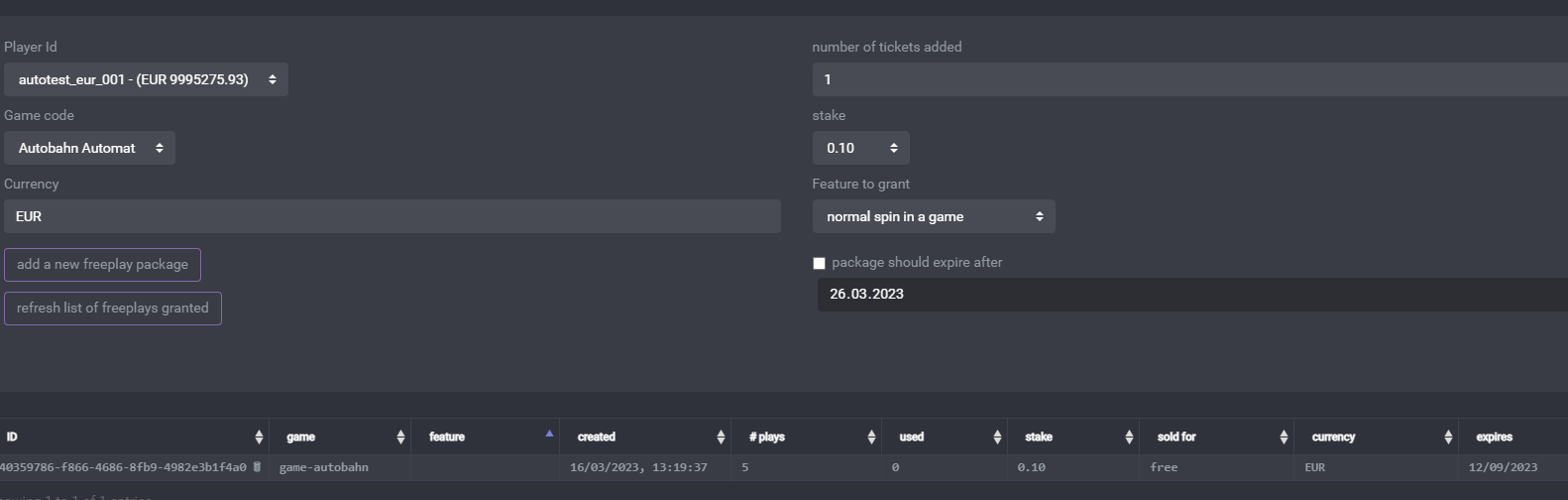
Select a player. Select the number of tickets (spins) to add. Select the currency and stake. Submit the package.
---
# Game configuration
Configure the game (backend) settings in the hizi.io backoffice.
Contact hinterzimmer for credentials. If you already completed the [Game Studio Form](https://docs.google.com/forms/d/e/1FAIpQLScMHC3JiqYf7rzFH7IaKqUHJ7yjMoX9uej1-Cj7Bn8Ai56W9A/viewform?usp=header), hinterzimmer may have already given you credentials.
Ask hinterzimmer for full details about adding game definitions.
## V2 Endpoints to use
hinterzimmer gives you the API base URL for your environment. The path is `/gameapi/v2`. Use this URL for requests to the hizi.io Remote Gaming Server (RGS).
| Setting | Value |
| --- | --- |
| `V2_API_QUEUE` | API base URL, for example `https://api.sample.hizi.io/gameapi/v2` |
| `backendQueue` | Base URL of your game engine, for example `https://game-engine.example.com` |
The call examples name the API base URL `V2_API_ENDPOINT`.
Set `backendQueue` to the URL that receives calls from the RGS. See [Calls to implement](./calls-to-implement).
---
---
# Game Launch
When you create a game definition in the back office, you must define the location of a frontend index document.
When a game launch request occurs, the system redirects the player's web browser to the given URL. The system also passes a temporary (short-life) token as a parameter. It also passes a URL together with the token. The game uses this URL to connect to the back office. The game uses the URL to check that the token is correct.
**A typical URL looks like this**
```
https://test.gamestudio/index.html?token=3869af18-7e8b-415f-b9d7-dd8f2fb61162&login=http%3A%2F%2Fgamestudio%3A4577%2Fgameapi%2Fv2%2Fconnect
```
| | |
| --- | --- |
| Parameter (GET) | |
| token | Use this short-life token in the login call. |
| login | Use this URL to connect to the hizi.io RGS. The RGS returns a long-life token in response. |
The frontend now calls the URL passed in the login parameter. It passes the short-life token as a parameter of this GET request.
This call returns basic game information and token data. The token data contains a new token ID. This ID is now a long-life token. Use this long-life token for all further calls. The response also includes endpoints for calls to the game engine. The call returns all data as a JSON object.
The short-life token works only once. If the call fails, the operator must request a new game launch URL.
The login call returns this data. The game frontend must use the fields in bold.
| | |
| --- | --- |
| **token** | **Long-life token ID. Use this token for every subsequent call to backendUrl or refreshUrl.** |
| **backendUrl** | **Location of the game engine endpoint** |
| webSocketUrl | Optional URL for a websocket connection. Use this connection as an alternative to POST requests to backendUrl. For more information, request sample code from hizi.io customer support. |
| logoutUrl | Optional URL to log out of the game. Calling this URL invalidates the long-life token. The operator must then send a new game launch request. |
| refreshUrl | Optional URL to reconnect to a session. This call is equivalent to the login URL passed in the launch command. It needs a long-life token instead of a short-life token. |
| | |
| **balance** | **Contains information about the player's balance** |
| **gameSettings** | **The game uses these gameSettings.** |
| operatorProtocol | Defines the operator protocol in use. This is an informational parameter. It lets the game support operator-specific requirements. For more information, request sample code from hizi.io customer support. |
| **tokenData** | **Contents of the long-life token. This includes playerid, operatorid, gameid, gamemode (REAL or DEMO), and currency information.** |
NOTE: This call sends information about a potential open game round in tokenData. This information allows the game to resume.
---
---
# Game Studio API Reference
This page documents every call, callback, and data structure of the Game Studio
API (RGS / Game Studio API V2). VitePress renders it from the
[OpenAPI 3.0 specification](/game-studio-api/openapi.yaml). Each operation has
its own page, with its parameters, request and response schemas, examples, and
code samples.
The prose documentation under [Game Studio API](/game-studio-api/) is the
normative source. If the two disagree, the notes in the spec and the prose
take priority.
## Operations
**{{ group.tag }}**
- {{ operation.path }}
---
# addSpinCounterGameState
`POST /addSpinCounterGameState`, tag `round-lifecycle`.
Award or consume a spin counter (e.g. free spins) inside a round
Parameters, request and response schemas and examples render from the OpenAPI specification at https://docs.hizi.io/game-studio-api/reference/addSpinCounterGameState.html. The whole spec is at https://docs.hizi.io/game-studio-api/openapi.yaml.
---
# addWin
`POST /addWin`, tag `round-lifecycle`.
Add an uncollected (open) win to a gameround
Parameters, request and response schemas and examples render from the OpenAPI specification at https://docs.hizi.io/game-studio-api/reference/addWin.html. The whole spec is at https://docs.hizi.io/game-studio-api/openapi.yaml.
---
# collectWin
`POST /collectWin`, tag `round-lifecycle`.
Collect part or all of the open winnings
Parameters, request and response schemas and examples render from the OpenAPI specification at https://docs.hizi.io/game-studio-api/reference/collectWin.html. The whole spec is at https://docs.hizi.io/game-studio-api/openapi.yaml.
---
# connect
`GET /connect`, tag `freeplays`.
Establish the game session and exchange the short-life token for a long-life token
Parameters, request and response schemas and examples render from the OpenAPI specification at https://docs.hizi.io/game-studio-api/reference/connect.html. The whole spec is at https://docs.hizi.io/game-studio-api/openapi.yaml.
---
# disconnect
`GET /disconnect`, tag `game-launch`.
Signal that the player closed or left the game
Parameters, request and response schemas and examples render from the OpenAPI specification at https://docs.hizi.io/game-studio-api/reference/disconnect.html. The whole spec is at https://docs.hizi.io/game-studio-api/openapi.yaml.
---
# doAutoClose
`POST /doAutoClose`, tag `calls-to-implement`.
Implemented by you: auto-close a gameround left open
Parameters, request and response schemas and examples render from the OpenAPI specification at https://docs.hizi.io/game-studio-api/reference/doAutoClose.html. The whole spec is at https://docs.hizi.io/game-studio-api/openapi.yaml.
---
# doGetGameHistory
`POST /doGetGameHistory`, tag `calls-to-implement`.
Implemented by you: return in-game history of game events
Parameters, request and response schemas and examples render from the OpenAPI specification at https://docs.hizi.io/game-studio-api/reference/doGetGameHistory.html. The whole spec is at https://docs.hizi.io/game-studio-api/openapi.yaml.
---
# endGameRound
`POST /endGameRound`, tag `round-lifecycle`.
Close a gameround and collect any open winnings
Parameters, request and response schemas and examples render from the OpenAPI specification at https://docs.hizi.io/game-studio-api/reference/endGameRound.html. The whole spec is at https://docs.hizi.io/game-studio-api/openapi.yaml.
---
# getAvailableSpinCounter
`POST /getAvailableSpinCounter`, tag `round-lifecycle`.
Get the current value of a spin counter
Parameters, request and response schemas and examples render from the OpenAPI specification at https://docs.hizi.io/game-studio-api/reference/getAvailableSpinCounter.html. The whole spec is at https://docs.hizi.io/game-studio-api/openapi.yaml.
---
# getBalance
`POST /getBalance`, tag `session-and-lookups`.
Get the player's balance
Parameters, request and response schemas and examples render from the OpenAPI specification at https://docs.hizi.io/game-studio-api/reference/getBalance.html. The whole spec is at https://docs.hizi.io/game-studio-api/openapi.yaml.
---
# getCertifiedFiles
`GET /certifiedfiles`, tag `calls-to-implement`.
Implemented by you: return the certified components and their hashes
Parameters, request and response schemas and examples render from the OpenAPI specification at https://docs.hizi.io/game-studio-api/reference/getCertifiedFiles.html. The whole spec is at https://docs.hizi.io/game-studio-api/openapi.yaml.
---
# getGameConfiguration
`GET /getGameConfiguration`, tag `calls-to-implement`.
Implemented by you: return the game configuration for a currency
Parameters, request and response schemas and examples render from the OpenAPI specification at https://docs.hizi.io/game-studio-api/reference/getGameConfiguration.html. The whole spec is at https://docs.hizi.io/game-studio-api/openapi.yaml.
---
# getGameResult
`POST /getGameResult`, tag `calls-to-implement`.
Implemented by you: render a gameround result as HTML
Parameters, request and response schemas and examples render from the OpenAPI specification at https://docs.hizi.io/game-studio-api/reference/getGameResult.html. The whole spec is at https://docs.hizi.io/game-studio-api/openapi.yaml.
---
# getGameRoundHistoryInfo
`POST /getGameRoundHistoryInfo`, tag `round-lifecycle`.
Get historical information about a closed gameround
Parameters, request and response schemas and examples render from the OpenAPI specification at https://docs.hizi.io/game-studio-api/reference/getGameRoundHistoryInfo.html. The whole spec is at https://docs.hizi.io/game-studio-api/openapi.yaml.
---
# getGameRoundInfo
`POST /getGameRoundInfo`, tag `round-lifecycle`.
Get information about an open gameround
Parameters, request and response schemas and examples render from the OpenAPI specification at https://docs.hizi.io/game-studio-api/reference/getGameRoundInfo.html. The whole spec is at https://docs.hizi.io/game-studio-api/openapi.yaml.
---
# getHealth
`GET /health`, tag `calls-to-implement`.
Implemented by you: liveness probe
Parameters, request and response schemas and examples render from the OpenAPI specification at https://docs.hizi.io/game-studio-api/reference/getHealth.html. The whole spec is at https://docs.hizi.io/game-studio-api/openapi.yaml.
---
# getLastGameRounds
`POST /getLastGameRounds`, tag `session-and-lookups`.
Get a list of recently closed gamerounds
Parameters, request and response schemas and examples render from the OpenAPI specification at https://docs.hizi.io/game-studio-api/reference/getLastGameRounds.html. The whole spec is at https://docs.hizi.io/game-studio-api/openapi.yaml.
---
# getOperatorSettings
`GET /getOperatorSettings`, tag `session-and-lookups`.
Get the operator-specific game settings
Parameters, request and response schemas and examples render from the OpenAPI specification at https://docs.hizi.io/game-studio-api/reference/getOperatorSettings.html. The whole spec is at https://docs.hizi.io/game-studio-api/openapi.yaml.
---
# getPlayerData
`POST /getPlayerData`, tag `session-and-lookups`.
Read the stored player data for a game
Parameters, request and response schemas and examples render from the OpenAPI specification at https://docs.hizi.io/game-studio-api/reference/getPlayerData.html. The whole spec is at https://docs.hizi.io/game-studio-api/openapi.yaml.
---
# getRandomResult
`POST /getRandomResult`, tag `certified-rng`.
Get random integers or doubles from the hizi.io certified RNG
Parameters, request and response schemas and examples render from the OpenAPI specification at https://docs.hizi.io/game-studio-api/reference/getRandomResult.html. The whole spec is at https://docs.hizi.io/game-studio-api/openapi.yaml.
---
# getStatus
`GET /status`, tag `session-and-lookups`.
Check API status
Parameters, request and response schemas and examples render from the OpenAPI specification at https://docs.hizi.io/game-studio-api/reference/getStatus.html. The whole spec is at https://docs.hizi.io/game-studio-api/openapi.yaml.
---
# getTokenData
`POST /getTokenData`, tag `session-and-lookups`.
Resolve a token into its token data
Parameters, request and response schemas and examples render from the OpenAPI specification at https://docs.hizi.io/game-studio-api/reference/getTokenData.html. The whole spec is at https://docs.hizi.io/game-studio-api/openapi.yaml.
---
# getTokenForGameRound
`POST /getTokenForGameRound`, tag `session-and-lookups`.
Get a fresh token for an open gameround (janitor / autoclose use)
Parameters, request and response schemas and examples render from the OpenAPI specification at https://docs.hizi.io/game-studio-api/reference/getTokenForGameRound.html. The whole spec is at https://docs.hizi.io/game-studio-api/openapi.yaml.
---
# getUncollectedAmount
`POST /getUncollectedAmount`, tag `round-lifecycle`.
Get the amount of uncollected (open) winnings
Parameters, request and response schemas and examples render from the OpenAPI specification at https://docs.hizi.io/game-studio-api/reference/getUncollectedAmount.html. The whole spec is at https://docs.hizi.io/game-studio-api/openapi.yaml.
---
# reconnect
`GET /reconnect`, tag `game-launch`.
Re-establish the session using the long-life token
Parameters, request and response schemas and examples render from the OpenAPI specification at https://docs.hizi.io/game-studio-api/reference/reconnect.html. The whole spec is at https://docs.hizi.io/game-studio-api/openapi.yaml.
---
# setPlayerData
`POST /setPlayerData`, tag `session-and-lookups`.
Store player data for a game
Parameters, request and response schemas and examples render from the OpenAPI specification at https://docs.hizi.io/game-studio-api/reference/setPlayerData.html. The whole spec is at https://docs.hizi.io/game-studio-api/openapi.yaml.
---
# startGameOrAddBet
`POST /startGameOrAddBet`, tag `round-lifecycle`.
Place a bet, starting the gameround or adding to the open one
Parameters, request and response schemas and examples render from the OpenAPI specification at https://docs.hizi.io/game-studio-api/reference/startGameOrAddBet.html. The whole spec is at https://docs.hizi.io/game-studio-api/openapi.yaml.
---
# startGameRound
`POST /startGameRound`, tag `freeplays`.
Start a gameround and debit the bet
Parameters, request and response schemas and examples render from the OpenAPI specification at https://docs.hizi.io/game-studio-api/reference/startGameRound.html. The whole spec is at https://docs.hizi.io/game-studio-api/openapi.yaml.
---
# testPing
`POST /testPing`, tag `session-and-lookups`.
Echo a test payload to verify communication and payload signature
Parameters, request and response schemas and examples render from the OpenAPI specification at https://docs.hizi.io/game-studio-api/reference/testPing.html. The whole spec is at https://docs.hizi.io/game-studio-api/openapi.yaml.
---
# voidGameRound
`POST /voidGameRound`, tag `round-lifecycle`.
Void the debit of an open gameround
Parameters, request and response schemas and examples render from the OpenAPI specification at https://docs.hizi.io/game-studio-api/reference/voidGameRound.html. The whole spec is at https://docs.hizi.io/game-studio-api/openapi.yaml.
---
# wagerWin
`POST /wagerWin`, tag `round-lifecycle`.
Wager part or all of the open winnings
Parameters, request and response schemas and examples render from the OpenAPI specification at https://docs.hizi.io/game-studio-api/reference/wagerWin.html. The whole spec is at https://docs.hizi.io/game-studio-api/openapi.yaml.
---
# Handling Lost Responses and Retry Scenarios
This appendix gives guidance for common edge cases. In these cases, a response to a transactional call (for example, addWin, doTransactions) is lost because of a network issue. This leaves your system in an uncertain, or "stuck", state. Always query the status first. Do not retry blindly. This keeps the call idempotent (repeating the call produces the same result) and avoids issues like double-crediting.
**Key Principles:**
- Do not retry 4xx errors. For example, errorCode 13 (GAMEROUNDNOTACTIVE) means the gameRound hash is known, but the round is already closed. These errors show that the operation cannot proceed.
- Use a query call to confirm the state before you act. Use [`/getGameRoundInfo`](/game-studio-api/calls-provided#post-v2-api-endpoint-getgameroundinfo-optional) for an **open** round. Use [`/getGameRoundHistoryInfo`](/game-studio-api/calls-provided#post-v2-api-endpoint-getgameroundhistoryinfo-optional) for a **closed** round. `/getGameRoundInfo` fails once the round is closed. `/getGameRoundHistoryInfo` fails while the round is still open. If you do not know the round's state, try `/getGameRoundInfo` first. If it fails with errorCode 13, use `/getGameRoundHistoryInfo` instead.
**Step-by-Step Handling for Lost Responses:**
1. If a response is lost (for example, timeout or network error), do not immediately retry the original call.
2. Query the round status:
- Use POST /getGameRoundInfo with the gameRound ID. If that fails with errorCode 13 (GAMEROUNDNOTACTIVE), the round has closed. Use POST /getGameRoundHistoryInfo instead.
3. Based on the query:
- If status="closed" and the transactions match what you expect (for example, win added and collected), treat this as success. Take no further action.
- If status="open" but transactions show partial processing (for example, debit occurred but win not credited), close the round with endGameRound.
4. Retries: Retry the original call only on 5xx errors.
**Example Scenario: Lost Response to addWin (with collect=true)**
- Your system sends addWin but receives no response.
- Query with getGameRoundInfo (fall back to getGameRoundHistoryInfo if the round has since closed).
- If the response shows status="closed" and totalWinAmount matches, log as success.
- If status="open", call endGameRound to close it cleanly.
- If the query fails with errorCode 14 (GAMEROUNDNOTFOUND), the round was never started. Start a new one if needed.
If issues persist, contact support with full logs, including headers (for example, x-h-error-id).
## Which calls are idempotent, and when
"Idempotent" means that sending the exact same call again produces the same result. The call does not apply a second time. This guarantee is **not the same for every call**. It only applies while the gameRound is still open:
- **`voidGameRound`** is safe to retry. A repeat of an already-successful `voidGameRound` does not cause an error. It does not void the round a second time.
- **`addWin`** does **not** currently deduplicate a retry. Suppose your first call succeeded, but you never saw the response, and the round is still open. In this case, resending the same `addWin` call **adds the win a second time**. Do not retry `addWin` blindly. Always query the round state first (see above). Resend the call only if the query shows the win is missing.
- **`startGameRound`**, **`wagerWin`**, **`collectWin`**, and **`endGameRound`** likewise have no automatic deduplication. Follow the query-first flow above before resending any of them.
Once a gameRound is **closed**, none of these calls can be safely retried, not even the normally-safe ones. The system no longer tracks the round as open. Any call that references it fails with errorCode 13 (GAMEROUNDNOTACTIVE). At that point, use `/getGameRoundHistoryInfo` to confirm the final state. Do not retry the call.
---
# Appendix - Signing a POST request sent to the RGS
```
import { Headers } from 'node-fetch';
import fetch from 'node-fetch';
import { v4 as uuidV4 } from 'uuid';
import * as crypto from 'crypto';
import { V2_GameAPIReply } from '@hoelle/apiv2-definitions/lib/v2_interfaces';
enum HTTP_CUSTOMHEADERS {
XHEADERID = 'X-Response-Id',
XAUTHID = 'X-H-AUTH-ID',
XAUTHSIG = 'X-H-AUTH-SIG',
XTIMESTAMP = 'X-H-TIMESTAMP',
XFORWARDEDHEADERID = 'X-Forwarded-Response-Id',
}
type RecordData = Record;
type CustomHeaders = Record;
interface GameResponseData {
status: number;
reply: V2_GameAPIReply;
headers: CustomHeaders;
}
// eslint-disable-next-line @typescript-eslint/no-explicit-any
export async function sendSignedV2Request(
gameProviderId: string,
gameProviderSecret: string,
url: string,
requestId?: string,
body?: RecordData,
headers?: CustomHeaders,
): Promise {
const customHeaders: CustomHeaders = headers ?? {} as CustomHeaders;
setHeaderField(customHeaders, HTTP_CUSTOMHEADERS.XHEADERID, uuidV4());
setHeaderField(customHeaders, HTTP_CUSTOMHEADERS.XAUTHID, gameProviderId);
setHeaderField(customHeaders, HTTP_CUSTOMHEADERS.XTIMESTAMP, (new Date()).toISOString());
if (requestId) {
setHeaderField(customHeaders, HTTP_CUSTOMHEADERS.XFORWARDEDHEADERID, requestId);
}
setHeaderField(customHeaders, HTTP_CUSTOMHEADERS.XAUTHSIG, calcSignature(
gameProviderSecret,
[
JSON.stringify(body),
getHeaderField(customHeaders, HTTP_CUSTOMHEADERS.XTIMESTAMP),
],
'#',
));
try {
if (
url.toLowerCase().startsWith('http://')||
url.toLowerCase().startsWith('https://')
) {
setHeaderField(customHeaders, 'Content-Type', 'application/json');
setHeaderField(customHeaders, 'accept', 'application/json');
const rawFetchResponse = await fetch(
url,
{
method: 'POST',
body: JSON.stringify(body),
headers: customHeaders as Record,
},
);
const apiResponse = await rawFetchResponse.json();
const responseHeaders: CustomHeaders = readResponseHeaders(rawFetchResponse.headers as unknown as Headers) as CustomHeaders;
const gameResponse: Record = {
headers: responseHeaders,
status: (rawFetchResponse && rawFetchResponse.status) ? rawFetchResponse.status : 500,
reply: apiResponse,
};
console.log('sent signed request via http', JSON.stringify({
url: url,
body: body,
headers: customHeaders,
response: gameResponse,
requestId: requestId,
}, null, 2));
return gameResponse as unknown as GameResponseData;
} else {
console.error('invalid url provided for sending a signed V2 request', {
url,
});
throw new Error('invalid url provided for sending a signed V2 request');
}
} catch (error) {
console.error('error in processing a signed V2 request', {
error,
});
throw(error);
}
}
function calcSignature(secretToUse: string, fieldsToSign: Array, separatorToUse = '#'): string {
// check if we got an array to sign
const hmacGenerated: crypto.Hmac = crypto.createHmac('sha256', secretToUse);
const fieldsToSignArray: Array =
(fieldsToSign instanceof Array) ?
fieldsToSign :
Object.values(fieldsToSign);
// convert any date objects passed to an ISO String
const fieldsToSignArrayConverted: Array = fieldsToSignArray.map(function(e: Date | string | unknown) {
if ((e instanceof Date)&&(typeof e.toISOString === 'function')) return e.toISOString();
return e;
});
hmacGenerated.update(fieldsToSignArrayConverted.join(separatorToUse));
return hmacGenerated.digest('base64');
}
function setHeaderField(headers: CustomHeaders, key: string, value: string | Date): void {
headers[key] = value;
}
function getHeaderField(headers: CustomHeaders, key: string): string | Date {
return headers[key];
}
function readResponseHeaders(httpHeaders: Headers): CustomHeaders {
const headersToReturn: CustomHeaders = {};
const allowedHeaders: string[] = Object.values(HTTP_CUSTOMHEADERS);
for (const allowedHeader of allowedHeaders) {
if (httpHeaders.has(allowedHeader)) {
setHeaderField(headersToReturn, allowedHeader, httpHeaders.get(allowedHeader) as string);
}
}
return headersToReturn;
}
```
---
# Hizi App
The hizi app is where you build and import games, configure studios and partners, and publish your setup live to the operator sites.
## Next Steps
- [Getting Started](/hizi-app/getting-started): Pick your path. Build games with the hizi engine, import your own games, or distribute games to operators.
- [What's What in the hizi app](/hizi-app/whats-what): A summary of every section in the app, from Games and Partners to Logs and Audits.
- [Glossary](/hizi-app/glossary): Definitions of the terms you find in the hizi app. Each entry maps the term to its name in the previous backoffice.
- [Currencies](/hizi-app/currencies): How default currencies, multipliers, and custom currencies work, including cryptocurrencies.
- [Websockets](/hizi-app/websockets): How to turn the live websocket connection on or off for a game, and how to set its password.
---
# Currencies
**Where can I see the list of currencies?**
Log into the hizi app to see the default list of supported currencies, in the side panel. We use the ISO-4217 code for currencies. The side panel also shows the default multiplier for these currencies. Use this list to check if a currency is supported by default. You can also share this currency list with partners.
**What are multipliers?**
The multiplier is a user-friendly value that the player sees. EUR is our base currency for calculation. For example, if 1 EUR equals 4.7 PLN, the system uses a multiplier of "5" for PLN. Multipliers do not affect actual currency exchange rates. They only improve the player experience.
**Can I change the multiplier from the default one?**
Yes. Change it under the custom currency multipliers section. Multipliers cannot be less than "1".
**The currency is not on the list. Can I add custom currencies?**
Yes. Add custom currencies per Identity, in the "Settings" section. If an Identity tries to load a game with a currency that you have not added, the system returns an error message.
**Will I see any custom currencies I add in the main currency list?**
No. You can view them in the Identities where you created them.
**If a Partner asks for "Bitcoin" or "Ethereum" support, what do we tell them?**
Tell the Partner the exact code used for this cryptocurrency, along with any logic for that code, including the multipliers. See below for a full explanation.
**How does it work with cryptocurrencies?**
Cryptocurrencies use the same mechanism as fiat currencies. Our existing crypto codes, like METH ("milli-ETH", one thousandth of an ether) and UBTC ("micro-BTC", one millionth of a bitcoin), are virtual currencies. Each is a small, whole-number-friendly unit of a real cryptocurrency. Each has its own multiplier, just like a fiat currency.
All wallet amounts, in any currency, are integers equal to 1/100 of a currency unit (like cents). This rule does not change for a cryptocurrency.
The constraint that decides your currency code: the multiplier must be a whole number, 1 or higher. The multiplier tells the system how many units of the new currency equal about 1 EUR. The system only accepts a whole number of 1 or more for this field. It cannot accept a fraction.
**How to add a new cryptocurrency?**
Take the example of SOL. One whole SOL is worth far more than 1 EUR. If you try to add the code `SOL` directly, the correct multiplier is a fraction, well under 1. The form rejects a fractional multiplier.
The solution is the same one we already use for BTC and ETH. Define the new currency as a small fraction of one coin. Make sure one unit of the new currency is worth close to, or less than, 1 EUR. For SOL, one thousandth of a coin is a reasonable fraction to start from. Call it MSOL.
Step 1: Open the Identity Settings template
1. Go to app.hizi.io.
2. Open App > Partners > Identity Settings - Templates.
3. Open the settings template used by the operator's Identity (an Identity is an operator brand). Or create a new template if the operator does not have one yet.
Step 2: Add the custom currency
1. Scroll to the "Custom currencies" section of the template. Do not confuse this with the "Custom currencies multipliers" section above it. That section only overrides the multiplier for an *existing* known currency code. "Custom currencies" defines a brand-new code.
2. Click "Add" to create a new row.
3. Set Currency code to `MSOL`. A currency code must be 3 or 4 characters.
4. Set Multiplier to a whole number, 1 or higher (see the next step for how to pick it).
5. Save the template.
Step 3: Choose the multiplier value
Estimate how many units of the new currency equal about 1 EUR, at current market prices. Round the result to a whole number.
Worked example: say 1 SOL is worth about 150 EUR today. Then 1 MSOL (0.001 SOL) is worth about 0.15 EUR. It takes roughly 7 MSOL to equal 1 EUR. A multiplier of 7 is a reasonable starting point. Treat this as an example calculation, not a live rate. Check the coin's actual price before you set the real value.
A crypto coin's price can move a lot in a short time. This multiplier is a fixed number. It does not update automatically when the coin's price changes. Revisit it manually if the coin's value drifts far from what the multiplier assumes.
Step 4: Confirm the operator sends the right currency code
The operator's game launch call must send `currency: "MSOL"` for the player. Check two more settings in the same template, since either one can block the new currency:
- Currencies restricted: if this list is set and does not include MSOL, the system blocks launches with MSOL.
- Fixed currency: if this is set, it overrides whatever currency the operator sends.
The operator's own wallet must also track player balances in MSOL. It must use the same 1/100-unit integer convention when it answers our debit and credit calls.
**Important!** Cryptocurrencies have little to no standardisation. Be careful with the values and codes you assign. You are responsible for confirming that they are correct. Confirm that the values match the desired multipliers.
---
# Getting started in the hizi app
Welcome to hizi!
::: tip
The system saves everything you configure in hizi as a draft first. **Publish** (see below) pushes your changes to the relevant sites.
:::
Below is a summary of where to start, depending on your aims.
## 1. I want to build games with hizi
Build your game with the in-house hizi engine. Then bring it into the app under **Hizi Engine Config**. Launch the engine's own creator tool from there. Save your work as a config. The config has its own lifecycle: in progress, publishing, published. It also has its own versions. When you have a config you are happy with, attach it to a **Game**. Promote that version to staging or production. This is the same promotion mechanism as for every other game type. See [the hizi engine documentation](/engine/) for details.
## 2. I want to import my own games
**RGS-to-RGS**: your game runs entirely on your own infrastructure. hizi's RGS only points at your wallet API over HTTP. You bring your own certified RNG (random number generator). This is the classic integration model. See the [Game Studio API](/game-studio-api/basics#integration-models-and-what-each-needs) docs for the wallet contract.
## 3. Now I want to distribute my games
You can build games in any of the above ways. To distribute them to operators, use the Partner → Identity chain:
1. Create a **Partner** for the operator or business relationship. Assign an Account for billing, a Legal Entity for invoicing, and any Geo Rules.
2. Under that Partner, create one **Identity** for each operator brand or casino site. The Identity connects to a specific site. It carries its own integration settings and credentials. It can also carry Settings and Game Settings templates for consistency across many Identities.
3. Set each Game's permissions to control which Partners or Identities can access it.
4. Select **Publish**. This step pushes your published games, current versions, and permissions live to the operator sites. Everything before this step stays a draft.
Use **Game Launcher** and **Wallet test runner** along the way. Verify that a game launches correctly. Verify that your wallet integration behaves correctly before you go live.
::: warning Note
This is a high-level summary of the flow. It assumes the integration, contract, and any QA work with the relevant Partner or Identity are complete and signed off. Some operators may also have additional steps.
:::
---
# Glossary
Below is a glossary of common terms you will find in the hizi-app. It also explains how we define each term.
- **Account (Commercial Account)**: groups Partners or Identities that are commercially connected, for CRM purposes. This was the field "Account" in the previous backoffice. You found it in the "operator" record, now known as Identity.
- **Audit**: the change-history trail of who created, updated, or deleted what, and when. This did not exist as a viewable section in the previous backoffice.
- **Billing Group**: bundles several Identities under one Legal Entity for combined invoicing (still a work-in-progress feature). This was known as "Group" in the previous hizi backoffice.
- **Freeplay**: a promotional free spin grant to a player for a specific game.
- **Game**: a catalogue entry with a code, an Origin, and a status. Only Published games go live.
- **Game Launcher**: a tool to test-launch a game (with a real or test player, a demo, or a shareable demo link).
- **Gameround**: one played round of a game. You can search for it by hash or by filters, with a full detail and forensic view. This is more powerful than the "Game round lookup" from the previous backoffice.
- **Game Studio** (also known as Brand): the publisher entity that owns Games and sits between the tenant and its Games. This was known as "Game provider" in the previous hizi backoffice.
- **Geo Rule**: a named allow or deny list of countries and IPs. You can attach it to a Partner, Game Studio, Identity, or Game.
- **Hizi Engine Config**: a saved build or config from the hizi engine's own creator tool, attached to a Game.
- **Identity**: a specific operator brand or casino site under a Partner. Games are access-controlled per Identity. This was known as an "Operator" in the previous hizi backoffice. Why is it now called an Identity? One "operator" might have several brands linked on their side. Each brand has its own Identity, for more clarity.
- **Identity Settings / Identity Game Settings templates**: reusable, live-linked presets applied to one or more Identities. In the previous backoffice, you found this in the "Operator" details, in the field known as "custom settings". That field used JSON only. Now you configure the settings with toggles.
- **Legal Entity**: the company record (name, address, VAT) required for invoicing.
- **Logs**: game transaction and communication details. You use them for debugging.
- **Partner**: the top-level business relationship with a casino operator group. It is the parent of Identities and Legal Entities. The old hizi backoffice did not clearly define this concept. The Partner name usually appeared under "Operator Group", so you can consider it similar to that.
- **Player**: a per-tenant wallet record (balance, currency) linked to gamerounds and transactions. This is the same functionality as the "Player" section in the previous backoffice. You use it primarily for testing.
- **Publish**: the "go live" action that pushes your published games, versions, and permissions out to the operator sites. Everything before this step is a draft.
- **Site**: a deployed regional server (production or staging) that an Identity runs on. This did not exist in the previous hizi backoffice. Each site instance had a separate log-in.
- **Stats**: the historical KPI dashboard (revenue, rounds, players) pulled live per site. This is the "Statistics" section from the previous backoffice.
- **Transaction**: a single wallet debit or credit entry in the ledger.
- **Users**: Hizi app users, not end users. Configure accounts for hizi app users here, including roles and permissions. This was labelled as "Logins" in the old backoffice.
- **Wallet test runner**: a simulator to run wallet-API test cases against an Identity before you go live. The previous backoffice called this the "Operator integration test suit".
---
# Websockets
Some games need a live, two-way connection between the game and the site. A multiplayer game, a jackpot ticker, and a real-time promotion are examples. The site serves this connection with the websocket router. The websocket router is a service that runs on every hizi site.
You turn this connection on or off for each game separately. The setting lives in the hizi app, on the game itself. There is no global switch, and there is no switch per Identity.
## Turn websockets on or off
1. Go to app.hizi.io.
2. Open App > Games.
3. Open the game you want to change. To set the value on a new game, click "Add" instead.
4. Open the "Game settings" tab. The tab is next to "Details".
5. Set the "Enable websockets" switch. The switch sits below "Game engine base URL".
6. Save the game.
7. Open App > Publish and publish. The switch only reaches the operator sites when you publish.
The switch is off by default. A new game has no websocket connection until you turn the switch on.
## What each position does
**On.** The site accepts a websocket connection for this game. It accepts game messages on that connection. It accepts a broadcast from the game.
**Off.** The site refuses all three. It answers with an "invalid parameter" error and logs that the game is not enabled for websockets. The player's game still runs. Only the live connection is gone.
The setting is per game and per tenant. It applies to every Identity that has access to the game. To keep websockets off for one operator only, remove the game's permission for that Identity instead.
## Websocket password
The "Websocket password" field sits next to the switch. It holds the shared secret that authenticates the game against the site's websocket router.
Set a password. If you leave the field empty, the site accepts a broadcast for this game without a check on the sender.
::: warning Enter the SHA-1 digest, not the plain secret
The site compares the value in this field with the SHA-1 hex digest of the secret that the game sends. It does not hash the field for you. Enter the SHA-1 hex digest of the shared secret. The game keeps the plain secret and sends it in its authentication header.
Compute the digest like this:
```bash
printf '%s' 'your-shared-secret' | sha1sum
```
:::
A change to the password also needs a publish before the site uses it.
## Check the setting
The websocket router logs every refusal. Open App > Logs. Search for `websocket-router`, and select the site the Identity runs on. A message that reads "not enabled for websockets" means the switch is still off on that site. The most common cause is a change that nobody published yet.
---
# What's What in the hizi app
The list below summarises the categories. In each section, you can find more information in the app itself. This overview is a summary only.
## 1. Games
This is the game catalog entry itself. It has a code, an origin (hizi-engine, or your own RGS-to-RGS), and a status (draft or published). Only published games sync live. Permissions control which Partners or Identities may access it. Each game belongs to one Game Studio. Use this section to add and configure games, and to promote a build to production. The "Game settings" tab of a game also holds the switch for websockets. See [Websockets](/hizi-app/websockets).
## 2. Game studios
This is the publisher entity (you can think of it as a brand) that owns games. It holds its own legal-entity info, geo rule, and per-game access permissions. It sits between the tenant and its Games. Set this up before you add games under it.
## 3. Hizi Engine Config
This is a stored hizi-engine build config. It holds the file location, publish lifecycle (in progress → publishing → published), and versioning. It is only relevant for games built on the in-house hizi engine, not external RGS. Studio staff use it to build and edit hizi-engine games. Launch the engine's own creator tool from here. Save the result as a config. The config then attaches to a Game.
## 4. Commercial Accounts
This is a billing or commercial-contact record. It groups together Partners or Identities that are commercially connected but otherwise separate. The in-app help text states that this feature is primarily for CRM teams. It is not yet fully implemented. Later releases will add more functionality for this module.
## 5. Partners
This is the top-level business relationship with a casino operator group. It holds a name and tier. It links to one Account and a Geo Rule. It is the parent of Identities and Legal Entities. Hierarchy: Partner → Identities → Games. Staff use it to onboard and manage an operator relationship.
## 6. Identities
This is a specific operator brand or casino site under a Partner. It has a code, tier, mode (production or staging), the site it runs on, integration protocol, and credentials. Games are access-controlled per Identity. An Identity can carry a Settings template, a Game Settings template, a Geo Rule, and a Billing Group. Use this section to configure each operator brand individually.
## 7. Identity Settings - Templates
This is a reusable preset of Identity-level settings. Create a template once. Apply it to any number of Identities. The template is live-linked, not copy-on-apply. When you edit the template, the system updates every Identity that uses it. Studio staff use this to keep many Identities configured consistently.
## 8. Identity Game Settings - Templates
This follows the same idea as Identity Settings, but for per-game configuration on an Identity. It has separate settings blocks for real play, demo play, and general game behaviour. It is also live-linked. When you edit the template, the system updates every Identity and game that uses it. Studio staff use this for consistent game-level configuration across Identities.
## 9. Integrations
This is a browsable catalogue of supported wallet and RGS integration protocols. It covers the native hizi protocol and third-party operator protocols, and their capability flags. It also has a per-Identity view of that Identity's live integration details (callback URLs, protocol settings), with a PDF export. Tenant technical and integration staff use it as a reference and to debug a specific brand's connection. hizi staff manage the underlying protocol definitions internally.
## 10. Legal Entities
This is the company record (name, address, VAT) required for invoicing. You can optionally link it to a Partner. Tenant finance and back-office staff use it.
## 11. Billing Groups
This section is a work in progress.
## 12. Game Launcher
This is a test-launch tool to verify a game's integration and try the gameplay. Launch with a real or test player. Launch a no-player demo. Or generate a shareable static demo link, for example to hand to an operator. Studio QA and integration staff use it.
## 13. Wallet test runner
This is a wallet-API simulator. Run a fixed suite of test cases (normal operations, tickets, failures, voids, protocol validation) against a chosen Identity with a fake player. View pass or fail results with full request and response logs, including ready-to-paste curl commands. Export a PDF report. Studio integration engineers use it to validate their wallet endpoint before going live, without real players or money.
## 14. Players
This is the per-tenant player wallet record. It has a name, code, balance, currency, and any discount or promo info. This is the wallet-side player account, linked to rounds and transactions, not the operator's own player identity. It sits alongside the wallet-testing tools. It is mainly a studio ops toolkit for managing test and demo player balances.
## 15. Freeplays
This is a promotional free spin grant tool. Pick a player and a game. Set the stake size the free spins use. Set how many to grant, plus an expiry. The tool tracks how many free spins have been used or won. Studio and ops staff use it to award free spins to a specific player on a specific game.
## 16. Transactions
This is the read-only wallet debit and credit ledger. It records every transaction against a player's balance (bet, win, void, and so on), with the balance before and after, the linked round, and freeplay ticket usage. Ops, finance, and support staff use it to reconcile what happened on a round. You cannot create or edit anything here.
## 17. Logs
This section searches the site logs from inside the app. Type a search term, pick one or more Sites (a Site is a regional server deployment), pick a time range, and read the matching messages in the table. The app searches every selected site and merges the results. It only returns messages that mention your tenant. Each Identity runs on a specific site. Technical and support staff use this section to trace an issue back to the right site's logs.
## 18. Audits
This is a genuine change-history trail. The system records every create, update, or delete action on tenant-managed entities (games, identities, partners, brands, settings templates, accounts, users, and so on). Each record shows who made the change and the values before and after. Anyone who needs to answer "who changed this and when" can use it: compliance staff, support staff investigating a dispute, or a studio admin reviewing team activity.
## 19. Stats
This is a historical KPI dashboard (revenue, rounds, players, and so on). You can filter it by date range, currency, operator (Identity), and game. The dashboard pulls data live from each RGS site your identities run on. It is not a fixed local report. Studio staff and management use it to track game and business performance.
## 20. Search gamerounds
This is the search form to look up gamerounds. Search by exact hash, or by advanced filters (player, game, operator identity, date range, status). It submits an asynchronous search job. Ops and support staff use it to start an investigation into a player's or game's round history.
## 21. Gameround search result
This is the results and per-round detail view for a search submitted above. It shows the status of the search, and a full forensic breakdown of one round (bet and win amounts, free spin usage, raw transaction data). Ops and support staff use it to reconstruct exactly what happened in a specific round, for example for a player dispute.
## 22. Publish
This is not a stored record. It is the "go live" action. The system saves everything you configure on Games, Identities, and Settings as a draft first. Publish pushes your published games (with their current version and per-Identity permissions) out to the operator sites. Use it as the final step after you set up everything else.
## 23. Sites
This is a deployed regional server (production or staging) with its own region, credentials, and URLs. It is the infrastructure an Identity runs on. Provisioning new sites is a hizi staff task. You only see a read-only list of the sites your tenant is entitled to use. You mainly use this list to pick a site when you publish.
## 24. Geo Rules
This is a named allow or deny list of countries and IP addresses. You can attach it to a Partner, Game Studio, Identity, or Game. One rule can cover several of them at once. It explicitly overrides any broader restriction set at the platform's Jurisdictions level. Studio compliance and ops staff use it to configure territory restrictions per operator relationship.
---
# Operator API
The Operator API is the server-to-server integration for casino operators that integrate with hizi.io. It covers game launch, player management and transactions, in real-money or demo mode.
::: warning Amounts are always 1/100 of base currency
Every monetary value in this API is an integer. This includes bets, wins, balances, stakes, and discounts. The API always expresses the value as **1/100 of the base currency** (a fixed ×100 factor), never as a decimal. For example, the API sends €10.00 as `1000`, and €1.50 as `150`.
This is a **fixed 1/100 convention, not the currency's ISO minor unit**. Some currencies have no minor unit (for example JPY, CLP). A few currencies use 1/1000. hizi always expects 1/100 of the base currency. Never send or expect fractions or decimals. See the [`amount` type](/operator-api/data-types) for the full definition.
:::
## Scope
The Operator API provides a standardized, TypeScript-based interface. Game clients use this interface to integrate with casino operators and aggregators. The API is reliable and easy to use. It manages game states, player interactions, and communications with the backend. It supports real-money mode and demo mode.
Key functions include server-to-server calls. The API uses these calls to launch games, query balances, and process transactions (for example debits, credits, and voids). The API also handles events, such as spins, errors, and reality checks. It supports an event-based protocol for two-way communication. This protocol uses post messages between game iframes and operator lobbies. The protocol keeps operations secure and idempotent. It includes robust error handling and authentication.
Built-in compatibility with major aggregators supports deployments across multiple operators. The API also offers methods for game control. It offers optional backoffice calls for configuration and statistics.
See [Response Codes & Error Codes](/response-codes) for the full reference. It lists the HTTP return codes, response headers, and error codes for these calls.
## The Parts of the API
The API consists of several parts.
**Server to server calls**
The operator server sends calls to the hizi.io server.
The hizi.io server sends calls to the operator server.
All calls use HTTPS (**hizi does not support HTTP**). Authenticate each call with one of the supported methods. For GET calls, always use URL-encoded parameters. For POST calls, set the Content-Type header field to application/json. Always use UTF8 as the character set. Note that CORS policies may apply. The response content type is application/json.
This section outlines the basic flow. Additional calls may be possible. See the detailed documentation in this document.
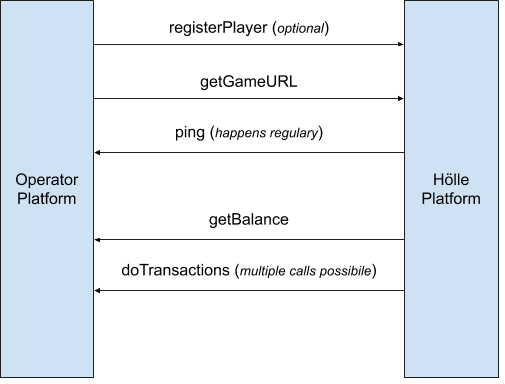
**Post Messages between game iFrame and operator lobby (embedding site)**
The game client sends Post Messages to the operator lobby.
The operator lobby sends Post Messages to the game client.
**Game client implementation**
The game client sends calls to the hizi.io game server. Game developers only need this section.
**Backoffice calls**
Use these calls to configure settings and game parameters. You can also access this functionality through the hizi.io Operator back office. These calls are optional. You can make all settings in the back office instead.
## What's In This Section
- **OpenAPI Reference**: Every call and callback, with parameters, schemas, examples, and copy-paste code samples ([Browse the API Reference](/operator-api/reference/)).
- **Game Launch & Sessions**: The calls that launch a game in real-money mode or demo mode, and that manage the game state ([Operator → hizi.io](/operator-api/operator-to-hizi)).
- **Players & Transactions**: The calls that query a balance and that process debits, credits, and voids ([hizi.io → Operator](/operator-api/hizi-to-operator)).
- **Event Protocol**: The two-way post messages between the game iframe and the operator lobby, for spins, errors, and reality checks ([Appendix A: Events](/operator-api/appendix-a-events)).
- **Backoffice Calls**: The optional calls that return configurations and statistics for your integration ([Appendix B: Backoffice Calls](/operator-api/appendix-b-backoffice)).
- **Game Settings Parameters**: The full reference of the settings you can pass at launch, such as autoplay, orientation, and display of the RTP ([Appendix C: Game Settings](/operator-api/appendix-c-game-settings)).
- **Freeplays & Discounts**: How to grant freeplays and how to apply discounts for player promotions and campaigns ([Appendix D: Freeplays](/operator-api/appendix-d-free-plays)).
- **Discounts**: How to return discount information with a balance response, so that hizi.io applies your own promotions to later transactions ([Appendix E: Discounts](/operator-api/appendix-e-discounts)).
- **Health & Certified Hash**: The health-check and certified-hash calls for monitoring and for verification by a regulator ([Appendix F: Health & Certified Hash](/operator-api/appendix-f-health)).
- **Response & Error Codes**: The HTTP return codes, the response headers, and the error codes in the `X-H-ERROR-ID` field ([Response Codes & Error Codes](/response-codes)).
## OpenAPI Specification
This site provides a machine-readable [OpenAPI 3.0 specification](/operator-api/openapi.yaml). The specification covers every documented call, callback, and data type on this page. Point your tooling (codegen, request collections, or LLM/agent integrations) at `https://docs.hizi.io/operator-api/openapi.yaml`. This site generates the spec from this prose documentation. The spec notes a few places where the source docs are ambiguous or contradictory. Where a note and the spec's own types conflict, treat the note as authoritative.
This site also renders the same spec as a browsable [OpenAPI Reference](/operator-api/reference/), with one page per operation.
---
# Appendix A - Events
## Operator -> Game (via postmessage to game on webpage)
To interact with the game, send a postmessage to the window of the game. For example, type this in the browser console to enable turbo:
| |
| --- |
| **window.postMessage({type: "turbo", data: true})** |
| | | |
| --- | --- | --- |
| **type** | **details** | **data** |
| spin | request a spin | |
| stop | request the reels to stop | |
| spinStop | request the current spin to stop | |
| clearCookies | remove all stored settings (muted / turbo etc) | |
| stopAutoplay | stop autoplay after current spin | |
| reload | reload entire game after current spin | |
| pause | pause game until unpaused | |
| resume | resume the game after pausing | |
| stakeUp | increase the current selected stake | |
| stakeDown | decrease the current selected stake | |
| turbo | enable or disable turbo | true/false |
| setAudio | mute or unmute all sounds | true/false |
| mute | mute all sounds | |
| unmute | unmute all sounds | |
| toggleMute | toggle the mute state | |
| updateBalance | refresh player balance | |
| showHelp | show the rules dialog | |
## Game -> Operator (via postmessage from game on webpage)
To see the messages that the game sends, type this in the browser console and press enter:
| |
| --- |
| **window.onmessage = message => console.log(message.data);** |
| | | |
| --- | --- | --- |
| **type** | **sent when** | **data** |
| onAppFrameReady | the web page loads | |
| cashier | the player has insufficient funds to place a bet | |
| gameDataLoaded | the login call succeeds | |
| audioToggle | the player toggles the mute state of the game | muted state (true/false) |
| gameReady | the game finishes loading. The game is ready to play. | |
| roundStarted | the player starts a new gameround | balance |
| roundEnded | the player ends the current gameround | |
| balance | the game updates the displayed player balance | balance |
---
---
# Appendix B - Backoffice Calls
## getGameList - get list of known games
This call queries all available games.
| | | | |
| --- | --- | --- | --- |
| **GET /backoffice/getGameList** | | | get list of known games |
| *fields to sign (order is important)* | | | |
| **secret + X-H-AUTH-ID + X-H-TIMESTAMP** | | | |
| *mandatory request header fields* | | | |
| **X-H-AUTH-ID, X-H-AUTH-SIG, X-H-TIMESTAMP** | | | |
| *returned attributes* | | | |
| *attribute* | *type* | *mandatory* | *notes* |
| **gameList** | jsondata | YES | Object with a list of known games. Use the keys in further calls. This field is deprecated. Use **extendedGameList** instead. |
| **extendedGameList** | jsondata | YES | Object with a list of known games. Use the keys in further calls. This field returns the name and studio of the game. |
| **errorCode** | errorCode | NO | If an error occurs, the HTTP status is not 200. The response can include additional error information. |
### Sample call to get a list of games
| | |
| --- | --- |
| *Sample call to query a players details* | *Description* |
| **GET /backoffice/getGameList** | Ask for a list of available games |
| *Sample response (****success****)* | *Description* |
| { "gameList": { "27ac1acbefb9496baec0192289f144b9": "Testgame 1", "7ca75731adea48b08cec72f0aac04d62": "Testgame 2" }, "extendedGameList": { "0220f223d0754509bb2ad025d0efd719": { "name": "fbc207ffee11469a8010f7a6be00160f", "studio": "hizi.io Games" } } } | Returns list of games |
## getGameConfiguration - get configuration of a game
This call queries the game configuration, for example supported stakes and RTP information.
| | | | |
| --- | --- | --- | --- |
| **GET /backoffice/getGameConfiguration** | | | Get configuration of a game with a given currency |
| *fields to sign (order is important)* | | | |
| **secret + X-H-AUTH-ID + X-H-TIMESTAMP + gameCode + currency** | | | |
| *mandatory request header fields* | | | |
| **X-H-AUTH-ID, X-H-AUTH-SIG, X-H-TIMESTAMP** | | | |
| *request Parameters (URI parameters)* | | | |
| *attribute* | *type* | *mandatory* | *notes* |
| **gameCode** | string | YES | The ID of the game. Use it to query the freeplays. |
| **currency** | currency | YES | The currency to use when you query the freeplays. |
| *returned attributes* | | | |
| *attribute* | *type* | *mandatory* | *notes* |
| **config** | jsondata | YES | JSON structure that contains data about the game (see example below) |
| **errorCode** | errorCode | NO | If an error occurs, the HTTP status is not 200. The response can include additional error information. |
---
### Sample call to get a game config
| | |
| --- | --- |
| *Sample call to query a players details* | *Description* |
| **GET /backoffice/getGameConfiguration?gameCode=game-bells¤cy=EUR** | Get a gameconfig for the currency EUR |
| *Sample response (****success****)* | *Description* |
| { "config": { "stakes": [ 10, 20, 50, 100, 200, 500, 1000, 2000, 5000, 10000 ], "currency": "EUR", "currencyMultiplier": 1, "expectedRtp": 96.19, "oneHundredXOdds": 5522, "maxWinOdds": 103680, "maxPayout": 1000, "maxPayoutOdds": 2488327800, "maxExposure": 10000000, "calculatedMaxExposure": 10000000, "operator": "internal\_testoperator" }, "gameCode": "game-bells" } | Returns the list of game settings |
---
## getCurrencyList - get list of known currencies
This call queries all available games.
| | | | |
| --- | --- | --- | --- |
| **GET /backoffice/getCurrencyList** | | | get list of known currencies |
| *fields to sign (order is important)* | | | |
| **secret + X-H-AUTH-ID + X-H-TIMESTAMP** | | | |
| *mandatory request header fields* | | | |
| **X-H-AUTH-ID, X-H-AUTH-SIG, X-H-TIMESTAMP** | | | |
| *returned attributes* | | | |
| *attribute* | *type* | *mandatory* | *notes* |
| **currencyList** | jsondata | YES | Object with a list of known currencies and their multipliers. |
| **errorCode** | errorCode | NO | If an error occurs, the HTTP status is not 200. The response can include additional error information. |
### Sample call to get a list of currencies
| | |
| --- | --- |
| *Sample call to query a players details* | *Description* |
| **GET /backoffice/getCurrencyList** | Ask for a list of available currencies |
| *Sample response (****success****)* | *Description* |
| { "currencyList": { "EUR": 1, "PLN": 5 } } | Returns the list of currencies |
## getStats - query statistical data
This call queries statistical data on a daily basis.
| | | | |
| --- | --- | --- | --- |
| **POST /backoffice/getStats** | | | retrieve statistical data |
| *request Parameters (json payload)* | | | |
| *attribute* | *type* | *mandatory* | *notes* |
| **groupBy** | Array of string | YES | Array of properties that group the result. Allowed values: 'operator' 'game' 'currency' 'stake' 'mode' 'environment' 'language' |
| **filterBy** | jsondata | NO | Object that can contain one or both of these properties: dateFrom dateToIncluding Both values must use the format “YYYY-MM-DD”. |
| **showTotals** | boolean | NO | If true, the API returns totals and does not group them by day. The default is false. |
| **playerId** | string | NO | ID that identifies the player at the operator's site. If given, the API returns stats for this player only. |
| *fields to sign (order is important)* | | | |
| **secret + X-H-AUTH-ID + X-H-TIMESTAMP** | | | |
| *mandatory request header fields* | | | |
| **X-H-AUTH-ID, X-H-AUTH-SIG, X-H-TIMESTAMP** | | | |
| *returned attributes* | | | |
| *attribute* | *type* | *mandatory* | *notes* |
| **records** | Array of jsondata | YES | Array of statistical records. |
| **errorCode** | errorCode | NO | If an error occurs, the HTTP status is not 200. The response can include additional error information. |
### Sample call to get stats data
| | |
| --- | --- |
| *Sample call to query a players details* | *Description* |
| **POST /backoffice/getStats** | Retrieve stats data grouped by currency from 2020-09-01 to 2020-09-20 |
| *Sample payload* | *Description* |
| { "groupBy": ["operator", "currency"], "filterBy": { "dateFrom": "2020-09-01", "dateToIncluding": "2020-09-20" } } | Set the group and filter options |
| { "records": [{ "DAY": "2020-09-18", "currency": "EUR", "games": 6526, "player": 3, "bet": "6526.00", "win": "6640.00", "betInEuro": "6526.00", "winInEuro": "6640.00", "RTP": 101.75 }, { "DAY": "2020-09-18", "currency": "GBP", "games": 2254, "player": 1, "bet": "2254.00", "win": "2298.00", "betInEuro": "2468.41", "winInEuro": "2516.60", "RTP": 101.95 }, { "DAY": "2020-09-18", "currency": "HUF", "games": 2222, "player": 1, "bet": "666600.00", "win": "686400.00", "betInEuro": "1848.28", "winInEuro": "1903.18", "RTP": 102.97 }] } | Returns data grouped by operator, date, and currency. Values appear in the local currency and in EUR, converted using the exchange rate of that day. |
## getTicketStats - query statistical data about tickets
This call queries statistical data on a daily basis.
| | | | |
| --- | --- | --- | --- |
| **POST /backoffice/getTicketStats** | | | retrieve statistical data for tickets |
| *request Parameters (json payload)* | | | |
| *attribute* | *type* | *mandatory* | *notes* |
| **groupBy** | Array of string | YES | Array of properties that group the result. Allowed values: 'operator' 'game' 'currency' 'stake' |
| **filterBy** | jsondata | NO | Object that can contain one or both of these properties: dateFrom dateToIncluding Both values must use the format “YYYY-MM-DD”. |
| **showTotals** | boolean | NO | If true, the API returns totals and does not group them by day. The default is false. |
| **playerId** | string | NO | ID that identifies the player at the operator's site. If given, the API returns stats for this player only. |
| *fields to sign (order is important)* | | | |
| **secret + X-H-AUTH-ID + X-H-TIMESTAMP** | | | |
| *mandatory request header fields* | | | |
| **X-H-AUTH-ID, X-H-AUTH-SIG, X-H-TIMESTAMP** | | | |
| *returned attributes* | | | |
| *attribute* | *type* | *mandatory* | *notes* |
| **records** | Array of jsondata | YES | Array of statistical records. |
| **errorCode** | errorCode | NO | If an error occurs, the HTTP status is not 200. The response can include additional error information. |
getGameCriticalFiles
[WORK IN PROGRESS - CONTACT SUPPORT FOR DETAILS]
---
---
# Appendix C - game settings parameters
## Definitions
This appendix describes launch settings. See the [frontend reference](/engine/sdk/settings-reference) for the complete current field inventory. You use these settings when you launch a game. The settings control the features of that game. You can pass game settings in two ways. Use a predefined set of settings, called a profile, with the profile parameter of the getGameURL call. Or pass a valid JSON structure with the options parameter of this call.
## List of available game settings
| | | | |
| --- | --- | --- | --- |
| *Setting* | *Type* | *Default value* | *Notes* |
| autoplayEnabled | boolean | true | |
| autoplayLossLimitRequired | boolean | false | |
| displayCoins | boolean | true | |
| displayJackpotOdds | boolean | false | |
| displayRTP | boolean | false | |
| displayXRTP | boolean | false | |
| displayClock | boolean | true | If false, the game does not show a clock |
| forceOrientation | none landscape portrait | none | Use one of the allowed values |
| gambleEnabled | boolean | true | |
| historyURL | string | not set | |
| homeURL | string | not set | |
| loadMsg | string | not set | |
| maxExposure | number | not set | Maximum exposure, in 1/100 of base currency (see note below) |
| maxStake | number | not set | Maximum stake, in 1/100 of base currency (see note below) |
| minStake | number | not set | Minimum stake, in 1/100 of base currency (see note below) |
| minLoadTime | number | not set | in milliseconds |
| minSpinTime | number | not set | in milliseconds |
| multipleInstancesAllowed | boolean | false | |
| rcDisplayWinLoss | boolean | false | |
| rcEnabled | boolean | false | |
| rcInterval | number | not set | in milliseconds |
| stopEnabled | boolean | true | |
| topupURL | string | not set | |
| turboEnabled | boolean | true | |
| homeEnabled | boolean | true | If false, the game does not display a home button |
| redirectTarget | 'self' \| 'parent' \| 'top' | top | Redirect target for the “Home” and “History” buttons |
| dynamicMinSpinTime | boolean | false | Select an approved dynamic timing policy. The boolean does not define an averaging algorithm. See the frontend timing guide. |
| defaultStakeIndex | number | Not set | Index for default stake (starts with 0) |
| operatorHandlesErrors | boolean | false | If true, the game does not generate popups for errors. The game sends all errors to the frame with postMessage. |
| customStakes | Array of numbers | Not set | An array of custom stakes available in the game, in 1/100 units of the game currency. The system does not apply a further multiplier to these values. Contact hizi.io support to activate this option for your operator account. Sample: [10000, 20000, 100000, 200000] |
| abbreviateAmounts | boolean | true | Used for social casinos. It abbreviates large amounts in the balance or stake display, for example 1M instead of 1,000,000. Use this setting only for social casinos. |
| showExactRTP | boolean | false | If true, the game shows the exact RTP (not rounded) in the frontend rules |
| packageBuyEnabled | boolean | true | If true, the game allows feature package buy (if the game supports it). If false, the game session does not offer feature package buy. |
| displaySessionTimer | boolean | false | This setting tells the game to display a session timer (for example, for UKGC) |
| skipWinsEqualToOrLessThanStake | boolean | false | If true, the game does not celebrate small wins (for example, for UKGC) |
| reportAnimationEnd | boolean | false | If true, the game sends the reportAnimationEnd call |
| launcherType | 'reelLink' \| 'online' | Not set | Used for special integrations. Contact hizi.io support before you use this setting. |
| autoplayShowTotalStake | boolean | false | Shows the total stake in the autoplay popup. Used for Brazilian legislation. |
| translateErrors | boolean | false | Uses a standard translation for unexpected errors. Used for Brazilian legislation. |
| currencyToDisplay | string | Not set | Use this string to display the currency. Mostly used for custom currencies or sweep stakes. |
::: tip `maxExposure`, `maxStake`, `minStake` and the currency multiplier
You always specify these three values as integers in 1/100 of the **base** currency (no fractions). When a game launches in another currency, the system multiplies the value by that currency's multiplier. These values define the intended bounds. The current engine custom-stake path skips its separate min/max checks. Frontends must apply the effective bounds themselves. (By contrast, you give `customStakes` in 1/100 of the **game** currency. The system does not apply a multiplier to `customStakes`.)
:::
---
## Jurisdiction profiles
Use the current [jurisdiction inventory](/engine/sdk/jurisdictions#platform-preset-inventory) for all 13 named Hizi presets. That reference records source revisions and frontend behavior.
A preset contains platform defaults. It does not establish game certification or complete legal compliance. Apply the player's limits and the requirements for the product. For example, the UKGC preset needs player-specific stake caps and different timing for non-slot casino games.
The [settings reference](/engine/sdk/settings-reference) lists every SDK field and additional Hizi settings. It defines the units and required controls.
---
## List of available game variables
Game variables are settings that the system forwards to the game client. The system passes only known variables. If you pass another variable in the variables parameter of getGameURL, the API throws an invalid parameter error.
| | | |
| --- | --- | --- |
| *Setting* | *Type* | *Notes* |
| rcElapsed | number | Time elapsed for games with reality check enabled |
---
---
# Appendix D - Freeplays
## Basics
These calls allow the operator to grant freeplays to a player. A freeplay is like a free spin in slot games. The operator account must have this feature enabled. Contact customer support to check if the feature is enabled.
The operator grants freeplays for a specific game and stake (amount and currency). The operator can set an expiry date. After this date, the granted freeplays are not available. Each time the operator grants a package to a player, the operator must provide a unique serial for the package. Calls with the same serial are idempotent. This means repeated assignPlayerFreerounds calls with the same serial do not change or assign information linked to that serial twice.
When a player uses a freeplay, the doTransactions call includes additional information. The operator side needs no further changes when a player uses freeplays. The operator must accept debit transactions with an amount of zero and a serial. This serial must be known to the operator from a previous assignPlayerFreerounds call.
---
## assignPlayerFreerounds - assign a package of freeplays to a player
The operator sends this call to hizi.io to grant freeplays for a given stake and game to a player.
| | | | |
| --- | --- | --- | --- |
| **POST /assignPlayerFreerounds** | | | Assign a package of freeplays for a game and stake to a player |
| *fields to sign (order is important)* | | | |
| **secret + X-H-AUTH-ID + X-H-TIMESTAMP + playerId + gameCode + serial + currency + stake + count** | | | |
| *mandatory request header fields* | | | |
| **X-H-AUTH-ID, X-H-AUTH-SIG, X-H-TIMESTAMP** | | | |
| *request Parameters (json payload)* | | | |
| *attribute* | *type* | *mandatory* | *notes* |
| **playerId** | string | YES | ID that identifies the player at the operator site |
| **gameCode** | string | YES | The game ID of the game for which the operator grants the freeplays |
| **serial** | string | YES | A unique identifier for this package. This call is idempotent for this parameter. The operator must generate a unique serial. The operator should use a UUID. If the player uses the freeplay in a later debit transaction, hizi.io sends this serial as a reference. |
| **currency** | currency | YES | Currency for which the operator grants the freeplay |
| **stake** | amount | YES | Stake in the game for which the operator grants the freeplay |
| **count** | number | YES | Number of freeplays that the operator grants in this package |
| **expires** | timestamp | NO | If set, the freeplay expires after this date. If not set, the expiry date defaults to 180 days after the call. |
| *returned attributes* | | | |
| *attribute* | *type* | *mandatory* | *notes* |
| **serial** | string | YES | Serial of the created package (the same value the operator passed) |
| **errorCode** | errorCode | NO | If an error occurs, the HTTP status is not 200. hizi.io can return additional error information. |
### Sample call to grant a freeplay package
| | |
| --- | --- |
| *Sample call grant a freeplay package* | *Description* |
| **POST /assignPlayerFreerounds** | Assign a package of freeplays |
| *Sample payload* | *Description* |
| { "playerId": "141ad0ffab554ba8b9022db6dfdc05ad", "gameCode": "game-oddoreven", "serial": "unique-value", "currency": "EUR", "stake": "100", "count": "4", "expires": "2020-12-07T00:00:00Z" } | This call creates 4 freeplays. They are not valid after 7-Dec-2020. The signature must include the fields shown in red. |
| *Sample response (****success****)* | *Description* |
| { "serial": "unique-value", "internalid": "4596dbe02be2483598f261b7f8c853cd", "count": 4, "used": 0, "expires": "2020-12-07T00:00:00.000Z" } | Information about the created package |
---
## revokePlayerFreerounds - delete freeplays from a player
The operator sends this call to hizi.io to revoke (delete) previously granted freeplay packages. This call is idempotent. It always returns the same result when the operator sends it more than once.
| | | | |
| --- | --- | --- | --- |
| **POST /revokePlayerFreerounds** | | | Revoke a package of freeplays granted to a player |
| *fields to sign (order is important)* | | | |
| **secret + X-H-AUTH-ID + X-H-TIMESTAMP + playerId + gameCode + serial** | | | |
| *mandatory request header fields* | | | |
| **X-H-AUTH-ID, X-H-AUTH-SIG, X-H-TIMESTAMP** | | | |
| *request Parameters (json payload)* | | | |
| *attribute* | *type* | *mandatory* | *notes* |
| **playerId** | string | YES | ID that identifies the player at the operator site |
| **gameCode** | string | YES | The game ID of the game for which the operator granted the freeplay. The operator must supply this ID so hizi.io transmits the correct information. |
| **serial** | string | YES | A unique identifier for this package. The operator must have used this serial in a previous assignPlayerFreerounds call with the same gameCode and playerId. |
| *returned attributes* | | | |
| *attribute* | *type* | *mandatory* | *notes* |
| **serialRevoked** | string | YES | Serial that hizi.io revoked (the same serial the operator passed in the body of this call) |
| **errorCode** | errorCode | NO | If an error occurs, the HTTP status is not 200. hizi.io can return additional error information. |
### Sample call to revoke a freeplay package
| | |
| --- | --- |
| *Sample call* | *Description* |
| **POST /revokePlayerFreerounds** | Revoke a previously granted package of freeplays |
| *Sample payload* | *Description* |
| { "playerId": "141ad0ffab554ba8b9022db6dfdc05ad", "gameCode": "game-oddoreven", "serial": "dbf8907c-8002-4bdc-8804-3b1ec00d21be" } | This call revokes a package with the given information |
| *Sample response (****success****)* | *Description* |
| { "serialRevoked": "dbf8907c-8002-4bdc-8804-3b1ec00d21be" } | hizi.io revoked the package |
---
## getPlayerFreerounds - query freeplays granted to a player
The operator sends this call to hizi.io to query available freeplay packages. hizi.io does not report used or expired packages.
| | | | |
| --- | --- | --- | --- |
| **GET /getPlayerFreerounds** | | | Query freeplay packages |
| *fields to sign (order is important)* | | | |
| **secret + X-H-AUTH-ID + X-H-TIMESTAMP + playerId + gameCode + currency** | | | |
| *mandatory request header fields* | | | |
| **X-H-AUTH-ID, X-H-AUTH-SIG, X-H-TIMESTAMP** | | | |
| *request Parameters (URI parameters)* | | | |
| *attribute* | *type* | *mandatory* | *notes* |
| **playerId** | string | YES | ID that identifies the player at the operator site |
| **gameCode** | string | YES | The game ID of the game for which the operator queries the freeplays |
| **currency** | currency | YES | Currency for which the operator queries the freeplays |
| *returned attributes* | | | |
| *attribute* | *type* | *mandatory* | *notes* |
| **tickets** | Array of ticket structure | YES | Returns the available packages, with serial, currency, stake, and count for each |
| **errorCode** | errorCode | NO | If an error occurs, the HTTP status is not 200. hizi.io can return additional error information. |
### Sample call to query available freeplay packages
| | |
| --- | --- |
| *Sample call* | *Description* |
| **GET /getPlayerFreerounds?playerId=141ad0ffab554ba8b9022db6dfdc05ad&gameCode=game-oddoreven¤cy=EUR** | Queries the freeplays available for a game, player, and currency |
| *Sample response (****success****)* | *Description* |
| { "tickets": [ { "serial": "unique-value", "currency": "EUR", "stake": 100, "availableTickets": 4 }, { "serial": "959e3491-4d90-429b-be21-d5bde520982c", "currency": "EUR", "stake": 100, "availableTickets": 2 }, { "serial": "dbf8907c-8002-4bdc-8804-3b1ec00d21be", "currency": "EUR", "stake": 500, "availableTickets": 1 } ] } | hizi.io returns three packages. Two packages have a stake of 100 (1 EUR). One package has a stake of 5 EUR. In total, 6 freeplays are available for spins with a stake of 1 EUR. 1 freeplay is available for spins with a stake of 5 EUR. |
registerFreeroundTemplate
[WORK IN PROGRESS - CONTACT SUPPORT FOR DETAILS]
getFreeroundTemplate
[WORK IN PROGRESS - CONTACT SUPPORT FOR DETAILS]
removeFreeroundTemplate
[WORK IN PROGRESS - CONTACT SUPPORT FOR DETAILS]
---
---
# Appendix E - Discounts
To implement live discounts, the operator sends discount information with every request that returns a balance in reply. Subsequent doTransactions calls apply this discount. The operator must check that the submitted discount is eligible. If the discount is not eligible, the operator must send an error back on debit requests and must not accept the call.
To activate this functionality, contact hizi.io support.
The operator can send an optional discountInfo object together with every balances object it returns in response to a call from the hizi API. This applies to getBalance and doTransactions calls.
If a discount applies, the engine sends it in the gameTransaction structure in a debit transaction through doTransactions. The engine sends the original stake as amount. The operator must deduct the discountAmount when it debits the player's wallet. Example: a call with amount = 100 and discountAmount = 10 results in a debit of 90, in 1/100 of the base currency given in that call.
If the discount is not eligible, the operator must deny the operation. The operator sends error code 33 back (DISCOUNTNOTELIGIBLE). See [Response Codes & Error Codes](/response-codes). The operator must not debit any amount. The operator must not start a game round.
### discountInfo
This type describes the discount information available to the player. The operator can send it in every call that returns a balances object.
| | | | | |
| --- | --- | --- | --- | --- |
| *attribute* | *type* | *allowed values* | *mandatory* | *notes* |
| **text** | string | any | YES | Text to display in the frontend. Localize it based on the session. |
| **currency** | currency | any 3 character currency code | YES | ISO 4217 3 letter currency code |
| **discounts** | Array of discount entries defining a discount in absolute amount per stake | Array of discountEntry | YES | |
| **campaignId** | string | any | YES | Campaign ID that identifies the discount. The API sends it back in debit calls. |
| **validFrom** | timestamp | any valid value | NO | Timestamp when this campaign starts. If not present, the engine uses the current date. |
| **validTo** | timestamp | any valid value | NO | Timestamp when this campaign ends (inclusive). If not present, the campaign is valid forever. |
### discountEntry
| | | | | |
| --- | --- | --- | --- | --- |
| *attribute* | *type* | *allowed values* | *mandatory* | *notes* |
| **stake** | amount | any | YES | Stake in 1/100 of base currency |
| **absoluteDiscountAmount** | amount | any | YES | Discount in 1/100 of base currency to apply to the stake above |
| **spinsRemaining** | number | any | NO | Number of remaining spins (bets) for this discount. For information only. |
| | |
| --- | --- |
| *Samples* | *Description* |
| { "text": "happy hour", "currency": "EUR", "discounts": [ { "stake": 10, "absoluteDiscountAmount": 1 }, { "stake": 100, "absoluteDiscountAmount": 10 } ] } | Example of discount information. It gives a discount of 1 cent for a stake of 0.10 EUR. It also gives a discount of 10 cents for a stake of 1 EUR. |
---
---
# Appendix F - Health and Certified Hash endpoints
The hizi RGS provides endpoints for two tasks: checking the health of a game engine, and getting certified hashes and game versions.
Contact hizi.io support to get the values for these placeholders:
```
[api-endpoint-url]
[swiss-endpoint-url]
```
## Game engine endpoints
These endpoints return the certified file hashes and the health status. Replace [gamecode] with the game you want to query.
```
https://[api-endpoint-url]/gameapi/[gamecode]/health
https://[api-endpoint-url]/gameapi/[gamecode]/certifiedfiles
```
**Note**: These are GET requests. On success, they return HTTP code 200 and JSON content.
## RNG endpoints
```
https://[api-endpoint-url]/rngFortuna/health
https://[api-endpoint-url]/rngFortuna/certifiedfiles
```
## Endpoints for Swiss regulation
Contact hizi.io support to enable this call.
```
https://[swiss-endpoint-url]/game-swiss-info.json
```
**Note**: These are GET requests. On success, they return HTTP code 200 and JSON content.
v1.8.7
---
# Common definitions
## Authentication
**The hizi.io Server (Backend) authenticates calls from the operator server with HTTP request header fields.**
The call sends the following HTTP request header fields.
| Header field | Description |
| --- | --- |
| X-H-AUTH-ID | Operator ID |
| X-H-AUTH-SIG | Signature of the payload. See [Signing payloads](#signing-payloads). |
| X-H-TIMESTAMP | A timestamp in ISO\_8601 format |
**The operator server authenticates calls from the hizi.io Server (Backend) with HTTP request header fields.**
The call sends the following HTTP request header fields.
| Header field | Description |
| --- | --- |
| X-H-AUTH-ID | Operator ID |
| X-H-AUTH-SIG | Signature of the payload. See [Signing payloads](#signing-payloads). |
| X-H-TIMESTAMP | A timestamp in ISO\_8601 format |
## Signing payloads
You need a secret to sign requests. To get this secret, log in to the hizi.io backoffice with your credentials. The signature is a base 64 encoded sha256 HMAC digest of a defined set of request parameters. This method lets you share the secret without including it in the request. You must also provide a timestamp as a request header field. Include this timestamp in the signature. Concatenate the fields with a hash character (#) before you calculate the sha256 HMAC.
The request always sends the signature in the request header field X-H-AUTH-SIG. For an example implementation of signature creation, log in to the hizi.io backoffice and look at the sample code provided.
---
# Data types and definitions
::: warning Amounts are always 1/100 of base currency
Every monetary value in this API is an **integer expressed as 1/100 of the base currency** (a fixed ×100 factor). This includes bets, wins, balances, stakes, and discounts. The API never uses a decimal. For example, the API sends €10.00 as `1000`, and €1.50 as `150`.
This is a **fixed 1/100 convention, not the currency's ISO minor unit**. Some currencies have no minor unit (for example JPY, CLP). A few currencies use 1/1000. hizi always expects 1/100 of the base currency. Do not send or expect fractions or decimals. See the `amount` type below.
:::
## Basic types
Basic types are scalar types. Objects use these types.
| | | | |
| --- | --- | --- | --- |
| *type* | *description* | *format* | *sample value* |
| **string** | represents a string value | UTF-8 encoded string | test |
| **number** | represents a number | any valid number notation with or without decimals | 180.1 |
| **amount** | a monetary value, always expressed as **1/100 of the base currency**. It is an integer, never a fraction or decimal (for example €12.00 = `1200`). This is a fixed ×100 factor, not necessarily the currency's ISO minor unit (see the callout above) | a positive integer, 0 or more, no fractions | 1200 |
| **currency** | ISO 4217 3-letter currency code. See | 3 letter string (uppercase) | EUR |
| **language** | identifies a language. See | 2 or 5 letter string | en en-US |
| **country** | an ISO-3166-2 2-letter country code. See | 2 letter string (uppercase) | GB |
| **hash** | a UUID (a 128-bit unique identifier) that identifies transactions or other unique values. The API uses hashes to identify gamerounds, transactions, and other unique objects | 128 Bit UUID represented as a 36 character string see | 123e4567-e89b-12d3-a456-426655440000 |
| **timestamp** | an ISO 8601 timestamp. See . Example: use the following code to generate an ISO string in JavaScript: `console.log(new Date().toISOString());` | represented as a string. Always use UTC time | 2020-01-21T14:48:04Z |
| **array** | an array of any basic or object types | json array notation | [1,2] |
| **boolean** | represents a binary value | true false "true" "false" | true |
| **jsondata** | a valid json object | json object notation | { "test": "ok" } |
## Object types
The following objects are complex data types used in request and response payloads. Each attribute has a basic type.
### playerBalance
This type describes the balance of a player.
| | | | | |
| --- | --- | --- | --- | --- |
| *attribute* | *type* | *allowed values* | *mandatory* | *notes* |
| **type** | string | “real” “bonus” “demo” | YES | |
| **amount** | amount | a positive integer, 0 or more, no fractions | YES | balance in 1/100 of the base currency, no fractions |
| **currency** | currency | any 3 character currency code | YES | ISO 4217 3-letter currency code |
| | |
| --- | --- |
| *Samples* | *Description* |
| { "type": "real", "amount": 1200, "currency": "EUR" } | sample of a real money balance (12 EUR) |
| { "type": "bonus", "amount": 0, "currency": "EUR" } | sample of a bonus money balance |
---
### gameTransaction
This object describes a transaction linked to a gameround. The request or response body always includes the hash that identifies the gameround.
| | | | | |
| --- | --- | --- | --- | --- |
| *attribute* | *type* | *allowed values* | *mandatory* | *notes* |
| **type** | string | “end” “debit” “credit” “void” | YES | determines the type of the transaction. hizi can send “VOID” in upper case. Compare the type without case sensitivity |
| **isFirstDebit** | boolean | true or false | YES if type = "debit". If the type is not "debit", the operator ignores this field. YES indicates the start of a new gameround | for a debit transaction, this field indicates the first bet needed to start the game |
| **amount** | amount | a positive integer, 0 or more, no fractions. The amount can be 0 if the operator grants a freeplay | only for debit, credit, and void transactions | the value of the transaction in 1/100 of the base currency. For a void, this is the amount of the voided debit |
| **discountAmount** | amount | Optional discount applied to the amount | Only for debit transactions | The value of the discount in 1/100 of the base currency |
| **discountCampaignId** | string | Optional campaignId used for a discount | Only for debit transactions | campaignId received in discount information |
| **currency** | currency | any 3 character currency code | only for debit, credit, and void transactions | the currency of the transaction |
| **hash** | [hash](#basic-types) | any valid value | only for debit, credit, and void transactions | identifies a transaction. All calls must be idempotent on this value |
| **timestamp** | timestamp | any valid value | NO | timestamp of the transaction. The API sends this only when reporting transactions back to the operator |
| **reason** | string | any valid value | NO | optional reason of this transaction |
| *The following attributes apply when the operator uses a freeplay instead of debiting an amount. In that case, the amount attribute is 0. See Appendix D for details of freeplay processing* | | | | |
| **freePlayStake** | amount | If the operator uses a freeplay (amount = 0), this value indicates the stake used for that gameround | NO | |
| **freePlayUsed** | boolean | If the operator uses a freeplay, this value is true | NO | |
| **serial** | string | Serial of the freeplay package used | NO | Serial used in assignPlayerFreerounds call |
**Notes**
A transaction always has a type. The type can be any of the following. The gameround hash links multiple transactions.
---
**Allowed transaction types**
| | | |
| --- | --- | --- |
| *value* | *description* | *notes* |
| **debit** | a player placed a wager (bet). If **isFirstDebit** is true, this indicates the start of a new gameround | The operator decides whether to use real or bonus money |
| **credit** | the operator adds a win to the player's account | |
| **void** | the operator voids a debit transaction | The operator might receive the void command before the actual debit transaction. In this case, the operator voids the debit transaction. This means no deduction from the player's account. The transaction hash identifies the debit to void. A void never refers to a credit. A void of the first debit cancels the whole gameround: reverse the debit and any credit of that gameround. See [Void of the first debit](/operator-api/hizi-to-operator#void-of-the-first-debit) |
| **end** | the gameround is finished | The API sends this when the gameround finishes. After a void of the first debit, the API does not send an end transaction |
| | |
| --- | --- |
| *Samples* | *Description* |
| { "type": "debit", "isFirstDebit": "true", "amount": 200, "currency": "EUR", "hash": "62848922-da8b-46af-b7b3-7cf10190cd25" } | A gameround starts. The player places an initial wager of 2 EUR. Make this call idempotent. |
| { "type": "debit", "isFirstDebit": "false", "amount": 100, "currency": "EUR", "hash": "39ab89c2-f722-405e-a2e1-c96fedbfd586" } | The player places a continuation bet of 1 EUR. Make this call idempotent. |
| { "type": "credit", "amount": 1000, "currency": "EUR", "hash": "5b1ba0fc-6040-478e-9a19-58bd4786ca23" } | The player wins 10 EUR in that gameround. Make this call idempotent. |
| { "type": "VOID", "hash": "62848922-da8b-46af-b7b3-7cf10190cd25", "amount": 200, "currency": "EUR" } | The call with the first debit above failed. hizi voids that debit. The operator reverses the debit and cancels the gameround. Make this call idempotent. |
| { "type": "end" } | The gameround finishes. The operator closes it. Make this call idempotent. |
| *Sample when a freeplay is used* | *Description* |
| { "hash": "9385ec9642034ed89ef974d0fffbdff7", "type": "debit", "isFirstDebit": true, "amount": 0, "currency": "EUR", "freePlayStake": 100, "freePlayUsed": true, "serial": "f089ec54-8e3b-40b0-92c3-e614402f5358" } | The operator uses a free ticket worth 1 EUR instead of a debit |
---
### errorCode
The operator uses this structure to return an error as the result of an API call.
| | | | | |
| --- | --- | --- | --- | --- |
| *attribute* | *type* | *allowed values* | *mandatory* | *notes* |
| **id** | number | ID of error that occurred (0 means no error, a successful operation) | YES | see list of known errors |
| **msg** | string | optional explanation | NO | The game client does not display this text. Use it to give hints in log files |
| **clientmsg** | string | optional message to be displayed in game client | NO | The game client displays this message exactly, without further interpretation |
| | |
| --- | --- |
| *Samples* | *Description* |
| { "id": 1, "msg": "player id unknown" } | example of an error when the API cannot find a player |
| { "id": 0 } | example of errorCode for no error (a successful operation) |
| { "id": 11, "msg": "betlimit reached", "clientmsg": "You reached your daily betting limit!" } | example of an error when the player reaches the bet limit, with text for the game client to display |
---
### clientMessage
The operator uses this structure to trigger a dialog in the game client. Use it to pass a message about a switch from bonus to real money, to control betting limits, or to show reality checks. Additional flags let the operator interrupt an autoplay.
| | | | | |
| --- | --- | --- | --- | --- |
| *attribute* | *type* | *content* | *mandatory* | *notes* |
| **title** | string | title of the message box | YES | |
| **msg** | string | message that the game client displays in a message box | YES | |
| **buttons** | array of jsondata | optional list of buttons to display. See notes for details | NO | If this field is not present, the game client shows a standard "OK" button. This button closes the dialog box without further action |
| **stopAutoPlay** | boolean | true false | NO | If this field is true, the game client interrupts any running autoplay. The player must resume autoplay manually |
---
**Structure of button data in a client message**
Use the following object to define buttons for a client message box.
| | | | | |
| --- | --- | --- | --- | --- |
| *attribute* | *type* | *allowed values* | *mandatory* | *notes* |
| **label** | string | text on button | YES | |
| **url** | string | URL that the game client calls when the player clicks the button | NO | If this field is not present, the button just closes the box |
| | |
| --- | --- |
| *Sample* | *Description* |
| { "title": "Reality check", "msg": "You are now playing for 60 minutes, do you want to continue ?", "stopAutoPlay": true, "buttons": [ { "label": "Yes" }, { "label": "No", "url": "http://gotolobby" } ] } | Displays a reality check message box. Stops autoplay. Gives the player a choice to continue or exit. |
---
### tickets
The API uses this structure to return information about tickets and freeplays available to a player. See Appendix D for details on freeplays.
| | | | | |
| --- | --- | --- | --- | --- |
| *attribute* | *type* | *allowed values* | *mandatory* | *notes* |
| **serial** | string | Serial assign to this package | YES | Unique for each operator |
| **stake** | amount | a positive integer greater than 0, no fractions | YES | Stake for which the freeplay is valid |
| **currency** | currency | any 3 character currency code | YES | Currency for which the freeplay is valid |
| **availableTickets** | number | a positive integer greater than 0 | YES | Number of freeplays available |
| | |
| --- | --- |
| *Samples* | *Description* |
| { "serial": "unique-value", "currency": "EUR", "stake": 100, "availableTickets": 4 } | 4 tickets with a stake of 1 EUR available |
| { "serial": "dbf8907c-8002-4bdc-8804-3b1ec00d21be", "currency": "EUR", "stake": 500, "availableTickets": 1 } | One ticket with a stake of 5 EUR available |
---
---
# hizi.io -> Operator
This section describes the calls that the hizi.io backend can make to the operator backend. IP whitelisting might apply.
::: warning Amounts are always 1/100 of base currency
Every `amount` you receive (debits, credits) is an integer. Every balance you return here is also an integer. Each integer represents **1/100 of the base currency** (a fixed x100 factor). It is never a decimal. For example, a debit `amount` of `200` is EUR 2.00. A returned balance of `12000` is EUR 120.00.
This is a fixed 1/100 convention. It is **not** the currency's ISO minor unit. For example, JPY and CLP have no minor unit. A few other currencies use 1/1000. hizi always expects 1/100 of the base currency. Do not send or expect fractions or decimals. See the [`amount` type](/operator-api/data-types).
:::
## getBalance - get a player’s balance
This call queries a player's balance at the operator. The operator may return two balances: real and bonus. Returning a bonus balance is optional. Some legislation requires it. If the operator returns a bonus balance, it must also return the attribute "**useBonusFirst**". The game frontend uses this attribute to show the use of bonus or real money, when legislation requires this.
| | | | |
| --- | --- | --- | --- |
| **GET /getBalance** | | | Get the balance of a player. |
| *request Parameters (URI parameters)* | | | |
| *attribute* | *type* | *mandatory* | *notes* |
| **playerId** | string | YES | ID that identifies the player at the operator's site |
| **currency** | currency | YES | Currency of the requested balance |
| **gameCode** | string | NO | If the request includes a game code, return freeplays or tickets allocated to that game and player. This is the ID that identifies the game (same code as in the getGameUrl call). See the ticket and freeplay documentation in Appendix D - freeplays and game tickets |
| **externalSessionId** | string | NO | Reference to a session ID passed in the getGameURL call |
| *fields to sign (order is important)* | | | |
| **secret + X-H-AUTH-ID + X-H-TIMESTAMP + playerId + currency + gameCode (if present)** | | | |
| *mandatory request header fields* | | | |
| **X-H-AUTH-ID, X-H-AUTH-SIG, X-H-TIMESTAMP** | | | |
| *returned attributes* | | | |
| *attribute* | *type* | *mandatory* | *notes* |
| **balances** | array of playerBalance objects | YES | The response can include one or two entries. One entry must be “real” money. The response may optionally include “bonus” money |
| **discountInfo** | discountInfo structure | NO | Optional information about discounts. See Appendix E for details |
| **useBonusFirst** | boolean | NO (defaults to true) | true if the player must use bonus funds first. false if the player must use real money first. This field is informational. The game frontend displays it only when regulations require it |
| **errorCode** | errorCode | NO | If an error occurs, the HTTP status code must not be 200. The response can include additional error information |
| **clientMessage** | clientmessage | NO | Defines a message box that appears in the game client. This field can also appear when an error occurs |
---
### Sample call to query a player's balance
| | |
| --- | --- |
| *Fields marked in red must be part of the signature* | *Description* |
| **GET /getBalance?playerId=****1234567****¤cy=****EUR** | Request a EUR balance |
| *Sample response (****success****)* | *Description* |
| { "useBonusFirst": "true", "balances": [{ "type": "real", "amount": 12000, "currency": "EUR" }, { "type": "bonus", "amount": 8010, "currency": "EUR" }] } | The response returns a real money balance of EUR 120.00. It also returns a bonus money balance of EUR 80.10. The player must use bonus money first, so the game displays the message “you are using bonus funds” when legislation requires it. |
| *Sample response (****error****)* | *Description* |
| { "errorCode": { "id": 1, "msg": "player id unknown" } } | Returns an error because the operator did not find the player ID. This call must not return HTTP code 200. |
---
## doTransactions - submit game transactions
Use this call to submit one or more transactions from a game. All transactions refer to a gameround. A unique [hash](/operator-api/data-types#basic-types) identifies the gameround. You can submit multiple transactions in one call. You can also submit multiple calls. A unique [hash](/operator-api/data-types#basic-types) identifies each transaction. This call must be idempotent on these hashes.
Process transactions in the order you receive them. A void operation for a debit transaction can arrive before the debit transaction it refers to. In that case, treat the debit transaction as voided, even if you receive it after the void.
If an error occurs in a debit transaction, decline subsequent credit transactions. Do this for the same request and for later requests. Do not process these declined transactions. **If at least one operation fails, the HTTP return code must not be 200**.
If you receive an initial debit request (isFirstDebit set to true) and it generates an error, for example insufficient funds, treat the gameround as closed. Do not accept further debit or credit transactions.
If you receive a follow-up debit request (isFirstDebit set to false) and it generates an error, for example insufficient funds, do not perform the debit transaction. Keep the gameround open. Accept further debit and credit requests. **You will never receive a debit request after an end command in the same call**.
Return the player's balance after you process the transactions.
If you receive debit or credit transactions for a closed gameround, and you have not processed them before, report an error.
Process void calls regardless of the gameround's state.
**Error handling for credit transactions**
**A credit transaction must never fail with a 5xx error**. hizi uses `hashesProcessed` in your response to decide the result of each credit. The HTTP status code does not decide it.
- **Processed:** Return the credit hash in `hashesProcessed` without an `errorCode`. hizi books the credit as paid.
- **Result unknown:** Do not return the credit hash in `hashesProcessed`. A timeout or an empty response body has the same effect. hizi keeps the credit pending and the gameround open. hizi sends the credit again later. See [Retry Logic / Error handling](#retry-logic-error-handling).
- **Final error:** Return the credit hash with an `errorCode`. hizi does not send the credit again. hizi does not void the debit. hizi marks the gameround as stranded.
If a previous credit transaction succeeded, do not void any debit or credit transactions. Treat the gameround as crashed. Reconcile the gameround.
**List of actions that can be submitted**
The following actions can appear in a transaction. You always receive at least one debit transaction and one end transaction.
| | | |
| --- | --- | --- |
| *action* | *notes* | *mandatory during lifetime of a gameround* |
| debit | A player placed a wager (bet). If **isFirstDebit** is true, this indicates the start of a new gameround | YES |
| credit | A player won an amount | NO |
| void | If you receive a void call for a gameround, do not process or accept further calls for that gameround. Do not expect an end transaction. hizi automatically marks the round as cancelled. If you receive a transaction for a gameround that has been voided, respond with HTTP status code 400. | NO |
| end | The gameround is closed. Do not accept further transactions, except void operations. If you already sent a VOID action, the end action is not mandatory. You can still send an end action together with a debit action in one combined call | YES unless a VOID was sent |
### Void of the first debit
A void always refers to the hash of a debit. A void never refers to a credit.
A void always has the hash of the debit that it voids. For games on the native hizi game studio protocol, the first debit (`isFirstDebit` is true) uses the gameRound hash as its hash. So for these games, a void with the gameRound hash is a void of the first debit. It is not a void of a credit. Games on other game studio protocols can use a different hash for the first debit. Identify the debit by the hash of the void, not by the gameRound hash.
A void of the first debit cancels the whole gameround. After the void, the gameround must have a net result of 0 for the player:
- Reverse the first debit. If you did not process the debit, do not process it later.
- If you booked a credit for this gameround, reverse the credit too. This occurs when your wallet processed a call, but the reply did not get to hizi in time.
- Do not expect an end transaction. hizi marks the gameround as cancelled.
- Answer all later transactions for this gameround with HTTP status code 400.
hizi does not send a void of the first debit after you confirmed a credit of the same gameround in `hashesProcessed`. In that case, hizi treats the gameround as crashed. Reconcile the gameround.
hizi can send the transaction type in upper case (`VOID`). Compare transaction types without case sensitivity.
For a sample, see [Scenario 3: a doTransactions call times out](#scenario-3-a-dotransactions-call-times-out).
---
### Flows for transactions
The following diagrams explain the handling of transactions.
**Flow of a debit operation**
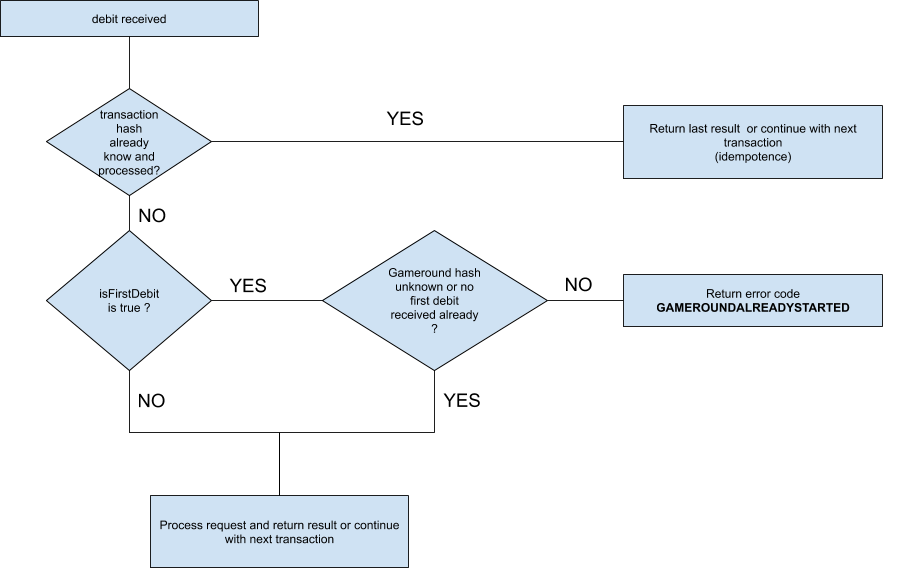
**Flow of a credit operation**
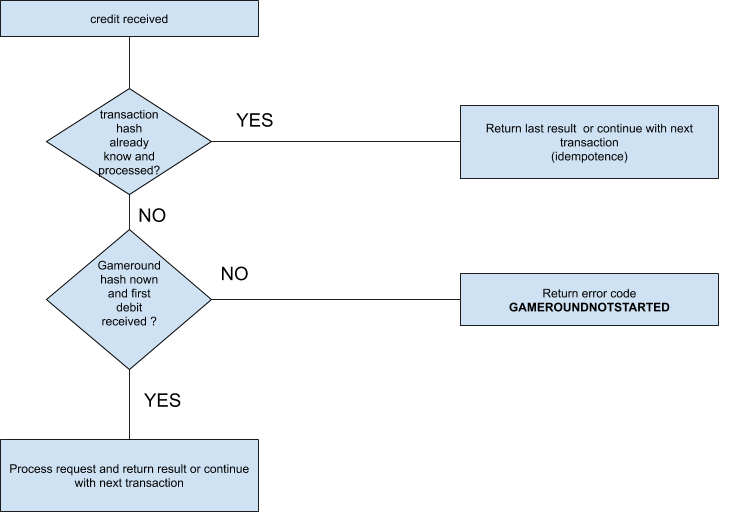
---
| | | | |
| --- | --- | --- | --- |
| **POST /doTransactions** | | | Submit an array of gameTransactions |
| *request Parameters (JSON payload)* | | | |
| *attribute* | *type* | *mandatory* | *notes* |
| **playerId** | string | YES | ID that identifies the player at the operator's site |
| **gameCode** | string | YES | ID that identifies the game played (same code as in the getGameUrl call) |
| **gameRound** | [hash](/operator-api/data-types#basic-types) | YES | Gameround that brackets all transactions |
| **transactions** | array of gameTransactions | YES | List of transactions to process. This array must hold at least one entry |
| **transactionCount** | number | YES | Count of transactions in the payload. This count must match the length of the submitted transactions array. If the count differs, reject the call with error code 400 and error id 16 |
| **serialUsed** | string | NO | Contains the serial of the ticket / freeplay package used for the first deposit in this gameround. hizi sets this field only when there is no first deposit transaction in the call, because the field “serial” in the **transactions** data contains the information instead. This field is for information only. It links credit + end transactions to a serial, when you send these in separate calls. Note: To activate this field, set the flag “addSerialToTransactions” in the operator settings |
| **ticketInformation** | Object (see below) | NO | If a package of tickets / freeplays finishes in that gameround, this field contains information about the ticket / freeplay, for example the total amount won Note: To activate this field, set the flag “addSerialToTransactions” in the operator settings |
| ``` { serial: string; stake: number; won: number; isFinal: boolean; used: number; } ``` | | | |
| **externalSessionId** | string | NO | Reference to a session id passed in the getGameURL call **Note:** hizi sends this property only when the getGameURL call originally included it and the session is still active. If the RGS's built-in janitor process auto-closes the round, no session might be active. In that case, hizi does not send externalSessionID. Process the call whether or not it includes an externalSessionId |
| *fields to sign (order is important)* | | | |
| **secret + X-H-AUTH-ID + X-H-TIMESTAMP + playerId + gameCode + gameRound + all transaction hashes and if applicable amounts submitted** Sign the fields for transactions in the same sequence as you submit them in the transactions payload. See an example here for a debit/end transaction, and [here for a debit/credit/end transaction](#sample-for-a-gameround-with-multiple-calls-6-calls-in-this-example) For example: Hash of the first transaction Amount of the first transaction (do not add an amount if there is no amount, or the amount is 0 (zero), for example an end operation, or a debit with a ticket supplied. A void that hizi sends after a failed debit has the amount of that debit. Add this amount) Hash of the second transaction (do not add an amount if there is no amount, or the amount is 0 (zero), for example an end operation, or a debit with a ticket supplied. A void that hizi sends after a failed debit has the amount of that debit. Add this amount) | | | |
| *mandatory request header fields* | | | |
| **X-H-AUTH-ID, X-H-AUTH-SIG, X-H-TIMESTAMP** | | | |
| *returned attributes* | | | |
| *attribute* | *type* | *mandatory* | *notes* |
| **balances** | array of playerBalance objects | YES | The response can include one or two entries. One entry must be “real” money. The response may optionally include “bonus” money. The balances must reflect the balance after you process the transactions. |
| **discountInfo** | discountInfo structure | NO | Optional information about discounts. See Appendix E for details |
| **useBonusFirst** | boolean | NO (defaults to true) | true if the player must use bonus funds first. false if the player must use real money first. This field is informational. The game frontend displays it only when regulations require it |
| **errorCode** | errorCode | NO / YES (in case of error) | If an error occurs, the HTTP status code must not be 200. Return this error information. If you did not process any of the transmitted hashes correctly, this field is mandatory. The game frontend uses this information to display error messages |
| **clientMessage** | clientmessage | NO | Defines a message box that appears in the game client. This field can also appear when an error occurs |
| **hashesProcessed** | array of json objects | YES | Array of transaction hashes and the result of processing each one. Return this field also when an error occurs. hizi assumes that transaction hashes missing from this list were not processed, and treats them as an error. See the structure below for details. hizi logs the errorCode structure that hashesProcessed returns |
#### Structure of hashesProcessed
| | | | | |
| --- | --- | --- | --- | --- |
| *attribute* | *type* | *allowed values* | *mandatory* | *notes* |
| **hash** | [hash](/operator-api/data-types#basic-types) | a transaction hash submitted in the call | YES | |
| **errorCode** | errorCode | the result of processing the transaction | NO | **If this field is not present, the call was processed successfully** |
### Retry Logic / Error handling
If a doTransactions call with debits returns an HTTP 5xx code, or if a network error occurs, hizi does not retry the call. hizi sends a VOID transaction. hizi marks the gameround as “canceled”.
If a doTransactions call with debits returns an HTTP 4xx code, hizi does not retry the call. hizi marks the gameround as “canceled”.
If the payload of a doTransactions call contains a credit but no debit, hizi retries the call immediately if it does not get HTTP 200. This applies to all other HTTP status codes and to network errors. hizi makes up to 5 retries, with no delay between them. hizi does not queue a credit for retries at increasing intervals.
After the last attempt, hizi uses `hashesProcessed` to decide the result of each credit. See **Error handling for credit transactions** in [doTransactions](#dotransactions-submit-game-transactions):
- The hash has no `errorCode`: hizi books the credit as paid.
- The hash has an `errorCode`: hizi marks the gameround as stranded. hizi does not send the credit again.
- The hash is missing: the credit stays pending, and the gameround stays open.
hizi sends a pending credit again in these cases:
- **The player launches the same game again.** hizi sends the credit after your getGameURL call returns, before the game starts. The call has the `externalSessionId` of the new launch. Accept the credit at that time. If you return an error for the credit, hizi marks the gameround as stranded, and the game does not start.
- **The RGS janitor process retries open gamerounds.** The janitor is a background job that runs every hour. It sends pending credits of gamerounds that are older than a configured age. The call can come without an `externalSessionId`. When the gameround reaches the maximum gameround age, the janitor stops the retries and closes the gameround.
### Scenarios and samples
The following sections describe example scenarios and sample calls.
#### Scenario 1: single shot gamerounds
In a single shot gameround, the game determines the outcome after the player's initial bet, for example a normal spin. In this case, hizi transmits all transactions in a single call. The call has 2 transactions if there is no win, or 3 transactions if there is a win. Treat the initial debit as the start of a new gameround. If an error occurs on the debit, for example no balance available, forfeit any possible credit call. Mark the gameround as closed and failed.
If an error occurs on credit and the HTTP error code is 500 or higher, hizi retries the call a few times. If the error persists, or if the HTTP error code is between 400 and 500, hizi sends a void transaction for the debit. hizi marks the gameround as closed and failed.
The following sample calls show two cases: with a win, and without a win. All calls assume the player's initial balance is EUR 10. Fields marked in red must be part of the signature.
##### Sample for a one shot game without a win
| | |
| --- | --- |
| *Sample call for a one shot game without a win* | *Description* |
| **POST /doTransactions** | Submit a list of transactions |
| *Sample payload* | *Description* |
| { "playerId": "sampleplayer", "gameCode": "testgame", "gameRound": "04d4e7fc-092b-459e-bd32-c41343b4af2a", "transactions": [ { "type": "debit", "isFirstDebit": true, "currency": "EUR", "hash": "13536977-5cfa-430b-a019-18430d61b48f", "amount": 200, "timestamp": "2020-01-21T14:48:04Z", "reason": "spin" }, { "type": "end", "hash": "b92f866a-5fe9-4ac1-ae0d-9f403dfe1a12", "timestamp": "2020-01-21T14:48:04Z" } ], "transactionCount": 2 } | The player spins for EUR 2 and does not win anything. Because there is no gameround yet, the first debit indicates the start of a new round. hizi immediately closes the gameround. |
| debit / end example of fields to sign for transaction [ "13536977-5cfa-430b-a019-18430d61b48f", 200, "b92f866a-5fe9-4ac1-ae0d-9f403dfe1a12" ] | Append these fields to the fields used to calculate the signature |
| *Sample response (****success****)* | *Description* |
| { "balances": [{ "type": "real", "amount": 800, "currency": "EUR" }], "hashesProcessed": [{ "hash": "13536977-5cfa-430b-a019-18430d61b48f" } ,{ "hash": "b92f866a-5fe9-4ac1-ae0d-9f403dfe1a12" }] } | The response returns a real money balance of EUR 8. |
##### Sample for a one shot game with a single win
| | |
| --- | --- |
| *Sample call for a one shot game with a win* | *Description* |
| **POST /doTransactions** | Submit a list of transactions |
| *Sample payload* | *Description* |
| { "playerId": "sampleplayer", "gameCode": "testgame", "gameRound": "04d4e7fc-092b-459e-bd32-c41343b4af2a", "transactions": [ { "type": "debit", "isFirstDebit": true, "amount": 200, "currency": "EUR", "hash": "13536977-5cfa-430b-a019-18430d61b48f", "timestamp": "2020-01-21T14:48:04Z", "reason": "spin" }, { "type": "credit", "amount": 150, "currency": "EUR", "hash": "4fac9a5d-3662-4f85-88ad-8301681d4b61", "timestamp": "2020-01-21T14:48:04Z", "reason": "3 symbols in line 1" }, { "type": "end", "hash": "b92f866a-5fe9-4ac1-ae0d-9f403dfe1a12", "timestamp": "2020-01-21T14:48:04Z" } ], "transactionCount": 3 } | The player spins for EUR 2 and wins EUR 1.50. Because there is no gameround yet, the first debit indicates the start of a new round. hizi immediately closes the gameround. |
| debit/credit/end example of fields to sign for transaction [ "13536977-5cfa-430b-a019-18430d61b48f", 200, "4fac9a5d-3662-4f85-88ad-8301681d4b61", 150, "b92f866a-5fe9-4ac1-ae0d-9f403dfe1a12" ] | Append these fields to the fields used to calculate the signature |
| *Sample response (****success****)* | *Description* |
| { "balances": [{ "type": "real", "amount": 950, "currency": "EUR" }], "hashesProcessed": [{ "hash": "13536977-5cfa-430b-a019-18430d61b48f" } ,{ "hash": "4fac9a5d-3662-4f85-88ad-8301681d4b61" } ,{ "hash": "b92f866a-5fe9-4ac1-ae0d-9f403dfe1a12" }] } | The response returns a real money balance of EUR 9.50 |
#### Scenario 2: multiple transaction calls for a gameround
Use multiple doTransactions calls when the game cannot determine the outcome after the player's initial bet, for example when the player enters a bonus round or wins in-game free spins. In this case, hizi transmits all transactions in multiple calls. Each call has 1 or 2 transactions. The first call is always an initial debit call. hizi transmits wins and additional bets in separate calls. At the end of the gameround, hizi transmits an end action, or appends it to the last credit call. If an error occurs on the initial debit, for example no balance available, mark the gameround as closed and failed. Do not accept further calls for this gameround, except an end action.
If an error occurs on a credit call, hizi does not send a void transaction for the debit. See **Error handling for credit transactions** in [doTransactions](#dotransactions-submit-game-transactions) and [Retry Logic / Error handling](#retry-logic-error-handling).
If an error occurs when you submit an additional bet (**isFirstDebit** is false), take no further action. The game can continue with a smaller stake. In this case, hizi sends a new debit transaction.
If you receive a second initial bet for the same gameround hash, always respond with an error, because the gameround has already started. Take no further action.
The following example shows a multi transaction call flow. All calls assume the player's initial balance is EUR 10. Fields marked in red must be part of the signature.
---
##### Sample for a gameround with multiple calls (6 calls in this example)
| | |
| --- | --- |
| *Sample call sequence for multiple calls in a gameround (a basic game plus a bonus round with an additional wager)* | *Description* |
| *Sample payload* | *Description* |
| *Sample response (****success****)* | *Description* |
| **Step 1** **POST /doTransactions** | Submit the initial debit to start a new gameround |
| *Sample payload* | *Description* |
| { "playerId": "sampleplayer", "gameCode": "testgame", "gameRound": "04d4e7fc-092b-459e-bd32-c41343b4af2a", "transactions": [ { "type": "debit", "isFirstDebit": true, "amount": 200, "currency": "EUR", "hash": "13536977-5cfa-430b-a019-18430d61b48f", "timestamp": "2020-01-21T14:48:04Z", "reason": "spin" } ], "transactionCount": 1 } | The player bets an initial EUR 2 |
| *Sample response (****success****)* | *Description* |
| { "balances": [{ "type": "real", "amount": 800, "currency": "EUR" }], "hashesProcessed": [{ "hash": "13536977-5cfa-430b-a019-18430d61b48f" }] } | The response returns a real money balance of EUR 8. |
| **Step 2** **POST /doTransactions** | The player wins on the basic spin |
| *Sample payload* | *Description* |
| { "playerId": "sampleplayer", "gameCode": "testgame", "gameRound": "04d4e7fc-092b-459e-bd32-c41343b4af2a", "transactions": [ { "type": "credit", "amount": 150, "currency": "EUR", "hash": "4fac9a5d-3662-4f85-88ad-8301681d4b61", "timestamp": "2020-01-21T14:48:04Z", "reason": "3 symbols in line 1" } ], "transactionCount": 1 } | The player wins EUR 1.50 from the basic spin |
| *Sample response (****success****)* | *Description* |
| { "balances": [{ "type": "real", "amount": 950, "currency": "EUR" }], "hashesProcessed": [{ "hash": "4fac9a5d-3662-4f85-88ad-8301681d4b61" }] } | The response returns a real money balance of EUR 9.50. |
| **Step 3** **POST /doTransactions** | The player places a continuation bet |
| *Sample payload* | *Description* |
| { "playerId": "sampleplayer", "gameCode": "testgame", "gameRound": "04d4e7fc-092b-459e-bd32-c41343b4af2a", "transactions": [ { "type": "debit", "isFirstDebit": false, "amount": 170, "currency": "EUR", "hash": "2f1e3eeb-4330-4d26-87d8-4a72b3fdc4d6", "timestamp": "2020-01-21T14:48:04Z", "reason": "get more scatters bet for bonus round" } ], "transactionCount": 1 } | The player bets EUR 1.70 for additional scatters in a bonus game |
| *Sample response (****success****)* | *Description* |
| { "balances": [{ "type": "real", "amount": 780, "currency": "EUR" }], "hashesProcessed": [{ "hash": "2f1e3eeb-4330-4d26-87d8-4a72b3fdc4d6" }] } | The response returns a real money balance of EUR 7.80. |
| **Step 4** **POST /doTransactions** | The player wins in a bonus game |
| *Sample payload* | *Description* |
| { "playerId": "sampleplayer", "gameCode": "testgame", "gameRound": "04d4e7fc-092b-459e-bd32-c41343b4af2a", "transactions": [ { "type": "credit", "amount": 950, "currency": "EUR", "hash": "02ab706a-749a-4851-894b-ba48bec74ec4", "timestamp": "2020-01-21T14:48:04Z", "reason": "win in bonus game" } ], "transactionCount": 1 } | The player wins EUR 9.50 in the bonus game |
| *Sample response (****success****)* | *Description* |
| { "balances": [{ "type": "real", "amount": 1730, "currency": "EUR" }], "hashesProcessed": [{ "hash": "02ab706a-749a-4851-894b-ba48bec74ec4" }] } | The response returns a real money balance of EUR 17.30. |
| **Step 5** **POST /doTransactions** | This call closes the gameround |
| *Sample payload* | *Description* |
| { "playerId": "sampleplayer", "gameCode": "testgame", "gameRound": "04d4e7fc-092b-459e-bd32-c41343b4af2a", "transactions": [ { "type": "end", "hash": "b92f866a-5fe9-4ac1-ae0d-9f403dfe1a12", "timestamp": "2020-01-21T14:48:04Z" } ], "transactionCount": 1 } | The gameround is finished. Do not accept further debits or credits |
| *Sample response (****success****)* | *Description* |
| { "balances": [{ "type": "real", "amount": 1730, "currency": "EUR" }], "hashesProcessed": [{ "hash": "b92f866a-5fe9-4ac1-ae0d-9f403dfe1a12" }] } | The response returns a real money balance of EUR 17.30. |
| **Step 4a (replaces 4+5)** **POST /doTransactions** | This is an alternative to steps 4 and 5. Here, the last credit call also closes the gameround |
| *Sample payload* | *Description* |
| { "playerId": "sampleplayer", "gameCode": "testgame", "gameRound": "04d4e7fc-092b-459e-bd32-c41343b4af2a", "transactions": [ { "type": "credit", "amount": 950, "currency": "EUR", "hash": "02ab706a-749a-4851-894b-ba48bec74ec4", "timestamp": "2020-01-21T14:48:04Z", "reason": "win in bonus game" }, { "type": "end", "hash": "b92f866a-5fe9-4ac1-ae0d-9f403dfe1a12", "timestamp": "2020-01-21T14:48:04Z" } ], "transactionCount": 2 } | The player wins EUR 9.50 in the bonus game. The gameround is now finished. Do not accept further debits or credits |
| *Sample response (****success****)* | *Description* |
| { "balances": [{ "type": "real", "amount": 1730, "currency": "EUR" }], "hashesProcessed": [{ "hash": "02ab706a-749a-4851-894b-ba48bec74ec4" },{ "hash": "b92f866a-5fe9-4ac1-ae0d-9f403dfe1a12" }] } | The response returns a real money balance of EUR 17.30. |
#### Scenario 3: a doTransactions call times out
hizi waits a limited time for the reply to doTransactions. If the call contains a debit and your wallet does not reply in time, hizi does not retry the call. hizi sends a void of the first debit, and cancels the gameround. Your wallet can still process the first call after hizi stopped to wait. In that case, reverse the debit and the credit of that call. See [Void of the first debit](#void-of-the-first-debit).
All calls assume the player's initial balance is EUR 10. The game uses the native hizi game studio protocol, so the gameRound hash and the hash of the first debit have the same value.
| | |
| --- | --- |
| **Step 1** **POST /doTransactions** | hizi submits a one shot gameround with a win |
| *Sample payload* | *Description* |
| { "playerId": "sampleplayer", "gameCode": "testgame", "gameRound": "5417dcd79e964235bd8e112e29c23dd9", "transactions": [ { "type": "debit", "isFirstDebit": true, "amount": 100, "currency": "EUR", "hash": "5417dcd79e964235bd8e112e29c23dd9" }, { "type": "credit", "amount": 50, "currency": "EUR", "hash": "1937bafe0dde4a118b010f21d8d35cc5" }, { "type": "end", "hash": "4fead761e38d4b08b62d64fab690fa74" } ], "transactionCount": 3 } | The player spins for EUR 1 and wins EUR 0.50. |
| *Sample response* | *Description* |
| no reply in time | hizi stops to wait and records a network error. hizi does not retry a call that contains a debit. |
| **Step 2** **POST /doTransactions** | hizi voids the first debit |
| *Sample payload* | *Description* |
| { "playerId": "sampleplayer", "gameCode": "testgame", "gameRound": "5417dcd79e964235bd8e112e29c23dd9", "transactions": [ { "hash": "5417dcd79e964235bd8e112e29c23dd9", "type": "VOID", "amount": 100, "currency": "EUR" } ], "transactionCount": 1 } | The void has the hash of the first debit. In this sample, this hash is also the gameRound hash. The void cancels the whole gameround. |
| void example of fields to sign for transaction [ "5417dcd79e964235bd8e112e29c23dd9", 100 ] | Append these fields to the fields used to calculate the signature |
| *Sample response (****success****)* | *Description* |
| { "balances": [{ "type": "real", "amount": 1000, "currency": "EUR" }], "hashesProcessed": [{ "hash": "5417dcd79e964235bd8e112e29c23dd9" }] } | The balance is EUR 10 again. If your wallet processed Step 1, it reversed the debit of EUR 1 and the credit of EUR 0.50. If your wallet did not process Step 1, it booked nothing. |
---
## logEvent (optional)
hizi uses this call to inform the operator of events. Log in to the hizi.io backoffice with your credentials to turn this call on or off. An event is always bound to a player. An event is optionally bound to a gameround. Events can include big wins or other events during a game, for example free spins won or a bonus level entered. See Appendix A for details on events.
The operator is responsible for storing this data. We recommend that you expose these events to the operator's helpdesk, because they can contain information about big wins or big stakes.
| | | | |
| --- | --- | --- | --- |
| **POST /logEvent** | | | Submit an event |
| *request Parameters (JSON payload)* | | | |
| *attribute* | *type* | *mandatory* | *notes* |
| **playerId** | string | YES | ID that identifies the player at the operator's site |
| **gameRound** | [hash](/operator-api/data-types#basic-types) | NO | Gameround that the event is bound to |
| **eventType** | string | YES | A string describing the event |
| **eventData** | jsondata | NO | A JSON structure describing the event. See Appendix A for the possible values |
| **reason** | string | NO | Optional reason for this call |
| *fields to sign (order is important)* | | | |
| **secret + X-H-AUTH-ID + X-H-TIMESTAMP + playerId + (gameround if present in payload)** | | | |
| *mandatory request header fields* | | | |
| **X-H-AUTH-ID, X-H-AUTH-SIG, X-H-TIMESTAMP** | | | |
| *returned attributes* | | | |
| *attribute* | *type* | *mandatory* | *notes* |
| **errorCode** | errorCode | NO | If an error occurs, the HTTP status code must not be 200. The response can include additional error information |
### Sample call to submit an event
Fields marked in red must be part of the signature.
| | |
| --- | --- |
| *Sample call to report a bonus win* | *Description* |
| **POST /logEvent** | Report a bonus win |
| *Sample payload* | *Description* |
| { "playerId": "sampleplayer", "gameRound": "04d4e7fc-092b-459e-bd32-c41343b4af2a", "eventType": "BONUSROUND", "eventData": { "credit": { "amount": 950, "currency": "EUR" }, "freespins": 10 }, "reason": "Player got 10 freespins" } | The player receives 10 in-game free spins and wins EUR 9.50 |
| *Sample response (****success****)* | *Description* |
| { } | Empty response |
---
## doGameRoundReport (optional)
hizi sends this call with **gameround** details only after the round is closed. The payload includes the most important details of a gameround. You can use these details for reporting and historical records.
The operator must request that hizi enable this endpoint. Otherwise, hizi does not send requests.
| | | | |
| --- | --- | --- | --- |
| **POST /doGameRoundReport** | | | Submit gameround details (for a closed gameround) |
| *request Parameters (JSON payload)* | | | |
| *attribute* | *type* | *mandatory* | *notes* |
| **gameRoundDetail** | jsondata | YES | Gameround payload |
| *fields to sign (order is important)* | | | |
| **secret + X-H-AUTH-ID + X-H-TIMESTAMP** | | | |
| *mandatory request header fields* | | | |
| **X-H-AUTH-ID, X-H-AUTH-SIG, X-H-TIMESTAMP** | | | |
| *returned attributes* | | | |
| *attribute* | *type* | *mandatory* | *notes* |
| **errorCode** | errorCode | NO | If an error occurs, the HTTP status code must not be 200. The response can include additional error information |
### Sample call to submit a gameround
Fields marked in red must be part of the signature.
| | |
| --- | --- |
| *Sample call to submit a gameround report* | *Description* |
| **POST /doGameRoundReport** | Sends a gameround's payload |
| *Sample payload* | *Description* |
| { "gameRoundDetail": { "hash": "789b5513cb1a499dba181c6091c57d36", "mode": "REAL", "game": "bg-olympus-gold-96", "operator": "internal\_testoperator", "status": "closed", "player": "acfbf7980c4d4add8688c944c9c2a22a", "language": "EN", "currency": "EUR", "environment": "gmzp", "timestamp": "2025-07-08T13:22:01.874+00:00", "baseStake": 10, "totalBetAmount": 10, "totalPayedAmount": 10, "totalWinAmount": 15, "dataStored": {}, "ticketUsed": false, "balanceAfter": 9075, "transactions": [ { "hash": "789b5513cb1a499dba181c6091c57d36", "type": "debit", "amount": 10, "payed": 10, "isFirstDebit": true, "currency": "EUR", "timestamp": "2025-07-08T13:21:44.599Z", "balanceAfter": 9060 }, { "hash": "3ef71295e3924915aec018ee32d10e17", "type": "credit", "amount": 15, "payed": 15, "currency": "EUR", "timestamp": "2025-07-08T13:22:01.555Z", "balanceAfter": 9075 }, { "hash": "637310141d1c4fdf8dc8579e0b8dec21", "type": "end", "currency": "EUR", "timestamp": "2025-07-08T13:22:01.855Z", "balanceAfter": 9075 } ] } } | Gameround payload |
| *Sample response (****success****)* | *Description* |
| { } | Empty response |
---
## doGameRoundResult (optional)
hizi sends this call with the gameround result only after the round is closed. The payload includes an HTML representation of the game result. The operator must request that hizi enable this endpoint. Otherwise, hizi does not send requests.
| | | | |
| --- | --- | --- | --- |
| **POST /doGameRoundResult** | | | Submit a gameround result (for a closed gameround) |
| *request Parameters (JSON payload)* | | | |
| *attribute* | *type* | *mandatory* | *notes* |
| **gameCode** | string | YES | Game code |
| **msg** | string | YES | Base64-encoded HTML that you can use to display the gameround. ``` Buffer.from(body.msg,'base64').toString('utf-8'); ``` |
| **gameRound** | [hash](/operator-api/data-types#basic-types) | YES | Gameround ID |
| **playerId** | string | YES | Player ID |
| *fields to sign (order is important)* | | | |
| **secret + X-H-AUTH-ID + X-H-TIMESTAMP + gameRound + gameCode + playerId + msg** | | | |
| *mandatory request header fields* | | | |
| **X-H-AUTH-ID, X-H-AUTH-SIG, X-H-TIMESTAMP** | | | |
| *returned attributes* | | | |
| *attribute* | *type* | *mandatory* | *notes* |
| **errorCode** | errorCode | NO | If an error occurs, the HTTP status code must not be 200. The response can include additional error information |
### Sample call to submit a gameround result
Fields marked in red must be part of the signature.
| | |
| --- | --- |
| *Sample call to submit a gameround result* | *Description* |
| **POST /doGameRoundResult** | Sends a gameround's HTML result |
| *Sample payload* | *Description* |
| { "gameRound": "789b5513cb1a499dba181c6091c57d36", "playerId": "acfbf7980c4d4add8688c944c9c2a22a", "gameCode": "bg-olympus-gold-96", "msg": "<html>...</html>" } | Gameround payload |
| *Sample response (****success****)* | *Description* |
| { } | Empty response |
---
## reportAnimationEnd (optional)
hizi sends this call to the operator when the animation of the current gameround finishes. At this point, the spin or play button is active again, and the player can start a new game. This call must never fail. It must always report HTTP 200 (success).
**Use case**:
A gameround can consist of a single transaction. hizi closes the gameround immediately in one doTransactions call. Client-side animations can still be running. From the player's point of view, the game is still running. Some legal frameworks require game start and end events to go to a safe server for the regulator. Use this call to report correct game start and end events for these frameworks. This call is mostly useful for German regulations.
The operator must request that hizi enable this endpoint. Otherwise, hizi does not send requests.
| | | | |
| --- | --- | --- | --- |
| **POST /reportAnimationEnd** | | | Report that the animation of a closed gameround finished |
| *request Parameters (JSON payload)* | | | |
| *attribute* | *type* | *mandatory* | *notes* |
| **gameRound** | [hash](/operator-api/data-types#basic-types) | YES | Gameround to report as finished |
| *fields to sign (order is important)* | | | |
| **secret + X-H-AUTH-ID + X-H-TIMESTAMP + gameRound** | | | |
| *mandatory request header fields* | | | |
| **X-H-AUTH-ID, X-H-AUTH-SIG, X-H-TIMESTAMP** | | | |
| *returned attributes* | | | |
| *attribute* | *type* | *mandatory* | *notes* |
| **errorCode** | errorCode | NO | If an error occurs, the HTTP status code must not be 200. The response can include additional error information |
### Sample call to report the end of an animation
Fields marked in red must be part of the signature.
| | |
| --- | --- |
| *Sample call to report the end of an animation* | *Description* |
| **POST /reportAnimationEnd** | Gameround is finished (animation stopped) |
| *Sample payload* | *Description* |
| { "gameRound": "8a73676f4e5c4b4d8507b526f48b4f4d" } | Gameround payload |
| *Sample response (****success****)* | *Description* |
| { } | Empty response |
---
## ping
hizi uses this call to test the availability of the operator's service. hizi can call this endpoint at any time. The endpoint must return HTTP status code 200 to confirm operation. The response can include additional performance data for extended monitoring.
If this call receives repeated errors, the hizi.io Backoffice notifies you.
| | | | |
| --- | --- | --- | --- |
| **GET /ping** | | | Call the operator to confirm operation |
| *request Parameters (URI parameters)* | | | |
| *attribute* | *type* | *mandatory* | *notes* |
| *NONE* | | | |
| *fields to sign (order is important)* | | | |
| **secret + X-H-AUTH-ID + X-H-TIMESTAMP** | | | |
| *mandatory request header fields* | | | |
| **X-H-AUTH-ID, X-H-AUTH-SIG, X-H-TIMESTAMP** | | | |
| *returned attributes* | | | |
| *attribute* | *type* | *mandatory* | *notes* |
| **performanceData** | jsondata | NO | Additional data that you can use for monitoring |
| **errorCode** | errorCode | NO | If an error occurs, the HTTP status code must not be 200. The response can include additional error information |
### Sample call to test availability of operator service
| | |
| --- | --- |
| *Fields marked in red must be part of the signature* | *Description* |
| **GET /ping** | Get the operational status |
| *Sample response (****success****)* | *Description* |
| { "performanceData": { "status": "operational" } } | The response indicates success and returns an optional status |
---
# Operator → hizi.io
This section describes the calls the operator can make to launch games and get information about game status and rounds. The operator must implement getGameURL. The operator uses this call to launch games. All other calls are optional. These calls give the operator more control over games and players. IP whitelisting might apply.
## getGameURL - get a game launch URL for a player for a game
The operator uses this call to launch a game for a player. The call returns a URL. Direct the player to this URL (for example, in an iframe). The call creates the necessary sessions and starts the game with the passed parameters. Each URL is for one launch only. Read the [launch URL rules](#launch-url-rules) before you implement this call.
### Launch URL rules
The URL contains a temporary token. The first open of the URL uses the token and starts a game session. After that, the token is not valid anymore.
**The launch URL has these properties:**
- The URL works one time only. A second open of the same URL fails.
- The URL is valid for 120 seconds after the getGameURL call. hizi.io can set a different time for your integration.
- The URL is for one game, one currency, and one mode. You cannot use it to open a different game.
**The operator must obey these rules:**
- Call getGameURL each time a player opens a game. This includes a change to a different game.
- Call getGameURL again for each reload of the game. This includes a reload of the casino page and a "back" navigation to the game.
- Call getGameURL only when the player selects the game. Do not create launch URLs in advance, for example for all games in a lobby.
- Open the URL immediately after you receive it.
- Do not store, cache, or share the URL. Do not put a used URL back into an iframe.
If the operator does not obey these rules, the game shows the error SESSIONINVALID (1008) with the message "Temporary token ... is not valid". The player cannot play until the operator sends a new getGameURL call.
**Sample flow: the player plays Game A, then Game B**
| Step | Operator action | Result |
| --- | --- | --- |
| 1 | The player selects Game A. The operator calls getGameURL with `"gameCode": "game-a"`. | hizi.io returns URL A. |
| 2 | The operator opens URL A in the iframe. | Game A starts. URL A is now used. |
| 3 | The player selects Game B. The operator calls getGameURL with `"gameCode": "game-b"`. | hizi.io returns URL B. |
| 4 | The operator opens URL B in the iframe. | Game B starts. URL B is now used. |
| 5 | The player goes back to Game A. The operator calls getGameURL with `"gameCode": "game-a"` again. | hizi.io returns a new URL A. Do not open the first URL A again. |
If the player ID is unknown, the system registers the player with an implicit registerPlayer call. If the operator passes playerdetails, the system updates the record with these values.
**The operator can launch the game in three modes.**
**REAL** - a normal real money game. The Operator API debits bets and credits winnings.
**DEMO** - the game launches in demo (fun) mode. The system makes no calls to the Operator API. The system does not record demo games. playerId is not mandatory. The system generates a temporary user for demo games.
**HISTORY** - the game replays a real money gameround that the player already played. Pass the gameround to replay in the **gameround** field. Only real money gamerounds can be replayed.
| | | | |
| --- | --- | --- | --- |
| **POST /getGameURL** | | | get a URL to launch a game |
| *request Parameters (json payload)* | | | |
| *attribute* | *type* | *mandatory* | *notes* |
| **playerId** | string | YES for mode= REAL or mode= HISTORY NO if mode= DEMO | ID that identifies the player at the operator site. Omit this field if mode=DEMO, unless the operator has a strong reason to persist demo balances. |
| **currency** | currency | YES | currency used to start the game |
| **gameCode** | string | YES | ID of the game to start |
| **language** | language | YES | language to use. Fallbacks might apply if a game does not support the language code. |
| **mode** | string | YES | mode of the game to use. One of the following: **REAL**, **DEMO**, **HISTORY** |
| **gameround** | [hash](/operator-api/data-types#basic-types) | NO **mandatory when mode= HISTORY** | gameround to replay. Used only when mode=history. Note: only real money gamerounds can be replayed. |
| **playerdetails** | jsondata | NO | optional additional information about the player. See the registerPlayer call for the structure of this data. |
| **profile** | string | NO | a set of predefined game parameters. If not present, the system uses default settings. See Appendix C for available profiles. To use multiple profiles, separate them with commas. |
| **options** | jsondata | NO | additional game settings to use to launch the game. See Appendix C for available settings. These settings override any settings defined in the profile. |
| **variables** | jsondata | NO | Optional game variables. For a list of allowed variables, see Appendix C |
| **externalSessionId** | string | NO | Optional reference to a session. The system passes this reference back in doTransactions and getBalance calls. |
| *fields to sign (order is important)* | | | |
| **secret + X-H-AUTH-ID + X-H-TIMESTAMP + playerId (if present) + currency + gameCode + mode** | | | |
| *mandatory request header fields* | | | |
| **X-H-AUTH-ID, X-H-AUTH-SIG, X-H-TIMESTAMP** | | | |
| *returned attributes* | | | |
| *attribute* | *type* | *mandatory* | *notes* |
| **url** | string | YES | URL for redirecting the player. |
| **errorCode** | errorCode | NO | If an error occurs, the HTTP status is not 200. The response can include additional error information. |
| **isNew** | boolean | NO | True if the player was not known before. False if the system updated existing information. Returned only if mode = "REAL" |
| **internalPlayerId** | string (max 32 characters) | NO | the internal player ID (for reference). Returned only if mode = "REAL" |
---
### Sample 1: start a real money game
This sample starts a real money game. The signature must include the fields highlighted in red.
| | |
| --- | --- |
| *Sample call to start a real money game* | *Description* |
| **POST /getGameURL** | start a real money game |
| *Sample payload* | *Description* |
| { "playerId": "sampleplayer", "currency": "GBP", "gameCode": "testgame", "language": "en", "mode": "real", "playerdetails": { "country": "GB" }, "profile": "jurisdiction-de,customProfileName", "options": { "homeURL": "https://myhome.com/example" } } | Starts a real money game in English, using British Pound. Uses the jurisdiction setting for Germany and a custom profile created earlier. Passes a home URL. |
| *Sample response (****success****)* | *Description* |
| { "url": "https://testgame?token=f264e73f-5aa4-4858-bf6e-3d02bcfa5e2d" } | returns a game URL |
### Sample 2: start a demo game
This sample starts a demo money game. The signature must include the fields highlighted in red.
| | |
| --- | --- |
| *Sample call to start a demo game* | *Description* |
| **POST /getGameURL** | start a demo money game |
| *Sample payload* | *Description* |
| { "currency": "GBP", "gameCode": "testgame", "language": "en", "mode": "demo" } | Starts a demo game in English, using British Pound. |
| *Sample response (****success****)* | *Description* |
| { "url": "https://testgame?token=cfc62f2b-45ca-4444-8f62-5e87c5fb5273" } | returns a game URL |
## registerPlayer - register a player (optional)
The operator uses this call to register a player in the hizi.io database. This call is optional. If a getGameURL call includes a playerId the system does not know, the system makes this call implicitly. The operator can pass additional data for better statistics and for targeting users with freeplay templates. The system does not link this data to a name. It links the data only to the ID on the operator's side. The operator does not need to submit any data. However, we recommend submitting country, gender, and birthday.
This call is idempotent. The operator can call it multiple times. Each call updates the information linked to the player account with the submitted information.
If freeplay templates are associated with the passed playerdetails, the system grants them to the user when it creates a new record (isNew = true in the response).
Use the getPlayerDetails call to query all stored information.
| | | | |
| --- | --- | --- | --- |
| **POST /registerPlayer** | | | register a player with the hizi.io database |
| *request Parameters (json payload)* | | | |
| *attribute* | *type* | *mandatory* | *notes* |
| **playerId** | string | YES | ID that identifies the player at the operator site |
| **playerdetails** | jsondata | NO | player information to store. See [Structure of player details](#structure-of-player-details). |
| *fields to sign (order is important)* | | | |
| **secret + X-H-AUTH-ID + X-H-TIMESTAMP + playerId** | | | |
| *mandatory request header fields* | | | |
| **X-H-AUTH-ID, X-H-AUTH-SIG, X-H-TIMESTAMP** | | | |
| *returned attributes* | | | |
| *attribute* | *type* | *mandatory* | *notes* |
| **isNew** | boolean | YES | True if the player was not known before. False if the system updated existing information. |
| **internalPlayerId** | string (max 32 characters) | YES | the internal player ID (for reference) |
| **errorCode** | errorCode | NO | If an error occurs, the HTTP status is not 200. The response can include additional error information. |
### Structure of player details
Pass playerdetails as a one-level JSON object in the following format:
```jsonc
{
"attribute 1": "value",
"attribute 2": "value"
// …and so on
}
```
The operator can pass any attribute name. Use each attribute name only once.
The following attributes are predefined. Use them to store the corresponding information. The operator can use all attributes to target a group of users for freeplays.
| | | | |
| --- | --- | --- | --- |
| ***attribute*** | ***description*** | ***format*** | ***sample value*** |
| displayName | the player's nickname (some games can display this nickname) | string (max 80 characters) | TheBoss |
| country | The player's country of residence. This can have legal implications, depending on the jurisdiction. | countrycode | GB |
| affiliate | code or channel that identifies the affiliate that referred the player. If the operator submits this information, the system can award the player free rounds supported by the game. | string (max 80 characters) | IncomingChannel |
| promotionCode | code that lets the operator grant a bonus to the player. If the operator submits this information, the system can award the player free rounds supported by the game. | string (max 80 characters) | thebestpromoever |
| gender | the player's gender. Accepted values: M (male), F (female), O (other) | string length 1 character (uppercase) | M |
| birthDate | the player's birth date. Format: YYYY-MM-DD | string (length 10 characters) | 1978-05-12 |
| isTestPlayer | true if the operator wants to exclude the player from billing reports | boolean | Optional, default is false |
### Sample: register a player with full details
This sample registers a player. The signature must include the fields marked in red.
| | |
| --- | --- |
| *Sample call for registering a player* | *Description* |
| **POST /registerPlayer** | registers a player |
| *Sample payload* | *Description* |
| { "playerId": "sampleplayer", "playerdetails": { "displayName": "TheBoss", "country": "GB", "affiliate": "Affiliate No. 1", "promotionCode": "promonewyear2020", "gender": "F", "birthDate": "1985-05-10", "custom Attribute 1": "some information", "custom Attribute 2": "other information" } } | Registers a player. Submits standard attributes and two custom attributes. |
| *Sample response (****success****)* | *Description* |
| { "isNew": true, "internalPlayerId": "acfbf7980c4d4add8688c944c9c2a22a" } | The system created a player account because the player was not known before. |
---
## getPlayerDetails - query information linked to a player
The operator uses this call to query all information linked to a player ID submitted by registerPlayer or getGameURL calls. The call also returns whether the player is blocked.
| | | | |
| --- | --- | --- | --- |
| **GET /getPlayerDetails** | | | query stored player details |
| *request Parameters (URI parameters)* | | | |
| *attribute* | *type* | *mandatory* | *notes* |
| **playerId** | string | YES | ID that identifies the player at the operator site |
| *fields to sign (order is important)* | | | |
| **secret + X-H-AUTH-ID + X-H-TIMESTAMP + playerId** | | | |
| *mandatory request header fields* | | | |
| **X-H-AUTH-ID, X-H-AUTH-SIG, X-H-TIMESTAMP** | | | |
| *returned attributes* | | | |
| *attribute* | *type* | *mandatory* | *notes* |
| **playerdetails** | jsondata | YES | player information that the system has stored. See [Structure of player details](#structure-of-player-details). |
| **isBlocked** | boolean | YES | true if the operator blocked the player in the hizi.io database with a setPlayerBlock call |
| **blockReason** | string | NO | optional reason for the player block, if the operator passed one in the setPlayerBlock call |
| **errorCode** | errorCode | NO | If an error occurs, the HTTP status is not 200. The response can include additional error information. |
---
### Sample call to query player details
This sample retrieves player details. The signature must include the fields highlighted in red.
| | |
| --- | --- |
| *Sample call to query a players details* | *Description* |
| **GET /getPlayerDetails?playerId=****sampleplayer** | Ask for stored player details |
| *Sample response (****success****)* | *Description* |
| { "isBlocked": false, "playerdetails": { "displayName": "TheBoss", "country": "GB", "affiliate": "Affiliate No. 1", "promotionCode": "promonewyear2020", "gender": "F", "birthDate": "1985-05-10", "custom Attribute 1": "some information", "custom Attribute 2": "other information" } } | Returns player details |
---
## setPlayerBlock - block or unblock a player
The operator uses this call to block or unblock a player for all hizi.io games. Use this call when the operator also blocks the player.
Use the getPlayerDetails call to query the status of the player.
| | | | |
| --- | --- | --- | --- |
| **POST /setPlayerBlock** | | | block or unblock a player |
| *request Parameters (json payload)* | | | |
| *attribute* | *type* | *mandatory* | *notes* |
| **playerId** | string | YES | ID that identifies the player at the operator site |
| **isBlocked** | boolean | YES | indicates whether the operator blocks or unblocks the player |
| **blockReason** | string | NO | optional reason why the operator blocks this player |
| *fields to sign (order is important)* | | | |
| **secret + X-H-AUTH-ID + X-H-TIMESTAMP + playerId** | | | |
| *mandatory request header fields* | | | |
| **X-H-AUTH-ID, X-H-AUTH-SIG, X-H-TIMESTAMP** | | | |
| *returned attributes* | | | |
| *attribute* | *type* | *mandatory* | *notes* |
| **errorCode** | errorCode | NO | If an error occurs, the HTTP status is not 200. The response can include additional error information. |
---
### Sample: block a player
This sample blocks a player. The signature must include the fields highlighted in red.
| | |
| --- | --- |
| *Sample call for blocking a player* | *Description* |
| **POST /setPlayerBlock** | blocks a player |
| *Sample payload* | *Description* |
| { "playerId": "sampleplayer", "isBlocked": true, "blockReason": "Credit card fraud" } | blocks a player and sets a reason |
| *Sample response (****success****)* | *Description* |
| { } | empty response |
---
## getOpenGameRounds - get open gamerounds for a player
The operator uses this call to query open gamerounds for a player.
| | | | |
| --- | --- | --- | --- |
| **GET /getOpenGameRounds** | | | query any open real money gamerounds for a player |
| *request Parameters (URI parameters)* | | | |
| *attribute* | *type* | *mandatory* | *notes* |
| **playerId** | string | YES | ID that identifies the player at the operator site |
| *fields to sign (order is important)* | | | |
| **secret + X-H-AUTH-ID + X-H-TIMESTAMP + playerId** | | | |
| *mandatory request header fields* | | | |
| **X-H-AUTH-ID, X-H-AUTH-SIG, X-H-TIMESTAMP** | | | |
| *returned attributes* | | | |
| *attribute* | *type* | *mandatory* | *notes* |
| **gameRoundList** | array of [gameround hashes](/operator-api/data-types#basic-types) | YES | list of open gameround IDs. Use these IDs in the getGameRoundDetails call to retrieve more details. |
---
## getOpenGameRoundsByGame- get open gamerounds by game
The operator uses this call to query open gamerounds for a game code.
| | | | |
| --- | --- | --- | --- |
| **GET /getOpenGameRoundsByGame** | | | query any open real money gamerounds for a game code |
| *request Parameters (URI parameters)* | | | |
| *attribute* | *type* | *mandatory* | *notes* |
| **gameCode** | string | YES | code that identifies the game (for example, as received from getGameList or submitted to getGameURL) |
| *fields to sign (order is important)* | | | |
| **secret + X-H-AUTH-ID + X-H-TIMESTAMP + gameCode** | | | |
| *mandatory request header fields* | | | |
| **X-H-AUTH-ID, X-H-AUTH-SIG, X-H-TIMESTAMP** | | | |
| *returned attributes* | | | |
| *attribute* | *type* | *mandatory* | *notes* |
| **gameRoundList** | array of [gameround hashes](/operator-api/data-types#basic-types) | YES | list of open gameround IDs. Use these IDs in the getGameRoundDetails call to retrieve more details. |
---
## getGameRoundDetails - get information for a gameround
The operator uses this call to query open gamerounds for a player.
| | | | |
| --- | --- | --- | --- |
| **GET /getGameRoundDetails** | | | query gameround details |
| *request Parameters (URI parameters)* | | | |
| *attribute* | *type* | *mandatory* | *notes* |
| **playerId** | string | YES | ID that identifies the player at the operator site |
| **gameRound** | [hash](/operator-api/data-types#basic-types) | YES | ID (hash) that identifies the gameround. The system can return this ID from getOpenGameRounds or getGameRoundReport. |
| *fields to sign (order is important)* | | | |
| **secret + X-H-AUTH-ID + X-H-TIMESTAMP + playerId + gameRound** | | | |
| *mandatory request header fields* | | | |
| **X-H-AUTH-ID, X-H-AUTH-SIG, X-H-TIMESTAMP** | | | |
| *returned attributes* | | | |
| *attribute* | *type* | *mandatory* | *notes* |
| **gameRound** | JSON Data | YES | Details of the gameround, including: hash player mode game operator status language currency environment timestamp totalBetAmount totalWinAmount (both `amount` type, in 1/100 of the base currency) transactions (a list of debits, credits, and voids), as defined in the gameTransaction structure |
## getGameRoundReport - get a list of gamerounds for a player / game
The operator uses this call to query open gamerounds for a player.
| | | | |
| --- | --- | --- | --- |
| **GET /getGameRoundReport** | | | get a list of real money gamerounds for a player / game |
| *request Parameters (URI parameters)* | | | |
| *attribute* | *type* | *mandatory* | *notes* |
| **playerId** | string | YES | ID that identifies the player at the operator site |
| **gameCode** | string | YES | code that identifies the game (for example, as received from getGameList or submitted to getGameURL) |
| **daysBack** | number | NO | number of days back to retrieve. This parameter defaults to the maximum days stored (7 days). |
| **currency** | currency | NO | Optional currency to filter for |
| **gameRound** | [hash](/operator-api/data-types#basic-types) | NO | Optional gameround hash (or hash prefix) to filter by |
| *fields to sign (order is important)* | | | |
| **secret + X-H-AUTH-ID + X-H-TIMESTAMP + playerId + gameCode** | | | |
| *mandatory request header fields* | | | |
| **X-H-AUTH-ID, X-H-AUTH-SIG, X-H-TIMESTAMP** | | | |
| *returned attributes* | | | |
| *attribute* | *type* | *mandatory* | *notes* |
| **gameRounds** | array of JSON Data | YES | array of records that identify a gameround: hash, mode, game, status, timestamp, bet, win |
---
## getGameRoundResult - get a HTML representation of a result of a gameround
The operator uses this call to query open gamerounds for a player.
| | | |
| --- | --- | --- |
| **GET /getGameRoundResult** | | get a HTML representation of a game result |
| *request Parameters (URI parameters)* | | |
| *attribute* | *type* | *notes* |
| **playerId** | string | ID that identifies the player at the operator site |
| **gameRound** | [hash](/operator-api/data-types#basic-types) | gameround hash to get data for |
| **getURL** | boolean | If true, the call returns a URL valid for 10 minutes to display the game result. If false or not present, the call returns HTML code. |
| *fields to sign (order is important)* | | |
| **secret + X-H-AUTH-ID + X-H-TIMESTAMP + playerId + gameRound** | | |
| *mandatory request header fields* | | |
| **X-H-AUTH-ID, X-H-AUTH-SIG, X-H-TIMESTAMP** | | |
| *returned attributes* | | |
| *attribute* | *type* | *notes* |
| **resultURL** | string | If the operator sets the getURL request parameter to true, the call returns a URL that displays the game result. This URL is valid for only 10 minutes. |
| **msg** | string | If the operator sets the getURL request parameter to false, or omits it, the call returns HTML code to display the game result. |
| **gameCode** | string | If the operator sets the getURL request parameter to false, or omits it, the call returns the name of the game for the requested gameround. |
## reconcileTransactions - request of replaying a gameround
The operator uses this call to request a replay of all transactions from a gameround. The gameround must already be closed. The system supports only real money gamerounds. The operator receives a doTransactions call with all transactions processed in that gameround in the payload. The submitted hashes are the same as in the original call. Therefore, the doTransactions endpoint must support idempotence for this call. If the gameround is open, the system also closes it automatically.
Note: Use the getGameRoundDetails call to query the status of the gameround. Use the getOpenGameRoundsByGame call to retrieve open rounds per game.
| | | | |
| --- | --- | --- | --- |
| **POST /reconcileTransactions** | | | request resending of all transactions of a closed real money gameround |
| *request Parameters (json payload)* | | | |
| *attribute* | *type* | *mandatory* | *notes* |
| **gameRound** | [hash](/operator-api/data-types#basic-types) | YES | ID (hash) that identifies the gameround. The system can return this ID from getOpenGameRounds or getGameRoundReport. |
| *fields to sign (order is important)* | | | |
| **secret + X-H-AUTH-ID + X-H-TIMESTAMP + gameRound** | | | |
| *mandatory request header fields* | | | |
| **X-H-AUTH-ID, X-H-AUTH-SIG, X-H-TIMESTAMP** | | | |
| *returned attributes* | | | |
| *attribute* | *type* | *mandatory* | *notes* |
| **gameRound** | JSON Data | YES | Details of the gameround, including: hash player mode game operator status language currency environment timestamp totalBetAmount totalWinAmount (both `amount` type, in 1/100 of the base currency) transactions (a list of debits, credits, and voids), as defined in the gameTransaction structure |
| **hashesProcessed** | array of json objects | YES | array of transaction hashes and the result of processing. The response includes this array even if an error occurs. The system treats transaction hashes not in this list as not processed, and therefore as an error. For details, see [Structure of hashesProcessed](/operator-api/hizi-to-operator#structure-of-hashesprocessed). |
| **balance** | number | YES | balance returned by the operator, in 1/100 units of the base currency |
| **currency** | currency | YES | currency of balance |
| **mode** | string | YES | mode of the round. Only REAL is supported here. |
| **errorCode** | errorCode | NO | If an error occurs, the HTTP status is not 200. The response can include additional error information. |
---
## voidGameRound - void a debit of a gameround
The operator uses this call to void (revert) a previously submitted debit call. The operator receives a doTransactions call with a void operation for the initial debit. This call fails and returns an error if the gameround is not open, or if the system already processed a credit successfully.
Note: Use the getGameRoundDetails call to query the status of the gameround. Use the getOpenGameRoundsByGame call to retrieve open rounds per game.
| | | | |
| --- | --- | --- | --- |
| **POST /voidGameRound** | | | Request voiding the initial debit of a gameround |
| *request Parameters (json payload)* | | | |
| *attribute* | *type* | *mandatory* | *notes* |
| **gameRound** | [hash](/operator-api/data-types#basic-types) | YES | ID (hash) that identifies the gameround. The system can return this ID from getOpenGameRounds or getGameRoundReport. |
| *fields to sign (order is important)* | | | |
| **secret + X-H-AUTH-ID + X-H-TIMESTAMP + gameRound** | | | |
| *mandatory request header fields* | | | |
| **X-H-AUTH-ID, X-H-AUTH-SIG, X-H-TIMESTAMP** | | | |
| *returned attributes* | | | |
| *attribute* | *type* | *mandatory* | *notes* |
| **errorCode** | errorCode | NO | If an error occurs, the HTTP status is not 200. The response can include additional error information. |
---
getGameHealth ping / availability of game
[WORK IN PROGRESS - CONTACT SUPPORT FOR DETAILS]
getGameRoundState for given player / game / currency (or session)
[WORK IN PROGRESS - CONTACT SUPPORT FOR DETAILS]
forceCloseGameRound for a given gameRound
[WORK IN PROGRESS - CONTACT SUPPORT FOR DETAILS]
---
---
# Operator API Reference
This page renders every call, callback and schema of the Operator API from the
[OpenAPI 3.0 specification](/operator-api/openapi.yaml). Each operation has its
own page. Each page shows the parameters, request and response schemas,
examples and code samples for that operation.
The prose documentation under [Operator API](/operator-api/) is the normative
source. If this reference page disagrees with the prose, the notes in the spec
and the prose take priority.
## Operations
**{{ group.tag }}**
- {{ operation.path }}
---
# assignPlayerFreerounds
`POST /assignPlayerFreerounds`, tag `Free Plays`.
Assign a package of free plays for a game and stake to a player
Parameters, request and response schemas and examples render from the OpenAPI specification at https://docs.hizi.io/operator-api/reference/assignPlayerFreerounds.html. The whole spec is at https://docs.hizi.io/operator-api/openapi.yaml.
---
# doGameRoundReport
`POST /doGameRoundReport`, tag `hizi.io → Operator`.
(Operator implements, optional) Receive the details of a closed round
Parameters, request and response schemas and examples render from the OpenAPI specification at https://docs.hizi.io/operator-api/reference/doGameRoundReport.html. The whole spec is at https://docs.hizi.io/operator-api/openapi.yaml.
---
# doGameRoundResult
`POST /doGameRoundResult`, tag `hizi.io → Operator`.
(Operator implements, optional) Receive the HTML result of a closed round
Parameters, request and response schemas and examples render from the OpenAPI specification at https://docs.hizi.io/operator-api/reference/doGameRoundResult.html. The whole spec is at https://docs.hizi.io/operator-api/openapi.yaml.
---
# doTransactions
`POST /doTransactions`, tag `Discounts`.
(Operator implements) Process one or more gameround transactions
Parameters, request and response schemas and examples render from the OpenAPI specification at https://docs.hizi.io/operator-api/reference/doTransactions.html. The whole spec is at https://docs.hizi.io/operator-api/openapi.yaml.
---
# getBalance
`GET /getBalance`, tag `Discounts`.
(Operator implements) Get a player's balance
Parameters, request and response schemas and examples render from the OpenAPI specification at https://docs.hizi.io/operator-api/reference/getBalance.html. The whole spec is at https://docs.hizi.io/operator-api/openapi.yaml.
---
# getCurrencyList
`GET /backoffice/getCurrencyList`, tag `Backoffice`.
Get the list of known currencies and their multipliers
Parameters, request and response schemas and examples render from the OpenAPI specification at https://docs.hizi.io/operator-api/reference/getCurrencyList.html. The whole spec is at https://docs.hizi.io/operator-api/openapi.yaml.
---
# getGameConfiguration
`GET /backoffice/getGameConfiguration`, tag `Backoffice`.
Get the configuration of a game for a currency
Parameters, request and response schemas and examples render from the OpenAPI specification at https://docs.hizi.io/operator-api/reference/getGameConfiguration.html. The whole spec is at https://docs.hizi.io/operator-api/openapi.yaml.
---
# getGameEngineCertifiedFiles
`GET /gameapi/{gameCode}/certifiedfiles`, tag `Health & Certified Hash`.
Certified file hashes / version of a game engine
Parameters, request and response schemas and examples render from the OpenAPI specification at https://docs.hizi.io/operator-api/reference/getGameEngineCertifiedFiles.html. The whole spec is at https://docs.hizi.io/operator-api/openapi.yaml.
---
# getGameEngineHealth
`GET /gameapi/{gameCode}/health`, tag `Health & Certified Hash`.
Health of a game engine
Parameters, request and response schemas and examples render from the OpenAPI specification at https://docs.hizi.io/operator-api/reference/getGameEngineHealth.html. The whole spec is at https://docs.hizi.io/operator-api/openapi.yaml.
---
# getGameList
`GET /backoffice/getGameList`, tag `Backoffice`.
Get the list of games available to the operator
Parameters, request and response schemas and examples render from the OpenAPI specification at https://docs.hizi.io/operator-api/reference/getGameList.html. The whole spec is at https://docs.hizi.io/operator-api/openapi.yaml.
---
# getGameRoundDetails
`GET /getGameRoundDetails`, tag `Operator → hizi.io`.
Get the details of a single gameround
Parameters, request and response schemas and examples render from the OpenAPI specification at https://docs.hizi.io/operator-api/reference/getGameRoundDetails.html. The whole spec is at https://docs.hizi.io/operator-api/openapi.yaml.
---
# getGameRoundReport
`GET /getGameRoundReport`, tag `Operator → hizi.io`.
List real-money gamerounds for a player and game
Parameters, request and response schemas and examples render from the OpenAPI specification at https://docs.hizi.io/operator-api/reference/getGameRoundReport.html. The whole spec is at https://docs.hizi.io/operator-api/openapi.yaml.
---
# getGameRoundResult
`GET /getGameRoundResult`, tag `Operator → hizi.io`.
Get an HTML representation of a gameround result
Parameters, request and response schemas and examples render from the OpenAPI specification at https://docs.hizi.io/operator-api/reference/getGameRoundResult.html. The whole spec is at https://docs.hizi.io/operator-api/openapi.yaml.
---
# getGameURL
`POST /getGameURL`, tag `Operator → hizi.io`.
Get a game launch URL for a player and game
Parameters, request and response schemas and examples render from the OpenAPI specification at https://docs.hizi.io/operator-api/reference/getGameURL.html. The whole spec is at https://docs.hizi.io/operator-api/openapi.yaml.
---
# getOpenGameRounds
`GET /getOpenGameRounds`, tag `Operator → hizi.io`.
List open real-money gamerounds for a player
Parameters, request and response schemas and examples render from the OpenAPI specification at https://docs.hizi.io/operator-api/reference/getOpenGameRounds.html. The whole spec is at https://docs.hizi.io/operator-api/openapi.yaml.
---
# getOpenGameRoundsByGame
`GET /getOpenGameRoundsByGame`, tag `Operator → hizi.io`.
List open real-money gamerounds for a game
Parameters, request and response schemas and examples render from the OpenAPI specification at https://docs.hizi.io/operator-api/reference/getOpenGameRoundsByGame.html. The whole spec is at https://docs.hizi.io/operator-api/openapi.yaml.
---
# getPlayerDetails
`GET /getPlayerDetails`, tag `Operator → hizi.io`.
Query the information stored for a player
Parameters, request and response schemas and examples render from the OpenAPI specification at https://docs.hizi.io/operator-api/reference/getPlayerDetails.html. The whole spec is at https://docs.hizi.io/operator-api/openapi.yaml.
---
# getPlayerFreerounds
`GET /getPlayerFreerounds`, tag `Free Plays`.
Query the free-play packages available to a player
Parameters, request and response schemas and examples render from the OpenAPI specification at https://docs.hizi.io/operator-api/reference/getPlayerFreerounds.html. The whole spec is at https://docs.hizi.io/operator-api/openapi.yaml.
---
# getRngCertifiedFiles
`GET /rngFortuna/certifiedfiles`, tag `Health & Certified Hash`.
Certified file hashes of the Fortuna RNG service
Parameters, request and response schemas and examples render from the OpenAPI specification at https://docs.hizi.io/operator-api/reference/getRngCertifiedFiles.html. The whole spec is at https://docs.hizi.io/operator-api/openapi.yaml.
---
# getRngHealth
`GET /rngFortuna/health`, tag `Health & Certified Hash`.
Health of the Fortuna RNG service
Parameters, request and response schemas and examples render from the OpenAPI specification at https://docs.hizi.io/operator-api/reference/getRngHealth.html. The whole spec is at https://docs.hizi.io/operator-api/openapi.yaml.
---
# getStats
`POST /backoffice/getStats`, tag `Backoffice`.
Query statistical data on a daily basis
Parameters, request and response schemas and examples render from the OpenAPI specification at https://docs.hizi.io/operator-api/reference/getStats.html. The whole spec is at https://docs.hizi.io/operator-api/openapi.yaml.
---
# getSwissGameInfo
`GET /game-swiss-info.json`, tag `Health & Certified Hash`.
Game information document for Swiss regulation
Parameters, request and response schemas and examples render from the OpenAPI specification at https://docs.hizi.io/operator-api/reference/getSwissGameInfo.html. The whole spec is at https://docs.hizi.io/operator-api/openapi.yaml.
---
# getTicketStats
`POST /backoffice/getTicketStats`, tag `Backoffice`.
Query statistical data about tickets / free plays
Parameters, request and response schemas and examples render from the OpenAPI specification at https://docs.hizi.io/operator-api/reference/getTicketStats.html. The whole spec is at https://docs.hizi.io/operator-api/openapi.yaml.
---
# logEvent
`POST /logEvent`, tag `hizi.io → Operator`.
(Operator implements, optional) Receive a game event
Parameters, request and response schemas and examples render from the OpenAPI specification at https://docs.hizi.io/operator-api/reference/logEvent.html. The whole spec is at https://docs.hizi.io/operator-api/openapi.yaml.
---
# ping
`GET /ping`, tag `hizi.io → Operator`.
(Operator implements) Availability check of the operator service
Parameters, request and response schemas and examples render from the OpenAPI specification at https://docs.hizi.io/operator-api/reference/ping.html. The whole spec is at https://docs.hizi.io/operator-api/openapi.yaml.
---
# reconcileTransactions
`POST /reconcileTransactions`, tag `Operator → hizi.io`.
Replay all transactions of a closed gameround to the operator
Parameters, request and response schemas and examples render from the OpenAPI specification at https://docs.hizi.io/operator-api/reference/reconcileTransactions.html. The whole spec is at https://docs.hizi.io/operator-api/openapi.yaml.
---
# registerPlayer
`POST /registerPlayer`, tag `Operator → hizi.io`.
Register (or update) a player in the hizi.io database
Parameters, request and response schemas and examples render from the OpenAPI specification at https://docs.hizi.io/operator-api/reference/registerPlayer.html. The whole spec is at https://docs.hizi.io/operator-api/openapi.yaml.
---
# reportAnimationEnd
`POST /reportAnimationEnd`, tag `hizi.io → Operator`.
(Operator implements, optional) Receive the end-of-animation signal
Parameters, request and response schemas and examples render from the OpenAPI specification at https://docs.hizi.io/operator-api/reference/reportAnimationEnd.html. The whole spec is at https://docs.hizi.io/operator-api/openapi.yaml.
---
# revokePlayerFreerounds
`POST /revokePlayerFreerounds`, tag `Free Plays`.
Revoke a previously granted free-play package
Parameters, request and response schemas and examples render from the OpenAPI specification at https://docs.hizi.io/operator-api/reference/revokePlayerFreerounds.html. The whole spec is at https://docs.hizi.io/operator-api/openapi.yaml.
---
# setPlayerBlock
`POST /setPlayerBlock`, tag `Operator → hizi.io`.
Block or unblock a player for all hizi.io games
Parameters, request and response schemas and examples render from the OpenAPI specification at https://docs.hizi.io/operator-api/reference/setPlayerBlock.html. The whole spec is at https://docs.hizi.io/operator-api/openapi.yaml.
---
# voidGameRound
`POST /voidGameRound`, tag `Operator → hizi.io`.
Void the initial debit of an open gameround
Parameters, request and response schemas and examples render from the OpenAPI specification at https://docs.hizi.io/operator-api/reference/voidGameRound.html. The whole spec is at https://docs.hizi.io/operator-api/openapi.yaml.
---
# Operator & Game Settings
Operator-level settings, game permissions, payment retry strategies and regional access controls, all configured from the backoffice.
This section describes the settings you can define per operator in the backoffice: strategies for retrying payments, operator geo-IP blocking, and game permissions with the default settings applied to them.
## What's In This Section
- **Operator Settings**: The strategy for payment retries, and the geo-IP rules that control where a game is available ([Operator Settings](/operator-game-settings/operator-settings)).
- **Game Permissions & Defaults**: The games an operator can access, and the default settings applied to them ([Game Permissions & Defaults](/operator-game-settings/game-permissions)).
---
# Game permissions and default settings
[https://](https://environment.hoelle.games/operatorsettings)**[environment](https://environment.hoelle.games/operatorsettings)**[.hoelle.](https://environment.hoelle.games/operatorsettings)[games/](https://environment.hoelle.games/operatorsettings)gamespermissions
(Replace **environment** with dev, staging, or europe-1.)
Version V1.9 of the hinterzimmer back office adds this page. Use it to set game permissions. You need admin rights to use this page.
Use game permissions to allow or deny games for an operator, country, or currency. Enter policies as a valid JSON object. Use jsonlint.com to validate JSON objects.
The image above shows the default policy. This policy allows all operators, countries, and currencies to launch the game.
Record the history of game permission configuration on production in the internal production tracking spreadsheet.
---
## Structure of game permission JSON object
A game permission can contain any of the following lists. Each list is an array of strings. The strings are operator IDs, [2 letter ISO country codes](https://en.wikipedia.org/wiki/ISO_3166-1_alpha-2), or 3(4) letter [currency codes](https://en.wikipedia.org/wiki/ISO_4217).
The system evaluates allow lists before deny lists. If an allow list has entries, the system denies all other operators.
The system evaluates operator lists before country code lists. It evaluates country code lists before currency code lists.
```
{
"operatorIdAllowList": [],
"operatorIdDenyList": [],
"countryCodeAllowList": [],
"countryCodeDenyList": [],
"currencyCodeAllowList": [],
"currencyCodeDenyList": []
}
```
The following example combines an operator allow list with a currency deny list.
```
{
"operatorIdAllowList": [
"internal_testoperator"
],
"currencyCodeDenyList": [
"USD",
"UBTC"
]
}
```
The following example shows an operator allow list with two operator IDs. Both operators can launch the game. The system denies all other operators. Use this method for custom games for one operator.
```
{
"operatorIdAllowList":
["31829bfdcc1d40f8ab77a1c2938adf14",
"91fc92e9ea14463d9a3aa8864660de07"]
}
```
You can also define forced [gamesettings](/operator-api/appendix-c-game-settings). Forced gamesettings override all other settings from operator config or profiles.
globalGameSettings / forced can contain any valid [gamesettings](/operator-api/appendix-c-game-settings).
The following example disables the gamble feature for specific games. It also uses an operator deny list.
```
{
"globalGameSettings": {
"forced": {
"gambleEnabled": false
}
},
"operatorIdDenyList": [
"c72f7ccb80614251ad86e1da29aa230b",
"3b4e392a7c29434c99190a6618b93cc0",
"93d63d55b45d47939344683d9d522897",
"b9c1abc13b1447cb9242c2b3e1e0e335"
]
}
```
---
# Operator settings
[https://](https://environment.hoelle.games/operatorsettings)**[environment](https://environment.hoelle.games/operatorsettings)**[/operatorsettings](https://environment.hoelle.games/operatorsettings)
(Replace **environment** with the URL of your environment.)
At the end of the page, you can enter operator settings in a field.

Enter valid JSON. Use to validate your JSON before you enter it in the form and submit the changes.
You can combine any options defined in that document.
## Operator protocol independent settings
You can apply the following settings to any operator protocol.
### Default profile
```
{
"defaultProfile": "jurisdiction-de"
}
```
This setting defines the default settings profile for game launches (not to be confused with the operator's integration protocol, described in [Operator protocol specific settings](#operator-protocol-specific-settings) below). You can use any profile listed [here](/operator-api/appendix-c-game-settings).
### Default game settings (all games)
```
{
"defaultSettings": {
"displayXRTP": false,
"gambleEnabled": false
}
}
```
This setting defines game settings for launched games. You can define any properties listed [here](/operator-api/appendix-c-game-settings).
### Default game settings (demo games only)
```
{
"demoSettings": {
"displayCurrency": false
}
}
```
This setting defines game settings for launched demo games. You can define any properties listed [here](/operator-api/appendix-c-game-settings).
### Default max exposure (all games)
```
{
"defaultSettings": {
"maxExposure": 25000000
}
}
```
The example above limits the max exposure in games for that operator to 250,000 EUR. Write amounts without a decimal point. For example, write 250,000 EUR as 25000000.
In the game, the engine caps the max stake to prevent players from exceeding the max exposure.
### Enable animation end reporting (all games)
```
{
"defaultSettings": {
"reportAnimationEnd": true
}
}
```
This setting enables the `reportAnimationEnd` call to the operator. The engine calls this endpoint after a gameround's win animation finishes and the spin/play button becomes active again. The operator must request this endpoint. If the operator does not request it, the engine sends no requests. See [reportAnimationEnd](/operator-api/hizi-to-operator#reportanimationend-optional) in the Operator API documentation for the full call spec.
### Default game settings (specific games)
```
{
"defaultGameSpecificSettings": {
"game-bells": {
"gambleEnabled": true
}
}
}
```
This setting applies game settings only to the named game (`game-bells` above). It overrides the defaults set in "Default game settings (all games)" for that game. You can define any properties listed [here](/operator-api/appendix-c-game-settings).
### Age of gameround before its closed
```
{
"gameRoundAgeToCloseInMS": 21600000
}
```
This setting defines the number of milliseconds before the engine either closes a gameround automatically or retries pending transactions (if the delayed queue does not process them). This setting is optional. It defaults to the value shown above.
---
### Delayed queue options
These options override the default behaviour of delayed payments. All of these settings are optional. They default to the values stated below.
#### Enable delayed payment queue
```
{
"shouldWeDelay": true
}
```
The engine enables this setting by default for EveryMatrix, ISoftbet, LottoLand Omni, and Pariplay integrations. All other integrations do not use delayed payment by default.
#### Enable delayed payment for transaction calls with generic errors (internal use only)
```
{
"shouldWeDelayOnUnprocessedTransactions": true
}
```
This setting is disabled by default. It delays transaction calls when the response contains only a generic error and no transaction hashes. This setting is for internal use only, for now.
#### Set intervals of retries made
```
{
"delaySettings": {
"shortRetryCount": 10,
"longRetryTimeInMS": 3600000,
"shortRetryTimeInMS": 60000
}
}
```
The engine retries payments in the delayed payment queue shortRetryCount times, at intervals of shortRetryTimeInMS milliseconds. After that, the engine retries every longRetryTimeInMS milliseconds. The example above shows the default values.
#### Maximum age of a gameround
```
{
"maxGameRoundAge": 86400
}
```
This setting defines the maximum age of a gameround, in seconds, that the delayed payment queue holds it before marking it as stranded. The example above shows the default value.
#### Use closing state
```
{
"doNotUseClosingState": false
}
```
For default operation, set this value to false. When false, the engine queues end transactions but does not stop a player from starting a new gameround. The gameround state changes to "closing" instead of "open". This setting is suitable for most operators. For some ISoftBet operators, set the value to true. When true, gamerounds stay in the "open" state until the transaction transmits successfully. If the transaction does not transmit, the delayed payment queue marks the gameround as stranded after the maxGameRoundAge setting (in seconds). The example above shows the default value.
#### Void debits on all errors (native integration only)
```
{
"voidAllDebits": true
}
```
The default value is false. When false, the engine voids debits only on 5xx errors or network timeouts. When you enable this flag, the engine voids all debit transactions with errors. It sends a VOID transaction to the operator, even for 4xx errors. This setting applies only to native integrations.
## Operator protocol specific settings
**The settings listed above are mandatory for the given operator protocol.** The values shown are examples. Define the actual values as given by the integrator or operator.
### PARIPLAY\_EVI (Protocoltype 2)
```
{
"account": {
"Password": "******",
"Username": "******"
}
}
{
"reconToken": "*****"
}
{
"apiKey": "",
"licenseeId": "soft2bet-licenseeid",
"sharedSecret": ""
}
```
### LOTTOLAND\_OMNI (Protocoltype 4)
### SOFT2BET/GAMEKONG (Protocoltype 22)
Replace **licenseeid** with the value given by Soft2bet. Add the prefix soft2bet- before you enter it in the hinterzimmer backend.
#### Operator to RGS endpoints (To share with operators)
Consult the operator documentation for the most recent version and the correct payload to use.
##### Game Launcher/Session
```
POST /operator/gamekong/session
POST /operator/gamekong/bonus
DELETE /operator/gamekong/bonus/{bonusId}
```
##### Create and delete bonuses
---
### BETCONSTRUCT (Protocoltype 24)
```
{
"licenseeId": "betconstruct-licenseeid",
"sharedSecret": ""
}
```
Replace **licenseeid** with the value given by BetConstruct. Add the prefix betconstruct- before you enter it in the hinterzimmer backend.
#### Operator to RGS endpoints (To share with operators)
Consult the operator documentation for the most recent version and the correct payload to use.
##### Game Launcher
```
POST /operator/betconstruct/launch
POST /operator/betconstruct/bonus
POST /operator/betconstruct/getGames
{
"licenseeId": "isb-licenseeid",
"sharedSecret": "*******"
}
```
##### Create bonus
##### Get Games
---
### ISOFTBET\_PACIFIC (Protocoltype 5)
Replace **licenseeid** with the value given by ISoftbet. Add the prefix isb- before you enter it in the hinterzimmer backend.
This integration supports multiple licensee IDs. To use a different prefix, change "isb" to another value. The prefix must start with "isb". The prefix must contain only alphabetic characters, with no spaces or special characters.
The following example shows an alternative prefix and some other common settings for ISB operators.
```
{
"licenseeId": "isbaws2-134",
"sharedSecret": "******",
"delaySettings": {
"shortRetryCount": 0,
"longRetryTimeInMS": 3600000,
"shortRetryTimeInMS": 60000
},
"doNotUseClosingState": true
}
{
"sharedSecret": "******"
}
{
"platform": "dev",
"gameStudio": "hoelle",
"gameStudioFullName": "Hölle Games",
"licenseeId": "relax-partnerid",
"incomingAccount": {
"passWord": "password",
"userName": "username"
}
}
```
### EVERYMATRIX\_ENGINE (Protocoltype 6)
### RELAX (Protocoltype 7)
Replace **partnerid** with the value given by Relax. Add the prefix relax- before you enter it in the hinterzimmer backend. Also share the values "platform", gameStudio, and incomingAccount with Relax. The engine uses the value of "gameStudioFullName" to send the full game studio name in the getGames call. Relax uses this call to get a list of available games.
### GAMANZA (Protocoltype 8)
```
{
"sharedSecret": "******"
}
{
"licenseeId": "softswiss-casino_id",
"sharedSecret": "*******"
}
```
### SOFTSWISS (Protocoltype 10)
Replace **casino\_id** with the value given by SOFTSWISS. Add the prefix softswiss- before you enter it in the hinterzimmer backend.
SOFTSWISS: disabling BetWin requests
```
{
"softswissDisableUseBetWin": true
}
```
This setting is optional. It defaults to false. If you enable it (set to true), the engine sends bet and win requests in two separate calls. No transaction contains both a win and a bet action in the same payload. Add this setting to the default parameters mentioned in the paragraph above.
**Note:** Do not use this flag. Contact SoftSwiss before you decide to use it. The default value is false.
---
### Light & Wonder (aka SGD aka OGS) (Protocoltype 12)
```
{
"gameStudio": "265",
"licenseeId": "ogs-5",
"gcmLauncher": "https://hoellefrontend.s3.eu-central-1.amazonaws.com/sgd-launcher/index.html",
"incomingAccount": {
"passWord": "***",
"userName": "***"
},
"outgoingAccount": {
"passWord": "***",
"userName": "***"
}
}
```
This integration supports multiple prefixes for licenseeId. The prefix must start with "ogs". The prefix must contain only alphabetic characters, with no spaces or special characters.
Each assigned prefix also needs a default profile. Some backoffice calls from the L&W backend do not include an operator ID.
The engine uses the setting **incomingAccount** to identify calls from L&W to the hinterzimmer backend. The engine uses the setting **outgoingAccount** to identify calls from the hinterzimmer backend to L&W. Share these settings with L&W. These settings must be the same for all operators that share the same prefix.
The setting **gameStudio** is fixed. Set it to 265 in all cases.
The setting **gcmLauncher** is also fixed, but its value depends on the environment.
The following example shows a default operator profile.
```
{
"gameStudio": "265",
"licenseeId": "ogs-default",
"gcmLauncher": "https://hoellefrontend.s3.eu-central-1.amazonaws.com/sgd-launcher/index.html",
"incomingAccount": {
"passWord": "***",
"userName": "***"
},
"outgoingAccount": {
"passWord": "***",
"userName": "***"
}
}
```
Note: To activate free rounds for an L&W operator, select the following checkbox in operator settings:
---
### Native (Protocoltype 1)
```
{
"splitNativeDebitCreditEnd": true
}
```
This setting is optional. It defaults to false. If you enable it (set to true), the engine splits native payment requests that contain a debit, credit, and end into two internal calls. The first call contains the debit operation. The second call contains the credit and end transactions.
**Note:** Do not use this flag, unless the operator cannot support a single call containing debit, credit, and end in one package. Contact hinterzimmer support before you activate this flag.
```
{
"addSerialToTransactions": true
}
```
This setting is optional. It defaults to false. If you enable it (set to true), doTransaction calls sent to the operator include information about tickets and freeplays used. Refer to the Operator API documentation for details.
---
## GeoIP blocking
Since version V1.6.38 of hinterzimmer back office, you can define geo IP blocking for an operator account. You need administrator rights to view or change these settings. Geo blocking applies only to game-api/login calls. Blocked players cannot launch new game sessions. Games already in progress continue.
The following image shows a sample of a valid rule.

Enter IP blocking rules as a valid JSON object. If you have problems, use a JSON validator such as . The JSON object can contain the following properties:
| | |
| --- | --- |
| ***Property*** | ***Contents*** |
| **whiteList** | An array of uppercase ISO 3166-1 alpha-2 country codes to allow. The engine blocks all other countries. You can also use ISO 3166-2 codes to target region codes, for example DE-BB for Germany/Brandenburg or US-TX for USA/Texas. |
| **blackList** | An array of uppercase ISO 3166-1 alpha-2 country codes to block. The engine allows all other countries. You can also use ISO 3166-2 codes to target region codes, for example DE-BB for Germany/Brandenburg or US-TX for USA/Texas. |
| **grayList** | An array of uppercase ISO 3166-1 alpha-2 country codes to allow, overriding a blackList or a global block. You can also use ISO 3166-2 codes to target region codes, for example DE-BB for Germany/Brandenburg or US-TX for USA/Texas. |
| **allowedIPList** | An array of IP addresses in CIDR notation. The engine ignores whiteList or blackList rules for these addresses. |
**Note:** If you define both whiteList and blackList rules, the engine uses only whiteList.
---
### Examples
**Allow only traffic from DACH and allow internal testplays**
```
{"whiteList":["DE","AT","CH"],"allowedIPList":["172.16.16.0/24"]}
```
**Deny players from US but allow a special IP**
```
{"blackList":["US"],"allowedIPList":["12.87.118.10"]}
```
**Override a default country block for NL while still allowing all other countries**
```
{"grayList":["NL"]}
```
**Deny traffic from Canada, but allow traffic from Quebec and all other countries**
```
{
"blackList": ["CA"],
"grayList": ["CA-QC"]
}
```
**Deny traffic from Ontario**
```
{
"blackList": ["CA-ON"]
}
```
---
## **Other settings**
### Restrict game mode
This setting restricts an operator to real or demo games only.
```
{
"validGameModes": [
"DEMO"
]
}
```
Allowed values are "DEMO" or "REAL".
### Restrict to a list of currencies
This setting restricts an operator to games within a list of permitted currencies.
```
{
"currenciesRestricted": [
"EUR",
"HUF"
]
}
```
The allowed value is an array of any currencies (3 or 4 digits).
### Use a fixed currency
```
{
"useFixedCurrency": "COIN"
}
```
This setting is recommended for social casinos. It forces the currency, regardless of what the operator sends in the game launch request.
---
### Using custom currencies
```
{
"customCurrencies": {
"GOLD": 500,
"SILV": 1000,
}
}
```
Use these settings to enable a set of custom currencies. The currency code is limited to 4 characters. The multiplier must be an integer with a minimum value of 1.
### Using custom currency multipliers
```
{
"customCurrencyMultipliers": {
"GBP": 2
}
}
```
Use this setting to define a multiplier that differs from the global multipliers. The multiplier must be an integer with a minimum value of 1.
**Changes might take 24 hours to propagate. The currency multipliers are bound to an active game session, which expires after 24 hours. This delay avoids interference with running games and assigned freeplays.**
### Enabling custom stakes sent by the operator
```
{
"allowCustomStakes": true
}
```
This setting enables the game setting "customStakes". The operator can send customStakes as a parameter to the game launch command. See the section "[Appendix C - game settings parameters](/operator-api/)" in the Operator API Documentation.
---
### Restrict to a list of games
This setting restricts an operator to specified games.
```
{
"allowedGames": [
"game-fruits"
]
}
```
The example above allows only the game "game-fruits" to be played.
### Disable to a list of games
This setting disables a list of games for an operator.
```
{
"deniedGames": [
"game-fruits"
]
}
```
The example above allows all games except "game-fruits" to be played.
---
### Recommend settings for social casinos
```
{
"isSocial": true,
"defaultSettings": {
"maxExposure": 100000000000000000,
"displayCurrency": false
},
"useFixedCurrency": "COIN",
"allowCustomStakes": true
}
```
This set of settings enables the operator to send custom stakes. It locks the currency to "COIN" to prevent the use of other currencies. It sets the maximum exposure to the highest available number. It also suppresses the display of the currency in the game client.
---
---
# Operator Interface
The Operator Interface is the standard interface for integrating game clients with operators and aggregators. It makes game integration seamless across every lobby it supports. It uses one event-based protocol for game state, errors, and player interactions. It includes built-in support for major aggregators such as EveryMatrix, Pariplay, and Relax. hizi writes the module in TypeScript and ships full type definitions with it.
## Next Steps
- [Getting Started](/operator-interface/guide/getting-started): Log in to the @hoelle NPM registry. Install the module.
- [Usage](/operator-interface/guide/usage): Import the module, set up `OperatorInterface`, and handle the messages it exchanges with the lobby.
- [Configuration](/operator-interface/guide/configuration): Logging and the `setup` parameters.
- [API Reference](/operator-interface/api/): The static methods and the events sent to the game.
---
# API Reference
This page is the API Reference for the Operator Interface.
- [Methods](./methods.md) - The `OperatorInterface` class provides these static methods.
- [Events](./events.md) - The Operator Interface sends these events to the game.
---
# API Events
## Incoming Events (Operator to Game)
The OperatorInterface sends these events to the game. Listen to them with `OperatorInterface.on()`.
### Game Control
- `spinRequested`: Operator requests a spin.
- `spinStopRequested`: Operator requests to stop the spin.
- `stopRequested`: Operator requests to stop the game.
- `stopAutoplayRequested`: Operator requests to stop autoplay.
- `pauseRequested`: Operator requests to pause the game.
- `resumeRequested`: Operator requests to resume the game.
- `reloadRequested`: Operator requests to reload the game.
### Settings
- `muteRequested`: Operator requests to mute the game.
- `unmuteRequested`: Operator requests to unmute the game.
- `toggleMuteRequested`: Operator requests to toggle mute.
- `enableTurboRequested`: Operator requests to enable turbo mode.
- `disableTurboRequested`: Operator requests to disable turbo mode.
- `toggleTurboRequested`: Operator requests to toggle turbo mode.
### Stake Control
- `increaseStakeRequested`: Operator requests to increase stake.
- `decreaseStakeRequested`: Operator requests to decrease stake.
- `updateStakeRequested`: Operator requests to update stake.
### UI
- `showRulesDialogRequested`: Operator requests to show rules.
- `hideRulesDialogRequested`: Operator requests to hide rules.
- `showAutoplayDialogRequested`: Operator requests to show autoplay dialog.
- `showErrorDialogRequested`: Operator requests to show error dialog.
### Other
- `clearCookiesRequested`
- `continueRequested`
- `updateBalanceRequested`
- `handleFreeRoundsUpdate`
- `setPromoInfoResponse`
- `getPromoInfoResponse`
## Operator Messages (Operator to OperatorInterface)
These are the raw `postMessage` types that an operator wrapper sends to the game window (the `OperatorToOperatorInterfaceMessage` type). The OperatorInterface's generic message handler maps each type to the corresponding incoming event listed above. The handler then forwards the event to the game. See [Appendix A: Events](/operator-api/appendix-a-events) for the postMessage format.
For most operators, the OperatorInterface reads the message string from `e.data.type`. For EveryMatrix, it reads the message string from `e.data.name`. For Lottoland, it reads the message string from `e.data.action`. For Playtech POP, it reads the message string from `_type`. The OperatorInterface reads the payload from `e.data.data`.
| Message | Forwarded to the game as |
| :--- | :--- |
| `spin` (also `spinRequested`, `requestSpin`) | `spinRequested` |
| `stop` (also `stopRequested`) | `stopRequested` |
| `spinStop` (also `spinStopRequested`) | `spinStopRequested` |
| `clearCookies` | `clearCookiesRequested` |
| `stopAutospins` / `stopAutobet` | `stopAutoplayRequested` |
| `stakeUp` | `increaseStakeRequested` |
| `stakeDown` | `decreaseStakeRequested` |
| `turbo` | no data → `toggleTurboRequested`; `true` → `enableTurboRequested`; `false` → `disableTurboRequested` |
| `toggleMute` | no data → `toggleMuteRequested`; `true` → `muteRequested`; `false` → `unmuteRequested` |
| `setAudio` | `true` → `muteRequested`; `false` → `unmuteRequested` (no data is ignored) |
| `updateBalance` | `updateBalanceRequested` |
| `showHelp` (also `paytableshow`, `showPaytable`) | `showRulesDialogRequested` |
::: warning Not routed by the generic handler
The `OperatorToOperatorInterfaceMessage` type also declares `reload`, `pause`, `resume`, `mute`, `unmute`, and `stopAutoplay`. The generic postMessage handler does **not** map these strings. Operator-specific SDK callbacks emit the corresponding `*Requested` events instead. For example, Relax Gaming's `feim` callback maps `freeze` → `pauseRequested`, `unfreeze` → `resumeRequested`, `pauseAutoPlay` → `stopAutoplayRequested`, and `updateSettings` → `muteRequested`/`unmuteRequested`/`enableTurboRequested`/`disableTurboRequested`. Playtech POP's UCIP pause command also emits its event this way. The package declares `reloadRequested`. The package never emits it.
:::
For messages that the game sends to the operator, see the notification methods (for example `gameReady`, `roundStarted`, `balanceUpdated`) in the [API Methods](/operator-interface/api/methods) reference.
---
# API Methods
The `OperatorInterface` class provides static methods to communicate with the operator.
## Setup
### setup
Initializes the OperatorInterface.
```typescript
static setup(
operatorProtocol: OperatorProtocol,
gameCode: string,
currencyCode: string,
languageCode: string,
playerID: string,
mode: string,
lobbyURL: string,
isMobile?: boolean
): Promise
```
**Parameters:**
- `operatorProtocol`: The operator protocol to use.
- `gameCode`: The game code.
- `currencyCode`: The 3-letter ISO currency code.
- `languageCode`: The 2-letter ISO language code.
- `playerID`: The player ID.
- `mode`: The game mode (e.g., "REAL", "DEMO").
- `lobbyURL`: The URL to the lobby.
- `isMobile`: (Optional) Whether the game is in mobile mode. Defaults to `false`.
## Event Handling
### addEventListener
Adds a listener to a given incoming event.
```typescript
static addEventListener(event: OperatorInterfaceToGameMessage, callback: Callback): Callback
```
**Parameters:**
- [`event`](/operator-interface/api/events#incoming-events-operator-to-game): The incoming event to listen for.
- `callback`: The callback function to call.
**Returns:**
- The callback function.
### on
Adds a listener to a given incoming event. `on` is an alias for `addEventListener`.
```typescript
static on(event: OperatorInterfaceToGameMessage, callback: Callback): Callback
```
**Parameters:**
- [`event`](/operator-interface/api/events#incoming-events-operator-to-game): The incoming event to listen for.
- `callback`: The callback function to call.
**Returns:**
- The callback function.
### once
Adds a listener to a given incoming event. The method removes the listener after the first call.
```typescript
static once(event: OperatorInterfaceToGameMessage, callback: Callback): Callback
```
**Parameters:**
- [`event`](/operator-interface/api/events#incoming-events-operator-to-game): The incoming event to listen for.
- `callback`: The callback function to call.
**Returns:**
- The callback function.
### removeEventListener
Removes a listener for a given event.
```typescript
static removeEventListener(event: OperatorInterfaceToGameMessage, callback: Callback): void
```
**Parameters:**
- [`event`](/operator-interface/api/events#incoming-events-operator-to-game): The incoming event.
- `callback`: The callback function to remove.
## Game State
### gameReady
Call this method after the game loads and initializes.
```typescript
static gameReady(): void
```
### loadProgress
Call this method to update the casino with the loading progress. The casino displays the progress in a loading screen.
```typescript
static loadProgress(progress: number): void
```
**Parameters:**
- `progress`: A number between 0 and 1 representing the loading progress (1 = 100%).
### loadComplete
Call this method when loading is complete.
```typescript
static loadComplete(): void
```
### gameDataLoaded
Call this method when the game receives the loadConfig call.
```typescript
static gameDataLoaded(): void
```
### initialGameState
Call this method before loading starts. It tells the operator whether the game will be muted.
```typescript
static initialGameState(muted: boolean): void
```
**Parameters:**
- `muted`: Whether the game is muted.
### retrievedStoredSettings
Call this method after the game retrieves stored user settings, such as the mute state.
```typescript
static retrievedStoredSettings(): void
```
### gameUIUpdated
Call this method when the buy feature menu opens or closes. Also call it when the splash screen appears or disappears, or when the game waits for user confirmation.
```typescript
static gameUIUpdated(buyFeatureMenuOpen: boolean, splashScreenVisible: boolean, waitingForUserConfirmation: boolean): void
```
**Parameters:**
- `buyFeatureMenuOpen`: Whether the buy feature menu is open.
- `splashScreenVisible`: Whether the splash screen is visible.
- `waitingForUserConfirmation`: Whether the game is waiting for user confirmation.
## Gameplay
### autoPlayStarted
Call this method when the game starts autoplay.
```typescript
static autoPlayStarted(): void
```
### autoPlayFinished
Call this method when the game ends autoplay.
```typescript
static autoPlayFinished(): void
```
### spinAnimationStarted
Call this method when the spin animation starts.
```typescript
static spinAnimationStarted(): void
```
### spinAnimationStopped
Call this method when the spin animation ends.
```typescript
static spinAnimationStopped(): void
```
### roundStarted
Call this method when a new gameround starts.
```typescript
static roundStarted(balance: number, stake: number): void
```
**Parameters:**
- `balance`: The player's balance in minor units.
- `stake`: The player's stake in minor units.
### roundEnded
Call this method when a gameround ends.
```typescript
static roundEnded(balance: number, stake: number, winAmount?: number, ticketsLeftAfter?: number): void
```
**Parameters:**
- `balance`: The player's balance in minor units.
- `stake`: The player's stake in minor units.
- `winAmount`: (Optional) The player's win amount in minor units. Defaults to 0.
- `ticketsLeftAfter`: (Optional) The number of tickets left after the gameround. Defaults to 0.
### balanceUpdated
Call this method whenever the displayed balance changes.
```typescript
static balanceUpdated(realBalance: number, demoBalance?: number, bonusBalance?: number, fudgeAmount?: number): void
```
**Parameters:**
- `realBalance`: The real balance of the player.
- `demoBalance`: (Optional) The demo balance of the player. Defaults to 0.
- `bonusBalance`: (Optional) The bonus balance of the player. Defaults to 0.
- `fudgeAmount`: (Optional) How much to fudge the displayed balance (if win animations have not yet finished). Defaults to 0.
### stakeUpdated
Call this method to update the stake that the casino displays.
```typescript
static stakeUpdated(stake: number): void
```
**Parameters:**
- `stake`: The player's stake in minor units.
### cashWin
Call this method to update the win amount that the casino displays.
```typescript
static cashWin(
winAmount: number,
stake: number,
winType?: 'normal' | 'big' | 'mega' | 'monster' | 'legendary',
isFreePlayWin?: boolean,
totalFreePlayWin?: number
): void
```
**Parameters:**
- `winAmount`: The player's win amount in minor units.
- `stake`: The player's bet amount in minor units.
- `winType`: (Optional) The type of win. Defaults to 'normal'.
- `isFreePlayWin`: (Optional) Whether the game awarded the win during freeplays. Defaults to `false`.
- `totalFreePlayWin`: (Optional) The total win during freeplays. Defaults to 0.
### collected
Call this method when the player collects a win.
```typescript
static collected(collectedAmount: number): void
```
**Parameters:**
- `collectedAmount`: The amount the player collected in minor units.
### cashier
Call this method when the user runs out of funds, or attempts to spin with insufficient funds.
```typescript
static cashier(): void
```
### help
Call this method when the user requests help.
```typescript
static help(): void
```
### history
Call this method to navigate to the game history.
```typescript
static history(): void
```
### quit
Call this method when the user presses the quit button.
```typescript
static quit(): void
```
### resume
Call this method when the game regains focus.
```typescript
static resume(): void
```
### visibleSymbols
Call this method to tell the operator which symbols are visible on the reels.
```typescript
static visibleSymbols(visibleSymbols: number[][], stake: number): void
```
**Parameters:**
- `visibleSymbols`: The visible symbols.
- `stake`: The stake amount.
### winningSymbols
Call this method to tell the operator which symbols appear in all winlines.
```typescript
static winningSymbols(symbols: number[], stake: number): void
```
**Parameters:**
- `symbols`: The winning symbols.
- `stake`: The stake amount.
### lineCountUpdated
Call this method when the number of winlines changes.
```typescript
static lineCountUpdated(lineCount: number): void
```
**Parameters:**
- `lineCount`: The number of winlines.
### cardGamble
Call this method when the player places a card gamble bet.
```typescript
static cardGamble(): void
```
### ladderGamble
Call this method when the player places a ladder gamble bet.
```typescript
static ladderGamble(): void
```
### gambleWin
Call this method when the game awards a win after a gamble (bonus).
```typescript
static gambleWin(winAmount: number, stake: number): void
```
**Parameters:**
- `winAmount`: The player's win amount in minor units.
- `stake`: The player's bet amount in minor units.
### fullRow
Call this method when the game awards a full row winline.
```typescript
static fullRow(rowCount: number, includesWilds: boolean, winlineSymbols: number[]): void
```
**Parameters:**
- `rowCount`: The number of symbols in the winline.
- `includesWilds`: Whether the winline includes a wild.
- `winlineSymbols`: The symbols in the winline.
### scatterWin
Call this method when scatters award cash.
```typescript
static scatterWin(winAmount: number, scatterSymbolID: number, positions: number[][]): void
```
**Parameters:**
- `winAmount`: The amount of cash the scatters awards.
- `scatterSymbolID`: The ID of the symbol which awarded the scatter win.
- `positions`: The position of the scatters on the reels.
## Features
### freeSpinsAwarded
Call this method when the game awards the free spins feature.
```typescript
static freeSpinsAwarded(awarded: number, stake: number, inFreeSpins: boolean): void
```
**Parameters:**
- `awarded`: The number of free spins the game awarded.
- `stake`: The player's bet amount in minor units.
- `inFreeSpins`: Whether the game awarded the free spins during free spins.
### featuredStarted
Call this method when the game enters a feature, such as free spins.
```typescript
static featuredStarted(): void
```
### featuredFinished
Call this method when the game finishes a feature, such as free spins.
```typescript
static featuredFinished(): void
```
### freeplaysAwarded
Call this method when the game enters freeplays.
```typescript
static freeplaysAwarded(awarded: number, stake: number): void
```
**Parameters:**
- `awarded`: The number of freeplays awarded.
- `stake`: The stake of the freeplays in minor units.
### freeplaysSummary
Call this method when freeplays end.
```typescript
static freeplaysSummary(used: number, stake: number, totalWin: number): void
```
**Parameters:**
- `used`: The number of freeplays used.
- `stake`: The stake of the freeplays in minor units.
- `totalWin`: The total win of the freeplays in minor units.
### getPromoInfo
Call this method while the game is in freeplays.
```typescript
static getPromoInfo(): void
```
### setPromoInfo
Call this method when the response contains `response.ticketInfo.promotions.data`.
```typescript
static setPromoInfo(promoInfo: string): void
```
**Parameters:**
- `promoInfo`: The promo info passed by the game engine.
### registerOption
You can call this method to tell the operator that the commonUI can display specific game options.
```typescript
static registerOption(option: RegisterOption): void
```
**Parameters:**
- `option`: The game option to register.
### realityCheck
Call this method to display the reality check dialog.
```typescript
static realityCheck(elapsedMS: number, intervalMS: number, exitURL: string, historyURL: string): void
```
**Parameters:**
- `elapsedMS`: The elapsed time in milliseconds.
- `intervalMS`: The interval between reality checks in milliseconds.
- `exitURL`: The URL to redirect to when the player exits the game.
- `historyURL`: The URL to redirect to when the player wants to see their history.
### sendRealityCheckResponse
Call this method when the player responds to the reality check dialog.
```typescript
static sendRealityCheckResponse(backendURL: string, token: string, continued: boolean): Promise
```
**Parameters:**
- `backendURL`: The backend URL received in the login call.
- `token`: The token received in the last successful call.
- `continued`: Whether the player chose to continue.
**Returns:**
- A promise that resolves to a `GameAPIReply` object on success, or an `ErrorResponse` on failure.
Playtech (POP) requires this call after a bet fails with error 38 (REALITYCHECK). See [Playtech (POP) reality check](/operator-interface/operators/pop#reality-check).
## Audio & Turbo
### muted
Call this method to tell the operator that the sound is now muted.
```typescript
static muted(): void
```
### unmuted
Call this method to tell the operator that the sound is now unmuted.
```typescript
static unmuted(): void
```
### support
Call this method when the user requests support.
```typescript
static support(): void
```
### turboEnabled
Call this method to tell the operator that turbo is now enabled.
```typescript
static turboEnabled(): void
```
### turboDisabled
Call this method to tell the operator that turbo is now disabled.
```typescript
static turboDisabled(): void
```
## Other
### error
Call this method when the game shows an error.
```typescript
static error(category: ErrorCategory, severity: ErrorSeverity, message: string, code?: string): void
```
**Parameters:**
- `category`: The error category.
- `severity`: The severity of the error.
- `message`: The message to display.
- `code`: (Optional, except required for Light and Wonder (LNW).)
### orientationUpdated
Call this method when the orientation changes.
```typescript
static orientationUpdated(): void
```
### passThroughMessage
Call this method with each message that the frontend receives.
```typescript
static passThroughMessage(message: string): void
```
**Parameters:**
- `message`: The message to forward to the operator.
### playerActivity
Call this method when the player performs an action in the game. This allows the lobby to control session inactivity requirements for specific jurisdictions.
Examples of actions that trigger this method:
- Clicking the spin button
- Changing the bet/stake amount
- Interacting with game menus or settings
- Clicking collect/gamble buttons
- Any touch or click input during gameplay
```typescript
static playerActivity(): void
```
---
# Configuration
## Logging
Set the static `log` property to `true` to enable basic logging to the console.
```typescript
OperatorInterface.log = true;
```
From version 1.4.5, the OperatorInterface enables this logging by default.
## Setup Parameters
The `setup` method accepts the following parameters:
| Parameter | Type | Description |
| :--- | :--- | :--- |
| `operatorProtocol` | `OperatorProtocol` | The operator protocol for communication (for example, `OperatorProtocol.GAMESGLOBAL`). |
| `gameCode` | `string` | The identifier for the game. |
| `currencyCode` | `string` | The 3-letter ISO currency code (for example, 'EUR'). |
| `languageCode` | `string` | The 2-letter ISO language code (for example, 'en'). |
| `playerID` | `string` | The unique identifier for the player. |
| `mode` | `string` | The game mode (for example, "REAL", "DEMO"). |
| `lobbyURL` | `string` | The URL to redirect to when exiting. |
| `isMobile` | `boolean` | (Optional) States whether the game runs on a mobile device. The default value is `false`. |
See [`setup`](/operator-interface/api/methods#setup) in the API reference for the full signature.
---
# Getting Started
## Installation
Log in to the @hoelle NPM registry. hizi provides the username and password.
```bash
npm login --registry=https://code.hoelle.games:7082/ --scope=@hoelle
```
Install the module as a dependency.
```bash
npm install -S @hoelle/operator-interface@latest
```
---
# Usage
## Basic Setup
```typescript
// Import statements
import {
ErrorCategory,
ErrorSeverity,
OperatorInterface,
OperatorInterfaceToGameMessage,
OperatorProtocol,
RegisterOption
} from '@hoelle/operator-interface';
// Enable logging
OperatorInterface.log = true;
// Initialize OperatorInterface
await OperatorInterface.setup(
operatorProtocol,
gameCode,
currencyCode,
languageCode,
playerID,
mode,
lobbyURL,
isMobile
);
```
## Event Handling
### Listening for Events
```typescript
// Listen for an incoming mute event and mute the game
OperatorInterface.on('muteRequested', this.mute.bind(this));
```
### Broadcasting Events
```typescript
// Broadcast an outgoing event
OperatorInterface.spinAnimationStarted();
```
---
# Operators Overview
The Operator Interface supports integration with various operators and aggregators. Some operators require specific method calls to function correctly.
## Supported Operators
- [EveryMatrix](./everymatrix)
- [GamesGlobal](./gamesglobal)
- [Lottoland](./lottoland)
- [Pariplay](./pariplay)
- [Playtech (POP)](./pop)
- [Relax Gaming](./relax)
- [Light and Wonder (LNW)](./lnw)
- [Whow Games](./whow)
- [ReelLink](./reellink)
## Integration Requirements
Each operator has a set of required method calls. See the specific operator guide for details.
---
# EveryMatrix
## Required Methods
EveryMatrix requires the following methods for integration:
- [`error`](/operator-interface/api/methods#error)
- [`loadComplete`](/operator-interface/api/methods#loadcomplete)
- [`loadProgress`](/operator-interface/api/methods#loadprogress)
- [`muted`](/operator-interface/api/methods#muted)
- [`quit`](/operator-interface/api/methods#quit)
- [`roundEnded`](/operator-interface/api/methods#roundended)
- [`roundStarted`](/operator-interface/api/methods#roundstarted)
- [`stakeUpdated`](/operator-interface/api/methods#stakeupdated)
- [`unmuted`](/operator-interface/api/methods#unmuted)
---
# GamesGlobal
GamesGlobal uses the Bridge API protocol for communication between the game and the lobby. The game and the lobby exchange messages through `window.postMessage`.
## Bridge API Message Format
Every message to the GamesGlobal lobby follows this structure:
```typescript
{
Id: string, // UUID for the message
Name: string, // Message name (e.g., "bridge_api_ready")
Body: object | null,
Type: "REQUEST" | "NOTIFICATION" | "RESPONSE",
Origin: "embeddedgame",
SenderId: string // window.name
}
```
## Required Methods
To integrate with GamesGlobal, use the following methods:
- [`gameReady`](/operator-interface/api/methods#gameready) - Sends the `BRIDGE_API_READY` message to tell the lobby that the game is ready to communicate
- [`playerActivity`](/operator-interface/api/methods#playeractivity) - Sends the `PLAYER_ACTIVITY` message when the player performs an action
- [`quit`](/operator-interface/api/methods#quit) - Sends the `CLOSE_APPLICATION` notification when the player requests to close the game
## Bridge API Messages
### BRIDGE_API_READY
The game sends this message when it calls `gameReady()`. Send this message as soon as the game loads. The lobby does not send messages to the game before it receives this message. The lobby does not respond to any message before it receives this message.
### PLAYER_ACTIVITY
The game sends this message when it calls `playerActivity()`. This message tells the lobby that the player performed an action. The lobby uses this information to control the rules for session inactivity in specific jurisdictions.
The following actions trigger this message:
- Clicking the spin button
- Changing the bet/stake amount
- Interacting with game menus or settings
- Clicking collect/gamble buttons
- Any touch or click input during gameplay
### CLOSE_APPLICATION
The game sends this message when it calls `quit()`. This message tells the lobby that the player requested to close the game. The lobby closes the game. The lobby returns the player to the lobby.
## Usage Example
```typescript
import { OperatorInterface, OperatorProtocol } from '@hoelle/operator-interface';
// Setup with GamesGlobal protocol
await OperatorInterface.setup(
OperatorProtocol.GAMESGLOBAL,
'game-code',
'EUR',
'en',
'player123',
'REAL',
'https://lobby.example.com'
);
// Notify lobby that game is ready (sends BRIDGE_API_READY)
OperatorInterface.gameReady();
// Notify lobby of player activity (sends PLAYER_ACTIVITY)
OperatorInterface.playerActivity();
// Close the game (sends CLOSE_APPLICATION)
OperatorInterface.quit();
```
---
# Light and Wonder (LNW)
## Required Methods
Light and Wonder requires the following methods for integration:
- [`balanceUpdated`](/operator-interface/api/methods#balanceupdated)
- [`cashWin`](/operator-interface/api/methods#cashwin)
- [`error`](/operator-interface/api/methods#error)
- [`gameReady`](/operator-interface/api/methods#gameready)
- [`getPromoInfo`](/operator-interface/api/methods#getpromoinfo)
- [`loadProgress`](/operator-interface/api/methods#loadprogress)
- [`passThroughMessage`](/operator-interface/api/methods#passthroughmessage)
- [`realityCheck`](/operator-interface/api/methods#realitycheck)
- [`registerOption`](/operator-interface/api/methods#registeroption)
- [`resume`](/operator-interface/api/methods#resume)
- [`roundEnded`](/operator-interface/api/methods#roundended)
- [`roundStarted`](/operator-interface/api/methods#roundstarted)
- [`setPromoInfo`](/operator-interface/api/methods#setpromoinfo)
- [`spinAnimationStarted`](/operator-interface/api/methods#spinanimationstarted)
- [`spinAnimationStopped`](/operator-interface/api/methods#spinanimationstopped)
- [`stakeUpdated`](/operator-interface/api/methods#stakeupdated)
---
# Lottoland
## Required Methods
Lottoland requires the following methods for integration:
- [`cashier`](/operator-interface/api/methods#cashier)
- [`history`](/operator-interface/api/methods#history)
- [`quit`](/operator-interface/api/methods#quit)
---
# Pariplay
## Required Methods
Integration with Pariplay requires the following methods:
- [`balanceUpdated`](/operator-interface/api/methods#balanceupdated)
- [`cashier`](/operator-interface/api/methods#cashier)
- [`loadProgress`](/operator-interface/api/methods#loadprogress)
- [`quit`](/operator-interface/api/methods#quit)
- [`roundEnded`](/operator-interface/api/methods#roundended)
- [`roundStarted`](/operator-interface/api/methods#roundstarted)
---
# Playtech (POP)
Playtech POP integration uses the UCIP (Unified Client Integration Protocol) for communication. The game and the wrapper exchange messages as JSON-stringified strings through `postMessage`.
Playtech sets requirements for when events must trigger. Playtech also specifies when to use each call. These requirements can change. Find the latest documentation directly on the Playtech site:
[https://pop-playtech.readme.io/docs/client-api](https://pop-playtech.readme.io/docs/client-api)
(Contact the hizi integration team for the password)
## Required Methods
The following methods are required for integration with Playtech POP:
- [`autoPlayFinished`](/operator-interface/api/methods#autoplayfinished)
- [`autoPlayStarted`](/operator-interface/api/methods#autoplaystarted)
- [`quit`](/operator-interface/api/methods#quit)
- [`sendRealityCheckResponse`](/operator-interface/api/methods#sendrealitycheckresponse): see [Reality Check](#reality-check)
## Reality Check
Playtech can reject a bet with a reality check. A regulation or the operator can enable this check. When it happens, the bet call fails with error **38 (REALITYCHECK)**. See [Response Codes](/response-codes). The reality check occurs only on a bet. It never occurs on a win, a cancellation, or the close of a game round.
Playtech requires a dialog with two buttons: continue and stop. Do these steps:
1. Show the text from `passThroughData.clientMessage.msg` on the failed reply. Playtech sets this text. It can contain HTML links (``). Render them as links.
2. Show a continue button and a stop button.
3. When the player selects continue, call [`sendRealityCheckResponse`](/operator-interface/api/methods#sendrealitycheckresponse) with `continued: true`. Playtech then resets the reality check counter. The player can then place the bet again.
4. When the player selects stop, call [`sendRealityCheckResponse`](/operator-interface/api/methods#sendrealitycheckresponse) with `continued: false`. Then call [`quit`](/operator-interface/api/methods#quit). The game must close itself.
::: warning
If the game does not call `sendRealityCheckResponse`, Playtech does not reset the counter. The next bet then fails with the same reality check again.
:::
A simpler fallback is permitted. Show the text with one "OK" button only. When the player selects "OK", call [`quit`](/operator-interface/api/methods#quit). This closes the game, so the player experience is worse.
The backend keeps the identifier of the reality check from Playtech (`actionId`). It sends this identifier back to Playtech when the game calls `sendRealityCheckResponse`. The game does not handle `actionId`.
Do not confuse this flow with the [`realityCheck`](/operator-interface/api/methods#realitycheck) method. For POP, that method only opens the `responsible_gaming` page of the wrapper.
## Page Navigation
If the game supports any of the following features, the game must call the corresponding method to delegate navigation to the wrapper. The wrapper enables page delegation when `w2gInitializationResponse` includes `openpage`.
- [`cashier`](/operator-interface/api/methods#cashier): delegates the `deposit` page
- [`help`](/operator-interface/api/methods#help): delegates the `help` page
- [`history`](/operator-interface/api/methods#history): delegates the `game_history` page
- [`realityCheck`](/operator-interface/api/methods#realitycheck): delegates the `responsible_gaming` page
- [`support`](/operator-interface/api/methods#support): delegates the `support` page
If the wrapper provides a `delegatePages` array in `w2gInitializationResponse`, the Operator Interface delegates only the listed pages. It silently ignores all other pages. If `delegatePages` is absent or empty, the Operator Interface delegates all pages.
## Event Listeners
The Operator Interface emits the following events in response to messages from the POP wrapper:
- `stopAutoplayRequested`: the wrapper sends an interrupt command
- `pauseRequested`: the wrapper sends a pause command (if the `pause` feature is enabled)
- `resumeRequested`: the wrapper sends an unpause command (if the `pause` feature is enabled)
---
# ReelLink
## Required Methods
Implement the following method to integrate the game with ReelLink:
- [`gameReady`](/operator-interface/api/methods#gameready)
Also implement the following event listeners. These listeners handle events that the ReelLink platform sends to the game:
- [`spinRequested`](/operator-interface/api/methods#addeventlistener)
- [`stopRequested`](/operator-interface/api/methods#addeventlistener)
- [`stopAutoplayRequested`](/operator-interface/api/methods#addeventlistener)
- [`updateBalanceRequested`](/operator-interface/api/methods#addeventlistener)
When the game receives `updateBalanceRequested`, refresh the balance through the [engine SDK balance operation](/engine/sdk/endpoints#updatebalance). Check the response before updating the displayed balance.
## Mandatory Game Settings
ReelLink passes the following settings to the game provider in the `connect`/`login` response. The game must respect these settings.
| Setting | Type | Remarks |
| --------------- | --------- | ------------------------------------------------------ |
| `gambleEnabled` | `boolean` | Turns the gamble feature on or off |
| `displayClock` | `boolean` | Turns the on-screen clock on or off |
| `maxStake` | `number` | Maximum stake. The response can omit this field in some cases. |
| `minStake` | `number` | Minimum stake. The response can omit this field in some cases. |
---
# Relax Gaming
## Required Methods
Implement the following methods to integrate with Relax Gaming:
- [`autoPlayFinished`](/operator-interface/api/methods#autoplayfinished)
- [`autoPlayStarted`](/operator-interface/api/methods#autoplaystarted)
- [`balanceUpdated`](/operator-interface/api/methods#balanceupdated)
- [`cashWin`](/operator-interface/api/methods#cashwin)
- [`cashier`](/operator-interface/api/methods#cashier)
- [`error`](/operator-interface/api/methods#error)
- [`featuredFinished`](/operator-interface/api/methods#featuredfinished)
- [`featuredStarted`](/operator-interface/api/methods#featuredstarted)
- [`history`](/operator-interface/api/methods#history)
- [`initialGameState`](/operator-interface/api/methods#initialgamestate)
- [`loadComplete`](/operator-interface/api/methods#loadcomplete)
- [`loadProgress`](/operator-interface/api/methods#loadprogress)
- [`muted`](/operator-interface/api/methods#muted)
- [`quit`](/operator-interface/api/methods#quit)
- [`roundEnded`](/operator-interface/api/methods#roundended)
- [`roundStarted`](/operator-interface/api/methods#roundstarted)
- [`stakeUpdated`](/operator-interface/api/methods#stakeupdated)
- [`turboDisabled`](/operator-interface/api/methods#turbodisabled)
- [`turboEnabled`](/operator-interface/api/methods#turboenabled)
- [`unmuted`](/operator-interface/api/methods#unmuted)
---
# Whow Games
## Required Methods
The following methods are required for integration with Whow Games:
- [`autoPlayFinished`](/operator-interface/api/methods#autoplayfinished)
- [`autoPlayStarted`](/operator-interface/api/methods#autoplaystarted)
- [`cashWin`](/operator-interface/api/methods#cashwin)
- [`freeSpinsAwarded`](/operator-interface/api/methods#freespinsawarded)
- [`freeplaysAwarded`](/operator-interface/api/methods#freeplaysawarded)
- [`fullRow`](/operator-interface/api/methods#fullrow)
- [`gambleWin`](/operator-interface/api/methods#gamblewin)
- [`lineCountUpdated`](/operator-interface/api/methods#linecountupdated)
- [`scatterWin`](/operator-interface/api/methods#scatterwin)
- [`stakeUpdated`](/operator-interface/api/methods#stakeupdated)
- [`turboDisabled`](/operator-interface/api/methods#turbodisabled)
- [`turboEnabled`](/operator-interface/api/methods#turboenabled)
- [`visibleSymbols`](/operator-interface/api/methods#visiblesymbols)
- [`winningSymbols`](/operator-interface/api/methods#winningsymbols)
---
# Response Codes & Error Codes
## Response Headers
The API uses custom HTTP response header fields to report errors or information that is not specific to a request payload.
| | |
| --- | --- |
| *Custom header field* | *Description* |
| X-H-ERROR-ID | The error ID that caused the call to fail. See below for a list of possible values. If this field is present and the HTTP code is 200, the API treats the call as failed. The failure equals HTTP code 400. |
| X-H-ERROR-MSG | A text description of the error that caused the call to fail. **This text is for diagnostics and logs only. It is not localized. Do not show it to the player.** For a player-facing message on responsible-gambling prompts (for example, error 11/38), use `passThroughData.clientMessage.msg` on the reply body instead. See [PassThroughData](game-studio-api/data-structures.md#v2-gameapireply). |
## Error Reporting / Handling
The API answers every request with an HTTP return code. This code represents the overall success or failure of the call. Custom header fields and the response payload can give more information. See the table below for the retry rules.
**NOTE**: An HTTP return code of 200 usually means the call was successful. Ignore any error information in the response payload in this case. If the X-H-ERROR-ID response header field is present and the HTTP code is 200, the API treats the call as failed. The failure equals HTTP code 400.
### HTTP return codes
| | | |
| --- | --- | --- |
| *Return code* | *Description* | *retry y/n* |
| **Success codes: the response is in JSON format** | | |
| 200 | The API received the request and authenticated it correctly. The operation succeeded without errors. **NOTE**: An HTTP code 200 means the call was successful. The API ignores any error reported in an errorCode object unless it also receives an **X-H-ERROR-ID**. | can be repeated (all calls are idempotent) |
| **Error codes: the API received the request, but an error occurred during processing. Check the optional X-H-ERROR-ID and X-H-ERROR-MSG response header fields for details. The response may also contain more information.** | | |
| 400 | The API could not process the request because of an error in the request payload. | do not retry |
| 401 | The signature of the request was wrong. The API could not perform other authorisation. | do not retry |
| 403 | The API authenticated the call, but the caller does not have permission to use the endpoint. | do not retry |
| 404 | The API could not find the endpoint. | do not retry |
| 405 | The method (GET/POST) is wrong or not allowed. | do not retry |
| 429 | The caller exceeded the rate limit. If you get this error repeatedly, contact customer support. | retry after waiting some time |
| 451 | The content is not available for legal reasons. | do not retry |
| 4xx | Some other, unspecified error occurred. | do not retry |
| **Error codes for an internal problem. Treat these as temporary.** | | |
| 5xx | An unexpected error occurred. | retry the call |
| 501 | The API does not implement this call. | do not retry |
---
### Error codes sent via X-H-ERROR-ID field or used in errorCode object
The API can send the following error codes in the custom response header field. In most cases, you also get a text description of the error. The API also uses these values (column Return code) to identify known errors in an errorCode object.
| | | |
| --- | --- | --- |
| *Errorcode* | *Return code* | *Description* |
| **SUCCESS** | 0 | The call was successful. |
| **PLAYERNOTFOUND** | 1 | The operator could not find the player. |
| **PLAYERBLOCKED** | 2 | The player is blocked. |
| **BALANCETOOLOW** | 10 | The player's balance is too low for a debit. |
| **BETLIMITREACHED** | 11 | The bet limit is reached. The API cannot accept the bet. Game Studio API: if present, the reply body carries player-facing text in `passThroughData.clientMessage.msg`, not in this header. Whether this text is present depends on the operator's own decline message. Not every operator or account includes player-facing text, so the game studio must still have a static fallback ready for when it is absent. See [PassThroughData](game-studio-api/data-structures.md#v2-gameapireply). |
| **GAMEROUNDALREADYSTARTED** | 12 | The gameround already started (the operator already received an initial bet). The operator sends this error if it receives a second initial bet with a different transaction hash. |
| **GAMEROUNDNOTACTIVE** | 13 | The gameround is not active. The operator sends this error if it knows the gameround hash but the gameround already closed. |
| **GAMEROUNDNOTFOUND** | 14 | The operator did not find the gameround hash. The operator sends this error when it receives a transaction with an unknown gameround hash. Exception: an initial debit with **isFirstDebit** true indicates the start of a new gameround. |
| **GAMEROUNDNOTSTARTED** | 15 | The gameround has not started. The operator sends this error in this case: it receives a debit with **isFirstDebit** false, or a credit call, it knows the gameround hash, but it did not receive the initial debit. This does not normally happen. It indicates a problem in the implementation. |
| **TRANSACTIONCOUNTWRONG** | 16 | In a doTransaction call, transactionCount does not match the number of transactions passed. This does not normally happen. It indicates a problem in the implementation. |
| **GAMEROUNDPLAYERMISMATCH** | 17 | There is a mismatch between the gameround ID and the user ID. The gameround hash does not belong to the given player ID. |
| **CURRENCYINVALID** | 18 | The given currency is not valid, or it is not available for that player or game. |
| **INVALIDPARAMETER** | 19 | The operator received an invalid value for a parameter. |
| **TRANSACTIONAFTEREND** | 20 | In a gameTransaction package list, the operator received a debit or credit after an end transaction. |
| **GAMEROUNDISLOCKED** | 21 | The gameround is locked, or the operator is retrying a credit call. The player cannot start new games until the gameround unlocks. After 24 hours, the system marks the gameround as stranded. Perform manual reconciliation in this case. The player can start new games after that time. |
| **GAMEROUNDISCLOSING** | 22 | The gameround is closing, but the operator has not yet accepted the end gameround call. The player can start new games. |
| **SPINNOTAVAILABLE** | 23 | The requested spin type (free or bonus) is not available. Handle this the same way as a low balance error. |
| **DEBITSHOULDBECANCELLED** | 24 | A debit failed. Cancel it. (Internal EveryMatrix use only.) |
| **COOLOFFPERIODACTIVE** | 25 | The player is in a cool-off period. |
| **TRANSACTIONSARERETRYING** | 26 | The operator receives new transactions, but pending transactions still exist. (Internal error.) |
| **ENDTRANSACTIONALREADYRECEIVED** | 27 | The operator receives new transactions, but it already processed the end transaction. The operator is retrying it. (Internal error.) |
| **REGIONISBLOCKED** | 28 | The operator blocked the request for legal reasons. |
| **NOTLOGGEDON** | 29 | The player is not logged in to the casino. |
| **RESPONSIBLEGAMINGLIMITREACHED** | 30 | The player reached the bet limit. |
| **RESPONSIBLESGAMINGSESSIONEXPIRED** | 31 | The session limit is reached. The session expired. |
| **PLAYERNOAUTHENTICATED** | 32 | The casino does not know the player. |
| **DISCOUNTNOTELIGIBLE** | 33 | The discount submitted in doTransactions is not eligible. |
| **GENERICBETERROR** | 34 | An unexpected error occurred on a debit transaction. |
| **GENERICWINERROR** | 35 | An unexpected error occurred on a credit transaction. |
| **OPERATIONBEINGPROCESSED** | 36 | The operator is processing another transaction. |
| **TRANSACTIONALREADYEXISTS** | 37 | The operator already processed the transaction. |
| **REALITYCHECK** | 38 | The operator triggered a reality check. Game Studio API: for this code, `passThroughData.clientMessage.msg` always contains text. Use it for display, then retry the same call once the player acknowledges it. See [PassThroughData](game-studio-api/data-structures.md#v2-gameapireply). |
| **SIGNATUREWRONG** | 1001 | The signature is incorrect. |
| **PAYLOADNOTJSON** | 1002 | The received payload is not valid JSON. |
| **WRONGHEADERS** | 1003 | Header fields are missing or wrong. |
| **PARAMETERMISSING** | 1004 | The request is missing a mandatory parameter. |
| **INVALIDGAMEMODE** | 1005 | The request contains an invalid game mode. |
| **GAMECODENOTFOUND** | 1006 | The operator could not find the game code, or the game code is not available. |
| **GAMECONFIGNOTSUPPORTED** | 1007 | The requested game configuration is not supported. |
| **SESSIONINVALID** | 1008 | The session is expired or invalid. The most frequent cause is a launch URL that the operator opened a second time, or opened after its validity time. Reload the game with a new launch URL from a new getGameURL call. See the [launch URL rules](/operator-api/operator-to-hizi#launch-url-rules). |
| **RNGFAILURE** | 1009 | The RNG failed. |
| **NETWORKERROR** | 1010 | A general network error occurred. |
| **DATASTRUCTUREWRONG** | 1200 | The sent payload is wrong. |
| **RATELIMITEXCEEDED** | 1300 | The caller exceeded a rate limit. The operator usually also reports this with HTTP status code 429. |
| **UNEXPECTED** | -1 | An unexpected error occurred. The operator cannot specify it in more detail. |
---
---
## Who this is for
You are a game studio. You want to build a game on the in-house hizi engine, run your own frontend for it, and get that game ready to hand to operators. Everything you need is already documented, but it is spread across the hizi app, engine, SDK, and Operator Interface sections. This guide gives you the running order.
Each step is a short checklist. It links onward to the page that covers that step in full. Read the linked pages for the detail. Use this page to know what comes next.
::: tip
The five steps are roughly sequential. Steps 3 to 5 are all frontend work and can overlap. Two steps must come first: Step 1, because you need a config attached to a Game before there is anything to launch, and Step 2, because you need a launch URL before your frontend can log in.
:::
::: info Building your game a different way?
This guide assumes the hizi engine. Do you already have your own engine, or your own RGS (remote game server)? Then the shape of the work is different. See [I want to import my own games](/hizi-app/getting-started) in the hizi app docs, and read the [Game Studio API](/game-studio-api/) instead.
:::
---
# Step 1: Create your engine
The hizi engine stores your game's math and outcomes in a config file. You build this config in the engine's creator tool. You open the creator tool from the hizi app. Then you attach the config to a Game. This gives an operator something to launch.
## What to do
1. Log in to the hizi app at [app.hizi.io](https://app.hizi.io).
2. Open **Hizi Engine Config**. Launch the engine's creator tool from there.
3. Build your game in the creator tool: set the reels, features, weights, and RTP (return to player). Save your work as a config. Each config has its own lifecycle (in progress, then publishing, then published) and its own versions.
4. When you are happy with a config, attach it to a **Game**. Set the Game's Origin to the hizi engine. In the Game's settings, set its status from **DRAFT** to **PUBLISHED**.
5. Promote that Game version to sandbox or staging. This uses the same promotion step as every other game type. It makes the version launchable for testing.
::: tip
Everything you configure in the hizi app stays a draft until you **Publish**. Promoting a version to staging is enough to test it yourself through the Game Launcher. Publishing pushes it out to operator sites. Do this last, after Step 5.
:::
## Where to read more
- [Getting started in the hizi app](/hizi-app/getting-started): see section **1. I want to build games with hizi** for this flow. See **Hizi Engine Config** and **Games** in [What's What in the hizi app](/hizi-app/whats-what) for what each section holds.
- [hizi engine docs](/engine/): read the overview to learn how the engine serves pre-computed outcomes. Then read [Getting Started](/engine/getting-started) and [Core Concepts](/engine/core-concepts) for entries, weights, and scenarios.
Next: [Step 2: Set your frontend URL](/studio-quickstart/set-your-frontend-url).
---
# Step 3: Install the SDK
`@hizi.io/engine-sdk` is the typed client between your frontend and the running engine. It is on the public npm registry. You need no registry setup.
```bash
npm install --save-exact @hizi.io/engine-sdk@0.2.18
```
## What to do
1. Read `token` and `login` from your page's query string (see Step 2).
2. Connect once through the [SDK getting-started guide](/engine/sdk/getting-started). Preserve metadata needed by the operator and reality checks.
3. Apply `gameSettings` in your UI. This includes stake limits, autoplay, gamble, and other operator platform rules. The engine validates financial requests. Your frontend implements the controls and disclosures.
4. Call `loadConfig({ backendURL, token })` to get the game's configuration. This includes the available stakes, RTP (return to player), buy-feature options, and any per-game tables your client needs to render.
5. Check the `success` boolean on every response before you read `result`.
::: tip
Keep the long-life `token` and `backendURL` for the rest of the session. Every later call needs them. The launch token can be single-use, and `login()` consumes it. Call `login()` once. Do not add a second connect path beside it.
:::
## Where to read more
- [Getting Started with hizi engine SDK](/engine/sdk/getting-started): covers installation, the annotated `login` and `loadConfig` code, and what you need before you start.
- [Endpoints](/engine/sdk/endpoints): the full request and response shape of [`/login`](/engine/sdk/endpoints#login) and [`/loadConfig`](/engine/sdk/endpoints#loadconfig), including the complete `gameSettings` list.
Next: [Step 4: Place bets and collect](/studio-quickstart/place-bets-and-collect).
---
# Step 5: Implement the Operator Interface
Your game runs inside an operator's lobby or wrapper. It does not run on its own page. `@hoelle/operator-interface` is the client-side protocol that connects the two. It tells the wrapper what your game is doing, such as a spin starting, a round ending, or a balance changing. It also reacts to what the wrapper asks of your game, such as mute, quit, or resume.
The package lives on the `@hoelle` registry. Log in to it once before you install the package.
```bash
npm login --registry=https://code.hoelle.games:7082/ --scope=@hoelle
npm install -S @hoelle/operator-interface@latest
```
## What to do
1. Register event listeners, then await `OperatorInterface.setup(...)` once at start-up. Pass the operator protocol, game code, currency, language, player ID, mode, and lobby URL. The login call in Step 3 returned the protocol in `operatorProtocol`.
2. Broadcast the lifecycle events your game produces. This includes `gameReady`, `roundStarted`, `roundEnded`, `spinAnimationStarted`, `spinAnimationStopped`, `balanceUpdated`, `cashWin`, and others.
3. Listen for the wrapper's incoming events and act on them. This includes mute, quit, resume, and stake changes.
4. Check the operator's own page for any calls it specifically requires, and implement those too. See the next section.
## Per-operator requirements
Most of the protocol works the same way everywhere. Some operators require specific calls before your game passes their integration checks. For one example, Light and Wonder (LNW) requires the reality-check dialog. Call [`realityCheck`](/operator-interface/api/methods#realitycheck) when the interval expires. Playtech (POP) instead delegates the `responsible_gaming` page through the same method. Send [`sendRealityCheckResponse`](/operator-interface/api/methods#sendrealitycheckresponse) only when the operator's contract requires an acknowledgement.
Do not assume every operator needs the same calls as this example. Go to [Operators](/operator-interface/operators/) and read the page for each operator you integrate with. The required calls differ per operator. If your operator is not listed there, ask hizi.io support what that operator requires. Do not assume the defaults are enough.
## Where to read more
- [Getting Started](/operator-interface/guide/getting-started): registry login and installation.
- [Usage](/operator-interface/guide/usage): `setup`, listening for events, and broadcasting events.
- [Configuration](/operator-interface/guide/configuration): every `setup` parameter, logging, and the available operator protocols.
- [Operators](/operator-interface/operators/): per-operator notes and required calls.
- [API Methods](/operator-interface/api/methods) and [Events](/operator-interface/api/events): the full method and event reference.
## Validate the complete frontend
Complete the [frontend release checks](/engine/sdk/release-checklist) before operator acceptance. Test the actual wrapper, player limits, jurisdiction behavior, and interrupted rounds.
Use the [implementation guide](/engine/sdk/operator-interface) for notification ordering, audio, pause, errors, and reality-check acknowledgements. A working wallet alone does not complete operator or jurisdiction integration.
After acceptance, configure distribution through Hizi. See [Now I want to distribute my games](/hizi-app/getting-started).
---
# Step 4: Place bets and collect
Your session is up and the config is loaded. Now the round loop needs two more calls. `placeBet` starts or continues a round. `collect` banks winnings when the game offers that choice.
## What to do
1. Restore the loaded round before enabling any money action. Apply [effective stakes](/engine/sdk/stakes-and-money).
2. For a new player-requested round, call `placeBet({ backendURL, token, stake, config })` under a request lock.
3. Render the scenario. Finish required timing, operator notifications, and animation reporting.
4. Inspect round status, `canCollect`, pending choices, and `inProgress`, in that order. Use the [slot controller](/engine/sdk/game-flow).
5. Wait for player input where a choice or cashout is offered. Continue only as the vertical permits.
6. Reconcile failed or lost responses through [recovery](/engine/sdk/recovery-and-session). Never automatically retry a money request.
Partial collection can protect winnings inside an open round without crediting the wallet. Full collection omits the amount. See [gamble and banking](/engine/sdk/gamble-features).
::: tip
Use approved test outcomes to exercise wins, bonus triggers, and losses. See [Cheating](/engine/cheating) for test-environment controls.
:::
## Where to read more
- [Getting Started with hizi engine SDK](/engine/sdk/getting-started): the ordered implementation path and validated session setup.
- [Game Flow](/engine/sdk/game-flow): one worked, class-based implementation of the whole round lifecycle. Use it as a model for your client.
- [Response Handling](/engine/sdk/response-handling): the `IGameResult` shape, multi-step continuations, and progression counters.
- [Error Handling](/engine/sdk/error-handling): the response union, recoverable error codes, and what to do with each.
- [Game Guides](/engine/games/): the `scenario` shape for each game type, and any `additionalData` that type's rounds need.
Next: [Step 5: Implement the Operator Interface](/studio-quickstart/operator-interface).
---
# Step 2: Set your frontend URL
The engine serves the outcomes. Your frontend shows them to the player. The platform connects the two by redirecting the player's browser to a URL you own. So the Game needs to know where your frontend lives.
## What to do
1. When you create the Game definition in the hizi app, set the location of your frontend index document. A game launch redirects the player's browser to this URL.
2. On launch, the platform adds two GET parameters to that URL:
- `token`: a short-life token. Your frontend uses it once, to exchange for a session.
- `login`: the URL your frontend calls with that token. This call returns a long-life token, the game engine endpoint (`backendUrl`), and the player's `gameSettings`.
3. Read both parameters from your frontend's own query string. This completes the handshake. Step 3 covers what to do with them.
::: tip Testing before the URL is final
While you are still testing, you do not need to set the Game's frontend location yet. The hizi app's **Game Launcher** lets you pass a temporary frontend URL with the launch, in its extra or additional launch settings. Use this to point a test launch at a local or staging build without changing the Game itself. The exact field name and location can differ by app version. If you cannot find it, check the Game Launcher screen's own in-app help, or ask hizi.io support.
:::
## Where to read more
- [Game Launch](/game-studio-api/game-launch): documents this exact mechanism. It covers the redirect URL, the `token` and `login` parameters, and everything the login call returns.
- [Game Launcher](/hizi-app/whats-what): see the **Game Launcher** entry in "What's What in the hizi app" for the test-launch tool. It supports a real or test player, a no-player demo, or a shareable static demo link.
Next: [Step 3: Install the SDK](/studio-quickstart/install-the-sdk).